33 IoT Machine Learning Pipeline
More
Depth: Practitioner
Progress saves as you read. Mark sections complete as you go; your progress appears in the sidebar.
A bearing’s vibration becomes useful to maintenance only after sampling, cleaning, machine-learning feature work, machine-learning model training, pipeline evaluation, and deployment all agree on what one record means. The IoT machine-learning pipeline is that evidence chain. A strong final score cannot repair an ambiguous sensor sample at its start.
33.1 Carry One Bearing Event Through Seven Stages
This section: Carry One Bearing Event Through Seven Stages — Read Figure 33.1 in order.
Read Figure 33.1 in order. Collection binds sensor identity, unit, rate, and observation time to raw vibration. Preparation handles gaps and invalid ranges without hiding them. Machine-learning feature engineering creates a versioned window record. Training fits only the training partition. Pipeline evaluation tests held-out bearings or time periods. Deployment packages the same preprocessing with the machine-learning model. Monitoring compares field inputs and outcomes with the released claim.
Use 10 machines, each producing 100 labelled windows. A split by random window can place near-identical windows from one machine into both training and test sets. Instead, hold out two entire machines: eight machines give 800 training or validation windows, and two give 200 test windows. The arithmetic is simple, but the grouping prevents machine identity from leaking into the score.
Figure 33.2 adds a branch in the evidence chain. Early fusion joins aligned sensor values or features before modelling. Late fusion combines separate machine-learning model outputs. Decision-level fusion joins explicit alarms or states. Follow the figure from each source to the merge point and ask whether clocks, missing inputs, and confidence remain visible there.
Imagine vibration at 100 Hz and temperature once each second. A two-second vibration window has 200 samples but only two temperature observations. Early fusion needs a named alignment rule; repeating one temperature value 100 times does not create 100 independent measurements. A late-fusion design can preserve separate machine-learning feature clocks, then combine the vibration score with a temperature rule.
The pipeline release record should include source population, label rule, split rule, machine-learning feature code version, machine-learning model artifact hash, pipeline evaluation metrics, deployment runtime, and monitoring thresholds. Those items let another engineer replay a result. A notebook screenshot leaves too many stages implicit.
Predict three failure checks. Change a sensor unit and expect preparation to reject or explicitly convert it. Attempt to fit scaling on the held-out machines and expect the leakage guard to fail. Run one saved raw window through training-time and deployed preprocessing and expect identical features within tolerance. Only then compare machine-learning model scores.
Treat labels as pipeline inputs with provenance. Record who confirmed a bearing fault, when confirmation occurred, and how uncertain cases are represented. If maintenance happens after the sensor event, a time-aware join must not attach that outcome to windows recorded after the repair.
Archive the small fixtures used at each boundary. They allow a later library or firmware change to prove that collection, preparation, fusion, and deployed inference still agree before the full pipeline evaluation is repeated.
Name the acceptance boundary before training. It may limit false negatives on held-out machines, peak edge memory, inference time, or alert volume. The pipeline can then report a failed requirement honestly instead of choosing the most flattering metric after pipeline evaluation.
33.2 Start With the Story
This section: Start With the Story — Machine learning means using examples to build a rule that can score new data.
Machine learning means using examples to build a rule that can score new data. Firmware is the software stored on a device. Picture a pump that sometimes sounds wrong before it fails. A team wants a warning, but it must show why each warning deserves action.
Name the decision first. Decide what counts as a fault, who checks it, and what happens when the score is unclear. Then keep the sensor record, label, time window, and model version tied to that decision.
Test the path with old and new pumps. A model may look strong because the same pump appears in both training and test data. Missing readings, late repair notes, new firmware, or a changed mounting point can also alter the result.
This pump story does not choose a model or prove safe use. It does not settle feature design, split rules, edge placement, or when to train again. Each needs its own evidence and a safe fallback.
Use the Practitioner section to build the release record. Use Under the Hood to inspect data contracts, leakage, change over time, and retraining triggers. Those deeper checks narrow the claim while keeping the same decision-first path.
Walk one release from start to end. Name the pump. Name the fault. Name the action. Save the raw samples. Check each clock. Mark each missing value. Keep labels with dates. Split old and new time. Hold back whole pumps. Build the same features twice. Save every setting. Test the safe fallback. Give the model a version. Give the feature code a version. Test the target device. Watch time and memory. Watch missed faults. Watch false alarms. Ask staff what happened. Keep that answer. Roll back a bad release. Train again only with cause. This short walk creates a trail. It does not promise a perfect model.
Follow a pump fault from raw samples and clocks through split rules and model output to the release decision.
33.3 Pipeline as Evidence Chain
This section: Pipeline as Evidence Chain — An IoT machine-learning pipeline is the evidence chain that turns field observations into a deployed prediction.
An IoT machine-learning pipeline is the evidence chain that turns field observations into a deployed prediction. It starts with a decision, captures sensor data and labels, builds reproducible features, trains and evaluates a model, deploys the model with guardrails, and watches production behavior for drift, misses, and retraining triggers.
The useful claim is not that a notebook trained a model. The useful claim is that a named input stream can become a model output that is accurate enough, timely enough, and reliable enough for a specific operational decision. Every pipeline stage either supports that claim or narrows it.
If you only need the intuition, this layer is enough: approve an IoT ML pipeline only when the data path, label meaning, feature recipe, evaluation split, deployment artifact, fallback behavior, monitoring owner, and retraining trigger are all reviewable.
Worked example: a pump-fault classifier should start by naming the maintenance decision, then collecting vibration, temperature, pump-state, and ticket data from the same operating regimes the model will see after release. The feature recipe might use 5-second vibration windows, spectral peaks, missing-sample flags, and operating-state context. Training and evaluation then need a chronological holdout plus a pump-held-out check, because a random split can mix nearly identical operating periods across train and test. Deployment is not just exporting a model file; it bundles the scaler, feature code, threshold, fallback rule, alert owner, rollback path, drift monitor, and retraining trigger. Label delay also belongs in the record, because maintenance tickets may confirm a fault days after the vibration pattern appeared. That chain keeps the claim reviewable from field data to operational response.
The seven-stage diagram in Figure 33.1 lets you audit the whole evidence chain before examining any one training technique.
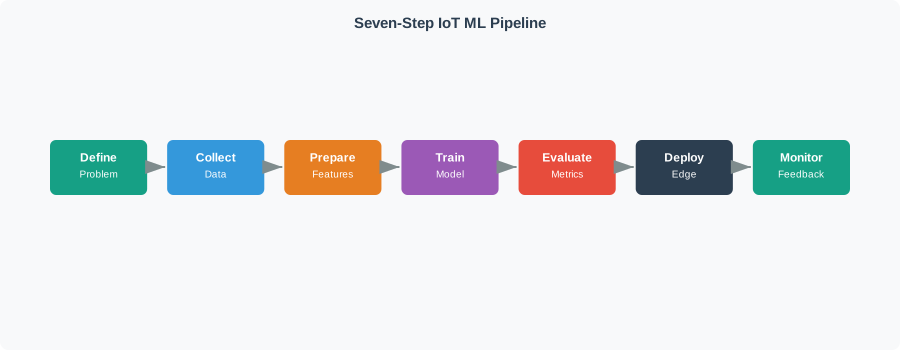
Follow Figure 33.1 from the operational problem through collection, preparation, training, evaluation, deployment, and monitoring. The first stages define what the label and feature evidence mean; evaluation tests the deployment boundary rather than merely the training sample; deployment packages the feature recipe and fallback with the model; monitoring returns field outcomes to the next review. That final feedback path connects the figure to the running narrative: each stage must preserve enough provenance for a reviewer to trace a production prediction back to the decision and evidence that authorised it.
The Seven Pipeline Boundaries
Decision and data
Name the prediction, the operator or system that uses it, the sensor sources, and the conditions the training data actually represents.
Cleaning and features
Preserve units, timestamps, missingness, window boundaries, normalization, context, and feature code so inference can repeat training behavior.
Training and evaluation
Use splits and metrics that match deployment: future time periods, new devices, rare events, latency, false alarms, and missed-event cost.
Deployment and feedback
Version the artifact, define confidence and fallback rules, monitor input quality and drift, capture outcomes, and set retraining gates.
Beginner Examples
Read the Beginner Examples material as a decision path rather than as isolated entries. First identify the operating condition in each entry and keep its units, timing, source, and assumed system state attached to it. Next compare the entries at the point where responsibility changes between device, gateway, network, analytic service, and operator; that hand-off is where apparently similar choices often produce different outcomes. Then follow the failure case: ask what becomes stale, delayed, unavailable, or unsafe, who detects it, and what evidence permits recovery. Finally connect the result to the chapter's running design record by naming the selected behavior, the rejected alternative, the measurement that justifies the choice, and the condition that forces a recheck. That order turns the examples or comparison into an auditable engineering argument.
- A pump fault model needs vibration windows, maintenance labels, class-balance evidence, false-alarm handling, latency limits, and a retraining rule after equipment changes.
- An activity-recognition model needs user diversity, device placement evidence, chronological or user-held-out evaluation, privacy boundaries, and battery-aware deployment.
- A leak detector should not be approved from overall accuracy alone when leak examples are rare; recall, false alarms, alert ownership, and fallback matter.
- A model running at the edge needs the same feature meaning as training, plus resource, update, telemetry, and rollback evidence.
Train, Test, and Validation Sets
Training data is fed to the model so it can learn parameters. Test data is held back so the team can measure accuracy on examples the fitted model did not see. A validation set is optional but common: use it for model-specific choices such as a decision-tree depth, threshold, early-stopping point, or hyperparameter setting. Keep the split aligned with deployment. If the system must work for a new user, device, room, site, or time period, do not let examples from that same group leak into both training and test evidence.
Cross-validation repeats the holdout idea. In N-fold cross-validation, the dataset is divided into N subsets; each subset takes a turn as the held-out test fold while the other folds train the model. Leave-one-out cross-validation is the special case where each sample, user, or other unit is held out once. For IoT, cross-validation is useful only when the folds preserve the real generalization boundary. Random folds can still overstate performance if near-duplicate windows from the same user or device appear on both sides of the split.
Pipeline steps after model selection are still modeling decisions. Hyperparameters are adjustable model settings such as the number or radius of neighbours, a decision-tree maximum depth, or the minimum samples required before a split; tune them with validation evidence, not with the final test set. Post-processing is also part of the approved artifact: smoothing a heart-rate spike, suppressing impossible activity transitions, or adding context rules can make outputs more useful, but those rules must be versioned and evaluated because they change false alarms, missed events, latency, and operator trust.
Overview Knowledge Check
33.4 Pipeline Release Record
This section: Pipeline Release Record — A practical pipeline release record should let another engineer reproduce the training claim and operate the deployed claim.
A practical pipeline release record should let another engineer reproduce the training claim and operate the deployed claim. It ties each stage to evidence: collection conditions, cleaning rules, feature code, label source, train-test split, baseline, metric, model artifact, deployment target, monitoring signal, feedback source, and retraining rule.
Early design may record assumptions. A release review should replace assumptions with representative data, held-out evaluation, deployment dry runs, fallback decisions, telemetry checks, and ownership. The safest review statement is often narrow: this model supports this decision under these data and deployment boundaries.
Worked Review: Pump Fault Classifier
A maintenance team trains a model to classify pump vibration windows as normal, review, or likely fault. The release record should name the sensor placement, sample window, units, operating regimes, maintenance label source, label delay, chronological split, baseline threshold, false-alarm burden, missed-fault cost, edge or cloud inference target, alert owner, and retraining trigger after pump, sensor, firmware, or maintenance-process changes.
The approval should not say that the model detects all pump faults. It should say which pump class, sensor setup, operating regime, feature window, model version, and response workflow were reviewed.
Example Release Record
Practitioner Knowledge Check
33.5 Contracts, Leakage, and Drift
This section: Contracts, Leakage, and Drift — Under the hood, the pipeline is a set of contracts.
Under the hood, the pipeline is a set of contracts. The data contract states what each field means. The feature contract states how windows, scaling, and context are built. The label contract states what outcome the model is learning. The artifact contract states which model, scaler, threshold, and feature definition deploy together. The operations contract states how the system handles missing inputs, low confidence, drift, feedback, rollback, and retraining.
Most serious IoT ML pipeline failures are contract mismatches. Training may use future readings that inference will not have. Lab data may lack device drift, battery effects, weather, or user variation. A model may run with a different scaler than the one evaluated. A dashboard may keep showing stale predictions after sensors or gateways fail. The review should make these mismatches visible before release.
Diagnosis Pattern
Read the Diagnosis Pattern material as a decision path rather than as isolated entries. First identify the operating condition in each entry and keep its units, timing, source, and assumed system state attached to it. Next compare the entries at the point where responsibility changes between device, gateway, network, analytic service, and operator; that hand-off is where apparently similar choices often produce different outcomes. Then follow the failure case: ask what becomes stale, delayed, unavailable, or unsafe, who detects it, and what evidence permits recovery. Finally connect the result to the chapter's running design record by naming the selected behavior, the rejected alternative, the measurement that justifies the choice, and the condition that forces a recheck. That order turns the examples or comparison into an auditable engineering argument.
- Name the failing boundary. Separate bad sensor data, label delay, feature leakage, weak split, model threshold, deployment mismatch, stale prediction, and missing feedback.
- Check training versus inference. Confirm that every deployed feature is available at the same time, in the same units, with the same window and scaler used during evaluation.
- Trace artifact versioning. Keep model, threshold, scaler, feature code, schema, and release note together so rollback and comparison are possible.
- Write the unsupported claim. If evaluation covered one site, one season, one device batch, or one operator workflow, keep other claims out until they are tested.
Under-the-Hood Knowledge Check
The fusion fork in Figure 33.2 identifies where alignment, missingness, and validation responsibilities enter a production pipeline.

Read Figure 33.2 at ONE LEARNER and ENSEMBLE. The early path requires synchronized, versioned feature vectors before training; the late path requires calibrated per-sensor outputs and a versioned vote or weighted combiner. The pipeline release record must test the chosen join point under sensor loss and drift.
33.6 Summary
This section: Summary
- An IoT ML pipeline is an evidence chain from decision target through data, labels, features, training, evaluation, deployment, monitoring, and feedback.
- Data collection must record sensor meaning, context, label process, missingness, and out-of-scope conditions before training results are trusted.
- Feature engineering must be reproducible at inference time and must avoid future information, unit drift, inconsistent scaling, and hidden leakage.
- Evaluation should match deployment with appropriate training, test, optional validation, time, device, site, user, or population splits plus metrics that reflect false alarms, misses, latency, and uncertainty.
- Cross-validation can rotate held-out folds, but the fold design must still protect the real deployment boundary such as user, device, site, or time separation.
- Deployment needs a versioned artifact bundle, fallback behavior, monitoring, feedback capture, rollback path, owner, and retraining gate.
Approve an IoT ML pipeline only when each stage preserves the same decision boundary from field data to deployed prediction, monitoring, feedback, and retraining.
33.7 See Also
This section: See Also
Feature Engineering for ML
Build feature windows, units, labels, leakage controls, feature stores, and operational feature meaning.
Data Quality and Preprocessing
Prepare profiling, cleaning, normalization, missing-data handling, outlier checks, leakage controls, and evidence records.
Edge ML and TinyML Deployment
Review model size, latency, power, update paths, fallback behavior, telemetry, drift, and release evidence.
Production ML Monitoring
Monitor drift, data quality, performance, alerts, rollback plans, feedback loops, ownership, and release evidence.
Find help
3 reviewed answers.
Where should I start in a module?
Open the module page from the sidebar to see its chapters in order. Use the module map to return to a topic you need.
Modules and pathsReviewed
What can I try when a project does not work?
Check the symptom, then work through the diagnostic steps. Keep the error message and the smallest example that reproduces it.
When you are stuckReviewed
How do interactive examples work?
Use the interactive guide to check how examples and simulations work before changing your project.
Interactive examples guideReviewed