5 Data Quality Monitoring
More
Depth: Practitioner
Progress saves as you read. Mark sections complete as you go; your progress appears in the sidebar.
5.1 Start With the Bad Reading
This section: Start With the Bad Reading — Picture a cold-room chart that suddenly shows forty degrees instead of four.
Decide the Fate of a Bad Record Before It Arrives
Picture a cold-room chart that suddenly shows forty degrees instead of four. The store manager needs to know whether the room is unsafe, the unit changed, or the record was copied twice. Saving the value first and asking later can turn a data fault into a costly action.
A gateway is a device that joins one network to another. Firmware is the code stored on a device. Machine learning means software that finds patterns from examples. None of these can rescue a record whose source, unit, time, and quality are missing. Keep those facts with the value from arrival to review.
Write the rule for each outcome: accept, flag, hold apart, reject, or send to an owner. Then test a missing time, a repeated identity, an impossible value, a renamed field, and a slow sensor drift. Check that the chart shows uncertainty and that every held record has a next action.
These checks cannot prove that every accepted reading is accurate. Field calibration and user context still matter. The deeper sections show where to place checks and how to review range, shape, delay, drift, and release evidence.
One bad reading is enough to make a dashboard lie if the storage path accepts it silently. A clock can drift, a gateway can retry the same packet, a firmware update can rename a field, or a sensor can age out of calibration. Quality monitoring is the habit of deciding what to trust before the record becomes durable evidence.
IoT data quality monitoring is the set of gates that decides whether a record is trusted, flagged, quarantined, rejected, or sent for later review. The goal is not to produce a single impressive score. The goal is to prove that missing readings, stale timestamps, duplicate retries, invalid values, schema drift, and slow sensor drift are visible before dashboards, control logic, billing, or machine learning depend on them.
Learning Objectives
This section: Learning Objectives
By the end of this chapter, you will be able to:
- define the main IoT data-quality dimensions and connect each one to a detectable failure mode;
- place cheap validation checks on the ingestion path and expensive checks in near-real-time or batch jobs;
- design reject, quarantine, and flag routing for low-quality records;
- explain why range checks do not catch slow sensor drift;
- list the release evidence needed before quality-monitored storage is trusted in production.
5.2 Quality Is a Storage Contract
This section: Quality Is a Storage Contract — A storage system can be fast and still store untrustworthy data.
A storage system can be fast and still store untrustworthy data. A sensor may send a value outside physical limits, a gateway may replay the same message, a firmware update may rename fields, or a device clock may be hours behind. If those records silently enter the durable path, later systems inherit the error.
Data quality monitoring turns those assumptions into explicit checks:
Use Figure 5.1 to see why validation must make a routing decision before storage. Trace one incoming record through schema and quality checks, then compare the accepted, flagged, quarantined, and rejected destinations.
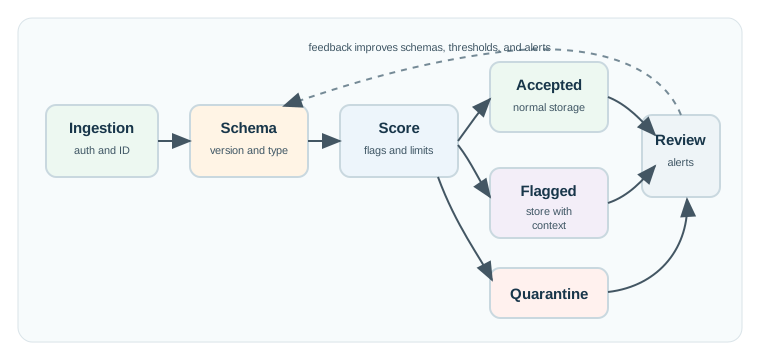
In Figure 5.1, the main path leads from ingestion through checks to durable storage only when the record remains interpretable. Suspect but usable records retain a visible quality state, quarantine preserves evidence for review, and rejection stops malformed input. That routing contract prevents a bad sample from silently becoming trusted history.
5.3 Data Quality Dimensions
This section: Data Quality Dimensions — Quality dimensions are useful only when they connect to a concrete test and an operational action.
Quality dimensions are useful only when they connect to a concrete test and an operational action. Treat each dimension as a question the storage path must answer.
5.4 Where Checks Belong
This section: Where Checks Belong — Not every quality check should run inside the write transaction.
Not every quality check should run inside the write transaction. A production pipeline separates cheap checks that protect storage from heavier checks that need history, peer sensors, or model context. Figure 5.2 makes that placement decision visible; read it from the ingestion path outward toward near-real-time, batch, and release evidence.
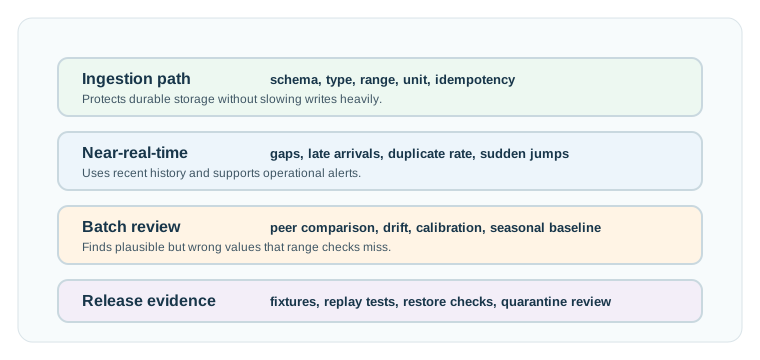
In Figure 5.2, required fields, types, ranges, units, and idempotency protect the critical write path first. Recent-history checks then detect gaps and late arrivals, while batch work can compare peers and long-term drift. Release evidence closes the loop with replay and restore tests, keeping expensive context away from each insert without losing accountability.
5.5 A Minimal Quality Contract
This section: A Minimal Quality Contract — A useful quality contract stores both the raw observation and the quality evidence needed to explain downstream decisions.
A useful quality contract stores both the raw observation and the quality evidence needed to explain downstream decisions. The exact schema differs by platform, but these fields are common:
CREATE TABLE telemetry_observation (
  device_id       text        NOT NULL,
  event_time      timestamptz NOT NULL,
  receive_time    timestamptz NOT NULL DEFAULT now(),
  schema_version  integer     NOT NULL,
  metric          text        NOT NULL,
  value_num       double precision,
  unit            text        NOT NULL,
  message_id      text        NOT NULL,
  quality_state   text        NOT NULL CHECK (
    quality_state IN ('accepted', 'flagged', 'quarantined')
  ),
  quality_flags   jsonb       NOT NULL DEFAULT '{}'::jsonb,
  PRIMARY KEY (device_id, event_time, metric, message_id)
);
This contract separates several concepts that are often blurred:
event_time says when the device believes the measurement happened;
receive_time says when the platform saw it;
schema_version explains how the payload was interpreted;
message_id supports duplicate detection and replay safety;
quality_state routes the record for analytics, filtering, or review;
quality_flags records the failed dimensions and reasons.
Replacing an impossible value with the last good value can keep a dashboard smooth, but it hides the sensor fault. Prefer storing a derived display value separately from the raw observation and the quality flags that explain it.
5.6 Routing Strategies
This section: Routing Strategies — Reject, quarantine, and flag are not maturity levels.
Reject, quarantine, and flag are not maturity levels. They are different responses to different risk profiles.
Unsafe or uninterpretable
Use when a record cannot be parsed, lacks a schema version, fails authentication, or would create dangerous state if stored.
Preserve for investigation
Use when a record is suspicious and operationally useful for debugging, but should not drive normal analytics or automation.
Store with context
Use when data remains useful if downstream queries can filter, weight, or annotate it.
Normal path
Use when required checks pass and the record meets the quality budget for its intended use.
5.7 Label the Quality Gate
This section: Label the Quality Gate
5.8 Detecting Slow Drift
This section: Detecting Slow Drift — Range validation catches broken values.
Range validation catches broken values. It does not catch all wrong values. A temperature sensor that slowly drifts from 20 C to 22 C may still pass every physical range check while corrupting energy analysis, comfort reports, and model training data.
Drift detection needs a different kind of evidence:
5.9 Schema Evolution and Firmware Rollouts
This section: Schema Evolution and Firmware Rollouts — IoT fleets rarely update at the same time.
IoT fleets rarely update at the same time. Some devices are offline, some run old firmware for months, and some are replaced by different hardware. Quality monitoring must make schema evolution visible instead of assuming all payloads mean the same thing.
def normalize_temperature(payload):
    version = payload.get("version")
    if version == 1:
        return {
            "schema_version": 1,
            "metric": "temperature",
            "value_num": payload["temp"],
            "unit": "C"
        }
    if version == 2:
        return {
            "schema_version": 2,
            "metric": "temperature",
            "value_num": payload["temperature"],
            "unit": payload.get("unit", "C")
        }
    raise ValueError("unknown schema version")
5.10 Monitoring Views
This section: Monitoring Views — A quality dashboard should show operational failure patterns, not just an average score.
A quality dashboard should show operational failure patterns, not just an average score. A high average can hide one failing device, one noisy site, or one schema version that is producing bad records.
SELECT
  device_id,
  count(*) AS records_seen,
  count(*) FILTER (WHERE quality_state = 'flagged') AS flagged_records,
  count(*) FILTER (WHERE quality_state = 'quarantined') AS quarantined_records,
  count(*) FILTER (WHERE quality_flags ? 'late_arrival') AS late_records,
  count(*) FILTER (WHERE quality_flags ? 'duplicate_retry') AS duplicate_records
FROM telemetry_observation
WHERE receive_time >= now() - interval '24 hours'
GROUP BY device_id
ORDER BY quarantined_records DESC, flagged_records DESC;
The dashboard should keep these views separate:
fleet-level trend: whether quality is improving or degrading overall; device-level ranking: which devices are repeatedly failing checks; schema-version breakdown: whether a firmware version is producing bad data; site or gateway view: whether a network segment is dropping or delaying records; quarantine review queue: which records need action and whether review is current.
5.11 Monitoring the Quality Monitor
This section: Monitoring the Quality Monitor — The quality system needs its own meta-metrics.
The quality system needs its own meta-metrics. Record points per second, accepted/flagged/quarantined/rejected rates, duplicate rate, ingest-lag distribution, parser error count, and quarantine review age. These signals tell you whether the quality gate is healthy before a monthly report, machine-learning feature, or billing export discovers the damage.
At scale, three mechanisms keep quality evidence honest. First, idempotent writes keyed by series, event time, metric, and message identity prevent an at-least-once pipeline from inflating counts after a retry. Second, a lateness watermark separates live data from backfill, so old buffered readings recompute affected quality scores and rollups instead of silently changing dashboards. Third, meta-metrics monitor the monitor itself.
Worked example: an MQTT bridge redelivers a 12,000-point batch after a network retry. If inserts use only an auto-increment row id, the day suddenly contains 12,000 extra points and completeness appears better than reality. If the durable key is (series_id, event_time, metric, message_id), the retry becomes 12,000 idempotent conflicts or updates, and the duplicate-rate metric becomes evidence for the replay.
5.12 Release Checklist
This section: Release Checklist
Before a quality-monitored storage path is release-ready, verify more than “the insert works.”
5.13 Common Pitfalls
This section: Common Pitfalls
A single score can help filtering, but it should not be the only evidence. Store dimension-specific flags so operations can tell whether the problem is schema drift, stale data, missing readings, duplicates, or sensor accuracy.
Peer comparison, historical baselines, and model residuals can be valuable, but running them inside every write transaction can damage ingestion reliability. Keep the write path cheap and schedule context-heavy checks outside it.
Quarantine is useful only if someone reviews it. Define who owns the queue, how long suspicious records are retained, what reason codes mean, and how fixes are replayed or backfilled.
Physical limits catch impossible values. They do not prove the sensor is calibrated. Accuracy needs reference checks, peer comparison, or calibration evidence.
5.14 Summary
This section: Summary — Data quality monitoring protects IoT storage from silent trust failures.
Data quality monitoring protects IoT storage from silent trust failures. Good systems record quality evidence at ingestion, separate cheap write-path checks from heavier drift checks, route bad data deliberately, preserve suspicious records for investigation, and prove behavior with replay, schema-version, late-arrival, duplicate, and quarantine-review tests.
5.15 Concept Relationships
This section: Concept Relationships — Data Storage Overview introduces storage roles and lifecycle evidence that quality gates depend on.
Data Storage Overview introduces storage roles and lifecycle evidence that quality gates depend on. Data Storage and Databases explains how quality gates fit into broader storage contracts. Database Selection Framework helps choose storage roles that support validation, quarantine, and analytical filtering. Sharding Strategies covers how quality checks behave when writes are distributed across partitions. Stream Processing Fundamentals covers validation before records reach durable storage.
5.16 What’s Next
This section: What’s Next
Sharding Strategies
Design partition keys and distributed write paths that keep quality checks reliable at fleet scale.
Database Selection Framework
Choose storage technologies that can support validation, quarantine, flags, and dashboard queries.
Time-Series Retention
Decide how quality flags, quarantine records, summaries, and raw history should be retained.
5.17 Official References
This section: Official References
5.18 Key Takeaway
This section: Key Takeaway — Storage quality monitoring should detect missing, late, duplicated, out-of-range, and schema-breaking data before analytics depend on it.
Storage quality monitoring should detect missing, late, duplicated, out-of-range, and schema-breaking data before analytics depend on it. Bad data stored reliably is still bad data.
Sensor data from home
For ages 14 and over. Explore one week of your own sensor readings, or try an illustrative sample week.
Your file stays in this tab. Nothing is uploaded, saved or shared. Closing or reloading the page clears the readings.
CSV format: timestamp,value. Use UTC timestamps such as 2026-01-01T09:15:00Z and numeric readings from one sensor in the same unit. Include at most seven days, 10,080 readings and 1 MB. Leave out names, locations and other columns. Times are rounded down to the hour.
Readings across your week
| Day | Count | Mean | Minimum | Maximum |
|---|
Why do readings wobble? Consider sensor noise, missing readings and changes in the environment before drawing conclusions.
Find help
3 reviewed answers.
Where should I start in a module?
Open the module page from the sidebar to see its chapters in order. Use the module map to return to a topic you need.
Modules and pathsReviewed
What can I try when a project does not work?
Check the symptom, then work through the diagnostic steps. Keep the error message and the smallest example that reproduces it.
When you are stuckReviewed
How do interactive examples work?
Use the interactive guide to check how examples and simulations work before changing your project.
Interactive examples guideReviewed