10 Time-Series Query Optimization
More
Depth: Practitioner
Progress saves as you read. Mark sections complete as you go; your progress appears in the sidebar.
10.1 Start With the Question on the Screen
This section: Start With the Question on the Screen — Query tuning starts with the sentence a user is trying to answer.
Query tuning starts with the sentence a user is trying to answer. “Show the latest room temperature for this floor” is a different storage problem from “replay the last outage at raw resolution.” Once the question names the time range, entity, metric, and quality rule, the query plan can be reviewed instead of guessed.
10.2 In 60 Seconds
This section: In 60 Seconds — Time-series query optimization is not a bag of product tricks.
Time-series query optimization is not a bag of product tricks. It is a review habit: name the question, bound the time range, filter by stable dimensions, choose the right data tier, prove the query plan, and preserve enough quality evidence for the result to be trusted.
The most common IoT query families are latest value, bounded window scan, dashboard rollup, rate or delta, gap and quality check, and incident replay. Each family has a different access path. A dashboard trend should not repeatedly scan raw history when a tested rollup exists. An incident replay should not read a coarse aggregate that hides spikes. A counter rate should not be treated like a gauge. The right query is the one that answers the product question with visible evidence.
Learning Objectives
This section: Learning Objectives
After this chapter, you should be able to:
- Classify IoT read requests into latest-value, window, rollup, rate, gap, and incident-replay query families.
- Write bounded SQL query patterns that expose time, entity, metric, quality, and dimension predicates.
- Use query-plan evidence to distinguish pruning, index use, filtering, sorting, and raw table scans.
- Decide when a dashboard should read raw data, a continuous aggregate, a materialized view, a recording rule, or a cache.
- Preserve sample counts, min/max values, freshness timestamps, and gap flags so rollups remain reviewable.
- Build a query-review record that can be checked during release and incident investigations.
10.3 Query Optimization Starts With the Question
This section: Query Optimization Starts With the Question — A time-series database can only optimize the query you actually send.
A time-series database can only optimize the query you actually send. Before touching indexes or dashboards, write the request in plain language:
For each device in building-1 / floor-3-east,
show the latest valid room_temperature value
observed in the last 2 hours,
and mark any stale device separately.
That sentence already contains the shape of the access path:
“Show all temperature data” is not a dashboard query. It is an export or investigation request that needs paging, archive controls, and a clear time range. Every normal dashboard, alert, and report query should have a bounded time window or a documented reason for using a precomputed latest-state table.
10.4 Query Families
This section: Query Families — Time-series queries are safer when the question determines the access path.
Time-series queries are safer when the question determines the access path. Before using the builder, inspect Figure 10.1 from the question through its time range, entity predicates, chosen data tier, plan evidence, and result-quality checks.
Current state
Find the newest valid reading per device, room, gateway, or metric and mark stale entities.
Bounded scan
Read raw samples for one entity, site, or metric over a specific investigation interval.
Dashboard trend
Read bucketed summaries with count, min, max, mean, and gap flags for repeat dashboards.
Counter change
Calculate increase, rate, or delta for counters without treating reset-prone counters as gauges.
Gaps and stale data
Find missing intervals, invalid samples, late arrivals, and devices whose current state is old.
Incident investigation
Recover the raw or highest-resolution interval around an event, then compare it with rollups.
Use Figure 10.1 to turn those query families into one review path from the question to result-quality evidence. The path makes the time boundary, entity filters, storage tier, execution plan, and quality checks visible before a fast response is accepted as the correct operational answer.
Inspect the access-path diagram in Figure 10.1 to turn those query families into one review path from the question to result-quality evidence. The path makes the time boundary, entity filters, storage tier, execution plan, and quality checks visible before a fast response is accepted as the correct operational answer.
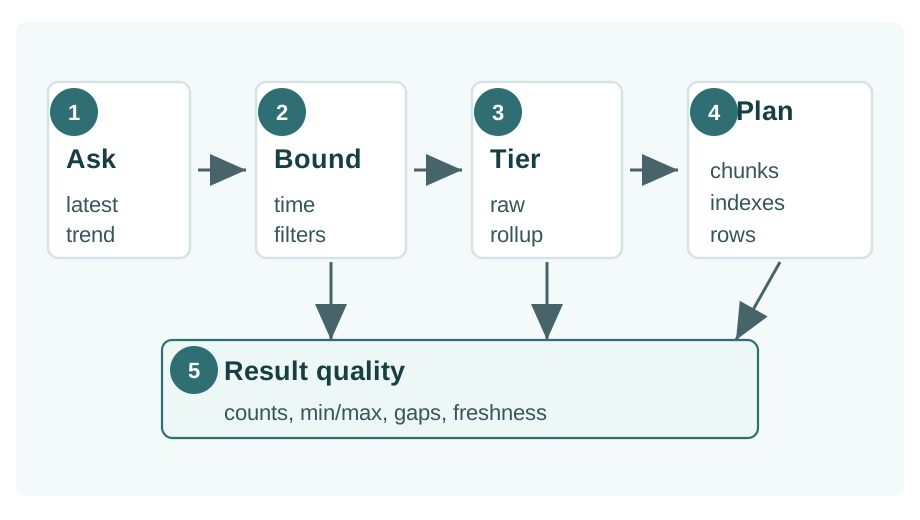
Read Figure 10.1 from the bounded question through predicates and tier selection, then confirm the plan and result-quality checks before accepting the answer.
In Figure 10.1, the question first becomes a bounded time predicate and an explicit entity or metric filter. Those constraints select raw data, a latest-value view, or a rollup before the engine plans the scan. Plan evidence shows whether pruning actually occurred, and result checks expose gaps or stale coverage. That chain keeps a fast answer from being mistaken for the right answer.
10.5 Predicates That Make Queries Reviewable
This section: Predicates That Make Queries Reviewable — The strongest query predicates come from the data contract.
The strongest query predicates come from the data contract. They usually include:
Read the fields below in query-planning order. Bind the time window first, narrow the tenant or site and device next, select the metric, and retain quality state in the result. That order turns a broad telemetry scan into a bounded question while preserving the context needed to judge whether its answer is trustworthy.
observed_at: the event time used for analysis and dashboard windows.
received_at: the platform time used to inspect ingest lag and late arrivals.
tenant_id, site_id, zone_id, or asset_id: stable dimensions that users actually filter by.
device_id: the entity whose state, trend, or replay is being inspected.
metric_name: the measured signal, such as temperature, vibration, battery voltage, or queue depth.
quality_status: whether a reading is valid, late, estimated, rejected, or part of an incident window.
-- Reviewable bounded query pattern.
SELECT
  observed_at,
  device_id,
  metric_name,
  value,
  unit,
  quality_status
FROM readings
WHERE observed_at >= :start_time
  AND observed_at <  :end_time
  AND site_id = :site_id
  AND metric_name = :metric_name
  AND quality_status = 'valid'
ORDER BY observed_at ASC, device_id ASC
LIMIT 5000;10.6 Plan Evidence
This section: Plan Evidence — For SQL-backed time-series systems, plan evidence is usually the fastest way to catch a false optimization.
For SQL-backed time-series systems, plan evidence is usually the fastest way to catch a false optimization. PostgreSQL EXPLAIN exposes the plan tree, scan nodes, estimates, filters, sort operations, and index use. In a time-series store built on PostgreSQL, the same habit helps reviewers confirm that time and dimension predicates are being used as intended.
EXPLAIN (ANALYZE, BUFFERS)
SELECT
  time_bucket('15 minutes', observed_at) AS bucket_start,
  device_id,
  avg(value) AS avg_value,
  min(value) AS min_value,
  max(value) AS max_value,
  count(*) AS sample_count
FROM readings
WHERE observed_at >= TIMESTAMPTZ '2026-05-23 00:00:00+00'
  AND observed_at <  TIMESTAMPTZ '2026-05-24 00:00:00+00'
  AND site_id = 'building-1'
  AND metric_name = 'room_temperature'
  AND quality_status = 'valid'
GROUP BY bucket_start, device_id
ORDER BY bucket_start, device_id;
Reviewers should record the plan evidence in a compact table:
10.7 Capture Plans With Representative Data
A query that looks fine on a tiny development table may fail after realistic devices, dimensions, late arrivals, and retention tiers are present. Capture plans on a dataset that resembles the production access path, preferably while normal ingest is running.
10.8 Latest-Value Queries
This section: Latest-Value Queries — Latest-value queries power current-state dashboards, status lists, maps, and device detail panels.
Latest-value queries power current-state dashboards, status lists, maps, and device detail panels. They are often deceptively expensive because the UI asks for “one row per device” while the database may need to search a large recent window.
-- Latest valid temperature per device in one zone.
SELECT DISTINCT ON (device_id)
  device_id,
  observed_at,
  value,
  unit,
  quality_status
FROM readings
WHERE observed_at >= now() - interval '2 hours'
  AND site_id = 'building-1'
  AND zone_id = 'floor-3-east'
  AND metric_name = 'room_temperature'
  AND quality_status = 'valid'
ORDER BY device_id, observed_at DESC;Define stale
A current-state query should say how old a value may be before it is displayed as stale or missing.
Entity then time
Latest-per-entity queries often benefit from an access path aligned to entity filters and descending time.
Latest-state table
When the same latest view is hit constantly, maintain a tested latest-state table or cache with freshness metadata.
Silent old values
Do not show the last known value as current unless the UI also exposes its timestamp and stale status.
10.9 Bounded Window Queries
This section: Bounded Window Queries — Window queries are used for device detail charts, diagnostics, calibration checks, and incident triage.
Window queries are used for device detail charts, diagnostics, calibration checks, and incident triage. They should have a start time, end time, entity or dimension filters, and a result-size budget.
-- Raw samples for one device around an investigation window.
SELECT
  observed_at,
  received_at,
  value,
  unit,
  quality_status
FROM readings
WHERE observed_at >= TIMESTAMPTZ '2026-05-23 10:00:00+00'
  AND observed_at <  TIMESTAMPTZ '2026-05-23 10:30:00+00'
  AND device_id = 'sensor-a17'
  AND metric_name = 'motor_vibration_rms'
ORDER BY observed_at ASC;
For APIs, prefer seek pagination over growing offsets. The cursor should continue from the last (observed_at, device_id, sequence_id) tuple rather than asking the database to skip an increasing number of rows.
-- Seek-style next page.
SELECT observed_at, device_id, sequence_id, value, quality_status
FROM readings
WHERE observed_at >= :start_time
  AND observed_at <  :end_time
  AND site_id = :site_id
  AND (observed_at, device_id, sequence_id) > (:last_time, :last_device, :last_sequence)
ORDER BY observed_at, device_id, sequence_id
LIMIT 1000;
10.10 Rollups and Dashboard Queries
This section: Rollups and Dashboard Queries — Repeated dashboards should usually read the coarsest data tier that can answer the question.
Repeated dashboards should usually read the coarsest data tier that can answer the question. A daily executive trend and a five-minute operations panel should not share the same raw scan. Use Figure 10.2 to trace how raw readings become a dashboard summary without losing the path back to incident detail.
Use Figure 10.2 to trace how raw readings become a dashboard summary without losing the path back to incident detail.
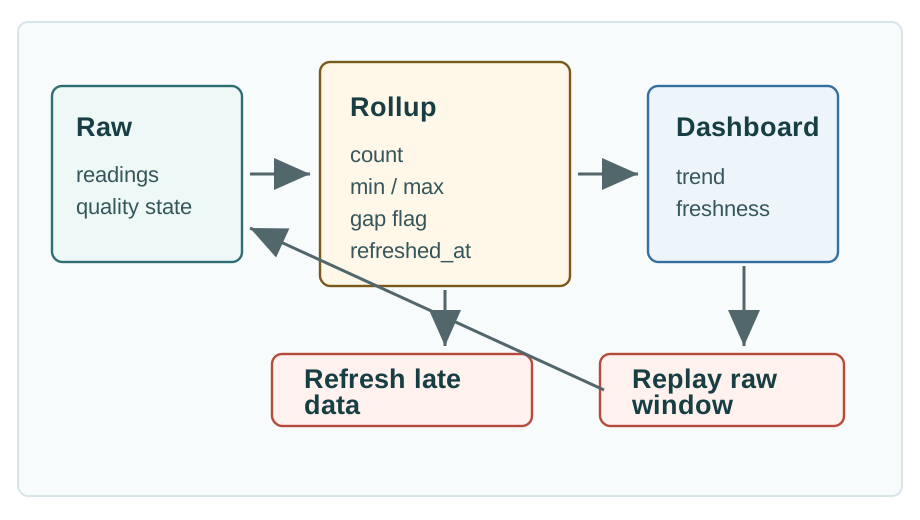
Read Figure 10.2 from raw samples into bucketed values, verify that quality and refresh metadata survive, and then follow the investigation path back to raw evidence.
Read Figure 10.2 from raw samples into bucketed values, checking that counts, gaps, extrema, and refresh metadata travel with each summary. The dashboard consumes that bounded tier for routine speed, while an investigation can follow the lineage back to raw readings. The rollup is therefore a reviewed derivative, not a replacement that silently erases evidence.
-- Hourly dashboard trend with quality evidence.
SELECT
  bucket_start,
  zone_id,
  avg_value,
  min_value,
  max_value,
  sample_count,
  gap_count,
  refreshed_at
FROM room_temperature_hourly
WHERE bucket_start >= now() - interval '30 days'
  AND bucket_start <  now()
  AND site_id = 'building-1'
ORDER BY bucket_start ASC, zone_id ASC;
TimescaleDB users often use time_bucket for bucketed aggregation and continuous aggregates for repeated summaries. The durable lesson is broader than one product: a rollup must document bucket size, source query, refresh policy, late-arrival behavior, and quality fields.
10.11 Rollup Refresh and Invalidation Rules
This section: Rollup Refresh and Invalidation Rules — A rollup is not only a smaller table.
A rollup is not only a smaller table. It is a promise that a dashboard can read fewer rows without losing the evidence needed to explain the result. TimescaleDB continuous aggregates, InfluxDB downsampling tasks, and Prometheus recording rules all make that trade: compute a cheaper series or bucketed view on a schedule, then route repeated dashboards to that precomputed tier.
The cost shift is easy to review. A fleet with 10,000 devices sampled once per minute creates 432,000,000 raw rows in 30 days for one metric. A device-level one-hour rollup for the same window has 7,200,000 rows, a 60x reduction. If most dashboards show site averages for 50 sites, the site-hour rollup is only 36,000 rows. That is small enough for repeated dashboard refreshes, provided the query is deliberately routed to the rollup tier and the UI labels the granularity honestly.
The hidden contract is refresh scope. A continuous aggregate policy might refresh buckets from three days ago up to five minutes ago, leaving the newest five minutes to raw real-time reads. Late readings from yesterday are corrected during the next refresh. Late readings from last month may require an explicit backfill job. Prometheus recording rules and InfluxDB tasks have the same ownership problem: they must name the source range, destination series or bucket, late-arrival behavior, and rerun policy.
10.12 Rates, Deltas, and Counters
This section: Rates, Deltas, and Counters — Counters need different treatment from gauges.
Counters need different treatment from gauges. A temperature gauge can go up or down naturally. A message counter usually increases until the service restarts or the counter resets. Rate queries must account for that difference.
rate(iot_gateway_messages_total{site="plant-a",gateway="gw-17"}[5m])Prometheus uses range selectors such as [5m] and functions such as rate() for counter changes. In SQL systems, the same design issue appears when calculating deltas between adjacent counter samples.
WITH ordered AS (
  SELECT
    observed_at,
    gateway_id,
    messages_total,
    lag(messages_total) OVER (
      PARTITION BY gateway_id
      ORDER BY observed_at
    ) AS previous_total,
    lag(observed_at) OVER (
      PARTITION BY gateway_id
      ORDER BY observed_at
    ) AS previous_at
  FROM gateway_counters
  WHERE observed_at >= now() - interval '30 minutes'
    AND site_id = 'plant-a'
)
SELECT
  observed_at,
  gateway_id,
  CASE
    WHEN previous_total IS NULL THEN NULL
    WHEN messages_total < previous_total THEN NULL
    ELSE (messages_total - previous_total)
         / NULLIF(EXTRACT(EPOCH FROM (observed_at - previous_at)), 0)
  END AS messages_per_second
FROM ordered
ORDER BY observed_at, gateway_id;
Display a NULL messages_per_second result as unavailable, not zero.
Record whether a signal is a gauge, counter, event count, cumulative energy value, or derived rate. Optimizing the query is not enough if the math treats a reset-prone counter as a regular measurement.
10.13 Gaps, Staleness, and Quality Checks
This section: Gaps, Staleness, and Quality Checks — An optimized dashboard that hides missing data is not a good dashboard.
An optimized dashboard that hides missing data is not a good dashboard. Gap queries should be part of the release evidence for any telemetry path that supports monitoring, reports, or incident review.
-- Find expected 5-minute buckets with no valid sample for one device.
WITH expected AS (
  SELECT generate_series(
    TIMESTAMPTZ '2026-05-23 10:00:00+00',
    TIMESTAMPTZ '2026-05-23 11:00:00+00',
    INTERVAL '5 minutes'
  ) AS bucket_start
),
actual AS (
  SELECT
    time_bucket('5 minutes', observed_at) AS bucket_start,
    count(*) AS sample_count
  FROM readings
  WHERE observed_at >= TIMESTAMPTZ '2026-05-23 10:00:00+00'
    AND observed_at <  TIMESTAMPTZ '2026-05-23 11:05:00+00'
    AND device_id = 'sensor-a17'
    AND metric_name = 'room_temperature'
    AND quality_status = 'valid'
  GROUP BY bucket_start
)
SELECT
  expected.bucket_start,
  coalesce(actual.sample_count, 0) AS sample_count
FROM expected
LEFT JOIN actual USING (bucket_start)
WHERE coalesce(actual.sample_count, 0) = 0
ORDER BY expected.bucket_start;No sample
The device did not report, the gateway dropped data, or the query filtered the sample out.
Arrived after rollup
Late readings may require refreshing affected buckets and marking the aggregate as revised.
Old latest value
The latest value exists but is older than the freshness target for the UI or alert.
Filled value
Interpolation or last-value carry-forward should be visible to users and excluded from some analyses.
10.14 Incident Replay Queries
This section: Incident Replay Queries — Incident replay is the exception path that proves the telemetry system can still explain what happened.
Incident replay is the exception path that proves the telemetry system can still explain what happened. It should retrieve the highest-resolution data available around an event, include quality metadata, and compare the raw view with any dashboard rollup that users saw.
incident_window:
  event_id: overheat-2026-05-23-plant-a-line-2
  raw_start: 2026-05-23T09:58:00Z
  raw_end: 2026-05-23T10:12:00Z
  entities: motor-17, controller-17, gateway-4
  required_fields: observed_at, received_at, metric_name, value, unit, quality_status
  compare_with: five_minute_dashboard_rollup
The replay query is allowed to be more expensive than a dashboard query because it serves a different purpose. It still needs bounds, ownership, and a result-size expectation.
10.15 Label the Query Review
This section: Label the Query Review
10.16 Code Challenge: Query Review Record
This section: Code Challenge: Query Review Record
10.17 Query Symptom Triage
This section: Query Symptom Triage
10.18 Common Pitfalls
This section: Common Pitfalls
10.18.1 Optimizing a Demo Query Instead of the Product Query
A query that filters one device for five minutes may be easy, while the product dashboard filters a site, groups by zone, compares device classes, reads 30 days, and refreshes repeatedly. Those differences change the workload that needs optimization. Review the actual query mix, including time ranges, entity filters, grouping, data tiers, and repeated refreshes. Capture query plans using representative devices, dimensions, late arrivals, and retention tiers, preferably while normal ingest is running. Check whether the intended predicates support pruning and whether repeated summaries use an appropriate rollup. A fast demonstration query provides limited evidence for a dashboard with a broader access path.
10.18.2 Using Functions on the Time Column in the Predicate
Some expressions prevent the database from using the time axis efficiently. Prefer raw range predicates such as observed_at >= :start_time AND observed_at < :end_time, then bucket or format timestamps after the range has selected candidate rows.
10.18.3 Treating Rollups as Just Smaller Tables
Rollups summarise both measurements and the evidence needed to interpret them. Sample counts and gap flags expose coverage, while minimum and maximum values retain evidence of extremes that an average can hide. Freshness and source-window metadata show when the summary was refreshed and which period it represents. Review these fields alongside bucket size, source query, refresh policy, and late-arrival behavior. A smaller result may suit repeated dashboard reads, but its usefulness depends on whether it still answers the product question. Keep a documented path back to raw readings for incident replay, so investigators can compare the summary users saw with the available detail.
10.18.4 Letting a Cache Hide Freshness
A latest-value cache should expose when the reading was observed, when the cached value was refreshed, and how the interface displays stale values. The observation timestamp places the measurement in time; the refresh timestamp describes the cache update. Both belong in the review because a fast response alone does not establish that the displayed reading is current. Check the timestamps and stale-value presentation alongside the returned value and its quality state. Without that context, a dashboard can present old or poor-quality data as current. Treat freshness checks as part of query-result validation when choosing a cache for current-state dashboards, status lists, or device panels.

10.18.5 Mixing Monitoring Metrics and Business Telemetry
Prometheus-style metrics support infrastructure and service-health questions through signals such as queue depth, request duration, scrape health, dropped messages, and ingest lag. Long-lived customer telemetry, regulated history, and replayable raw readings usually also need a telemetry store or archive path. Choose the storage role from the question and the evidence the result must retain. A service-health query and an incident replay can require different data tiers and levels of detail. Review whether the chosen path supports the required time range, quality metadata, and raw resolution. Recording rules can provide repeated summaries, while investigations may still need access to the underlying readings.
10.19 Release Checklist
This section: Release Checklist
Query family
Latest value, bounded window, rollup, rate, gap, or incident replay is named.
Bounded access path
Time range, entity, metric, dimension, and quality predicates are explicit and tested.
Right data level
The query uses raw data, a latest-state table, a rollup, a monitoring rule, or a cache intentionally.
Evidence captured
Plans, scanned chunks or partitions, index use, rows returned, and runtime budget are recorded.
No hidden gaps
Sample counts, min/max values, freshness timestamps, quality status, and gap flags are visible.
Review packet
The dashboard owner, data owner, rollback limit, query budget, and next review date are documented.
10.20 Self-Assessment
This section: Self-Assessment
Query scan work narrated tour
Play silently with captions on provisional storyboard timing; narration audio is pending. Production pacing is not sensor, query, or protocol time. Choose Reduced motion for a complete still at each beat.
Compare time pruning with summaries and indexes disabled. Read the numeric scan labels; bar lengths are not proportional and no database query is executed. Play the tour to open the workbench. Pause, replay a beat, or read the full transcript below. Unsupported situations keep the existing frame and provide captions only.
Full transcript — Query scan work (8 beats)
B1 — Dashboard request
You are the operator responsible for a building's temperature dashboard. Sensors supply the measurements, but a slow dashboard makes the temperature trend harder to use. You need a timely answer without changing what the trend means. How much stored history must the database read to answer your question?
Model caption: A building operator needs a timely temperature trend that keeps its intended meaning.
B2 — Grouping and aggregation
A query asks storage for data. For your temperature trend, set a start time and an end time, then choose the building. Grouping puts measurements into time buckets. Aggregation summarizes a group, for example by calculating its average. The question determines which measurements belong together.
Model caption: Choose the building and time range. Time buckets group measurements; an average summarizes each group.
B3 — Fifty-million-row baseline
Use a teaching model with fifty million stored rows and a window covering the past twenty four hours. Give the result a budget of five thousand rows. Keep summaries and indexes disabled for the comparison, so the change in scan work comes from time pruning alone.
Model caption: Teaching model: fifty million stored rows; twenty four hour window; five thousand row output budget. Summaries and indexes off.
B4 — Pruning missed
Time pruning means skipping storage outside the requested time range. With pruning disabled, multiplying fifty million by one leaves fifty million. The model keeps at least one row, so fifty million remains the scan estimate. The time range is present, but old storage still enters the scan.
Model caption: Fifty million times one is fifty million. Keeping at least one row leaves fifty million rows to scan.
B5 — Pruning enabled
Now enable time pruning. For twenty four hours, the model assigns a fraction of zero point zero three three. Multiply fifty million by zero point zero three three to get one million six hundred fifty thousand. Compare that with the minimum of one row; the larger number remains one million six hundred fifty thousand rows to scan.
Model caption: Fifty million times zero point zero three three is one million six hundred fifty thousand. That exceeds the one-row floor.
B6 — Access path
The scan estimate has fallen from fifty million rows to one million six hundred fifty thousand. The intended temperature question still covers twenty four hours, and the result budget remains five thousand rows. The model changes which storage is read, while the requested time range stays fixed.
Model caption: Scan estimate: fifty million before, one million six hundred fifty thousand after. Same twenty four hour question and five thousand row budget.
B7 — Work versus output
The misconception is that a small result means little database work. A five thousand row budget limits the output, while the first version still scans fifty million rows. For your dashboard, judge the work needed to produce the answer as well as the size of the answer.
Model caption: A five thousand row budget limits output. The earlier version still scanned fifty million rows; output size alone does not describe scan work.
B8 — Read less history
Make storage read less while keeping the question the same.
Model caption: Make storage read less while keeping the question the same.
10.21 Summary
This section: Summary — Time-series query optimization is the discipline of making the access path visible.
Time-series query optimization is the discipline of making the access path visible. The strongest queries start from the user question, bind the time range, filter by meaningful dimensions, use the right data tier, and preserve result quality.
For IoT systems, query speed and trust are linked. A dashboard that scans too much raw history is slow. A dashboard that hides sample counts, min/max values, stale data, and gaps is misleading. The review habit in this chapter keeps both problems visible before they reach learners, operators, or customers.
10.22 Concept Relationships
This section: Concept Relationships — Use these links as the query chapter’s dependency map.
Use these links as the query chapter’s dependency map. Fundamentals explains the physical storage structures, platforms shows product-specific roles, retention defines which tiers remain available, practice turns the review into drills, and anomaly detection consumes the same bounded windows and quality-aware results.
Time-Series Database Fundamentals explains chunks, timestamp contracts, rollups, compression, and lifecycle mechanics. Time-Series Database Platforms compares platform roles and the query evidence each platform should provide. Data Retention and Downsampling expands the rollup, archive, restore, and deletion decisions that affect query tiers. Time-Series Practice and Labs turns query review into hands-on workload, schema, retention, and release drills. Anomaly Detection builds on bounded window, rate, gap, and quality queries for model and rule evidence.
10.23 What’s Next
This section: What’s Next
| If you need to… | Read next |
|---|---|
| Design retention, rollups, archive, and deletion | Data Retention and Downsampling |
| Practice query plans and release evidence | Time-Series Practice and Labs |
| Revisit storage mechanics behind query paths | Time-Series Database Fundamentals |
| Choose a platform role for the query workload | Time-Series Database Platforms |
| Detect unusual telemetry behavior | Anomaly Detection |
10.24 Official References
This section: Official References — Use the database references to confirm plan and rollup behavior for the deployed version, then use the metrics references to check selector cardinality and counter semantics.
Use the database references to confirm plan and rollup behavior for the deployed version, then use the metrics references to check selector cardinality and counter semantics. These sources support implementation details; the workload’s bounded question, representative data, and captured plan remain the release evidence.
PostgreSQL EXPLAIN - query-plan inspection, scan nodes, estimates, filters, and index use. Tiger Data time_bucket - bucketed time aggregation for TimescaleDB workloads. Tiger Data continuous aggregates - incremental aggregate refresh and real-time aggregate behavior. Prometheus querying basics - instant vectors, range vectors, label matchers, and query load guidance. Prometheus rate function - counter-rate calculation over range vectors and reset handling.
10.25 Key Takeaway
This section: Key Takeaway — Good time-series queries control time ranges, grouping, aggregation, and downsampling explicitly.
Good time-series queries control time ranges, grouping, aggregation, and downsampling explicitly. Unbounded or poorly grouped queries become slow, expensive, and misleading at IoT scale.
Find help
3 reviewed answers.
Where should I start in a module?
Open the module page from the sidebar to see its chapters in order. Use the module map to return to a topic you need.
Modules and pathsReviewed
What can I try when a project does not work?
Check the symptom, then work through the diagnostic steps. Keep the error message and the smallest example that reproduces it.
When you are stuckReviewed
How do interactive examples work?
Use the interactive guide to check how examples and simulations work before changing your project.
Interactive examples guideReviewed