9 Time-Series Platform Selection
More
Depth: Practitioner
Progress saves as you read. Mark sections complete as you go; your progress appears in the sidebar.
9.1 Start With the Job, Not the Logo
This section: Start With the Job, Not the Logo — Picture a cold room that reports one temperature each minute.
Choose the Store From the Questions
Picture a cold room that reports one temperature each minute. The team wants a live alarm, a weekly chart, and proof after an incident. Those three questions shape the store more than a product name does.
A time series is a set of values kept with their times. A time-series platform stores and searches that kind of record. Telemetry means data that a device sends for remote use. Start by writing the real load: how many sources report, how often they report, how long records stay, and which questions must return quickly.
Use one real data set. Run one common chart. Run one alarm check. Add a late value. Remove a value. Stop one writer. Fill one queue. Restore one copy. Record each result. Name who responds.
Next, test a small copy of the real work. Add late and missing readings. Run the common chart and alarm questions. Restore a backup. Check who can change or remove records. Note the skills and effort needed to run the service.
One platform may suit device readings. Another may suit service health or joins with business records. Using more than one can be honest when each has a clear job and exit plan.
Use Practitioner to compare workload evidence and operations. Use Under the Hood to study storage units, long life, and scale limits.
Two platforms can both store time-series data and still solve different problems. One may fit device telemetry, another may fit SQL joins, another may fit service monitoring, and another may fit high-ingest interval scans. Start by naming the job, the people who will run it, and the evidence they need before comparing product names.
9.2 In 60 Seconds
This section: In 60 Seconds — Time-series platform selection is not a ranking exercise.
Time-series platform selection is not a ranking exercise. It is a fit test between the workload and the operating model. InfluxDB-style stores emphasize telemetry ingestion, tag and field modeling, and time-window analytics. TimescaleDB-style stores add time partitioning to PostgreSQL so teams can use SQL, joins, governance, and continuous aggregates. Prometheus-style stores are built for monitoring, labels, scrape targets, alert rules, and operational evidence. QuestDB-style stores focus on ordered timestamp ingestion, partitions, and SQL interval scans.
The decision should be based on evidence: the ingest contract, the timestamp source, the dimension model, representative queries, retention behavior, restore procedure, operational alerts, migration plan, and the team’s ability to run the system. Avoid product claims that are not tested against your own schema, data volume, query mix, and failure modes.
Learning Objectives
This section: Learning Objectives
After this chapter, you should be able to:
- Compare platform patterns by role instead of choosing from generic benchmark claims.
- Explain how InfluxDB-style, TimescaleDB-style, Prometheus-style, and QuestDB-style systems model time-series data.
- Identify platform risks caused by query-language mismatch, unbounded dimensions, retention assumptions, and late data.
- Build a platform decision record that includes evidence, owners, rollback limits, and migration risk.
- Review whether a candidate platform is ready for release in an IoT system.
9.3 Start With the Platform Role
This section: Start With the Platform Role — A platform is easier to evaluate when you name the job it is supposed to do.
A platform is easier to evaluate when you name the job it is supposed to do. The same IoT product may use more than one time-series system: one for device telemetry, one for platform health metrics, one for SQL analytics, and one for archived or replayable history. Use Figure 9.1 to separate those roles before comparing products.
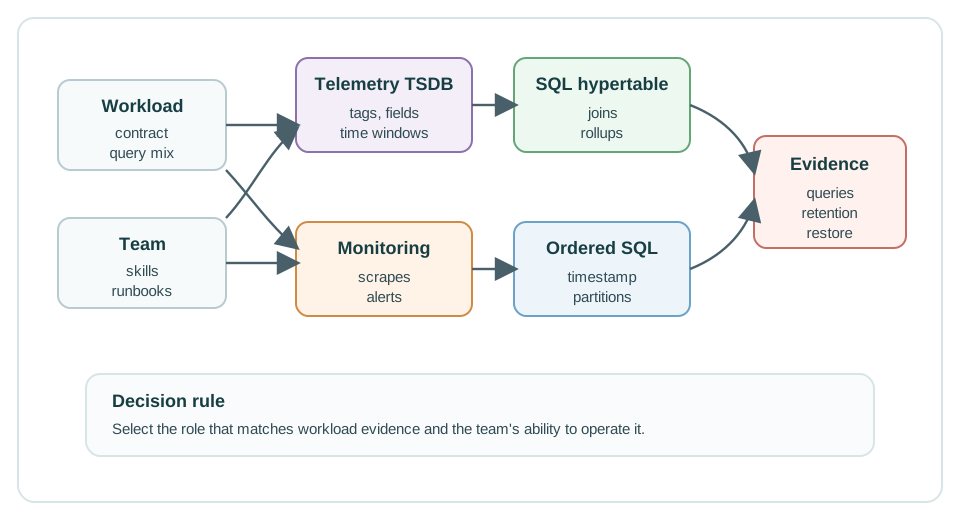
Read Figure 9.1 from workload role to release evidence. The telemetry path emphasizes pushed samples, tag or field design, and retention; the SQL path emphasizes relational joins and query plans; the monitoring path emphasizes scrape health, rules, and alert delivery. Archive and replay sit behind all three as lifecycle duties. A platform earns a role by proving that path, not by winning a generic feature comparison.
InfluxDB-style platform
Fits measurements written as timestamped points with tag and field modeling, time-window queries, dashboards, and retention rules.
TimescaleDB-style platform
Fits teams that need PostgreSQL compatibility, SQL joins, asset metadata, continuous aggregates, and familiar database operations.
Prometheus-style platform
Fits operational metrics, scrape targets, labels, recording rules, alert rules, and service health review.
QuestDB-style platform
Fits high-ingest streams where a designated timestamp, partitioning, and SQL interval scans are central to the read path.
The platform choice is usually not permanent, but it becomes expensive to reverse after dashboards, queries, retention jobs, alert rules, access control, and operational runbooks depend on it. That is why the release review should make the evidence visible before the platform becomes the production source of truth.
9.4 Evidence Axes
This section: Evidence Axes — Every candidate platform should answer the same review questions.
Every candidate platform should answer the same review questions.
time hides clock drift, replay order, and late arrivals.9.5 Workload-First Platform Selection Map
This section: Workload-First Platform Selection Map — Start platform selection from the workload record, not from a product name.
Start platform selection from the workload record, not from a product name. A candidate platform is only a fit when it can show evidence for the timestamp contract, dimension model, retention path, and query families that the IoT system will actually use.
| Workload signal | Platform pattern to test first | Evidence that should decide |
|---|---|---|
| High-volume device telemetry with field/tag model and downsampling | InfluxDB-style telemetry store | Series-cardinality report, write rejection behavior, retention policy, and rollup query proof. |
| Operational data that needs SQL joins with asset, work-order, or tenant tables | TimescaleDB-style SQL hypertables | Join query plans, partition/chunk policy, compression behavior, and late-data update proof. |
| Service health, alerting, and scrape-based metrics | Prometheus-style monitoring store | Label cardinality review, alert rules, scrape target health, and remote-write or long-term retention plan. |
| Very high ingest with ordered timestamp scans and SQL analytics | QuestDB-style high-ingest SQL | Designated timestamp proof, partition strategy, out-of-order ingest behavior, and window query latency. |
Prometheus is not a general telemetry warehouse just because it stores time-series data. It is usually strongest as the monitoring and alerting tier. Long-lived device history, replay, joins, and regulated retention often need a separate telemetry or analytical store.
9.6 A Decision Record Beats a Product Ranking
This section: A Decision Record Beats a Product Ranking — A short decision record keeps the review grounded.
A short decision record keeps the review grounded. It should explain the workload and the proof, not just the chosen product.
Course hubs and product architecture pages should point to stable learning roles: telemetry TSDB, SQL hypertable, monitoring store, high-ingest SQL engine, archive, and dashboard layer. Product examples can live inside chapters and decision records. That keeps the learning path maintainable when platforms, query languages, docs URLs, and deployment options change.
9.7 Platform Pattern Comparison
This section: Platform Pattern Comparison
9.8 InfluxDB-Style Telemetry Stores
This section: InfluxDB-Style Telemetry Stores — InfluxDB-style systems are often attractive when the core record is a measurement with tags, fields, and a timestamp.
InfluxDB-style systems are often attractive when the core record is a measurement with tags, fields, and a timestamp. The review question is not “Is this product fast?” The question is “Does the measurement, tag, field, and timestamp model match the actual query path?”
equipment_vibration,site=plant-a,line=press-2,device_class=motor rms_g=0.18,temp_c=52.4 1716400000000000000Tags and fields
Tags identify source or context. Fields hold measured values. The schema should follow query needs and avoid needless width.
Time windows
Representative reads should include latest value, recent windows, aggregate windows, and filters by stable dimensions.
Query language changes
Do not assume every InfluxDB deployment uses the same query language, storage engine, or cardinality behavior.
Schema evidence
Capture the first-write schema, tag order, field types, retention plan, export path, and dashboard query set.
InfluxDB 3 documentation describes databases, tables, tags, fields, timestamps, primary keys, and schema guidance. It also warns about wide schemas and too many tags because they can affect resource use and sorting behavior. That current guidance is different from older InfluxDB advice that treated high tag cardinality as the main failure mode in all versions. For a chapter that must age well, keep the learning point stable: put dimensions in the access path only when they support real filters, and test the version you will run.
Ask: which dimensions appear in most dashboards, which values are measurements, which tags are stable, which fields are sparse, and which export or migration path protects the team if the schema needs to change later?
9.9 TimescaleDB-Style SQL Hypertables
This section: TimescaleDB-Style SQL Hypertables — TimescaleDB-style systems extend PostgreSQL with time-series structures such as hypertables, chunks, and continuous aggregates.
TimescaleDB-style systems extend PostgreSQL with time-series structures such as hypertables, chunks, and continuous aggregates. The practical benefit is that the team can keep SQL, relational joins, familiar access control, and PostgreSQL tooling while adding time partitioning and rollup support.
CREATE TABLE vibration_readings (
  observed_at TIMESTAMPTZ NOT NULL,
  device_id TEXT NOT NULL,
  site_id TEXT NOT NULL,
  metric_name TEXT NOT NULL,
  value DOUBLE PRECISION NOT NULL,
  quality_status TEXT NOT NULL
);

SELECT create_hypertable('vibration_readings', 'observed_at');Join context
Good fit when readings must join to devices, assets, tenants, sites, tickets, firmware, or maintenance windows.
Continuous aggregates
Useful for repeated dashboard summaries, but they need refresh policies, late-data rules, and completeness checks.
PostgreSQL still matters
Indexes, vacuum behavior, connection pools, memory, storage, backup, and upgrades still need database ownership.
Query plans
Collect plans showing chunk pruning, index use, aggregate reads, scanned rows, and latency under normal ingest load.
TimescaleDB is strongest when the IoT product is not only “measurements over time” but also “measurements joined to business context.” The release review should still prove chunk sizing, index choices, aggregate refresh, backup and restore, and raw-data retention before production dashboards depend on the platform.
9.10 Prometheus-Style Monitoring Stores
This section: Prometheus-Style Monitoring Stores — Prometheus is often the right system for platform health.
Prometheus is often the right system for platform health. It stores time series identified by a metric name and labels, scrapes configured targets, evaluates rules, and sends alerts. That makes it excellent for gateway health, broker queue depth, validation failures, ingest lag, service latency, and infrastructure saturation.
iot_ingest_validation_failures_total{site="plant-a",reason="schema_version_unknown"}
iot_gateway_queue_depth{gateway="gw-17",site="plant-a"}Health evidence
Use metric names and labels to capture service and infrastructure state with alertable dimensions.
Alerts and recording
Recording rules and alert rules turn raw samples into operational signals and incident triggers.
Not every reading
Do not make Prometheus the only source of truth for regulated device history, customer analytics, or replayable raw telemetry.
Cardinality budget
Review labels carefully. Changing label values creates new time series and can make monitoring expensive or unstable.
Prometheus local storage is intentionally a local time-series database with remote storage integration options. That is useful and powerful, but it should be reviewed as a monitoring architecture. If the IoT platform also needs long-term customer reports, warranty evidence, and replayable raw readings, use a separate telemetry or archive path and let Prometheus monitor that path.
9.11 QuestDB-Style High-Ingest SQL
This section: QuestDB-Style High-Ingest SQL — QuestDB-style systems are designed around a designated timestamp and SQL analytics over time-ordered data.
QuestDB-style systems are designed around a designated timestamp and SQL analytics over time-ordered data. The designated timestamp is not just a display column. It defines the time axis for partitioning, time-range scans, and time-series operations such as time-bucket sampling.
CREATE TABLE readings (
  observed_at TIMESTAMP,
  device_id SYMBOL,
  site_id SYMBOL,
  temperature_c DOUBLE
) TIMESTAMP(observed_at) PARTITION BY DAY;Designated time axis
The chosen timestamp should match the time range users filter by most often and should be defined at table creation.
Interval scans
Queries should prove partition pruning and interval scans for realistic time windows and dimensions.
Out-of-order behavior
Test late and replayed readings. They may be accepted, but they can change write amplification and operational cost.
SQL evidence
Capture the DDL, partition policy, sample queries, EXPLAIN output, replay test, and retention or TTL behavior.
This pattern is a strong candidate when the workload is append-heavy, time filters dominate, and SQL interval analytics are the main product experience. It is weaker when the central need is PostgreSQL ecosystem governance, complex relational joins, or a mature observability workflow.
9.12 Label the Platform Decision
This section: Label the Platform Decision
9.13 Evidence Matrix
This section: Evidence Matrix — Use Figure 9.2 to ask whether every candidate has faced the same intake, schema, query, data-life, operations, and move tests.
Use Figure 9.2 to ask whether every candidate has faced the same intake, schema, query, data-life, operations, and move tests.
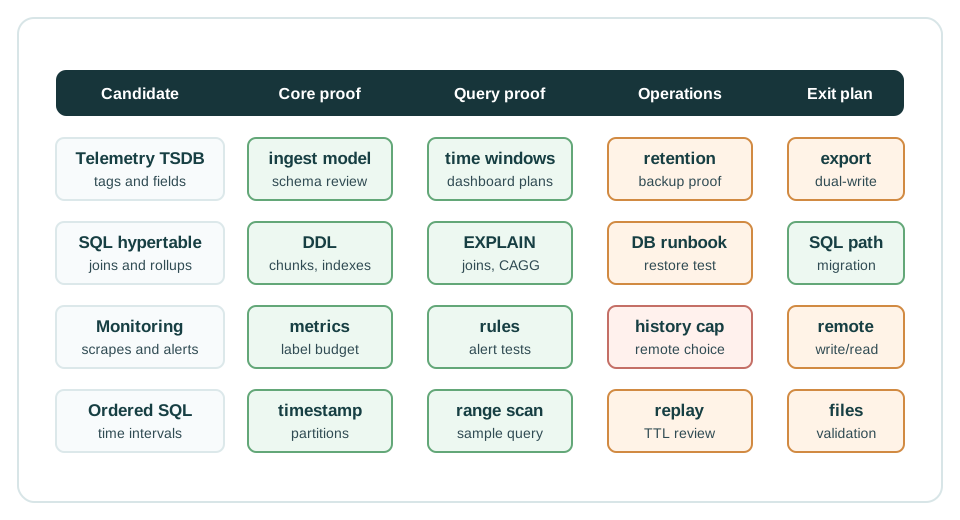
In Figure 9.2, each column exposes a different failure boundary. Ingest proof tests bursts, retries, rejection, and backpressure; schema proof controls timestamps, units, versions, tags, and cardinality. Query proof measures the real latest-value, window, rollup, alert, or join paths. Lifecycle evidence covers retention, late correction, archive, and restore. Operations and migration checks then show whether the team can run, upgrade, export, dual-write, validate, and leave the platform safely. Apply the same order to every candidate: an empty evidence cell is a known risk, not a neutral score.
9.14 Code Challenge: Decision Record
This section: Code Challenge: Decision Record
9.15 Common Pitfalls
This section: Common Pitfalls
9.15.1 Treating Platform Selection as a Winner List
There is no stable winner across all IoT workloads. A product can be excellent for monitoring and weak for regulated raw history. Another can be excellent for SQL joins and heavier to operate. Compare roles and evidence, not generic popularity.
9.15.2 Copying Old Cardinality Advice Without Version Context
High-cardinality dimensions can still harm many systems, but the exact behavior depends on the database version, storage engine, query path, and schema. Teach the durable rule: keep unbounded values out of the primary access path unless the platform version and workload evidence prove it is safe.
9.15.3 Ignoring Query-Language Fit
Query-language fit affects whether the people supporting a platform can maintain its dashboards, analysis, and operational rules. SQL, PromQL, Flux, InfluxQL, and platform-specific SQL extensions have different strengths, so assess them against the actual questions the system must answer. Relational joins, time-window analysis, and monitoring rules place different demands on the query model. Record the exact platform version because available query languages can depend on the engine and version. Release evidence should include the query text that support, analytics, and operations teams will maintain, together with relevant plans and latency results. Review ownership and migration needs too: dashboards, queries, and alert rules become dependencies that make a later platform change more expensive.
9.15.4 Using Prometheus as the Only Historical Store
Prometheus-style monitoring is a good place for gateway health, service latency, queue depth, dropped messages, and validation failures. It should not quietly become the only durable store for raw customer telemetry unless the retention, durability, replay, and governance evidence support that role.
9.15.5 Forgetting the Exit Plan
The cheapest time to define export format, dual-write validation, and dashboard migration is before the first production release. Without an exit plan, the platform choice becomes a hidden long-term constraint.
9.16 Release Checklist
This section: Release Checklist
Workload contract
Message format, timestamp source, units, schema version, dimensions, batch size, retry policy, and late-data rule.
Schema and dimensions
Tags, labels, fields, indexed columns, cardinality budget, sparse-field review, and schema-change owner.
Representative reads
Latest, window, rollup, alert, join, and restore queries with plans, scanned rows, and dashboard screenshots.
Retention and restore
Raw retention, aggregate retention, archive manifest, restore sample, late-arrival refresh, and deletion owner.
Runbook evidence
Backup, restore, upgrade, scale limit, disk pressure, compaction or maintenance load, query timeout, and alert routes.
Migration control
Export format, dual-write plan, dashboard parity checks, rollback limit, security review, and owner sign-off.
9.17 Self-Assessment
This section: Self-Assessment
9.18 Platform Engine Boundaries
This section: Platform Engine Boundaries — Real time-series platforms cluster into a few shapes rather than one generic “TSDB.” A dedicated telemetry store receives pushed measurements and optimizes for tags, fields, retention, and dashboards.
Real time-series platforms cluster into a few shapes rather than one generic “TSDB.” A dedicated telemetry store receives pushed measurements and optimizes for tags, fields, retention, and dashboards. A SQL hypertable keeps relational SQL while adding time partitioning. A monitoring store scrapes targets, evaluates rules, and alerts on system health. High-ingest SQL engines and clustered long-retention stores sit beside those roles, but they still need the same workload proof.
Before reading the capacity example, inspect Figure 9.3 to ask who writes, reads, alerts, keeps history, and restores data in each push or pull design.
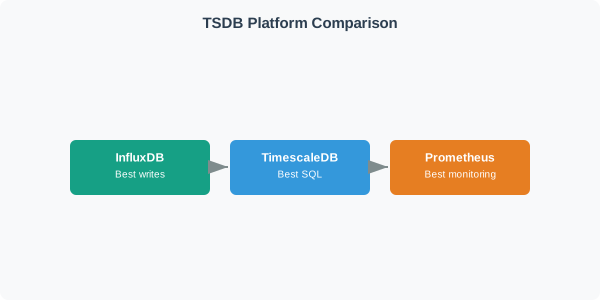
In Figure 9.3, follow pushed telemetry into the dedicated store and SQL hypertable, then contrast that with the monitoring engine pulling from discovered targets. Suppose 1,200 gateways expose 40 metrics every 15 seconds. That is 48,000 streams and 48,000 / 15 s = 3,200 samples/s. A push store must absorb reconnect bursts; a pull monitor must discover 1,200 targets and report missing ones; a SQL hypertable must govern indexes and joins. Their query outputs differ too, so compare who writes, queries, alerts, retains history, and restores failure rather than ranking platform names.
| Platform role | Structural model | Query model | Best first evidence |
|---|---|---|---|
| TimescaleDB-style SQL hypertable | PostgreSQL extension, pushed writes | SQL | Joins to device registry, window queries, chunk pruning, restore, and access control |
| InfluxDB-style telemetry store | Purpose-built TSDB, pushed writes | Flux, InfluxQL, SQL in newer engines depending on version | Line-protocol payloads, tag cardinality, retention, late data, and dashboard latency |
| Prometheus-style monitor | Pull-based scraper and alert engine | PromQL | Target discovery, scrape health, rule evaluation, alert routing, and remote-write plan |
| QuestDB/VictoriaMetrics-style specialized store | High-ingest SQL or clustered metric storage | SQL or PromQL-compatible query paths | Sustained write rate, backpressure, long retention, query latency, and operational ownership |
Prometheus-style monitoring is commonly paired with remote-write or external long-term storage when local retention is not enough. Treat “which system scrapes and alerts” as a separate decision from “which system holds two years of customer telemetry.”
9.19 Production-Scale Selection Evidence
This section: Production-Scale Selection Evidence — Selection is about the query language the team must maintain, the relational data it must join to, the ingest shape it must survive, and the operations team that owns it.
-

Write the real questions before comparing storage tools.
-

Check joins, incoming load, and who will run the system.
-

Keep a choice only after a real query and recovery test pass.
Selection is about the query language the team must maintain, the relational data it must join to, the ingest shape it must survive, and the operations team that owns it. Work backward from the first three product questions the platform must answer.
A maintenance portal may ask, “Which motors in tenant A exceeded vibration limits after firmware 3.8 and already have an open ticket?” That needs joins, access control, and SQL-friendly plans, so a SQL hypertable is a better first candidate than a monitoring store. An operations team may ask, “Which gateways have ingest lag above 90 seconds and are dropping validation failures right now?” That points to metrics, recording rules, and alerts. A lab bench may ask, “Can we ingest 50,000 sensor readings per second, keep 14 raw days, and show one-minute rollups?” That is an ingest and retention proof for a telemetry TSDB or high-ingest SQL engine.
Make the selection test measurable. For a dashboard, require a representative 24-hour query over 500 devices to stay under the agreed latency target, for example two seconds at the 95th percentile while ingest continues. For an archive, run a restore sample and prove that a seven-day outage replay does not corrupt timestamps, duplicate rows, or break rollup completeness. For a managed service, record the owner for backup, quota alarms, index growth, and version upgrades. For self-hosting, add disk-pressure and failover drills.
| Review question | Evidence to capture | Release risk if skipped |
|---|---|---|
| Can the product query be maintained? | Exact query text, query plan, scanned partitions, latency target, and dashboard capture | A one-device demo hides slow multi-tenant dashboards |
| Can late data be corrected? | Replay test, duplicate handling, rollup refresh behavior, and audit sample | Gateway outages create wrong aggregates or duplicate points |
| Can operators keep it alive? | Backup, restore, disk pressure, quota alarms, upgrade plan, and on-call owner | The platform becomes an unsupported incident surface |
| Can the team leave later? | Export format, dual-write plan, validation queries, rollback limit, and runner-up notes | Dashboards, alerts, and schemas become migration traps |
The final decision record should say why the runner-up failed, because that is what future migration work will need. A demo that plots temperature for one device says little about cardinality, joins, alert rules, late data, downsampling, restore time, or the team’s ability to debug slow queries at 02:00.
9.20 Storage Engine Units
This section: Storage Engine Units — Under the product names, mature time-series systems often share one storage idea: buffer recent writes, seal immutable time-partitioned units, compact and compress in the background, and prune by time.
Under the product names, mature time-series systems often share one storage idea: buffer recent writes, seal immutable time-partitioned units, compact and compress in the background, and prune by time.
InfluxDB 1.x/2.x storage used the TSM and TSI lineage: writes landed in a write-ahead log and cache, then flushed to immutable time-series files with an index that mapped tags to series. Newer InfluxDB engines use a different storage stack, so a platform review should always record the exact product version and storage engine being approved. TimescaleDB splits a hypertable into chunks partitioned by time and optionally by a space dimension; each chunk is a PostgreSQL child table behind a routing layer. Prometheus appends to a write-ahead log and a hot head block, then seals immutable on-disk blocks with chunk files and a label index that compaction can merge into larger ranges.
Use storage units to reason about cost. In TimescaleDB, a one-day chunk interval over 180 days creates roughly 180 time chunks before any space partitioning. A query for the last six hours should prune almost all of those chunks; a retention policy can drop old chunks without scanning every row; and compression after seven days can rewrite colder chunks into a better layout for scans. In Prometheus, the head block covers recent samples and then turns into block windows, so 15 days of local retention starts as many block ranges before compaction merges them. A query engine can skip blocks outside the time range and then use the label index to find matching series.
The durable idea is that time-series platforms trade row-by-row mutation for append, partition, compact, and prune. Once students can identify the partition unit, index path, and retention drop unit, platform documentation becomes much easier to compare.
9.21 Summary
This section: Summary — Time-series platform selection is a release decision with long-term consequences.
Time-series platform selection is a release decision with long-term consequences. InfluxDB-style, TimescaleDB-style, Prometheus-style, and QuestDB-style systems are not interchangeable labels. They represent different data models, query languages, storage assumptions, operations surfaces, and migration risks.
The strongest IoT platform review starts from the workload contract, names the platform role, proves representative queries, tests lifecycle behavior, captures operations evidence, and records migration control. That process keeps the chapter durable even as product versions and deployment options change.
9.22 Concept Relationships
This section: Concept Relationships — Data Storage and Databases defines the broader storage roles that surround telemetry, registry, event, cache, and archive data.
Data Storage and Databases defines the broader storage roles that surround telemetry, registry, event, cache, and archive data. Time-Series Databases for IoT introduces the TSDB workload, series modeling, query evidence, and retention thinking. Time-Series Database Fundamentals explains append paths, chunks, compression, timestamp contracts, and lifecycle mechanics. Time-Series Query Optimization focuses on query patterns, indexes, rollups, and dashboard performance. Data Retention and Downsampling focuses on aging data, summaries, archive, restore, and deletion evidence.
9.23 What’s Next
This section: What’s Next
| If you need to… | Read next |
|---|---|
| Practice choosing and defending a platform | Time-Series Practice and Labs |
| Tune dashboards and analytical queries | Time-Series Query Optimization |
| Design retention, rollups, archive, and deletion | Data Retention and Downsampling |
| Revisit storage mechanics behind the platforms | Time-Series Database Fundamentals |
9.24 Official References
This section: Official References — InfluxDB schema design recommendations - tags, fields, timestamps, primary keys, and current schema guidance.
InfluxDB schema design recommendations - tags, fields, timestamps, primary keys, and current schema guidance. Tiger Data hypertables - TimescaleDB hypertables and time partitioning. Tiger Data continuous aggregates - incremental rollups and refresh behavior. Prometheus data model - metric names, labels, samples, and time series. Prometheus storage - local storage, retention flags, and remote storage integrations. QuestDB designated timestamp - timestamp designation, partitioning, and interval-scan behavior. QuestDB SAMPLE BY - time-bucket aggregation over designated timestamps.
9.25 Key Takeaway
This section: Key Takeaway — Time-series platform selection should compare ingest rate, query language, retention/downsampling, clustering, cloud operations, alerting, and integration with dashboards or analytics tools.
Time-series platform selection should compare ingest rate, query language, retention/downsampling, clustering, cloud operations, alerting, and integration with dashboards or analytics tools.
Find help
3 reviewed answers.
Where should I start in a module?
Open the module page from the sidebar to see its chapters in order. Use the module map to return to a topic you need.
Modules and pathsReviewed
What can I try when a project does not work?
Check the symptom, then work through the diagnostic steps. Keep the error message and the smallest example that reproduces it.
When you are stuckReviewed
How do interactive examples work?
Use the interactive guide to check how examples and simulations work before changing your project.
Interactive examples guideReviewed