3 Database Selection for IoT Workloads
More
Depth: Practitioner
Progress saves as you read. Mark sections complete as you go; your progress appears in the sidebar.
-

Which store fits a record whose job keeps changing?
3.1 Start With the Next Data Change
This section: Start With the Next Data Change — Picture a sensor record that is read now, joined next week, and removed at the end of a job.
Picture a sensor record that is read now, joined next week, and removed at the end of a job. Each step asks a different thing from storage.
First, name the reads, writes, links, time span, and loss that matter. Then choose the smallest store that can meet those needs.
One store can make the first build easy, but it may strain under a new query or fault. More stores fit each job, yet they add copies and repair work.
A database label does not settle the choice; match each store to its role, failure behavior, and recovery record.
Use the Practitioner section to build and compare the storage ledger. Use Under the Hood to study faults, growth, change, and repair limits in more depth.
Firmware is the code stored on a device.
Plain check
- Name each data kind. Name each write. Name each read. Name each life span.
- Mark needed links. Mark needed order. Mark the loss cost. Mark the repair owner.
- Test a full store. Test a lost copy. Test a slow read. Test an old record.
- Check the next change. Check the next query. Check safe removal. Reopen the store choice.
- Use Practitioner to compare. Use deeper fault checks. Test restore work. State each bound.
A database choice feels abstract until the next firmware release adds a field, a dashboard needs a new query, or a support engineer asks for last month’s raw readings. Start the decision there. If the storage role, query path, owner, and restore story survive that change, the product name becomes a smaller part of the review.
Data Dora
“Every reading has a time and a cost — decide retention before you decide the database.”
Here Dora walks each storage role separately: what the record must prove, what stays with it, and what a wrong merge costs later.
3.2 Overview: Choose A Database From Evidence
This section: Overview: Choose A Database From Evidence — Database selection is a release decision, not a popularity contest.
Database selection is a release decision, not a popularity contest. An IoT system may store telemetry, device registry records, events, media artifacts, latest dashboard values, and analytics outputs. Those records do not all have the same query path, consistency need, retention window, or recovery requirement.
The useful first question is not "Which database should we use?" It is "What must this data prove, who reads it, how long must it live, and what failure behavior is acceptable?" Once those answers are visible, the team can choose the smallest set of storage roles that proves the release claims without creating unnecessary operational burden.
If you only need the intuition, use this rule: select the storage role from the data contract and query evidence before naming a product or deployment shape.
Worked example: a cold-chain service stores one temperature reading every minute from 4,000 containers, plus a device registry and a small set of shipping documents. The temperature readings are append-heavy and usually queried by container id plus time range, so the evidence points toward a time-series or time-partitioned telemetry role. The registry needs uniqueness, ownership, audit, and controlled updates, so it belongs in a transactional registry role even if the telemetry store can technically hold JSON documents.
The documents are a third role. A calibration certificate or delivery photo should be stored as an object with checksum, content type, retention rule, access policy, and metadata linking it to a device or trip. A latest dashboard value can be a cache only if it has a durable source-of-truth link and freshness label. One product may implement more than one role in a small deployment, but the role evidence must be reviewed before that consolidation is accepted.
Dora’s Retention Ledger
- Reading: a cold-chain service takes one temperature reading a minute from 4,000 containers, plus a device registry and shipping documents.
- Keep: the registry needs uniqueness, ownership, audit, and controlled updates — its own transactional role, even though the telemetry store could technically hold it too.
- Cost: one product may serve more than one role in a small deployment, but that consolidation needs role evidence before it is accepted.
The Four Selection Questions
Data Shape
Is the record telemetry, registry state, event log, latest value, artifact, relationship, aggregate, or model feature?
Query Path
Will users read by time window, key lookup, join, search, graph traversal, report export, dashboard refresh, or training batch?
Lifecycle
How are retention, downsampling, archive, legal hold, deletion, restore, schema evolution, and data quality handled?
Operations
Can the team monitor, back up, restore, migrate, secure, upgrade, and troubleshoot the chosen store?
Common Storage Roles
Read these roles by responsibility rather than product name. Start with the authoritative registry, follow high-volume measurements into the time-series path, separate variable events and binary artifacts, and treat caches as rebuildable views. This sequence keeps ownership, query, lifecycle, and recovery evidence attached to each class.
Transactional registry role: authority-sensitive device, owner, authorization, configuration, and audit state.
Time-series role: timestamped measurements, trends, windows, rollups, late arrivals, and retention rules.
Document or event role: variable operational records, event envelopes, logs, replay, and search indexing.
Cache or materialized view: latest-value and dashboard acceleration backed by a durable source of truth.
Object storage with metadata: images, audio, firmware, reports, bulk logs, checksums, lifecycle, and access policy.
Graph or relationship role: topology, dependency, ownership, and traversal queries when relationship paths are central.
Data Shape: Structured, Semi-Structured, and Unstructured
The "Data Shape" question above has a classic three-way answer worth naming explicitly. Structured data is organized into pre-designed fields with relational keys — most commonly rows and columns in a SQL-standard relational database, with common implementations including MySQL, PostgreSQL, and Oracle. Semi-structured data, such as XML or JSON, carries its own organizational structure and can be stored in document stores or in JSON columns of relational tables. Unstructured data — text, images, audio, video, and log files — has no predefined data model at all. An IoT deployment produces all three in the same day: a device registry row is structured, a sensor's JSON payload is semi-structured, and a camera clip is unstructured.
That shape is what drives the relational-versus-NoSQL tradeoff behind several of the roles above. Relational databases impose a set schema for columns, and decades of production use have made them stable and efficient to query, but horizontal scaling of writes across multiple machines can require additional design; PostgreSQL can also store variable-shape JSON in jsonb columns. NoSQL stores relax that structure — common categories include key-value stores, column-oriented stores, and document stores such as MongoDB — which is what makes them easier to scale horizontally and better suited to IoT's mixed data variety. That flexibility comes at a cost: transactional reliability is typically weaker than a mature relational engine provides. Neither category is a default choice; use the storage-role evidence above, not the category label, to decide which shape — and therefore which product category — fits each record class.
The three shapes are easier to keep apart when each carries its own sample. Figure 3.1 shows a registry row, a telemetry payload, and a camera clip side by side, with example traits and destinations for each shape.

The registry table’s fixed device_id / zone / fw columns make it queryable by a stable schema, so the example lands in: SQL row store. The JSON payload carries its own field names; adding a firmware field need not change a relational table definition when the payload is stored in a JSON column. The camera clip lands in: object storage under a metadata index. The SAME DAY, SAME SYSTEM strip is the selection lesson of this whole section: one greenhouse minute legitimately produces all three shapes, so the storage-role ledger should account for all three shapes and test whether one product or several products meet their distinct roles.
Overview Knowledge Check
3.3 Practitioner: Build The Storage Role Ledger
This section: Practitioner: Build The Storage Role Ledger — A practical selection review separates storage role from product choice.
A practical selection review separates storage role from product choice. The role describes the job the data store must do. The product and deployment shape are selected only after representative workloads prove the role can be operated safely.
This distinction matters because one product may safely serve multiple roles in a small system, while a larger system may need separate stores for telemetry history, registry authority, artifacts, search, and latest values. Splitting too early creates operational risk. Splitting too late can hide lifecycle, query, and consistency problems.
Selection Workflow
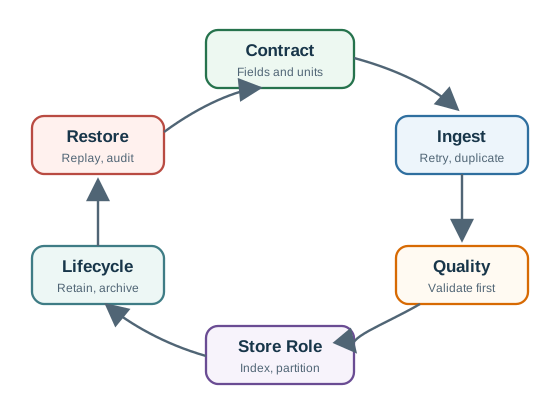
- Define the contract. Record fields, IDs, timestamps, units, schema version, quality flags, owner, and authority boundary.
- List access paths. Include ingest, retry, duplicate, backfill, dashboard, report, export, incident, and maintenance queries.
- Name the role. Choose a storage role such as transactional registry, time-series, document/event, object, cache, search, or graph.
- Choose configuration. Decide indexes, partitions, keys, consistency settings, access control, retention policy, and migration path.
- Attach evidence. Capture representative queries, query plans, replay tests, retention dry runs, backup/restore proof, and owner approval.
- Retest after change. Repeat the review when workload, schema, retention, scale, product configuration, or operational ownership changes.
Role Ledger
One Store Or Several?
Use one configured product when the data classes share access patterns, lifecycle policy, consistency needs, and operational ownership. Split roles when evidence shows real differences: telemetry retention differs from registry authority, search needs a derived index, latest values need a rebuildable cache, or media artifacts need object lifecycle rules.
Every additional store must have an owner, backup and restore proof, security policy, migration path, monitoring, and incident response. Polyglot persistence is a design tool only when the team can operate the additional moving parts.
Practitioner Knowledge Check
3.4 Under The Hood: Selection Is A Failure-Mode Decision
This section: Under The Hood: Selection Is A Failure-Mode Decision — Database categories are shorthand.
Database categories are shorthand. The release risk lives in failure modes: partitions, duplicate writes, late telemetry, stale cache values, schema drift, unbounded queries, missing backups, bad restores, access mistakes, and deletion errors. A database can be suitable for one role and unsafe for another depending on configuration and evidence.
For IoT systems, the same physical device can produce different records with different authority. A raw temperature measurement may tolerate eventual arrival. A firmware-assignment record may need tighter authority and audit behavior. A latest dashboard value may be disposable if it can be rebuilt, but misleading if it hides staleness. The selection review should make those differences explicit.
Worked example: the telemetry role accepts a duplicate sample after a gateway retry. If the store uses `(device_id, event_time, sequence)` as an idempotency key, the duplicate can update the same record or be ignored with an audit reason. If the key is only an auto-increment row id, the duplicate becomes a second reading and a one-hour average can be biased. A database category cannot answer that; the selected write path and key policy do.
Dora’s Retention Ledger
- Reading: the telemetry role accepts a duplicate sample after a gateway retry.
- Keep: the `(device_id, event_time, sequence)` idempotency key — the duplicate updates the same record or is ignored with an audit reason.
- Cost: with only an auto-increment row id instead, the duplicate becomes a second reading and can bias a one-hour average.
The read path needs the same discipline. A dashboard query for "last 24 hours by container" should show bounded predicates, expected row count, index or partition pruning evidence, freshness status, and behavior when the durable store lags behind a cache. A restore drill should reload a representative backup and rerun that query against restored data. Include one negative test where the query is rejected or marked stale when evidence is missing. Record the retest trigger for schema, scale, and ownership changes. Selection is complete only when those failure-mode tests are attached to the chosen role.
Failure Modes To Surface
Write Path
Retries, duplicate messages, batching, backpressure, offline buffers, and backfills can corrupt state unless idempotency and replay behavior are defined.
Read Path
Dashboards and reports need bounded predicates, query-plan evidence, freshness labels, quality flags, and gap handling.
Lifecycle
Retention, downsampling, archive, legal hold, deletion, and restore rules must preserve enough evidence for later review.
Operations
Backup, restore, upgrade, access review, monitoring, capacity planning, migration, and incident ownership decide whether the system can be trusted.
Review Tests
Run the tests in release order: prove representative writes and reads first, exercise failure and replay next, and finish with retention, backup, and restore evidence. A candidate store is acceptable only when the operational team can reproduce those results under the expected workload and ownership model.
Representative query test: prove the most important read paths with realistic predicates and expected data volume.
Replay test: resend duplicate, late, and out-of-order records and confirm the chosen store preserves the intended truth.
Partition test: document what happens when edge, gateway, cloud, or region components cannot communicate.
Retention dry run: show what would be deleted, rolled up, archived, or held before any data is removed.
Restore drill: recover the store and prove representative queries still answer correctly.
Migration rehearsal: apply schema or index changes to representative data and record rollback limits.
Under-the-Hood Knowledge Check
3.5 Place Meter Readings and Work Orders Deliberately
This section: Place Meter Readings and Work Orders Deliberately — A utility receives a new meter value every minute and a technician closes one work order each visit.
A utility receives a new meter value every minute and a technician closes one work order each visit. Figure 3.1 places regular time-stamped measurements apart from changing business records. Follow workload shape, query, scale, consistency, retention, and operating evidence into a database selection.
For 10,000 meters at one reading per minute, the store receives (10{,}000\times1{,}440=14.4) million readings per day. A time-series path can optimise append and time-window queries, while relational work-order data needs joins and transaction rules. Using two stores may fit better than forcing both shapes into one database.
3.5.1 Predict the Database Workload
- Predict: The main query asks for each meter’s last 24 hours. Which database evidence matters most? Check: Time-range read cost, ingestion rate, retention, compression, and device-series indexing match that workload.
- Predict: A product page says a database is “scalable” but gives no tested rate or node plan. Is selection finished? Check: No. Database scale must be checked against the 14.4-million-reading daily workload and failure target.
3.6 Summary
This section: Summary — Database selection starts from the data contract, workload, lifecycle, consistency need, and operational evidence.
Database selection starts from the data contract, workload, lifecycle, consistency need, and operational evidence. Select the storage role before selecting a product or deployment shape. Telemetry, registry state, events, latest values, artifacts, and relationships often need different evidence even when one product stores several of them. Polyglot persistence is justified only when each additional store has a clear role, owner, recovery path, security policy, and migration plan. Release evidence should include representative queries, replay behavior, retention dry runs, restore drills, and retest triggers.
Choose databases by workload evidence, not popularity: define the data shape, query path, lifecycle, consistency tradeoff, and operations proof before committing to a store.
3.7 See Also
This section: See Also
Data Storage Overview
Frame the module-wide storage roles, evidence habits, and lifecycle questions.
CAP Theorem and Database Categories
Review partition behavior, consistency claims, conflict handling, and category limits.
Time-Series Fundamentals
Apply the selection framework to timestamped telemetry and time-window workloads.
Data Quality Monitoring
Connect storage choice to validation, replay, quarantine, and quality evidence.
Find help
3 reviewed answers.
Where should I start in a module?
Open the module page from the sidebar to see its chapters in order. Use the module map to return to a topic you need.
Modules and pathsReviewed
What can I try when a project does not work?
Check the symptom, then work through the diagnostic steps. Keep the error message and the smallest example that reproduces it.
When you are stuckReviewed
How do interactive examples work?
Use the interactive guide to check how examples and simulations work before changing your project.
Interactive examples guideReviewed