8 Time-Series Database Fundamentals
More
Depth: Practitioner
Progress saves as you read. Mark sections complete as you go; your progress appears in the sidebar.
8.1 Start With One Reading
This section: Start With One Reading — Take one temperature reading and follow it through a system.
Take one temperature reading and follow it through a system. Its time must stay clear. The device and the type of measurement must stay named. A quality note must survive if the system sends the reading again. A later search must show whether the value is original or a summary. Time-series design is the set of storage choices that keeps millions of such readings understandable.
8.2 In 60 Seconds
This section: In 60 Seconds — Time-series storage holds observations in time order.
Time-series storage holds observations in time order. Each reading has a timestamp, which records a time. It also names the source, the type of measurement, the value, and any quality notes. Telemetry means measurements or status reports sent from a device. A successful database keeps those facts intact while data enters, is stored, is searched, is summarised, is aged, and is restored after a failure.
The fundamentals are design ideas, not product names. New readings are usually added rather than used to replace old ones. The design states which clock supplied each time. It groups readings into time chunks or partitions. It keeps the number of searchable labels under control. It compresses repeated patterns and skips chunks outside a search range. Tests must also show what happens to late readings and old data.
Learning Objectives
This section: Learning Objectives
After this chapter, you should be able to:
- Explain why device telemetry behaves differently from records that are often updated, such as shop orders.
- Define a timestamp contract that separates observed time, receive time, and ingest time.
- Describe an append write path. Explain how fixed segments, chunks, indexes, and later merging support time-series storage.
- Explain how column layout and three compression methods reduce search work: storing changes between values, replacing repeated text with codes, and counting repeated values. Explain how minimum and maximum summaries help too.
- Review whether a time-series design has enough evidence for release.
8.3 The Shape of Time-Series Data
This section: The Shape of Time-Series Data — A time-series record is not just a table row with a time.
A time-series record is not just a table row with a time. It is an observation made by a named source. A data contract states the fields, units, time rules, and quality checks that the system must preserve.
When did the observation happen?
Use Coordinated Universal Time (UTC) and name the clock: device observation, gateway receipt, message service, or platform storage.
What produced it?
A device, asset, site, customer, gateway, zone, software version group, or running service.
What was measured?
Temperature, pressure, average vibration level, battery voltage, lost-message rate, waiting-message count, or energy use.
What value was recorded?
A number, true-or-false state, named status, distribution chart, or structured event value. Keep its unit and check result too.
The storage engine sees a repeated pattern. New readings arrive often, while changes to old readings are rare. Searches usually cover a time range. Dashboards need the latest value or a summary, also called a rollup. Old data later moves to cheaper storage or is deleted. This pattern explains why these systems focus on adding data, grouping it by time, compressing it, and setting rules for how long to keep it.
8.4 Workload Clues
This section: Workload Clues — Use workload clues before choosing schema, indexes, or platform.
Use workload clues before choosing schema, indexes, or platform.
8.5 Timestamp Contracts
This section: Timestamp Contracts — Timestamp bugs are storage bugs.
Timestamp bugs are storage bugs. A chart that mixes device local time, gateway time, and platform ingest time without labels can hide late data, create false gaps, and make incident replay unreliable.
The primary time column for storage depends on the use case. Device observed time is often best for physical-world analysis. Ingest time is often best for operational monitoring of the pipeline. Keep both when incident review, delay analysis, or replay matters.
Avoid a single ambiguous column named time unless the contract says exactly what it means. A better schema names the source and keeps validation fields such as quality_status, clock_skew_ms, late_arrival, or schema_version.
8.6 The Append Write Path
This section: The Append Write Path — Inspect Figure 8.1 to ask when the engine makes a reading durable and how it arranges that record for later time scans.
Inspect Figure 8.1 to ask when the engine makes a reading durable and how it arranges that record for later time scans.
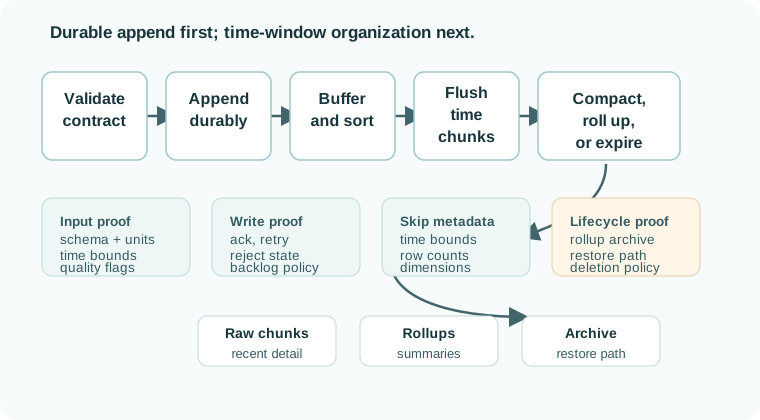
Read Figure 8.1 as an immutable-block example, from the first check to the durable append. Depending on the engine, buffered readings are flushed into immutable blocks or written into time chunks that remain updateable. Short notes beside those chunks let a query skip work. Later merge and rollup jobs change the data layout away from the reply path. This split lets the store take a steady stream without making each new write pay the full cost of its future layout or data-life rule.
Time series write path narrated tour
Play silently with captions on provisional storyboard timing; narration audio is pending. Production pacing is independent of model time. Choose Reduced motion for a complete still at each beat.
Play the tour to open the workbench. Pause, replay a beat, or read the full transcript below. Situations the model cannot show use captions only and keep the existing frame.
Full transcript — Time series write path (8 beats)
B1 — Greenhouse batch
You are the engineer keeping a greenhouse's sensor history safe as readings arrive. Losing accepted readings after a crash would leave holes in that history. Your gateway gathers readings into batches. What must the database do before telling the gateway that a batch is accepted?
Model caption: A greenhouse gateway groups timestamped readings. The operator needs accepted readings to survive a crash.
B2 — Immediate and background work
A time series database stores readings associated with times. In the log structured write path, immediate work saves incoming readings, while background work organizes files for later queries. Following a batch separates the moment it becomes safe from the work that makes its eventual storage layout useful.
Model caption: The immediate path saves incoming readings. Background work organizes files for later time-range queries.
B3 — Workload arithmetic
Suppose your greenhouse has one thousand devices, each sending a reading every ten seconds. Divide one thousand by ten: the incoming rate is one hundred readings per second. Group them into batches of one hundred. Divide one hundred readings per second by one hundred readings per batch: that gives one batch per second in the teaching model.
Model caption: 1,000 ÷ 10 = 100 readings/s. Then 100 readings/s ÷ 100 readings/batch = 1 batch/s. Teaching estimate.
B4 — Validation and durable log
First, validation checks the metric name, unit, and timestamp. Then the database appends the batch to a write ahead log, or W A L. For our chosen durable policy, it waits for disk synchronization. After a crash, recovery can replay accepted writes from that log.
Model caption: Validation checks incoming readings. The write-ahead log saves the batch; the selected durable policy waits for disk synchronization before safe acknowledgement. Recovery can replay accepted writes; replay is not simulated.
B5 — Memory and acknowledgement
The batch also enters the MemTable, a sorted buffer held in memory. Recent readings can be queried from that buffer before a flush. Once the chosen durability policy and memory insertion are complete, the database returns an acknowledgement: the batch is accepted.
Model caption: MemTable means a sorted buffer in memory. Recent readings are queryable before flush. Acceptance follows the chosen durability policy and memory insertion.
B6 — Immutable file flush
Our memory buffer has a limit of sixteen megabytes. When the buffer reaches its threshold, a flush writes its contents into an immutable file organized by time. Immutable means the file is not changed in place. Buffering lets the database group readings before writing larger files.
Model caption: At the sixteen-megabyte threshold, the buffer flushes to an immutable file organized by time. The file is not changed in place.
B7 — Background compaction
A tempting mistake is to think an accepted write means all storage work is finished. Acceptance comes earlier. Background compaction still merges overlapping files, helping later queries scan fewer files. Your greenhouse batch can be accepted while that organization work remains pending.
Model caption: Accepted does not mean all storage work is finished. Background compaction merges overlapping files so later queries scan fewer files.
B8 — Save then organize
Save the readings before saying yes; organize their files in the background.
Model caption: Save the readings before saying yes; organize their files in the background.
Different systems implement this path differently. Some use relational partitions or hypertables. Some use log-structured storage. Some use columnar files and metadata. The review point is stable: the design should prove how new readings become durable, searchable, compressed, and removable without blocking normal ingestion.
8.7 Log-Structured Write Mechanics
This section: Log-Structured Write Mechanics — A normal B-tree index can store timestamps, but high-rate append telemetry stresses the in-place update model.
A normal B-tree index can store timestamps, but high-rate append telemetry stresses the in-place update model. A B-tree keeps keys sorted in pages, so a stream of inserts must update the main index and every secondary index while the write path is still waiting. At 50,000 readings per second, a table with a primary time index plus three secondary indexes asks the engine to maintain four sorted structures for every row.
Log-structured write paths change the timing of that work. The hot path appends to a write-ahead log for durability, inserts into an in-memory buffer, then flushes larger immutable files, blocks, segments, or chunks when the buffer fills. Background compaction later merges smaller units, rewrites colder data, and updates summary metadata. That pattern is visible in systems such as InfluxDB’s TSM lineage, RocksDB-backed stores, Cassandra-style storage, and Prometheus’s WAL, head block, immutable block, and compaction flow, even though each product names the pieces differently.
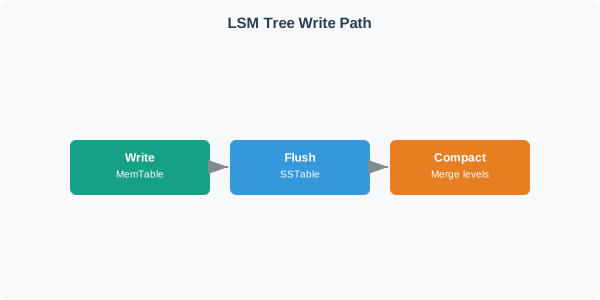
The tradeoff is read amplification. A query for the last hour of one device may need to check several immutable units because recent data can live in multiple levels or blocks. A good time-series design keeps time ranges, tag or label summaries, min/max values, row counts, and bloom-like metadata beside those units so a range query can skip files whose interval or dimensions cannot match.
8.8 Chunks, Partitions, and Skip Metadata
This section: Chunks, Partitions, and Skip Metadata — Time-series query performance starts with not reading irrelevant data.
Time-series query performance starts with not reading irrelevant data. A query for one device over the last hour should not scan years of measurements.
Physical time range
A chunk, partition, block, or file covers a bounded time range. Query planning can skip chunks outside the requested window.
Useful dimensions
Indexes, tags, labels, or sorted keys help find the device, site, metric, or quality subset inside the time range.
Skip summaries
Min/max time, value ranges, bloom-like summaries, and row counts help the engine skip blocks that cannot match.
Wrong chunk size
Chunks that are too small create management overhead. Chunks that are too large make queries and retention operations read too much.
PostgreSQL partitioning and BRIN indexes show the same underlying idea in a general-purpose database: physical layout and summary metadata help queries avoid work when data is naturally ordered by time. Time-series platforms usually make those ideas more automatic, but the release evidence is still the query plan and the lifecycle test.
8.9 Compression Fundamentals
This section: Compression Fundamentals — Time-series data compresses well when values are regular.
Time-series data compresses well when values are regular. Compression should not be treated as a guaranteed product ratio; it depends on sampling regularity, value variance, tag cardinality, nulls, schema changes, and whether queries can use compressed data without excessive decompression.
Compression is a lifecycle decision, not only a disk-size decision. The design should prove when data becomes compressed, whether late arrivals can still be accepted, how rollups refresh, and whether dashboards still meet their freshness target while compressed chunks are queried.
8.10 Label the Storage Path
This section: Label the Storage Path
8.11 Query Lifecycle
This section: Query Lifecycle — The best time-series query is the query that reads only the necessary time range, entity subset, metric subset, and columns.
The best time-series query is the query that reads only the necessary time range, entity subset, metric subset, and columns. That requires the schema, chunking, indexes, and rollups to match the actual questions people ask. Read Figure 8.2 to see where each narrowing decision removes unnecessary work.
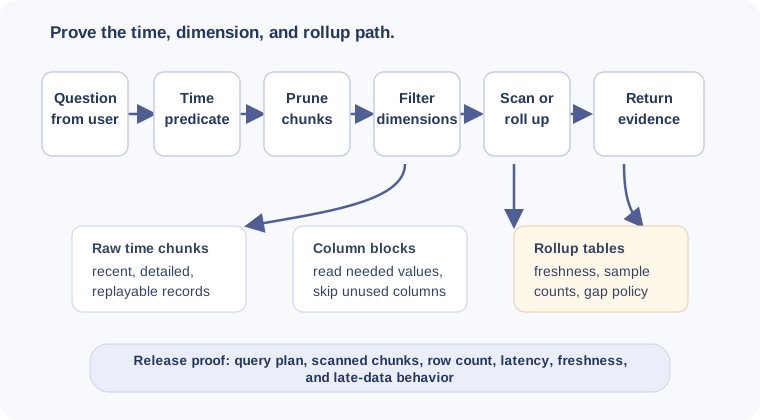
Follow Figure 8.2 from the bounded time predicate, because it excludes whole chunks before rows are touched. Dimension filters then reduce the entity set, column selection limits decoded data, and an appropriate rollup can avoid raw history altogether. The returned value is trustworthy only when the result also carries freshness, coverage, and quality evidence for the question asked.
8.12 Cardinality and Dimensions
This section: Cardinality and Dimensions — Cardinality is the number of distinct series or indexed dimension combinations.
Cardinality is the number of distinct series or indexed dimension combinations. A stable tag such as site=plant-a can be useful. A unique tag such as message_id=... can create one series per reading and make indexes, memory, and metadata grow without helping dashboard filters.
High-cardinality information is not automatically bad. The danger is putting it in the access path when it is not used for broad filtering. Store identifiers needed for audit or replay, but be deliberate about whether they become tags, labels, indexed columns, or ordinary fields.
8.13 Worked Review: Vibration Telemetry
This section: Worked Review: Vibration Telemetry — Consider a factory platform receiving vibration summaries from motors.
Consider a factory platform receiving vibration summaries from motors. The platform needs live dashboards, maintenance investigation, and a monthly reliability report. The storage review should not start by asking which database is fastest. It should define evidence for the workload.
Message shape
observed_at, received_at, device_id, site_id, metric_name, value, unit, quality_status, and schema_version.
Representative reads
Latest state per motor, last shift for one production line, fault window replay, and monthly rollup by site and device class.
Retention path
Recent raw detail, validated hourly summaries with sample counts, archived raw incident windows, and deletion only after rollup checks pass.
Review failures
Device local time without UTC normalization, message ID as a tag, raw data deleted before rollups refresh, and no restore sample.
The design is ready for platform comparison only after this evidence exists. Without it, a benchmark, product label, or compression claim cannot prove the system will answer the user’s questions.
8.14 Code Challenge: Timestamp Admission
This section: Code Challenge: Timestamp Admission
8.15 Common Pitfalls
This section: Common Pitfalls
-

Wrong: One field called time tells us when the reading happened. Name the clock and its source.
8.15.1 Using One Ambiguous Timestamp
A column named time leaves the meaning of a reading uncertain unless the data contract identifies its source. Reviewers need to distinguish sensor observation time from gateway or broker receipt and storage ingest time. Mixing these meanings can hide late readings, suggest false gaps, and make incident replay unreliable. Keep timestamp sources explicit and their representation normalized. Choose the primary storage time according to the question: observed time often suits physical-world analysis, while ingest time often suits pipeline monitoring. Retain both when delay analysis or incident review matters. Quality and validation fields such as clock_skew_ms and late_arrival provide further evidence for interpreting the recorded times.
8.15.2 Making Every Field Searchable
Making a field searchable adds responsibilities to the storage design because searchable dimensions shape indexes, metadata, and series cardinality. Cardinality describes the number of distinct series or indexed dimension combinations. A stable site tag can support useful filtering, while a unique message identifier used as a tag can create a separate series for each reading. Indexes, memory use, and metadata can then grow without improving dashboard filters. Choose searchable dimensions from the queries the system needs to answer. Keep unbounded values out of the series identity, and retain identifiers needed for audit or replay as ordinary fields where appropriate. High cardinality needs a deliberate access-path decision rather than automatic indexing.
8.15.3 Deleting Raw Data Before Rollup Proof
Retention is risky when raw data disappears before aggregate refresh, sample counts, min/max values, and late arrivals have been checked. Prove the rollup and archive path before raw deletion becomes automatic.
8.15.4 Assuming Compression Solves Bad Modeling
Compression reduces storage work when the data pattern supports it, but it does not resolve unclear measurement meaning or poor query design. Mixed units and ambiguous metrics remain modeling problems, while unbounded labels still affect cardinality. A query that selects irrelevant history still needs better time bounds, dimensions, or column selection. Define the measurement contract and access paths before assessing compression. Its effectiveness depends on sampling regularity, value variance, tags, nulls, and schema changes, so verify behavior with real data. Include lifecycle checks: establish when compression occurs, whether late readings remain acceptable, how rollups refresh, and whether queries over compressed chunks meet dashboard freshness needs.
8.15.5 Comparing Products Before Defining Queries
A platform comparison needs defined questions because strengths in ingestion, SQL joins, monitoring alerts, and ordered analytics serve different workloads. Start with the required time ranges, entities, metrics, and result types. These requirements guide schema, chunking, indexes, and rollup choices, giving query plans a concrete purpose in the review. For vibration telemetry, live dashboards, maintenance investigation, and monthly reliability reporting provide distinct needs to test. Compare candidates using representative query evidence alongside lifecycle behavior, including late arrivals, compression, rollup refresh, retention, and restore. A benchmark or product label alone cannot establish that a platform will answer those questions. Make the workload evidence available before choosing between products.
8.16 Release Notes
This section: Release Notes — Before releasing a time-series storage design, capture evidence for each gate.
Before releasing a time-series storage design, capture evidence for each gate.
Ingest evidence
Schema version, timestamp source, unit policy, validation results, duplicate handling, rejected writes, and retry behavior.
Cardinality evidence
Tag or label inventory, expected distinct values, high-cardinality fields, and approval rule for schema changes.
Read-path evidence
Representative query text, query plan, chunk pruning, scanned rows, dashboard screenshot, and freshness target.
Retention evidence
Raw retention, rollup refresh window, late-data policy, archive manifest, restore sample, and deletion owner.
Operational evidence
Full disk, slow compaction, backlog, rejected batches, clock drift, query timeout, and restore failure tests.
Migration evidence
Backfill procedure, replay ordering, schema compatibility, rollback plan, and validation against old dashboards.
8.17 Self-Assessment
This section: Self-Assessment
8.18 Summary
This section: Summary — Time-series database fundamentals are about physical workload fit.
Time-series database fundamentals are about physical workload fit. IoT telemetry is mostly appended, read by time range, aggregated into rollups, and aged through a lifecycle. A strong design names timestamp sources, controls cardinality, writes durably through an append path, organizes data into time chunks, uses compression where the data pattern supports it, proves representative queries, and records release evidence before retention or migration becomes automatic.
8.19 Concept Relationships
This section: Concept Relationships — Time-Series Databases introduces the broader role of time-series storage in IoT architectures.
Time-Series Databases introduces the broader role of time-series storage in IoT architectures. Time-Series Databases for IoT compares platform roles and release evidence for specific storage patterns. Time-Series Database Platforms focuses on product-specific tradeoffs after the fundamentals are clear. Time-Series Query Optimization goes deeper into query plans, rollups, dashboard freshness, and scan avoidance. Data Retention and Downsampling focuses on raw retention, rollups, archive, restore, and deletion safety.
8.20 What’s Next
This section: What’s Next
| If you need to… | Read next |
|---|---|
| Compare InfluxDB-style, TimescaleDB-style, Prometheus-style, and high-ingest SQL roles | Time-Series Database Platforms |
| Tune dashboard, window, latest-value, and replay queries | Time-Series Query Optimization |
| Design raw retention, rollups, archive, restore, and deletion rules | Data Retention and Downsampling |
| Practice storage review with scenarios | Time-Series Practice and Labs |
8.21 Official References
This section: Official References — PostgreSQL table partitioning - physical partitioning, partition pruning, and partition maintenance.
PostgreSQL table partitioning - physical partitioning, partition pruning, and partition maintenance. PostgreSQL BRIN indexes - block range summaries for naturally ordered data. Timescale hypertables - time partitioning, chunks, and hypertable behavior. InfluxDB data elements - measurements, tags, fields, series, and points. Prometheus data model - metric names, labels, samples, and time series. Apache Parquet documentation - column-oriented storage concepts used in analytics and archive paths.
8.22 Key Takeaway
This section: Key Takeaway — Time-series fundamentals begin with measurement identity, timestamp, value, tags, and retention.
Time-series fundamentals begin with measurement identity, timestamp, value, tags, and retention. Small modeling mistakes at this level can make later aggregation, alerting, and troubleshooting expensive.
Find help
3 reviewed answers.
Where should I start in a module?
Open the module page from the sidebar to see its chapters in order. Use the module map to return to a topic you need.
Modules and pathsReviewed
What can I try when a project does not work?
Check the symptom, then work through the diagnostic steps. Keep the error message and the smallest example that reproduces it.
When you are stuckReviewed
How do interactive examples work?
Use the interactive guide to check how examples and simulations work before changing your project.
Interactive examples guideReviewed