11 Data Retention and Downsampling
More
Depth: Practitioner
Progress saves as you read. Mark sections complete as you go; your progress appears in the sidebar.
11.1 Start With the Deletion Request
This section: Start With the Deletion Request — Picture a cold store that keeps one temperature reading each minute.
Delete Only After the Replacement Can Answer
Picture a cold store that keeps one temperature reading each minute. Telemetry means readings and status sent from equipment for remote use. The storage owner wants to remove old raw data, while the duty team may still need to explain a short heat spike from last month.
Write what each user must still learn after deletion. Name the raw time range, summary fields, unit, source clock, gap mark, quality state, archive, hold rule, and owner. State which detail may be lost and which event must remain visible.
Test one normal day, one missing hour, one late reading, one sharp spike, and one reading with a bad quality mark. Restore a sample archive and repeat a real query. Compare the result with the raw record before any deletion job is allowed to run.
Pause deletion during an incident, dispute, warranty case, or legal hold. Keep the pause in the same release record as the normal rule so a hidden side list cannot be missed.
This opening does not set one lifetime for every reading. Practitioner designs the raw, summary, archive, hold, and approval route. Under the Hood examines late arrivals, partition removal, refresh windows, platform commands, and the proof needed before detail is gone.
Retention becomes serious the first time someone asks to delete raw readings. Before that job runs, the team should know which summaries replace the detail, which archive can be restored, which investigation holds stop deletion, and who approved the loss of resolution. Downsampling is safe only when that evidence survives.

Data Dora
“Every reading has a time and a cost — decide retention before you decide the database.”
In this chapter, Dora keeps her ledger open at every deletion gate: what arrived, what survives as rollup or archive, and what a restore will cost.
11.2 In 60 Seconds
This section: In 60 Seconds — Downsampling is only safe when the aggregate preserves enough evidence: sample count, min, max, quality status, gap flags, source window, and refresh time.
Retention is not just “delete old data.” It is a lifecycle contract that says which raw readings stay queryable, which summaries replace them, which archives can be restored, which data is held for investigation or compliance, and who approved each loss of detail.
Downsampling is only safe when the aggregate preserves enough evidence: sample count, min, max, quality status, gap flags, source window, and refresh time. A smaller table that hides missing data or erases incident spikes is not an optimization. It is a data-quality problem.
Learning Objectives
This section: Learning Objectives
After this chapter, you should be able to:
- Design a retention contract that separates raw telemetry, rollups, archives, deletion, and legal holds.
- Choose downsampling fields that preserve enough evidence for dashboards and investigations.
- Run a retention dry run before deleting raw data.
- Explain how late arrivals and rollup refresh windows affect retention safety.
- Compare TimescaleDB-style policies, InfluxDB-style retention periods, and Prometheus-style monitoring retention without treating them as interchangeable.
- Build a release packet that proves retention, archive, restore, query replay, and owner approval.
11.3 Retention Is a Release Contract
This section: Retention Is a Release Contract — Retention decisions are product decisions.
Retention decisions are product decisions. A storage engineer can implement the job, but the owner of the data must decide what detail can be lost, when it can be lost, and how an incident can still be reconstructed later.
An archive that has never been restored is only a file. Before raw data expires, prove that a sample partition can be restored, queried, and compared with the original dashboard or investigation result.
11.4 Lifecycle Map
This section: Lifecycle Map — Retention is a sequence of evidence-bearing state changes, not a single expiry number.
Retention is a sequence of evidence-bearing state changes, not a single expiry number. Use Figure 11.1 to follow raw readings into rollups and archive, then through restore checks, hold exceptions, and deletion approval.
Use Figure 11.1 to follow raw readings into rollups and archive, then through restore checks, hold exceptions, and deletion approval.
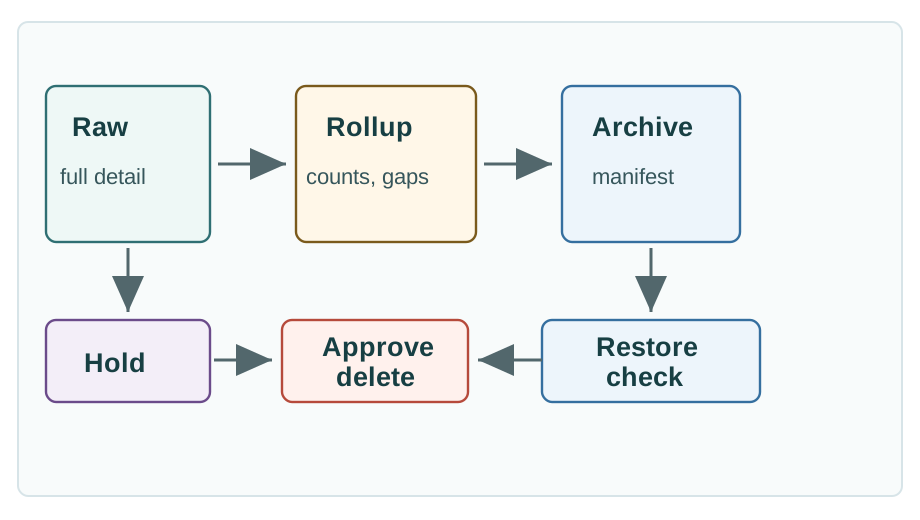
Read Figure 11.1 from recent raw detail through quality-bearing rollups and a tested archive, then check the hold branch before the final governed deletion transition.
In Figure 11.1, raw detail remains available while investigations and late arrivals need it. Rollups preserve declared statistics and coverage, the archive preserves a recoverable copy, and a restore test proves that copy can answer a real query. Holds interrupt the normal route before approval. Deletion is the final governed transition only after every replacement path has evidence.
Keep recent detail
Preserve high-resolution readings long enough for alert confirmation, support cases, late arrivals, and incident replay.
Summarize with evidence
Store aggregate values with counts, min/max, gap flags, quality state, source window, and refresh timestamp.
Restore on demand
Keep manifests, schema versions, checksums, partition keys, access owners, and tested restore steps.
Pause deletion
Retain raw or archive detail when an investigation, contract, compliance rule, or customer dispute requires it.
11.5 Downsampling That Preserves Evidence
This section: Downsampling That Preserves Evidence — Downsampling replaces many high-resolution samples with fewer summary rows.
Downsampling replaces many high-resolution samples with fewer summary rows. The mistake is treating the average as the whole story. For IoT telemetry, a useful rollup normally needs fields that preserve coverage, extremes, and quality.
-- Example rollup shape. Adapt table names and policy details to your platform.
SELECT
  time_bucket('15 minutes', observed_at) AS bucket_start,
  site_id,
  device_id,
  metric_name,
  avg(value) FILTER (WHERE quality_status IN ('valid', 'late_valid')) AS avg_value,
  min(value) FILTER (WHERE quality_status IN ('valid', 'late_valid')) AS min_value,
  max(value) FILTER (WHERE quality_status IN ('valid', 'late_valid')) AS max_value,
  count(*) FILTER (WHERE quality_status IN ('valid', 'late_valid')) AS sample_count,
  count(*) FILTER (WHERE (quality_status IN ('valid', 'late_valid')) IS NOT TRUE) AS nonvalid_count,
  max(received_at) AS latest_received_at
FROM readings
WHERE observed_at >= :source_start
  AND observed_at <  :source_end
GROUP BY bucket_start, site_id, device_id, metric_name; Dora’s Retention Ledger
- Reading: raw samples grouped into 15-minute buckets per site, device, and metric.
- Keep: each bucket’s average, min, and max from accepted valid and late_valid rows, accepted-row sample count, nonvalid count including invalid and unclassified rows, and latest receive time.
- Cost: an average alone erases the spikes and sparse coverage that support and safety teams need.
Keep the smallest summary that still answers the product question and explains its own quality. If the dashboard needs to show spikes, a mean alone is not enough. If the report needs compliance proof, a summary without restore evidence is not enough.
11.6 Retention Dry Run
This section: Retention Dry Run — A dry run should run before the first automated deletion and before any policy change that shortens raw retention.
A dry run should run before the first automated deletion and before any policy change that shortens raw retention. It should report the raw partitions that would be affected, the rollups that replace them, archive status, restore status, query replay results, hold exceptions, and approval owner. Use Figure 11.2 to inspect those gates in the order a release reviewer should clear them.
Use Figure 11.2 to inspect the replacement, recovery, hold, and approval gates in the order a release reviewer should clear them.
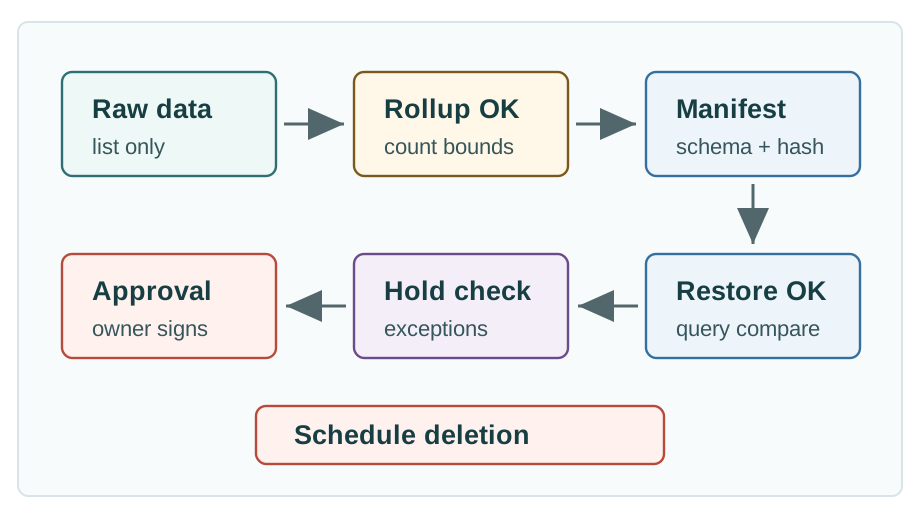
Read Figure 11.2 from rollup completeness to archive evidence. Every source interval needs a matching summary with plausible sample counts; every raw partition needs a manifest, schema version, checksum, object path, and owner. Next restore one sample partition and replay a source query so its row count and result can be compared. The hold gate then checks investigations, disputes, compliance rules, and warranty cases that still need raw detail. Only a named owner may approve deletion after every gate passes; any failed check delays deletion or revises the policy.
retention_dry_run:
  policy_name: room_temperature_raw_expiry
  candidate_window: before 2026-05-01T00:00:00Z
  raw_partitions_found: list_only
  rollup_check: sample_count, min_value, max_value, gap_count, refreshed_at
  archive_check: manifest, schema_version, checksum, object_path
  restore_check: restored_partition_query_matches_expected_result
  hold_check: no_active_investigation_or_contract_exception
decision: approve, delay, or revise_policy Dora’s Retention Ledger
- Reading: raw partitions before the candidate window, listed but not yet touched.
- Keep: rollups with sample counts, min and max, gap counts, plus an archive manifest and checksum.
- Cost: a restored sample partition must match the expected query result before deletion is approved.
11.7 Platform Patterns
This section: Platform Patterns — Retention is implemented differently across systems.
Retention is implemented differently across systems. The review habit should stay stable even when the command changes.
Drop chunks on schedule
Retention policies can drop old chunks from hypertables or continuous aggregates. Review chunk age, policy schedule, and rollup dependency first.
Retain by database or table
Current InfluxDB versions use retention periods rather than old retention-policy assumptions. Review version, scope, mutability, and migration plan.
Monitoring retention
Prometheus local storage retention is for monitoring samples. Use it for operational metrics, not as the only customer-history archive.
External lifecycle
Object storage, lake tables, or exported files need manifests, checksums, schema versions, access control, and tested restore paths.
11.7.1 TimescaleDB-Style Policies
TimescaleDB retention commonly uses a background policy that drops chunks older than a chosen interval. That command is powerful because it deletes data. Use it after rollup, archive, restore, and hold checks pass.
-- Example: drop raw chunks after the approved raw-retention window.
SELECT add_retention_policy(
  'readings',
  drop_after => INTERVAL '30 days',
  if_not_exists => true
);
Continuous aggregates can preserve summaries after raw chunks expire, but they need refresh windows and late-data rules. The release review should prove that a late reading inside the allowed correction window refreshes the affected buckets before the raw source disappears.
11.7.2 InfluxDB-Style Retention Periods
InfluxDB guidance changed across major versions, so avoid copy-pasting old retention-policy examples into a modern chapter. In InfluxDB 3 Core, retention periods are associated with databases at creation time; Enterprise also supports more advanced retention controls such as table-level retention and database retention updates. Review the exact edition and version before writing migration instructions.
influxdb_retention_review:
  edition: core_or_enterprise
  scope: database_or_table
  duration: approved_by_data_owner
  downsample_target: separate_database_or_table
  migration_needed_if_duration_changes: yes_or_no
11.7.3 Prometheus-Style Monitoring Retention
Prometheus local storage retention is a monitoring setting, usually controlled by retention time or retention size flags. It is useful for service health, gateway queues, scrape health, ingest lag, and alert history. It is not a complete substitute for a telemetry store or archive when raw customer readings must be replayed.
monitoring_retention_review:
  metrics_role: service_health
  retention_time: supports_on_call_investigation_window
  retention_size: fits_disk_budget
  remote_write_or_archive: documented_if_needed
  not_source_of_truth_for: regulated_or_customer_raw_history
11.8 Partition-Aligned Deletion Mechanics
This section: Partition-Aligned Deletion Mechanics — Retention is cheap only when the storage layout gives the engine a whole unit to remove.
Retention is cheap only when the storage layout gives the engine a whole unit to remove. In time-partitioned systems, old raw data should expire as a complete chunk, partition, shard, or block. That is very different from a large DELETE WHERE observed_at < cutoff job that scans old rows, writes tombstones or dead tuples, updates indexes, and then needs vacuum or compaction cleanup.
Use the same scale as the capacity worksheet. A fleet with 5,000 devices, 8 metrics per device, and one sample per second creates 40,000 points per second. One raw day contains 3,456,000,000 points before indexes, replicas, metadata, and compression. A row-by-row delete for that day has to evaluate billions of row-level decisions. Dropping a one-day chunk removes the partition that already owns that time range. The exact implementation differs by engine, but the review question is stable: does the deletion unit match the retention boundary?
Dora’s Retention Ledger
- Reading: 5,000 devices with 8 metrics at one sample per second — 40,000 points every second.
- Keep: each raw day as a whole chunk, aligned to the retention cutoff.
- Cost: row-by-row deletion of one day weighs 3.456 billion decisions; an aligned chunk drops in one.
Boundary alignment is the trap. If chunks are one day long and the approved cutoff is midnight UTC, the engine can drop whole day chunks. If the job uses local time and the cutoff lands at noon UTC, the chunk straddles the boundary; the policy either waits until the whole chunk is expired or falls back to a slow partial-window path. Monitoring stores have the same idea with blocks: a Prometheus-style store removes old complete blocks, not arbitrary rows inside a block.
Design retention boundaries when the schema is created. The chunk interval, policy schedule, timezone, archive partition key, and hold scope should all agree before the first deletion job is enabled.
11.9 Late Arrivals and Rollup Refresh
This section: Late Arrivals and Rollup Refresh — Late data makes retention tricky because the reading belongs to an old observed time but arrives after a rollup may already have been calculated.
Late data makes retention tricky because the reading belongs to an old observed time but arrives after a rollup may already have been calculated. A retention contract should define how late is still acceptable and what gets refreshed.
quality_status = late_valid, refresh job ID, revised bucket timestamp.Retention usually follows the event timestamp used for analysis, not the time the server happened to receive the record. Keep both observed_at and received_at so late arrivals, clock skew, and ingestion delay remain visible.
11.10 Capacity Worksheet
This section: Capacity Worksheet — Capacity math is useful as a design input, but it is not release evidence by itself.
Capacity math is useful as a design input, but it is not release evidence by itself. Use formulas, then compare the estimate with actual sample records, compression output, rollup size, archive size, and query behavior.
raw_points_per_day = device_count * samples_per_device_per_day
raw_bytes_per_day = raw_points_per_day * average_record_bytes

rollup_points_per_day = device_count * buckets_per_day * metrics_per_device
rollup_bytes_per_day = rollup_points_per_day * average_rollup_record_bytes

archive_manifest_count = partitions_per_period * data_classes
restore_test_scope = sample_partition + representative_queries + reviewer_signoffUse workload inputs
Device count, sample rate, metrics, dimensions, payload size, quality fields, and expected growth.
Measure real output
Check actual table, chunk, object, and rollup sizes after representative sample ingestion.
Test restore cost
Restore a sample partition and run the queries that support teams would use during an incident.
Update the contract
If real data disagrees with the worksheet, revise retention before automation deletes anything.
11.11 Label the Retention Evidence
This section: Label the Retention Evidence
11.12 Code Challenge: Retention Decision Record
This section: Code Challenge: Retention Decision Record
11.13 Retention Triage
This section: Retention Triage
11.14 Common Pitfalls
This section: Common Pitfalls
11.14.1 Treating Retention as a Storage-Only Setting
Storage pressure may prompt a retention change, but the contract needs decisions from product, operations, compliance, and support owners. They should agree which raw detail remains queryable, what summaries replace it, which archive can be restored, and which holds interrupt deletion. Record who approves the loss of resolution and how later investigations can recover the evidence they need. The database job implements that agreed lifecycle. Before enabling deletion or shortening raw retention, review a dry run covering affected partitions, replacement rollups, archive and restore status, query replay, and hold exceptions. This connects the storage action to the product and operational needs that justify it.
11.14.2 Keeping Averages Without Evidence
An average summarises readings but does not explain their coverage, extremes or quality. Without sample count and gap markers, missing readings can become difficult to recognize. Without minimum and maximum values, a short incident spike may disappear from the dashboard even though it matters to an investigation. Quality status records whether the underlying readings carry a bad quality mark.
Keep these fields alongside the source window and refresh time so the summary explains what it represents. Before deleting raw detail, compare rollup results with raw records for normal operation, missing data, late arrivals and spikes. A smaller summary is useful when it still answers the product question and preserves the evidence needed to interpret its result.
11.14.3 Confusing Archive With Backup
Backup supports recovery of the platform, while archive supports recovery of historical data for a particular partition, schema and query. These purposes require separate consideration in the retention contract. Having a backup does not establish that the historical partition needed for an investigation can be restored and queried after raw data expires.
Before approving deletion, restore a sample archive partition, repeat a real dashboard or investigation query, and compare the result with the original raw record. Include archive status, restore status and query replay results in the retention dry run. This connects the archive to the historical questions it must answer, rather than treating the existence of a stored file as sufficient recovery evidence.
11.14.4 Forgetting Version and Edition Differences
Retention controls depend on the platform, version, edition and deployment being used. TimescaleDB-style policies commonly drop old chunks, while continuous aggregates require refresh windows and late-data rules. InfluxDB 3 Core associates retention periods with databases at creation; Enterprise supports additional controls. Prometheus local retention uses time or size settings for monitoring data.
Start with the shared evidence model: identify the raw window, replacement rollups, archive, holds and approval owner. Then confirm the exact implementation documentation for the deployed system, including scheduling and deletion behavior. Copying commands from another version can miss differences in scope. Documentation should be accompanied by a local dry run and restore result before deletion is approved.
11.14.5 Letting Legal Holds Live Outside the Data Path
A hold must be visible to the deletion process, rather than recorded only in email or a ticket comment. Otherwise, the normal retention job can still remove partitions needed for an incident, dispute, warranty case or legal hold. Record the hold with machine-readable scope, an owner, an expiry review and a release condition.
The scope should agree with the partition boundaries and archive partition key used by retention. Include hold exceptions in the dry run and keep the pause in the same release record as the normal deletion rule. This makes the exception part of the lifecycle decision reviewed before approval, with responsibility and the condition for release recorded explicitly.
11.15 Release Checklist
This section: Release Checklist
Lifecycle owner
Raw window, rollup tiers, archive window, delete rule, hold scope, and data owner are named.
Evidence fields
Sample count, min/max, quality counts, gap flags, source window, and refresh timestamp are present.
Restore proof
Manifest, schema version, checksum, partition key, access owner, and restore sample are checked.
Dry-run approval
Candidate partitions are listed, replacement coverage is proven, and holds are checked before deletion.
Hold workflow
Investigation, compliance, warranty, and customer-dispute holds are machine-readable and reviewable.
Next review date
Retention is revisited when device count, sample rate, legal needs, query patterns, or product promises change.
11.16 Self-Assessment
This section: Self-Assessment
11.17 Summary
This section: Summary — Data retention is the lifecycle discipline behind time-series systems.
Data retention is the lifecycle discipline behind time-series systems. It decides how long raw detail remains, what summaries replace it, what archive can be restored, which data is held, and when deletion is approved.
The strongest retention design is evidence-first: preserve quality in rollups, dry-run every deletion policy, restore a sample before trusting an archive, make holds visible to automation, and record owner approval. That keeps storage manageable without letting quality drift or incident evidence disappear.
11.18 Concept Relationships
This section: Concept Relationships — Use these relationships to follow retention’s dependencies and consequences.
Use these relationships to follow retention’s dependencies and consequences. Fundamentals defines chunks and timestamps, query optimization shows which tiers serve users, platforms supplies implementation controls, practice rehearses restore and deletion gates, and stream processing can create quality-bearing summaries before long-term storage takes ownership.
Time-Series Database Fundamentals explains timestamp contracts, chunks, compression, and lifecycle mechanics. Time-Series Query Optimization explains how query tiers, rollups, freshness, and raw replay affect dashboard performance. Time-Series Database Platforms compares platform roles and version-sensitive implementation differences. Time-Series Practice and Labs turns retention dry runs, restore checks, and release packets into hands-on drills. Stream Processing can create rollups and quality flags before data reaches long-term storage.
11.19 What’s Next
This section: What’s Next
| If you need to… | Read next |
|---|---|
| Practice retention dry runs and restore checks | Time-Series Practice and Labs |
| Tune dashboards that read raw and rollup tiers | Time-Series Query Optimization |
| Process late arrivals before storage | Stream Processing |
| Detect unusual telemetry before downsampling hides detail | Anomaly Detection |
| Revisit storage roles across the whole module | Data Storage and Databases |
11.20 Official References
This section: Official References — Consult the platform references only after the policy names its raw window, rollup replacement, archive, hold, and approval owner.
Consult the platform references only after the policy names its raw window, rollup replacement, archive, hold, and approval owner. Confirm the exact version’s scheduling and deletion behavior, then retain a dry-run and restore result because documentation alone does not prove the local policy is safe.
Tiger Data data retention - retention overview and relationship to continuous aggregates. Tiger Data add_retention_policy - scheduled chunk deletion policies for hypertables and continuous aggregates. Tiger Data continuous aggregates - rollup behavior and refresh concepts. InfluxDB 3 Core data retention - current database retention-period behavior and constraints. Prometheus storage - local storage retention time and retention size settings.
11.21 Key Takeaway
This section: Key Takeaway — Retention policy is a product and cost decision.
Retention policy is a product and cost decision. Keep high-resolution data only while it is useful, then downsample or archive so storage cost does not grow faster than insight.
Find help
3 reviewed answers.
Where should I start in a module?
Open the module page from the sidebar to see its chapters in order. Use the module map to return to a topic you need.
Modules and pathsReviewed
What can I try when a project does not work?
Check the symptom, then work through the diagnostic steps. Keep the error message and the smallest example that reproduces it.
When you are stuckReviewed
How do interactive examples work?
Use the interactive guide to check how examples and simulations work before changing your project.
Interactive examples guideReviewed