7 Storage Design Case Studies
More
Depth: Practitioner
Progress saves as you read. Mark sections complete as you go; your progress appears in the sidebar.
7.1 Start With the Review Room
This section: Start With the Review Room — Picture a cold-room sensor that reports four degrees during the day, then reconnects at night with six hours of saved readings.
Follow One Reading Before Choosing the Store
Picture a cold-room sensor that reports four degrees during the day, then reconnects at night with six hours of saved readings. The manager needs to know which values are current, which arrived late, and which can support an audit. A product name cannot answer those questions.
Telemetry here is the time-stamped reading and device status that the storage path must preserve, including the original device identity and observation time when delayed batches arrive after newer values. Firmware means the software stored on that device. Trace one reading from the firmware clock through the live view, the history query, the age rule, and the restore copy. Name the owner of each step and the time field that keeps late data honest.
Test the design by delaying a batch, repeating one reading, changing a device label, and restoring a week from backup. The live view should not treat old data as new. The history should keep the original time and identity. The restore should reproduce the reviewed result.
This runway does not choose a database or prove its cost. The deeper cases show how workload size, query shape, storage roles, retention, and migration evidence turn this trace into a release decision.
Use each case study like a design review, not a template to copy. A team should be able to point at the workload, explain the storage roles, show which queries matter, and prove what happens when data ages, moves, or must be restored. The example is useful only if it leaves that review trail visible.
Worked examples are not recipes to copy. They are structured design reviews. Start by measuring the workload, split storage roles by query and lifecycle, choose the smallest set of databases that can prove the required behavior, and release only when the evidence shows ingestion, queries, retention, recovery, and migration paths work.
Learning Objectives
This section: Learning Objectives
By the end of this chapter, you will be able to:
- translate IoT requirements into storage roles, query paths, and lifecycle windows;
- design a fleet tracking storage stack that separates registry, telemetry, current state, and archive data;
- design a smart city data lake with separate tracks for telemetry, video, metadata, and compliance exports;
- identify where exact cost and performance numbers must be replaced by measured release evidence;
- plan a migration-safe architecture so future database changes do not require device firmware changes.
7.2 How to Use These Examples
This section: How to Use These Examples — Before naming a database, use the decision map to follow one workload from measured demand through storage roles, schema, and release evidence.
Each example uses the same review loop:
Before naming a database, use the decision map to follow one workload from measured demand through storage roles, schema, and release evidence.
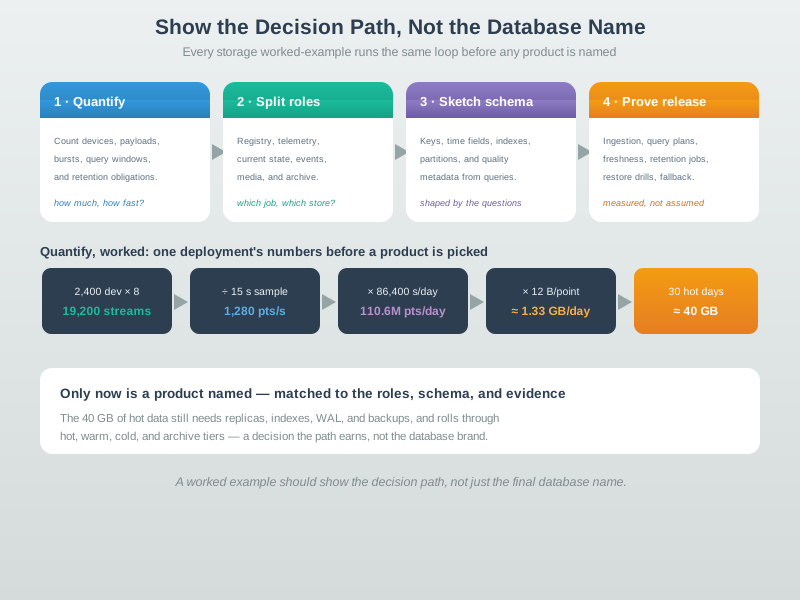
Read @embed-datastoragedecisionmap-modern-20260718 from quantify to prove release. For 2,400 devices with eight metrics each, the design has 19,200 streams. At one sample every 15 seconds, 19,200 / 15 s = 1,280 points/s; over 86,400 seconds that is about 110.6 million points/day. At 12 bytes per point, the raw estimate is about 1.33 GB/day and roughly 40 GB for 30 hot days. Only then split registry, telemetry, current state, events, media, and archive roles, sketch query-led keys and partitions, and test ingestion, freshness, restore, and fallback.
The numbers below are planning estimates used to show the reasoning process. Real deployments must replace them with measured payload sizes, compression ratios, cloud or on-prem prices, query plans, and restore times from the target environment.
7.3 Capacity Arithmetic Before Product Choice
This section: Capacity Arithmetic Before Product Choice — Sizing a storage design starts with arithmetic, not vendor claims.
Sizing a storage design starts with arithmetic, not vendor claims. The first pass needs two formulas:
ingest rate = active series count / sampling intervalstorage = active series count x points per series x bytes per point
The term that often breaks estimates is active series count. It is driven by metric count and searchable dimensions, and risky tags multiply it quickly. A low-cardinality dimension such as site may be safe when each device belongs to exactly one site and users filter by site. An unbounded per-message field such as request_id, raw GPS coordinate, session id, or free-text note should not become a tag or series key. Before applying the formulas, use Figure 7.1 to connect the calculation to the lifecycle: read from hot data through warm and cold storage to archive.
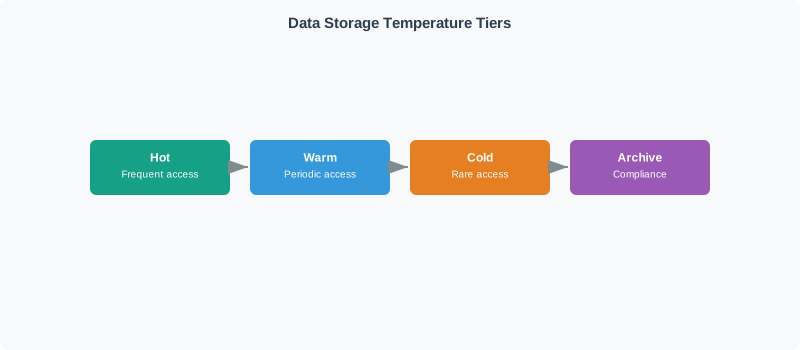
In Figure 7.1, access frequency and operational urgency fall as data moves right, while restore delay and the need for durable manifests grow. Hot capacity must serve dashboards and investigations; warm and cold tiers trade speed for cost; archive is credible only with checksums and a tested restore. The arithmetic therefore needs a separate retention window and overhead assumption for each tier.
For example, a building fleet with 2,400 devices, 8 metrics, and one sample every 15 seconds has 2,400 x 8 = 19,200 active metric streams. Its ingest rate is 19,200 / 15 = 1,280 points per second. Over a day, that is 1,280 x 86,400 = 110,592,000 points. At 12 compressed bytes per point, the value stream is about 1.33 GB per day, so 30 hot days is about 40 GB before replicas, indexes, write-ahead logs, object manifests, and backups.
Capacity review also separates disk from memory. Disk is mostly a function of points and bytes per point, which depends on codec, sampling regularity, value variance, and retention tier. Memory is driven heavily by active series metadata. Two workloads can both ingest 1,000 points per second, but the one with 100,000 active series sampled every 100 seconds asks the index, cache, compaction planner, and query engine to track far more metadata than the one with 1,000 active series sampled every second.
7.4 Worked Example 1: Fleet Tracking
This section: Worked Example 1: Fleet Tracking
7.4.1 Scenario
A logistics platform tracks delivery vehicles. Devices report location, speed, heading, fuel, and diagnostic fields. Users need a live map, route history, geofence alerts, driver and vehicle reports, and audit exports. The design must support growth without forcing a database migration every time a new query appears.
7.4.2 Step 1: Model the Workload
Use a simple capacity model first. For a planning example, assume 10,000 vehicles, one report every 10 seconds, and a normalized stored row around 250 bytes before indexes and replicas.
The important question is not only “how many rows?” It is “which reads must be local, fresh, and cheap?”
7.4.3 Step 2: Split Storage Roles
Fleet tracking is a poor fit for a single “one database does everything” decision. It is usually a small set of storage roles with clear contracts.
PostgreSQL tables
Vehicles, drivers, depots, tenants, devices, firmware, permissions, and geofence definitions.
Time-series table
Append-heavy readings partitioned by time and indexed by vehicle, tenant, and metric.
PostGIS indexes
Geofence polygons, route geometry, point-in-polygon checks, and map query acceleration.
Object storage
Compliance exports and coarse summaries stored in queryable columnar files.
This role split explains why TimescaleDB plus PostGIS can be a strong starting point: it keeps time-series rows and spatial queries inside PostgreSQL while preserving SQL joins to registry data. InfluxDB can still be appropriate when spatial joins are not central. MongoDB can be appropriate when event documents are the primary query surface. The deciding factor is the query contract, not a generic product ranking.
7.4.4 Step 3: Sketch the Schema
The schema keeps event time, insert time, tenant, vehicle, location, and quality evidence together. It also keeps a separate latest-state path so dashboards do not scan raw history.
CREATE TABLE fleet_points (
    observed_at  TIMESTAMPTZ      NOT NULL,
    inserted_at  TIMESTAMPTZ      NOT NULL DEFAULT now(),
    tenant_id    TEXT             NOT NULL,
    vehicle_id   TEXT             NOT NULL,
    location     GEOGRAPHY(POINT, 4326),
    speed_kmh    NUMERIC(6,2),
    heading_deg  NUMERIC(5,2),
    fuel_pct     NUMERIC(5,2),
    quality      SMALLINT         NOT NULL DEFAULT 100,
    PRIMARY KEY (tenant_id, vehicle_id, observed_at)
);

SELECT create_hypertable(
    'fleet_points',
    by_range('observed_at', INTERVAL '1 day'),
    if_not_exists => TRUE
);

CREATE INDEX fleet_points_vehicle_time_idx
    ON fleet_points (vehicle_id, observed_at DESC);

CREATE INDEX fleet_points_location_idx
    ON fleet_points USING GIST (location);

CREATE TABLE fleet_latest (
    tenant_id    TEXT        NOT NULL,
    vehicle_id   TEXT        NOT NULL,
    observed_at  TIMESTAMPTZ NOT NULL,
    location     GEOGRAPHY(POINT, 4326),
    quality      SMALLINT    NOT NULL,
    PRIMARY KEY (tenant_id, vehicle_id)
);
The latest-state table is updated by the ingest pipeline or a controlled database job. It is a product decision: it trades a small amount of write-side work for predictable map reads and clear freshness evidence.
7.4.5 Step 4: Prove the Design
7.5 Worked Example 2: Smart City Data Lake
This section: Worked Example 2: Smart City Data Lake
7.5.1 Scenario
A city platform collects environmental telemetry, traffic counts, streetlight status, water quality readings, video clips, asset metadata, and incident records. City operators need dashboards. Analysts need historical queries and model training datasets. Compliance teams need retention evidence and restore procedures.
7.5.2 Step 1: Separate Data Classes
The first design mistake is treating every stream as the same kind of data. The second is optimizing the small stream while ignoring the large one.
7.5.3 Step 2: Route to Storage Tracks
Before choosing partitions, use Figure 7.2 to see why a city platform routes telemetry, media, registry metadata, and analytics through distinct storage responsibilities. The path previews how ingestion decisions determine later query, lifecycle, access-control, and recovery evidence across this worked example.
Before choosing partitions, inspect Figure 7.2 to ask why city sensor data, media, device records, and study results need different storage duties.
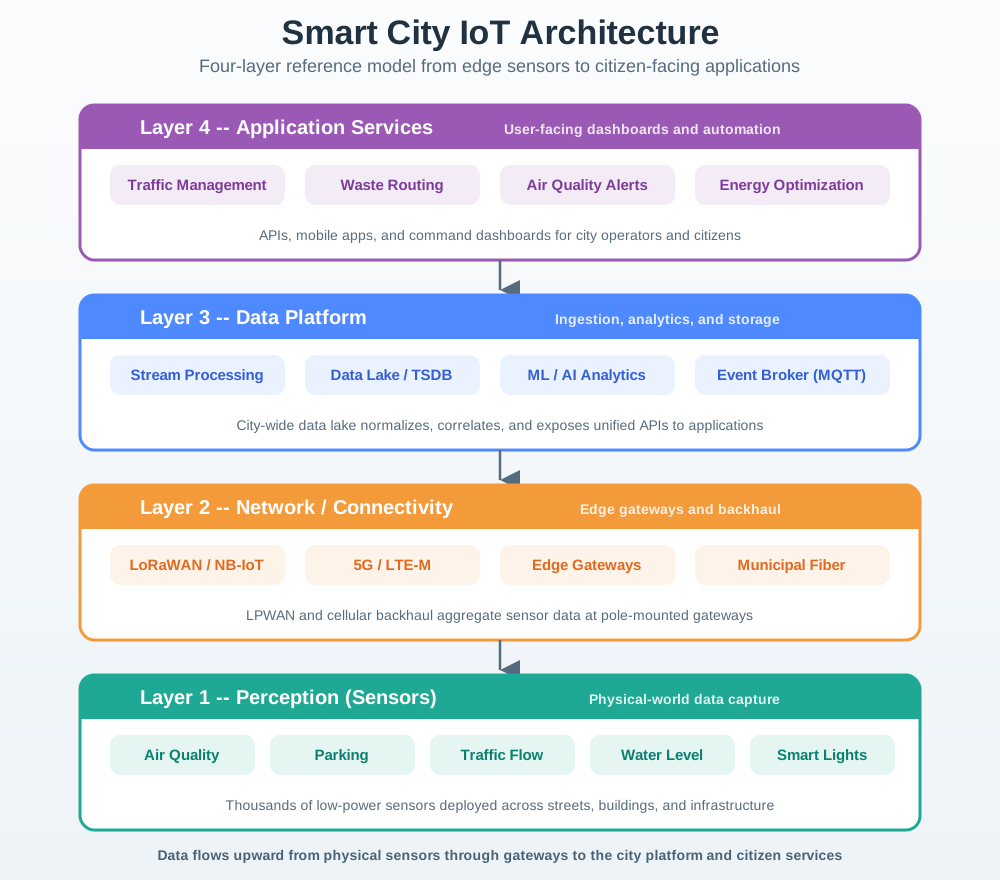
Read Figure 7.2 from the four sensor groups to their network links. Parking, traffic, lights, and waste can arrive through LoRaWAN, cellular, fibre, Ethernet, or city Wi-Fi. The data platform then splits live stream work from the data lake, time-series store, and later study. Follow the outputs to the four city apps. Sensor data, media, and device records have different search needs, life spans, access rules, and restore plans. One city platform can join them without forcing all of them into the same storage contract.
Hot raw, warm rollups
Keep recent readings queryable, then roll up older readings to the resolution operators and planners need.
Objects and metadata
Store clips as objects, keep searchable metadata separately, and use lifecycle rules only after policy approval.
Versioned meaning
Track sensor model, unit, calibration, location, ownership, and schema version so old readings stay interpretable.
Curated datasets
Publish Parquet or warehouse tables with lineage, data quality status, and retention tags.
7.5.4 Step 3: Partition for Queries and Lifecycle
Time-series tables and object storage need different partitioning schemes. Do not blindly reuse the same key.
CREATE TABLE city_readings (
    observed_at    TIMESTAMPTZ NOT NULL,
    sensor_id      TEXT        NOT NULL,
    sensor_type    TEXT        NOT NULL,
    district_id    TEXT        NOT NULL,
    metric         TEXT        NOT NULL,
    value          DOUBLE PRECISION,
    unit           TEXT,
    schema_version INTEGER     NOT NULL,
    quality        SMALLINT    NOT NULL DEFAULT 100,
    PRIMARY KEY (sensor_id, metric, observed_at)
);

SELECT create_hypertable(
    'city_readings',
    by_range('observed_at', INTERVAL '1 day'),
    if_not_exists => TRUE
);

CREATE INDEX city_readings_dashboard_idx
    ON city_readings (sensor_type, district_id, observed_at DESC);
city-media/
raw/
year=2026/month=05/day=23/district=north/camera=cam-014/
reviewed/
incident_id=inc-2026-00142/
public/
release=transport-study-2026-q2/
archive/
retention_class=legal-hold/The object path is not the only index. A searchable metadata table should hold camera id, district, incident id, retention class, privacy status, and review status. Otherwise every investigation becomes a bucket crawl.
7.5.5 Step 4: Keep Schema Meaning Versioned
Sensors change. Units change. Firmware changes. The data lake needs to know what a value meant when it was recorded.
CREATE TABLE sensor_schema_versions (
    sensor_type     TEXT        NOT NULL,
    schema_version  INTEGER     NOT NULL,
    effective_from  TIMESTAMPTZ NOT NULL,
    field_contract  JSONB       NOT NULL,
    unit_contract   JSONB       NOT NULL,
    notes           TEXT,
    PRIMARY KEY (sensor_type, schema_version)
);7.5.6 Step 5: Prove the Lake
7.6 Worked Example 3: Migration-Safe Architecture
This section: Worked Example 3: Migration-Safe Architecture — The safest storage design assumes that one decision will be wrong later.
The safest storage design assumes that one decision will be wrong later. Query patterns change, compliance obligations change, managed-service features change, and teams learn more after production traffic arrives.
Migration safety starts before a migration is needed:
Canonical event envelope
Every record has event time, ingest time, source id, schema version, quality status, and trace id.
Durable ingestion log
A broker or append-only log lets new sinks be backfilled without changing devices.
Controlled dual-write
New stores are fed in parallel until row counts, checksums, freshness, and query outputs match.
Measured switch
Route a small read percentage first, compare behavior, then expand with rollback criteria.
REQUIRED_FIELDS = {
    "event_time",
    "ingest_time",
    "source_id",
    "schema_version",
    "quality",
    "payload",
}


def validate_storage_event(event: dict) -> tuple[bool, list[str]]:
    missing = sorted(REQUIRED_FIELDS - event.keys())
    if missing:
        return False, [f"missing:{field}" for field in missing]
    if event["quality"] < 0 or event["quality"] > 100:
        return False, ["quality_out_of_range"]
    return True, []
7.7 Label the Storage Roles
This section: Label the Storage Roles
7.8 Design Review Order
This section: Design Review Order
7.9 Symptom-to-Control Match
This section: Symptom-to-Control Match
7.10 Common Pitfalls
This section: Common Pitfalls
“Use a time-series database” is not enough. The design needs to state which queries are local, which use rollups, which need current state, which join metadata, and which require archive restore.
Spreadsheet cost estimates are useful for comparing options, but they are not release evidence. Replace estimates with measured row size, compression, storage growth, lifecycle movement, and restore time from the target environment.
Video, images, numeric telemetry, metadata, and public datasets usually have different privacy, cost, and restore rules. Store them through separate tracks with explicit retention classes.
In many city platforms, media or logs dominate storage while numeric sensor data is small. Measure volume by data class before spending effort on the wrong optimization.
7.11 Summary
This section: Summary — Worked examples should train design judgment.
Worked examples should train design judgment. For fleet tracking, the key is separating registry, telemetry, spatial queries, latest state, rollups, and archive exports. For smart city storage, the key is splitting telemetry, media, metadata, analytics, and compliance tracks. For migration safety, the key is a stable event envelope and durable ingestion log. In every case, the release bar is measured evidence: load behavior, query plans, freshness, lifecycle dry runs, restore drills, access review, and fallback.
7.12 Concept Relationships
This section: Concept Relationships
Database Selection
Use the framework to compare roles and query contracts before choosing products.
Time-Series Storage
Apply chunking, rollups, retention, freshness, and late-data evidence to telemetry.
Sharding Strategies
Use shard keys only after the worked example proves routing and hot-key needs.
Data Quality Monitoring
Carry quality, freshness, schema, and lineage evidence through each storage role.
7.13 What’s Next
This section: What’s Next
Big Data Overview
Scale the worked-example method to batch, lakehouse, and analytics workloads.
Edge Compute Patterns
Reduce storage pressure by filtering, summarizing, and validating data before upload.
Stream Processing
Build the ingestion log, enrichment, and multi-sink routing path used in migration-safe storage.
Time-Series Retention
Turn lifecycle decisions into raw, rollup, archive, restore, and deletion evidence.
7.14 Official References
This section: Official References
PostgreSQL table partitioning PostGIS manual: spatial data management Timescale create_hypertable Timescale continuous aggregates InfluxDB 3 write data MongoDB geospatial queries Apache Parquet documentation Apache Kafka documentation
7.15 Key Takeaway
This section: Key Takeaway — Worked examples should end with a storage justification: what is written, how often, how long it is kept, who queries it, and what failure or scaling constraint drives the design.
Worked examples should end with a storage justification: what is written, how often, how long it is kept, who queries it, and what failure or scaling constraint drives the design.
Find help
3 reviewed answers.
Where should I start in a module?
Open the module page from the sidebar to see its chapters in order. Use the module map to return to a topic you need.
Modules and pathsReviewed
What can I try when a project does not work?
Check the symptom, then work through the diagnostic steps. Keep the error message and the smallest example that reproduces it.
When you are stuckReviewed
How do interactive examples work?
Use the interactive guide to check how examples and simulations work before changing your project.
Interactive examples guideReviewed