14 Anomaly Detector Evaluation
14.1 Start With the Story
Picture an IoT team using the ideas in Anomaly Detector Evaluation during a live operations review. A device has produced messy evidence, an analytic step is about to change an alert or control decision, and someone has to explain why the result should be trusted.
Read this page as that path from sensor evidence to accountable action. Start with what the system observes, keep the model or data treatment visible, and finish with the check that would convince an operator, maintainer, or auditor to act.
14.2 Alert Quality Metrics
Anomaly detection is usually a rare-event problem. A sensor fleet may produce thousands of normal windows for every real incident, so ordinary accuracy can look excellent even when the detector misses the events that matter. Evaluation must ask two operational questions: how many alerts were real, and how many real incidents were caught.
The core evidence is the confusion matrix. True positives are real incidents that were alerted. False positives are alerts on normal behavior. False negatives are missed incidents. True negatives are normal windows left alone. Precision, recall, F1, false positive rate, detection latency, and review outcome all come from that evidence.
In IoT operations, a metric is incomplete unless it can be tied back to a window, threshold, detector version, label source, and operator disposition. A dashboard number without review evidence is weak evidence.
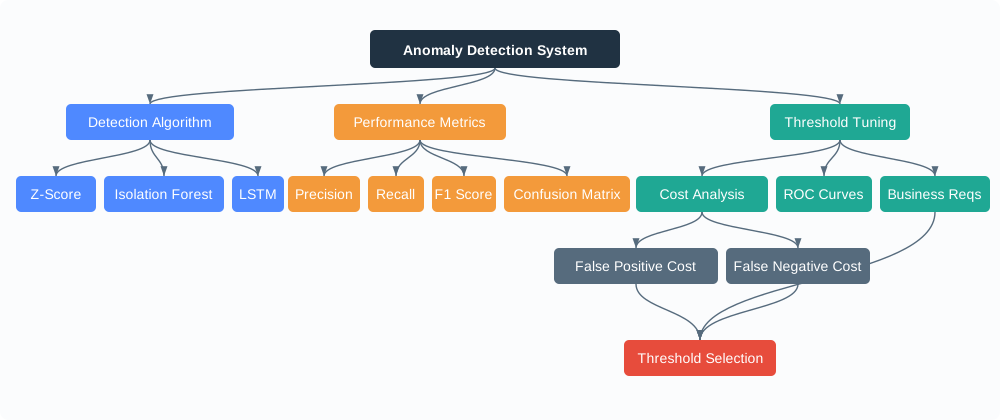
Worked example: suppose a cold-storage fleet evaluates 10,000 five-minute temperature windows in one week. Twenty windows belong to reviewed refrigeration incidents, but the detector raises 40 alerts. If 12 alerts match real incidents and 28 are normal defrost cycles, the sample-level accuracy still looks high because most windows are normal. Operators, however, experience a 30% precision rate and eight missed incident windows, so the review should focus on alert quality, recall, and whether the threshold is tuned for the right operating cost.
From those same counts, recall is 12 / 20 = 60%, false negatives are 20 - 12 = 8, and the normal-window false-positive rate is 28 / 9,980 = 0.28%. The percentage looks small, but the operator still saw 28 false alerts in a week. That is why anomaly dashboards should show both rates and counts: rates compare detectors, while counts describe workload.
Precision
Of alerts raised, the share that were real incidents: TP / (TP + FP).
Recall
Of real incidents, the share that were caught: TP / (TP + FN).
False Positive Rate
Of normal windows, the share incorrectly alerted: FP / (FP + TN).
Latency
How long the system takes to detect, route, and review the event after enough evidence exists.
Overview Knowledge Check
14.3 Tune Thresholds to Review Cost
Threshold tuning is an operating decision. Lower thresholds usually catch more incidents but create more false alerts. Higher thresholds usually reduce alert volume but miss weaker or earlier incidents. The right threshold depends on the cost of investigation, the cost of missed events, staffing, escalation policy, and whether alerts can be grouped before reaching an operator.
Worked example: one week of scored sensor windows
total windows: 10,000
reviewed real incidents: 20
alerts raised: 30
true positives: 12
false positives: 18
false negatives: 8
true negatives: 9,962

precision = 12 / (12 + 18) = 0.40
recall    = 12 / (12 + 8)  = 0.60
F1        = 2 * 0.40 * 0.60 / (0.40 + 0.60) = 0.48
FPR       = 18 / (18 + 9,962) = 0.0018 = 0.18%

Interpretation:
The detector catches 60% of reviewed incidents, but only 40% of alerts are real.
Operators see 18 false alerts for 12 true alerts, so alert review may become the
limiting factor before the sample-level false positive rate looks large.
Precision-recall curves are often more useful than ROC curves for highly imbalanced anomaly tasks because they show what happens to real alert quality as the threshold moves. ROC curves still help compare ranking behavior, but a small false-positive rate can produce many alerts when normal windows are numerous.
Practitioner Knowledge Check
14.4 Metric Labels, Windows, Latency
Detector metrics depend on how events are matched to labels. A vibration spike, a battery brownout, or a connectivity outage may last many samples but represent one incident. Evaluation should define the event window, the allowed detection delay, duplicate-alert suppression, and whether a late alert counts as success, partial success, or a miss.
Streaming systems add timing constraints. Kafka, Spark, Flink, or a gateway pipeline may score event-time windows, and those windows may close before late packets arrive. Metrics should record whether an alert was based on complete data, a provisional early window, imputed samples, or degraded sensor-health evidence. Otherwise, late data and missing samples can change both the label and the score after the dashboard has already reported a metric.
Choose one metric grain before comparing detectors. If the grain is samples, a 20-minute outage with four five-minute windows can create four positives. If the grain is incidents, those four windows may map to one outage. A detector that alerts on all four windows looks strong at sample recall but noisy at operator workload. The incident-grain record should keep first-detection time, last-alert time, duplicate count, and final disposition so precision and recall do not change when someone re-aggregates the same evidence later.
Late data also needs a declared rule. If a gateway sends an alert after three minutes using partial data and the cloud receives the missing packet five minutes later, the metric should preserve both the early alert state and the completed-window state. Otherwise teams may tune a detector on corrected historical data while operators experience provisional edge decisions in production. Keep that distinction in the release note so historical replays do not overwrite what the operator actually saw.
Event Matching
Map many samples or alerts to one incident using a declared window and duplicate-suppression policy.
Label Source
Separate confirmed maintenance records, operator labels, synthetic fault tests, and uncertain weak labels.
Latency Budget
Measure when the detector had enough evidence, when it alerted, and when review completed.
Segment Drift
Track metrics by site, sensor type, firmware version, season, and operating mode before averaging.
Evaluation record for one alert
alert_id: pump-17-2026-07-03T10:20Z
detector: residual-ewma-v4
window: 10:15:00 to 10:20:00 event time
score: 4.8 sigma-equivalent residual
threshold: 4.0
data state: complete window, no imputed samples
operator label: true positive
incident id: pump-17-bearing-review-042
detection latency: 3 min after first threshold crossing
review latency: 14 min after alert routing

This record supports precision, recall, F1, false-alert workload,
time-to-detection, and post-incident audit without changing the detector.
Worked example: if pump-17 raises four overlapping alerts between 10:17 and 10:20 for the same bearing review, the metric job should keep one incident id, one first-alert time, and the duplicate count. Precision then scores one reviewed true positive instead of four, while workload reporting can still show that the operator saw four routed notifications.
Under-the-Hood Knowledge Check
14.5 Summary
Anomaly-detector evaluation starts with a reviewed confusion matrix, not ordinary accuracy. Precision measures alert quality, recall measures missed-event coverage, F1 summarizes the tradeoff, false positive rate explains sample-level noise, and latency shows whether the detector is fast enough for the operating risk. A useful IoT metrics record preserves the event window, detector version, threshold, data-completeness state, label source, duplicate-suppression rule, operator disposition, and timing.
Use precision, recall, cost, and latency together. A low false-positive rate can still overload operators when normal windows are numerous, and high precision can still be unsafe if missed incidents are costly.
14.6 See Also
Anomaly Detection
Connect metric choices to detector evidence, persistence rules, and operator review.
Types of Anomalies
Map point, contextual, and collective anomalies to event windows and labels.
Statistical Methods
Review z-score, IQR, and EWMA thresholds before comparing alert metrics.
Anomaly Pipelines
Place metrics inside the edge, gateway, stream, and review pipeline that produces alerts.