50 Sensor Fusion Applications
More
Depth: Practitioner
Progress saves as you read. Mark sections complete as you go; your progress appears in the sidebar.
50.1 Decide Whether the Shuttle Can Move
This section: Decide Whether the Shuttle Can Move — Imagine a shuttle enters a busy depot and several sensors disagree about an object near its path.
Imagine a shuttle enters a busy depot and several sensors disagree about an object near its path. The team must decide whether the shuttle may move, slow down, or stop. Latency means the wait from a real event to the system’s response.
At the depot, the object estimate is usable only if the shuttle’s camera, lidar, and radar readings refer to the same object at compatible times. The safety choice must include how uncertain the position is; a missing or drifting sensor can change whether moving is allowed.
50.1.1 Check the Sensor Match
- Which object is the shuttle trying to locate?
- Do the camera, lidar, and radar readings describe that object at the same time?
- Which sensor is missing, unhealthy, or unsure?
- What evidence permits movement, and when should the shuttle slow or stop?
Keep the source, time, health flag, and uncertainty beside each reading. If the readings cannot be matched to one object, record that mismatch and use the stop or slow response chosen for weak evidence.
50.1.2 When Fusion Evidence Is Weak
A precise-looking fused range is useful only when the contributing readings describe the intended object at compatible times. Keep source identity, event time, health and uncertainty beside each observation, and check coordinate frames and units before combining measurements. A bad object match or drifting clock can weaken the evidence even when the reported distance appears precise.
Weight compatible measurements using their stated uncertainty, while retaining classification or velocity evidence when the movement decision needs it. Late observations may need prediction, reduced weight or rejection against the application’s timing limit. Test missing, drifting and mismatched sources, checking that the loss of confidence is visible and that the chosen slow or stop response works. Record the mismatch, fallback and test result with the release evidence.
50.1.3 Before the Shuttle Moves
Before acting on the fused obstacle range, check the identity and time of every contributing observation. If one source drops out, show the loss of confidence to the operator and apply the shuttle’s tested safe response. Keep the mismatch and the response in the release record.
50.1.4 Retell the Fusion Route
Begin with the choice, not the model name. Say what state the team needs. Name each source that can see part of it. Mark the time on each reading. Check that all axes and units match. Keep a health flag for each source. Keep a note when one source is absent. Show how much doubt remains. Set the limit for a safe result. Set a fallback for a weak result.
Now test the route with a fault. Make one source late. Make one source drift. Give two records the wrong match. Check that the screen shows the loss of trust. Check that the safe step still works. Keep the test result with the release. This short path is the core of fusion. The deeper methods explain how to weigh, match, and update the sources.
50.2 Start With the Story
This section: Start With the Story — Name the application decision first, then test whether late, drifting, or mismatched sources change it.
Name the application decision first, then test whether late, drifting, or mismatched sources change it.
50.3 Applications Define Fusion Contracts
This section: Applications Define Fusion Contracts — Sensor fusion applications start with a decision, not with a fashionable algorithm.
Sensor fusion applications start with a decision, not with a fashionable algorithm. A phone needs a stable orientation for display and interaction. A wearable needs activity or fall evidence. A building system needs a trustworthy air-quality or occupancy state. A mobile robot needs an obstacle, pose, or track estimate with known uncertainty. Each application chooses sensors, latency, validation, and fallback rules around that decision.
The autonomous shuttle in Figure 50.1 is a useful fusion prompt because its roof-mounted lidar is visible, but a safe driving-state estimate still needs timing, calibration, association, and fallback evidence from the complete sensor set.

Photo: Velodyne Lidar Inc., CC BY-SA 4.0
Read Figure 50.1 as evidence of mounting context, not proof of autonomy. The visible lidar has a height, field of view, and occlusion boundary; camera, GNSS, inertial, and wheel-odometry inputs may be elsewhere or hidden, so the fusion record must name them rather than infer them from the vehicle body.
The same raw sensor can play different roles in different applications. An accelerometer can supply gravity for roll and pitch, step features for activity recognition, vibration evidence for equipment monitoring, or a fault signal when it saturates. A good application design records the state being estimated, the sensors that can observe it, the failure modes each sensor introduces, and the evidence that downstream users need before acting.
Daily-life context recognition often uses indirect traces rather than one obvious sensor. A workshop task might be inferred from wrist vibration plus sound, a home scene from camera regions or thermal patches, appliance use from power-line, plumbing-pressure, or acoustic signatures, a vacuum surface from its spectrum, and attention or interface state from eye-movement or gaze-path sensors. A faucet, toilet, or tub event may appear as a pressure drop and recovery shape; a gaze trace may show attention only after it is tied to scene context. Those are all activity or object claims, so the fusion contract should state the proxy feature, placement, privacy boundary, and validated labels instead of treating the sensor name as proof.
Motion capture is a useful stress test for that contract. Optical rigs, marker suits, depth cameras, and body-worn IMUs can all produce a plausible moving body, but they carry different infrastructure and failure boundaries. An Orient-style wearable IMU design is attractive because it can be fully wireless and interactive, but the application still has to choose what travels over the radio. A low-rate Bluetooth path may be enough for a 200 Hz quaternion stream, while a faster 2.4 GHz path may be needed for roughly 2500 Hz quaternions or higher-rate gyroscope and accelerometer evidence. The record should therefore name the body placement, sample rates, radio mode, latency budget, wireless charging state, calibration pose, dropped-frame policy, and whether the display is a demonstration view or validated motion evidence.
Camera-based 3-D motion capture is a complementary fusion case, not just a bigger camera array. Each camera or marker view sees only part of the body and can be blocked by occlusion, lighting, reflective clothing, or calibration drift. A defensible capture record names the camera layout, calibration volume, marker set, synchronization method, reconstruction error, missing-marker policy, and the conditions where a depth-camera or wearable-IMU fallback is allowed to contribute.
Performance and game cases make the same contract stricter because the fused pose may drive an actuator immediately. In a music-from-motion design, a dancer's 3-D orientation can be estimated from accelerometer, gyroscope, and magnetometer data and mapped into sound sequences; the review should record the raw sensor rate, quaternion update rate, sound-response latency, and the radio capacity that keeps multiple performers synchronized. A concrete record might include 512 Hz sensor data, 256 Hz quaternion updates, a 2.4 GHz Zigbee/TDMA link near 150 kbit/s, and whether the design still meets its timing budget at 128 Hz updates for 12 devices or 64 Hz updates for 24 devices. For avatar, game, or sports demos, the screenshot is only a demonstration artifact; the validation record still has to prove latency, synchronization, dropped frames, and realistic movement.
Robot imitation and two-person interaction add another boundary. A wearable demo may show a MotionViewer axis trace on a phone, a human arm driving a humanoid robot, or Speckled Tango Dancers with chest, waist, and foot landmarks. Treat these as relational motion claims: record the body segment placement, human-to-robot mapping, gesture replay alignment, per-person clock synchronization, and the metric being inferred. Chest-parallel angle difference, chest-foot motion correlation, and chest-bend angle are not just pictures; they are derived features that need timing and calibration evidence before they can support a robot-learning or social-interaction claim.
Environmental deployments show the difference between redundant and cooperative fusion. Five co-located temperature and relative-humidity sensors can be redundant witnesses for the same local air state, so the useful output is not only an average but also the spread, outlier status, sensor id, calibration age, and failure flag for each channel. An inertial-magnetic unit plus a barometric altimeter is different: accelerometer, gyroscope, magnetometer, and pressure signals jointly support heading and relative-height claims that no single channel can publish safely without axis, magnetic-quality, pressure-baseline, and weather-drift evidence.
Event localization is a different fusion problem again: instead of tracking one continuously moving state, the system infers where a single, brief event happened from when a network of fixed, synchronized sensors each detected it. Acoustic gunshot-detection networks use this pattern: several fixed microphones at known positions each timestamp the arrival of the same loud, distinctive sound, and because sound travels at a known, roughly constant speed, the differences in arrival time between sensor pairs constrain where the source could be. Three well-placed sensors can localize a source constrained to a known two-dimensional plane from those time differences without amplitude or timbre agreement, but some source positions remain ambiguous; an unconstrained three-dimensional fix needs at least four sensors. The same time-difference-of-arrival pattern can localize a Wi-Fi transmitter when synchronized receivers timestamp the same transmitted frame; ordinary access-point association logs do not contain the arrival-time measurements needed for that calculation. The fusion contract for this pattern should record sensor position accuracy, clock synchronization method and drift, the detection threshold that triggers a timestamp, and the minimum sensor count and geometry needed before a position estimate is published rather than discarded as underdetermined.
The application should say what "good enough" means: maximum age, minimum sensor set, uncertainty limit, degraded-mode behavior, and validation dataset. Without those limits, a fused value can look precise while being stale, unobservable, or driven by a failed input.
Fusion earns its place only when the combined evidence changes a named decision. Figure 50.2 follows one home from heterogeneous readings to coordinated comfort and security actions, establishing the contract used by the application examples that follow.
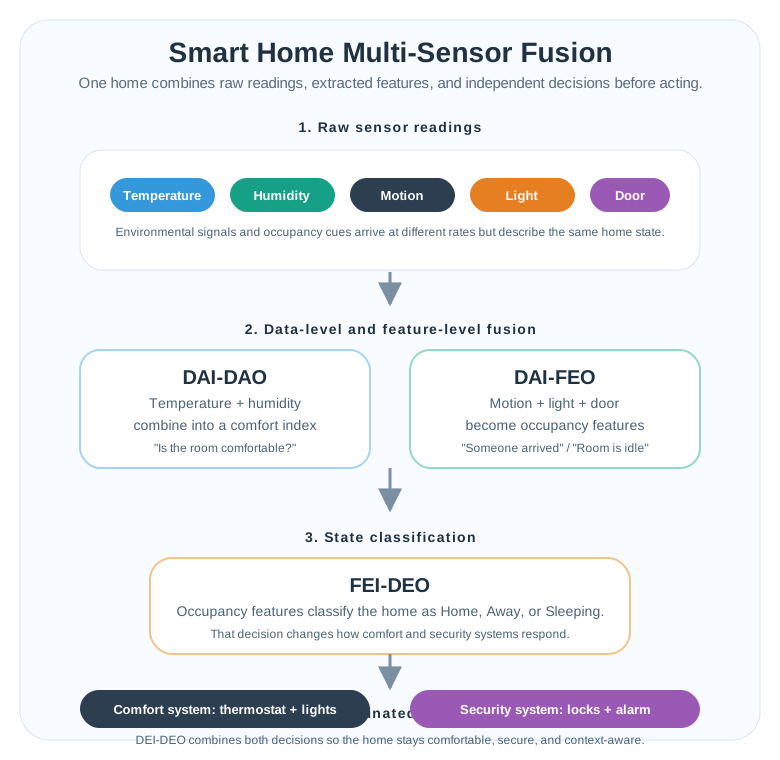
The first stage of Figure 50.2 separates Temperature, Humidity, Motion, Light, and Door readings. In stage 2, temperature plus humidity become a comfort index, while motion, light, and door events become occupancy features. Stage 3 asks both “Is the room comfortable?” and whether someone arrived or the room is idle; only then does stage 4 coordinate the Comfort system: thermostat + lights with the Security system: locks + alarm. This sequence connects the sensors to a reviewable application claim: timing, quality flags, and fallback behaviour must survive both fusion branches because one classified home state drives two different action systems.
State
The thing the application needs, such as pose, orientation, occupancy, air quality, activity, or machine condition.
Sensor Mix
The inputs that observe the state from different angles, with different noise, rate, and failure modes.
Decision Boundary
The threshold for display, alerting, control, or actuation, including confidence and freshness limits.
Fallback
The behavior when one sensor is stale, disagrees, saturates, or becomes unavailable.
Overview Knowledge Check
50.4 Match Sensors by State and Rate
This section: Match Sensors by State and Rate — Application fusion is usually more than averaging values.
Application fusion is usually more than averaging values. Measurements must describe the same state at compatible times, use the same coordinate frame and units, and include uncertainty or quality labels. For tracking applications, a data-association step decides whether camera, lidar, radar, radio, or inertial evidence belongs to the same object or person before any update is applied.
A simple inverse-variance fusion is a useful design check when several sensors report the same scalar state with independent errors. It is not a replacement for a full tracker, but it shows the core idea: lower-variance sensors receive more weight, and the fused output should publish its remaining uncertainty.
Worked example: obstacle range from three sensors
state being estimated: pedestrian range ahead of a vehicle
camera measurement: 44.8 m, sigma = 1.0 m
lidar measurement: 45.1 m, sigma = 0.3 m
radar measurement: 45.5 m, sigma = 0.5 m

precision weight = 1 / sigma^2
camera precision = 1 / 1.0^2 = 1.00
lidar precision = 1 / 0.3^2 = 11.11
radar precision = 1 / 0.5^2 = 4.00
total precision = 16.11

normalized weights:
camera = 1.00 / 16.11 = 0.062
lidar = 11.11 / 16.11 = 0.690
radar = 4.00 / 16.11 = 0.248

fused range:
44.8*0.062 + 45.1*0.690 + 45.5*0.248 = about 45.18 m

fused standard deviation:
sqrt(1 / total precision) = sqrt(1 / 16.11) = about 0.25 m

Interpretation:
The output is pulled mostly by lidar because its stated uncertainty is smallest.
The application should still keep camera classification evidence and radar
velocity evidence if those are needed for the decision.
Practitioner Knowledge Check
The mathematical gist. A 0.300 m lidar sigma implies 2.00 ns timing precision, while a 300 MHz FMCW sweep resolves 0.500 m. Stereo range follows , so with px, m, and 0.150 px disparity uncertainty, camera sigma is about 1.00 m at 44.8 m but 4.02 m at 89.6 m. Inverse-variance weights therefore change with range: the camera’s geometric error grows as even when its pixel matching stays constant.

50.5 Timing Failures in Fusion
This section: Timing Failures in Fusion — Many fusion failures are not caused by the filter equation.
Many fusion failures are not caused by the filter equation. They come from stale evidence, mismatched coordinate frames, duplicate detections, missing context, weak validation labels, or a downstream decision that assumes normal confidence during degraded mode. These are application-level failures, so the application must define how evidence enters, ages, conflicts, and exits the fused state.
Latency deserves special attention. A measurement that was accurate when captured can be unsafe when used too late. Tracking systems therefore need event timestamps, prediction to the fusion time, stale thresholds, and a rule for publishing lower confidence when evidence is old or out of sequence.
Worked example: stale position evidence
tracked object speed: 1.6 m/s
camera event time: 120 ms before the fusion update
lidar event time: 40 ms before the fusion update

uncompensated motion during camera age:
1.6 m/s * 0.120 s = 0.192 m

uncompensated motion during lidar age:
1.6 m/s * 0.040 s = 0.064 m

application rule:
If stale error budget is 0.10 m, the 120 ms camera measurement needs prediction,
downweighting, or rejection before range fusion. The 40 ms lidar measurement
is inside the budget if its other quality gates pass.
Event Time
Use the physical capture time for fusion. Arrival time can hide network, buffering, or processing delay.
Coordinate Frame
Record transforms between sensor, device, vehicle, room, map, and global frames before comparing values.
Ground Truth
Validate against labeled walks, surveyed anchors, reference instruments, or reviewed incidents that match the use case.
Operating Envelope
Define the environment, speed, load, lighting, weather, placement, and sensor health where the fused output is valid.
Under-the-Hood Knowledge Check
50.6 Summary
This section: Summary — Sensor fusion applications connect algorithms to decisions.
Sensor fusion applications connect algorithms to decisions. The application defines the estimated state, sensor mix, timing budget, uncertainty limit, minimum evidence set, validation data, and fallback behavior. Phone orientation, body motion capture, activity recognition, indoor tracking, environmental control, and object tracking all use different evidence contracts even when they share sensors. Reliable application fusion keeps data association, event time, coordinate frames, uncertainty, sensor health, degraded modes, and retest triggers visible with the fused output.
A sensor-fusion application is trustworthy when it publishes not just the fused state, but also the evidence boundary that says which sensors contributed, how fresh they were, how uncertain the result is, and what degraded mode is active.
50.7 See Also
This section: See Also
Fusion Architectures
Choose centralised, hierarchical, distributed, or decision-level placement for an application.
Fusion Best Practices
Apply calibration, event-time alignment, gates, degraded modes, and retest triggers.
Kalman Filters
Use covariance and innovation evidence when tracking state with model and measurement updates.
Particle Filters
Use weighted hypotheses when an application has nonlinear, constrained, or multimodal state beliefs.
Find help
3 reviewed answers.
Where should I start in a module?
Open the module page from the sidebar to see its chapters in order. Use the module map to return to a topic you need.
Modules and pathsReviewed
What can I try when a project does not work?
Check the symptom, then work through the diagnostic steps. Keep the error message and the smallest example that reproduces it.
When you are stuckReviewed
How do interactive examples work?
Use the interactive guide to check how examples and simulations work before changing your project.
Interactive examples guideReviewed