37  Cloud Reference Model L5-L7

In 60 Seconds

The IoT Reference Model Levels 5-7 bridge Operational Technology to Information Technology: Level 5 (Data Abstraction) cleans and normalizes data from diverse sources, Level 6 (Application) delivers analytics dashboards and business intelligence, and Level 7 (Collaboration) integrates IoT insights into cross-organizational business workflows.

37.1 Cloud Data: IoT Reference Model Levels 5-7

This chapter covers the upper levels of the IoT Reference Model where data transitions from operational technology to information technology, enabling analytics, applications, and business integration.

37.2 Learning Objectives

By the end of this chapter, you will be able to:

  • Explain Cloud Data Layers: Describe IoT Reference Model Levels 5-7 (Data Abstraction, Application, Collaboration) and their roles
  • Design Data Abstraction: Implement reconciliation, normalization, and indexing strategies for multi-source IoT data
  • Build Cloud Applications: Configure analytics dashboards, reporting systems, and control applications using cloud services
  • Integrate Business Processes: Connect IoT data with enterprise systems and cross-organizational business workflows

37.3 Prerequisites

Before diving into this chapter, you should be familiar with:

  • Cloud Computing for IoT: Understanding cloud service models (IaaS, PaaS, SaaS) and deployment types (public, private, hybrid) provides essential context for how IoT data is hosted, processed, and managed in cloud environments
  • Edge, Fog, and Cloud Overview: Knowledge of the three-tier architecture clarifies how data flows from edge devices through fog processing to cloud storage and analytics, explaining the transition from Levels 1-4 to Levels 5-7
  • Data Storage and Databases: Familiarity with database technologies (relational, NoSQL, time-series) is crucial for understanding Level 5 data abstraction and Level 4 data accumulation, as cloud systems must store and query massive IoT datasets efficiently

Think of the cloud as a massive, always-on warehouse for your IoT data—but smarter.

Imagine your smart home has sensors everywhere: thermostats, door sensors, cameras, and motion detectors. Each device generates data constantly. Where does all this data go?

The Three-Stage Journey:

Stage What Happens Real-World Analogy
Edge Data collected at the source Security cameras recording locally
Fog Initial processing nearby A local server summarizing “motion detected”
Cloud Long-term storage & analysis A central warehouse storing months of data for trends

Why send data to the cloud?

  1. Storage: Your smart thermostat can’t store 5 years of temperature history—the cloud can
  2. Processing power: Complex AI analysis requires servers you can’t fit at home
  3. Access anywhere: Check your home security camera from vacation
  4. Integration: Combine data from multiple sources (weather + thermostat + schedule)

The IoT Reference Model Levels (5-7) explained simply:

  • Level 5 (Data Abstraction): “Clean and organize the data” — Like sorting your mail before filing it
  • Level 6 (Application): “Show me something useful” — Dashboards, alerts, reports
  • Level 7 (Collaboration): “Connect to business” — Trigger work orders, update inventory systems

Key cloud platforms you’ll encounter:

Platform Best Known For Example Use
AWS IoT Core Massive scale, most services Industrial manufacturing
Azure IoT Hub Microsoft integration Enterprise with Office 365
ClearBlade Google-recommended replacement Predictive maintenance

Note (2025): Google Cloud IoT Core was discontinued in August 2023. Google recommends ClearBlade as the migration path. AWS IoT Core and Azure IoT Hub remain the dominant cloud IoT platforms.

Pro tip: The cloud isn’t just storage—it’s where your raw sensor data becomes actionable insights!

Cloud computing is like having a super-smart library in the sky that remembers everything and helps you find answers!

37.3.1 The Sensor Squad Adventure: The Magic Memory Castle

One day, Sammy the Sensor was feeling overwhelmed. “I’ve been measuring temperatures all week, and I can’t remember what happened on Monday!” she cried. Her tiny memory chip could only hold a few numbers at a time.

Bella the Battery had an idea. “Let’s send your measurements to the Cloud Castle! It’s a magical place high above the city where thousands of computers work together. They have SO much memory that they never forget anything!”

Max the Microcontroller helped Sammy pack her data into tiny digital packages. “We’ll send these through the internet, like paper airplanes flying up to the castle,” he explained. Lila the LED lit up the way as the data zoomed through Wi-Fi waves, bounced between cell towers, and finally arrived at the enormous Cloud Castle.

Inside the castle, friendly Cloud Helpers sorted Sammy’s temperature readings by date and time, stored them in giant digital filing cabinets, and even made colorful charts showing how the temperature changed each day. “Now you can ask the Cloud Castle about any day, any time, and it will remember!” cheered the team. When Sammy’s family wanted to see if Tuesday was warmer than Wednesday, the Cloud Castle answered instantly - something tiny Sammy could never do alone!

37.3.2 Key Words for Kids

Word What It Means
Cloud Powerful computers far away that store data and do hard math for us
Upload Sending your data UP to the cloud, like mailing a letter to a faraway friend
Download Getting data back FROM the cloud, like receiving a letter in return
Dashboard A screen that shows important information in easy pictures and charts
Analytics When the cloud finds patterns and answers hidden in lots of data
Server A super-strong computer in the cloud that helps many devices at once

37.3.3 Try This at Home!

Create Your Own Cloud Memory Game:

  1. Get a small notebook (this is your “sensor” with limited memory)
  2. Write down the temperature outside every hour for one day (your sensor data)
  3. At the end of the day, copy ALL the temperatures to a big poster board (this is “uploading to the cloud”)
  4. Decorate the poster with a line graph showing how temperature changed

What you learned:

  • Your small notebook could only hold today’s data (like a sensor’s tiny memory)
  • The big poster can display everything clearly (like the cloud’s big storage)
  • A graph helps you see patterns (like cloud analytics!)

Bonus: Ask a family member to look at just your notebook vs. your poster. Which one helps them understand the day’s weather better? That’s why we use the cloud!

Artistic visualization of cloud-centric IoT architecture showing IoT devices at the edges feeding data into a central cloud core, with analytics engines, machine learning models, and business applications consuming the unified data lake
Figure 37.1: Cloud-centric architectures centralize data storage and processing in scalable cloud infrastructure. This approach simplifies management and enables powerful analytics but requires reliable connectivity and incurs data transfer costs. Modern hybrid architectures often use cloud-centric designs for historical analytics while processing time-critical decisions at the edge.

37.4 IoT Reference Model: Levels 5-7

⏱️ ~10 min | ⭐ Foundational | 📋 P10.C03.U01

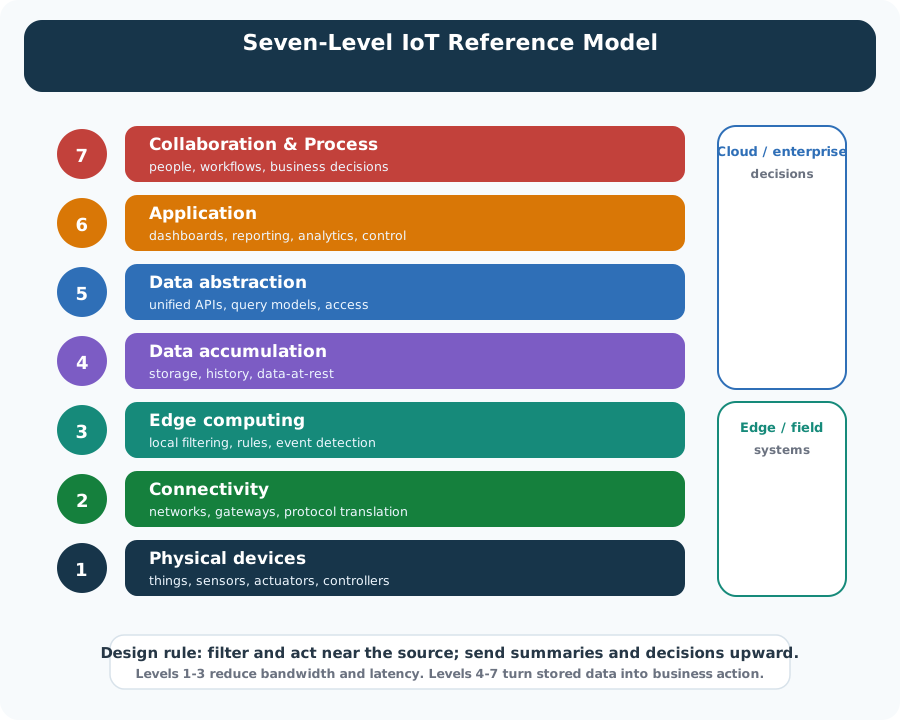
Seven-level IoT reference architecture diagram showing Operational Technology layers (Levels 1-4: Physical Devices, Connectivity, Edge Computing, Data Accumulation) and Information Technology layers (Levels 5-7: Data Abstraction, Application, Collaboration) with data flow arrows between layers

IoT Reference Model showing seven levels from Physical Devices through Collaboration, with Operational Technology (Levels 1-4) transitioning to Information Technology (Levels 5-7)
Figure 37.2: Complete IoT reference model levels 1-7

Previously, we focused on Levels 1-4 of the IoT Reference Model, where raw dynamic data is generated in motion. At Level 5, we take this accumulated data and abstract it, making it ready for analysis. As the diagram shows, Level 5 marks the transition from Operational Technology into the Information Technology realm. The paradigm shifts from events driving the system to queries on structured datasets.

37.4.1 Level 5: Data Abstraction

Level 5 deals with: - Reconciling data formats from different sources - Normalization and standardizing formats and terminology - Confirming completeness of data prior to analysis - Data replication and centralized storage - Indexing within databases to improve access times - Security and access level management

37.4.2 Level 6: Application

Once data is cleaned and organized, it’s available to applications. Level 6 applications may: - Provide back-end support for mobile apps - Generate business intelligence reports - Give analytics on business processes - Provide system management and control for IoT systems

37.4.3 Level 7: Collaboration and Processes

Building on Levels 1-6, business processes span systems and involve multiple people. Level 7 allows for collaboration and processes beyond the IoT network and individual applications.

Worked Example: Designing Cloud Dashboard Data Pipeline for Multi-Region Deployment

Scenario: A global manufacturing company operates 8 factories across 3 continents (North America, Europe, Asia-Pacific). Each factory has 500+ sensors monitoring production lines. The company needs a unified cloud dashboard accessible from headquarters (London) showing real-time production metrics with less than 5-second data latency.

Given:

  • Factories: 3 in USA (EST/CST/PST), 2 in Germany (CET), 3 in China/Japan (CST/JST)
  • Sensors per factory: 500 sensors reporting every 5 seconds
  • Total message volume: 8 factories × 500 sensors × 12 msg/min = 48,000 messages/minute
  • Dashboard users: 50 executives in London viewing simultaneously
  • Latency requirement: End-to-end data visibility within 5 seconds
  • Refresh rate: Dashboard updates every 2 seconds for real-time feel

Steps:

  1. Calculate regional data volumes and latency budgets:
    • Asia-Pacific → London: 280ms network RTT (undersea cables)
    • USA → London: 120ms network RTT (transatlantic)
    • Germany → London: 25ms network RTT (European backbone)
    • Available processing time per region: 5000ms - RTT - 500ms rendering = variable budget
  2. Design edge aggregation strategy:
    • Deploy edge gateway at each factory: aggregate 500 sensors to 10 KPI values every 2 seconds
    • Pre-compute: production rate, defect count, energy consumption, uptime %, top 5 alerts
    • Data reduction: 500 raw readings → 10 aggregates = 50× reduction
    • New message rate: 8 factories × 10 metrics × 30/min = 2,400 messages/minute (vs. 48,000)
  3. Configure multi-region cloud architecture:
    • Primary: Azure IoT Hub in West Europe (London-adjacent region)
    • Regional hubs: Azure IoT Hub in East US, West Europe, East Asia
    • Data flow: Factory → Regional Hub → Cosmos DB global replication → West Europe dashboard
    • Cosmos DB consistency: Strong consistency for EU, Bounded staleness (5s) for US/APAC
  4. Design dashboard query strategy:
    • Dashboard connects to West Europe Cosmos DB only (single read region)

    • Query pattern:

      SELECT * FROM metrics WHERE timestamp > NOW() - 10 seconds ORDER BY factory, timestamp
    • Pre-materialized views: hourly/daily rollups computed by Azure Stream Analytics

    • Real-time panels: pull from Cosmos change feed via SignalR for push updates

  5. Calculate end-to-end latency by region:
    • Asia-Pacific: 100ms (edge) + 280ms (RTT) + 50ms (Cosmos replication) + 500ms (render) = 930ms ✓
    • USA: 100ms + 120ms + 50ms + 500ms = 770ms ✓
    • Germany: 100ms + 25ms + 10ms + 500ms = 635ms ✓
    • All regions within 5-second requirement with 4+ second margin
  6. Implement dashboard refresh optimization:
    • WebSocket connection from browser to SignalR hub
    • Server pushes delta updates (only changed values) every 2 seconds
    • Client-side interpolation for smooth gauge animations between updates
    • Fallback: Long-polling at 5-second intervals if WebSocket unavailable

Result: London executives see unified global production dashboard with <1 second average latency. 50 concurrent users supported with single Cosmos DB read replica. Monthly cost: approximately $2,400 (IoT Hub: $800, Cosmos DB: $1,200, Stream Analytics: $400). Edge aggregation reduces cloud messaging costs by 95% compared to raw sensor ingestion.

Key Insight: For global IoT deployments, edge aggregation is critical for both latency and cost. Pre-compute KPIs at the factory level, transmit only aggregated metrics to cloud, and use globally-distributed databases with tuned consistency levels. The 50× data reduction at the edge transforms an expensive real-time streaming problem into an affordable periodic update pattern.

Multi-Region Latency Budget: Factory in Tokyo sends data to London dashboard. Network RTT: \(280\text{ ms}\). Total latency budget: \(5000\text{ ms}\).

Breakdown: Edge processing (100ms) + network (280ms) + Cosmos DB replication (50ms) + SignalR push (20ms) + browser render (500ms) = \(950\text{ ms}\) total. Remaining margin: \(5000 - 950 = 4050\text{ ms}\) (81% buffer).

Data volume calculation: 500 sensors × 1 reading/5 sec = 100 readings/sec × 50 bytes = \(5 \text{ KB/sec}\) raw. Edge aggregation: 10 KPIs every 2 seconds = \(5 \text{ values/sec} \times 20 \text{ bytes} = 100 \text{ bytes/sec}\). Reduction: \((5000 - 100) / 5000 = 98\%\).

Monthly bandwidth: \(100 \text{ bytes/sec} \times 2.628M \text{ sec/month} = 262.8\text{ MB}\) vs \(5\text{ KB/sec} \times 2.628M = 13.14\text{ GB}\) without edge. Savings at \(\$0.09/\text{GB}\): \((13.14 - 0.26) \times 0.09 = \$1.16/\text{month}\) per factory. Across 8 factories: \(\$111.36/\text{year}\) bandwidth savings alone.

37.4.4 Try It: Edge Aggregation Cost Calculator

Explore how edge aggregation reduces cloud messaging costs. Adjust the factory and sensor parameters to see the impact on data volumes and monthly costs.

Worked Example: Cloud Analytics Dashboard for Predictive Maintenance Visualization

Scenario: An airline operates 150 aircraft with 2,000 sensors each monitoring engine health, hydraulics, and avionics. Maintenance engineers need a cloud dashboard to visualize anomaly predictions, prioritize inspections, and track component remaining useful life (RUL) across the global fleet.

Given:

  • Fleet: 150 aircraft × 2,000 sensors = 300,000 sensor channels
  • Data rate: Engine sensors at 1 Hz, others at 0.1 Hz during flight
  • Average flight duration: 4 hours, 6 flights per aircraft per day
  • Prediction model output: RUL estimates updated every 15 minutes per component
  • Users: 25 maintenance engineers, 5 fleet managers, viewable on 1920x1080 desktop monitors
  • Critical visualization: Heatmap of fleet health, trend charts for degrading components, alert queue

Steps:

  1. Define dashboard information architecture:
    • Level 1 (Overview): Fleet heatmap - 150 aircraft in 10×15 grid, color-coded by health score (green 90-100%, yellow 70-89%, orange 50-69%, red <50%)
    • Level 2 (Aircraft Detail): Single aircraft with 20 component groups, each showing RUL gauge
    • Level 3 (Component Deep Dive): Time-series of specific sensor with anomaly overlays
    • Navigation: Click aircraft → see components → click component → see sensors
  2. Design efficient data model for visualization:
    • Pre-aggregate health scores at component level (2,000 sensors → 20 component scores per aircraft)
    • Store in time-series DB with 15-minute buckets for trend queries
    • Materialized view for fleet overview: 150 rows × 5 columns (aircraft_id, health_score, worst_component, RUL_days, alert_count)
    • Query for heatmap: SELECT aircraft_id, health_score FROM fleet_health ORDER BY health_score - returns in <50ms
  3. Calculate visualization rendering requirements:
    • Fleet heatmap: 150 cells at 48×48px each = 720×480px panel (fits in 800×600 allocation)
    • Component RUL gauges: 20 gauges at 80×80px in 4×5 grid = 320×400px panel
    • Trend chart: 7-day history at 15-min resolution = 672 data points, line chart at 600×300px
    • Alert queue: Scrollable list, 60px row height, show top 10 without scrolling = 600px height
  4. Implement progressive loading strategy:
    • Initial load (300ms): Fleet heatmap + summary stats (4 API calls, parallel)
    • On aircraft selection (+200ms): Fetch 20 component scores (1 API call)
    • On component selection (+150ms): Fetch 672 trend points + anomaly annotations (2 API calls)
    • Total drill-down time: <700ms from overview to component detail
  5. Configure refresh rates by panel priority:
    • Fleet heatmap: Refresh every 5 minutes (RUL predictions update every 15 minutes)
    • Alert queue: Refresh every 30 seconds (new anomalies need prompt visibility)
    • Component gauges: Refresh every 60 seconds when aircraft panel is open
    • Trend chart: No auto-refresh (historical data, user triggers reload)
  6. Design color scheme for maintenance context:
    • Health score gradient: #27AE60 (100%) → #F1C40F (70%) → #E67E22 (50%) → #E74C3C (<50%)
    • Anomaly markers on trend: Red triangles at detected anomaly timestamps
    • RUL thresholds: Green (>60 days), Yellow (30-60 days), Orange (14-30 days), Red (<14 days)
    • Ensure 4.5:1 contrast ratio for all text labels per WCAG 2.1

Result: Maintenance engineers identify at-risk aircraft in <5 seconds via fleet heatmap color scan. Drill-down to specific component takes <1 second. Alert queue surfaces new anomalies within 30 seconds of model prediction. Dashboard reduces maintenance planning time by 40% compared to spreadsheet-based tracking. No missed critical alerts in 6-month pilot.

Key Insight: Predictive maintenance dashboards must balance overview (fleet-wide health at a glance) with drill-down capability (sensor-level forensics). Pre-aggregate health scores to enable instant heatmap rendering. Use color-coded thresholds aligned with maintenance action windows (30/60/90 day inspection cycles). Design for the “worst-first” workflow where engineers scan for red/orange, not green.

37.5 Case Study: John Deere’s OT-to-IT Transformation (Levels 5-7 in Practice)

John Deere’s precision agriculture platform demonstrates how Levels 5-7 of the IoT reference model create business value from raw sensor data.

Level 5 (Data Abstraction) in Action

John Deere equipment generates data from 50+ sensor types across tractors, combines, sprayers, and planters – each with different formats, sampling rates, and units. Level 5 reconciles this diversity:

Source Raw Format Normalized Format
Yield sensor (combine) lb/acre at GPS coordinate (NAD83) kg/hectare at lat/long (WGS84)
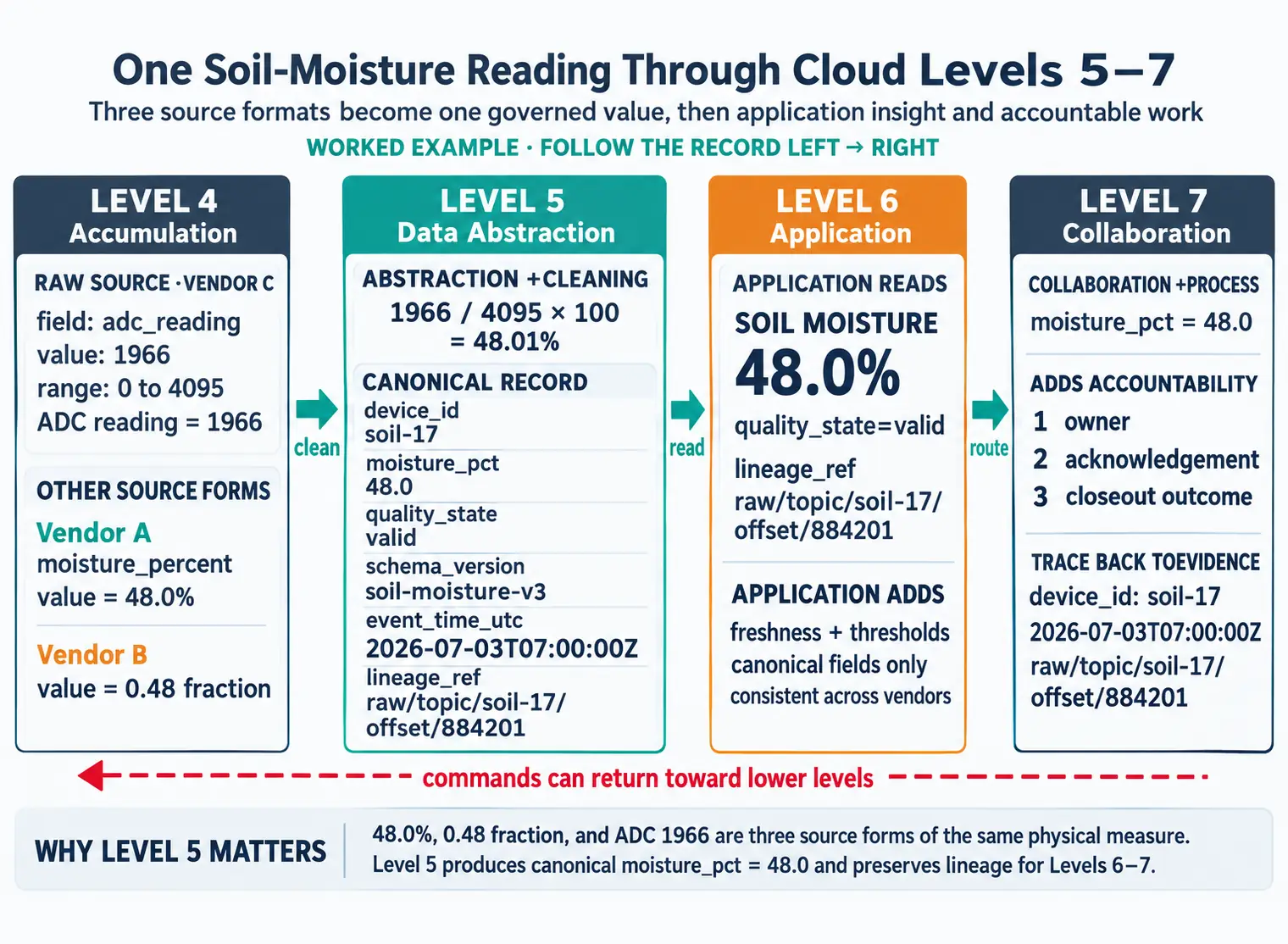
Soil moisture probe ADC value 0-4095 (vendor-specific) Volumetric water content % (0-100)
Weather station Imperial units, local timestamp Metric, UTC timestamp
Planting unit Seeds per linear foot, ground speed Seeds per hectare, normalized rate

Without Level 5 normalization, a farmer running John Deere tractors alongside CNH (Case IH) equipment would see incompatible data silos.

Level 6 (Application) in Action

The Operations Center application provides analytics that raw data cannot:

  • Yield mapping: Overlays harvest data onto field maps, showing 2-4x variation within a single field
  • Prescription generation: Combines soil tests + yield history + weather to recommend variable-rate seeding (e.g., 34,000 seeds/acre in productive zones, 28,000 in marginal zones)
  • Machine performance: Identifies combine settings that reduce grain loss by 2-5%, worth $15-30/acre at current commodity prices

Level 7 (Collaboration) in Action

Level 7 integrates IoT insights into multi-stakeholder business workflows:

  • Farmer-agronomist collaboration: Shared field dashboards enable remote crop consulting (reduced on-site visits by 40%)
  • Insurance integration: Yield data auto-populates crop insurance claims, reducing processing from 6 weeks to 3 days
  • Grain elevator connectivity: Predicted harvest timing helps elevators schedule labor and equipment

Quantified Business Impact

Metric Before IoT (Manual) With L5-L7 Platform Improvement
Average yield increase Baseline +8-12% $40-60/acre
Input cost reduction (seed, fertilizer) Baseline -15-20% $25-35/acre
Insurance claim processing 6 weeks 3 days 93% faster
Agronomist visits per season 6-8 in-person 2 in-person + 10 remote 60% cost reduction

On a 2,000-acre operation, the combined benefit is $130,000-190,000/year – significantly exceeding the $30,000/year platform subscription cost.

37.6 Knowledge Check

Test your understanding of IoT Reference Model concepts.

Scenario: Your smart agriculture deployment has 5,000 soil moisture sensors from 3 manufacturers. Manufacturer A reports in Fahrenheit and percentage, Manufacturer B in Celsius and decimal (0.0-1.0), Manufacturer C sends raw ADC values (0-4095). All send timestamps in different formats (Unix epoch, ISO8601, custom strings).

Think about:

  1. What Level 5 data abstraction tasks are required before analytics?
  2. How would you design a normalized schema for multi-manufacturer compatibility?
  3. What quality score would you assign to incomplete or out-of-range readings?

Key Insight: Level 5 reconciliation pipeline: (1) Format normalization: Convert all timestamps to ISO8601, all temperatures to Celsius, all moisture to percentage (0-100%). (2) Schema standardization: Create unified schema: {device_id, timestamp, temp_celsius, moisture_pct, quality_score}. (3) Validation & scoring: Reject temp < -40°C or > 60°C (physically impossible), moisture < 0% or > 100%. Quality score: 100 (perfect) - 40 (out of range) - 20 (stale > 1 hour) - 20 (missing fields). Store quality_score with every record to enable filtering at Level 6 analytics. Without Level 5 abstraction, analysts would need custom code for each manufacturer—unscalable and error-prone.

37.6.1 Try It: Data Quality Score Calculator

Level 5 data abstraction assigns quality scores to each sensor reading. Simulate how different quality issues affect the usable data in your pipeline.

Key Concepts
  • IoT Reference Model Levels 5-7: Data Abstraction (format reconciliation, normalization), Application (analytics, insights), and Collaboration (business workflows) bridging OT to IT
  • Level 5 Data Abstraction: Reconciling data formats, normalization, completeness validation, data replication, indexing, and security management
  • Level 6 Application: Analytics dashboards, business intelligence, system management and control for IoT
  • Level 7 Collaboration: Business process integration across organizations and systems

Common Pitfalls

Treating IoT as ‘just sensors + cloud’ omits the critical device management layer responsible for provisioning, firmware updates, health monitoring, and decommissioning. Without it, managing fleets at scale becomes operationally impossible.

A real-time safety monitoring system and a monthly energy reporting system have very different tier requirements. Apply the reference model as a template, not a prescription, adapting each tier to the specific latency, security, and cost constraints of your use case.

Most reference model discussions focus on the analytics tiers and neglect the device connectivity layer. Protocol selection (MQTT vs HTTPS vs CoAP), authentication mechanisms, and QoS settings at the southbound interface have the largest impact on system reliability.

Reference models describe logical tiers and data flows, not physical deployments. One physical cloud service can implement multiple logical tiers; one logical tier may require multiple physical services. Always map logical to physical separately.

37.7 Summary

The IoT Reference Model Levels 5-7 represent the transition from Operational Technology to Information Technology. Level 5 (Data Abstraction) transforms raw accumulated data into clean, normalized datasets through format reconciliation, unit standardization, and quality validation. Level 6 (Application) builds analytics, dashboards, and reporting systems on this abstracted data. Level 7 (Collaboration) enables business process integration and cross-organizational workflows. Together, these levels convert raw sensor streams into actionable business intelligence.

37.8 What’s Next

If you want to… Read this
Explore architecture gallery patterns built on this model Cloud Data Architecture Gallery
Study specific cloud platform implementations Cloud Data Platforms and Services
Understand data quality within the reference model layers Cloud Data Quality and Security
Learn the foundational cloud data concepts Data in the Cloud
Return to the module overview Big Data Overview

Cloud & Edge Architecture:

Data Management: