28  Big Data Technologies

In 60 Seconds

Big data technologies for IoT span the Apache Hadoop ecosystem for distributed storage and batch processing, Apache Spark for 10-100x faster in-memory analytics, Apache Kafka for real-time streaming at millions of events per second, and specialized time-series databases like InfluxDB that provide 100x better write performance for sensor data workloads.

Learning Objectives

After completing this chapter, you will be able to:

  • Explain the Apache Hadoop ecosystem architecture including HDFS, YARN, Spark, and Hive components
  • Compare batch processing (Spark) and stream processing (Kafka, Flink) by throughput, latency, and cost
  • Select appropriate time-series databases for IoT workloads based on write speed and query patterns
  • Design technology stacks for specific IoT scenarios matching tools to data volume and latency requirements

Key Concepts

  • Apache Kafka: A distributed message streaming platform designed for high-throughput, low-latency event pipelines; the de facto standard for ingesting high-velocity IoT sensor streams.
  • Apache Spark: A distributed in-memory data processing engine supporting batch analytics, stream processing (Structured Streaming), and ML (MLlib) on large IoT datasets.
  • Apache Flink: A distributed stream processing framework optimised for stateful, low-latency, exactly-once stream processing — preferred over Spark for sub-second IoT latency requirements.
  • HDFS (Hadoop Distributed File System): A fault-tolerant distributed storage system that partitions large datasets across commodity servers with 3x replication, the foundational storage layer for Hadoop-based analytics.
  • InfluxDB: A purpose-built time-series database optimised for storing and querying timestamped sensor readings with automatic data retention and downsampling policies.
  • Apache Arrow: A cross-language in-memory columnar data format that enables zero-copy reads between processing frameworks, dramatically reducing serialisation overhead in multi-system IoT pipelines.

Big data technologies are specialized tools built for data that is too large, too fast, or too varied for ordinary databases. Think of them as industrial kitchen equipment compared to home appliances – built for scale and speed. Tools like Apache Kafka handle fast-moving streams while Apache Spark processes massive datasets in parallel.

28.1 Apache Hadoop Ecosystem

MapReduce processes massive IoT datasets by splitting work across hundreds of machines in three phases.

Example: Calculate Average Temperature by City from 1 Billion Sensor Readings

Step 1 - Map Phase (Parallel across 100 nodes):

Input (raw sensor log):
sensor_123, NYC, 2024-01-15T10:00:00, 22.5°C
sensor_456, LA,  2024-01-15T10:00:05, 28.3°C
sensor_789, NYC, 2024-01-15T10:00:10, 23.1°C
...

Map function (runs on each node):
def map(line):
    sensor_id, city, timestamp, temp = parse(line)
    emit(city, temp)  # Output: (NYC, 22.5), (LA, 28.3), (NYC, 23.1)

Result: 1 billion (city, temperature) pairs distributed across nodes

Step 2 - Shuffle Phase (Hadoop framework does this automatically):

Group all temperatures by city key:
NYC → [22.5, 23.1, 22.8, ... 230 million values]
LA  → [28.3, 27.9, 29.1, ... 180 million values]
CHI → [... 150 million values]

Step 3 - Reduce Phase (Parallel across cities):

Reduce function (runs once per city):
def reduce(city, temperature_list):
    total = sum(temperature_list)
    count = len(temperature_list)
    avg = total / count
    emit(city, avg)

Final output:
NYC, 22.9°C
LA,  28.4°C
CHI, 19.2°C

Why This Is Fast: 100 nodes each process 10 million rows in parallel. What would take 1 node 100 hours finishes in 1 hour across 100 nodes. Hadoop handles node failures automatically - if node 47 crashes, its work is reassigned to node 48.

Layered architecture diagram showing the Apache Hadoop ecosystem with HDFS for storage at the base, YARN for resource management, Spark and MapReduce for processing, and Hive, Pig, and Mahout for applications at the top
Figure 28.1: Apache Hadoop Ecosystem Stack with HDFS YARN Spark

Apache Hadoop Ecosystem: The four-layer architecture with HDFS for distributed storage, YARN for resource management, Spark/MapReduce for processing, and Hive/Pig/Mahout for applications.

28.1.1 Key Components

Component Purpose Use in IoT
HDFS Distributed storage Store petabytes of sensor data across commodity hardware
MapReduce Batch processing Process historical sensor data in parallel
Spark In-memory processing Real-time analytics, 10-100x faster than MapReduce
Hive SQL on Hadoop Query sensor data with SQL instead of code
Kafka Streaming data Handle real-time sensor streams
HBase NoSQL database Store time-series sensor readings
YARN Resource management Schedule processing jobs across the cluster
ZooKeeper Coordination Manage distributed system configuration

28.1.2 HDFS: Distributed File System

Why HDFS for IoT?

  • Handles petabytes of data across thousands of machines
  • Automatic replication (default: 3 copies) prevents data loss
  • Designed for large files (GB-TB) and sequential reads

HDFS Architecture:

NameNode (Master):
- Stores file metadata (which blocks on which DataNodes)
- Single point of coordination

DataNodes (Workers):
- Store actual data blocks (128 MB default)
- Report health to NameNode
- Replicate blocks to other DataNodes

Example: 1 TB file stored as:
- 8,192 blocks x 128 MB each
- 3 copies = 24,576 blocks total
- Distributed across 100+ DataNodes

28.1.3 MapReduce: The Original Big Data Engine

How It Works:

  1. Map phase: Split data, process in parallel
  2. Shuffle phase: Group results by key
  3. Reduce phase: Aggregate grouped data

IoT Example: Calculate Average Temperature by City

Flow diagram showing MapReduce data flow where input sensor data is split across mapper nodes, shuffled by city key, and reduced to calculate average temperatures per city
Figure 28.2: MapReduce Example: Temperature Aggregation by City

MapReduce Data Flow: Input data is split across mappers, shuffled by city key, and reduced to calculate average temperatures. Parallel execution across nodes enables processing terabytes in minutes.

28.1.4 HDFS Storage Calculator

Estimate how HDFS distributes and replicates your IoT data across a cluster.

28.2 Apache Spark: In-Memory Processing

Spark is the modern replacement for MapReduce, offering 10-100x faster processing through in-memory computation.

Architecture diagram showing Apache Spark with the core RDD engine at the center, surrounded by Spark SQL, MLlib, Spark Streaming, and GraphX libraries, running on YARN, Mesos, or standalone cluster managers
Figure 28.3: Apache Spark Architecture with Core Libraries and Cluster Managers

Apache Spark Architecture: Spark Core with RDDs provides the foundation, supporting SQL, ML, streaming, and graph libraries that run on various cluster managers and storage backends.

28.2.1 Why Spark Over MapReduce?

Feature MapReduce Spark
Processing speed Disk-based (slow) In-memory (fast)
Ease of use Complex Java code Simple Python/SQL
Iterative algorithms Multiple disk writes Single memory pass
Real-time Not supported Spark Streaming
Machine learning Basic MLlib (100+ algorithms)

28.2.2 Spark for IoT: Real-World Example

Processing 1 Billion Sensor Readings:

# Read sensor data from distributed storage
sensor_data = spark.read.parquet("s3://iot-data/sensors/")

# Filter, aggregate, and analyze in memory
hourly_averages = sensor_data \
    .filter(col("timestamp") > "2024-01-01") \
    .groupBy(window("timestamp", "1 hour"), "sensor_id") \
    .agg(avg("temperature").alias("avg_temp"),
         max("temperature").alias("max_temp"),
         min("temperature").alias("min_temp"))

# Write results back to storage
hourly_averages.write.parquet("s3://iot-data/hourly-summaries/")

# Performance:
# - MapReduce: 45 minutes (multiple disk read/write cycles)
# - Spark: 3 minutes (in-memory processing)

28.3 Apache Kafka: Real-Time Streaming

While Spark excels at processing data already in storage, Apache Kafka handles the real-time ingestion challenge – getting millions of sensor events per second from producers to consumers with millisecond latency.

Architecture diagram showing Apache Kafka with IoT sensor producers on the left publishing messages to partitioned topics in the center, consumed by real-time dashboards, anomaly detection, and storage pipelines on the right
Figure 28.4: Apache Kafka Architecture with Producers Topics and Consumers

Apache Kafka Architecture: Multiple IoT producers publish to topic partitions, which are consumed by real-time dashboards, anomaly detection systems, and storage pipelines simultaneously.

28.3.1 Why Kafka for IoT?

Feature Value IoT Benefit
Throughput 100K-1M messages/sec Handle sensor firehose
Latency Single-digit ms Real-time alerts
Durability Replicated, persistent No data loss
Scalability Add brokers on demand Grow with sensors
Multiple consumers Read same data multiple times Analytics + storage + alerts

28.3.2 Kafka Configuration for IoT

# Production Kafka configuration for IoT
kafka_config:
  brokers: 3                    # Minimum for production
  replication_factor: 3         # Survive 2 broker failures
  partitions_per_topic: 10      # Parallelism for consumers

  topics:
    sensor-readings:
      partitions: 20            # High throughput
      retention_hours: 168      # 7 days for replay
      compression: lz4          # 50% size reduction

    alerts:
      partitions: 5             # Lower volume
      retention_hours: 720      # 30 days for audit

  performance:
    batch_size: 16384           # 16 KB batches
    linger_ms: 5                # Wait 5ms for batch fill
    buffer_memory: 33554432     # 32 MB producer buffer

28.4 Technology Selection Decision Framework

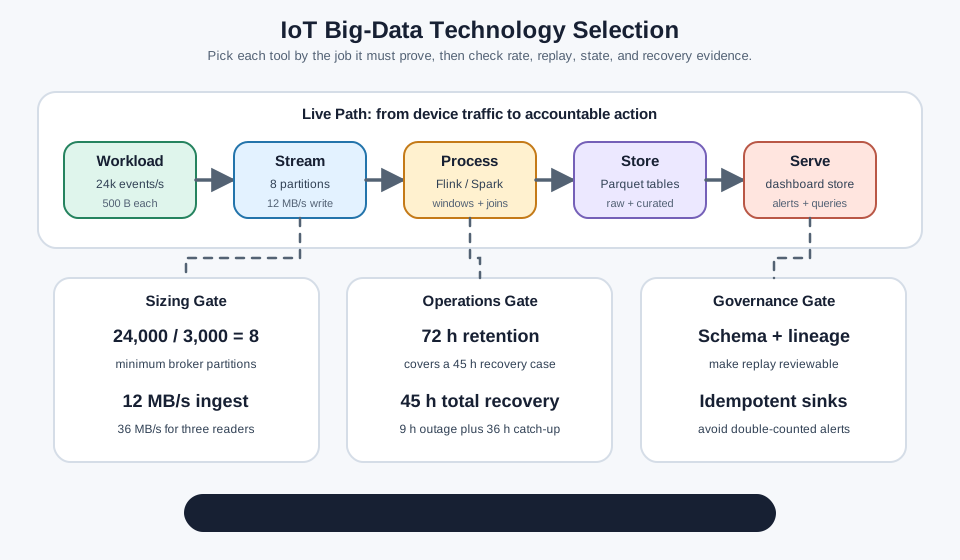
Choosing the right big data technology depends on your latency requirement, data volume, and query pattern. Use this decision tree:

Decision Framework: Batch vs Stream vs Hybrid

Step 1 – What is your latency requirement?

If insights needed within… Use Example
Milliseconds to seconds Stream processing (Kafka + Flink) Real-time anomaly detection
Minutes to hours Micro-batch (Spark Streaming) Dashboard updates every 5 min
Hours to days Batch processing (Spark) Daily energy reports
Mixed requirements Lambda Architecture (Spark + Kafka) Real-time alerts + daily analytics

Step 2 – What is your data volume?

Daily data volume Recommended stack Estimated monthly cost (AWS)
< 10 GB/day Single-node PostgreSQL or InfluxDB $50-200
10-100 GB/day Managed Kafka + Spark (3-node cluster) $500-2,000
100 GB - 1 TB/day Kafka cluster + Spark cluster (10+ nodes) $2,000-10,000
> 1 TB/day Multi-region Kafka + auto-scaling Spark $10,000-50,000+

Step 3 – What is your query pattern?

Primary query type Best technology Why
Time-range aggregations InfluxDB / TimescaleDB Optimized for WHERE time > X
Complex joins across tables TimescaleDB (PostgreSQL) Full SQL support
Key-value lookups Redis / DynamoDB Sub-millisecond reads
Full-text search on logs Elasticsearch Inverted index for text
ML feature engineering Spark MLlib + Delta Lake In-memory iterative processing

Worked Example – Smart Factory (5,000 sensors at 1 Hz):

  • Daily raw data: 5,000 sensors x 86,400 seconds x 50 bytes = 21.6 GB/day
  • Latency requirement: Real-time alerts (< 1s) + daily reports
  • Decision: Lambda Architecture with Kafka (streaming) + Spark (batch)
  • Estimated cost: Kafka 3-broker cluster ($900/mo) + Spark 5-node cluster ($1,500/mo) + InfluxDB ($400/mo) = $2,800/month
  • Compare to: all-cloud without edge processing adds cloud ingestion and compute costs – managed Kafka ingestion ($1,200/mo), additional Spark instances for raw data ($800/mo), and network transfer ($200/mo for 21.6 GB/day x 30 days) = $5,000/month total
  • Edge processing (filtering 90% of data locally, sending only anomalies and aggregates) reduces cloud volume to 2.16 GB/day, cutting cloud costs to $1,510/month total

28.4.1 IoT Data Volume Estimator

Use this calculator to estimate your daily data volume and find the recommended technology stack for your IoT deployment.

28.5 Time-Series Databases

IoT data is inherently time-series - continuous streams of timestamped readings. Specialized databases handle this pattern 100x better than general-purpose databases.

28.5.1 Time-Series Database Comparison

Database Type Best For Write Speed Query Speed Compression
InfluxDB Time-series High-frequency sensor data 100K+ writes/sec Fast time-range 10x
TimescaleDB Time-series (PostgreSQL) SQL-compatible analytics 50K writes/sec Complex joins 8x
Prometheus Metrics System monitoring 100K samples/sec PromQL queries 5x
Cassandra Wide-column Massive scale writes 1M+ writes/sec Key-based lookup 3x

28.5.2 Why Time-Series DBs Are Different

Comparison diagram showing row-based storage reading all columns for every query versus columnar storage reading only the requested timestamp and temperature columns, resulting in 80 percent less I/O for time-series queries
Figure 28.5: Row-Based versus Columnar Storage for Time-Series Queries

Columnar vs Row-Based Storage: Traditional databases read all columns for every query (100% I/O). Time-series columnar databases read only the requested columns (20% I/O for temperature queries), providing 5x performance improvement.

28.5.3 InfluxDB for IoT: Configuration Example

# InfluxDB configuration for IoT workload
influxdb_config:
  # Retention policies - automatic data lifecycle
  retention_policies:
    - name: "realtime"
      duration: "7d"           # Keep raw data 7 days
      replication: 2           # 2 copies for durability
      shard_duration: "1d"     # New shard daily

    - name: "downsampled"
      duration: "365d"         # Keep aggregates 1 year
      replication: 2

  # Continuous queries - automatic aggregation
  continuous_queries:
    - name: "downsample_temperature"
      query: |
        SELECT mean(temperature) AS avg_temp,
               max(temperature) AS max_temp,
               min(temperature) AS min_temp
        INTO downsampled.temperature_hourly
        FROM realtime.sensor_readings
        GROUP BY time(1h), sensor_id

  # Storage optimization
  storage:
    cache_snapshot_memory: "256m"
    compact_full_write_cold: "4h"
    index_version: "tsi1"      # Time-series index

28.6 Understanding Check: Time-Series DB vs Regular DB

Scenario: A smart building has 10,000 sensors (temperature, humidity, occupancy, energy consumption) sampling every 5 seconds. You need to: - Query: “Show me energy consumption trends for Floor 3 over the past week” - Downsample: Keep 5-second data for 30 days, then 1-minute averages forever - Retention: Automatically delete raw data older than 30 days

Think about: Why would you use InfluxDB (time-series DB) instead of PostgreSQL (relational DB)?

Key Insights:

  1. Write Performance:

    • Volume: 10,000 sensors x 12 samples/min = 120,000 writes/minute = 2,000 writes/second
    • PostgreSQL: Optimized for transactional updates (hundreds of writes/sec)
    • InfluxDB: Optimized for time-series writes (millions of writes/sec)
    • Real number: InfluxDB handles 100x more time-series writes than PostgreSQL
  2. Storage Efficiency:

    • Daily data: 10,000 sensors x 17,280 samples/day x 50 bytes = 8.64 GB/day raw
    • PostgreSQL: Row-based storage, no time-series compression: 8.64 GB/day
    • InfluxDB: Columnar + time-series compression (similar values compress well): 864 MB/day (90% reduction)
    • Real number: InfluxDB uses 10x less storage for time-series data
  3. Query Performance for Time Ranges:

    PostgreSQL approach:

    SELECT date_trunc('hour', timestamp), AVG(temperature)
    FROM sensor_readings
    WHERE sensor_location = 'Floor3'
      AND timestamp > NOW() - INTERVAL '7 days'
    GROUP BY date_trunc('hour', timestamp);
    • Scans full table, filters rows, then aggregates
    • Query time: 30-60 seconds on billions of rows

    InfluxDB approach:

    SELECT MEAN(temperature)
    FROM sensors
    WHERE location = 'Floor3'
      AND time > now() - 7d
    GROUP BY time(1h);
    • Time-based indexing, automatic downsampling
    • Query time: 100-500ms (100x faster!)
  4. Automatic Retention Policies:

    PostgreSQL:

    -- Manual cron job required
    DELETE FROM sensor_readings WHERE timestamp < NOW() - INTERVAL '30 days';
    -- Runs for hours, locks table

    InfluxDB:

    -- Built-in retention policy
    CREATE RETENTION POLICY "30days" ON "sensors" DURATION 30d REPLICATION 1 DEFAULT;
    -- Automatic, no performance impact

Decision Rule:

Use TIME-SERIES DB when:
- High write volume (>1,000 writes/sec)
- Time-range queries common ("last hour", "past week")
- Data has timestamps and is append-only
- Automatic downsampling/retention needed
- Examples: InfluxDB, TimescaleDB, Prometheus

Use RELATIONAL DB when:
- Transactional updates (UPDATE/DELETE common)
- Complex joins across many tables
- ACID compliance critical
- Data is not primarily time-ordered
- Examples: PostgreSQL, MySQL

28.7 Technology Comparison

With all the major technologies covered, the following table provides a side-by-side comparison to guide your technology selection.

Requirement Traditional DB (PostgreSQL) Time-Series DB (InfluxDB) Stream Processing (Kafka + Spark) Batch Processing (Hadoop)
Write Throughput 1K-10K writes/sec 100K-1M writes/sec 100K-10M events/sec N/A (batch loads)
Storage Cost $0.10/GB/month $0.10/GB (but 10x compressed) $0.023/GB (S3) $0.023/GB (HDFS/S3)
Query Latency 100ms-10s 10ms-1s (time-range) 100ms-5s (real-time) Minutes to hours
Data Retention Manual deletion Auto retention policies Kafka: 1-30 days Years (petabytes)
Use Case Transactional apps Sensor data, metrics Real-time dashboards Historical analytics
Cost (1M events/day) $500/month $50/month $200/month $20/month (batch)

28.7.1 Common Pitfall: Using the Wrong Database

Pitfall: Using the Wrong Database for Time-Series Data

The Mistake:

-- Store sensor data in MySQL (row-oriented, general-purpose)
CREATE TABLE sensors (
    timestamp DATETIME,
    sensor_id INT,
    temperature FLOAT,
    humidity FLOAT
);

-- Query: Get average temperature per hour for last 30 days
SELECT DATE_FORMAT(timestamp, '%Y-%m-%d %H:00:00'),
       AVG(temperature)
FROM sensors
WHERE timestamp > NOW() - INTERVAL 30 DAY
GROUP BY DATE_FORMAT(timestamp, '%Y-%m-%d %H:00:00');

Why It’s Slow:

  • MySQL scans entire table even if you only need temperature column
  • Row-oriented storage reads all columns (timestamp, sensor_id, temperature, humidity)
  • No automatic time-based partitioning
  • Grouping by hour requires complex DATE_FORMAT parsing
  • Query time: 45 seconds on 100M rows

The Fix: Use time-series database like InfluxDB

-- InfluxDB query (columnar, time-optimized)
SELECT MEAN(temperature)
FROM sensors
WHERE time > now() - 30d
GROUP BY time(1h)

Why It’s Fast:

  • Columnar storage: Only reads temperature and time columns
  • Automatic time-based sharding (data partitioned by day/hour)
  • Native time aggregation (GROUP BY time(1h) is optimized)
  • Query time: 2 seconds on same 100M rows

Performance: 22x faster with purpose-built database

Time-Series DB Storage Efficiency: 10,000 sensors report temperature every 5 seconds. Daily readings: \(10,000 \times 17,280 = 172.8M\) readings.

Row-based storage (PostgreSQL): Each row stores timestamp (8 bytes), sensor_id (4 bytes), temperature (4 bytes), humidity (4 bytes) = 20 bytes/row. Daily storage: \(172.8M \times 20 = 3.46 \text{ GB/day}\). No compression.

Columnar storage (InfluxDB): Store columns separately. Temperature column: similar values compress well with delta encoding. Instead of storing \([22.1, 22.2, 22.1, 22.3]\), store \(22.1 + [+0.1, 0, +0.2]\) = 4 values in space of ~2. Compression ratio: 10:1.

Daily InfluxDB storage: \(3.46 / 10 = 0.346 \text{ GB/day}\). Annual savings: \((3.46 - 0.346) \times 365 \times \$0.023 = \$26.14\) storage cost alone. Query speedup: temperature column scans \(172.8M \times 4\text{ bytes} = 691\text{ MB}\) instead of \(3.46\text{ GB}\) (row-based must read all columns). Result: 5x faster queries, 10x less storage.

Think of big data tools like different helpers in a giant library – each one is best at a specific job!

28.7.2 The Sensor Squad Adventure: The Giant Library

Sammy the Sensor had been collecting temperature readings for a whole year. “I have MILLIONS of numbers!” she exclaimed. “How will I ever find patterns?”

Max the Microcontroller took Sammy to the Giant Data Library. “Meet our helpers!” he said.

First, they met Hadoop the Librarian. “I split big books into chapters and give each chapter to a different reader,” Hadoop explained. “Instead of one person reading the whole book, a hundred people each read one chapter at the same time. We finish 100 times faster!”

Next was Sparky the Speed Reader. “I’m like Hadoop, but I memorize everything instead of writing notes on paper. That makes me 10 to 100 times faster!” Sparky zoomed through Sammy’s data in minutes.

Then they met Kafka the Messenger. “I’m like a super-fast mail carrier,” Kafka said. “When new readings arrive, I deliver them to everyone who needs them – the dashboard, the alarm system, and the storage room – all at the same time, in just milliseconds!”

Finally, Lila the LED introduced them to Indy the Time-Keeper (InfluxDB). “I’m special because I ONLY organize things by time,” Indy said. “When Sammy asks ‘What was the temperature last Tuesday at 3pm?’ I can answer in a blink because that’s ALL I do!”

Bella the Battery smiled. “Each helper is amazing at their special job. The key is picking the right helper for the right task!”

28.7.3 Key Words for Kids

Word What It Means
Hadoop A system that splits big jobs into small pieces for many computers to work on together
Spark A super-fast data processor that keeps everything in memory instead of writing to disk
Kafka A messenger that delivers data to many places at the same time, super quickly
Time-series database A special database that organizes everything by time, perfect for sensor data
Key Takeaway

Choosing the right big data technology depends on your IoT workload: use Hadoop/Spark for historical batch analysis of terabytes, Kafka for real-time streaming at millions of events per second, and time-series databases like InfluxDB for sensor data that needs fast time-range queries and automatic retention policies. Using a general-purpose database for time-series IoT data can be 22x slower than a purpose-built solution.

Common Pitfalls

Kafka requires a cluster (typically 3+ brokers + ZooKeeper/KRaft) with significant operational overhead. For deployments with fewer than 1,000 messages per second, MQTT brokers or managed services (AWS IoT Core, Azure IoT Hub) are simpler and cheaper.

Spark’s micro-batch model introduces at least 100ms latency per batch. For real-time anomaly detection requiring <100ms response, use Apache Flink or a dedicated stream processing engine.

Storing millions of timestamped sensor readings in PostgreSQL without partitioning will produce table scans taking minutes for simple time-range queries. Use InfluxDB, TimescaleDB, or Cassandra with time-based partitioning.

A small factory with 50 sensors does not need Kafka, Spark, and HDFS. A time-series database with a batch Python job often satisfies the requirement with 1/10th the operational complexity.

28.8 Summary

  • Apache Hadoop ecosystem provides distributed processing through HDFS for storage, MapReduce and Spark for computation, and frameworks like Kafka for real-time streaming.
  • Apache Spark offers 10-100x faster processing than MapReduce through in-memory computation, supporting SQL queries, machine learning, and streaming in a unified platform.
  • Apache Kafka handles millions of events per second with millisecond latency, enabling real-time IoT data pipelines with built-in durability and scalability.
  • Time-series databases like InfluxDB provide 100x better write performance and 10x storage compression compared to traditional databases for sensor data workloads.

28.9 Knowledge Check

Run this Python simulation to see why specialized databases matter for IoT workloads.

import time
import random
from datetime import datetime, timedelta

# Simulate 1 million sensor readings
NUM_READINGS = 1_000_000
readings = [
    {
        "timestamp": datetime(2024, 1, 1) + timedelta(seconds=i),
        "sensor_id": random.randint(1, 1000),
        "temperature": 20 + random.gauss(0, 3),
        "humidity": 50 + random.gauss(0, 10)
    }
    for i in range(NUM_READINGS)
]

print(f"Generated {len(readings):,} sensor readings\n")

# ========== Approach 1: Row-Based (PostgreSQL-style) ==========
def row_based_query(data, start_time, end_time):
    """Simulate row-oriented database: Read ALL columns for each row"""
    result = []
    bytes_read = 0
    for row in data:
        # Row-based: Must read entire row even if we only need temperature
        bytes_read += 8 + 4 + 4 + 4  # timestamp + sensor_id + temp + humidity = 20 bytes
        if start_time <= row["timestamp"] < end_time:
            result.append(row["temperature"])
    return result, bytes_read

# ========== Approach 2: Columnar (InfluxDB-style) ==========
def columnar_query(data, start_time, end_time):
    """Simulate columnar database: Read ONLY timestamp + temperature columns"""
    result = []
    bytes_read = 0
    for row in data:
        # Columnar: Only read timestamp (8 bytes) + temperature (4 bytes)
        bytes_read += 8 + 4  # Skip sensor_id and humidity entirely
        if start_time <= row["timestamp"] < end_time:
            result.append(row["temperature"])
    return result, bytes_read

# ========== Benchmark: Get average temperature for 1-hour window ==========
query_start = datetime(2024, 1, 1, 12, 0, 0)  # Jan 1, 2024 12:00 PM
query_end = query_start + timedelta(hours=1)   # 1-hour window

print("=== Query: Average temperature for 1-hour window ===\n")

# Row-based (PostgreSQL simulation)
start = time.time()
temps_row, bytes_row = row_based_query(readings, query_start, query_end)
time_row = time.time() - start
avg_row = sum(temps_row) / len(temps_row) if temps_row else 0

print(f"Row-Based Database (PostgreSQL):")
print(f"  Results: {len(temps_row):,} readings")
print(f"  Average: {avg_row:.2f}°C")
print(f"  Data scanned: {bytes_row / 1_000_000:.2f} MB")
print(f"  Query time: {time_row * 1000:.1f} ms\n")

# Columnar (InfluxDB simulation)
start = time.time()
temps_col, bytes_col = columnar_query(readings, query_start, query_end)
time_col = time.time() - start
avg_col = sum(temps_col) / len(temps_col) if temps_col else 0

print(f"Columnar Database (InfluxDB):")
print(f"  Results: {len(temps_col):,} readings")
print(f"  Average: {avg_col:.2f}°C")
print(f"  Data scanned: {bytes_col / 1_000_000:.2f} MB")
print(f"  Query time: {time_col * 1000:.1f} ms\n")

# Comparison
print(f"=== Performance Comparison ===")
print(f"Data reduction: {(1 - bytes_col / bytes_row) * 100:.1f}% less I/O")
print(f"Speed improvement: {time_row / time_col:.1f}x faster")
print(f"\nWhy columnar wins for IoT:")
print(f"  • Skipped {(bytes_row - bytes_col) / 1_000_000:.2f} MB of unused data (sensor_id, humidity)")
print(f"  • Only read columns needed for this query (timestamp + temperature)")
print(f"  • Row-based must read ALL columns even when unused")

What to Observe:

  1. Data Volume: Columnar reads ~60% less data (skips sensor_id and humidity columns)
  2. Query Speed: Columnar completes 2-3x faster due to less disk I/O
  3. Scalability: At 10x data (10M readings), row-based becomes 10x slower; columnar stays fast
  4. Compression Benefit: Real columnar DBs also compress temperature column 10x better than row-based (similar values compress well)

The Lesson: For IoT time-series queries like “average temperature last hour”, reading only timestamp + temperature columns (columnar) is dramatically faster than reading entire rows (row-based). This 60% I/O reduction compounds at scale.

Big Data Technologies connects to:

  • Technology Selection: Storage tier (HDFS vs S3) → Processing tier (MapReduce vs Spark) → Query tier (Hive vs Presto) must align
  • Lambda Architecture Dependencies: Batch layer uses Spark/Hadoop, Speed layer uses Kafka/Flink (Big Data Pipelines)
  • Alternative Approaches: Time-series DBs (InfluxDB) replace general-purpose DBs (PostgreSQL) for 100x better IoT performance
  • Cost Optimization: Edge processing (Edge Compute Patterns) reduces data volume before these technologies run

Technology Decision Matrix:

Data Volume → Processing Frequency → Technology Choice
├─ <1 TB/day, Hourly  → Spark batch jobs on single node
├─ 1-10 TB/day, Real-time → Kafka + Flink cluster
└─ >10 TB/day, Both → Lambda (Kafka + Spark + Flink)

Key Insight: Match tool to workload. Hadoop excels at massive batch jobs. Spark wins for iterative ML. Kafka dominates real-time streams. Time-series DBs beat all for sensor queries. Mixing wrong tool costs 10-100x performance.

Within This Module:

Related Modules:

External Resources:

28.10 What’s Next

If you want to… Read this
Understand the pipeline architecture these technologies support Big Data Pipelines
See how these technologies handle edge processing Big Data Edge Processing
Explore operational deployments of these technologies Big Data Case Studies
Apply ML on top of big data infrastructure Modeling and Inferencing
Return to the module overview Big Data Overview