55 Big Data Operations
More
Depth: Practitioner
Progress saves as you read. Mark sections complete as you go; your progress appears in the sidebar.
55.1 Start With the Story
This section: Start With the Story — Imagine a factory dashboard whose computers all report “up” while new machine readings are two hours late.
Operate the Decision Path, Not Just the Servers
Imagine a factory dashboard whose computers all report “up” while new machine readings are two hours late. The hardware is running, yet the maintenance decision is no longer timely.
The operations team should follow one fact from the device to the final screen. At each step, watch age, missing items, rejected formats, repeated work, storage growth, and response time. Set a limit that matches the decision, not a pleasing chart.
When an alert fires, name the first broken boundary and the decisions it affects. Use a written recovery guide, restore the path, and replay safe records if needed. Then prove that a fresh known fact reaches the end once and with the right time.
Give every limit a plain meaning. “Five minutes old” should connect to a named maintenance job, not just a red line on a chart. If a delay does not harm that job, choose a fairer limit. If one minute is dangerous, keep the first safe action near the machine.
After recovery, compare counts before and after each step. Check a sample against the original field record. Mark any gap that cannot be repaired. The closing note should tell the next shift what was lost, what was replayed, and what still needs watching.
This simple path does not cover every shared service or cost trade-off. Practitioner builds objectives, alerts, and recovery guides. Under the Hood explains partitions, checkpoints, watermarks, saved state, and large-scale replay.
A delayed reading matters when the team can identify the affected job, recover the queue, and reconcile the final count.
55.2 Operations Protect Data Contracts
This section: Operations Protect Data Contracts — Operating an IoT big-data system means keeping the evidence path reliable after real devices, networks, schemas, workloads, and costs change.
Operating an IoT big-data system means keeping the evidence path reliable after real devices, networks, schemas, workloads, and costs change. The operational contract should define service objectives for freshness, completeness, replay, retention, and query performance. It should also name the metrics that prove the objectives are being met: broker lag, event-time delay, processing rate, validation failure rate, duplicate rate, watermark drops, storage growth, query latency, and recovery time.
A healthy system is not one with no alerts. It is one where alerts point to a known runbook and where the team can explain which decisions are affected. A Kafka consumer lag alert, a Flink checkpoint failure, a Spark job slowdown, a schema registry rejection, or a rising dead-letter rate should lead to evidence: affected topics, partitions, offsets, devices, schemas, tables, and downstream dashboards.
The operations question is not "is the cluster up?" It is "can the current pipeline still produce timely, complete, replayable, and cost-bounded decisions from the device evidence?"
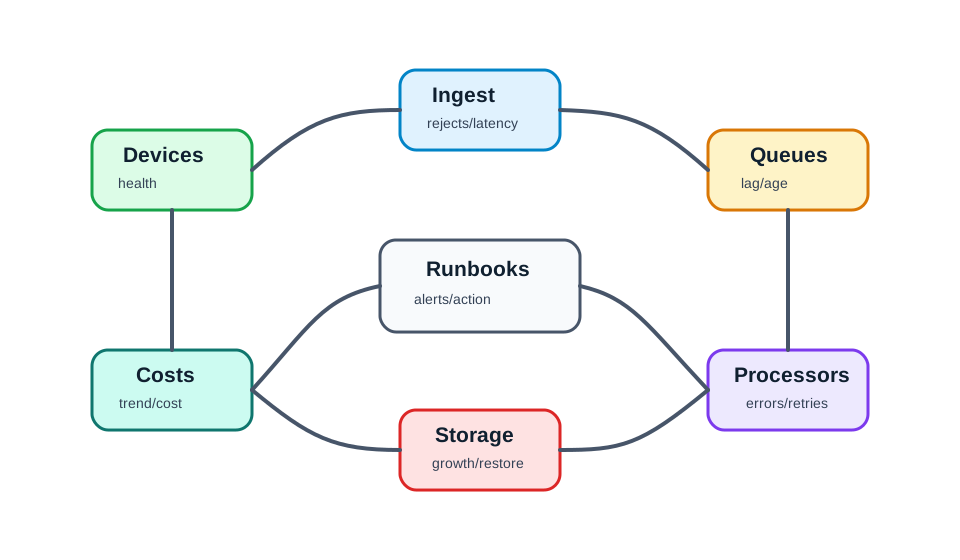
Across Figure 55.1, Devices contribute health, Ingest exposes rejects and latency, and Queues reveal lag and age before Processors report errors and retries. The path continues through Storage growth and restore evidence to Costs trends; Runbooks then turn those signals into alerts and action that feed the loop. Each label corresponds to a different broken contract, so the operational record must preserve the first failing boundary and the owner response instead of reducing every incident to “the cluster was down.”
Freshness
How quickly an event becomes usable in alerts, dashboards, features, and reports.
Completeness
How many expected devices, events, and windows arrive and pass validation.
Replay
How far back the system can rebuild outputs after a bug, schema change, or outage.
Cost
How storage, compute, stream retention, and query scans grow as data volume grows.
Governance
Who can change schemas, retention, access rules, quality gates, and serving definitions.
Overview Knowledge Check
55.3 Runbooks for Lag and Storage
This section: Runbooks for Lag and Storage — Operational alerts should lead to an action path.
Operational alerts should lead to an action path. If Kafka lag grows, the team checks whether producers increased, a consumer slowed, one partition became hot, a sink is throttling, or a schema error is forcing retries. If Spark or Flink jobs slow down, the team checks state size, checkpoint duration, garbage collection, input skew, and sink latency. If query latency grows, the team checks partition pruning, small files, table compaction, indexing, and retention.
Runbooks should include numbers. A lag alert is more useful when it says how fast the backlog is growing and how long until the recovery window is exceeded. A storage alert is more useful when it says which table, partition, or raw zone is growing faster than the lifecycle rule. Each action should preserve evidence before restarting jobs or deleting data.
Worked example: consumer lag incident
current Kafka lag: 420,000 events
incoming producer rate: 18,000 events/s
consumer processing rate: 14,500 events/s
critical lag threshold: 2,000,000 events

lag growth rate:
18,000 - 14,500 = 3,500 events/s

remaining lag budget:
2,000,000 - 420,000 = 1,580,000 events

time until critical threshold:
1,580,000 / 3,500 = 451.4 seconds
451.4 seconds = about 7.5 minutes

runbook implication:
This is not a "watch it tomorrow" alert. The team has minutes to identify
whether the consumer is CPU-bound, sink-bound, partition-skewed, retrying bad
records, or under-provisioned, then scale or shed noncritical work before the
recovery window is at risk.
Do not restart a stream job blindly. First capture current offsets, lag by partition, recent deployment id, checkpoint health, sink errors, and schema-validation failures. Otherwise the restart can erase the evidence needed to explain the incident.
Practitioner Knowledge Check
55.4 Reliability Needs Retesting
This section: Reliability Needs Retesting — Long-running IoT data systems fail slowly when retention and lifecycle rules are missing.
Long-running IoT data systems fail slowly when retention and lifecycle rules are missing. Raw data grows, small files multiply, compaction falls behind, dashboards scan too much history, and backup or replay windows become unclear. Operations should separate raw replay retention, curated analytical retention, serving retention, and aggregate retention. Each tier needs an owner, a cost limit, and a retest after policy changes.
Reliability also depends on routine retests. A restore drill proves that checkpoints can restart. A replay drill proves that raw events and transformation versions can rebuild a table. A schema-compatibility test proves that new firmware does not break downstream jobs. A data-quality retest proves that validation rules still catch impossible values without rejecting good data.
Worked example: lifecycle and storage pressure
raw daily volume: 69.12 GB/day
current raw retention: 90 days
proposed raw retention: 30 days
hourly aggregate volume: 28.8 MB/day
aggregate retention: 365 days

current raw footprint:
69.12 * 90 = 6,220.8 GB = 6.22 TB

proposed raw footprint:
69.12 * 30 = 2,073.6 GB = 2.07 TB

raw storage reduction:
6.22 TB - 2.07 TB = 4.15 TB

one year of hourly aggregates:
28.8 MB/day * 365 = 10,512 MB = 10.5 GB

operational implication:
Keeping raw data forever is rarely the right control. Keep raw long enough for
replay, audit, and debugging, then keep compact aggregates or curated tables
for longer-term trends. Retest replay before shortening raw retention.
Raw Retention
Bounded period for replay, audit, device debugging, and reprocessing after bad code or schema changes.
Curated Tables
Cleaned and versioned records for analytics, with quality flags and partition strategy.
Serving Data
Fast dashboard, alert, or API data with explicit freshness, retention, and rebuild rules.
Retest Drill
Scheduled proof that restore, replay, schema evolution, and quality gates still work.
Under the Hood Knowledge Check
55.5 Summary
This section: Summary — Operating IoT big-data systems means protecting the data contract after production conditions change.
Operating IoT big-data systems means protecting the data contract after production conditions change. Teams need metrics and runbooks for freshness, completeness, replay, cost, and governance. Kafka lag, stream checkpoints, schema registry failures, watermark drops, storage growth, compaction age, and query scan bytes are not isolated technical details; they show whether downstream alerts, dashboards, model features, and reports remain trustworthy.
Operations should prove that IoT data remains timely, complete, replayable, and cost-bounded. Alert on the evidence path, not just server uptime: lag by partition, validation failures, late events, checkpoint health, retention windows, table layout, query cost, and replay drills.
55.6 See Also
This section: See Also
Find help
3 reviewed answers.
Where should I start in a module?
Open the module page from the sidebar to see its chapters in order. Use the module map to return to a topic you need.
Modules and pathsReviewed
What can I try when a project does not work?
Check the symptom, then work through the diagnostic steps. Keep the error message and the smallest example that reproduces it.
When you are stuckReviewed
How do interactive examples work?
Use the interactive guide to check how examples and simulations work before changing your project.
Interactive examples guideReviewed