Signal
Name the physical or operational phenomenon the feature represents, including sensor source, units, sampling behavior, and expected noise.
Progress saves as you read. Mark sections complete as you go; your progress appears in the sidebar.
A vibration trace contains thousands of samples, but a maintenance model may need only energy, spread, peaks, and frequency content from a timed window. Feature engineering turns the waveform into measurements the model can use without erasing their physical meaning. The recipe must be reproducible at training and deployment.
This section: Turn a Waveform Into a Versioned Record — Follow Figure 32.1 from raw samples through cleaning, windowing, feature calculation, selection, and the model-ready table.
Follow Figure 32.1 from raw samples through cleaning, windowing, feature calculation, selection, and the model-ready table. Each stage changes representation. Keep the sensor unit and feature window time at the start, then bind every output column to the exact operation that created it.
For four acceleration samples 1, 3, 5, and 7 m/s², the mean is . The range is . These two features describe centre and spread but not sample order: the sequence 7, 5, 3, 1 has the same mean and range. If order carries a fault signature, add a slope, autocorrelation, or frequency feature rather than assuming summary statistics preserve it.
Feature window design is part of the recipe. A 100 Hz sensor gives 200 samples in two seconds. With 50% overlap, a feature row starts every second. Split train and test data by machine or time before producing overlapping windows; otherwise neighbouring windows can leak nearly identical samples across the boundary.
Packet traces need different features. Counts by direction, inter-arrival summaries, sizes, and burst lengths may help infer an application without inspecting payloads. Yet a device identifier, destination unique to one lab, or capture-file name can become a shortcut. Remove such columns or test on unseen devices and networks.
Selection should use training evidence only. A feature can be dropped because it is constant, too often missing, redundant under a written rule, too expensive on the target, or harmful in validated comparisons. Do not browse test performance repeatedly while choosing columns; that turns the test set into training guidance.
Predict the recipe with fixtures. The four-sample feature window should yield mean 4 m/s² and range 6 m/s². Reorder it and expect those two values to stay equal, demonstrating their limit. Send a 199-sample feature window to the two-second 100 Hz contract and expect a visible rejection or named padding rule. Finally compare one training feature row with edge-generated output, including names, order, units, and tolerance.
This section: Start With the Story — Picture a motor that begins to shake.
Picture a motor that begins to shake. Raw samples fill a file, but the repair team needs a clear sign of change. A useful model input keeps the part of the signal that helps that choice.
A feature is a measured clue made from raw data. Firmware is the software stored on the device that may collect or shape that data. Start with the field decision. Then name the source, unit, time window, and missing-data rule. Use the same recipe when the model learns and when it runs. A clue made after the result happened must not leak back into training. A clue that the field device cannot make is not ready for live use.
Ask these short questions:
One feature rarely proves a cause. It can support a bounded choice when its recipe and limits are clear. Practitioner writes the full recipe and test record. Under the Hood covers leakage, drift, version ties, and feature contracts. Those details can change which clue is trusted. They must not turn a late or missing clue into valid live evidence.
Keep the recipe plain. One source enters. One time window closes. One rule makes the clue. One test checks the live path.
Each feature needs a named source, time window, transformation, and live test before it becomes evidence.
This section: Inferring Applications from Packet Traces — When endpoints do not identify their application, an observer can infer a traffic class from packet traces.
When endpoints do not identify their application, an observer can infer a traffic class from packet traces. Deep packet inspection compares visible payload structures with known patterns; port analysis uses transport metadata; statistical and machine-learning approaches use features such as packet sizes, directions, inter-arrival times, burst shape, and flow duration. Clustering can explore unlabelled traces, while a supervised classifier can assign known classes when representative labels exist.
Each route has a different boundary. Payload inspection can be precise for recognisable cleartext protocols, but encryption and encapsulation remove visibility and inspection may be prohibited or disproportionate. Ports are cheap to read but are weak identities because applications share, change, or deliberately reuse them. Statistical models can operate without reading content, yet they can learn a device, site, firmware version, or capture setup instead of the application behavior the team intended.
Build the inference record like any other feature contract: name the observation point, flow key, direction convention, window, feature code, label source, encrypted-traffic handling, excluded payload fields, and retention policy. Split evaluation by device, site, or time when those boundaries could leak into both training and test data. Report per-class errors, unknown handling, drift, and the decision made from the prediction. A home gateway might classify video-like bursts to understand congestion, for example, but it should route uncertain or new traffic to an unknown class rather than silently applying a restrictive policy. Why it matters is operational: inference can support capacity planning and troubleshooting without endpoint cooperation, but a confident label is not consent to inspect content or proof that the application itself misbehaved.
This section: Features Preserve Signal Meaning — Feature engineering turns raw IoT observations into model inputs that preserve the meaning needed for a decision.
Feature engineering turns raw IoT observations into model inputs that preserve the meaning needed for a decision. The useful feature is not simply a statistic or embedding. It is a repeatable measurement of the signal, context, label boundary, and time window that the model will see again in deployment.
For a vibration classifier, a feature may describe energy in a frequency band, peak behavior, or a change from normal baseline. For an occupancy model, a feature may combine motion events, door state, time of day, and recent absence. For a battery-risk model, a feature may tie voltage, temperature, current draw, firmware state, and communication retries to a service decision.
If you only need the intuition, this layer is enough: a feature is acceptable when its source, window, units, label timing, missing-data behavior, transformation code, and deployment availability are all reviewable.
Worked example: a temperature-alert model might turn one-second sensor samples into a 60-second window with mean, maximum, slope, missing-sample count, and last-calibration age. Those features are only trustworthy if the same window boundary, unit conversion, calibration state, and missing-data rule are used during training, validation, and deployment. If the edge device later reports every 10 seconds, the feature recipe has changed even when the feature names stay the same.
Name the physical or operational phenomenon the feature represents, including sensor source, units, sampling behavior, and expected noise.
Define the time span, event boundary, aggregation rule, freshness, and whether the window is allowed to look before or after the prediction time.
Connect the feature to the target label without leaking future outcomes, maintenance notes, post-event states, or operator decisions.
Prove the same feature can be computed online or at the edge with the available latency, power, storage, privacy, and fallback behavior.
The feature-pipeline diagram in Figure 32.1 makes the deployable recipe visible before individual statistics are judged.
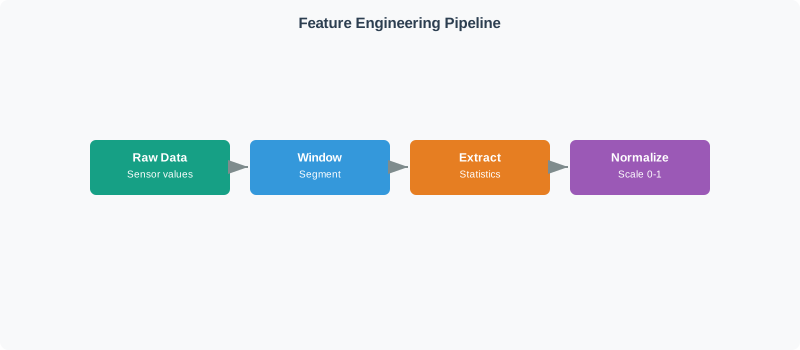
Follow Figure 32.1 from raw sensor values into a defined window, through statistic extraction, and finally normalization. The window fixes sample membership and latency; statistics encode the chosen signal behavior; normalization uses training-derived parameters to place features on the expected scale. Every arrow must execute identically after deployment. This carries forward the chapter’s running narrative: a useful feature is not just predictive in a notebook—it is physically meaningful, leakage-controlled, affordable, versioned, and available with the same semantics at inference time.
A feature set is useful when the chosen dimensions make the groups easier to distinguish together than they would be alone. Color by itself may overlap, weight by itself may overlap, but color plus weight may separate the examples well enough for a simple model. Even a simple image question such as whether a fruit is more red or orange needs a recipe: maximum channel value, mean channel value, channel ratio, and histogram shape can support different decisions. A weak feature is not "wrong" because it is ugly. It is weak when it is irrelevant, unstable, too expensive to compute, unavailable at inference time, or unable to separate the decision groups it is supposed to support.
Use physical quantities directly when the units and calibration are trustworthy: weight, temperature, pressure, vibration energy, battery voltage, or signal strength.
Represent objects as numbers only when the encoding preserves the useful difference. A color may become an RGB tuple; an image may become an ordered grid of pixel values.
Represent audio, motion, or other time-varying signals as fixed windows, sampled sequences, frequency features, or summary values such as mean, slope, variance, peaks, zero crossings, event counts, and energy.
Histograms, skewness, and kurtosis can preserve distribution shape, but bin choices and window boundaries matter: too few bins hide detail, while too many bins become sparse and sensitive to noise.
Real sensor preprocessing is application-dependent. Filtering, denoising, normalization, clipping, and windowing should be chosen because they preserve the decision signal, not because they are standard notebook steps. For a gesture classifier on a Particle-class device, the pipeline might collect IMU motion on the device, compute compact window features locally, train or configure the model from a phone workflow, display the predicted character on the phone, and keep raw logs for Python plots so the team can see whether four in-air gestures are actually separable.
This section: Practitioner: Write a Feature Recipe — A feature recipe is the contract between training and inference.
A feature recipe is the contract between training and inference. It states exactly how a feature is computed, what assumptions it uses, how missing and out-of-range values are handled, and what evidence proves it still means the same thing when deployed.
Keep feature selection reviewable. Removing redundant features can make a model cheaper and easier to monitor, but the retained features should still explain the operational claim. If a selected feature is a proxy for user identity, protected status, site ID, maintenance shift, or a post-decision workflow, the review should check whether it is meaningful, fair, legal, and available at inference.
Common selection methods ask different questions. A variance threshold keeps features that actually spread out across examples, so a nearly constant column does not pretend to add evidence. Univariate tests score one feature at a time against the label and can reveal a single strong separator, but they can miss combinations that only work together. Principal component analysis (PCA) transforms the feature space toward directions with high variation and can reduce dimensionality, but the projected components still need scaling, provenance, and deployment-time reproducibility.
When two sensors observe the same motion through different mechanisms, compare more than their raw traces. Welch power spectral density estimation divides a window into overlapping segments, windows each segment, estimates a periodogram, and averages the results. The averaging makes the estimate less erratic than one periodogram, at the cost of frequency resolution and added latency. The feature contract must record sample rate, synchronization, segment length, overlap, window function, detrending, filtering, normalization, and the frequency band used for the decision; otherwise two curves can differ because the pipelines differ rather than because the sensors disagree.
For example, an event camera and a balance board may both observe postural sway while measuring different physical quantities. Agreement of band power, dominant-frequency region, or spectral shape within a predeclared sway band supports the claim that both preserve relevant dynamics. It does not prove that their amplitudes are interchangeable or that either is clinically valid. Check coherence only when synchronization and signal definitions support it, preserve participant and stance context, and investigate spectral disagreement as possible timing, geometry, calibration, filtering, noise-floor, or measurand evidence. This turns a PSD plot into a reproducible validation feature rather than a visual similarity claim.
This section: Leakage, Drift, Feature Contracts — Feature engineering often fails because a model learns a shortcut that will not hold after deployment.
Feature engineering often fails because a model learns a shortcut that will not hold after deployment. The shortcut may be explicit leakage, such as a post-event field inside the feature table. It may also be a quiet proxy, such as a device ID that stands in for a site, a timestamp that stands in for maintenance schedule, or a missing-value pattern that stands in for a broken collection process.
A practical leakage test asks whether the value would exist, with the same precision and delay, at the moment the model must act. If the answer depends on a future repair ticket, a later human label, a batch backfill, or a post-alarm state, the feature contract is invalid for real-time inference.
The feature uses values, labels, repairs, alarms, or operator actions that happen after the prediction time.
The split lets the same device, user, room, asset, or site appear in both training and validation when deployment needs generalization.
The deployed code changes sampling, normalization, clipping, imputation, encoding, or missing-data labels compared with training.
The same feature name remains in the table after sensors, firmware, labels, usage, environment, or operating policy changes its meaning.
The strongest defense is a feature contract: a versioned recipe, an availability check at prediction time, a leakage audit, a held-out validation split that matches deployment, and monitors for input range, missingness, drift, and feature calculation failures. Feature stores can help when they preserve this contract, but they do not remove the need to review feature meaning.
Under the hood, feature selection should also be treated as a reliability decision. Dropping a feature can reduce cost, but it may remove the only signal that catches a rare failure mode. Adding a feature can improve a metric, but it may increase latency, power, privacy risk, or false confidence. The accepted feature set should state what it optimizes and what it no longer claims to detect.
This section: Summary
Feature engineering is trustworthy when training and deployment share the same feature meaning: source, window, transform, label boundary, quality behavior, leakage controls, and retest triggers all stay reviewable.
This section: See Also
Review the basic supervised-learning terms that feature recipes support.
Place features inside the full path from decision target to deployed model, monitoring, and retraining evidence.
Connect feature quality to schema checks, outlier handling, provenance, drift, and exception review.
Check whether feature computation fits edge latency, memory, power, update, telemetry, and fallback constraints.
3 reviewed answers.
Open the module page from the sidebar to see its chapters in order. Use the module map to return to a topic you need.
Modules and pathsReviewed
Check the symptom, then work through the diagnostic steps. Keep the error message and the smallest example that reproduces it.
When you are stuckReviewed
Use the interactive guide to check how examples and simulations work before changing your project.
Interactive examples guideReviewed