Decision Fit
Name the prediction, the user or system that acts on it, the latency or offline need, and the cost of a wrong, late, or missing output.
Progress saves as you read. Mark sections complete as you go; your progress appears in the sidebar.
A motor TinyML controller may need an anomaly decision before a cloud round trip can finish. TinyML moves a compact TinyML model beside the sensor, where memory, compute time, energy, and update safety become part of TinyML model quality. Edge deployment is therefore a placement and release problem, not just file conversion.
An actuator is a deployment device that changes the physical system. Firmware is the software installed on the TinyML controller, and latency means the time until its decision is ready.
This section: Fit the TinyML model Inside the Deployment device Budget — Follow Figure 34.1 from the trained TinyML model through deployment conversion, operator support, firmware integration, and on-device inference.
Follow Figure 34.1 from the trained TinyML model through deployment conversion, operator support, firmware integration, and on-device inference. Deployment conversion can quantize weights or replace operations, so the converted artifact needs its own accuracy check. Integration then adds the exact feature code and tensor shape expected by the deployment runtime. The deployment device result closes the path; a successful desktop deployment conversion does not prove it runs within the target memory and latency limits.
Suppose a TinyML controller has 256 kB of RAM, with 150 kB already used by firmware and communication buffers. That leaves before a safety reserve. Keeping 20 kB free gives the TinyML model, tensor arena, and feature buffers an 86 kB budget. A 60 kB TinyML model plus a 30 kB arena totals 90 kB and does not fit that release rule, even though each component fits alone.
Latency must include the whole local path. A 25 ms sensor window copy, 18 ms feature calculation, 12 ms inference, and 5 ms decision step total . If the actuator deadline is 100 ms, the measured path has 40 ms of margin. Test worst-case communication interrupts and thermal conditions because an average 60 ms run is not a deadline guarantee.
Quantization trades representation detail for size and speed. Compare the floating TinyML model and converted TinyML model on the same held-out fixtures, including boundary cases near the decision threshold. A one-point accuracy summary can hide a changed false-negative rate that matters for motor protection.
Updates need a recoverable boundary. Sign the TinyML model or firmware package, verify compatibility with the feature schema, stage it, run a known-answer self-test, and retain a rollback image. Log the TinyML model version with every anomaly result so field evidence identifies what executed.
Predict three target checks. Load the maximum input window and expect peak RAM to stay below 236 kB, preserving the 20 kB reserve. Replay a known fixture and expect the converted score within the approved tolerance. Interrupt an update and expect the TinyML controller to boot the last valid image. Those results make edge deployment evidence stronger than a build message.
Runtime and power depend on the specific microcontroller, compiler, clock, and operators. Measure the published budget on the production board rather than treating these worked numbers as a hardware promise.
This section: Start With the Story — Picture a machine that must spot a fault even when the Internet is down.
Picture a machine that must spot a fault even when the Internet is down. A small model runs inside the field device. It can act quickly and keep raw data on site. It also has far less memory, power, and processing room than a distant server.
Edge deployment means placing the model near the sensor and the event. Start with the decision. State how soon it must happen. Name the input it needs. Set the allowed error and power use. Then choose a device that can run the whole path.
Measure more than the model file. Input cleaning needs time and memory. The model needs working space. The result needs an action. Logs and recovery need space too. Test all of these together on the final hardware.
Plan the life after release. Watch input quality and result rates. Keep a safe fallback. Make updates gradual. Prove that a failed update leaves a working device. Record the version that produced each important result.
This first view assumes one small model and one local choice. Real products may split work between device and remote service. The Practitioner layer builds the size, speed, power, and release record. Under the Hood examines reduced number formats, memory peaks, drift, and the limits that appear when a lab model meets field hardware.
An edge model release must fit input cleaning, model memory, action time, logging, and a safe fallback on the device.
The mathematical gist. A stated-assumption 1.00 kHz vibration band needs at least 2.00 kHz sampling; the practical 2.56× anti-alias factor raises that target to 2.56 kHz. A catalog-typical 12-bit, 3.3 V ADC then adds a 0.806 mV step, 0.233 mV RMS rounding noise, and 74.0 dB ideal SNR. Those sensor limits exist before the chapter’s 100 MB model becomes a 5 MB TFLite model or a 200 kB microcontroller artifact, so firmware sample-rate changes remain release-level retest triggers.

This section: Edge Deployment as Placement — Edge ML and TinyML move inference closer to the sensor, gateway, phone, controller, or embedded device that observes the field condition.
Edge ML and TinyML move inference closer to the sensor, gateway, phone, controller, or embedded device that observes the field condition. The reason may be latency, privacy, offline operation, bandwidth reduction, cost control, or local resilience. The deployment is acceptable only when those reasons are tied to evidence.
The useful claim is not that a model can run somewhere small. The useful claim is that a specific model artifact, feature recipe, runtime, device, update path, fallback, and telemetry plan can support a named decision under real operating constraints.
If you only need the intuition, this layer is enough: approve edge ML when the placement reason, model artifact, feature parity, resource budget, update path, fallback behavior, telemetry, known limit, and retest trigger are all reviewable.
Worked example: a vibration classifier might begin as a 100 MB floating-point training artifact, convert to a 5 MB TFLite model, and finally ship as a roughly 200 KB microcontroller model with a fixed operator set and tensor arena. That size reduction is useful only if the deployed preprocessing, threshold, confidence rule, memory budget, and fallback path are tested on the same board and sensor schedule that will run in the field. Keep the model file, firmware build, and release record together.
Name the prediction, the user or system that acts on it, the latency or offline need, and the cost of a wrong, late, or missing output.
Version the model, feature code, preprocessing, thresholds, runtime, hardware target, and conversion steps used to produce the deployable artifact.
Measure memory, storage, compute time, thermal behavior, energy use, startup time, and contention with sensing, radio, and control tasks.
Define update, rollback, telemetry, drift review, privacy boundary, confidence handling, and the safe behavior when inference cannot be trusted.
The deployment diagram in Figure 34.1 connects cloud training to the exact memory and inference path that must operate on a microcontroller.
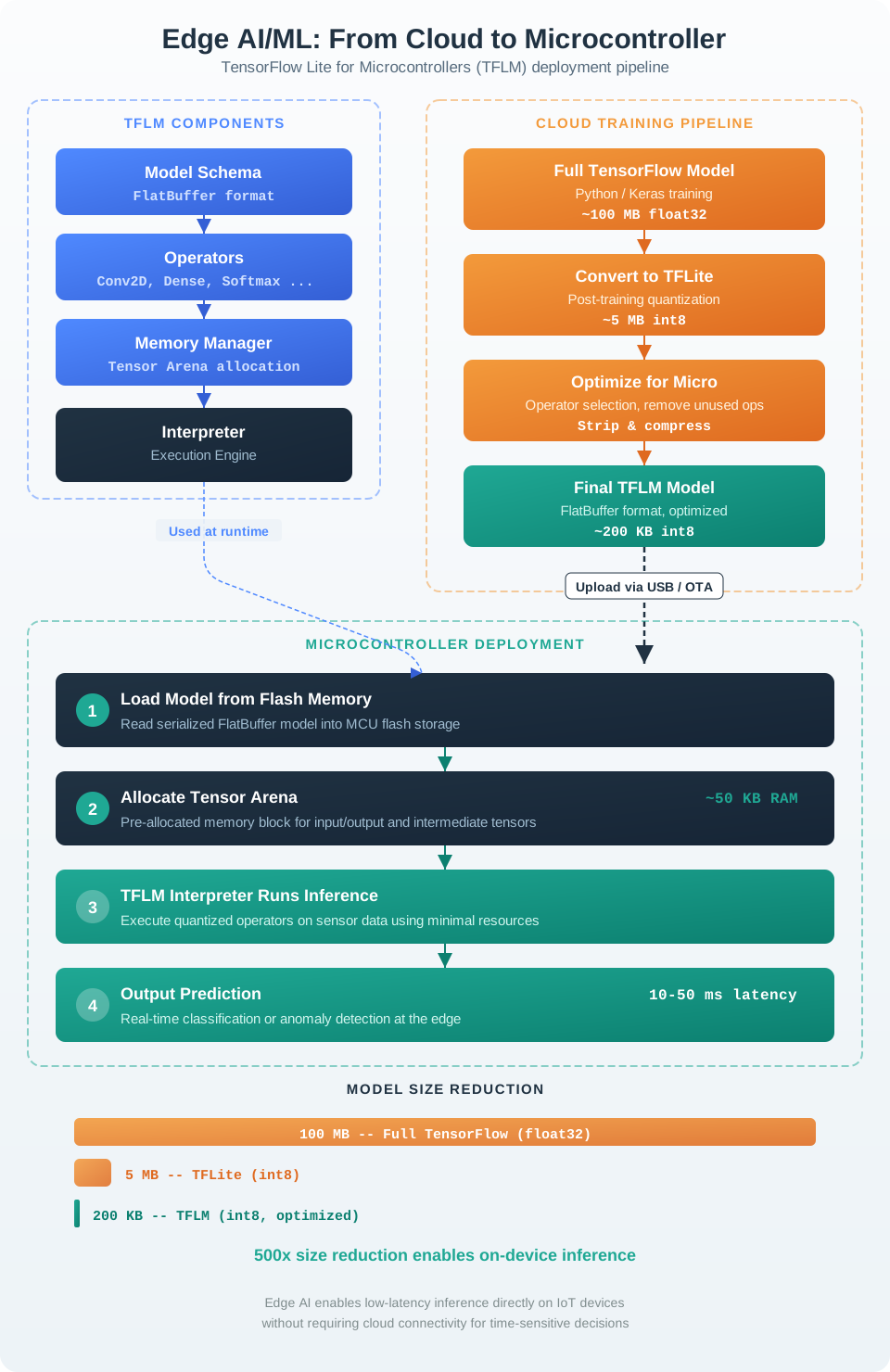
Begin at the trained model in Figure 34.1, then follow conversion to its first evidence check: changed weights or operations require a fresh accuracy result. Operator support and firmware integration come next because the target must accept the converted model and reproduce its exact features and tensor shape. The memory card then tests the whole release. From 256 kB, firmware uses 150 kB and the reserve takes 20 kB, leaving 86 kB. A 60 kB model plus a 30 kB arena needs 90 kB, so it misses the budget by 4 kB before inference even runs.
This section: Edge ML Release Record — The release record proves that the deployed artifact matches the pipeline claim.
The release record proves that the deployed artifact matches the pipeline claim. It should be understandable by model owners, firmware owners, field support, and operations reviewers. The record is not a model card alone; it includes runtime and service evidence.
Keep the acceptance decision narrow. A model that classifies equipment state on one gateway may not be approved for another gateway, another sensor enclosure, a faster control loop, a safety alarm, or a new population without retest evidence.
This section: Edge Runtime Boundaries — Edge deployment changes the operating boundary of a model.
Edge deployment changes the operating boundary of a model. Training may have used clean batches, stable timestamps, full precision, large memory, and cloud-side observability. The device may have noisy sensor streams, clock drift, missing packets, reduced precision, tight memory, limited power, intermittent backhaul, and delayed outcomes.
The runtime boundary is also a software boundary. The review should name the operator set, tensor arena or memory pool, compiler/runtime version, quantization calibration sample, preprocessing code path, and scheduler assumptions that make the artifact behave like the evaluated model. A firmware update that changes sampling order, task priority, clock source, or radio duty cycle can invalidate the evidence even when the model checksum is unchanged. That is why runtime changes belong in the retest trigger.
Online windows, filters, units, missing-data rules, and sensor timing must match the training recipe or the model sees a different problem.
Quantization, pruning, distillation, or runtime conversion can change confidence, rare-class behavior, and borderline decisions.
Inference shares memory, power, processor time, storage, and communication windows with firmware tasks that also matter to the product.
Privacy, bandwidth, and offline operation can hide inputs and outcomes, so telemetry must prove enough without collecting too much.
A strong deployment plan treats fallback as part of the model. If input quality is poor, confidence is low, the runtime is overloaded, or the model version is suspect, the system should choose a documented safe behavior: defer to a rule, ask for cloud review, use a conservative threshold, hold the previous state, or escalate to a human owner.
The under-the-hood rule is to preserve diagnosability. A field model that cannot report version, input quality, confidence, fallback frequency, resource pressure, and drift signals is hard to improve and unsafe to broaden.
This section: Lab: Measure an Edge Vision Pipeline — Measure acquisition, preprocessing, detection, and end-to-end latency separately.
Measure acquisition, preprocessing, detection, and end-to-end latency separately. The detector below is intentionally simple: it finds sufficiently large bright regions. Its purpose is to expose the runtime boundary and evidence record, not to claim production object recognition.
import statistics
import time
import cv2 as cv

camera = cv.VideoCapture(0)
if not camera.isOpened():
    raise RuntimeError("camera did not open")

rows = []
try:
    for frame_id in range(120):
        started = time.perf_counter_ns()
        ok, frame = camera.read()
        acquired = time.perf_counter_ns()
        if not ok:
            raise RuntimeError(f"frame {frame_id} was not captured")

        gray = cv.cvtColor(frame, cv.COLOR_BGR2GRAY)
        blurred = cv.GaussianBlur(gray, (5, 5), 0)
        _, mask = cv.threshold(blurred, 210, 255, cv.THRESH_BINARY)
        preprocessed = time.perf_counter_ns()

        contours, _ = cv.findContours(mask, cv.RETR_EXTERNAL, cv.CHAIN_APPROX_SIMPLE)
        detections = [cv.boundingRect(c) for c in contours if cv.contourArea(c) >= 400]
        finished = time.perf_counter_ns()
        rows.append({
            "capture_ms": (acquired - started) / 1e6,
            "preprocess_ms": (preprocessed - acquired) / 1e6,
            "detect_ms": (finished - preprocessed) / 1e6,
            "total_ms": (finished - started) / 1e6,
            "detections": len(detections),
        })
finally:
    camera.release()

for field in ("capture_ms", "preprocess_ms", "detect_ms", "total_ms"):
    samples = sorted(row[field] for row in rows[20:])  # discard warm-up
    p95 = samples[int(0.95 * (len(samples) - 1))]
    print(field, {"mean": round(statistics.mean(samples), 2), "p95": round(p95, 2)})
print("detection_count_range", min(r["detections"] for r in rows), max(r["detections"] for r in rows))
Run the same recorded frame set for every comparison. For the edge path, record the four timings above plus device temperature, CPU load, power mode, frame size, OpenCV version, and dropped frames. For a controlled cloud path, add encode time, payload bytes, upload time, queue time, remote inference time, return time, and failure/retry status. Report mean and p95, not one favourable sample.
| Placement | Latency equation | Failure and privacy evidence |
|---|---|---|
| Device/edge | capture + preprocess + detect + local action | thermal throttling, memory/CPU contention, fallback, retained frames |
| Cloud | capture + encode + upload + queue + inference + response + action | disconnect, timeout, duplicate request, region/data purpose, deletion proof |
Do not send identifiable camera frames to a public endpoint for this exercise. Use consented or synthetic footage and an organisation-controlled test service. An edge result is not automatically faster or more private; a cloud result is not automatically more accurate. Compare the same input, model/detector, threshold, decision deadline, and failure policy, then record which boundary owns fallback.
This section: Summary
Deploy edge ML only when the runtime evidence is as reviewable as the training evidence. Placement, artifact, device resources, fallback, telemetry, owner, known limit, and retest trigger belong in the same release record.
This section: See Also
Ground the deployment decision in prediction targets, training versus inference, labels, metrics, and decision risk.
Check that the deployed feature recipe preserves sensor meaning, timing, units, missingness, and prediction-time availability.
Place the edge artifact inside the full evidence chain from data and labels through monitoring and retraining.
Connect edge telemetry, drift, confidence, fallback, update, rollback, and incident ownership to production operations.
3 reviewed answers.
Open the module page from the sidebar to see its chapters in order. Use the module map to return to a topic you need.
Modules and pathsReviewed
Check the symptom, then work through the diagnostic steps. Keep the error message and the smallest example that reproduces it.
When you are stuckReviewed
Use the interactive guide to check how examples and simulations work before changing your project.
Interactive examples guideReviewed