57 Big Data Case Studies
More
Depth: Practitioner
Progress saves as you read. Mark sections complete as you go; your progress appears in the sidebar.
57.1 Start With the Story
This section: Start With the Story — Picture a city team claiming that millions of road readings will reduce bus delays.
Read a Large-Data Story Backwards From the Decision
Picture a city team claiming that millions of road readings will reduce bus delays. The number sounds impressive, but the service planner needs to know which decision changes, how quickly it changes, and what evidence shows that the change helped.
Choose one decision, such as moving a bus or sending a repair crew. Record the source, time, unit, place, quality mark, cleaning step, result, person who acts, and final outcome. Count records at each step so missing, late, rejected, and repeated items do not vanish inside a large total.
Replay a known day. Remove one source, delay part of the stream, change a field name, restart a worker, and fill a store. Check whether the same input gives the same result, whether old facts look current, and whether an operator can trace a surprising answer.
Large volume may justify work across several computers, but it does not prove value, truth, or fairness. Compare the outcome with a smaller method and include staff, storage, link, review, and recovery costs.
Practitioner turns the case into a decision and evidence record. Under the Hood explains split work, event time, saved state, data rules, and the limits of transferring a successful case to a new place.
Use this case-study audit:
- Name the decision that should improve.
- Name the person who acts.
- Count facts at each step.
- Keep source and time attached.
- Replay one known day exactly.
- Remove one source and compare.
- Delay part of the stream.
- Change one field name once.
- Restart one worker during load.
- Reconcile all final outcomes.
- Compare with a smaller method.
- State why transfer may fail.
A case study earns its claim by linking the decision to its input, failure test, and transfer limits.
57.2 Case Studies Start With Decisions
This section: Case Studies Start With Decisions — An IoT big-data case study is useful only when it connects a decision to the evidence path that supports it.
An IoT big-data case study is useful only when it connects a decision to the evidence path that supports it. "A city has millions of readings" is not enough. The case study must state the operational decision, the sensors involved, the sampling rates, the data contracts, the processing path, the retention rule, and the measured outcome. Otherwise it is only a volume story.
Good case studies also separate raw data from decision evidence. A traffic platform may keep raw video locally or in an archive, but dashboards often need counts, speeds, incident flags, confidence scores, and short event clips. A maintenance platform may keep raw vibration bursts for review, but streaming alerts often depend on features such as RMS, spectral energy, temperature trend, load state, and model version. The architecture is credible when the retained evidence can be replayed, audited, and tied back to a decision.
The first question is not "which big-data tool is fashionable?" It is "which decision is being made, which evidence proves it, and what must be retained if the decision is challenged later?"
Before treating a case study as proof of scale, inspect the two system diagrams in Figure 57.1 and ask which constraint actually exceeds one machine.
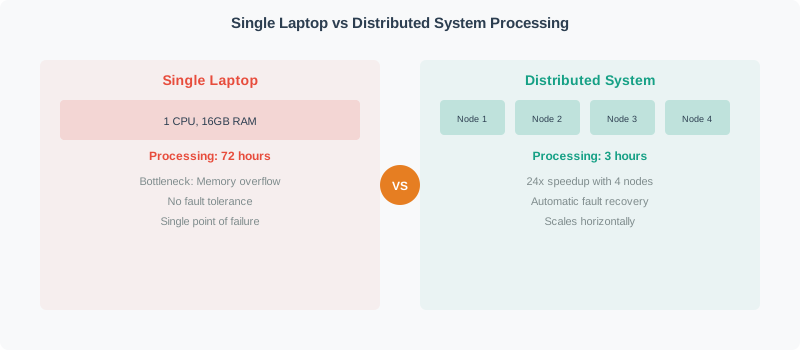
Read Figure 57.1 from the single-laptop path to the partitioned path. One machine keeps coordination simple but concentrates CPU, memory, storage, and failure risk; the distributed system divides data and work across nodes, then pays for partitioning, transfer, coordination, and recovery. The picture does not claim that distribution is automatically better. It connects the chapter's case studies to the running decision rule: scale out only after measured volume, velocity, deadline, or resilience requirements justify the extra operating contract.
Decision
Name the action: reroute traffic, dispatch maintenance, change a cooling setpoint, or quarantine a bad sensor.
Evidence
Define the readings, features, quality flags, model versions, and raw windows needed to defend the action.
Architecture
Map evidence through MQTT, Kafka, Flink, Spark, object storage, data lake tables, and serving stores.
Outcome
Measure latency, cost, avoided downtime, energy reduction, safety response, or analyst time saved.
Overview Knowledge Check
57.3 Build the Case Ledger First
This section: Build the Case Ledger First — A practical case ledger converts a scenario into rates, payloads, storage tiers, and query paths.
A practical case ledger converts a scenario into rates, payloads, storage tiers, and query paths. The numbers below are a representative smart-city workload, not a claim about one named city. The point is the calculation method: quantify the streams, separate metadata from heavy media, and make storage and processing choices from measured demand.
The same ledger also prevents architectural overreach. Parking sensors and air-quality stations may fit batch summaries. Traffic-loop counts may need sub-minute stream processing. Camera-derived events may need edge inference and privacy controls. A single relational database or a single data lake table is unlikely to serve all access patterns cleanly.
Worked case: representative smart-city platform
parking occupancy:
800 sensors * 2,880 readings/day * 80 bytes = 184,320,000 bytes/day = 0.184 GB/day

air quality:
200 stations * 1,440 readings/day * 220 bytes = 63,360,000 bytes/day = 0.063 GB/day

streetlight status:
15,000 lights * 1,440 readings/day * 90 bytes = 1,944,000,000 bytes/day = 1.944 GB/day

traffic-loop counts:
3,000 loops * 86,400 readings/day * 120 bytes = 31,104,000,000 bytes/day = 31.104 GB/day

camera event metadata:
600 cameras * 172,800 events/day * 400 bytes = 41,472,000,000 bytes/day = 41.472 GB/day

event clips selected by edge inference:
600 cameras * 200 clips/day * 2 MB = 240,000 MB/day = 240 GB/day

daily total:
0.184 + 0.063 + 1.944 + 31.104 + 41.472 + 240 = 314.767 GB/day

design reading:
The platform is not dominated by parking or air-quality records. It is dominated
by selected camera clips and traffic streams. That pushes the architecture toward
edge inference, hot summaries, lifecycle-managed object storage, and strict access
control for media.
Case-study math should change the design. If one stream contributes 76 percent of daily volume, retention, privacy, compression, and query strategy should focus there first.
Practitioner Knowledge Check
A second case shows why big-data systems do not always need the same stack. In cold-chain logistics, the main decision is whether a shipment stayed within temperature limits. A gateway may buffer BLE or cellular sensor readings during connectivity gaps, then upload signed time-series records. TimescaleDB, InfluxDB, or a cloud time-series service can serve recent queries, while object storage preserves signed audit bundles. The critical evidence is not petabytes of volume; it is timestamp integrity, custody handoff, clock sync, tamper state, and rule evaluation.
Practitioner Knowledge Check
57.4 Validate Economics and Evidence
This section: Validate Economics and Evidence — Case studies become engineering assets when their numbers can be checked.
Case studies become engineering assets when their numbers can be checked. Daily volume should follow from device count, sample rate, and payload size. Query latency should be measured from real dashboards or replay tests. Storage cost should separate hot, warm, and archive data. Outcomes should name the baseline and the measurement window: fewer truck rolls, shorter incident response, reduced energy use, lower spoilage, or faster analyst workflow.
Cloud prices, storage classes, and managed-service charges change, so procurement should always refresh current pricing. The calculation pattern is still stable: estimate retained GB by tier, multiply by the contract price for that tier, add compute, network egress, observability, and operations labor, then compare the result to the operational value.
Worked example: tiered storage for the smart-city case
daily generated evidence: 314.767 GB/day
hot retention target: 7 days
warm retention target: 90 days total
archive policy after 90 days: keep only 20 percent of records and clips

example storage prices from a contract, not a universal quote:
hot object storage: \$0.023 per GB-month
warm object storage: \$0.012 per GB-month
archive object storage: \$0.004 per GB-month

all data hot for 90 days:
314.767 * 90 = 28,329 GB
28,329 * \$0.023 = \$651.57/month

tiered first 90 days:
hot: 314.767 * 7 = 2,203 GB; 2,203 * \$0.023 = \$50.67/month
warm: 314.767 * 83 = 26,126 GB; 26,126 * \$0.012 = \$313.51/month
first-90-day tiered total = \$364.18/month

archive after 90 days for a seven-year record:
archive days = (7 * 365) - 90 = 2,465 days
archive retained volume = 314.767 * 2,465 * 0.20 = 155,180 GB
archive monthly storage = 155,180 * \$0.004 = \$620.72/month

design reading:
The storage bill is not the only cost, but the calculation proves why lifecycle
policy and archive sampling are architecture controls, not cleanup tasks. It
also shows which assumptions must be reviewed when actual access patterns arrive.
57.4.1 SKA Capacity and Backhaul Envelope
The Square Kilometre Array is a useful scale exercise because it forces three units into the same ledger: annual volume, sustained ingest rate, and backhaul capacity. Treat the source figures as a historical order-of-magnitude scenario, not as a current SKA design guarantee. Start with a 2016 global-IP-traffic reference of approximately 1.2 zettabytes per year and ask what “ten times that” means arithmetically.
The antenna field in Figure 57.2 supplies the physical scale behind that ledger: many instruments operate together at a remote high-altitude site, while the arithmetic below asks what can be retained or transported after collection.

Photo: ESO/S. Seip, CC BY 4.0{target=“_blank” rel=“noopener”}
In Figure 57.2, the separated dishes are not independent archives: they are parts of a coordinated instrument whose observations must be combined. The photograph therefore illustrates the collection footprint, while the worked example supplies the explicit rate and reduction assumptions that a photograph cannot establish.
Using decimal storage units,
The ten-times scenario is therefore
Annual capacity hides the ingest problem, so divide by the seconds in a 365-day year:
That is about 381 TB/s, or 3.05 Pbit/s, sustained. One day at that rate produces about 32.9 EB. Even ignoring replication, parity, metadata, failed media, cooling, and write bandwidth, storing the raw year would require the usable capacity of twelve billion 1 TB drives. The absurdity is the lesson: “save everything and decide later” is not an architecture at this scale.
Now test the transport boundary. A dedicated 400 Gbit/s link carries at most
before framing, protection, outages, or shared use. The raw 12 ZB/year stream is roughly 7,600 times larger. Equivalently, a 400 Gbit/s Perth backhaul could carry only about 0.013% of the hypothetical raw stream. Adding one faster link does not close that gap.
| Boundary | Raw scenario | Design consequence |
|---|---|---|
| Annual volume | 12 ZB/year | On-site storage cannot be a raw, indefinite archive |
| Average ingest | 381 TB/s | Memory, buses, accelerators, and writers must be parallel and continuously provisioned |
| 400 Gbit/s backhaul | 0.05 TB/s ideal payload rate | Raw off-site transfer needs about 7,600:1 reduction before overhead |
| One day of raw data | 32.9 EB | A short outage still creates an enormous local buffer obligation |
The system must therefore reduce data near the instruments. A defensible pipeline calibrates and flags samples, channelizes or correlates signals, rejects known interference under recorded rules, forms scientifically useful products, and retains only the raw windows needed for calibration, anomaly review, or reproducibility. Each reduction stage needs a ratio and a loss statement:
where is the retained fraction after stage . To fit the illustrative 400 Gbit/s link, the product of all retained fractions must be no more than about . That target should be allocated across reversible formatting, aggregation, correlation, event selection, and retention rather than hidden behind the word “compression.” The case record must say which scientific questions each irreversible step makes impossible, which raw windows remain available for audit, and how a backhaul outage changes the on-site queue.
Replay Evidence
Keep topic offsets, schema ids, table versions, raw object paths, and job versions so a result can be rebuilt.
Privacy Evidence
Record access logs, redaction state, retention expiry, consent or policy basis, and review decisions for sensitive data.
Cost Evidence
Track retained GB by tier, query scan bytes, compute hours, network egress, small-file counts, and owner tags.
Outcome Evidence
Compare decisions against a baseline: downtime avoided, incidents detected, trips reduced, energy saved, or spoilage prevented.
The under-the-hood lesson is that a case study must be falsifiable. If the dashboard claims sub-second traffic visibility, logs should show event-time delay, partition lag, query latency, and missing-window rate. If the maintenance system claims avoided downtime, the work orders should connect model alerts to inspections, repairs, and avoided failures. If the architecture claims a lower cost, the cost report should show which lifecycle rule, partition layout, and materialized view produced the reduction.
Under-the-Hood Knowledge Check
57.5 Summary
This section: Summary
- IoT big-data case studies should start with a decision, not with a tool list or a headline sensor count.
- A case ledger connects sensor rates, payload sizes, evidence contracts, ingestion paths, storage tiers, query systems, operating metrics, and measured outcomes.
- Representative smart-city workloads often become media, privacy, and lifecycle problems before they become pure database problems.
- Industrial, logistics, and building-energy cases may have lower total volume but higher evidence-integrity requirements.
- Strong case studies are falsifiable: their data rates, replay paths, cost assumptions, access controls, and outcome claims can be checked.
57.6 Key Takeaway
This section: Key Takeaway — A useful IoT big-data case study is an auditable architecture ledger.
A useful IoT big-data case study is an auditable architecture ledger. It names the decision, quantifies the data streams, separates raw data from decision evidence, chooses storage and processing systems from access patterns, and preserves enough operational evidence to replay, govern, and measure the result.
57.7 Common Pitfalls
This section: Common Pitfalls
- Treating a high sensor count as proof that a big-data platform is needed, without calculating rates, payload sizes, or query workload.
- Keeping every raw byte in the hottest tier instead of matching retention to replay, audit, privacy, and access frequency.
- Selecting Kafka, Spark, Flink, or a lakehouse table format before defining the evidence contract.
- Reporting an outcome without a baseline, measurement window, or link from data-driven decision to operational result.
57.8 See Also
This section: See Also
| If you want to… | Read this |
|---|---|
| Review the big-data concepts behind the cases | Big Data Fundamentals |
| Compare stream, batch, and storage technologies | Big Data Technologies |
| Design ingestion and transformation pipelines | Big Data Pipelines |
| Reduce high-volume streams before cloud upload | Edge Processing for Big Data |
| Operate replay, retention, freshness, and cost controls | Big Data Operations |
| Connect case-study choices to cloud services | Cloud Data Platforms and Services |
Find help
3 reviewed answers.
Where should I start in a module?
Open the module page from the sidebar to see its chapters in order. Use the module map to return to a topic you need.
Modules and pathsReviewed
What can I try when a project does not work?
Check the symptom, then work through the diagnostic steps. Keep the error message and the smallest example that reproduces it.
When you are stuckReviewed
How do interactive examples work?
Use the interactive guide to check how examples and simulations work before changing your project.
Interactive examples guideReviewed