11 Wi-Fi Bands: Channels, DFS, and 6 GHz

More
Depth: Practitioner
Progress saves as you read. Mark sections complete as you go; your progress appears in the sidebar.
11.1 Start With the Decision
This section: Start With the Decision — More channels do not remove local rules or radar events.
More channels do not remove local rules or radar events. DFS and 6 GHz power classes can change a deployment plan.
11.2 Route Overview
This section: Route Overview — This is part 2 of 2.
This is part 2 of 2. Review Wi-Fi Bands: Fit and Site Evidence for the preceding evidence.
11.3 Learning Objectives
This section: Learning Objectives
- Count usable channels by band and width.
- Evaluate DFS moves, 6 GHz access, and client support.
11.4 Chapter Roadmap
This section: Chapter Roadmap
- Three Bands, Many Channels, Several Widths
- The 5 GHz UNII Sub-Bands and Channel Count
- DFS Mechanics and the 6 GHz Power Classes
- Wi-Fi Fundamentals for IoT
- Summary
- Key Takeaway
- What’s Next
11.5 Three Bands, Many Channels, Several Widths
This section: Three Bands, Many Channels, Several Widths — Wi-Fi operates across three license-exempt bands where local rules permit, and each behaves differently for IoT.
Wi-Fi operates across three license-exempt bands where local rules permit, and each behaves differently for IoT. 2.4 GHz generally reaches farthest and penetrates walls best but is crowded; channels 1, 6, and 11 are the usual non-overlapping 20 MHz planning set. 5 GHz has more channels and generally shorter reach. 6 GHz (Wi-Fi 6E/7) offers up to 1200 MHz where the full band is allowed, with wide-channel room for compatible clients and generally shorter reach than lower bands.
Before choosing a channel width, inspect Figure 11.1 to ask how a wider peak rate changes reuse and exposure to other radio use.
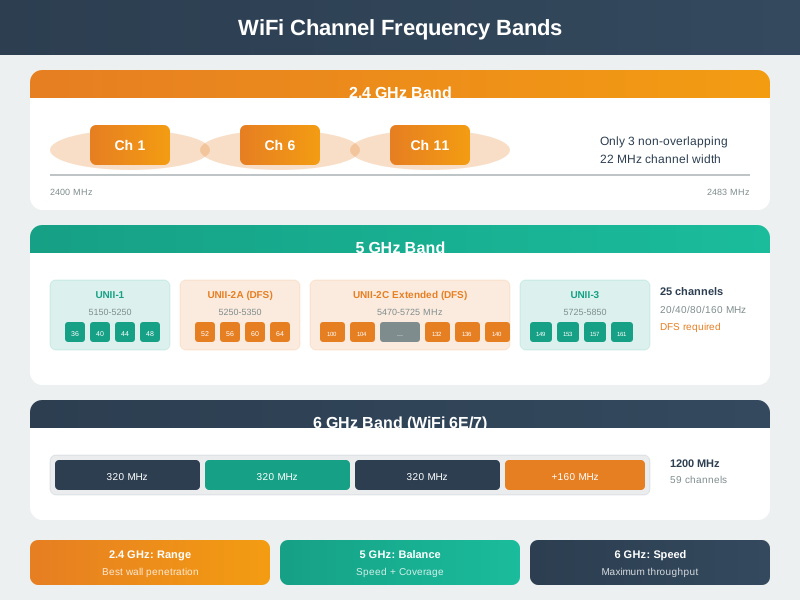
Read Figure 11.1 as evidence that a band is not a speed rank. In the worked strip, 80 MHz / 20 MHz = 4, so one 80 MHz channel consumes the space of four 20 MHz channels and leaves about one quarter as many independent choices. A 2.4 GHz plan may fit fixed sensors because the radios are common and the link reaches farther. A 5 GHz plan offers more reuse, but its mounts and DFS repair need proof. A 6 GHz plan gives clean space only to clients and sites that support it.
Channel width is the second half of the decision. A narrow 20 MHz channel often gives a dense IoT site more predictable reuse than a wide channel that looks faster in a single-link test. Wide channels belong in the approval only when the traffic needs the throughput, the AP layout can still reuse spectrum, and the support team knows which device classes are excluded. The approval record should name the band, width, client group, AP profile, and retest trigger together.
The map: 2.4 GHz = reach and the usual 1/6/11 plan; 5 GHz = more channels, less reach; 6 GHz = wide-channel room, usually least reach. Width trades peak rate for channel count.
11.5.1 Overview Knowledge Check
11.6 The 5 GHz UNII Sub-Bands and Channel Count
This section: The 5 GHz UNII Sub-Bands and Channel Count — The 5 GHz band is organised into UNII sub-bands, each with its own rules.
The 5 GHz band is organised into UNII sub-bands, each with its own rules. Knowing them explains why an AP offers the channels it does:
| Sub-band | 20 MHz channels | Note |
|---|---|---|
| UNII-1 | 36, 40, 44, 48 | No DFS; installation and power rules vary by region |
| UNII-2A | 52, 56, 60, 64 | DFS required (radar) |
| UNII-2C | 100–144 | DFS required; most channels |
| UNII-3 | 149, 153, 157, 161, 165 | No DFS where allowed; power limits vary |
Channel width consumes these channels fast. A 20 MHz plan yields many non-overlapping channels for reuse; an 80 MHz plan bonds four 20 MHz channels into one, so the same spectrum yields only a quarter as many independent channels. In a dense site that means far less reuse and more co-channel contention.
Worked example. In a plan allowing only UNII-1 and UNII-3 non-DFS channels, an installer sets every AP to 80 MHz and finds two non-overlapping 80 MHz blocks: 36–48 and 149–161. Channel 165 does not form another 80 MHz block. Dropping to 40 MHz gives four blocks in the same spectrum: 2 × 2 = 4, doubling the independent choices. Adjacent APs still need a surveyed reuse plan; a channel change alone does not guarantee interference-free service. Choose width for channel reuse in dense areas, and reserve 80/160 MHz for sparse, high-throughput links.
For IoT reviews, turn that trade-off into a channel evidence record. Start with the actual traffic class: low-rate sensors, cameras, support phones, gateways, and moving tools should not automatically share one width. Then record the channel list available under local rules, which channels the AP profile is allowed to use, which channels neighbouring APs already occupy, and whether a DFS event would interrupt service. The best width is the narrowest one that meets the service objective while leaving enough clean reuse for the installed cell pattern.
A useful field test has two views. The spectrum view shows neighbouring Wi-Fi, partial overlap, non-Wi-Fi interference, and channel changes over time. The service view shows association, retries, missing telemetry, video stalls, command latency, and update success for the client class. If the spectrum view looks clean but the service view fails, the record should keep investigating AP load, roaming, firmware, and backhaul instead of declaring the band solved.
11.6.1 Practitioner Knowledge Check
11.7 DFS Mechanics and the 6 GHz Power Classes
This section: DFS Mechanics and the 6 GHz Power Classes — The 6 GHz band manages incumbent coexistence without 5 GHz DFS.
The DFS-governed UNII-2 channels (52–144) are shared with radar, so an AP that wants them must obey a strict protocol: perform a channel-availability check (about 60 seconds of listening, longer on some weather-radar channels) before transmitting, then keep monitoring; on detecting a radar pattern it must stop transmitting on that channel within seconds and move. This unlocks many extra channels but risks a mid-service channel change.
The 6 GHz band manages incumbent coexistence without 5 GHz DFS. In the US, Low-Power Indoor (LPI) access points may operate indoors at reduced power without AFC; Standard-Power access points, indoors or outdoors, use an Automated Frequency Coordination (AFC) system to obtain permitted frequencies and power for their location. Other markets can authorize different portions of the band and power classes, so check the local rules.
Worked example. A campus wants dependable 5 GHz channels for outdoor cameras. UNII-2C offers many channels but they are DFS, so a passing weather radar could force a camera’s AP to vacate mid-stream. The planner reserves non-DFS UNII-1/UNII-3 channels for the cameras’ critical links and uses DFS channels for tolerant bulk traffic — a design driven directly by the band’s regulatory mechanics.
The hidden implementation detail is that a channel move is not just a radio event. Clients must hear the change, reassociate or follow the AP, refresh security state if needed, and rebuild the application path before the service timeout expires. That is why a DFS review should include recovery evidence, not only a list of allowed channels. For a moving tool or camera stream, record whether the application buffered through the move, whether telemetry was delayed or lost, and whether the support team can see the event in logs.
For 6 GHz, the equivalent review is compatibility and operating scope. LPI can be attractive indoors, but old clients, setup phones, gateways, and battery sensors may not support the band. Standard-power operation adds a location-aware coordination dependency. A bounded approval therefore names the client hardware, AP profile, indoor or outdoor scope, fallback SSID, and retest trigger for region, antenna, firmware, or mounting changes. Without those limits, a clean spectrum label can turn into an operations problem.
11.7.1 Under-the-Hood Knowledge Check
11.8 Wi-Fi Fundamentals for IoT
This section: Wi-Fi Fundamentals for IoT
11.8.1 Start With the Wireless Story
Prove the Whole Path, Not Just the Radio Sign
Picture a freezer monitor that shows a strong wireless sign but never sends its alarm. The radio link is only one step between the freezer and the person who must act.
An access point is the local unit that lets wireless devices join a wired or wider network. Walk the site and test the monitor at each real mounting place. Then restart the access point, fill the air with normal traffic, and remove the outside link.
Firmware is the built-in software that controls a device. Record its version with the access point setup, time, signal result, message delay, loss, and recovery. Make an old reading look old, and keep a safe local warning when the remote path is missing.
This first path test cannot predict every shared-air or roaming effect. Practitioner builds the fit record. Under the Hood follows association, queues, protection, and failure across each layer.
Start with why a device wants Wi-Fi at all. It may need local infrastructure, IP access, high bursts, simple commissioning, or existing security controls, but the choice only works if power, coverage, airtime, and ownership evidence match the device job.
11.8.2 What Wi-Fi Is Promising
Wi-Fi is a family of IEEE 802.11 wireless LAN technologies. For an IoT device, it usually promises short-range wireless access to an IP network through an access point. That promise is valuable when the device needs local services, cloud services, web APIs, dashboards, diagnostics, firmware updates, or richer data than a small sensor message.
Before approving Wi-Fi, inspect Figure 11.2 to ask which site, traffic, power, trust, or field result can overturn a device’s first successful connection.
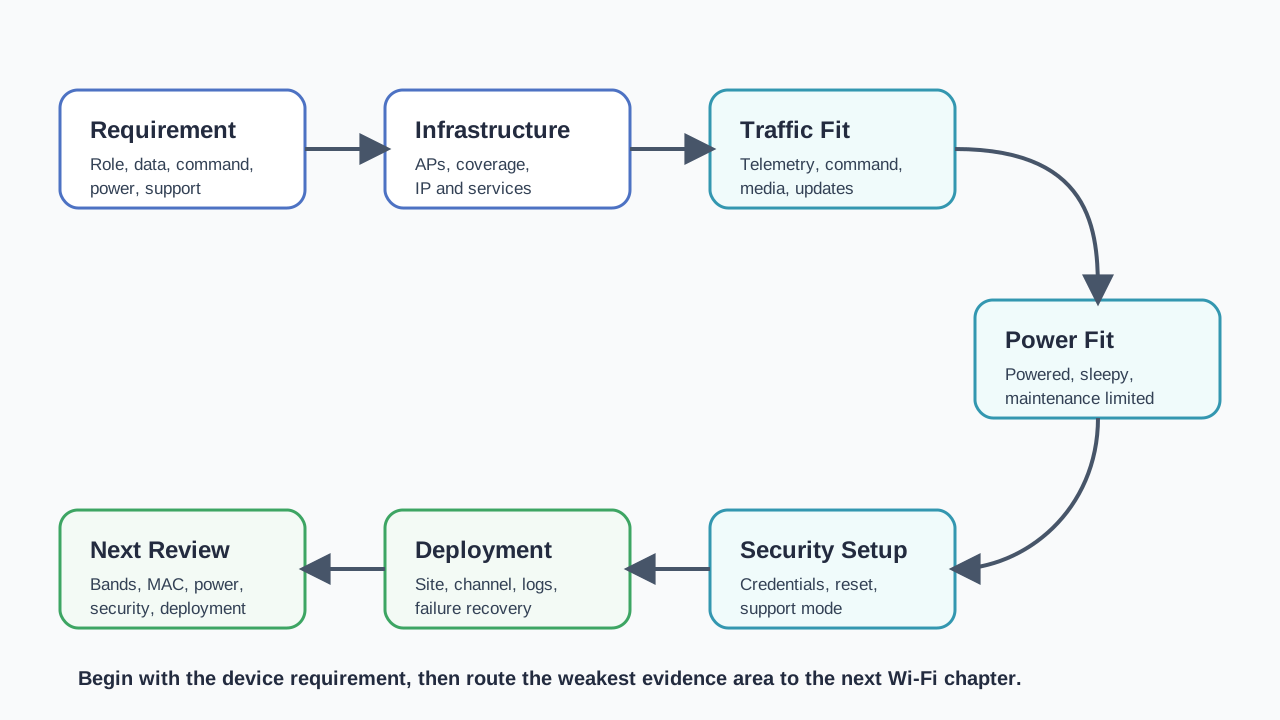
Read Figure 11.2 clockwise from the device need. Check the network already at the site, then test traffic, power, and trust in that order. A vague need must be made clear before anyone debates Wi-Fi types. An unknown site path sends the work to a coverage plan. A weak traffic, power, or trust result sends it down that branch before the pilot can pass. This order turns a common network name into a bounded claim: Wi-Fi fits only the device, site, and use that the saved test record covers.
Use Wi-Fi when the device requirement benefits from IP connectivity and the installed network, power source, security model, and support workflow can be proven. Do not approve Wi-Fi from a technology label or one lab connection.
11.8.2.1 The First Wi-Fi Fit Decision
11.8.2.2 Requirement
Name what the device must do: telemetry, command response, media, local dashboard, diagnostics, update, or gateway behavior.
11.8.2.3 Installed-System Checks
Check the installed access point, channel plan, IP service, application path, credential workflow, power state, and recovery behavior.
11.8.2.4 Decision
Accept Wi-Fi, accept it with limits, route to a deeper Wi-Fi review, or choose a different connectivity pattern.
11.8.2.5 Strong Starting Fits
First, Powered cameras, displays, controllers, gateways, and diagnostic tools that need IP-based services. Next, Devices installed where managed access points, support ownership, and service paths are known. Then, Products that need richer traffic, firmware updates, local dashboards, or technician access.
11.8.2.6 High-Evidence Fits
First, Small battery sensors with long maintenance intervals. Next, Outdoor, buried, mobile, or distant devices near the edge of coverage. Then, Large fleets that may wake, retry, roam, or reconnect at the same time. After that, Deployments where credentials, support mode, reset, or ownership are not yet clear.
11.8.2.7 Overview Knowledge Check
11.8.3 Build a Wi-Fi Fit Record
A practical Wi-Fi review starts with the device workflow, not with a standards table. The record should let another reviewer see why Wi-Fi is a fit, where the evidence came from, and what change would require retest.
Use the same structure for greenfield design, pilot review, and failure diagnosis. The difference is the amount of evidence available: early design may record assumptions and required tests, while a pilot should record installed observations and logs.
11.8.3.1 Worked Review: Powered Local Controller
A powered building controller needs a local dashboard for maintenance and a cloud path for status reports. Wi-Fi can be a strong fit if the access point is managed, the dashboard is only available during an authorized support workflow, cloud reachability is proven, and stale dashboard state is visible when the link fails.
The review should not stop at “connected.” It should record the AP owner, network policy, local API boundary, command authorization, reconnection behavior, and retest trigger for AP replacement, firmware update, credential rotation, or enclosure change.
11.8.3.2 Worked Review: Small Battery Sensor
A small room sensor sends one short reading occasionally and is expected to run for a long maintenance interval. Wi-Fi may still be possible, but it is no longer a low-evidence choice. The review must measure wake, association, service, retry, sleep, failure recovery, support mode, and update behavior on representative hardware.
If those measurements do not fit the maintenance requirement, a lower-power radio, a gateway-assisted design, or a different reporting schedule may be the better decision.
11.8.3.3 Practitioner Knowledge Check
11.8.4 Where Wi-Fi Evidence Changes Layer
Wi-Fi review is easier when each symptom is routed to the right layer. A failed cloud publish can start in radio coverage, association, authentication, IP addressing, DNS, routing, transport security, application authorization, power state, or server behavior. Treating all of those as “Wi-Fi is broken” slows diagnosis.
The overview decision should separate the layers enough that a future failure has a first place to look. This does not require inventing a complex model. It requires a clear evidence boundary between the radio link, the LAN service, the application path, and the product workflow.
11.8.4.1 Failure Diagnosis Pattern
First, Preserve the symptom. Record what failed, when it failed, what state the device was in, and what changed recently. Next, Identify the first unproven boundary. Do not jump from a cloud error directly to an antenna change. Then, Change one variable at a time. Mixing AP, firmware, credentials, and server changes makes the evidence hard to trust. After that, Write the retest trigger. The next reviewer should know which site, firmware, AP profile, credential, or application change invalidates the current approval.
11.8.4.2 Under-the-Hood Knowledge Check
11.8.5 Summary
First, Wi-Fi is useful for IoT when IP connectivity, local services, cloud services, richer traffic, diagnostics, updates, or support workflows matter. Next, Association to an access point is only one piece of evidence; it does not prove product readiness. Then, A good Wi-Fi fit record separates device requirement, infrastructure, traffic, power, security, provisioning, operations, and retest triggers. After that, Battery-constrained, distant, dense, or unmanaged deployments need stronger evidence before Wi-Fi is accepted. Finally, Diagnosis works best when symptoms are routed to the right boundary: radio, association, IP service, application path, or product workflow.
Approve Wi-Fi for an IoT device only when the installed network, traffic, power, security, provisioning, ownership, and recovery evidence match the product requirement.
11.8.6 See Also
Wi-Fi Architecture Fundamentals
Review access points, stations, BSS and ESS behavior, roaming, backhaul, and mesh evidence.
Wi-Fi Power Consumption
Connect Wi-Fi fit decisions to wake, join, retry, sleep, update, and support-mode power evidence.
Wi-Fi Security and Provisioning
Plan credential setup, setup-mode boundaries, reset, authorization, logs, and support workflows.
Wi-Fi Deployment Planning
Turn the overview decision into installed coverage, channel, owner, monitoring, and retest evidence.
11.9 Summary
This section: Summary — Wi-Fi bands and channels are not a simple hierarchy.
Wi-Fi bands and channels are not a simple hierarchy. A strong IoT design chooses the band, channel width, and channel plan that match the installed device, service path, site conditions, local rules, and operating model.
When the evidence changes, the band decision may change. That is why every band and channel plan needs scope, monitoring, and retest triggers.
11.10 Key Takeaway
This section: Key Takeaway — Wi-Fi Bands & Channels should match Wi-Fi standard, band, channel plan, airtime, density, security, power profile, and deployment evidence to the IoT use case.
Wi-Fi Bands & Channels should match Wi-Fi standard, band, channel plan, airtime, density, security, power profile, and deployment evidence to the IoT use case.
11.11 What’s Next
This section: What’s Next — Use Wi-Fi Deployment Planning to place the band and channel decision inside a full deployment plan.
Use Wi-Fi Deployment Planning to place the band and channel decision inside a full deployment plan.
Use Wi-Fi Power Consumption when the selected band affects sleep, wake, retry, or update-window behavior.
Use Wi-Fi Security and Provisioning when the selected SSID or band profile affects onboarding, identity, segmentation, or revocation.
Use Wi-Fi Standards Evolution when you need to connect band choice to Wi-Fi generations and feature support.
Use Zigbee Fundamentals when 2.4 GHz coexistence with Zigbee or Thread affects the deployment.
11.12 Continue Your Route
This section: Continue Your Route — This is the last part of this chapter.
This is the last part of this chapter. Return to Wi-Fi Bands: Fit and Site Evidence or continue from the wifi-mobile module index.
Find help
3 reviewed answers.
Where should I start in a module?
Open the module page from the sidebar to see its chapters in order. Use the module map to return to a topic you need.
Modules and pathsReviewed
What can I try when a project does not work?
Check the symptom, then work through the diagnostic steps. Keep the error message and the smallest example that reproduces it.
When you are stuckReviewed
How do interactive examples work?
Use the interactive guide to check how examples and simulations work before changing your project.
Interactive examples guideReviewed