16 Wi-Fi Security: Provisioning and Recovery Evidence

More
Depth: Practitioner
Progress saves as you read. Mark sections complete as you go; your progress appears in the sidebar.
16.1 Start With the Decision
This section: Start With the Decision — A device that cannot rotate a key will fail its next security review.
A device that cannot rotate a key will fail its next security review. Provisioning must cover updates, recovery, and safe removal from day one.
16.2 Route Overview
This section: Route Overview — This is part 2 of 2.
This is part 2 of 2. Review Wi-Fi Security: Access and Segmentation Controls for the preceding evidence.
16.3 Learning Objectives
This section: Learning Objectives
- Plan credential recovery, rotation, and device removal.
- Review provisioning evidence for shared-key and per-device risks.
16.4 Chapter Roadmap
This section: Chapter Roadmap
- Recovery, Updates, And Removal
- Worked Review: Small Building Sensors
- Worked Review: Local Setup Device
- Worked Review: Managed Facility Fleet
- Knowledge Check: Shared Credential Risk
- Knowledge Check: Provisioning Path
- Match Evidence To Security Review Area
- Order The Security Provisioning Review
- Common Mistakes
- Final Checklist
- Authenticate, Then Derive Keys
- The WPA2 Four-Way Handshake and Its Weakness
- WPA3-SAE, PMF, and DPP Onboarding
- Figure Review: Migration and Handshake State
- Summary
- Key Takeaway
- What’s Next
16.5 Recovery, Updates, And Removal
This section: Recovery, Updates, And Removal — Security design must survive normal operations.
Security design must survive normal operations.
Review:
- firmware update path and rollback behavior
- credential or certificate renewal path
- device reset and reprovisioning flow
- lost-device and stolen-device response
- decommissioning path before resale, disposal, or transfer
- support access limits and audit trail
- monitoring and alert ownership
Security fails when a design is secure only on the first day. The review should include maintenance and end-of-life behavior before approval.
16.6 Worked Review: Small Building Sensors
This section: Worked Review: Small Building Sensors
Scenario:
- A building sensor fleet uses Wi-Fi for periodic telemetry and occasional maintenance commands.
Review route:
- Authentication: decide whether shared-password mode is acceptable or whether per-device identity is needed.
- Provisioning: check installer flow, setup timeout, reset, and support workflow.
- Segmentation: allow telemetry and update paths, block unrelated internal paths.
- Recovery: define lost-device removal, credential rotation, and firmware update owner.
- Decision: accept only if the operational team can maintain the chosen security model.
16.7 Worked Review: Local Setup Device
This section: Worked Review: Local Setup Device
Scenario:
- A device creates a temporary setup path during installation.
Review route:
- Authentication: require physical-possession proof or a bounded pairing step.
- Provisioning: close setup mode after success, timeout, reset, or failed attempts.
- Credential handling: keep secrets out of logs, UI screenshots, source code, and support messages.
- Recovery: document how a user restarts setup without exposing the previous credential.
- Decision: accept only if setup convenience does not leave a permanent open management path.
16.8 Worked Review: Managed Facility Fleet
This section: Worked Review: Managed Facility Fleet
Scenario:
- A facility operates multiple device classes with different owners and service paths.
Review route:
- Authentication: prefer per-device identity when fleet operations can renew and revoke credentials.
- Provisioning: use managed enrollment and record ownership for identity lifecycle.
- Segmentation: separate device classes by service need, not just by convenience.
- Monitoring: alert on unexpected destinations, repeated join failures, and unsupported security modes.
- Decision: accept only if identity lifecycle, network policy, and support ownership are documented.
16.10 Knowledge Check: Provisioning Path
This section: Knowledge Check: Provisioning Path
16.11 Match Evidence To Security Review Area
This section: Match Evidence To Security Review Area
16.12 Order The Security Provisioning Review
This section: Order The Security Provisioning Review
16.13 Common Mistakes
This section: Common Mistakes
Treating onboarding as separate from security:
- Problem: setup mode works, but it leaves credentials or management access exposed.
- Repair: review setup entry, exit, timeout, reset, and credential handling as part of the security boundary.
Using one shared credential without a recovery plan:
- Problem: one leaked or lost device can force a disruptive fleet-wide credential change.
- Repair: document rotation, revocation, segmentation, owner, and whether per-device identity is needed.
Assuming the newest mode is enough:
- Problem: the label on the AP does not prove client support, provisioning safety, update behavior, or segmentation.
- Repair: review the full device lifecycle and measured join behavior.
Leaving support paths unbounded:
- Problem: a support feature becomes a permanent management opening.
- Repair: define who can enable it, when it closes, what it logs, and what forces a retest.
Forgetting decommissioning:
- Problem: devices leave service with credentials or owner binding still present.
- Repair: include transfer, wipe, removal, and identity retirement in the acceptance checklist.
16.14 Final Checklist
This section: Final Checklist
Before accepting a Wi-Fi security and provisioning design, confirm that the review includes:
- device class, data sensitivity, command risk, and owner
- selected authentication mode and blocked fallback modes
- provisioning path and physical-possession or pairing proof
- setup timeout, reset, failure, and support behavior
- credential storage, rotation, revocation, and removal plan
- network segment and allowed service rules
- update, recovery, and decommissioning path
- monitoring signal and response owner
- accepted decision and rejected alternatives
- retest triggers for firmware, AP profile, credential policy, installer flow, service path, or ownership changes
16.15 Authenticate, Then Derive Keys
This section: Authenticate, Then Derive Keys — Wi-Fi security answers two questions: is this device allowed on the network, and how do the two ends agree on encryption keys?
Wi-Fi security answers two questions: is this device allowed on the network, and how do the two ends agree on encryption keys? For home and IoT networks the dominant schemes are WPA2-Personal and its successor WPA3-Personal. Both start from a shared password, but they turn it into keys very differently — and that difference decides how resistant the network is to attack.
A separate but linked problem is provisioning: how a screenless IoT device gets the Wi-Fi credentials in the first place. Typing a passphrase into a sensor with no keyboard is impossible, so the industry built dedicated onboarding methods.
The review should keep those jobs separate. A strong key-agreement protocol does not prove that setup mode closes, credentials are stored safely, one lost device can be removed, or the device is isolated after it joins. Likewise, a convenient provisioning app does not prove that the final network session uses the intended authentication mode.
For an IoT fleet, the first evidence record should name the authentication mode, fallback modes that are blocked, provisioning entry and exit rules, credential owner, storage location, rotation or revocation path, segmentation boundary, update path, monitoring signal, and retest trigger. That record turns “uses WPA3” or “uses a QR code” into an auditable lifecycle decision.
A simple acceptance test can stay lightweight: join a representative device, confirm the negotiated security mode on the access point, confirm the provisioning path cannot be restarted without authorization, then remove the device and verify that it cannot silently rejoin from stale credentials. Keep screenshots or controller exports with the record. Those checks expose the failure modes that matter most in long-lived field deployments.
Two jobs: a key-agreement scheme (WPA2 or WPA3) secures the link, and a provisioning method gets credentials onto a device with no screen or keyboard.
16.15.1 Overview Knowledge Check
16.16 The WPA2 Four-Way Handshake and Its Weakness
This section: The WPA2 Four-Way Handshake and Its Weakness — Use Figure 16.1 to trace which values cross the air and which keys are derived locally.
WPA2-Personal turns the passphrase into a Pairwise Master Key (PMK), then runs the four-way handshake to derive the per-session Pairwise Transient Key (PTK) that actually encrypts traffic:
- AP → station: a random ANonce.
- Station → AP: its own SNonce plus a MIC. Both sides now derive the PTK from PMK + both nonces + both MAC addresses.
- AP → station: the group key (GTK) and a MIC, confirming keys.
- Station → AP: acknowledgment; encryption begins.
Use Figure 16.1 to trace which values cross the air and which keys are derived locally. That distinction is necessary before judging what a captured handshake reveals and why passphrase quality still matters.
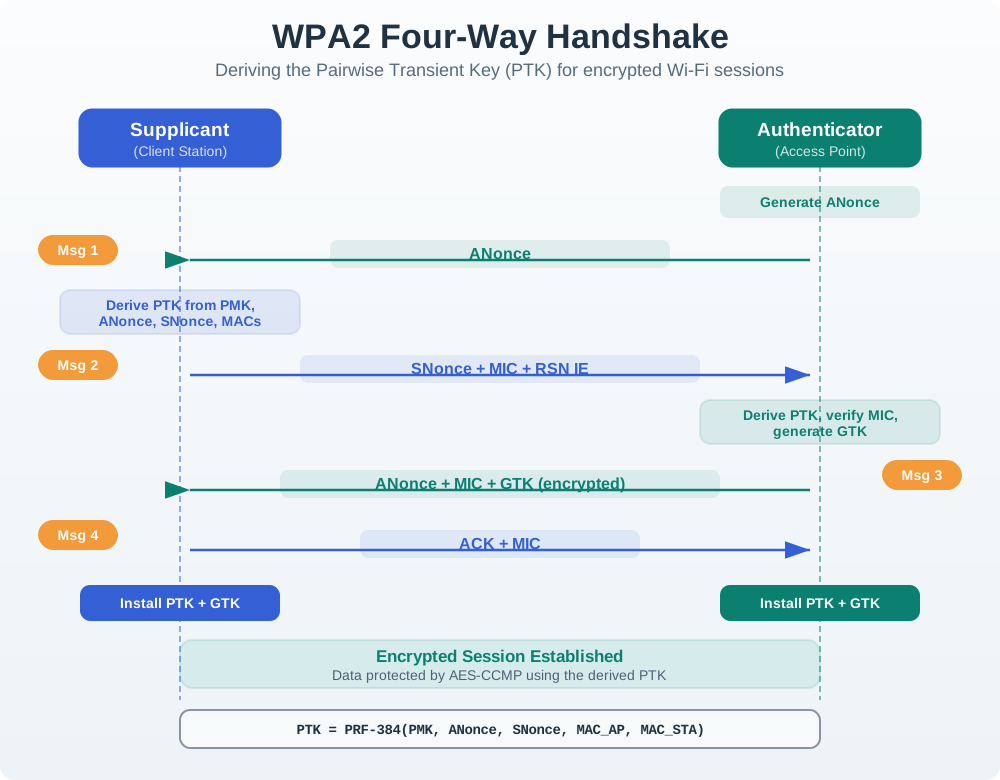
Read Figure 16.1 from the AP’s ANonce to the station’s SNonce and MIC, then through the AP’s protected GTK delivery and the final acknowledgement. The passphrase itself is not transmitted; both peers derive the PTK from the PMK, nonces, and addresses, while MICs prove possession. A capture therefore supplies material for offline guesses: an attacker can derive candidate keys and test the MIC without contacting the AP. This connects session establishment to the chapter’s fleet controls for passphrase entropy, rotation, segmentation, and device removal.
Worked example. An attacker sniffs a WPA2 network’s four-way handshake, then runs a wordlist offline against it. If the passphrase is a common phrase, it is recovered in minutes; a long random passphrase resists it. This offline-guessing exposure is exactly what WPA3 was designed to close.
In a defensive review, the point is not to reproduce an attack. It is to decide whether a shared passphrase is acceptable for this device class. Ask who knows the passphrase, how it is provisioned, whether it ever appears in logs or support messages, how one lost device is handled, and whether the network segment limits the damage if one credential leaks.
For WPA2-Personal fleets that cannot move immediately, the compensating controls should be explicit: unique SSIDs or VLANs for device classes, a high-entropy passphrase controlled by operations rather than end users, documented rotation triggers, disabled WPS, and monitoring for repeated authentication failures or unexpected reassociation after removal.
16.16.1 KRACK: The Key-Reinstallation State Failure
The four-way handshake must tolerate a lost final acknowledgement. If message 4 does not reach the AP, the AP retransmits message 3. Retransmission itself is correct. The failure appears when a client treats a valid retransmission as a command to install the same pairwise key again and resets state that must never move backwards.
Trace the vulnerable sequence:
- The AP and client derive a PTK from the PMK, both nonces, and both MAC addresses.
- Message 3 tells the client to install that key and carries group-key information and a replay counter.
- A man-in-the-middle delays or suppresses message 4, causing the AP to resend message 3.
- A vulnerable client accepts the authentic retransmission but reinstalls the already-used PTK.
- Reinstallation resets a transmit packet number/nonce and may reset receive replay state. Some affected Linux/Android behavior additionally installed an all-zero key; that was a particularly severe implementation case, not the behavior of every client.
- Encryption now reuses a nonce with the same key. For stream-like counter encryption, , so nonce reuse repeats keystream and can expose relationships between plaintexts, enable replay, or permit forgery depending on the negotiated cipher and traffic.
The repair is a state-machine invariant: after a key is installed, a retransmitted message may be acknowledged but must not reinstall that key or reset its nonce/replay counters. Test duplicate, reordered, and lost handshake messages against that invariant. WPA2 devices with patched supplicants can be safe from this flaw; migrating protocol labels without updating vulnerable implementations is not a fix.
WPA3 strengthens the surrounding design but its features solve different problems. SAE replaces PSK establishment with a password-authenticated exchange that resists passive offline guessing and provides forward secrecy. Enhanced Open/OWE encrypts traffic on otherwise open networks; it does not authenticate the access point and does not “replace PSK” on a protected personal network. DPP/Easy Connect gives limited-UI devices a public-key onboarding path. WPA3-Enterprise’s 192-bit security mode is an optional high-security enterprise profile, not the default for every IoT client. Record the negotiated suite, Protected Management Frames requirement, transition-mode fallback, key-installation regression test, and per-device onboarding result instead of recording only “WPA3 capable.”
16.16.2 Practitioner Knowledge Check
16.17 WPA3-SAE, PMF, and DPP Onboarding
This section: WPA3-SAE, PMF, and DPP Onboarding — WPA3-Personal replaces the PMK-from-passphrase step with SAE (Simultaneous Authentication of Equals), a password-authenticated key exchange (the “Dragonfly” handshake).
WPA3-Personal replaces the PMK-from-passphrase step with SAE (Simultaneous Authentication of Equals), a password-authenticated key exchange (the “Dragonfly” handshake). A passively captured SAE exchange does not permit the straightforward offline dictionary test used against a captured WPA2-PSK handshake; an active guess needs an exchange with the network. SAE also gives forward secrecy for sessions established with it. WPA3 additionally requires Protected Management Frames (802.11w), which authenticate deauthentication and disassociation frames after protection is established. PMF reduces forged-frame attacks but cannot prevent all radio denial of service.
For onboarding screenless devices, Wi-Fi Easy Connect (DPP) uses public-key cryptography: a configurator (say a phone app) reads the device’s public bootstrapping key — often from a printed QR code — and then provisions credentials over an authenticated encrypted exchange. No passphrase need be typed into the device, but the device receives the credential or connector needed to join; that credential still needs protection at rest. (Simpler schemes exist too: a device may host a temporary SoftAP or use BLE to receive credentials from an app.)
Worked example. A new smart sensor ships with a QR code on its label. During setup the installer scans it with the vendor app (the configurator); DPP uses the encoded public key to establish a secure channel and provision the sensor onto the WPA3 network. No keyboard is needed. After association, PMF protects applicable management frames, while setup and radio denial-of-service risks still need review.
The under-the-hood acceptance evidence is the negotiated behavior, not the label on the box. Record whether the AP and client actually use WPA3-SAE, whether transition mode or WPA2 fallback is allowed, whether PMF is required, how DPP bootstrapping keys are protected, and how the device leaves setup mode after success, timeout, or failure. Also record what invalidates the approval: AP profile change, firmware change, installer app change, QR label process change, credential rotation, ownership transfer, or service-path change.
16.17.1 Under-the-Hood Knowledge Check
16.18 Figure Review: Migration and Handshake State
This section: Figure Review: Migration and Handshake State — Legacy Wi-Fi security is easiest to reject when its failure mechanisms are traced through the packet-protection sequence rather than reduced to an age label.
Legacy Wi-Fi security is easiest to reject when its failure mechanisms are traced through the packet-protection sequence rather than reduced to an age label.

In Figure 16.2, visible IV · 24 bits and RC4 keystream lead to reuse and linear-integrity failures; TKIP · TEMPORARY BRIDGE adds mixing and replay checks but retains RC4 and the weak MIC “Michael”, so the route ends at AES-CCMP or WPA3.
Modern protocol review must also distinguish a sound key exchange from an unsafe implementation state transition.

Figure 16.3 marks M3 · install PTK + reset nonce ONCE and the unsafe retransmitted-M3 reinstallation that enabled KRACK; the WPA3 MECHANISM MAP then assigns SAE, OWE, DPP, and the 192-bit suite to different threat boundaries.
16.19 Summary
This section: Summary — Wi-Fi security and provisioning review is a lifecycle decision.
Wi-Fi security and provisioning review is a lifecycle decision. The design must be secure when the device joins, fails setup, receives updates, changes owner, loses credentials, is removed from service, or needs support.
The final output should be a bounded decision record: authentication mode, provisioning path, credential owner, storage and revocation behavior, segmentation boundary, maintenance path, monitoring signal, and retest triggers.
16.20 Key Takeaway
This section: Key Takeaway — Wi-Fi Security and Provisioning should align Wi-Fi onboarding, credentials, encryption, rotation, recovery, and support visibility with deployment evidence.
Wi-Fi Security and Provisioning should align Wi-Fi onboarding, credentials, encryption, rotation, recovery, and support visibility with deployment evidence.
16.21 What’s Next
This section: What’s Next — Use Wi-Fi Deployment Planning when the security decision must be validated across a site rollout.
Use Wi-Fi Deployment Planning when the security decision must be validated across a site rollout.
Use Wi-Fi 6 Density Review when the AP profile or client support decision affects dense-device behavior.
Use Wi-Fi Implementation: Comprehensive Lab when the reviewed security and provisioning plan is ready for release validation.
Use Wi-Fi Standards Index when the team needs to choose the right standards route before making a security decision.
16.22 Continue Your Route
This section: Continue Your Route — This is the last part of this chapter.
This is the last part of this chapter. Return to Wi-Fi Security: Access and Segmentation Controls or continue from the wifi-mobile module index.
Find help
3 reviewed answers.
Where should I start in a module?
Open the module page from the sidebar to see its chapters in order. Use the module map to return to a topic you need.
Modules and pathsReviewed
What can I try when a project does not work?
Check the symptom, then work through the diagnostic steps. Keep the error message and the smallest example that reproduces it.
When you are stuckReviewed
How do interactive examples work?
Use the interactive guide to check how examples and simulations work before changing your project.
Interactive examples guideReviewed