10 Wi-Fi Bands: Fit and Site Evidence

More
Depth: Practitioner
Progress saves as you read. Mark sections complete as you go; your progress appears in the sidebar.
10.1 Start With the Decision
This section: Start With the Decision — A stairwell sensor and a lobby camera may need different Wi-Fi bands.
A stairwell sensor and a lobby camera may need different Wi-Fi bands. Walls, traffic, power, and rate decide the fit.
10.2 Route Overview
This section: Route Overview — This is part 1 of 2.
This is part 1 of 2. Continue with Wi-Fi Bands: Channels, DFS, and 6 GHz.
10.3 Part Objectives
This section: Part Objectives
- Compare 2.4, 5, and 6 GHz at the device site.
- Choose channel width from reach, rate, and congestion.
10.4 Chapter Roadmap
This section: Chapter Roadmap
- Start With the Wireless Story
- In 60 Seconds
- Phoebe’s Field Notes: The Same Wavelength Sets Antenna Size AND Diffraction
- Quick Check: Wi-Fi Band
- Band Fit Map
- Channel Review Record
- Principle 1: Band Choice Is A Fit Decision
- Principle 2: Channel Width Changes The Trade-Off
- Principle 3: 2.4 GHz Needs Discipline
- Principle 4: 5 GHz Needs DFS And Coverage Awareness
- Principle 5: 6 GHz Needs Compatibility And Local Rule Evidence
- Principle 6: Coexistence Is Site Evidence
- Band Selection Method
- Worked Review: Fixed Cabinet Sensors
- Worked Review: Powered Cameras
- Worked Review: 6 GHz Candidate Devices
- Knowledge Check: Band Fit
- Knowledge Check: DFS Risk
- Match Band Evidence To The Decision
- Order The Band And Channel Review
- Common Mistakes
- Final Checklist
10.5 Start With the Wireless Story
This section: Start With the Wireless Story — Picture a battery door sensor in a concrete stairwell and a powered camera in a busy lobby.
Choose the Band at the Device’s Real Location
Picture a battery door sensor in a concrete stairwell and a powered camera in a busy lobby. Both use Wi-Fi, yet they do not need the same reach, data rate, channel width, or power pattern. The installer must choose from site evidence rather than a claim that one band is always faster or better.
An access point is the nearby network box that serves Wi-Fi devices. Its place, settings, load, and path to the wider service are part of the field proof.
Record each device’s place, traffic size and rhythm, allowed delay, power source, radio support, access-point position, local rules, nearby use, and receiver result. Measure at the device height with the final case and doors in normal positions.
Test the busy hour, a closed fire door, a changed channel, a restarted access point, a weak signal, a wide and narrow channel, and the loss of the outside link. Check airtime, retries, delay, energy, roaming or return time, and whether the service result is current.
Bars show received radio strength, not trust or full service reach. A clean survey on one day cannot prove later tenants, weather, furniture, software, or rule changes.
Practitioner builds the band and channel plan. Under the Hood explains frequency, channel width, shared airtime, radar avoidance, overlap, rate choice, and the limits that force a new site survey.
Use this site walk before release:
- Mark each final device position.
- Fit the final case and battery.
- Shut doors as users will.
- Run the normal busy load.
- Log retries, delay, and lost work.
- Check the service, not just bars.
- Compare wide and narrow channels.
- Repeat on the planned bands.
- Restart the nearby network box.
- Remove the outside service link.
- Record local rule and date.
- Set a trigger for resurvey.
Choosing a Wi-Fi band is a site decision. Start with the device location and traffic need, then compare 2.4 GHz reach, 5 GHz capacity, 6 GHz cleanliness, channel width, DFS risk, and coexistence evidence before locking the plan.
10.6 In 60 Seconds
This section: In 60 Seconds — Wi-Fi band and channel selection is an evidence decision.
Wi-Fi band and channel selection is an evidence decision. A good answer does not say that one band is always best. It explains why a specific band, channel width, and channel plan fit the device class, site, access point profile, local rules, coexistence environment, power behavior, service path, and operating owner.
For IoT, the best band is often the one that survives the installed environment with the least wasted airtime and the clearest support story. That may be 2.4 GHz for a fixed sensor, 5 GHz for a powered camera, or 6 GHz for a new compatible device in a controlled site. The review must prove the fit.
10.8 Learning Objectives
This section: Learning Objectives
By the end of this chapter, you will be able to:
- compare 2.4 GHz, 5 GHz, and 6 GHz as deployment evidence choices
- explain why channel width and channel reuse can matter more than peak data rate
- identify when DFS, local rules, coexistence, or client support changes the answer
- separate range, capacity, latency, power, and operations evidence
- record retest triggers for band and channel decisions
10.9 Band Fit Map
This section: Band Fit Map — Use Figure 10.1 to compare band choices without turning them into a universal ranking.
Use Figure 10.1 to compare band choices without turning them into a universal ranking.
The band comparison in Figure 10.1 brings range and capacity together with coexistence, client support, and site constraints.
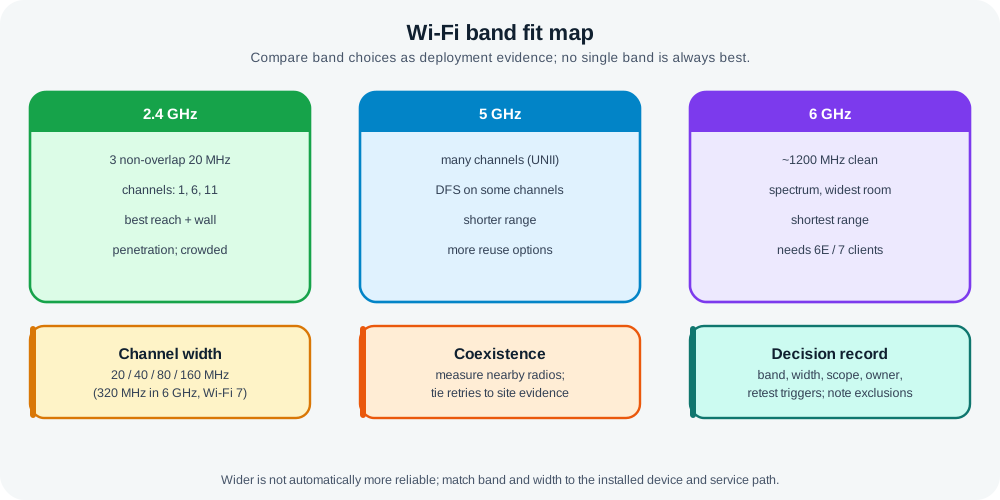
Read Figure 10.1 across 2.4, 5, and 6 GHz, then match the trade-offs to the installed clients and service. The comparison connects band physics and channel availability to evidence, not novelty.
The map keeps the review grounded:
- 2.4 GHz often helps range and obstacle tolerance, but it is shared with many devices and has limited channel reuse.
- 5 GHz often gives more channel-planning options and capacity, but it may need closer access points and can involve DFS channel behavior.
- 6 GHz can reduce legacy contention when the clients and local rules support it, but it needs compatible hardware and careful coverage evidence.
The right choice is the one that matches the installed device and service path, not the newest band name.
10.10 Channel Review Record
This section: Channel Review Record — Use Figure 10.2 to record the evidence behind a channel plan.
Use Figure 10.2 to record the evidence behind a channel plan.
Before approving a channel plan, inspect Figure 10.2 to see the evidence that must travel with the chosen band and width. This prevents a configuration value from being detached from site and client conditions.
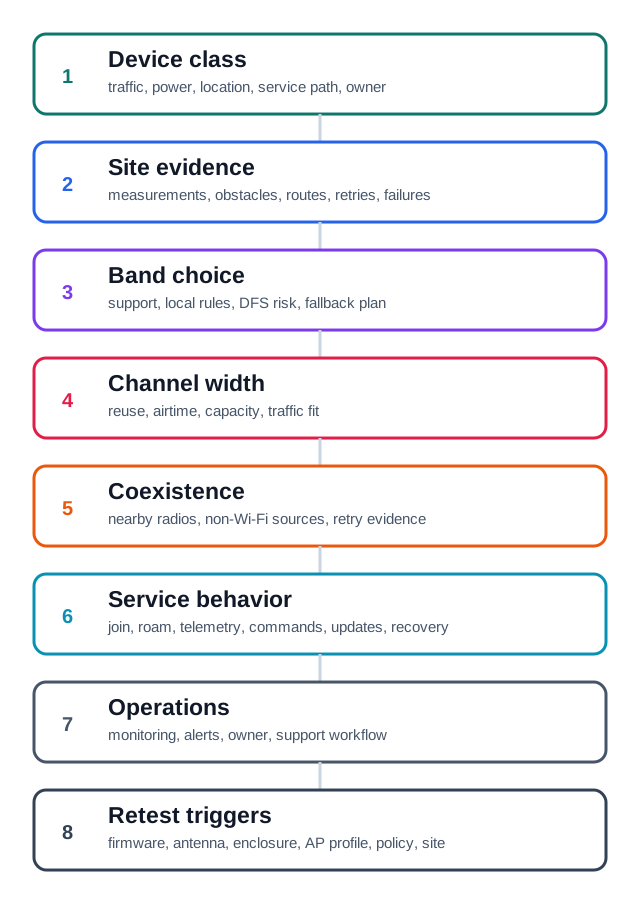
Read Figure 10.2, read from device class and traffic through band, width, and site observations, then finish with capability, regulatory, service, and retest evidence. That sequence connects channel selection to an auditable deployment decision rather than a preference for one frequency band.
A channel review record should include:
- device class and traffic pattern
- band and channel width
- channel plan or access point profile
- site measurements and coexistence observations
- client and access point capability evidence
- local rule or DFS constraints where relevant
- service behavior and power behavior
- owner, monitoring signal, and retest triggers
10.11 Principle 1: Band Choice Is A Fit Decision
This section: Principle 1: Band Choice Is A Fit Decision — The bands differ because radio behavior changes with frequency and rules.
The bands differ because radio behavior changes with frequency and rules.
Review:
- device location and mounting
- obstacles, enclosures, doors, racks, machinery, and people movement
- traffic pattern and latency tolerance
- battery, mains, or PoE power source
- client support for the candidate band
- access point support and local radio rules
- service reachability, updates, monitoring, and support workflow
Weak answer:
- “Use 6 GHz because it is cleaner.”
Stronger answer:
- “Use 6 GHz only for the compatible powered tools in the tested areas where coverage, access point profile, service path, support workflow, and local rules were verified. Keep the older fixed sensors on the band that their radios and installed locations can actually support.”
10.12 Principle 2: Channel Width Changes The Trade-Off
This section: Principle 2: Channel Width Changes The Trade-Off — Wider channels can carry more data when conditions are good.
Wider channels can carry more data when conditions are good. They also consume more spectrum and can reduce reuse in multi-access-point sites.
Check:
- whether the device traffic needs a wide channel
- whether adjacent access points can reuse spectrum cleanly
- whether the client can maintain a stable link at the selected width
- whether a narrower channel gives better reliability, range, or coexistence
- whether cameras, sensors, gateways, and support devices should use different profiles
For many IoT deployments, predictable service behavior matters more than peak throughput.
10.13 Principle 3: 2.4 GHz Needs Discipline
This section: Principle 3: 2.4 GHz Needs Discipline — The 2.4 GHz band is useful for many IoT devices because many clients support it and it often handles obstacles better than higher bands.
The 2.4 GHz band is useful for many IoT devices because many clients support it and it often handles obstacles better than higher bands. It is also crowded and has limited clean channel reuse.
Check:
- whether the site survey shows competing Wi-Fi networks or non-Wi-Fi interference
- whether adjacent access points are using overlapping channels
- whether the deployment uses the usual non-overlapping planning set for the region
- whether Zigbee, Bluetooth, cordless devices, microwave ovens, or other equipment affects the site
- whether the selected channel still supports the service path during busy periods
Do not choose an in-between 2.4 GHz channel just because it looks unused in a list. A partial-overlap choice can be worse than sharing a well-planned channel because devices may not defer cleanly.
10.14 Principle 4: 5 GHz Needs DFS And Coverage Awareness
This section: Principle 4: 5 GHz Needs DFS And Coverage Awareness — The 5 GHz band often gives more channel-planning flexibility than 2.4 GHz.
The 5 GHz band often gives more channel-planning flexibility than 2.4 GHz. It can also involve DFS channels and shorter practical coverage in obstacle-heavy spaces.
Check:
- whether the selected channels are subject to DFS behavior in the deployment region
- whether a DFS channel change would interrupt the device service
- whether the access point and clients recover cleanly after a channel change
- whether 5 GHz coverage reaches the final mounting points or movement routes
- whether channel width is appropriate for the traffic class and access point density
Avoid approving 5 GHz from a desk test when the final device sits behind walls, inside cabinets, or on a movement route.
10.15 Principle 5: 6 GHz Needs Compatibility And Local Rule Evidence
This section: Principle 5: 6 GHz Needs Compatibility And Local Rule Evidence — The 6 GHz band can be useful when compatible access points and clients are deployed in a controlled environment.
The 6 GHz band can be useful when compatible access points and clients are deployed in a controlled environment. It should not be treated as a universal upgrade.
Check:
- client support for 6 GHz
- access point support and profile settings
- local rules for the site and installation type
- installed coverage and obstacle behavior
- service behavior during normal operation and updates
- support workflow for devices that cannot use 6 GHz
Do not approve 6 GHz by assuming every device can join it. Mixed fleets often need different SSIDs, profiles, or device-class decisions.
10.16 Principle 6: Coexistence Is Site Evidence
This section: Principle 6: Coexistence Is Site Evidence — Wi-Fi shares spectrum with other systems, especially in the 2.4 GHz band.
Wi-Fi shares spectrum with other systems, especially in the 2.4 GHz band. Coexistence cannot be proven from a protocol name alone.
Check:
- which other radios operate near the devices
- whether the interference is continuous, bursty, mobile, or location-specific
- whether failures happen during a specific route, shift, machine state, or support activity
- whether retries, missing telemetry, or command delays match the coexistence evidence
- whether channel plan, power settings, device placement, or protocol separation reduces the problem
A coexistence decision should say which evidence changed the answer, not just which protocol is present.
10.17 Band Selection Method
This section: Band Selection Method — This method works better than choosing the highest frequency or widest channel by default.
Use this sequence when choosing a band:
- State the device class, power source, traffic pattern, service path, and location.
- Check client and access point support for each candidate band.
- Collect installed site evidence for the final location or movement route.
- Decide whether the problem is coverage, capacity, coexistence, latency, power, operations, or local rules.
- Choose band and channel width for the measured problem.
- Record exclusions and retest triggers.
This method works better than choosing the highest frequency or widest channel by default.
10.18 Worked Review: Fixed Cabinet Sensors
This section: Worked Review: Fixed Cabinet Sensors
Scenario:
- fixed sensors are mounted in cabinets and equipment rooms
- each sensor sends small telemetry records
- the site already has office Wi-Fi on multiple bands
Review:
- device evidence: fixed, low-rate, often enclosed, battery or low-power operation
- site evidence: measure final cabinet locations, not hallway signal
- band evidence: choose only from bands supported by the sensor radio and access point profile
- channel evidence: avoid partial-overlap 2.4 GHz choices; verify retries and missing telemetry
- service evidence: telemetry, update, failed-join, and support-reset behavior
- decision: approve only the measured rooms, enclosures, firmware, access point profile, and service path
10.19 Worked Review: Powered Cameras
This section: Worked Review: Powered Cameras
Scenario:
- powered cameras stream from a known set of locations
- the plan puts cameras and small sensors on the same SSID and channel width
- video is stable when the office is quiet but degrades during busy periods
Review:
- split cameras and sensors into separate traffic classes
- check whether cameras need a different band, channel width, or access point profile
- measure airtime, retries, and service path during busy periods
- verify whether powered cameras can use a higher-capacity profile without harming low-rate sensors
- decision: approve only the tested camera locations, profile, and service path; do not generalize camera evidence to battery sensors
10.20 Worked Review: 6 GHz Candidate Devices
This section: Worked Review: 6 GHz Candidate Devices
Scenario:
- a new tool supports 6 GHz, but older gateways and sensors do not
- the site wants one Wi-Fi design for every device
- the tool works well in one lab area
Review:
- check local rules and access point profile for 6 GHz
- verify tool coverage along real movement routes
- keep older gateways and sensors in their supported profile
- verify setup, support, update, and monitoring paths for both groups
- decision: use a device-class-specific plan rather than forcing the whole fleet onto the newest band
10.21 Knowledge Check: Band Fit
This section: Knowledge Check: Band Fit
10.22 Knowledge Check: DFS Risk
This section: Knowledge Check: DFS Risk
10.23 Match Band Evidence To The Decision
This section: Match Band Evidence To The Decision
10.24 Order The Band And Channel Review
This section: Order The Band And Channel Review
10.25 Common Mistakes
This section: Common Mistakes
Choosing the newest band by default:
- Problem: the answer assumes 6 GHz is best without checking client support, local rules, installed coverage, or support workflow.
- Repair: treat 6 GHz as one candidate and approve only the compatible device class and tested locations.
Using in-between 2.4 GHz channels:
- Problem: a channel looks empty but partially overlaps the cleaner planning set.
- Repair: review overlap, coexistence, retries, and missing telemetry before accepting the plan.
Making every channel wide:
- Problem: the plan maximizes width for every access point even when devices send small payloads.
- Repair: select width by traffic class, reuse needs, and installed airtime behavior.
Ignoring DFS behavior:
- Problem: a service depends on a DFS channel but no one tested channel-change recovery.
- Repair: document DFS risk, test service impact, and choose a different profile if the service cannot tolerate interruption.
Generalizing from one device class:
- Problem: a powered camera result is used to approve battery sensors or older gateways.
- Repair: split device classes and repeat evidence checks for each group.
10.26 Final Checklist
This section: Final Checklist
Before accepting a band and channel decision, confirm that it:
- states device class, power source, traffic pattern, service path, location, and owner
- verifies access point and client support for the selected band
- checks local rules and DFS behavior where relevant
- uses installed measurements rather than only a lab join or floor plan
- checks channel width, channel reuse, airtime, retries, and busy periods
- checks coexistence with other radio systems and non-Wi-Fi interference
- separates cameras, gateways, fixed sensors, moving tools, and setup devices where needed
- records monitoring signals and support workflow
- lists exclusions, missing evidence, and retest triggers
10.27 Continue to the Next Part
This section: Continue to the Next Part — Carry this evidence into Wi-Fi Bands: Channels, DFS, and 6 GHz, which begins with Three Bands, Many Channels, Several Widths.
Carry this evidence into Wi-Fi Bands: Channels, DFS, and 6 GHz, which begins with Three Bands, Many Channels, Several Widths.
Find help
3 reviewed answers.
Where should I start in a module?
Open the module page from the sidebar to see its chapters in order. Use the module map to return to a topic you need.
Modules and pathsReviewed
What can I try when a project does not work?
Check the symptom, then work through the diagnostic steps. Keep the error message and the smallest example that reproduces it.
When you are stuckReviewed
How do interactive examples work?
Use the interactive guide to check how examples and simulations work before changing your project.
Interactive examples guideReviewed