22 ESP32 Wi-Fi: Connection and Service Checks

More
Depth: Practitioner
Progress saves as you read. Mark sections complete as you go; your progress appears in the sidebar.
22.1 Start With the Decision
This section: Start With the Decision — An ESP32 is the device used for this Wi-Fi test.
An ESP32 is the device used for this Wi-Fi test. An access point provides the local Wi-Fi network the ESP32 joins. A service is the system the board must reach to send its reading; a link flag reports only the Wi-Fi connection state. An ESP32 can join an access point and still fail to reach its service. Connection code needs a usable-service check, not just a link flag.
22.2 Route Overview
This section: Route Overview — This is part 1 of 2.
This is part 1 of 2. Continue with ESP32 Wi-Fi: Provisioning and Recovery Workflows.
22.3 Part Objectives
This section: Part Objectives
- Trace ESP32 station connection states and the status checks a service needs.
- Distinguish link success from end-to-end service success.
22.4 Chapter Roadmap
This section: Chapter Roadmap — The board in this picture has noticed the school network.
- Start With the Wireless Story
- In 60 Seconds
- Phoebe’s Field Notes: The One Band ESP32 Has Is Also Its Best Diffraction Argument
- Quick Check: Wi-Fi ESP32
- ESP32 Implementation Route
- Connection Evidence Record
- Focused Lab Evidence
- What ESP32 Basics Means
- Scope Before Implementation
- Station Join Path
- Usable Service Check
The board in this picture has noticed the school network. Look at the three empty circles beside it: what steps still need proof before a reading reaches the service?
-

What must the board prove beyond seeing the network?
22.5 Start With the Wireless Story
This section: Start With the Wireless Story — The radio symbol and first marked circle show only a visible network.
The radio symbol and first marked circle show only a visible network. The remaining circles leave joining, sending, and recovery unproved. Follow the room sensor below through those steps before calling the link a working service. Picture a small room sensor that must post one reading every minute. The board can see the school network, but that is only the first step. It still has to join the right network, reach the right service, send useful data, and recover after a drop.
Write the service job before writing code. Record the network name, the service address, the success reply, and the longest allowed outage. Then watch one full run: start, scan, join, send, confirm, lose the link, and join again. Keep the event log so another person can tell which step failed.
Test with a wrong password, a missing service, and a weak signal. Check that setup mode does not expose secrets and that retries do not drain the battery. A serial message that says “connected” proves neither field coverage nor a usable service. It also does not replace a long power or security test.
Go deeper in two steps. The Practitioner section turns board events into a connection flow. Under the Hood follows the wireless join messages that cause those events.
Write the board job in one line. State the data or command, the service, and the longest gap the product can bear. Add the safe local result when Wi-Fi is gone. This line sets the goal for all later code.
Keep secrets out of the sketch. Choose how the unit receives its network name and key. State who may enter setup mode. State how setup ends. Clear old secrets when the owner resets the unit.
Build a small state list. Use start, setup, scan, join, check address, reach service, send, wait, retry, ready, offline, and rest where they fit. Log each state change with a time and short reason. Do not print the key.
Start with scan proof. Check that the wanted network can be seen in the final place. Record channel and signal. A scan result is not a join. It is only proof that one short radio view saw the name.
Next prove the join. Check the board joined the right name and got a valid address. Keep the join time and fail reason. Test a wrong key, missing network, and change of channel. Set a retry limit and a wait that grows.
Then prove the service. Use the real name, route, port, trust rule, and request. Check the full reply and data meaning. A network join can pass while name lookup, time, trust, or the service still fails.
Test loss during work. Remove the access point. Stop the service. Drop the reply. Restart the board. Restore each part. Check that old data is marked, queued work has a size limit, and a command cannot run twice by mistake.
Check setup access. Start it only by a clear local rule. Give it a time limit. Block outside control. Show the user when setup is open. End it after success or timeout. A setup network must not remain a hidden back door.
Check power. Measure scan, join, service work, waits, retries, and sleep at the source. Use a good and weak signal. A code path that keeps scanning can drain a battery even when no data is sent.
Check time. A board with a bad clock may reject a safe service or mark data with the wrong age. State how time is gained, how old it may be, and what happens before it is trusted. Test a restart with no outside time path.
Check logs for support. Keep build, reset cause, state, signal, address state, service result, queue size, and last good time. Use clear codes. Remove secret data and set a size limit.
Write the release record. Name the board, build, network, access point, site, service, power mode, faults, and pass rules. Add changes that force a retest. A desk join is not the same as a ready field unit.
ESP32 Wi-Fi work begins with a small state machine. The device must scan, join, receive events, recover from drops, expose a service, save power, and leave enough logs that a support team can tell whether firmware or the network failed.
22.6 In 60 Seconds
This section: In 60 Seconds — This chapter reviews the first usable ESP32 Wi-Fi implementation for an IoT device.
This chapter reviews the first usable ESP32 Wi-Fi implementation for an IoT device. The goal is not to paste a long sketch into a board and stop when the serial monitor says connected. The goal is to prove that the device joins the intended network profile, reaches the service it needs, handles common failure paths, protects credentials, and leaves a record that another reviewer can inspect.
Use this chapter when an ESP32-class device is moving from “Wi-Fi example works” to “this implementation is ready for a focused lab or pilot review.” Keep the claim bounded: this chapter can support an implementation decision, but it does not replace installed-site coverage, long-term power validation, or the deeper security review.
22.7 Learning Objectives
This section: Learning Objectives
By the end of this chapter, you will be able to:
- scope the ESP32 Wi-Fi behavior that must be reviewed before a device leaves the bench
- separate station-mode join success from usable service readiness
- decide when a setup access point is appropriate and when it should be disabled
- record connection, failure, recovery, credential, service, and support evidence
- identify common ESP32 Wi-Fi implementation mistakes before they become field problems
- prepare a clean handoff to HTTP, WebSocket, power, and security implementation chapters
22.8 ESP32 Implementation Route
This section: ESP32 Implementation Route — Use Figure 22.1 to keep a basic ESP32 Wi-Fi review in order.
Use Figure 22.1 to keep a basic ESP32 Wi-Fi review in order.
Before writing the connection loop, inspect Figure 22.1 to define what the firmware must prove beyond association.
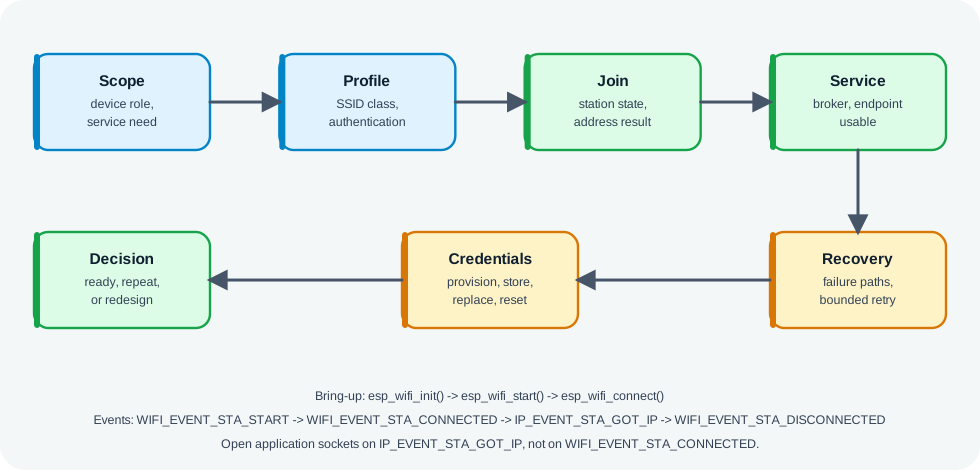
Read Figure 22.1 from device scope and network profile through join, usable service, failure recovery, credential handling, and support state. This connects basic ESP32 code to the operational behaviour later chapters depend on.
The walkthrough starts by fixing the device role, service freshness, power pattern, and support workflow, because those constraints determine what a successful connection means. Define the supported network profile next, then implement station join without allowing retries to block sensing or control indefinitely. After address assignment, prove name resolution, authentication, and application reachability as separate boundaries. Force weak-signal and service-outage failures, observe backoff and recovery, and make the current state visible to a user or operator. Finally, review credential setup and reset before deciding whether the implementation is ready to support later application work.
The seven checkpoints below summarize that guided route:
- scope the device role, service need, power pattern, and support workflow
- define the intended network profile and the profile that is out of scope
- implement station-mode join behavior without blocking the rest of the device indefinitely
- prove usable service after address assignment, name resolution, authentication, and application reachability
- handle failure, retry, backoff, and visible state after a weak signal or service outage
- keep credentials out of source code and provide a bounded setup or reset path
- decide whether the implementation is ready for the next chapter, a focused lab, or a design change
22.9 Connection Evidence Record
This section: Connection Evidence Record — Use Figure 22.2 to collect evidence that is stronger than a single “connected” print.
Use Figure 22.2 to collect evidence that is stronger than a single “connected” print.
Before treating an ESP32 as connected, inspect Figure 22.2 to see the stronger proof required. Association and address assignment are intermediate states, not evidence that the intended service works.
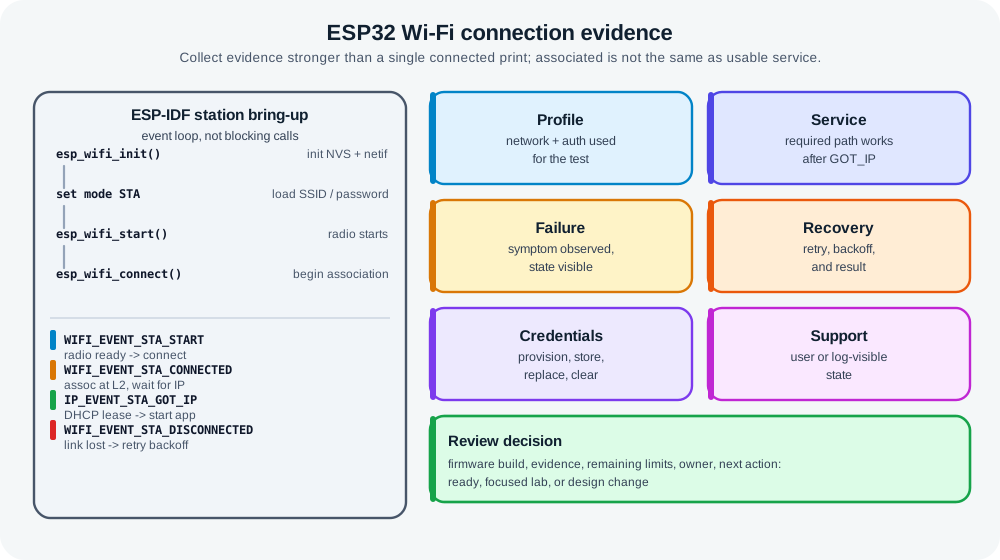
Read Figure 22.2, read from firmware and network profile through join, addressing, and application reachability, then follow a forced failure into recovery and visible status. Credential handling and remaining limits complete the record, connecting a console message to a supportable implementation.
A useful record contains:
- firmware build or configuration under review
- network profile used for the test
- station join result and address assignment result
- service reachability result
- failure event and recovery behavior
- credential provisioning and reset behavior
- operator or user-visible state
- remaining limits and next decision
22.10 Focused Lab Evidence
This section: Focused Lab Evidence — The merged hands-on lab material narrows ESP32 review to one question per exercise.
The merged hands-on lab material narrows ESP32 review to one question per exercise. A lab should prove a bounded behavior, state what changed, and record what still needs field validation.
A useful lab record states:
- the question, device, firmware, AP profile, antenna, enclosure, and test network
- controlled variables and variables left uncontrolled
- observed join, service, retry, latency, traffic, power, and recovery behavior
- failure cases attempted, conclusion supported by the evidence, limits, and retest triggers
Carry these practice areas into the basic ESP32 record:
- association and usable service, including address assignment and recovery after AP restart
- channel or coexistence observations that explain weak joins or retries
- onboarding, segmentation, revocation, reset, and update-access checks
- power observations for boot, scan, join, command windows, retry, sleep, and setup mode
- traffic evidence for telemetry, commands, diagnostics, updates, and maintenance transfers
- troubleshooting records that move from symptom to layer, test, fix, retest, and next owner
22.11 What ESP32 Basics Means
This section: What ESP32 Basics Means — This chapter does not require one specific framework.
The basic ESP32 Wi-Fi implementation has a few responsibilities:
- Station behavior: the device joins an existing access point as a client.
- Setup behavior: the device may temporarily host a setup network or use another provisioning path.
- State behavior: the device tracks connecting, connected, usable service, degraded, retrying, and stopped states.
- Service behavior: the device proves that the required application path works after network join.
- Credential behavior: the device receives, stores, replaces, and clears credentials through a supportable workflow.
- Recovery behavior: the device reacts to wrong credentials, missing access point, poor signal, service outage, restart, and reset.
This chapter does not require one specific framework. Arduino-style libraries, ESP-IDF event APIs, and higher-level device frameworks can all work if the resulting behavior and evidence are clear.
22.12 Scope Before Implementation
This section: Scope Before Implementation — The scope should also name what this basic review will not prove.
Before writing or accepting firmware, record the device context:
- device role: sensor, actuator, display, gateway, camera, mobile tool, or maintenance device
- required service: local broker, cloud endpoint, controller, update server, or local web service
- traffic type: telemetry, command, alert, diagnostic, update, or setup exchange
- power pattern: always powered, duty cycled, battery assisted, or battery primary
- network profile: band, SSID class, authentication method, segmentation boundary, and service reachability
- setup path: preloaded profile, setup access point, phone-assisted provisioning, support tool, or managed enrollment
- support path: reset, replacement, credential rotation, logs, visible state, and update ownership
The scope should also name what this basic review will not prove. Examples include installed building coverage, long-term battery life, fleet monitoring, and final security approval.
22.13 Station Join Path
This section: Station Join Path — A basic station join path should be event aware.
A basic station join path should be event aware. A blocking loop that waits forever can hide failures and starve sensors, controls, watchdogs, or user feedback.
Record these behaviors:
- how the firmware starts the Wi-Fi radio and selects station mode
- which stored or newly provisioned profile it attempts first
- how long it waits before declaring a join attempt failed
- whether retry behavior uses backoff rather than constant rapid reconnects
- what state is shown to the user, log, or support channel during each phase
- what the application is allowed to do before usable service is confirmed
Join success is not the same as service success. The device may be associated to the access point but still unable to reach the application service because address assignment, name resolution, routing, authentication, or service authorization failed.
22.14 Usable Service Check
This section: Usable Service Check — The first service check should match the device requirement.
The first service check should match the device requirement. Do not use a generic internet ping if the device actually needs a local broker, controller, update server, or application endpoint.
Useful evidence includes:
- address assignment or static address configuration result
- route or service discovery result
- application endpoint reachability result
- authentication or session result when the service requires it
- result after device restart
- result after service restart or service outage
- visible state when network join works but service reachability fails
For a telemetry device, usable service may mean a message is accepted and acknowledged by the intended broker. For a command device, usable service may mean a command can be received and acted on within the allowed window. For a setup tool, usable service may mean the local configuration page is reachable only during the intended setup window.
22.15 Continue to the Next Part
This section: Continue to the Next Part — Carry this evidence into ESP32 Wi-Fi: Provisioning and Recovery Workflows, which begins with Setup Access Point And Provisioning.
Carry this evidence into ESP32 Wi-Fi: Provisioning and Recovery Workflows, which begins with Setup Access Point And Provisioning.
Find help
3 reviewed answers.
Where should I start in a module?
Open the module page from the sidebar to see its chapters in order. Use the module map to return to a topic you need.
Modules and pathsReviewed
What can I try when a project does not work?
Check the symptom, then work through the diagnostic steps. Keep the error message and the smallest example that reproduces it.
When you are stuckReviewed
How do interactive examples work?
Use the interactive guide to check how examples and simulations work before changing your project.
Interactive examples guideReviewed