15 Wi-Fi Security: Access and Segmentation Controls

More
Depth: Practitioner
Progress saves as you read. Mark sections complete as you go; your progress appears in the sidebar.
15.1 Start With the Decision
This section: Start With the Decision — One shared Wi-Fi key can turn a lost sensor into a fleet-wide breach.
One shared Wi-Fi key can turn a lost sensor into a fleet-wide breach. Access, identity, and network segments must limit that blast radius.
15.2 Route Overview
This section: Route Overview — This is part 1 of 2.
This is part 1 of 2. Continue with Wi-Fi Security: Provisioning and Recovery Evidence.
15.3 Part Objectives
This section: Part Objectives
- Compare Wi-Fi access controls for device fleets.
- Design segmentation rules that isolate device services.
15.4 Chapter Roadmap
This section: Chapter Roadmap
- Start With the Wireless Story
- In 60 Seconds
- Quick Check: Wi-Fi Security
- Security Provisioning Review Flow
- Security Provisioning Record
- Authentication Mode Review
- Provisioning Path Review
- Credential Handling
- Segmentation And Service Rules
15.5 Start With the Wireless Story
This section: Start With the Wireless Story — Picture a new room sensor that must join the right building network.
Make First Join Safe and Repeatable
Picture a new room sensor that must join the right building network. A nearby stranger should not be able to claim it. A support worker should not need one shared secret for every device.
An access point is the local radio device that joins Wi-Fi devices to a network. Provisioning is the setup path that gives a device the right network details and its own trust record. Start with a clear proof of ownership, such as a physical action, a short code, or a managed claim.
Give each device its own identity. Check the network identity before sending secrets. Protect setup data while it moves. End the setup window quickly. Record who enrolled the device, when it happened, and which rule set it received.
Then test the full life. Replace a lost secret. Move the device. Change the network name. Remove an old owner. Reset and enrol again. A safe path must recover without falling back to a common password or an open setup mode.
Use Practitioner for enrolment and recovery records. Use Under the Hood for key exchange, protected frames, enterprise trust, and attack limits.
Picture a new sensor joining a shared Wi-Fi network. The join must prove who the device is, who may set it up, and what it can reach.
First, name the owner, join path, secret, and service rule. Then record how access is changed or removed when the device or staff role changes.
A shared secret is easy to start, but one leak can affect many devices. A unique identity is safer to revoke, yet it needs more care and support.
A safe Wi-Fi join needs the access rule, observed authentication result, and a site plan for failed or revoked devices.
Use the Practitioner sections to review setup, access, and recovery.
Plain check
- Name the device owner. Name the network owner. Name the setup user. Name the service need.
- Pick the join path. Limit who can start it. Set a short join time. Record the result.
- Give each device identity. Keep each secret safe. Limit where it lives. Plan safe removal.
- Check the first join. Check a repeat join. Check a wrong user. Check a wrong network.
- Test a weak secret. Test a lost device. Test a copied setup code. Test a failed update.
- Limit network reach. Limit service reach. Block unused paths. Log each denied path.
- Keep setup traffic local. Keep admin steps clear. Keep recovery safe. Give each step an owner.
- Plan staff change. Plan device sale. Plan device loss. Plan final removal.
- Save the device build. Save the join mode. Save the access rules. Save the test date.
- Recheck after code change. Recheck after router change. Recheck after owner change. Keep proof current.
- Use Practitioner to review. Use deeper key checks. Test one attack path. State each bound.
- Review the whole life. Remove stale access. Fix weak recovery. Repeat the join test.
Wi-Fi security starts before the first normal packet. The story runs from onboarding and credentials through WPA mode, identity proof, key rotation, fleet recovery, and deprovisioning, because a device that is easy to join must also be safe to operate.
15.6 In 60 Seconds
This section: In 60 Seconds — A Wi-Fi security and provisioning review checks whether an IoT device can be joined, authenticated, isolated, recovered, updated, and removed without exposing credentials or creating a flat network risk.
A Wi-Fi security and provisioning review checks whether an IoT device can be joined, authenticated, isolated, recovered, updated, and removed without exposing credentials or creating a flat network risk.
The review should not approve a design because it uses a familiar Wi-Fi password, a newer security label, or a convenient onboarding flow. It should record the device role, authentication mode, credential owner, provisioning path, storage behavior, recovery path, segmentation boundary, update path, monitoring signal, and retest triggers.
Only perform Wi-Fi security testing on networks and devices you own or are explicitly authorized to review. This chapter focuses on defensive design review, not attack instructions.
15.7 Learning Objectives
This section: Learning Objectives
By the end of this chapter, you will be able to:
- review Wi-Fi authentication and provisioning decisions for IoT devices
- distinguish shared-password, per-device, certificate, and managed onboarding models
- identify credential exposure, reset, revocation, update, and recovery risks
- check whether network segmentation and service rules limit device compromise impact
- write a bounded security and provisioning decision with owner and retest triggers
15.8 Security Provisioning Review Flow
This section: Security Provisioning Review Flow — Use Figure 15.1 to keep security and onboarding decisions connected.
Use Figure 15.1 to keep security and onboarding decisions connected.
Before approving a provisioning design, inspect Figure 15.1 to follow security from the device threat model through its operational lifecycle.
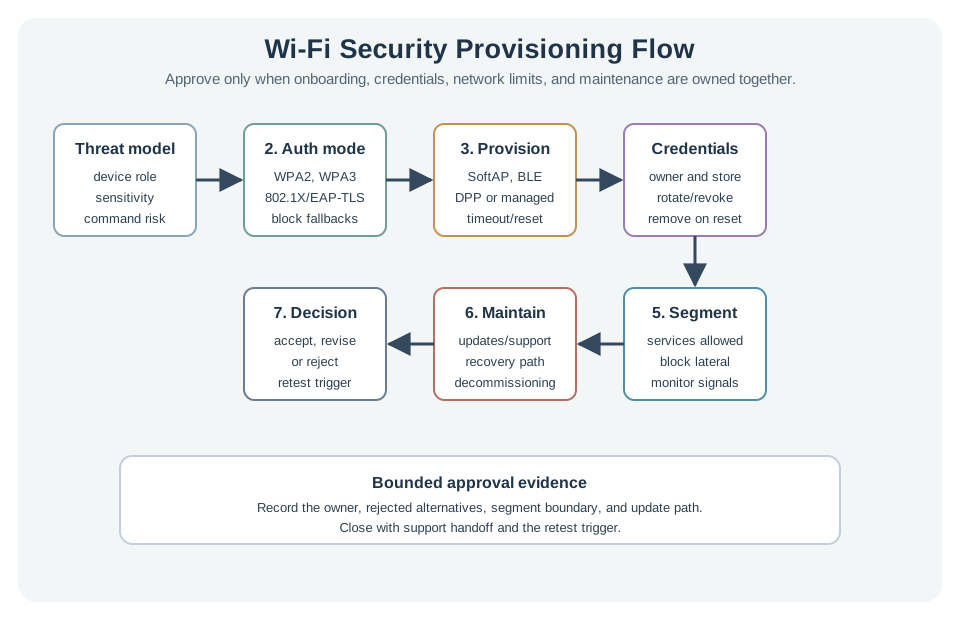
Read Figure 15.1 in sequence: define risk, select authentication, onboard the device, protect credentials, constrain network access, and maintain recovery. The final decision therefore includes reset, update, and support rather than ending when the device first joins.
The flow asks:
- What device role and threat model are being reviewed?
- Which authentication mode is used, and who owns credentials?
- How does a headless device receive network credentials?
- Where are secrets stored, rotated, revoked, and recovered?
- What network boundary limits device compromise impact?
- What update, reset, monitoring, and support path keeps the design maintainable?
15.9 Security Provisioning Record
This section: Security Provisioning Record — Use Figure 15.2 to make the approval traceable.
Use Figure 15.2 to make the approval traceable.
Before signing off setup, inspect Figure 15.2 to ask who owns each key, network line, update, repair step, reset, and cause for a new test.
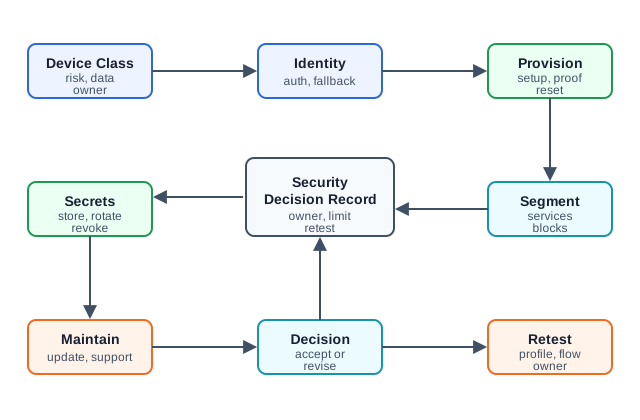
Read Figure 15.2 from device risk and key ownership to setup and safe key storage. Check the network lines next. One valid key should not open every service path. Then follow care, updates, watch, repair, and reset. Field support can change who or what is trusted at each step. The final choice states its limits and names an owner; it does not just say setup is done. Read the new-test trigger last. A new owner, key change, code change, or network change must reopen the checks that it may affect.
A useful record contains:
- device class, location, power source, data sensitivity, command risk, and owner
- selected Wi-Fi authentication mode and fallback modes that are allowed or blocked
- provisioning path, pairing proof, timeout behavior, reset behavior, and user/support workflow
- credential storage, rotation, revocation, factory reset, and lost-device handling
- network segment, allowed services, blocked lateral paths, and monitoring signals
- update path, certificate or password renewal path, firmware recovery, and support handoff
- accepted decision, rejected alternatives, limits, owner, and retest trigger
15.10 Authentication Mode Review
This section: Authentication Mode Review — Wi-Fi authentication is not one thing.
Wi-Fi authentication is not one thing. Review the actual protocol, because each one fails differently.
15.10.1 WEP — never accept it
WEP encrypts traffic with the RC4 stream cipher using short, reused initialization vectors. The key can be recovered from ordinary captured traffic in minutes. WEP is broken for every use — if a device supports only WEP, treat that as a hardware end-of-life signal, not a setting to tune.
15.10.1.1 Why WEP Fails Mechanically
WEP forms RC4’s per-packet seed by concatenating a public 24-bit initialization vector with a shared 40-bit or 104-bit secret:
RC4 expands that seed into keystream , and encryption is the stream-cipher operation . The IV must travel in the frame so the receiver can regenerate . It is therefore observable, not a nonce protected by encryption. When an IV repeats under the same shared secret, the same keystream repeats and an observer obtains
A 24-bit space has only values. By the birthday effect, collisions become likely after roughly frames, far earlier than exhausting all IVs. Worse, weak-IV and RC4 key-scheduling relationships leak statistical information about shared-key bytes across a large capture. Merely avoiding one immediately repeated IV does not repair the construction.
WEP appends CRC-32 as an integrity check before encryption. CRC detects accidental transmission errors, but it is linear and unkeyed. An attacker who flips a chosen delta in ciphertext can compute the corresponding CRC delta, so the receiver can accept a predictably modified plaintext without the attacker knowing the secret key. Confidentiality and integrity therefore fail for different but reinforcing reasons.
Known traffic accelerates capture. ARP frames have short, predictable fields. An attacker can replay a captured ARP request so the network emits many related ARP responses, rapidly collecting IVs and RC4 samples instead of waiting for ordinary use. The failure sequence is: observe a valid frame, stimulate repeatable traffic, collect public IV/ciphertext pairs, recover the shared key statistically, then decrypt or inject traffic.
WPA with TKIP was an emergency compatibility bridge. It retained RC4 but mixed the temporal key, transmitter address, and packet sequence into a per-packet key; expanded the sequence space; added replay checks and rekeying; and introduced the 64-bit Michael message-integrity code. Those changes made simple WEP-style reuse harder, but Michael was deliberately lightweight and weak. TKIP countermeasures react to repeated MIC failures, yet forgery and packet-injection techniques remained possible under constrained conditions. TKIP is now legacy, not a safe fallback: require AES-CCMP or an approved modern WPA2/WPA3 suite and remove WEP/TKIP rates and modes from acceptance tests.
Wi-Fi four-message handshake narrated tour
Narrated audio tour. The full transcript is below.
Play the tour to open the workbench. Pause, replay a beat, or read the full transcript below. Situations the model cannot show keep the existing frame and provide captions only.
Full transcript — Wi-Fi four-message handshake (8 beats)
B1 — Shared-password fleet
You are installing a Wi-Fi sensor in a fleet that shares one password. One exposed device credential could compromise the whole fleet. Before trusting the sensor’s connection, you need to understand what its four message handshake confirms, and what captured messages could reveal.
Model caption: Your sensor belongs to a shared-password fleet. One exposed device credential can compromise the fleet. What does the handshake prove?
B2 — Local master key
In this shared password setup, the password and network name produce a pairwise master key before the handshake begins. The handshake then derives session keys for encrypting traffic. The sensor exchanges messages with an access point, the device that connects it to the wireless network. The password and master key stay local. Instead, the two devices exchange message integrity codes, values calculated with a key to check that messages have not changed and that the sender possesses the key.
Model caption: Password plus network name produces the pairwise master key before the handshake. The handshake derives session keys; password and master key stay local.
B3 — Nonce and client proof
Message one carries a fresh value called a nonce from the access point, plus a replay counter. The sensor generates its own nonce and derives the session key. Message two returns the sensor’s nonce and a message integrity code for checking key possession. The access point can derive the same key and verify the code.
Model caption: Message 1: access-point nonce and replay counter. The sensor generates its nonce and derives a session key. Message 2: sensor nonce and integrity code; the access point derives the same key and verifies the proof.
B4 — Group key and installation
Message three carries an encrypted group key and a message integrity code confirming the access point possesses the key material. The group key protects group and broadcast traffic. Message four confirms the sensor has installed the keys. Protected traffic between the sensor and access point, and protected group traffic, can begin.
Model caption: Message 3: encrypted group key plus access-point proof. Message 4: sensor confirms installation. Protected individual and group traffic can begin.
B5 — Capture risk
Use the shared password setup for a capture example. Give the model four captured handshake messages. Set passphrase strength to two on its five setting scale; two means weak. The warning requires at least two captured messages. Four meets the minimum, so the model reports a risk that someone could test password guesses using the captured messages.
Model caption: Four captured frames; strength two of five means Weak. Four meets the model’s at-least-two threshold: Offline guess risk. These are model settings, not a cracking-time estimate.
B6 — Replay rejection
Now compare replay: attempting to reuse a captured message. With one replay attempt selected, the model reports replay rejected. The replay counter must move forward; an old counter makes a message invalid even with a correct integrity code. The replay result concerns accepting an old message.
Model caption: One replay attempt: Replay rejected. A reused counter is invalid even with a correct integrity code. The counter must move forward.
B7 — Local secrets and guessing
A common mistake is to assume replay rejection prevents password guessing, but in this shared password setup, captured handshake messages let an attacker test candidate passwords offline, without further network access. Rejecting an old message does not remove that guessing opportunity. The capture warning describes risk rather than a measured time to guess the password.
Model caption: Keeping the password local does not prevent offline candidate testing from captured handshake material. Replay rejection and offline guessing concern different uses of a recording. No cracking time is measured.
B8 — Handshake takeaway
The four message handshake confirms possession of session keys while keeping secrets local; captured messages can still enable password guessing.
Model caption: The four message handshake proves possession of session keys while keeping secrets local; captured proofs can still enable password guessing.
15.10.4 WPA2/WPA3-Enterprise (802.1X + EAP) — per-device identity
Enterprise mode removes the shared secret entirely. Each device authenticates through 802.1X, carrying an EAP exchange to a RADIUS server. With EAP-TLS, the device presents its own client certificate and validates the server’s — mutual authentication with no passphrase to leak. For IoT fleets this means:
- a single device can be revoked individually (revoke its certificate) without touching the rest of the fleet
- there is no shared credential to extract and reuse
The cost is operational: a certificate authority, per-device enrollment, renewal, revocation, and time sync. Choose Enterprise/EAP-TLS when the fleet is large or high-value and operations can run the identity lifecycle; it is usually too heavy for a handful of unmanaged consumer devices.
15.11 Provisioning Path Review
This section: Provisioning Path Review — Provisioning is often the weakest part of a Wi-Fi IoT design.
Provisioning is often the weakest part of a Wi-Fi IoT design.
For headless devices, review:
- how the device enters setup mode
- how the user or installer proves physical possession
- whether setup mode times out and closes cleanly
- how credentials are transferred and protected
- how failed setup is retried without exposing secrets
- how the device is reset, transferred, decommissioned, or reissued
- how support can diagnose setup without asking users to reveal passwords
Common provisioning paths, by name:
- SoftAP setup: the device hosts a temporary access point; a phone joins it and pushes the Wi-Fi credentials. Widely used, but the credentials cross that setup link, so it must close cleanly after onboarding.
- BLE-assisted provisioning: a companion app sends the credentials over a short-range Bluetooth Low Energy link, keeping them off any open Wi-Fi.
- WPS (Wi-Fi Protected Setup): PIN- or push-button onboarding. The PIN method is brute-forceable and should not be used — treat WPS support as something to disable.
- Wi-Fi Easy Connect (DPP, Device Provisioning Protocol): the modern standard — scanning a QR code bootstraps a public-key exchange, so no plaintext passphrase is ever transferred. Prefer it when supported.
- Zero-touch / managed enrollment: per-device certificates are pre-loaded at manufacture, so the device joins an Enterprise (EAP-TLS) network with no field secret entry at all.
None is automatically safe. Match the path to the device role, installer skill, support model, and recovery requirement.
15.12 Credential Handling
This section: Credential Handling — Do not accept a provisioning design until credential handling is clear.
Do not accept a provisioning design until credential handling is clear.
Review questions:
- Are credentials ever stored in source code, logs, screenshots, build artifacts, or support tickets?
- Does the device store secrets in a protected device store where available?
- Can a credential be rotated without replacing the device?
- Can one lost or compromised device be revoked without disrupting the full fleet?
- Is the reset path bounded, observable, and resistant to accidental exposure?
- Is there a documented owner for credential renewal and retirement?
The decision should identify which secrets exist, where they live, who can change them, how they are removed, and what event forces a retest.
15.13 Segmentation And Service Rules
This section: Segmentation And Service Rules — Wi-Fi authentication controls who joins.
Wi-Fi authentication controls who joins. Segmentation controls what a joined device can reach.
Review segmentation evidence:
- device segment name and purpose
- allowed service destinations and protocols
- blocked lateral movement to user, admin, and unrelated device areas
- management path for updates and support
- monitoring signal for unexpected destinations, retries, or join attempts
- exception owner and expiry date for temporary access
Segmentation should be tested with the real service path. A device that can join securely but can reach every internal system is still a weak design.
15.14 Continue to the Next Part
This section: Continue to the Next Part — Carry this evidence into Wi-Fi Security: Provisioning and Recovery Evidence, which begins with Recovery, Updates, And Removal.
Carry this evidence into Wi-Fi Security: Provisioning and Recovery Evidence, which begins with Recovery, Updates, And Removal.
Find help
3 reviewed answers.
Where should I start in a module?
Open the module page from the sidebar to see its chapters in order. Use the module map to return to a topic you need.
Modules and pathsReviewed
What can I try when a project does not work?
Check the symptom, then work through the diagnostic steps. Keep the error message and the smallest example that reproduces it.
When you are stuckReviewed
How do interactive examples work?
Use the interactive guide to check how examples and simulations work before changing your project.
Interactive examples guideReviewed