17 Development Environments: Reproducibility and Debugging
More
Depth: Practitioner
Progress saves as you read. Mark sections complete as you go; your progress appears in the sidebar.
17.1 Start With the Decision
This section: Start With the Decision — A named example helps only when another person can run it.
A named example helps only when another person can run it. Record each tool version, the exact release used; keep logs, the time-ordered records of what happened; and state exit checks, the results that show whether the run passed. Those records make the proof repeatable.
17.2 Route Overview
This section: Route Overview — This is part 2 of 2.
This is part 2 of 2. Review Development Environments: Selection and Setup Evidence for the preceding evidence.
17.3 Learning Objectives
This section: Learning Objectives
- Create a reproducible toolchain record.
- Use incremental builds, logs, and probes to debug failures.
17.4 Chapter Roadmap
This section: Chapter Roadmap
- Incremental Examples
- Worked Example: A Named Reference Toolchain
- Name the Exit Condition
- Quick Check: Environment Fit
- Reproducible Toolchain Record
- Debug and Observation Loop
- Probe and Toolchain Evidence Ladder
- Simulator and Harness Boundary
- Concept Check: Simulator Boundary
- Try It Now
- Review Environment Records
- Cold-Room Firmware Scenario
- Handoff Decision
- Knowledge Check
- Environment Evidence
- Match Environment to Evidence
- Order the Environment Review
- Common Failure Patterns
- See Also
- Summary
- Key Takeaway
- What’s Next
17.5 Incremental Examples
This section: Incremental Examples — Beginner Example: A student proves first contact with an Arduino Nano 33 IoT or ESP32 development board.
Beginner Example: A student proves first contact with an Arduino Nano 33 IoT or ESP32 development board. Arduino IDE or Thonny is acceptable if the record names the board package, selected port, library source, upload command, and one serial log line that shows the sensor read path. The result proves board contact and basic observation, but not power, RF reliability, or maintainable team workflow.
Intermediate Example: A small team moves an ESP32, STM32, or Raspberry Pi Pico prototype into PlatformIO, ESP-IDF, STM32CubeIDE, or a CMake-based project. The repository now contains the target profile, dependency lock or version notes, build command, host-side parser tests, and a serial capture for one normal run and one fault case. The result proves a repeatable multi-file build and reviewable logic, but hardware timing still needs board evidence.
Advanced Example: A product-like prototype uses Zephyr west, nRF Connect SDK, ESP-IDF, or a vendor SDK because the question depends on flash partitions, secure boot, RTOS timing, Bluetooth LE stack behavior, low-power states, or signed update flow. CI builds the firmware artifact, the debugger or trace method is documented, and the handoff record separates host-test evidence from target-board evidence. The result is stronger, but only if the team also records board revision, SDK version, configuration overlays, and the retest trigger for silicon or field changes.
Concrete names make a target profile checkable instead of vague. A lab reference toolchain, for instance, might name a Nordic nRF52-DK development board, an InvenSense MPU-9250 breakout wired over the board’s expansion header for accelerometer, gyroscope, and magnetometer readings, and the ARM mbed online compiler as the build environment. The reference firmware flashes an onboard LED, prints boot and sensor state to a PC over serial, and streams IMU samples over Bluetooth Low Energy to a paired app. Writing “Nordic nRF52-DK, MPU-9250 breakout, mbed” instead of “a dev board with a motion sensor” is what turns the target profile field from a checklist label into evidence another reviewer can rebuild.
Before choosing an environment, write the condition that will let the team move on. Examples: “clean build from checkout,” “sensor fault reproduced with logs,” “same payload built for two board profiles,” or “unit tests run without hardware.”
17.6 Reproducible Toolchain Record
This section: Reproducible Toolchain Record — The most common environment failure is an unrepeatable build.
The most common environment failure is an unrepeatable build. The prototype may work on one laptop, but nobody can explain compiler version, board profile, library state, or configuration inputs.
Figure 17.1 lists the inputs and observations needed to repeat a firmware build.
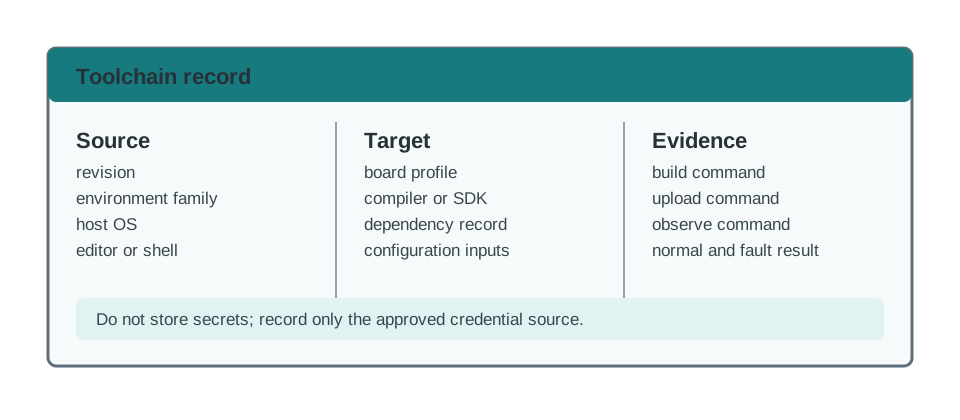
The source revision identifies the code under test; the compiler or SDK version, board profile, and dependency record identify the environment that built it. Keep the exact build, upload, and observation commands with the resulting artifact so another reviewer can run the same path. The closeout separates a normal result from a fault result and records the limits of the environment. If a dependency or board profile changes, the old result no longer proves the new build behaves the same way. Recording a retest trigger and owner makes that boundary visible without putting credentials in the record.
Record the environment as soon as the first meaningful build runs:
prototype=
evidence_question=
source_revision=
environment_family=
host_os=
editor_or_shell=
compiler_or_interpreter=
sdk_or_framework_version=
board_profile=
dependency_record=
configuration_inputs=
secret_handling_note=
build_command=
upload_or_run_command=
observe_command=
normal_result=
fault_result=
known_environment_limits=
retest_trigger=
review_owner=
review_date=
Keep secrets out of the record. It is enough to say where credentials come from, such as a local environment file, a secret manager, or a temporary lab token. Do not paste tokens, certificates, private keys, or production endpoints into prototype notes.
17.7 Debug and Observation Loop
This section: Debug and Observation Loop — The environment should shorten the loop between a code change and an observed behavior.
The environment should shorten the loop between a code change and an observed behavior. A faster editor does not help if the team cannot see why the device changed state or failed.
Figure 17.2 links each code change to an observed normal run and an injected fault.
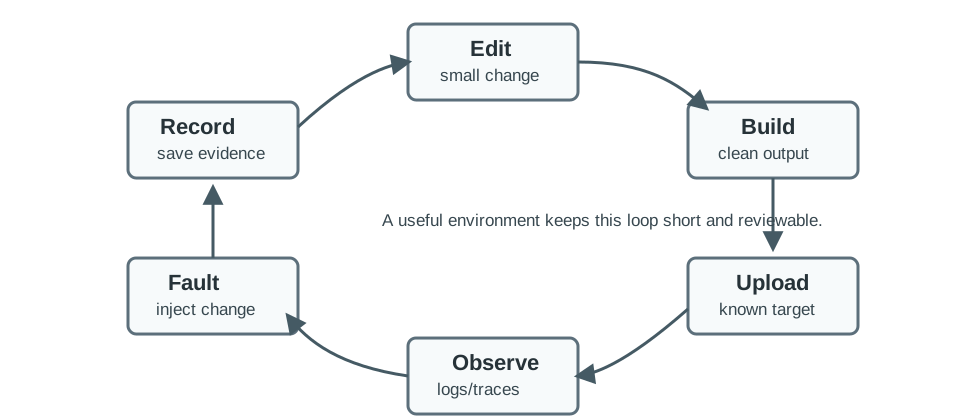
A debugging loop needs an observed result for each code change. In Figure 17.2, the air-monitor example records a source revision, builds for the esp32dev board, uploads it, and watches serial output for the expected payload. The next step injects a missing sensor, bad payload, or link loss to see whether the failure path behaves as intended. Capture the exact command, log excerpt, trace, or test result before changing the environment again. That record matters because a clean build shows that code compiled, while the normal and fault observations show what the device actually did. Repeat from the edit step after any setup change.
Use the lightest observation method that can answer the question:
Escalate tools by the question they can answer:
| Question | Tool | Evidence |
|---|---|---|
| What did firmware believe happened? | Serial monitor or structured log | Boot log, version, state transition, error counter, and timestamp |
| Where did execution stop? | Debugger, trace, or crash dump | Stack frame, register state, variable value, and source revision |
| Did the digital bus carry the expected bits? | Logic analyzer | I2C/SPI/UART trace with voltage level, sample rate, and decoded transaction |
| Did the analog or power signal behave correctly? | Oscilloscope or current probe | Rail sag, reset line, clock, wake signal, or current profile under load |
| Can another developer reproduce the build? | CI build node or scripted local build | Command, target profile, warnings, artifact, dependency lock, and size report |
| Does the behavior survive outside the bench? | Field log or long-running harness | Recovery event, reconnect count, watchdog reason, and retest trigger |
Before attaching a debugger, logic analyzer, or scope, check ground reference, voltage level, connector pinout, and probe loading. A debug session should not become the fault being debugged.
17.8 Simulator and Harness Boundary
This section: Simulator and Harness Boundary — Simulation is useful when it makes a software question cheaper to test.
Simulation is useful when it makes a software question cheaper to test. It is risky when reviewers treat simulated success as proof of hardware behavior.
17.9 Concept Check: Simulator Boundary
This section: Concept Check: Simulator Boundary
17.10 Try It Now
This section: Try It Now — Choose one IoT prototype you have already built or could plausibly build.
Choose one IoT prototype you have already built or could plausibly build. Fill in five fields from the toolchain record: evidence_question, environment_family, board_profile, build_command, and known_environment_limits. If any field is unknown, write the next action that would expose it without changing the product design.
17.11 Review Environment Records
This section: Review Environment Records — Keep the repeatable build and upload path.
Review this short record and mark one item to keep, one to retest, and one to escalate:
prototype=classroom-air-monitor
environment_family=PlatformIO project with ESP32 target
board_profile=esp32dev, recorded in project configuration
build_command=platformio run
upload_or_run_command=platformio run --target upload
observe_command=115200 baud serial monitor
normal_result=temperature and CO2 payload printed once per minute
known_environment_limits=no battery-current measurement, no Wi-Fi congestion test, no OTA rollback test
Keep the repeatable build and upload path. Retest power and wireless behavior on the actual enclosure and network. Escalate OTA rollback to a later environment if update recovery becomes part of the release question.
17.12 Cold-Room Firmware Scenario
This section: Cold-Room Firmware Scenario — A team is building firmware for a cold-room monitor.
A team is building firmware for a cold-room monitor. The device reads temperature and door state, logs excursions, and reports status through a gateway. The team chooses environments in stages instead of making one permanent choice on day one.
17.12.1 Stage 1: First Board Contact
The first environment is a low-friction starter setup. It proves that the board can boot, read one temperature value, toggle a status output, and write a serial log. The review record captures board profile, library version, upload command, and one clean log.
17.12.2 Stage 2: Repeatable Project Build
The firmware now spans a sensor boundary, state machine, payload formatter, and storage stub. A project-based toolchain keeps the dependencies, build commands, and board profiles with the repository, making the multi-file build easier for another developer to repeat. Record the source revision, compiler or SDK version, dependency versions, and configuration inputs alongside the exact build and upload commands.
A clean build from checkout provides a useful exit condition, but compilation alone does not describe device behavior. Keep serial captures for a normal run and a fault case with the build record. These observations connect the project setup to the firmware that ran on the board. Hardware timing remains a separate evidence requirement, while excursion logic and payload formatting can move into a host-side harness.
17.12.3 Stage 3: Host-Side Harness
Host tests check excursion logic and payload formatting before running the firmware on the target board. For the cold-room monitor, this makes the software decisions behind logging excursions and reporting status reviewable without requiring a hardware run for each check. Keep the harness inputs, test command, source revision, and observed results together so another developer can repeat the checks.
The evidence has a defined boundary: a passing host test supports the logic exercised by its inputs, while sensor accuracy, power use, and hardware timing still need board measurements. Preserve normal and fault results rather than recording only that tests passed. When the code or environment changes, repeat the relevant checks and retain the distinction between host results and observations from the device.
17.12.4 Stage 4: Vendor-Specific Evidence
Low-power wake behavior and secure update layout depend on silicon features, so the team evaluates a vendor SDK or lower-level framework. The decision is based on evidence needs, not on tool prestige.
prototype=cold-room-monitor
current_question=can the team rebuild, upload, and observe the firmware repeatably?
environment_family=project-based toolchain with host test harness
board_profile=recorded in repository configuration
dependency_record=committed lock file or explicit version list
build_command=recorded and checked from clean checkout
upload_command=recorded with board connection notes
observe_command=serial log plus host test output
simulator_limit=logic and payload only; no power, RF, enclosure, or sensor drift proof
handoff=language, architecture, library, testing, and OTA chapters can reuse the record
17.13 Handoff Decision
This section: Handoff Decision — An environment choice should leave a decision trail.
-

Record what the software environment truly proved and what it could not.
-

Sort repeatable proof, retests, unsafe scraps, and blocked checks.
-

Hand the record forward with its risk review and next test.
An environment choice should leave a decision trail. The next chapter may change language, the architecture chapter may split the firmware into tasks, and the testing chapter may formalize the harness. Those later decisions need to know what the current environment actually proved.
Figure 17.3 sorts repeatable environment evidence from assumptions that need another test.
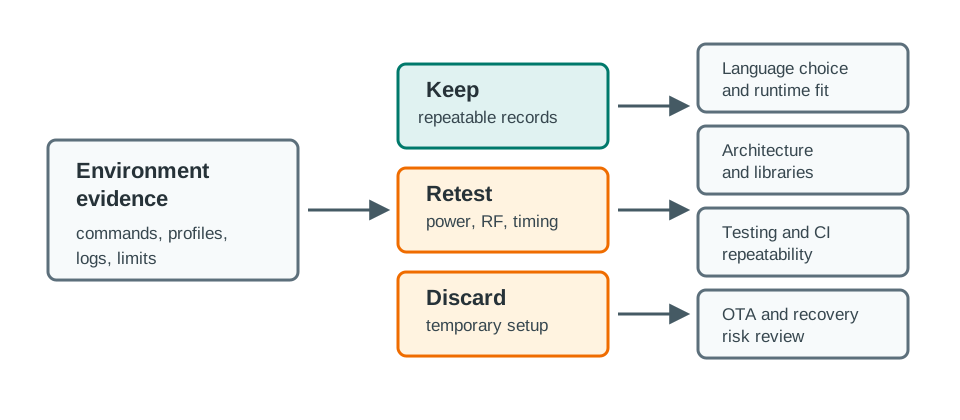
The handoff in Figure 17.3 sorts proof from assumptions before another team inherits it. Keep build commands, board profiles, dependency records, harness inputs, and logs that can be repeated. Mark power, timing, RF, update, and enclosure claims for retest because the current environment may not expose them. Discard temporary debug code, fixed lab credentials, and one-off setup steps rather than turning them into a product contract. Escalate gaps such as secure storage or production update behavior with a named next test. The handoff package carries a repeatable record, risk review, and next test into language, architecture, testing, and update decisions.
Before moving on, classify the result:
17.14 Knowledge Check
This section: Knowledge Check
17.15 Common Failure Patterns
This section: Common Failure Patterns
17.16 See Also
This section: See Also — First, Prototyping Languages explains how language choice changes firmware, gateway, scripting, and data-processing environment needs.
First, Prototyping Languages explains how language choice changes firmware, gateway, scripting, and data-processing environment needs. Next, Software Architecture Patterns shows how loop, event, task, and state models affect project structure and test harness design. Then, Libraries & Version Control covers dependency selection, reuse boundaries, version records, and update risk. After that, Testing & Debugging turns environment records into repeatable unit, integration, hardware, and fault checks. Finally, Over-the-Air Updates covers the deployment and rollback evidence that starter environments usually cannot prove.
17.17 Summary
This section: Summary — First, A development environment is part of the prototype evidence, not just a place to edit code.
First, A development environment is part of the prototype evidence, not just a place to edit code. Next, Choose the environment that exposes the current risk with the least hidden setup. Then, Record build inputs, board profiles, dependency versions, upload commands, observation commands, and simulator limits. After that, Treat simulated evidence and hardware evidence as different kinds of proof. Finally, Hand off only the parts of the environment that another reviewer can repeat or deliberately retest.
17.18 Key Takeaway
This section: Key Takeaway — Development environments should make builds repeatable across laptops, CI, and devices; undocumented manual setup becomes a deployment risk.
Development environments should make builds repeatable across laptops, CI, and devices; undocumented manual setup becomes a deployment risk.
17.19 What’s Next
This section: What’s Next
17.20 Continue Your Route
This section: Continue Your Route — This is the last part of this chapter.
This is the last part of this chapter. Return to Development Environments: Selection and Setup Evidence or continue from the prototyping module index.
Find help
3 reviewed answers.
Where should I start in a module?
Open the module page from the sidebar to see its chapters in order. Use the module map to return to a topic you need.
Modules and pathsReviewed
What can I try when a project does not work?
Check the symptom, then work through the diagnostic steps. Keep the error message and the smallest example that reproduces it.
When you are stuckReviewed
How do interactive examples work?
Use the interactive guide to check how examples and simulations work before changing your project.
Interactive examples guideReviewed