8 Smart Home: Needs, Protocols, and Boundaries
More
Depth: Practitioner
Progress saves as you read. Mark sections complete as you go; your progress appears in the sidebar.
- Podcast audio coming soon
- Character narration audio coming soon
8.1 Keep the Johnson Home Usable
A smart home uses connected sensors and automatic rules to manage lights, heating, security, and appliances. The Internet of Things (IoT) is the wider idea of physical devices sharing data and acting on it. Smart homes and commercial building automation bring that idea to hundreds of millions of homes and buildings worldwide. Saving energy, improving security, and reducing repetitive tasks matter only if people can still control the building.
Consider the Johnson family and their Sensor Squad on a cold Monday. A temperature sensor reports 58 degrees outside. The home controller starts the thermostat at 6:30 AM before the family gets up at 7:00 AM, then lowers the heat when everyone leaves at 8:15 AM. The lighting system handles the lights: when 10-year-old Emma enters the kitchen, motion turns them on, while daylight allows them to dim. At 3:30 PM, Max the Smart Lock recognizes Emma’s code, unlocks the door, and triggers the lights and an “after school” temperature setting. Mom receives a notification that Emma is home. At bedtime, Dad’s “Good night, house!” request turns off lights, locks doors, sets sleeping temperature, and starts Bella the Camera Sensor watching the front yard.
That is a scene: a group of actions run together. Automation means running an action without someone pressing a button each time; scheduling gives different times of day different settings. The story reports a bill 30% lower than the family’s old house. That story outcome is separate from the worked energy estimates below. Energy savings mean using less electricity by controlling when loads operate.
The problem is what happens when that routine is wrong or unavailable. Can Emma enter if the internet fails? Can a guest use a light without an account? Can someone explain a temperature change or stop a camera recording? Comfort, convenience, privacy, and trust share the same network. Routines, family permissions, installation quality, and everyday expectations decide whether automation feels helpful or intrusive.
This first chapter of two establishes household needs, communication duties, and local, safety, privacy, and ownership boundaries. We will follow sensors through controllers to physical actions, then examine conflicting controllers and a migration that preserves working equipment. The second chapter develops the calculations for energy, scene reliability, voice delay, false alarms, and commercial heating, ventilation and air conditioning (HVAC) payback. Start with a thermostat and a few smart bulbs, check whether they improve daily life, and expand from a demonstrated need.
KEY CONCEPTS
- Hub-and-spoke
Devices communicate through one central hub.
- Matter
A royalty-free smart-home standard helps products work across Apple, Google, Amazon, and Samsung systems.
- Occupancy control
Heating, ventilation, and air conditioning (HVAC) or lighting responds to occupied rooms.
- Zigbee mesh
Powered devices pass messages for low-power home devices; local control needs no internet.
- Geofencing
A phone entering or leaving a marked area triggers a home mode.
- Energy disaggregation
Software estimates running appliances from the total power pattern without a meter on every appliance.
- Local fallback
Core lights and locks keep working during an internet or cloud outage.
8.2 Learning Objectives
By the end of this chapter, you will be able to:
- Calculate return on investment (ROI). ROI compares the money saved with the money spent. You will use it for thermostats, lights, and plug loads.
- Design a home scene, which is a group of actions run together. Latency means the wait between a request and its result. You will account for both reliability and latency.
- Explain the parts of a voice assistant’s response time.
- Reduce false security alarms by combining evidence from more than one sensor. This is called multi-sensor fusion.
- Apply demand response, where a building changes energy use when the power grid asks. You will also use voltage and reactive-power optimisation (VVO) in a commercial building example.
8.3 Smart Homes Must Stay Livable
Before choosing a radio, follow the control loop. Sensors detect motion, temperature, light level, or an open door. A hub or controller connects devices and runs the decision rules. An actuator is the output device: a light dims, a thermostat changes, or a lock moves. An important event can then produce a phone notification. A phone’s Global Positioning System (GPS), for example, can indicate departure and trigger lights off, a thermostat setback, door locking, and alarm arming. Residents must still be able to check or undo those actions.
A smart-home system is successful when it makes daily life easier without making the home fragile. Lights, locks, thermostats, alarms, shades, appliances, and energy controls touch comfort, access, safety, privacy, and household routines. The design has to work for residents, guests, children, older adults, service workers, and people who do not want to manage an app every day. Treat the home as a shared control environment, not a gadget showroom.
Figure 1 answers the question behind a livable home: which decisions are allowed to leave the building?
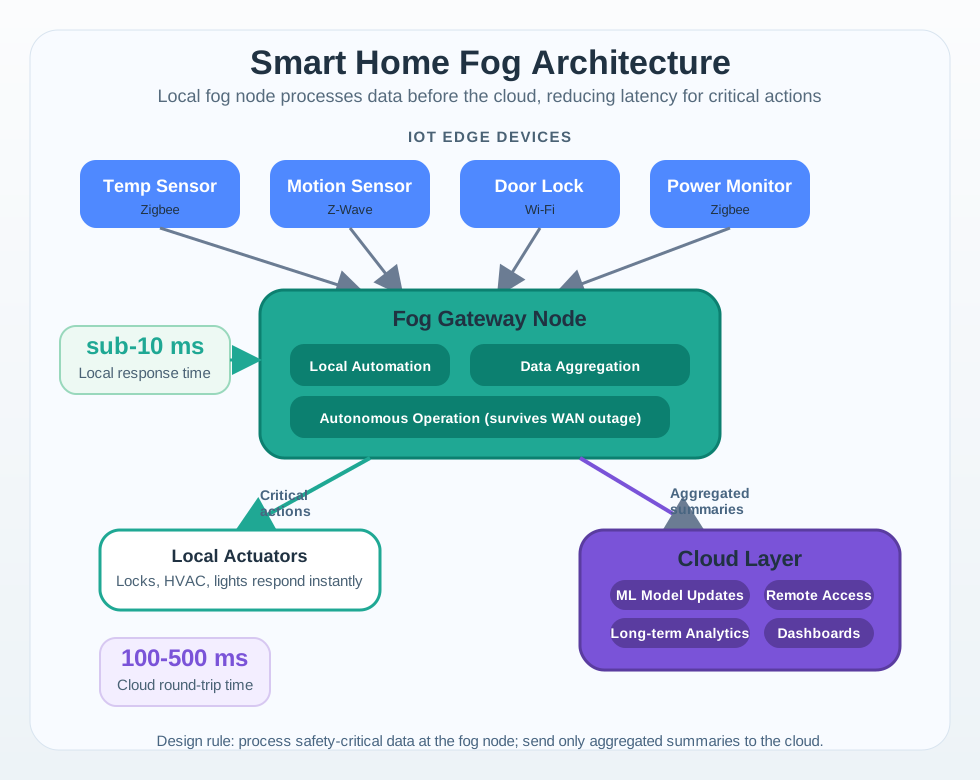
Figure 1 puts the gateway in the middle for a reason. Sensors and a lock arrive on the left over three different radios, and none of them talks to the cloud directly. The gateway runs the automation itself, which is why the short loop back to locks, heating and lights is marked in single-digit milliseconds. Follow the upward path instead and the figures change to hundreds of milliseconds for a cloud round trip. That upper path carries summaries, model updates and remote dashboards, not door decisions. The note on the gateway states the design rule in one phrase, because it keeps working when the wide-area link fails. A home stays livable when the safety-critical part never depended on the connection.
Use the household or building need instead of the gadget. A door lock needs manual access and local fallback. A heating scene needs override, stale-sensor handling, and limits that prevent discomfort. A security scene needs false-alarm controls and privacy boundaries. A commercial building scene needs zone ownership, facilities-team visibility, and demand-response rules. In all cases, the product must make the normal path easier while preserving an understandable manual path when automation is wrong.
The most useful smart-home questions are ordinary ones. Can a guest turn on a light? Can a child leave during an emergency? Can a resident understand why the thermostat changed? Can a cleaner enter without permanent account access? Can a facilities team see which zone is calling for heat? Can a security camera be useful without recording private spaces? The answers shape protocol choice, data retention, override design, and alert routing more than the brand of device.
- Need question: is the automation serving comfort, access, safety, energy, care, security, or maintenance?
- Fallback question: what still works when the internet, hub, phone app, voice assistant, or one device is unavailable?
- Resident question: who can override, disable, share, rename, or remove the automation?
A good smart-home plan also distinguishes residential and commercial stakes. A house may prioritize household trust, simple overrides, and low maintenance. A school, office, or apartment building may prioritize zone schedules, access policy, energy reporting, commissioning records, tenant privacy, and maintenance handoff. The shared principle is the same: every automated action needs a responsible owner, a visible reason, and a safe way back to manual control.
8.4 Match Protocols to Home Duties
Once the manual path is clear, choose communication duties. Smart-home prototypes often mix local mesh devices, Wi-Fi appliances, cloud services, and building controls. Matter over Thread or Wi-Fi can support multi-admin setup across Apple Home, Google Home, Amazon Alexa, and Samsung SmartThings. Zigbee networks may use Philips Hue, SmartThings, Zigbee2MQTT, or Home Assistant. Z-Wave devices may depend on Z-Wave JS or a certified hub. Wi-Fi and Bluetooth Low Energy (BLE) devices may use vendor clouds, MQTT, ESPHome, or local APIs. Commercial buildings may add BACnet, KNX, DALI, Modbus, Niagara, or BMS integration. The protocol choice should follow the action’s consequence.
Zigbee suits lights and sensors, while Z-Wave is often used for locks and switches. Wi-Fi uses more power than low-power meshes, and many Wi-Fi products depend on a cloud service. Thread and Matter support local-first control without requiring a cloud service for core actions. These distinctions matter more than choosing one radio for everything.
Write a scene record before buying or pairing devices. For each automation, record trigger evidence, controller, devices affected, expected latency, local fallback, manual override, notification rule, account owner, and rollback behavior. A front-door scene might use a keypad lock, door contact, hallway switch binding, hub automation, and phone notification. A bedtime scene might separate critical actions such as locks and lights from convenience actions such as music and cloud voice routines. A building ventilation scene might name the occupancy source, BMS point, CO2 threshold, comfort band, and facilities override.
- For lighting: record switch location, bulb or fixture id, group membership, local binding, scene priority, manual override, and behavior after power restoration.
- For climate: record thermostat, room sensor, occupancy source, HVAC stage, heat-pump limits, humidity, setback rule, preheat/pre-cool window, and demand-response enrollment.
- For access and security: record lock state, keypad/user code, door contact, motion/camera confidence, siren rule, arm mode, emergency contact, and local disarm path.
- For energy and appliances: record plug or circuit id, load threshold, standby rule, solar/battery state, EV charger schedule, tariff window, and appliance safety constraint.
Then test the scene under failure, not just during a perfect demo. Turn off the internet. Unplug the hub. Remove one Thread border router. Let a Zigbee bulb lose power. Let a phone leave the geofence without the resident leaving. Check whether wall switches still work, locks still open, alarms still disarm locally, and notifications describe what actually happened. Record which path is local, which path is cloud-assisted, and which path is convenience-only.
For commercial spaces, add commissioning discipline. Map room names to floor plans, label device ids physically, preserve BACnet or KNX point names, document who can change schedules, and keep a rollback plan for demand-response events. These records prevent the common failure where the original installer understands the automation but the resident, tenant, or facilities team cannot operate it safely.
8.5 Home Automation Needs Boundaries
A home-area network (HAN) is the local system formed by the home’s wired and wireless segments, gateways, controllers, devices, automation services, and user-control surfaces. It is not a synonym for Wi-Fi, and it does not stop at the radio. A wall switch on a KNX bus, a Z-Wave lock, a Thread sensor, a Matter controller, a bridge, a resident’s app, and the rule that decides which controller wins are all inside the HAN’s operational boundary. Vendor clouds can extend that boundary for remote access or analytics, but the home should not silently hand them authority over essential local functions.
A home automation engine is therefore a small control system. It should define which events are trusted, which actions are reversible, and which functions require human confirmation. It should also separate local control from cloud convenience so basic living functions do not depend on a remote service. Under the hood, the important object is not the device alone; it is the state transition from trigger to decision to command to acknowledgement to exception handling.
- Local-control boundary: keep locks, lights, climate, alarms, and water shutoff usable through wall switches, keypads, local bindings, hub automations, or manual handles.
- Cloud boundary: define which voice commands, remote access, AI recognition, notifications, vendor integrations, and analytics stop working when cloud services fail.
- Privacy boundary: define camera zones, microphone activation, presence sharing, guest access, location/geofencing data, retention, household consent, and account recovery.
- Conflict boundary: define automation priority, rate limits, cooldowns, sunrise/sunset changes, mode conflicts, child locks, vacation mode, and how residents can understand why an action happened.
Matter, Thread, Zigbee, Z-Wave, Wi-Fi, BLE, and cloud APIs expose different state and trust models. Matter fabrics and multi-admin commissioning determine which ecosystems can control a device. Thread border routers influence reachability, but Thread is an IPv6 mesh transport rather than the application model itself. Zigbee binding can keep simple lighting local even when the hub is degraded. Z-Wave security classes affect lock and sensor enrollment. Wi-Fi devices may be local, cloud-dependent, or both. Camera and voice services often add separate cloud identity, storage, and inference paths. A robust design names these control paths explicitly instead of assuming that an app button and a wall switch are equivalent.

8.6 Separate Reachability, Meaning, and Authority
Boundaries also explain why devices on the same network may still disagree. Inspect Figure 2 from physical devices to people, then compare whether each standard moves bits, describes behavior, or coordinates systems.

Read Figure 2 upward from physical segments to service descriptions. At layer 2, X10 carried simple addressed commands over household power lines; LonWorks supported distributed control using network variables; and KNX established a durable building-automation bus and group-address model. Zigbee and Z-Wave later supplied local wireless meshes, while Thread supplies an IPv6 mesh that Matter can use. These families solve useful transport, addressing, or control problems, but sharing a segment does not automatically give devices the same service description, state semantics, or owner.
Now move up the figure. UPnP historically combined IP discovery with device and service descriptions, while DLNA narrowed profiles for interoperable media use. Jini treated network capabilities as discoverable Java services. Research and middleware projects such as DomoNet, HYDRA, and Amigo explored service-oriented or ambient-intelligence ways to make heterogeneous home devices appear through common abstractions. They belong in the history of the design problem; they are not recommendations for a new installation. Their lasting lesson is that a virtual service remains trustworthy only while discovery, semantic mapping, routing, ownership, and recovery records remain correct.
Matter modernizes part of that upper contract by defining application behavior, commissioning, fabrics, and multi-admin operation across IP transports. A bridge can represent selected Zigbee, Z-Wave, or other native devices as Matter endpoints, but it cannot manufacture capabilities that the native system does not report. Nor does a bridge erase the underlying controller. The system still needs to say whether a physical switch, native hub, bridge, Matter controller, vendor cloud, or household member is authoritative for each state-changing action. The detailed middleware bridge lifecycle follows that translation and recovery contract.
The installation photograph makes the ownership problem physical. Before reading it, look for more than one controller and trace which connections supply power, local networking, and upstream internet access.

Follow the cabinet from the network feed at the top to the two powered controllers. Both can be reachable and apparently healthy while disagreeing about device state or rule ownership. Nothing visible on the front panels proves that a lock acknowledgement is fresh, that only one controller will restore a light after reboot, or that a cloud token is optional. Those are middleware and operating contracts, not cable properties.
For design review, compare a HAN across six capabilities rather than asking only whether two products “work together”:
| Capability | Evidence to keep | Failure if omitted |
|---|---|---|
| Discovery | Native join record, identity, security mode, last-seen time | A replacement or reset device is mistaken for the old one |
| Service description | Supported functions, commands, events, limits, firmware | A controller exposes controls the device cannot safely perform |
| Data model | Units, ranges, state quality, timestamps, unknown/offline values | A stale or vendor-specific value looks authoritative |
| Command routing | Controller, route, acknowledgement, timeout, retry rule | Two routes issue conflicting commands or report assumed success |
| Gateway translation | Native-to-virtual identifiers, mapping version, omissions | A bridge presents reachability as full semantic compatibility |
| Authority and recovery | Priority, manual override, rollback, audit owner | The household cannot regain control after a restart or account loss |
Conflict handling is where many smart homes fail. A motion rule may turn lights on while a sleep scene turns them off. A geofence may say the resident is away while a guest is inside. A demand-response event may raise the thermostat while a medical or comfort need requires a different limit. The automation layer needs priority rules, hysteresis, cooldowns, stale-state detection, and audit logs that a non-expert can read. Silent conflicts destroy trust because residents cannot tell whether the system is broken, misconfigured, or obeying someone else’s rule.
8.7 Migrate Without Losing Household Control
Return to the Johnson family’s bedtime scene. Its lights, locks, thermostat, and camera share a request, but each still needs an owner and evidence of its resulting state. The front-door routine similarly combines a code, door access, lighting, a temperature setting, and a notification. A notice that the routine ran cannot replace the lock state or explain which controller may change it. The scene record makes those separate responsibilities visible without asking residents to understand every radio.
The same distinction matters when household modes disagree. A departure geofence is evidence about a phone, while a guest may still need lights and comfortable heating. A sleep scene can conflict with motion lighting. Priority rules, manual overrides, and explanations belong beside the routine that uses them, so the household can understand why the system acted. These are the boundaries to preserve when a new app or bridge is introduced.
Those contracts become concrete during a migration. Keep the house usable while changing its control plane. Consider a house with KNX lighting and heating, Z-Wave door locks, Zigbee contact sensors, and Wi-Fi cameras. The owner wants one Matter-facing app without replacing working field devices. The migration starts by inventorying every native identifier and local fallback: KNX wall switches and heating limits remain authoritative for their circuits; lock keypads and mechanical keys remain the access fallback; the Zigbee coordinator remains responsible for join security; camera recording stays outside the bridge unless the household explicitly approves its privacy path.
Next, the gateway exposes only the behaviors it can translate and confirm. A KNX dimming group can map to a level-control endpoint if the gateway can read back the resulting level. A Z-Wave lock should not be published until secure enrollment, command acknowledgement, battery state, and manual unlock are represented. A Zigbee contact sensor can expose open/closed state, but its delayed offline detection must not be relabeled as a live “closed” report. Camera analytics should remain a separate service rather than being forced into an invented generic device model.
During cutover, new Matter automations run in observe-only mode beside the native rules. The team compares commands, acknowledgements, physical state, and resident overrides before granting write authority. If the bridge restarts and republishes stale endpoints, or if a Matter scene and a KNX schedule contest the heating setpoint, the recovery rule freezes the new automation, marks the virtual endpoint unavailable, and restores the documented native controller. Only after physical state is reconciled and the mapping tests pass does the bridge republish. Logs keep household presence and lock events locally, retain only what recovery needs, and expose an understandable reason when an automation is blocked.
The strongest smart-home design can trace an automation from trigger through local or cloud controller, device command, acknowledgement, manual override, resident notification, and rollback without hiding essential control behind a single vendor account. If the trace cannot explain internet outage, hub restart, expired cloud token, depleted lock battery, shared account removal, false occupancy, or a contested camera recording, the design is not ready for daily life.
8.8 Interpret the Energy and Reliability Estimates
With control ownership settled, numbers can help judge whether an automation is useful. Return on investment (ROI) compares money saved with money spent; first-year net ROI subtracts the initial cost before dividing by that cost. The examples cover thermostats, lights, and plug loads. The chapter’s average US household estimate places wasted energy above $400 per year, much of it from heating or cooling empty rooms and leaving devices on.
In the thermostat example, HVAC accounts for 45% of the home’s electricity costs. A $249 thermostat cuts HVAC costs by 18% and saves $194 per year, making it the example’s single biggest energy saver. It recovers 77.9% of its price in year one, but its first-year net ROI is −22.1%; simple payback is about 1.28 years before other costs. Keeping gross savings separate from net return prevents an attractive saving from being mistaken for a first-year profit.
Reliability needs the same care. Latency is the wait between a request and its result, including the parts of a voice assistant’s response time. In these examples, local Zigbee and Thread/Matter devices have at least 99.5% availability and respond in 100–500 milliseconds. Cloud-dependent Wi-Fi devices average 98% availability and 500–2,000 milliseconds. These are example values, not guarantees for every product using those protocols. A scene requiring 16 devices at 99.5% reliability and 6 at 98% succeeds only about 81.8% of the time under the example’s independent-success assumption: 0.995^16 × 0.98^6 ≈ 0.818. Adding devices can reduce the chance that every action succeeds.
Security benefits depend on evidence too. A pet-immune passive infrared (PIR) sensor filters the heat pattern of a small pet. Better placement, evidence from several sensors, and artificial-intelligence (AI) person detection together reduce false alarms by 87% in the worked example, from 18 per week to 2.3. Combining sensor evidence is multi-sensor fusion. It improves the decision rather than merely changing how loudly the system reports a motion trigger.
Fewer alarms do not necessarily yield a comparable battery gain. A 15 mA, 40 ms report at 3.0 V costs 1.80 mJ. Over three years, 18 alarms per week use about 1.40 mWh, while 2 microamps of quiet current use about 158 mWh. Cutting the alarm rate to 2.3 per week improves service quality but adds only weeks to a roughly 9.7-year ideal charge ledger: sleep current dominates. The separate maths lesson follows that distinction.
For commercial buildings, occupancy-based zone control cuts HVAC costs by 29% in the 50,000-square-foot example, saving $15,660 each year with a 2.87-year payback. Demand response means changing building energy use when the grid asks. The next chapter applies it alongside voltage and reactive-power optimisation (VVO) in a commercial example. Financial benefits still operate within comfort limits and facilities-team authority.
Summary
A useful home starts with a household or building need and a manual path that people can understand. Local-control boundaries protect lights, locks, climate, alarms, and water shutoff when an internet connection, hub, phone app, or cloud service is unavailable. Cloud convenience and household consent need explicit limits.
Protocol choice also assigns ownership. Matter fabrics, Thread border routers, Zigbee binding, Z-Wave security classes, Wi-Fi clouds, and camera identity systems shape who can reach and command devices. A scene record connects trigger evidence, controller authority, commands, acknowledgements, resulting state, override, notification, and rollback. Discovery and connectivity alone cannot establish that an action was safe or completed.
Keep essential control local and understandable, name who has authority, and preserve a safe manual path before expanding automation.