12 Storing vs Non-Storing Modes
More
Depth: Practitioner
Progress saves as you read. Mark sections complete as you go; your progress appears in the sidebar.
12.1 Start With the Downward Packet
This section: Start With the Downward Packet — Picture a control room sending a valve command down through a small field network.
Find Where the Return Route Is Kept
Picture a control room sending a valve command down through a small field network. Sensor reports may arrive at the root even when the return path is broken. The first question is where each device expects the downward route record to live.
A directed acyclic graph is a route shape with one-way links and no loop; DODAG means destination-oriented directed acyclic graph. RPL means Routing Protocol for Low-Power and Lossy Networks. Telemetry means measurements and status sent for remote use.
Record the root view, each router’s stored state, packet header size, node memory, route age, and valve result. Remove a router, repeat the report, send the command, restart the root, and show missing downward proof as a failure.
This runway does not prove that storing or non-storing mode is always better. The deeper sections compare state placement, source routes, memory, packet size, repair behavior, and mixed traffic evidence.
RPL routing mode matters most when a packet must travel from the root toward a node. In storing mode, intermediate routers keep downward route state. In non-storing mode, the root carries more of the path information in the packet.
Start with that downward packet and ask where the route knowledge lives. The answer changes memory pressure, header overhead, repair behavior, troubleshooting evidence, and whether a deployment can support commands as confidently as it supports upward telemetry.
12.2 Overview: The Mode Decides Where Downward State Lives
RPL builds an upward routing structure toward a DODAG root. A device can usually send traffic upward by forwarding to its preferred parent. Storing and Non-Storing mode become important when traffic must move downward from the root or across the DODAG between non-root nodes.
The core question is route-state placement. In Storing mode, router-capable nodes keep downward routes for descendants. In Non-Storing mode, the root keeps the downward path view and uses source-route information for packets that travel down the DODAG.
That placement changes the evidence, not the need for evidence. Storing mode asks whether intermediate routers have current descendant entries and enough memory to keep them. Non-Storing mode asks whether the root has the current path view and whether the resulting source-route information fits the packet and link constraints.
Mode choice also depends on the application mix. A network that mostly uploads readings may tolerate a different proof burden than a control system that sends frequent commands to sleeping devices. The overview decision should name the traffic direction before treating either mode as simpler.
The safest overview record is a comparison, not a slogan. It names where state is stored, which nodes are allowed to store it, how DAO evidence is checked, what packet overhead is expected, and what event forces retesting after the first deployment.
When a design has both telemetry and commands, review the two directions separately. The mode can be acceptable for one direction while still needing extra evidence for the other.
That discipline keeps mode selection tied to observable route state instead of preference alone.
Use Figure 12.1 to test where downward route state lives in each mode and which component must produce the corresponding evidence.
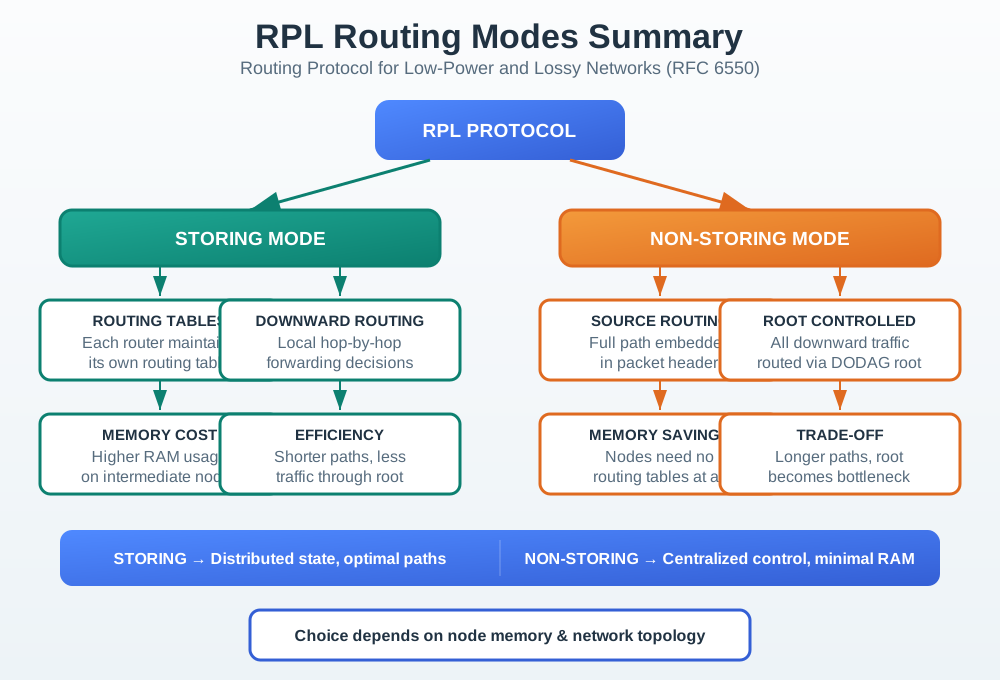
Read Figure 12.1 from storing mode, where each router keeps descendant entries and forwards downward hop by hop, to non-storing mode, where the root holds the path and inserts source-routing information. The first spends constrained-router memory to distribute the decision; the second increases root responsibility and packet-header length. Neither column proves delivery by itself. Inspect DAO and route state at the component named by the chosen mode, send a downward packet, and repeat that test after parent or root repair. The resulting control, forwarding, and recovery evidence supports the mode decision.
12.2.1 Upward Traffic
Node-to-root traffic normally follows preferred parents. This direction often looks similar in both modes.
12.2.2 Storing Mode
Router-capable nodes store descendant reachability and may forward downward packets using local route entries.
12.2.3 Non-Storing Mode
The root maintains downward path knowledge and includes source-route information for downward packets.
12.2.4 Peer Traffic
Node-to-node traffic needs explicit path evidence. Do not assume it is short, root-free, or reliable from the mode name alone.
Do not choose a mode from node count alone. Name the traffic direction, route-state location, DAO evidence, packet-size behavior, and retest trigger before accepting the choice.
12.3 Practitioner: Write the Mode Choice as Evidence
This section: Practitioner: Write the Mode Choice as Evidence — A practitioner should turn the mode choice into a short review record.
A practitioner should turn the mode choice into a short review record. The record separates upward telemetry, downward commands, and peer flows because each direction exercises different route-state assumptions.
The record also names node roles. A root, router-capable intermediate node, and leaf-only node do not carry the same routing responsibility.
Add the refresh rule to the same record. Parent churn, root failover, node mobility, firmware changes, payload growth, and new command flows can all invalidate an older mode decision even when the topology picture still looks familiar.
The upward, downward, and peer arrows in Figure 12.2 show why one successful sensor upload cannot validate every traffic direction. Exercise upward, downward, and peer traffic separately, including the return path used by each application.
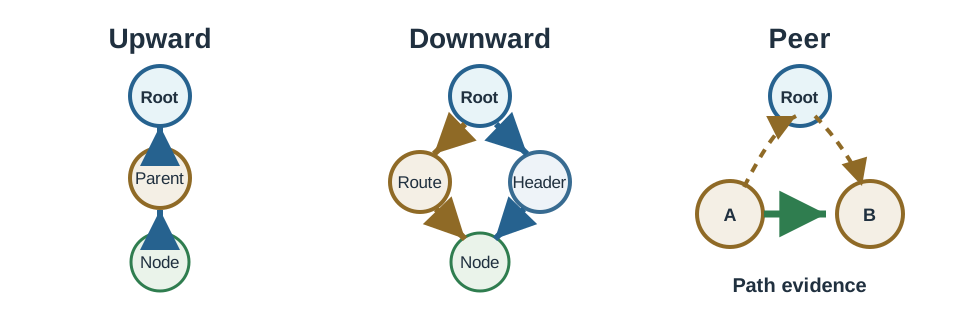
In Figure 12.2, the visual shows rPL traffic directions showing upward parent forwarding, downward routing differences, and peer traffic path evidence. Record the forwarding owner and packet result separately for each claimed direction and routing mode.
12.3.1 Mode Review Flow
The local turn in Figure 12.3 shows exactly what distributed descendant state buys for the E-to-F peer flow.

In Figure 12.3, E first follows its upward relation to B. The orange turn toward F is possible because B · descendant table stores both children, so E → B → F reaches the nearest common ancestor without visiting the root.
The matched topology in Figure 12.4 isolates the cost of moving that downward knowledge out of B and into A.

Trace Figure 12.4 from E through B to A, then follow the orange source-routed return through B to F. The labels upward and A writes source route [B,F] expose the trade: routers keep less descendant state, but peer traffic detours through the root and carries route information.
The hand-off in Figure 12.5 prevents this routing choice being mistaken for an application protocol choice.
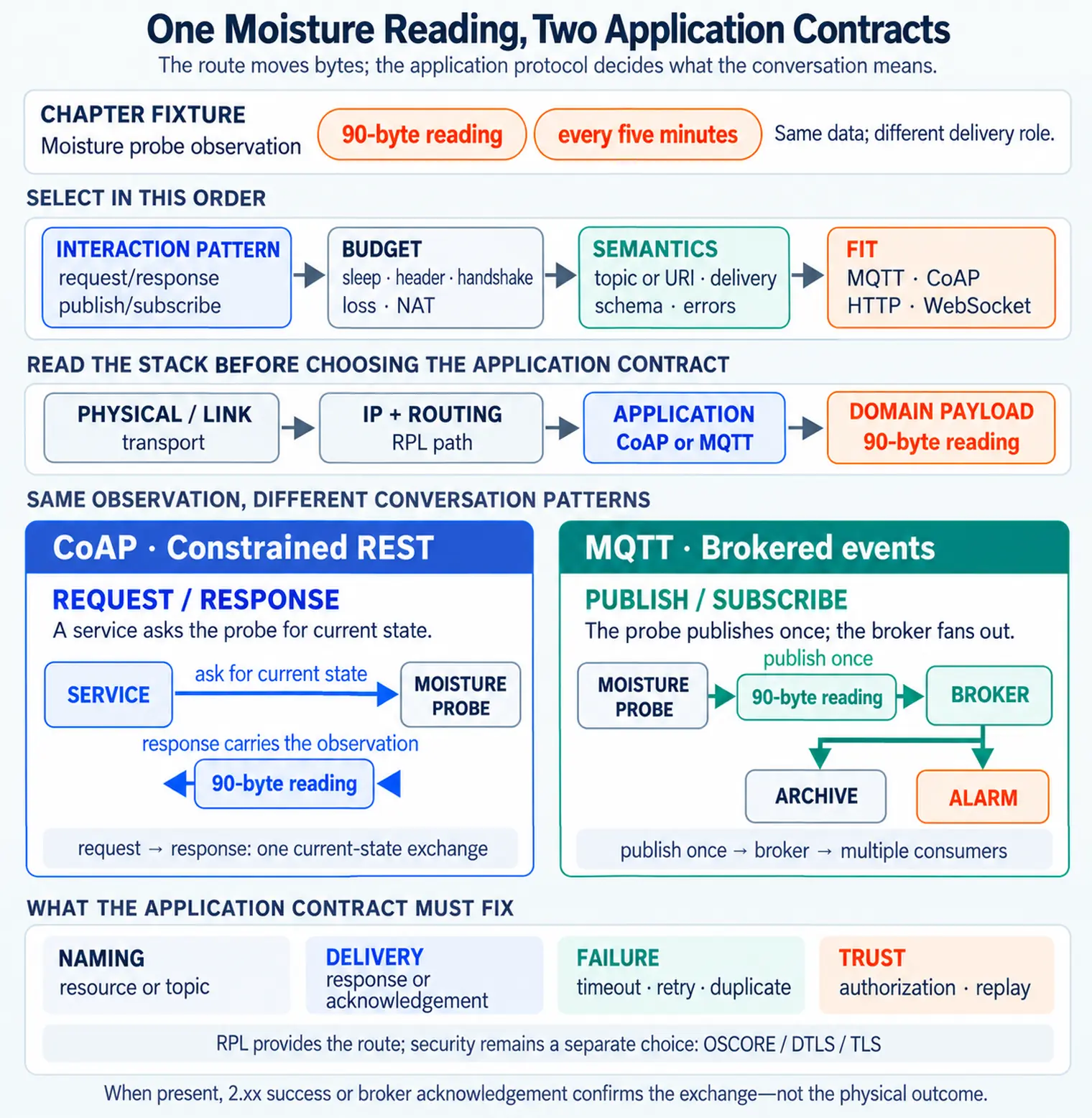
In Figure 12.5, Interaction pattern and Budget precede Semantics; only then does Fit name MQTT, CoAP, HTTP, or WebSocket. RPL provides the network route, while Security: OSCORE / DTLS / TLS and the application contract still govern meaning, authorization, and replay behavior above it.
12.3.2 Worked Example: One Peer Path, Two Different Routes
The mode difference is easiest to see on a single peer flow. Take two leaf nodes, E and F, that share the same parent B, with B itself a child of the root A. In Storing mode, B keeps a route-table entry for every descendant in its sub-DODAG, including F, so a packet from E to F only has to climb as far as the nearest common ancestor before turning back down: E -> B -> F. B recognizes F as its own descendant and forwards directly, without involving the root.
In Non-Storing mode, only the root keeps downward path knowledge; B has no route-table entry for F even though B is the same physical common ancestor. The same E-to-F packet has to climb all the way to the root, which looks up F's path and encloses it as a source route in the packet header, so the path becomes E -> B -> A -> B -> F, through B twice, once on the way up and once on the way back down. The peer path is still correct, but it is roughly twice as long as the Storing-mode path, and it now depends on the root staying reachable and holding a current route for F.
That gap is why the review rule above insists on explicit peer-path evidence. A design that only proves upward telemetry can look identical in both modes; the Storing-versus-Non-Storing difference only becomes visible once a peer or downward packet is traced hop by hop.

12.3.3 Interactive: Keep Medium Assumptions Attached to the Route Choice
Storing and non-storing mode describe downward state; they do not make every RPL-like route selector interchangeable. Use the protocol-assumptions preset below to compare RPL, CORPL, and CARP, then change the radio objective while keeping the medium fixed. The workbench labels which evidence belongs to a low-power radio mesh and which candidate is disabled when its acoustic-medium assumptions do not apply.
Carry the selected protocol, traffic direction, forwarding owner, and excluded-medium reason into the mode record. This prevents a comparison chart from silently overriding the DAO and packet evidence the deployed network actually needs.
12.4 Under the Hood: DAO and Packet Evidence Carry the Claim
This section: Under the Hood: DAO and Packet Evidence Carry the Claim — DAO evidence supports downward reachability, but it is not the same as application delivery.
DAO evidence supports downward reachability, but it is not the same as application delivery. It helps prove that the selected mode has route knowledge for a destination. Packet tests still have to show that the claimed traffic can move through the current topology.
Under the hood, Storing mode and Non-Storing mode put different stress on the system. Storing mode asks router-capable nodes to keep useful descendant state. Non-Storing mode asks the root to maintain the downward path view and fit source-route information into downward packets.
The Storing-mode route tables in Figure 12.1 place downward forwarding decisions at intermediate routers. Compare the table at each forwarding hop with the delivered packet; a table entry alone does not demonstrate delivery.
In Figure 12.1, the visual shows rPL Routing Modes Summary: Routing Protocol for Low-Power and Lossy Networks (RFC 6550), RPL PROTOCOL, STORING MODE, ROUTING TABLES, Each router maintains, its own routing table, DOWNWARD ROUTING, Local hop-by-hop, forwarding decisions. DAO registration explains how route knowledge is formed; a downward packet test checks whether those entries deliver traffic.
Apply Figure 12.1 to the earlier E-to-F flow: storing mode uses B’s entry for F, while non-storing mode uses A’s path information and source route. Inspect the corresponding state, then trace the packet to F. Counting the example’s links gives two forwarding steps for E → B → F and four for E → B → A → B → F; those counts alone do not establish latency.
12.4.1 Boundary Evidence
Do not treat DAO as proof of application success. DAO supports route knowledge; application delivery still needs packet evidence and receiver behavior.
12.4.2 Mode Acceptance Checklist
Accept a mode only after following the traffic claim through its evidence. Name the upward, downward, and peer directions the application actually uses, then record which nodes may store downward state and which remain leaf-only. For the selected mode, pair DAO evidence with either router route tables or the root’s path knowledge. Test packet size and forwarding on downward and peer paths as well as upward telemetry, and finish by recording parent churn, root replacement, firmware updates, payload growth, and topology changes as retest triggers.
12.5 Summary
This section: Summary
- RPL Storing and Non-Storing modes differ mainly in where downward route state lives.
- Upward traffic toward the root usually follows preferred parents in both modes.
- Storing mode lets router-capable nodes keep descendant reachability for downward forwarding.
- Non-Storing mode places downward path responsibility at the root and uses source-route information.
- Peer traffic and downward commands need explicit path evidence, not assumptions from the mode name.
- A review record should keep traffic direction, node roles, DAO evidence, packet proof, and retest triggers together.
12.6 Key Takeaway
This section: Key Takeaway
Choose an RPL routing mode by proving the route-state location and packet behavior for the traffic your application actually uses.
12.7 See Also
This section: See Also
Find help
3 reviewed answers.
Where should I start in a module?
Open the module page from the sidebar to see its chapters in order. Use the module map to return to a topic you need.
Modules and pathsReviewed
What can I try when a project does not work?
Check the symptom, then work through the diagnostic steps. Keep the error message and the smallest example that reproduces it.
When you are stuckReviewed
How do interactive examples work?
Use the interactive guide to check how examples and simulations work before changing your project.
Interactive examples guideReviewed