18 Advanced Routing Config
For Beginners: What This Chapter Covers
This chapter focuses on practical routing configuration for production IoT deployments:
- Redundant paths for high availability
- Floating static routes for automatic failover
- Router forwarding decisions step-by-step
- Default routes for internet connectivity
These are the skills you need to configure and troubleshoot real IoT gateway routing.
If you need foundational routing concepts first, see: - Routing Review: Longest Prefix Matching - Route selection basics - Routing Review: Convergence and Loop Prevention - Protocol behavior
Sensor Squad: Backup Plans and Failover!
“In production IoT, you always need a backup plan,” said Max the Microcontroller. “Floating static routes are your safety net – a backup route that activates automatically when the primary route fails. No human intervention needed.”
“Think of it like having two roads to school,” explained Sammy the Sensor. “Normally you take the highway because it is faster. But if the highway is closed, you automatically take the back road. The router does the same thing – it prefers the primary route with lower metric but keeps the backup route ready.”
“Default routes are equally important for IoT gateways,” added Lila the LED. “Your gateway needs to know where to send packets destined for the internet. A default route of 0.0.0.0/0 matches everything – it is the catch-all that forwards traffic to your ISP router when no more specific route exists.”
“Step-by-step forwarding analysis is the best debugging tool,” said Bella the Battery. “When packets are not reaching their destination, trace the forwarding decision at each router. Check the routing table, find the matching route, determine the next hop, and repeat at each router until you find where things go wrong.”
18.1 Learning Objectives
By the end of this chapter, you will be able to:
- Configure redundant paths by setting up primary and backup routes for high availability
- Implement floating static routes using metric-based priority for automatic failover
- Trace forwarding decisions to debug router behavior step-by-step through packet flow
- Design gateway routing tables for production IoT deployments with multiple uplinks
18.2 Prerequisites
Required Chapters:
Technical Background:
- Static route configuration
- Routing table structure
- Default gateway concepts
Estimated Time: 35 minutes
18.3 Redundant Path Configuration
Understanding Check: Redundant Path Configuration
Scenario: You’re deploying a critical industrial IoT system monitoring a chemical plant. The system must maintain 99.9% uptime to send real-time alerts about temperature and pressure anomalies. Your IoT gateway has two available paths to the cloud:
- Primary Path: Via fiber connection through Router A - 10 hops, 5ms latency, $100/month
- Backup Path: Via LTE cellular through Router B - 15 hops, 25ms latency, $500/month with per-GB charges
You need the backup path to activate automatically only when the primary fails (not for load balancing), then automatically fail back when primary recovers.
Think about:
- How can you configure both paths so the backup stays dormant until needed?
- What routing mechanism prevents the router from load balancing across both paths?
- How will the router detect when to switch between paths?
Key Insight: Floating static routes solve this with metric-based priority. Configure primary route with low metric (10) and backup with high metric (100). Router installs only the lowest-metric route. When primary interface fails, primary route disappears, backup route (now lowest) automatically installs. When primary recovers, its lower metric reclaims the active slot. Typical failover time: 1-5 seconds.
Configuration:
# IoT Gateway routing configuration
# Primary route (preferred, low metric)
ip route 0.0.0.0 0.0.0.0 192.168.1.1 10

# Backup route (standby, high metric)
ip route 0.0.0.0 0.0.0.0 192.168.2.1 100
Routing Table States:
Normal Operation (Primary UP):
Destination    Gateway       Metric  Status
0.0.0.0/0      192.168.1.1   10      ACTIVE
0.0.0.0/0      192.168.2.1   100     Not installed (higher metric)

Traffic flows via Router A (fiber)

Primary Fails:
Destination    Gateway       Metric  Status
0.0.0.0/0      192.168.2.1   100     ACTIVE

Traffic automatically switches to Router B (LTE)
Failover time: ~2 seconds

Primary Recovers:
Destination    Gateway       Metric  Status
0.0.0.0/0      192.168.1.1   10      ACTIVE
0.0.0.0/0      192.168.2.1   100     Not installed (higher metric)

Traffic automatically fails back to Router A (fiber)
Why This Matters:
Putting Numbers to It
Let’s calculate the exact cost difference between floating static routes (backup dormant) versus equal-cost load balancing (backup always active).
Traffic assumptions:
- IoT sensors: 500 devices sending 1 KB every 5 minutes
- Data volume: \(500 \times \frac{1 \text{ KB}}{5 \text{ min}} \times 1440 \text{ min/day} = 144 \text{ MB/day} = 4.32 \text{ GB/month}\)
Floating static route cost (backup only during outages):
- Primary fiber: $100/month (unlimited data)
- Backup LTE base: $500/month standby fee
- Expected outage: \(99.9\% \text{ uptime} = \frac{0.1\%}{100\%} \times 365 \times 24 = 8.76 \text{ hours/year}\)
- Data during outages: \(\frac{8.76}{8760} \times 4.32 \times 12 = 0.052 \text{ GB/year}\)
- LTE overage: \(0.052 \times \$50 = \$2.60/\text{year}\)
- Annual total: \((100 + 500) \times 12 + 2.60 = \$7{,}202.60\)
Equal-cost load balancing cost (backup always active):
- Primary fiber: $100/month (unlimited)
- Backup LTE base: $500/month
- Data split 50/50: \(4.32 / 2 = 2.16 \text{ GB/month}\) on LTE
- LTE overage: \(2.16 \times \$50 = \$108/\text{month} = \$1{,}296/\text{year}\)
- Annual total: \((100 + 500) \times 12 + 1{,}296 = \$8{,}496\)
Savings with floating static: \(8{,}496 - 7{,}202.60 = \$1{,}293.40/\text{year}\) (18% reduction)
Key insight: The backup link is only used 0.1% of the time with floating static, but 50% with load balancing. This 500x usage difference translates directly to cost savings when backup has per-GB charges.
Cost Savings:
- Primary fiber: Unlimited data, $100/month flat rate
- Backup LTE: $500/month + $50/GB overage charges
- Floating static ensures LTE only used during outages (~8.76 hours/year at 99.9% uptime)
- Estimated LTE cost with floating static: $500-600/year (vs $6,000/year if load balanced)
Performance:
- Primary: 5ms latency (optimal for real-time alerts)
- Backup: 25ms latency (acceptable during emergencies)
- Avoid load balancing which would degrade 50% of traffic to 25ms unnecessarily
Verify Your Understanding:
- What happens if you set both routes to metric 10? (Equal-cost load balancing - backup used even when not needed)
- What’s the failover time if you manually configure routes? (10-30 minutes - too slow for critical systems)
- How does the router detect primary link failure? (Interface down event removes connected route, triggering backup installation)
Show Trade-Off Analysis
Floating Static Routes vs Alternatives:
| Approach | Failover Time | Config Complexity | Cost Impact | Best For |
|---|---|---|---|---|
| Floating Static | 1-5 seconds | Low (2 commands) | Optimal (backup dormant) | Simple dual-path IoT |
| Equal-Cost Load Balance | N/A (always active) | Low (2 commands) | High (backup always used) | Equal-quality paths |
| Manual Failover | 10-30 minutes | Low (1 command) | Optimal (backup dormant) | Non-critical systems |
| Dynamic Routing (OSPF+BFD) | <1 second | High (full protocol) | Optimal (backup dormant) | Enterprise networks |
Why Not Equal-Cost Load Balancing?
# WRONG: Both routes with same metric
ip route 0.0.0.0 0.0.0.0 192.168.1.1 10
ip route 0.0.0.0 0.0.0.0 192.168.2.1 10  # Same metric!

Problems:
X Router installs BOTH routes simultaneously
X Traffic split 50/50 across fiber + LTE
X Half of traffic gets 25ms latency (vs 5ms)
X LTE data charges apply to 50% of traffic ($3,000/month extra!)
X Wastes backup capacity when primary is healthy
Why Not Manual Failover?
# WRONG: Only configure primary, manually add backup during outage
ip route 0.0.0.0 0.0.0.0 192.168.1.1

When primary fails:
1. Monitoring system detects failure (5 minutes)
2. Admin receives alert (5 minutes)
3. Admin logs into gateway (5 minutes)
4. Admin runs: ip route 0.0.0.0 0.0.0.0 192.168.2.1
5. Traffic resumes via backup (30 seconds)

Total: 15-20 minutes of downtime

Problems:
X Chemical plant sensors offline for 15+ minutes
X Temperature/pressure alerts not sent to operators
X Safety systems degraded during critical window
X Violates 99.9% uptime SLA (allows only 8.7 hours/year downtime)
Floating Static Route Benefits:
 Automatic failover (1-5 seconds vs 15+ minutes manual)
 Automatic failback when primary recovers
 No routing protocol overhead (no OSPF hellos, LSAs)
 Simple configuration (2 static routes)
 Predictable behavior (lowest metric wins)
 Cost-effective (backup dormant until needed)
 Perfect for IoT gateways with dual uplinks
Real-World Industrial IoT Example:
Oil and Gas Pipeline Monitoring Gateway:
-- Primary: Fiber to operations center (10 hops, 5ms, $100/mo)
-- Backup: Satellite VSAT (25 hops, 600ms, $1,000/mo + $100/GB)
-- Configuration:
   ip route 0.0.0.0 0.0.0.0 192.168.10.1 10   # Fiber (preferred)
   ip route 0.0.0.0 0.0.0.0 192.168.20.1 100  # Satellite (backup)

Normal operation:
- All sensor data via fiber (5ms latency optimal for real-time)
- Satellite link idle (saves $100/GB overage charges)

Fiber outage (rare):
- Automatic failover to satellite in 2 seconds
- Critical pressure/flow alerts still reach operators
- Higher latency acceptable during emergency
- Satellite costs ~$1,200/month during outage (vs $6,000 if always active)

Fiber restoration:
- Automatic failback to fiber
- Latency returns to 5ms optimal
- Satellite link returns to standby
Key Takeaway: Floating static routes provide automatic failover with manual route simplicity - ideal for cost-sensitive IoT deployments with redundant connectivity where backup paths should remain dormant until needed. The metric-based priority ensures predictable behavior without routing protocol complexity.
18.4 Router Forwarding Decisions
18.4.1 Floating Static Route Cost Calculator
Compare the annual cost of floating static routes (backup dormant) versus equal-cost load balancing:
Quiz: Routing Decisions and Forwarding
Alternative View: Longest Prefix Match Algorithm
This variant shows the routing decision as a prefix-based search, emphasizing how specificity determines the match:
This view emphasizes that routers try specific routes first (higher prefix numbers), then fall back to less specific routes. The default route (0.0.0.0/0) is the least specific and matches all destinations.
Alternative View: Routing Table as Decision Matrix
This variant presents routing decisions as a matrix showing destination, route matches, and outcomes:
Local destinations (green) go to connected interfaces, while external destinations (orange) go to the default gateway.
Step-by-Step Analysis:
1. Packet arrives at router:
Source:      192.168.2.50 (sensor)
Destination: 8.8.8.8 (Google DNS - cloud server)
2. Router checks routing table:
Destination          Next Hop         Interface  Type
192.168.1.0/24       Connected        eth0       C
192.168.2.0/24       Connected        eth1       C
192.168.3.0/24       Connected        eth2       C
192.168.4.0/24       Connected        eth3       C
0.0.0.0/0            10.0.0.1         eth4       S (default route)
3. Longest Prefix Match:
- Check 192.168.1.0/24: Does 8.8.8.8 match? NO
- Check 192.168.2.0/24: Does 8.8.8.8 match? NO
- Check 192.168.3.0/24: Does 8.8.8.8 match? NO
- Check 192.168.4.0/24: Does 8.8.8.8 match? NO
- Check 0.0.0.0/0 (default): Does 8.8.8.8 match? YES
4. Default route matches ALL destinations:
# Pseudocode for route matching
def matches_route(dest_ip, route_network, route_prefix):
    if route_network == "0.0.0.0" and route_prefix == 0:
        return True  # Default route matches EVERYTHING
    # Otherwise check if dest_ip is in route_network/prefix
    return ip_in_network(dest_ip, route_network, route_prefix)

matches_route("8.8.8.8", "0.0.0.0", 0)  # Returns True!
5. Forward to next hop:
- Forward packet to 10.0.0.1 (default gateway)
- Send out interface eth4 (connected to internet gateway)
- Default gateway will route to internet
Why Other Options Are Wrong:
A: Forward to 192.168.2.0/24 (local subnet):
Problem: 8.8.8.8 is NOT in 192.168.2.0/24

Check membership:
192.168.2.0/24 covers: 192.168.2.0 - 192.168.2.255
8.8.8.8 is in:         8.0.0.0 - 8.255.255.255

Result: No match! Router won't forward to subnet.
B: Drop the packet (no specific route):
Problem: Router DOES have default route!

Forwarding decision flowchart:
1. Check specific routes -> Not found
2. Check default route -> FOUND!
3. Only drop if NO default route exists

Since default route exists, packet is forwarded (not dropped).
C: CORRECT - Forward to default gateway:
 No specific route to 8.8.8.8
 Default route 0.0.0.0/0 exists
 Forward to next hop: 10.0.0.1
 Internet gateway handles routing to 8.8.8.8
D: Broadcast to all interfaces:
Problem: Routers don't broadcast at Network Layer!

Routers use routing tables for forwarding decisions:
- Layer 2 (switches): Flood/broadcast for MAC learning
- Layer 3 (routers): Never broadcast IP packets
- Routers make intelligent forwarding decisions based on routing table

Broadcasting would:
- Create network storms
- Violate routing principles
- Waste bandwidth on all interfaces
Default Route Behavior:
Default route (0.0.0.0/0) is the “catch-all”:
Specificity hierarchy (longest prefix match):

Most specific:  192.168.2.50/32  (single host)
                192.168.2.0/24   (256 hosts)
                192.168.0.0/16   (65,536 hosts)
                10.0.0.0/8       (16M hosts)
Least specific: 0.0.0.0/0        (ALL hosts - default route)

Router always chooses most specific match.
If no specific match found, uses default route.
Real-World IoT Routing Table:
# Show routing table on IoT gateway
$ route -n

Destination     Gateway         Genmask         Flags Metric Ref  Use Iface
192.168.1.0     0.0.0.0         255.255.255.0   U     0      0      0 eth0
192.168.2.0     0.0.0.0         255.255.255.0   U     0      0      0 eth1
192.168.3.0     0.0.0.0         255.255.255.0   U     0      0      0 eth2
192.168.4.0     0.0.0.0         255.255.255.0   U     0      0      0 eth3
0.0.0.0         10.0.0.1        0.0.0.0         UG    1      0      0 eth4

# Legend:
# U = Route is up
# G = Use gateway (default route)
# Metric = Route cost (lower is better)
Packet Flow:
Step 1: Sensor sends packet
        Source: 192.168.2.50
        Dest: 8.8.8.8

Step 2: Packet arrives at router eth1
        Router: "Where should I forward this?"

Step 3: Check routing table
        "No specific route to 8.8.8.0/24"
        "No specific route to 8.8.0.0/16"
        "No specific route to 8.0.0.0/8"

Step 4: Use default route
        "Found 0.0.0.0/0 -> 10.0.0.1"

Step 5: Forward to gateway
        Next hop: 10.0.0.1
        Out interface: eth4

Step 6: Internet gateway routes to 8.8.8.8
        Packet continues to cloud server
Why Default Routes are Essential for IoT:
Without default route:
Scenario: Sensor needs to reach cloud server

Problem:
- Cloud servers have millions of possible IPs
- Can't store specific route for every internet destination
- Routing table would be enormous
- Manual configuration impossible

Result: Packet dropped (no route to destination)
With default route:
Solution:
- Local subnets: Use specific connected routes
- Everything else: Use default route to internet gateway
- Gateway has more specific routes (BGP from ISP)
- Hierarchical routing reduces table size

Result: Sensor can reach any internet destination
IoT Gateway Configuration:
# Configure default route on IoT gateway
ip route add default via 10.0.0.1 dev eth4 metric 1

# Verify routing table
ip route show

# Expected output:
# default via 10.0.0.1 dev eth4 metric 1
# 192.168.1.0/24 dev eth0 scope link
# 192.168.2.0/24 dev eth1 scope link
# 192.168.3.0/24 dev eth2 scope link
# 192.168.4.0/24 dev eth3 scope link
Configuration Decision Tree:
Key Takeaways:
- Default routes enable internet connectivity without storing millions of routes
- Longest prefix match tries specific routes before default route
- Routers never broadcast at Network Layer (only switching does that)
- Default gateway is responsible for routing to internet destinations
- IoT gateways always need default route for cloud connectivity
18.5 Visual Reference Gallery
Explore these AI-generated visualizations that illustrate key routing concepts covered in this chapter.
Visual: Distance Vector Routing Algorithm
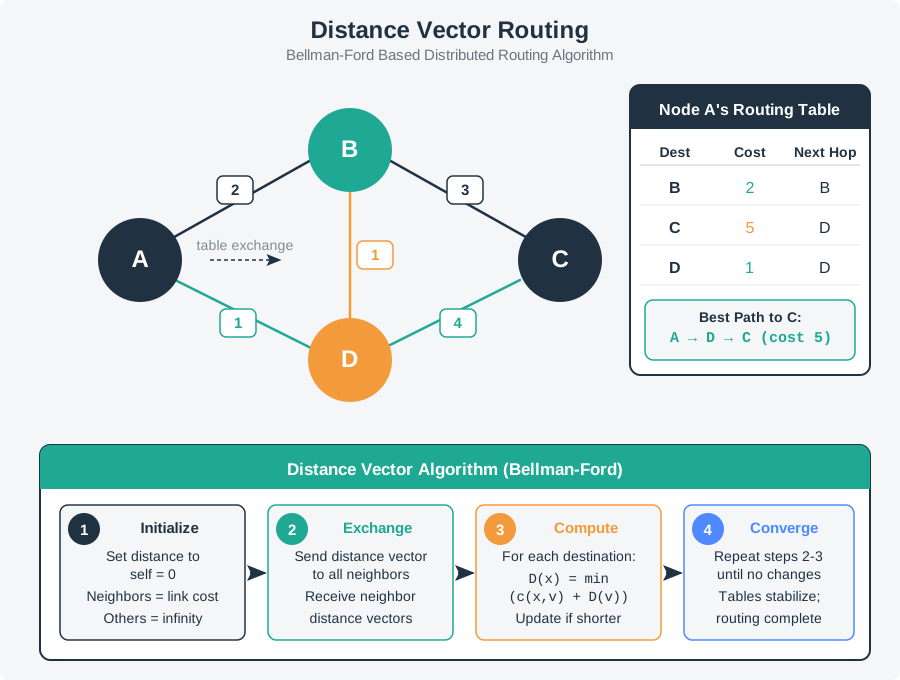
Distance vector routing is the foundation of protocols like RIP and forms the basis for understanding RPL’s approach to IoT routing.
Visual: Link State Routing Mechanism
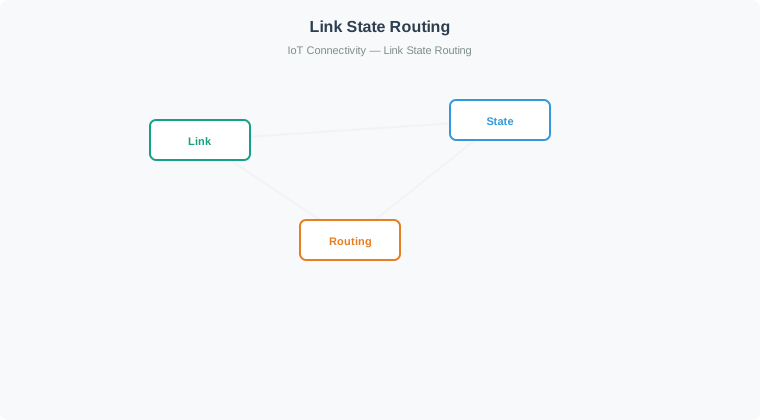
Link state routing provides faster convergence than distance vector but requires more memory, making it less suitable for constrained IoT devices.
Visual: Mesh Network Routing Patterns
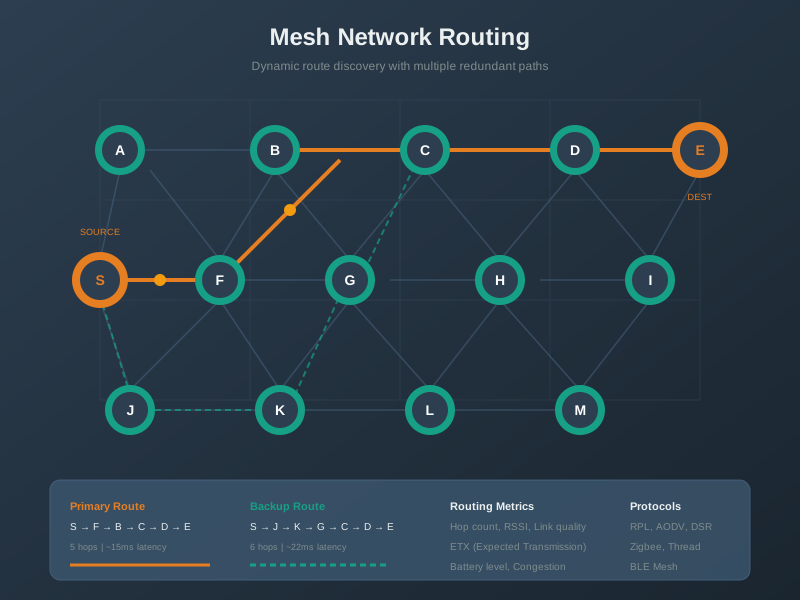
Mesh routing enables self-healing networks essential for reliable IoT deployments in challenging environments.
Visual: RPL DODAG Construction
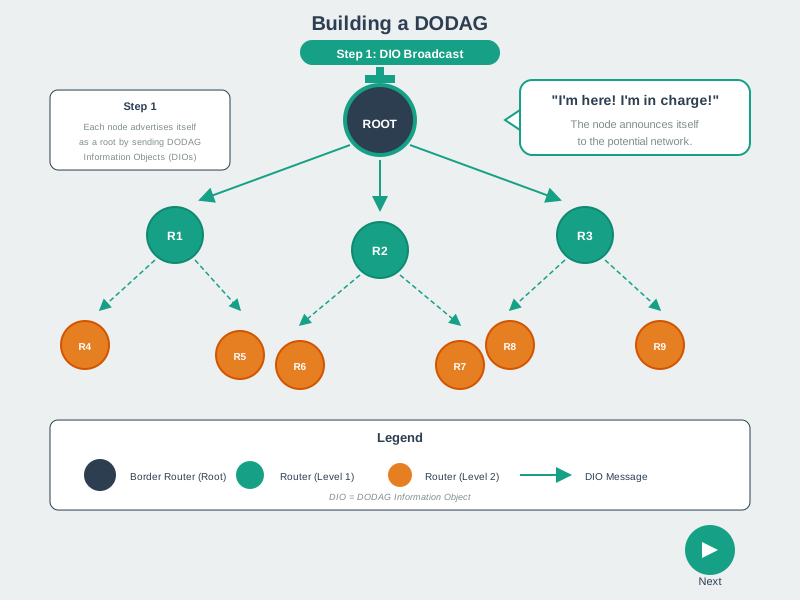
DODAG construction is fundamental to RPL operation, enabling efficient many-to-one routing for IoT sensor networks.
18.6 Key Concepts
- Floating Static Route: Static route with higher metric that activates only when lower-metric route fails
- Default Route: Catch-all route (0.0.0.0/0) used for any destination without more specific match
- Connected Route: Automatically created route for subnets directly attached to router interfaces
- Static Route: Manually configured route; appropriate for small networks and critical infrastructure
- Failover: Automatic switching to backup path when primary fails
- Failback: Automatic return to primary path when it recovers
- Metric: Cost value used to prioritize routes; lower metrics preferred
Common Pitfalls
1. Treating Advanced Review as Optional
Advanced routing topics (OSPF areas, route redistribution, policy-based routing) appear in IoT gateway and border router configurations. Skipping advanced review creates gaps in troubleshooting skills for production systems.
2. Not Connecting Advanced Concepts to IoT Application
Advanced routing features like route summarization and filtering are equally relevant in IoT border router configurations. Connect each advanced concept to a specific IoT deployment scenario.
3. Over-Relying on GUI Tools for Advanced Configuration
Advanced routing configuration often requires CLI access for fine-grained control. Develop CLI skills for OSPF, BGP, and RPL configuration alongside GUI familiarity.
18.7 Summary
Advanced routing configuration enables reliable IoT deployments:
Floating Static Routes:
- Configure primary route with low metric (10)
- Configure backup route with high metric (100)
- Router automatically uses lowest-metric available route
- Failover in 1-5 seconds; automatic failback when primary recovers
- Cost-effective: backup only used during outages
Router Forwarding Decisions:
- Check specific routes in routing table
- If no match, use default route (0.0.0.0/0)
- If no default route, drop packet
- Never broadcast at Network Layer
Default Routes:
- Essential for internet connectivity
- Match all destinations when no specific route exists
- Enable IoT sensors to reach any cloud server
- Reduce routing table size dramatically
18.8 Key Takeaways
- Routing implements packet switching - packets forwarded hop-by-hop to destination
- Routers examine destination IP in each packet and consult routing table
- Three forwarding decisions: specific route, default route, or drop packet
- TTL (Time-To-Live) prevents routing loops by limiting packet lifetime
- Routing tables contain destination network, next hop, and outbound interface
- Three route types: Connected (automatic), Static (manual), Dynamic (learned)
- Routing protocols enable routers to exchange topology information and adapt to changes
- RPL protocol is designed specifically for low-power IoT networks
- Dynamic rerouting allows automatic failover when links fail
18.9 What’s Next
| Previous | Up | Next |
|---|---|---|
| Routing Convergence | Routing Fundamentals | Routing Labs and Quiz |
Having completed this comprehensive routing review, you’re prepared to explore:
Network Topologies - How physical and logical arrangements of devices affect routing decisions and network scalability
Advanced Routing Protocols - Deep dives into OSPF, BGP, and specialized IoT protocols like RPL and AODV
Network Security - Securing routing infrastructure against attacks like route hijacking, spoofing, and denial-of-service
Quality of Service (QoS) - Prioritizing critical IoT traffic and managing bandwidth allocation across routes
The routing principles covered here - metric-based selection, failover mechanisms, and protocol behavior - form the foundation for designing resilient IoT networks. When you design mesh networks with Zigbee or Thread, configure multi-WAN gateways, or troubleshoot connectivity issues, you’ll apply these routing fundamentals daily.
Further Resources
Interactive Tools:
- Cisco Packet Tracer - Simulate routing scenarios
- GNS3 - Advanced network simulator
Video Tutorials:
- ARP Demonstration - Address Resolution Protocol
- Routing Demonstration - Packet Tracer routing
Documentation:
- RPL RFC 6550 - IoT routing protocol specification
- OSPF Basics
Practice:
- Run
tracerouteto different destinations and analyze paths - Examine routing tables on your home router
- Configure static routes in Packet Tracer labs
Worked Example: Configuring Floating Static Routes for IoT Gateway Redundancy
Scenario: A critical IoT deployment monitors industrial equipment in a manufacturing plant. The IoT gateway must maintain 99.9% uptime for real-time alerts. You have two internet uplinks: - Primary: Fiber connection via 192.168.1.1 (fast, reliable, $100/month) - Backup: LTE cellular via 10.0.0.1 (slower, expensive per-GB, $500/month + overages)
Requirement: Use fiber normally, automatically fail over to LTE only when fiber fails, then fail back when fiber recovers.
Step 1: Understand Floating Static Route Concept
A floating static route is a backup route with higher metric that remains in the routing table but is NOT installed as the active route until the primary route fails.
Key Insight: Routers install only the lowest-metric route to each destination. Higher-metric routes stay in the configuration but remain dormant.
Step 2: Configure Primary Route (Low Metric)
# Primary default route via fiber (metric 10)
ip route add 0.0.0.0/0 via 192.168.1.1 dev eth0 metric 10
Routing Table After Primary Route:
Destination    Gateway       Metric  Interface  Status
0.0.0.0/0      192.168.1.1   10      eth0       ACTIVE (installed)
All internet-bound traffic flows via fiber (192.168.1.1).
Step 3: Configure Backup Route (High Metric)
# Backup default route via LTE (metric 100)
ip route add 0.0.0.0/0 via 10.0.0.1 dev wwan0 metric 100
Routing Table After Both Routes Configured:
Destination    Gateway       Metric  Interface  Status
0.0.0.0/0      192.168.1.1   10      eth0       ACTIVE (installed)
0.0.0.0/0 10.0.0.1 100 wwan0 STANDBY (not installed)Important: The LTE route (metric 100) is NOT installed because metric 10 < 100. Fiber route wins.
Step 4: Simulate Fiber Failure
# Simulate fiber link down
ip link set eth0 down
Routing Table During Fiber Outage:
Destination    Gateway       Metric  Interface  Status
0.0.0.0/0      10.0.0.1      100     wwan0      ACTIVE (installed)
The fiber route disappears (interface down removes connected routes and dependent static routes). The LTE route (metric 100) is now the ONLY default route, so it becomes active.
Automatic Failover Time: 1-5 seconds (interface down event triggers immediate route update)
Step 5: Restore Fiber (Automatic Failback)
# Restore fiber link
ip link set eth0 up
Routing Table After Fiber Recovery:
Destination    Gateway       Metric  Interface  Status
0.0.0.0/0      192.168.1.1   10      eth0       ACTIVE (installed)
0.0.0.0/0      10.0.0.1      100     wwan0      STANDBY (not installed)
The fiber route (metric 10) automatically reclaims active status because 10 < 100. LTE route returns to standby.
Verification Tests:
| Test | Command | Expected Result |
|---|---|---|
| Normal operation (fiber up) | traceroute 8.8.8.8 |
First hop is 192.168.1.1 (fiber) |
| Fiber down | traceroute 8.8.8.8 |
First hop is 10.0.0.1 (LTE) |
| Fiber restored | traceroute 8.8.8.8 |
First hop returns to 192.168.1.1 |
| Traffic during failover | ping -i 0.2 8.8.8.8 |
1-3 packets lost during 1-5s failover |
Cost Analysis:
Without Floating Static Routes (load balancing both links equally):
Fiber: $100/month (unlimited)
LTE: $500/month + $50/GB overage
Average traffic: 100 GB/month
Load balancing: 50 GB via fiber + 50 GB via LTE

Monthly cost: $100 + $500 + (50 × $50) = $3,100/month
Annual cost: $37,200
With Floating Static Routes (LTE only during outages):
Fiber: $100/month (unlimited)
LTE: $500/month base + overages only during fiber outages
Fiber uptime: 99.9% (8.7 hours downtime per year)
Average outage traffic: ~2 GB/month

Monthly cost: $100 + $500 + (2 × $50) = $700/month
Annual cost: $8,400

Savings: $37,200 - $8,400 = $28,800 per year (77% cost reduction)
Configuration Best Practices:
Metric Spacing: Use 10x differences between primary and backup metrics
# Good spacing (10 vs 100)
ip route add 0.0.0.0/0 via 192.168.1.1 metric 10    # Primary
ip route add 0.0.0.0/0 via 10.0.0.1 metric 100      # Backup

# Bad spacing (10 vs 11)
ip route add 0.0.0.0/0 via 192.168.1.1 metric 10    # Primary
ip route add 0.0.0.0/0 via 10.0.0.1 metric 11       # Backup (too close!)
Why 10x spacing? Prevents accidental metric inversion if future dynamic routes are added (e.g., OSPF route with cost 15 would still prefer fiber at metric 10).
Monitoring Setup:
# Monitor active default route
watch -n 1 'ip route show | grep default'

# Alert on failover to backup
# (detect when active route changes from 192.168.1.1 to 10.0.0.1)
Alternative: Floating Static Route with Tracking
Some routers support route tracking (monitor next-hop health via ping):
# Advanced configuration (Cisco/MikroTik syntax)
# Remove route if next-hop fails 3 consecutive health checks

# Primary with tracking
ip route 0.0.0.0/0 192.168.1.1 metric 10 track 1

# Track object (ping fiber gateway every 5 seconds)
track 1 ip sla 1 reachability
ip sla 1
 icmp-echo 192.168.1.1 source-interface eth0
 frequency 5
ip sla schedule 1 life forever start-time now

# Backup (no tracking needed - takes over when primary removed)
ip route 0.0.0.0/0 10.0.0.1 metric 100
Key Takeaways:
- Floating static routes provide automatic failover without routing protocol overhead
- Metric determines priority - lowest metric wins, higher metrics stay dormant
- Interface down removes dependent routes - primary failure activates backup
- Failback is automatic - primary route reclaims active status when restored
- Cost-effective for dual-uplink IoT gateways - backup used only during outages
Concept Relationships
This chapter builds upon:
- Routing Review: Longest Prefix Matching - Route selection basics
- Routing Review: Convergence - Protocol behavior and timing
- Routing Fundamentals - Core routing concepts
This chapter connects to:
- Network Topologies - How topology affects redundancy design
- RPL Production Deployment - IoT-specific routing configuration
- Quality of Service - Traffic prioritization
Real-world applications:
- Dual-WAN IoT gateway configuration
- Industrial IoT high-availability designs
- Smart city infrastructure routing
- Critical infrastructure failover systems
See Also
Configuration Guides:
High Availability Resources:
- VRRP/HSRP: RFC 5798 - Virtual Router Redundancy Protocol
- BFD: RFC 5880 - Bidirectional Forwarding Detection
IoT Gateway Products:
Related Topics:
- Routing Labs: Advanced - Hands-on failover configuration
- Network Reliability Design
Continue to: Wired Communication Protocols