6  Routing Tables and Route Types

In 60 Seconds

Every routing table entry has three parts: destination network, next hop, and metric. Routes are classified as connected (directly attached), static (manually configured), or dynamic (learned via protocols like RIP, OSPF, RPL, or BGP). Routers select routes using longest prefix matching – the most specific route always wins.

6.1 Learning Objectives

By the end of this section, you will be able to:

  • Configure Routing Tables: Build routing table entries with destination networks, next hops, and metrics
  • Distinguish Route Types: Differentiate between connected, static, and dynamic routes with IoT examples
  • Apply Longest Prefix Match: Calculate which route a router selects using binary prefix comparison
  • Compare Routing Protocols: Justify when to use RIP, OSPF, RPL, or BGP based on network constraints

A routing table is like an address book that every network device keeps. It tells the device: to reach destination X, send the data to neighbor Y. When a router receives a packet, it looks up the destination in its table and forwards the packet in the right direction, much like asking for directions at each intersection on a road trip.

“Every router keeps a routing table – think of it as a cheat sheet,” said Max the Microcontroller. “Each entry says: to reach network 192.168.2.0, send the packet to neighbor router 192.168.1.1 through port eth0. Simple lookup, fast forwarding.”

“There are two types of routes,” explained Sammy the Sensor. “Static routes are manually configured by an engineer – like a permanent shortcut you always know. Dynamic routes are learned automatically from other routers using routing protocols – like getting live traffic updates on your GPS.”

Lila the LED compared them. “Static routes are simple and predictable but do not adapt when things change. Dynamic routes adapt automatically but use more memory and processing power. In IoT, constrained devices often use static routes to save resources, while more powerful gateways use dynamic routing.”

“When a packet arrives, the router checks the destination address against every entry in the table,” said Bella the Battery. “The most specific match wins – this is called ‘longest prefix match.’ If nothing matches, the packet goes to the default route. And if there is no default route? The packet is dropped. That is why a missing routing table entry is one of the most common causes of connectivity failure!”

6.2 Prerequisites


Key Concepts

  • Routing Table: A database in a router/device mapping destination IP prefixes to next-hop addresses and outgoing interfaces, used to make forwarding decisions.
  • Longest Prefix Match (LPM): The routing table lookup algorithm selecting the route with the most specific (longest) matching prefix for a destination address.
  • Administrative Distance (AD): A trustworthiness ranking of routing sources: directly connected (0) > static (1) > OSPF (110) > RIP (120); lower AD wins when multiple routes exist.
  • Route Metric: A numerical value used to compare routes from the same routing protocol; lower is generally better (e.g., hop count in RIP, composite metric in EIGRP).
  • CIDR (Classless Inter-Domain Routing): An IP addressing scheme using variable-length subnet masks, allowing flexible prefix lengths (/24, /16, /8) rather than fixed classful boundaries.
  • Default Route (0.0.0.0/0): A catch-all route matching any destination not matched by more specific routes; typically points to the upstream gateway.

6.3 Routing Tables: The Router’s Map

6.3.1 Structure of a Route

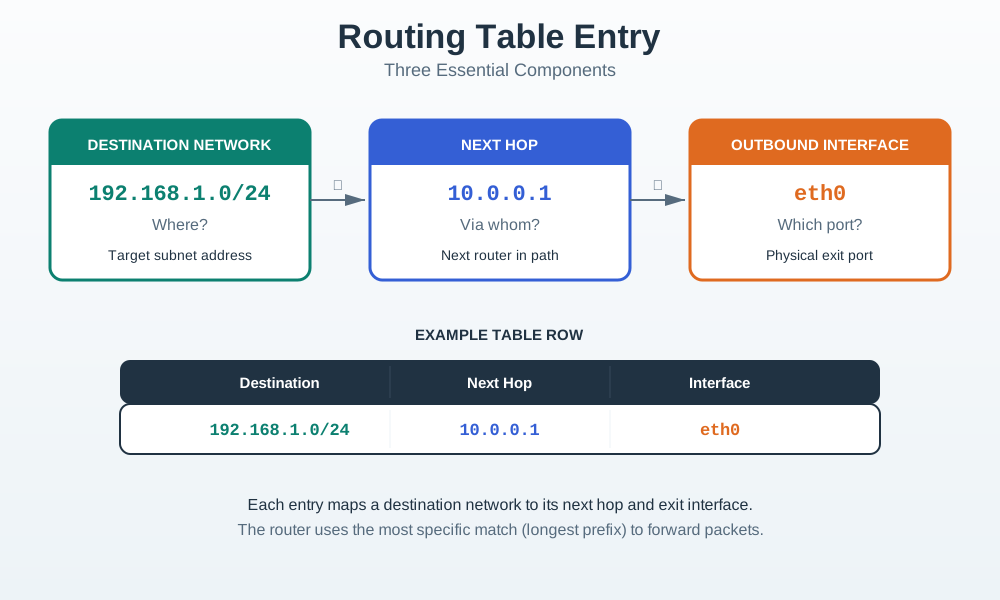
Every route in a routing table has THREE parts:

Three-component routing table entry diagram showing destination network block, next hop IP address arrow, and outbound interface label connected in a flow
Figure 6.1: Three essential components of a routing table entry: destination network, next hop IP, and outbound interface

6.3.2 Example Routing Table

Destination Network Next Hop Interface Metric Type
192.168.1.0/24 Connected eth0 0 C
10.0.0.0/8 Connected eth1 0 C
172.16.0.0/16 10.0.0.2 eth1 10 S
192.168.50.0/24 10.0.0.5 eth1 20 D
0.0.0.0/0 (default) 192.168.1.1 eth0 1 S

Legend:

  • C = Connected route
  • S = Static route
  • D = Dynamic route (learned via protocol)

6.3.3 Reading a Route Entry

Example route:

Destination: 172.16.0.0/16
Next Hop: 10.0.0.2
Interface: eth1

Interpretation:

  • To reach network 172.16.0.0/16
  • Send packets to router 10.0.0.2
  • Out of interface eth1


6.4 Worked Example: Longest Prefix Match

Worked Example: Packet Forwarding Decision

Context: An IoT gateway router receives a packet from a temperature sensor destined for a cloud analytics server. The router must decide where to forward the packet.

Given Information:

Incoming Packet:

  • Source IP: 192.168.1.50 (temperature sensor)
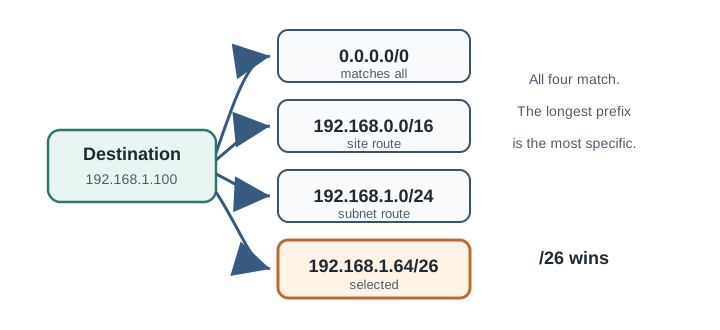
  • Destination IP: 192.168.1.100 (cloud server)

Router’s Routing Table:

Entry Destination Prefix Length Next Hop Interface
1 0.0.0.0 /0 (default) 10.0.0.1 eth0
2 192.168.0.0 /16 10.0.0.2 eth1
3 192.168.1.0 /24 10.0.0.3 eth2
4 192.168.1.64 /26 10.0.0.4 eth3

Problem: Which route should the router use to forward this packet?


Solution - Step 1: Convert Destination IP to Binary

First, convert 192.168.1.100 to binary:

192.168.1.100 in binary:
192 = 11000000
168 = 10101000
  1 = 00000001
100 = 01100100

Full address: 11000000.10101000.00000001.01100100

Solution - Step 2: Check Each Route for a Match

Entry 1 - Default Route (0.0.0.0/0):

  • Prefix length: /0 (matches 0 bits - matches everything)
  • Result: MATCH (but only 0 bits matched)

Entry 2 - (192.168.0.0/16):

  • Compare first 16 bits
  • Destination: 11000000.10101000
  • Route: 11000000.10101000
  • Result: MATCH (16 bits matched)

Entry 3 - (192.168.1.0/24):

  • Compare first 24 bits
  • Destination: 11000000.10101000.00000001
  • Route: 11000000.10101000.00000001
  • Result: MATCH (24 bits matched)

Entry 4 - (192.168.1.64/26):

  • 192.168.1.64/26 covers addresses 192.168.1.64 to 192.168.1.127
  • 192.168.1.100 falls within this range
  • Result: MATCH (26 bits matched)

Solution - Step 3: Apply Longest Prefix Match Rule

All four routes match! Now apply the Longest Prefix Match algorithm:

Entry Route Prefix Length Match?
1 0.0.0.0/0 0 bits Yes
2 192.168.0.0/16 16 bits Yes
3 192.168.1.0/24 24 bits Yes
4 192.168.1.64/26 26 bits Yes

Winner: Entry 4 (192.168.1.64/26) with 26 matching bits


Final Answer:

Forward packet to: 10.0.0.4
Via interface: eth3
Reason: Longest prefix match (/26 > /24 > /16 > /0)

Why Longest Prefix Match Matters:

  1. Specificity: More specific routes (longer prefixes) override general ones
  2. Hierarchy: Allows network engineers to create layered routing policies
  3. Default Routes: The /0 route acts as a “catch-all” for unknown destinations
  4. Aggregation: Smaller networks can be summarized into larger prefixes

Longest prefix matching relies on counting matching bits. The router essentially asks: “How many consecutive bits from the left match this route?”

\[\text{Match Length} = \max\{n : \text{bits}_{1..n}(\text{dest}) = \text{bits}_{1..n}(\text{route})\}\]

For destination 192.168.1.100 against route 192.168.1.64/26:

Destination: 11000000.10101000.00000001.01100100
Route /26:   11000000.10101000.00000001.01000000
             ^^^^^^^^^^^^^^^^^^^^^^^^^^  (26 bits match)

The /26 route covers \(2^{32-26} = 2^6 = 64\) addresses (192.168.1.64 through 192.168.1.127). The destination falls within this range, so we have a match.

In routing table lookups, complexity is \(O(\log n)\) with trie structures instead of \(O(n)\) linear search. For a router with 100,000 routes, this means approximately 17 comparisons vs 100,000.


6.5 Interactive: Prefix Match Calculator

Explore how prefix length affects the number of addresses covered and the specificity of a route:


6.6 Three Types of Routes

6.6.1 Connected Routes (Automatically Added)

Diagram showing connected route creation: an interface configured with IP address 192.168.1.1/24 automatically generates a connected route for 192.168.1.0/24 in the routing table
Figure 6.2: Connected routes: automatically added when network interfaces are configured with IP addresses and enabled

Connected routes are:

  • Listed automatically when interface is configured with IP address
  • Added when interface is enabled and connected
  • Removed when interface goes down

No manual configuration needed!

6.6.2 Static Routes (Manually Configured)

Diagram illustrating a static route entry manually added by an administrator specifying destination network 172.16.0.0/16 and next hop 10.0.0.2 on interface eth1
Figure 6.3: Static routes: manually configured by network administrator with fixed destination, next hop, and interface

Static routes:

  • Configured manually by network engineer
  • Used on small networks with stable topology
  • Don’t change unless manually updated
  • Low overhead (no protocol messages)

Advantages:

  • Predictable paths
  • No bandwidth/CPU for routing protocols
  • Secure (no dynamic updates)

Disadvantages:

  • Manual configuration required
  • No automatic failover
  • Difficult to scale to large networks

IoT Use Case:

  • Simple sensor network with fixed gateway
  • Remote monitoring station with single WAN link
  • Small building automation system

6.6.3 Dynamic Routes (Learned via Protocols)

Diagram showing dynamic route learning: two routers exchange routing protocol messages and automatically populate each other's routing tables with discovered routes
Figure 6.4: Dynamic routes: routers automatically exchange routing information via protocols like OSPF and RPL, adapting to topology changes

Dynamic routes:

  • Learned automatically from routing protocol messages
  • Exchange topology information with other routers
  • Automatically adapt to network changes
  • Calculate best paths based on metrics

Advantages:

  • Automatic adaptation to topology changes
  • Load balancing across multiple paths
  • Automatic failover
  • Scales to large networks

Disadvantages:

  • CPU and bandwidth overhead
  • Convergence time (delay while learning new routes)
  • More complex configuration

6.7 Routing Protocols

6.7.1 What Are Routing Protocols?

Routing protocols are software used by routers to: 1. Inform each other of network topology changes 2. Exchange routing information 3. Calculate best paths to destination networks

Four-stage routing protocol operation diagram: topology change detection feeds into neighbor information exchange, which triggers path calculation, resulting in converged routing tables across all routers
Figure 6.5: Routing protocol operation: topology change detected, routing information exchanged between neighbors, best paths calculated, and routing tables converge

6.7.2 Common Routing Protocols

Protocol Type Metric Use Case IoT Relevance
RIP Distance Vector Hop count Small networks Legacy, simple
OSPF Link State Cost (bandwidth) Enterprise LANs Campus IoT networks
EIGRP Advanced DV Composite (BW, delay) Cisco networks Enterprise IoT
BGP Path Vector AS path, policies Internet backbone Cloud IoT connectivity
RPL Distance Vector Energy, hop count IoT Low-Power Networks LoRaWAN, 6LoWPAN

6.7.3 Protocol Selection Decision Tree

Decision tree flowchart for routing protocol selection: branches by network scale (small/large), device power constraints (constrained/unconstrained), and topology type (enterprise LAN/internet/IoT mesh), terminating at RIP, OSPF, BGP, or RPL recommendations
Figure 6.6: Routing Protocol Selection Decision Tree: network size, power constraints, and topology type guide selection among RIP, OSPF, BGP, and RPL

6.7.4 RPL: Routing for Low-Power IoT

RPL (Routing Protocol for Low-Power and Lossy Networks) is designed specifically for IoT:

Features:

  • Energy-efficient: Minimizes control messages
  • Supports lossy links: Wireless networks with packet loss
  • Battery-friendly: Optimizes routing for battery life
  • Tree topology: DODAG (Destination-Oriented Directed Acyclic Graph)

Used in:

  • 6LoWPAN networks
  • Thread (smart home protocol)
  • Industrial IoT sensor networks


6.8 Real-World Case Study: IoT Gateway Routing Design for Multi-Protocol Factory

A German automotive parts manufacturer redesigned its factory IoT routing architecture after discovering that a flat network design caused 12% packet loss during production hours, leading to missed quality control alerts.

The Problem: The factory ran 1,200 IoT devices across 3 production halls, all on a single /16 subnet with one default gateway. Devices included Modbus/TCP PLCs, MQTT environmental sensors, CoAP quality inspection cameras, and OPC UA SCADA terminals. During production, broadcast traffic from device discovery (mDNS, DHCP) and ARP storms consumed 15% of backbone bandwidth. The single router’s 256 MB routing table could handle the entries, but its CPU was saturated processing 4,000+ ARP requests per second.

Routing Table Redesign:

The network team segmented the factory into purpose-specific subnets with explicit inter-subnet routing:

Gateway Router Routing Table (after redesign):

Destination Network     Next Hop        Interface   Type    Purpose
--------------------------------------------------------------------------------
10.10.1.0/24           Connected        eth1        C       Hall 1 - PLCs (Modbus)
10.10.2.0/24           Connected        eth2        C       Hall 2 - PLCs (Modbus)
10.10.3.0/24           Connected        eth3        C       Hall 3 - PLCs (Modbus)
10.20.0.0/22           10.10.1.1        eth1        S       Environmental sensors
10.30.0.0/24           10.10.2.1        eth2        S       QC cameras (CoAP)
10.40.0.0/24           Connected        eth4        C       SCADA terminals
10.50.0.0/24           10.10.1.1        eth1        S       Asset tracking (BLE GW)
172.16.0.0/16          10.40.0.1        eth4        S       Corporate network
192.168.100.0/24       Connected        eth5        C       Management VLAN
0.0.0.0/0              172.16.0.1       eth4        S       Default (internet via corporate)

Critical routing decisions:

  1. Longest prefix match for QC cameras: Quality inspection images (10.30.0.x) route directly to the on-premise ML server (10.30.0.10) via a dedicated /24 subnet. Without this specific route, the images would follow the default route through the corporate firewall, adding 45 ms latency that caused the real-time defect detection system to miss 3% of inspections.

  2. Static routes for PLC traffic: Modbus/TCP traffic between PLCs and SCADA uses static routes (not dynamic) because PLC networks must have deterministic, unchanging paths. A routing protocol convergence event (even 30 seconds with OSPF) would halt the production line – costing $4,500 per minute of downtime.

  3. Separate default routes by priority: Critical traffic (PLCs, SCADA) has no default route – if the destination is unknown, the packet is dropped rather than sent to the internet. Only management VLAN traffic reaches the corporate network via default route.

Results After Routing Redesign:

Metric Before (Flat Network) After (Segmented Routing)
ARP requests/second 4,000+ 150-300 per subnet
Backbone utilization (peak) 67% 23%
Packet loss (production hours) 12% 0.02%
Missed QC inspections 3% 0%
Mean time to isolate faults 4.2 hours 25 minutes
Unplanned downtime (monthly) 8.5 hours 0.4 hours

Key Insight: In industrial IoT, routing table design is not just about connectivity – it is about traffic isolation and determinism. Static routes for critical paths (PLC-to-SCADA) guarantee that no routing protocol convergence event can disrupt production. Longest prefix match ensures high-bandwidth traffic (camera images) takes the optimal path rather than the default. And the absence of a default route for critical VLANs is a deliberate security decision: unknown destinations are dropped, not forwarded to the internet where they could represent a data exfiltration attempt.


Common Pitfalls

A /28 route with a worse metric wins over a /24 route with a better metric for matching packets. Longest prefix match always wins, regardless of metric. This surprises many network engineers when traffic unexpectedly uses a suboptimal path.

After adding routes, verify the table with show ip route or netstat -r to confirm routes are installed correctly. A misconfigured subnet mask installs a route to the wrong prefix without any error message.

IPv6 routing tables include link-local and multicast addresses that behave differently from global unicast routes. RPL distributes routing information specifically in IPv6 routing tables — understand the differences before analyzing RPL deployments.

6.9 Summary

  • Routing tables contain destination network, next hop, and outbound interface
  • Longest prefix match selects the most specific route for each packet
  • Connected routes are automatic; static routes are manual; dynamic routes are learned
  • RIP for small networks, OSPF for enterprise, RPL for IoT
  • Choose routing protocol based on network size, power constraints, and reliability needs
Previous: TTL and Loop Prevention Next: Packet Switching

6.10 What’s Next

If you want to… Read this
Understand routing fundamentals and overview Routing Fundamentals
Learn TTL and loop prevention TTL and Loop Prevention
Study RPL routing decisions RPL Core Concepts
Practice routing table analysis in labs Routing Lab Fundamentals

Continue to Packet Switching and Failover to understand how packets are dynamically rerouted when links fail.