9  End-to-End Connectivity

In 60 Seconds

End-to-end IoT connectivity requires three components: IP addressing, a routing mechanism at each hop, and an IoT-optimized protocol stack. This chapter covers static route configuration for IoT gateways and using traceroute to diagnose routing problems through worked examples.

9.1 Learning Objectives

By the end of this section, you will be able to:

  • Identify Connectivity Requirements: Explain the three essential components for IoT end-to-end connectivity
  • Configure Static Routes: Set up routes for IoT gateways using ip route commands
  • Diagnose Routing Issues: Apply traceroute to identify and resolve connectivity problems
  • Demonstrate Knowledge: Complete worked examples of routing configuration and loop diagnosis

End-to-end connectivity means that a sensor at one end of a network can successfully send data all the way to a server at the other end. Think of it like mailing a letter – the postal system must get your letter from your mailbox to the recipient’s mailbox, passing through multiple sorting centers along the way. Routing makes this possible in networks.

“I want my temperature reading to reach the cloud server, but there are multiple routers between us,” said Sammy the Sensor. Max the Microcontroller explained the three requirements. “First, you need an IP address – that is your identity. Second, every router along the way needs a routing table telling it where to forward your data. Third, you need a default gateway – the first router that receives your data.”

“Think of it like mailing a letter,” said Lila the LED. “Your IP address is the return address. The routing tables at each post office are the sorting rules. And the default gateway is the mailbox where you drop off your letter.”

“If any one of these three things is missing, your data goes nowhere,” warned Bella the Battery. “No IP address? Nobody knows who you are. No routing table entry? The router does not know where to send your data. No default gateway? Your data never leaves the local network!”

“Traceroute is your debugging tool,” added Max. “It shows every hop your data takes on its journey. If the traceroute stops at hop 3, that is where the problem is – the router at hop 3 does not know how to forward your data further. Fix the routing table there, and the end-to-end connection works!”

9.2 Prerequisites


Key Concepts

  • End-to-End Connectivity: The ability for any source node to reach any destination node in a network through a sequence of forwarding decisions at intermediate routers.
  • Hop Count: The number of routers a packet passes through from source to destination; a simple but crude routing metric that doesn’t account for link quality or congestion.
  • Routing Loop: A situation where packets cycle between routers indefinitely because each router believes the next hop is the correct path to the destination; prevented by TTL.
  • Static Route: A manually configured routing table entry specifying an explicit next hop for a particular destination prefix; does not adapt to topology changes.
  • Next Hop: The IP address of the immediately adjacent router a packet should be sent to in order to progress toward its destination.
  • Routing Table: A data structure in a router containing destination prefixes mapped to next hops and interface information, used to make forwarding decisions.

9.3 End-to-End Connectivity Requirements

9.3.1 Three Essential Components

For an IoT sensor reading to reach a cloud dashboard, three components must align:

Diagram showing the three essential components for IoT end-to-end connectivity: global addressing, routing mechanism, and IoT constraints handling
Figure 9.1: Three essential components for IoT end-to-end connectivity

9.3.2 1. IP Addressing (Identity Layer)

Unique identifiers for every device:

  • IPv6 addresses (128-bit) – globally routable without NAT
  • Each device and router needs a unique address so packets can be directed correctly
Sensor: fd00:1::10   (IPv6 ULA or global unicast address)
Gateway: fd00:1::1   (border router)
Cloud: 2600:1f18::1  (public IPv6)

Without unique addresses: Routers cannot distinguish destinations

9.3.3 2. Routing Mechanism (Path Layer)

Each hop needs a forwarding entry pointing to the next hop:

  • Routing protocols (RPL for IoT) discover and maintain paths
  • Multi-hop forwarding passes packets through intermediate routers
Router A routing table:
fd00:1::/64  -> Connected (local sensors)
::/0         -> fd00:2::1 (default to gateway)

Without routing entries: Packets are dropped ("no route to host")

9.3.4 3. IoT-Optimized Protocol Stack (Transport Layer)

Minimize overhead for constrained devices:

  • 6LoWPAN: Compresses IPv6 headers (40 bytes down to as few as 6 bytes)
  • CoAP: Lightweight alternative to HTTP (4-byte header vs 200+ byte HTTP headers)
  • RPL: Energy-efficient routing (trickle-based updates vs OSPF’s continuous hello packets)
  • Limited energy (battery-powered), small message sizes, lossy wireless links
The Complete Path:

[Sensor fd00:1::10]
   | Has address?     Yes (Component 1)
   | Routing entry?   Yes (Component 2: default route to gateway)
   | Protocol stack?  Yes (Component 3: 6LoWPAN/CoAP)
[Gateway fd00:1::1]
   | Routing entry?   Yes (Component 2: default to ISP)
[ISP Router]
   | Routing entry?   Yes (Component 2: BGP route to cloud)
[Cloud 2600:1f18::1]
   Packet delivered


9.4 Worked Example: Configuring Static Routes for IoT Gateway

Worked Example: Configuring Static Routes for an IoT Gateway

Scenario: You are configuring an IoT gateway that connects three network segments: a sensor network (internal), a management network (internal), and the internet (via ISP). The gateway needs static routes to ensure sensors can reach the cloud while management traffic stays local.

Given:

  • Gateway interfaces:
    • eth0: 192.168.1.1/24 (sensor network - 50 temperature sensors)
    • eth1: 10.0.0.1/24 (management network - admin workstations)
    • eth2: 203.0.113.5/30 (ISP uplink, gateway 203.0.113.6)
  • Cloud server: 198.51.100.50 (via ISP)
  • Internal MQTT broker: 10.0.0.100 (on management network)
  • Requirement: Sensors reach cloud; management stays internal

Steps:

Step 1: Identify the routing requirements

Traffic Flow Analysis:
- Sensors (192.168.1.x) -> Cloud (198.51.100.50): via eth2 to ISP
- Sensors (192.168.1.x) -> MQTT (10.0.0.100): via eth1 to management
- Management (10.0.0.x) -> Sensors (192.168.1.x): via eth0
- All other traffic -> Internet via default route

Step 2: Configure connected routes (automatic)

Destination        Gateway         Interface    Type
192.168.1.0/24     0.0.0.0         eth0         Connected
10.0.0.0/24        0.0.0.0         eth1         Connected
203.0.113.4/30     0.0.0.0         eth2         Connected

Step 3: Add static route for cloud server

# Route to cloud server via ISP
ip route add 198.51.100.50/32 via 203.0.113.6 dev eth2

# Or as a network route for entire cloud subnet
ip route add 198.51.100.0/24 via 203.0.113.6 dev eth2

Step 4: Configure default route for internet access

# Default route - all unknown destinations via ISP
ip route add default via 203.0.113.6 dev eth2

Step 5: Verify final routing table

Destination        Gateway         Interface    Metric
192.168.1.0/24     0.0.0.0         eth0         0 (connected)
10.0.0.0/24        0.0.0.0         eth1         0 (connected)
203.0.113.4/30     0.0.0.0         eth2         0 (connected)
198.51.100.0/24    203.0.113.6     eth2         100 (static)
0.0.0.0/0          203.0.113.6     eth2         200 (default)

Result: Sensors can reach both the local MQTT broker (via directly connected route to management network) and the cloud server (via static route through ISP). Management workstations can access sensors directly.

Key Insight: Connected routes are automatically created when you assign an IP address to an interface. Static routes override the default route for specific destinations, enabling traffic engineering.


9.5 Worked Example: Diagnosing a Routing Loop

Worked Example: Diagnosing a Routing Loop with TTL Analysis

Scenario: An IoT sensor mesh network is experiencing packet loss. Sensors report that some data never reaches the gateway, and the gateway logs show “TTL exceeded” ICMP messages. You need to diagnose and fix the routing loop.

Given:

  • Network topology: 5 sensors in a mesh, 1 gateway
  • Routing protocol: Static routes (configured manually)
  • Initial TTL: 64 (Linux default)
  • Symptom: Packets from Sensor E never reach gateway
  • ICMP log shows TTL=0 discards from Router C

Steps:

Step 1: Analyze the path using traceroute

$ traceroute 192.168.1.1 (gateway)
1  192.168.5.1 (Router B)   2ms
2  192.168.4.1 (Router C)   3ms
3  192.168.5.1 (Router B)   4ms   <- Loop detected!
4  192.168.4.1 (Router C)   5ms
5  192.168.5.1 (Router B)   6ms
... (continues until TTL expires)
30 * * * (TTL exceeded, packet dropped)

Step 2: Examine routing tables on the looping routers

Router B routing table:
Destination        Next Hop        Interface
192.168.1.0/24     192.168.4.1     eth0    <- Points to Router C
0.0.0.0/0          192.168.4.1     eth0

Router C routing table:
Destination        Next Hop        Interface
192.168.1.0/24     192.168.5.1     eth0    <- Points BACK to Router B!
0.0.0.0/0          192.168.5.1     eth0    <- MISCONFIGURED

Step 3: Identify the root cause

Problem: Router C's default route points to Router B instead of gateway

Correct path should be:
Sensor E -> Router B -> Router C -> Router A -> Gateway

Current (broken) path:
Sensor E -> Router B -> Router C -> Router B -> Router C -> ... (loop)

Step 4: Fix the routing configuration

# On Router C - correct the default route
ip route del default via 192.168.5.1

# Add correct route to gateway via Router A
ip route add default via 192.168.3.1 dev eth1

Step 5: Verify the fix

$ traceroute 192.168.1.1
1  192.168.5.1 (Router B)   2ms
2  192.168.4.1 (Router C)   3ms
3  192.168.3.1 (Router A)   4ms
4  192.168.1.1 (Gateway)    5ms   <- Success!

Result: After correcting Router C’s default route, packets from Sensor E reach the gateway successfully in 4 hops.

Key Insight: TTL (Time-To-Live) is the network’s safety mechanism against routing loops. When you see “TTL exceeded” errors, use traceroute to identify where packets start repeating. Routing loops almost always result from misconfigured static routes or slow convergence in dynamic routing protocols.


How does TTL (called Hop Limit in IPv6) prevent routing loops from consuming network capacity? Consider a 10-node mesh with a misconfigured loop: Node A -> Node B -> Node C -> Node A.

Without TTL (infinite loops): - Packet circles forever: A -> B -> C -> A -> B -> C… - Each hop takes roughly 100 ms on a constrained wireless link, so one 3-hop loop iteration takes about 300 ms – roughly 3.3 iterations per second - One looping packet generates \(3.3 \times 3 \approx 10\) transmissions/second - Disaster: If 5 sensors each send 1 looping packet, \(5 \times 10 = 50\) transmissions/sec consume \(50 \times 100\text{ bytes} \times 8 = 40\text{ kbps}\) of a 250 kbps Zigbee channel – and it never stops

With TTL = 64 (standard IPv6 Hop Limit): - Packet dies after 64 hops: max 21 complete loops through the 3-node cycle (\(\lfloor 64/3 \rfloor = 21\)), consuming 63 of the 64 hops - Each looping packet lives for \(63 \times 0.1\text{ s} = 6.3\text{ seconds}\) - Burst from 5 simultaneous looping packets: \(5 \times 63 = 315\) extra transmissions over 6.3 s = 50 transmissions/s

With TTL = 16 (IoT-optimized): - Packet dies after 16 hops: max 5 complete loops (\(\lfloor 16/3 \rfloor = 5\)), using 15 hops - Lives for \(15 \times 0.1\text{ s} = 1.5\text{ seconds}\) - Burst: \(5 \times 15 = 75\) transmissions over 1.5 s = 50 transmissions/s (same rate, shorter duration)

Key insight: Lower TTL does not reduce the loop rate (50 transmissions/s while active) but reduces the duration (1.5 s vs 6.3 s), limiting total damage. The network still suffers but recovers 4x faster. This is why constrained IoT networks often use a Hop Limit of 16 instead of 64.

Try It: TTL Loop Impact Calculator

Adjust the parameters below to see how TTL (Hop Limit), loop cycle length, and the number of looping packets affect network overhead.


9.6 Incremental Example: Building a Working IoT Network

9.6.1 Level 1: Two Devices, No Routing

Setup:

Sensor A (10.0.0.10) ←→ Sensor B (10.0.0.20)
Both on same subnet: 10.0.0.0/24

What works: Direct communication via Layer 2 (Ethernet/Wi-Fi). No routing needed.

Limitation: Sensors can only talk to each other, not the cloud.


9.6.2 Level 2: Add Gateway, Missing Default Route

Setup:

Sensor A (10.0.0.10) ←→ Gateway (10.0.0.1 / 203.0.113.1) ←→ Cloud (8.8.8.8)

Sensor A routing table: | Destination | Next Hop | Interface | |————|———-|———–| | 10.0.0.0/24 | 0.0.0.0 | wlan0 | | (missing default route!) |

What happens: Sensor can talk to other sensors (10.0.0.x), but packet to 8.8.8.8 is dropped. No matching route.

Fix: Add default route: ip route add default via 10.0.0.1


9.6.3 Level 3: Sensor Has Route, But No Return Path

Corrected sensor routing table: | Destination | Next Hop | Interface | |————|———-|———–| | 10.0.0.0/24 | 0.0.0.0 | wlan0 | | 0.0.0.0/0 | 10.0.0.1 | wlan0 |

What works: Sensor → Cloud packets reach gateway.

New problem: Cloud responses can’t reach sensor! Gateway has no route back to 10.0.0.0/24 from internet side.

Fix: Gateway must have route: 10.0.0.0/24 via wlan0 AND NAT or public IPv6.


9.6.4 Level 4: Full Bidirectional Connectivity

Complete gateway routing table: | Destination | Next Hop | Interface | Direction | |————|———-|———–|———–| | 10.0.0.0/24 | 0.0.0.0 | wlan0 | Inbound from sensors | | 0.0.0.0/0 | 203.0.113.1 | eth0 | Outbound to internet |

With NAT: Gateway translates 10.0.0.10:5000 → 203.0.113.5:12345. Cloud sees public IP. Responses return via NAT state table.

With IPv6 (no NAT): Each sensor has a global unicast IPv6 address. The gateway advertises the sensor prefix via a routing protocol. The cloud routes responses directly back to the sensor without NAT translation.

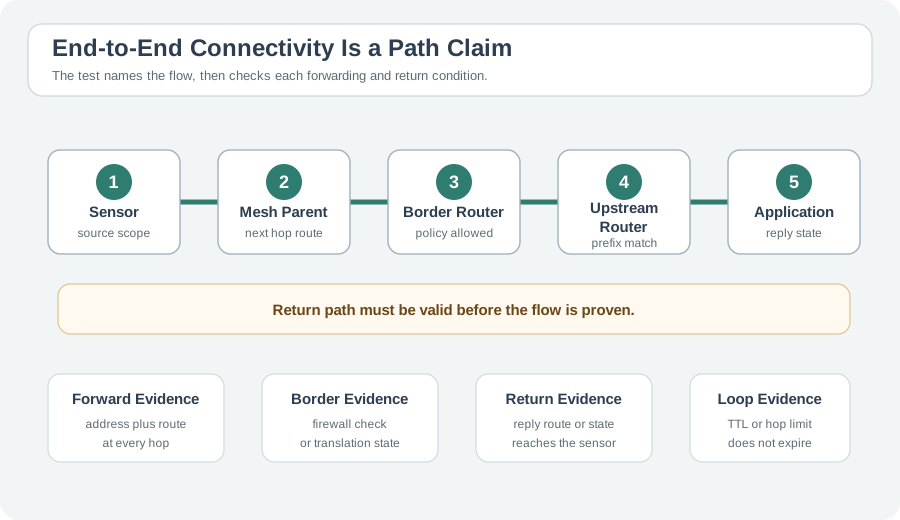
Key insight: End-to-end connectivity requires routing in BOTH directions.

9.7 Concept Check

Common Pitfalls

Two devices on different subnets cannot communicate without a route between them, even if physically connected. Always verify routing table completeness — a missing route silently drops packets.

Reachability (can packets reach the destination?) and connectivity (can devices exchange data bidirectionally?) are different. A route may exist in one direction but not the other — check both directions.

Static route-based connectivity fails silently when the next-hop becomes unreachable. Test connectivity after simulating link and node failures to verify resilience.

9.8 Summary

9.8.1 Key Takeaways

  1. Three Components: End-to-end IoT connectivity requires IP addressing (identity), routing tables at each hop (path), and an IoT-optimized protocol stack (transport)

  2. Static Routes: Connected routes are created automatically when an interface is configured. Static routes must be added manually for destinations beyond directly connected networks. A default route handles all unmatched destinations.

  3. Bidirectional Routing: Connectivity requires routes in both directions – outbound from sensor to cloud, and return path back. Missing return routes are a common source of one-way connectivity failures.

  4. TTL/Hop Limit: Prevents routing loops from consuming resources indefinitely. Lower Hop Limit values (e.g., 16 instead of 64) reduce loop damage duration in constrained IoT networks.

  5. Diagnosing Failures: Use traceroute to identify where packets stop. If packets loop between two routers, examine their routing tables for misconfigured next-hop entries.

9.8.2 Why RPL Exists: Convergence Cost on Constrained Devices

Traditional routing protocols were designed for routers with megabytes of RAM and reliable wired links. Running OSPF or RIP on a battery-powered 802.15.4 sensor node is not just suboptimal – it is often impossible. Here are the concrete numbers that motivated the IETF ROLL working group to create RPL.

Memory footprint comparison (50-node network):

Protocol RAM per Node Flash per Node Feasible on 802.15.4?
OSPF 120–200 KB (link-state database) 60–100 KB No (typical node: 8–32 KB RAM)
RIP 15–30 KB (distance vectors) 20–40 KB Marginal (fits only on high-end nodes)
RPL 2–5 KB (parent set + DODAG info) 8–15 KB Yes (designed for 2 KB RAM minimum)

Convergence energy cost (single topology change, 50-node mesh):

OSPF approach (if it could run):
  LSA flood: 50 nodes x 2 LSA retransmissions x 127 bytes = 12,700 bytes
  SPF recalculation: ~200 ms CPU time at 48 MHz = 1.7 mJ per node
  Total network energy: 50 x (TX energy + CPU energy) = ~250 mJ

RIP approach:
  Full table exchange: 50 routes x 20 bytes x 50 nodes = 50,000 bytes
  Convergence time: up to 180 seconds (count-to-infinity risk)
  Total network energy: ~800 mJ (repeated exchanges during convergence)

RPL approach:
  DIO trickle reset: affected subtree only (average 8 nodes)
  DIO message: 40-80 bytes per node
  Convergence time: 2-8 seconds (trickle timer reset)
  Total network energy: 8 x ~1.5 mJ = ~12 mJ

RPL uses 20x less energy than OSPF and 65x less than RIP for a single topology change. Over a year with daily link quality fluctuations causing 2–3 reconvergence events per day, this translates to months of additional battery life.

Try It: Routing Protocol Energy Comparison

Adjust the network size and reconvergence frequency to compare the annual energy cost of different routing protocols on constrained devices.

9.8.3 Quick Reference: When to Use Each Route Type

Scenario Route Type Protocol
Single gateway, static topology Static None
Small network (<15 hops) Dynamic RIP
Enterprise campus Dynamic OSPF
Battery-powered sensors Dynamic RPL
Internet connectivity Dynamic BGP
Mission-critical, sub-second failover Dynamic OSPF + BFD

9.8.4 Troubleshooting Checklist

When routing fails:

  1. Check if default route is configured
  2. Verify interface is UP and has correct IP
  3. Use traceroute to find where packets stop
  4. Check for TTL exceeded errors (routing loop)
  5. Verify routing table has expected entries
  6. Check for route flapping in logs

Prerequisites:

  • Routing Basics → Understanding next-hop forwarding
  • Routing Tables → Route types and lookup process
  • IP Addressing → Network prefixes and subnetting

Builds Toward:

  • Transport Protocols → TCP/UDP connection establishment over routes
  • Application Protocols → CoAP, MQTT traffic flows across networks
  • Network Security → Firewall rules depend on routing topology

Relates To:

  • NAT and IPv6 → Address translation vs end-to-end addressability
  • RPL Protocol → Automatic route discovery in IoT mesh
  • Troubleshooting → Using traceroute and ping to verify connectivity

Within This Module:

Related Modules:

Tools & Commands:

  • traceroute / traceroute6 - Map the path packets take
  • ip route show - View routing table on Linux
  • ping - Test basic reachability

Scenario: A smart home sensor cannot reach the cloud. You have access to the sensor’s shell.

Given:

  • Sensor IP: 192.168.1.50/24
  • Gateway IP: 192.168.1.1
  • Cloud IP: 8.8.8.8

Your diagnostic steps:

  1. ip addr - Verify sensor has IP address assigned
  2. ip route - Check if default route exists
  3. ping 192.168.1.1 - Test gateway reachability (Layer 2 + local routing)
  4. ping 8.8.8.8 - Test cloud reachability (end-to-end)
  5. traceroute 8.8.8.8 - Find where packets stop

Common findings and fixes:

  • No IP: Check DHCP or static configuration
  • No default route: ip route add default via 192.168.1.1
  • Gateway unreachable: Check Wi-Fi connection, signal strength
  • Packets stop at gateway: Gateway needs its own default route
  • Packets reach cloud but no response: Firewall or NAT issue
Previous: IoT Routing Next: RPL Fundamentals

9.9 What’s Next

If you want to… Read this
Learn about TTL and loop prevention TTL and Loop Prevention
Understand routing tables in depth Routing Tables
Explore IoT-specific routing challenges Routing for IoT
Practice connectivity design in labs Routing Lab Fundamentals

You have completed the Routing Fundamentals series. Next steps:

Return to the Routing Fundamentals Overview for the complete chapter guide.