4 Routing in Low-Power IoT Networks
More
Depth: Practitioner
Progress saves as you read. Mark sections complete as you go; your progress appears in the sidebar.
4.1 Start With the Weakest Link
This section: Start With the Weakest Link — Routing is the job of choosing a path for data through a network.
Routing is the job of choosing a path for data through a network. In an IoT network, the weakest part may be a battery device that sleeps or a radio link that fades. A relay device, called a parent, may change. A gateway is a device that links the local network to another network, and it may restart. The radio may carry only short bursts of data.
Start with those limits. A routing protocol is a shared set of rules for choosing routes. Internet Protocol is the set of rules used to address and route packets across networks. The design must explain how packets keep moving when power, memory, link quality, address space, and repair time are limited. IPv6 means Internet Protocol version 6. It supplies a very large address space. RPL means Routing Protocol for Low-Power and Lossy Networks. It was made for IPv6 networks where ordinary routing assumptions often fail.
4.2 Overview: IoT Routing Starts With Constraints
IoT routing is not ordinary Internet forwarding placed on smaller devices. Wireless links may lose messages. Devices may sleep, store only a few routes, and have little power. Most devices may send toward one gateway. A route can look correct in a diagram yet fail when a relay sleeps, the system chooses a weak parent, or nobody tests the return path.
A directed acyclic graph is a set of one-way links that never forms a loop. RPL builds a destination-oriented form of this graph, called a DODAG. The graph points toward a border router at its root. Each device chooses a preferred parent. An Objective Function is the rule used for that choice, such as preferring a stronger or cheaper link.
Begin the review with the way the network is used. A meter that reports once an hour needs different proof from an irrigation controller that must receive a command within a time limit. A moving asset needs another kind of proof because it may change parents during the day.
If you only need the intuition, this layer is enough: use simple static or gateway routing when the network is small and stable, use infrastructure routing for capable routers and backhaul, and consider RPL when constrained nodes form a lossy mesh that needs parent choice, repair, and traffic-direction evidence.
Use Figure 4.1 to see which link-quality evidence causes a node to leave its old parent and whether the replacement restores forwarding without a loop.
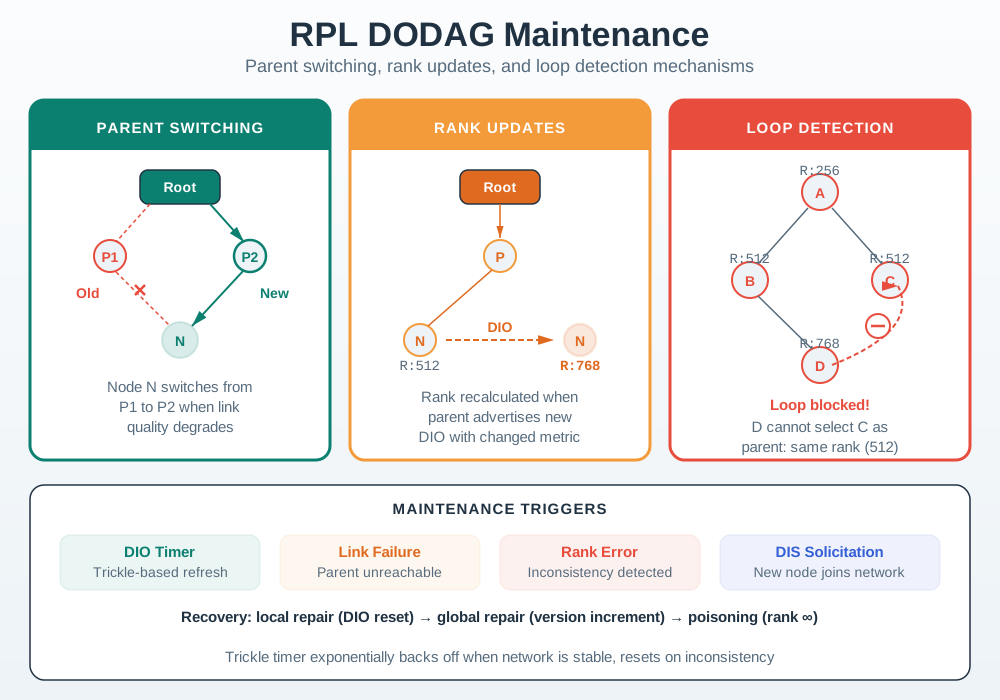
Read Figure 4.1 from the old parent and its degraded link to the new parent selected by node N. The next relay changes first, and the Rank update records the node’s new position relative to the root. Those control changes are necessary but do not by themselves prove recovery. Capture the candidate metrics, switch event, advertised Rank, and loop check, then send the required application traffic through the repaired path. Delivery and recovery time complete the evidence that the graph was maintained rather than merely redrawn.
Static or Default Route
Best for small, stable paths where the next hop rarely changes and a simple table entry is enough to inspect.
RPL
Best for constrained IPv6 meshes where nodes forward for one another and parent choice must react to link quality.
Infrastructure Routing
Best for gateways, routers, and backhaul links with enough power, memory, bandwidth, and operations support.
Do Not Guess
Hold the design when traffic direction, return path, repair behavior, or route-health evidence is missing.
4.2.1 Overview Knowledge Check
4.3 Practitioner: Write the RPL Fit Record
A practical routing record should let another engineer decide whether RPL is appropriate and whether the chosen parent, repair behavior, and return path were proven. Keep the record small, but make every claim testable.
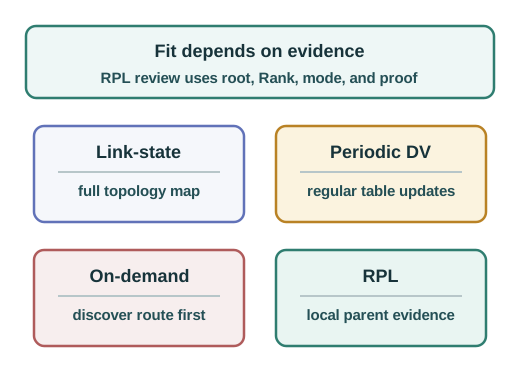
Before deciding whether RPL fits, make the required routing evidence concrete. Figure 4.2 shows a worked preferred-parent tree and a storing-mode DIO/DAO sequence. Use it to identify what belongs in the fit record: the root, parent policy, Rank, traffic direction, routing mode, and the route state that must be tested. The example explains RPL operation; it does not by itself establish that RPL is the best choice for a deployment.
Read Figure 4.2 from C toward A and R to follow upward forwarding, then trace the advertisements in the right panel. The example fixes OF0 with MinHopRankIncrease 256 and equal unit steps, so Rank rises from 256 to 512 to 768 away from the root; other metrics or Objective Functions need not produce these values. In the storing-mode example, C’s DAO lets A install a route to C, and A advertises C’s target onward in a new DAO. Check the resulting downward route at each router and send a command from R to C. In non-storing mode, the DAO’s logical destination is the root, although the packet still travels through intermediate routers. Carry these distinctions into the record below and test repair and application delivery separately.
Use the record to choose the simplest routing approach that satisfies the claim. A fixed gateway subnet may need only a default route and return-path proof. A constrained mesh with lossy parent options may need RPL with an Objective Function that accounts for link quality and relay role. A mains-powered backhaul can use ordinary infrastructure routing outside the constrained domain.
Accept RPL
Nodes forward for one another, links vary, route repair matters, and route-health evidence can be observed.
Keep It Simple
Use static or gateway routing when endpoints are stable and no constrained node needs to relay traffic.
Split the Domain
Use RPL inside the LLN and a different routing approach at the border router or backhaul boundary.
Hold Review
Do not approve when downward traffic, root failure, parent churn, or route repair has not been tested.
4.3.1 Practitioner Knowledge Check
4.4 Under the Hood: Parent Choice and Repair Are the Boundary
RPL parent selection is local but not arbitrary. A node hears DIO information, filters incompatible candidates, applies the Objective Function, computes Rank, and chooses one or more candidate parents. Upward forwarding should move toward lower Rank, while downward reachability depends on the selected routing mode and DAO behavior when that traffic is required.
Rank is not just hop count. A design can prefer a slightly longer path if it has better link evidence, a more suitable relay role, or a lower expected transmission cost. Hysteresis matters because frequent parent changes can waste control traffic and hide instability until queues, retries, or missed commands expose it.
Repair is the other half of the boundary. A node that finds a better parent, loses a parent, or hears a new DODAG version changes both forwarding behavior and review evidence. Capture the control-plane trigger, the chosen replacement, the packets sent during the change window, and whether downward state was refreshed when commands depend on it.
Keep the failure window explicit. If telemetry succeeds during repair but commands fail afterward, the evidence points to a different route-state question than a total loss of upward forwarding.
Two named variants show why protocol labels need their mechanism recorded. Cognitive RPL (CORPL) keeps the DODAG concept but routes through a forwarding set rather than relying only on parent forwarding state; DIO messages update neighbours as that set forms. Channel-Aware Routing Protocol (CARP) addresses underwater communication instead: a root broadcasts HELLO packets during network initialization, then data travels hop by hop from nodes toward the root. These are distinct routing mechanisms for distinct environments, not interchangeable transport protocols.
Check Figure 4.3 while working through Under the Hood: Parent Choice and Repair Are the Boundary. The asset depicts how upward telemetry and downward commands are different claims. A formed DODAG is not proof that both directions work, which identifies the concrete observation that the surrounding prose is about to use.
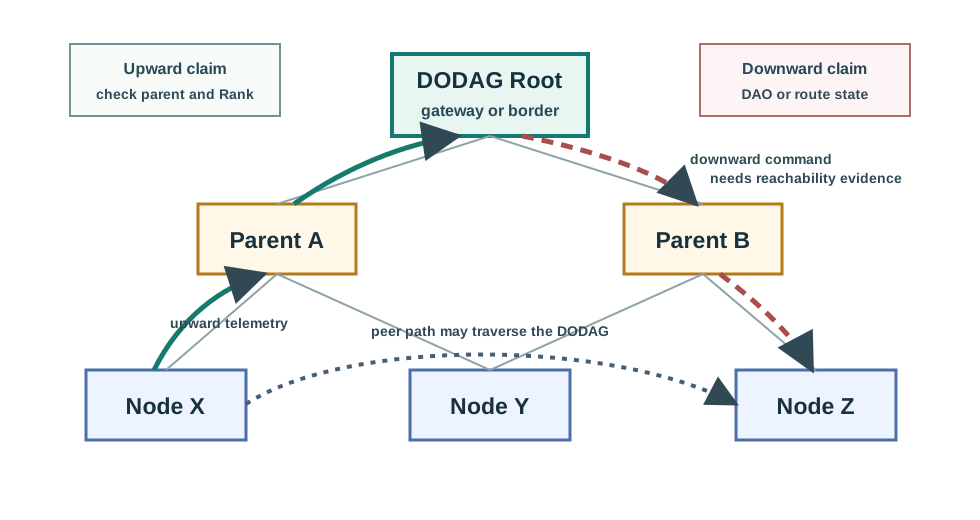
Follow C’s two directions in Figure 4.3 using the worked storing-mode example. A reading travels C → A → R through preferred parents. For a command back to C, check that R’s next hop is A and A’s next hop is C, then test R → A → C. After C changes parent, refresh the downward entries and repeat the command; the earlier successful reading cannot prove the repaired return path.
DIO Is Discovery Evidence
It advertises graph context and helps a node compare candidates. It is not application-delivery proof.
Rank Guards Direction
Upward forwarding should progress toward lower Rank and compatible graph information.
DAO Supports Return Paths
Downward commands or replies need mode-specific route-state evidence, not just an upward telemetry test.
Repair Must Be Tested
Relay loss, root loss, weak-link degradation, reboot during join, and command delivery after repair are separate checks.
Use Figure 4.4 to choose post-repair packet checks from the different locations where storing and non-storing modes keep downward state.
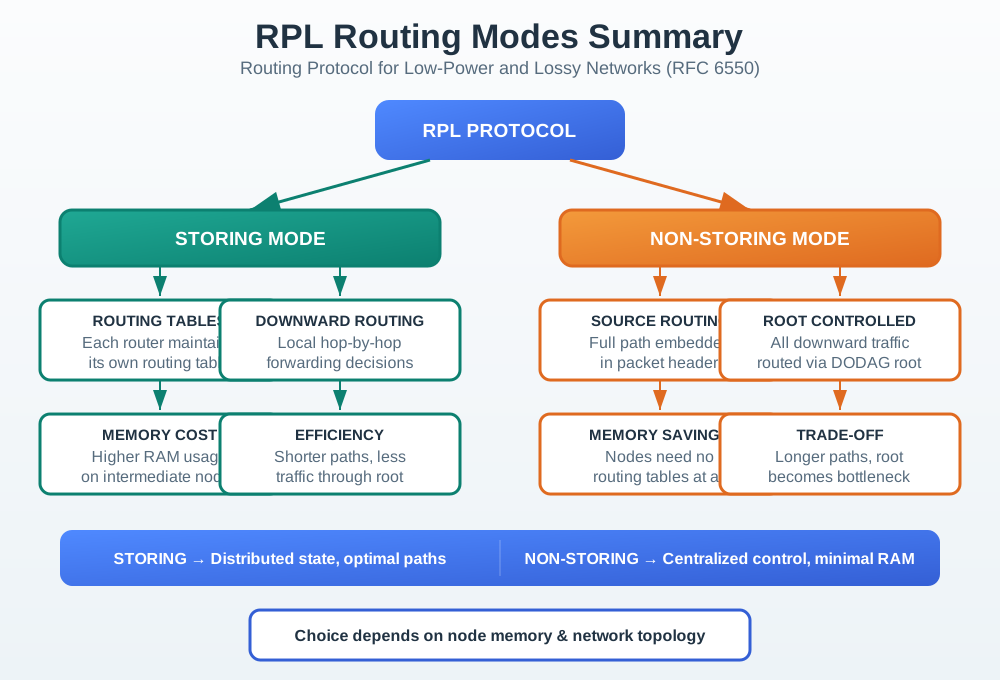
Figure 4.4 contrasts storing mode, where intermediate routers retain tables for local hop-by-hop downward forwarding, with non-storing mode, where the root owns the path and supplies source-route information. The placement of state determines the repair test. After a parent change in storing mode, inspect affected router entries; after a root or topology change in non-storing mode, inspect the root’s path view and packet header. In both cases, send the downward command after control state settles. Restored upward telemetry proves neither route location nor return-path delivery.
4.4.1 Under-the-Hood Knowledge Check

4.5 Proving End-to-End Paths
This section: Proving End-to-End Paths
4.5.1 Start With the Device That Must Be Reached
Prove Each Direction Before Calling It Connected
Picture a flood sensor that sends a warning to a control room. The warning arrives, but the reply that should silence the alarm never reaches the sensor. One successful message did not prove a working path. It proved only one trip in one direction.
Name the exact exchange before testing it. State who sends first, where the message should finish, how the reply returns, and how long the result may take. A gateway is the device that joins one network to another. Telemetry means the readings and status a device reports. Firmware is the code stored on the device. Test each of these flows separately when they use different routes or rules.
Now break one step at a time. Remove a route, block a reply, restart the gateway, or change the device address. Record which check finds the fault and who owns the repair. A green network icon is not enough evidence.
This simple path test does not prove every future condition. Loads, rules, and radio links can change. The deeper sections show how addresses, forward routes, return paths, and loop limits turn the first test into a reviewable connectivity record.
Connectivity is not proven by saying the network is up. Pick one constrained device and ask which traffic must reach it, which traffic must leave it, and which gateway or parent is responsible when the path changes.
That device-centered view keeps the design honest. It separates local radio reachability from routed IP reachability, and it shows whether the deployment has enough evidence for telemetry, commands, diagnostics, and recovery paths.
4.5.2 Overview: Connectivity Is a Whole-Path Claim
End-to-end connectivity means more than a sensor hearing its local gateway. A packet must have a usable source address, match a forwarding route at every hop, reach the intended destination, and have a valid path for the reply.
In IoT systems the path often crosses a constrained link, a border router, an IP backbone, and an application endpoint. A successful first-hop ping proves local reachability. It does not prove that upstream forwarding, firewall policy, translation, routed-prefix behavior, or the return path is correct.
Make the claim specific before testing. A telemetry upload, a cloud-to-device command, a firmware download, and an operator login can use different ports, policies, and return-state assumptions. Connectivity evidence is strongest when it names the exact flow, direction, source address, destination, and failure consequence. It should also name the next check when the path breaks.
The evidence boundary for Overview: Connectivity Is a Whole-Path Claim is visible in Figure 4.5. Study how end-to-end connectivity is proven by checking the named flow’s source address, hop-by-hop forwarding, border policy, upstream route, return path, and loop-limit evidence before carrying the claim into the next design or validation step.
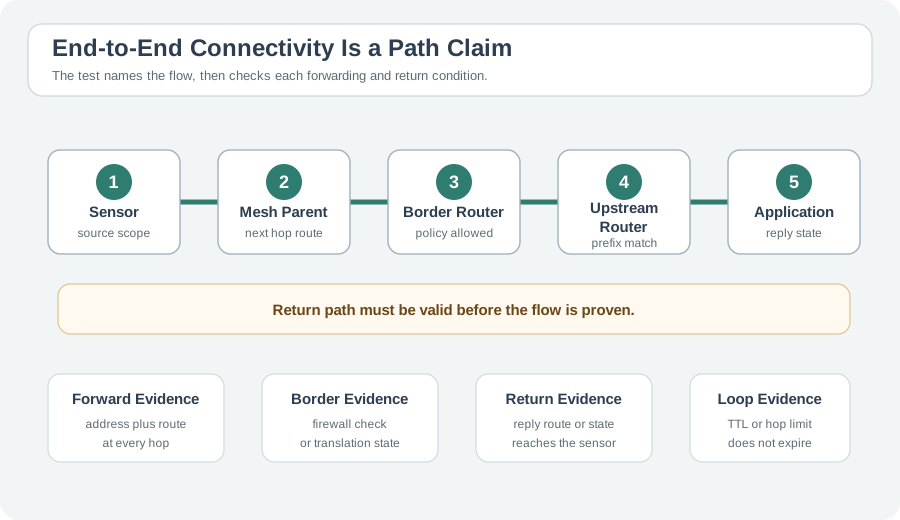
Trace one packet end to end. Keep each proof paired. Read Figure 4.5 from the sensor address through its mesh parent and border router to the application. Each transition asks a different question: local forwarding selects the next hop, border policy permits or denies the flow, and the upstream route must reach the destination. The return path is separate evidence, especially for commands or acknowledgements, while TTL or Hop Limit bounds a loop rather than repairing it. Naming the exact source, destination, direction, and service lets packet captures and route state prove one whole path instead of an ambiguous claim that the network is connected.
Address
The source needs an address that is valid for the intended scope. Private IPv4 and IPv6 unique local addresses are useful inside a deployment, but they need translation, proxying, or a routed return path for external services.
Forward Route
Each router needs a matching entry for the destination prefix. The entry can be connected, static, default, or maintained dynamically by a routing protocol.
Return Path
The destination, upstream router, gateway, or translation state must know how replies get back to the original conversation.
Loop Limit
TTL in IPv4 and Hop Limit in IPv6 stop packets from circulating forever. They reveal loops; they do not repair bad routes.
Use this contract when reviewing a routed design: source address, source route, first hop, gateway forwarding, upstream route, return path, and loop evidence. Missing any one of those can make an IoT workflow look intermittent even when the local radio link is healthy.
4.5.3 Practitioner: Prove the Path One Boundary at a Time
Start at the source and move outward. On a Linux-based node, inspect addressing and routes before changing gateway or upstream state:
ip addr show
ip route show
ping -c 3 192.168.10.1
traceroute -n 198.51.100.50
For a small gateway, imagine three interfaces: eth0 for sensors at 192.168.10.1/24, eth1 for management at 10.20.0.1/24, and eth2 for the uplink at 203.0.113.5/30 with upstream router 203.0.113.6. Connected routes appear automatically for directly attached prefixes. The off-link application endpoint needs either a default route or an explicit host route.
ip addr show and ip route showip route replace 198.51.100.50/32 via 203.0.113.6 dev eth2ip route replace default via 203.0.113.6 dev eth2sysctl -w net.ipv4.ip_forward=1Traceroute gives the quickest boundary clue. No first hop points to local addressing or route problems. A trace that stops at the gateway points to gateway forwarding, firewall policy, upstream reachability, or translation state. Repeated hop pairs point to a loop. Stars at the end do not always prove failure because some routers and endpoints filter ICMP while forwarding application traffic.
Sensor Evidence
Address, prefix, default route, first-hop ping, and the first visible traceroute hop.
Gateway Evidence
Route lookup, forwarding enabled, firewall policy, translation state, and logs for the attempted flow.
Upstream Evidence
Route back to the sensor prefix, application reachability, and whether ICMP filtering explains missing traceroute responses.
4.5.4 Under the Hood: Lookup, Return State, and RPL Boundaries
Routers do not need the whole path. Each hop performs a destination-prefix lookup, chooses the most specific matching entry, and forwards the packet to the selected next hop or directly connected interface. A host route such as 198.51.100.50/32 wins over 198.51.100.0/24, and both win over 0.0.0.0/0.
The return path is an independent requirement. A gateway that sends private IPv4 sensor addresses upstream usually needs source translation so replies map back to the sensor. A routed IPv6 design usually needs an upstream route for the delegated sensor prefix. A proxy design terminates the sensor-side protocol locally and starts a separate upstream conversation, which means the application workflow can succeed without direct sensor addressability.
Loop diagnosis relies on repeated evidence. If Router B sends gateway-bound traffic to Router C while Router C sends the same prefix back to Router B, traceroute can show the same two hops again and again:
1  192.168.5.1
2  192.168.4.1
3  192.168.5.1
4  192.168.4.1
TTL or IPv6 Hop Limit eventually expires, preventing endless circulation. The fix is route-state repair: remove the bad next hop, install a route that progresses toward the gateway, and retest until the repeated-hop evidence is gone.
RPL changes how IoT-side routes are maintained, not the connectivity contract itself. Nodes still need IPv6 addresses, upward traffic still needs a parent toward the DODAG root, downward traffic still depends on RPL mode, and the border router still needs upstream forwarding plus a return-path design outside the mesh.
Connected
Installed when an interface receives an address on a local prefix.
Static
Clear and testable for gateways, labs, and small stable topologies.
Default
Useful fallback for unmatched destinations, but dangerous if it hides a missing specific route.
RPL
Maintains routes in low-power IPv6 meshes where links, parents, and sleeping nodes change over time.
4.5.5 Summary
End-to-end IoT connectivity is a whole-path claim. A sensor needs a usable address, a route off its local link, gateway forwarding, upstream reachability, and a return path for replies. Traceroute, route-table lookup, gateway logs, and translation or routed-prefix evidence keep those checks separate.
Static routes are useful when the topology is small and stable. RPL becomes useful when low-power IPv6 routers need to maintain IoT-side routes as links and parents change. In both cases, the review question stays the same: can packets progress toward the destination and can responses get back?
4.5.6 Key Takeaway
Do not declare an IoT path healthy because the first hop responds. Prove address scope, forward routing, gateway policy, upstream route state, return handling, and loop behavior as separate pieces of evidence.
4.5.7 See Also
Builds the next-hop and forwarding-table model used by this chapter.
Explains prefix matching, connected routes, static routes, and defaults in more detail.
Shows how TTL and Hop Limit expose forwarding loops without repairing them.
Connects the end-to-end contract to low-power IPv6 routing state.
4.6 Summary
This section: Summary — IoT routing has to be selected from the deployment constraints: power, memory, link quality, relay role, traffic direction, gateway dependency, and maintenance visibility.
IoT routing has to be selected from the deployment constraints: power, memory, link quality, relay role, traffic direction, gateway dependency, and maintenance visibility. Static routes, RPL, and infrastructure routing all have valid places, but they prove different claims.
RPL fits constrained IPv6 meshes where nodes forward for one another and route repair matters. The review record should name the root, relay candidates, Objective Function, parent evidence, traffic directions, repair tests, and operations signals. A successful upward telemetry packet is useful evidence, but it does not automatically prove downward commands, return paths, or stability after parent repair.
4.7 Key Takeaway
This section: Key Takeaway
Trust an IoT routing design only when the selected approach, parent rule, traffic direction, repair behavior, and route-health evidence match the constrained network it must operate in.
4.8 See Also
This section: See Also
Routing Basics
Review next-hop forwarding, default routes, and loop limits before evaluating a constrained mesh.
End-to-End Connectivity
Connect route choice to gateway forwarding, return paths, and traceroute evidence.
RPL Core Concepts
Study DODAGs, Rank, DIO, DAO, and routing modes in more detail.
RPL DODAG Construction
Trace how parent selection and graph formation become reviewable route state.
Find help
3 reviewed answers.
Where should I start in a module?
Open the module page from the sidebar to see its chapters in order. Use the module map to return to a topic you need.
Modules and pathsReviewed
What can I try when a project does not work?
Check the symptom, then work through the diagnostic steps. Keep the error message and the smallest example that reproduces it.
When you are stuckReviewed
How do interactive examples work?
Use the interactive guide to check how examples and simulations work before changing your project.
Interactive examples guideReviewed