7  Packet Switching and Failover

In 60 Seconds

Packet switching enables dynamic rerouting when links fail – packets automatically find alternate paths without sender intervention. Routers choose between multiple paths using metrics (hop count, bandwidth, latency), and this chapter traces a real IoT sensor data journey from device to cloud.

7.1 Learning Objectives

By the end of this section, you will be able to:

  • Explain Dynamic Rerouting: Describe how packets are automatically rerouted when links fail
  • Apply Metric-Based Selection: Calculate how routers choose between multiple paths using ETX, hop count, and OSPF cost
  • Trace Real Packet Journeys: Map an IoT sensor data path from device through multiple network technologies to cloud

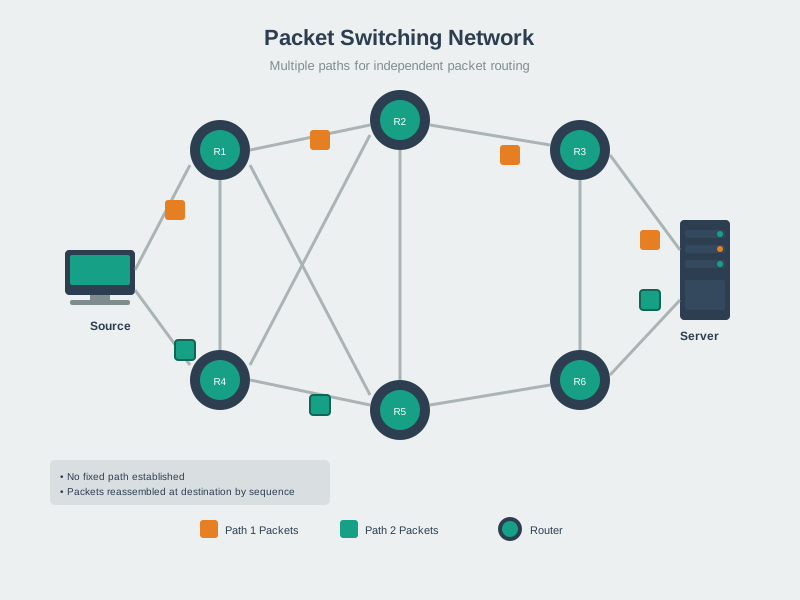
Packet switching means your data is broken into small pieces that each find their own way through the network, like cars on a highway that can take different exits to reach the same destination. Failover is what happens when a path breaks – the network automatically reroutes data through an alternate path, keeping communication alive.

“What happens when the path to the gateway is blocked?” asked Sammy the Sensor nervously. Max the Microcontroller reassured him. “In a packet-switched network, each packet finds its own way. If the usual path fails, routers automatically send your data on a detour – that is called failover.”

“Imagine a highway with multiple routes to your destination,” said Lila the LED. “If there is a traffic jam on Route A, you take Route B. Routers do the same thing – they keep backup paths ready and switch to them in milliseconds when the primary path fails.”

“The key word is AUTOMATIC,” emphasized Bella the Battery. “Nobody has to manually fix anything. The routing protocols constantly check link health and update their tables. When a link goes down, the next packet is already being sent on an alternate path. For IoT, this self-healing behavior is critical because nobody is going to climb a cell tower or wade into a field to manually reconnect a failed sensor.”

7.2 Prerequisites


Key Concepts

  • Packet Switching: A data transmission method where information is divided into packets, each independently routed through the network, potentially taking different paths.
  • Circuit Switching: A communication method reserving a dedicated path for the duration of a call; contrast to packet switching which shares network capacity dynamically.
  • Store-and-Forward: A router behavior where the complete packet is received and verified before being forwarded; introduces per-hop latency but ensures error checking.
  • Cut-Through Switching: A forwarding technique beginning transmission before the complete packet is received, reducing latency at the cost of forwarding corrupted frames.
  • PDU (Protocol Data Unit): The unit of data at each protocol layer: frame (Layer 2), packet (Layer 3), segment (Layer 4), message (Layer 5-7).
  • Header Overhead: The protocol-specific fields added to data at each layer; in IoT, header overhead on small frames can exceed the data payload, reducing efficiency.

7.3 Packet Switching in Action

One of routing’s key benefits: Packets can be dynamically rerouted mid-stream if topology changes.

Network diagram showing dynamic rerouting where packets switch from a failed primary path through Router 2 to an alternate path through Routers 3 and 4
Figure 7.1: Dynamic rerouting: when Router 2 fails, routing protocol automatically finds alternate path through Router 3 and 4

Scenario:

  1. Normal operation: Packets flow S -> R1 -> R2 -> Destination
  2. Link R2 fails: Routing protocol detects failure
  3. Routing tables update: R1 learns alternate path via R3
  4. Automatic failover: Subsequent packets flow S -> R1 -> R3 -> R4 -> Destination

Even packets from the same TCP connection can take different paths!


7.4 Metric-Based Path Selection

If a router learns multiple routes to the same destination, it chooses the route with the lowest metric:

Route Next Hop Metric Selected?
Route 1 10.0.0.2 10 No
Route 2 10.0.0.5 5 Best
Route 3 10.0.0.8 20 No

Router always forwards packets along the “best” route.

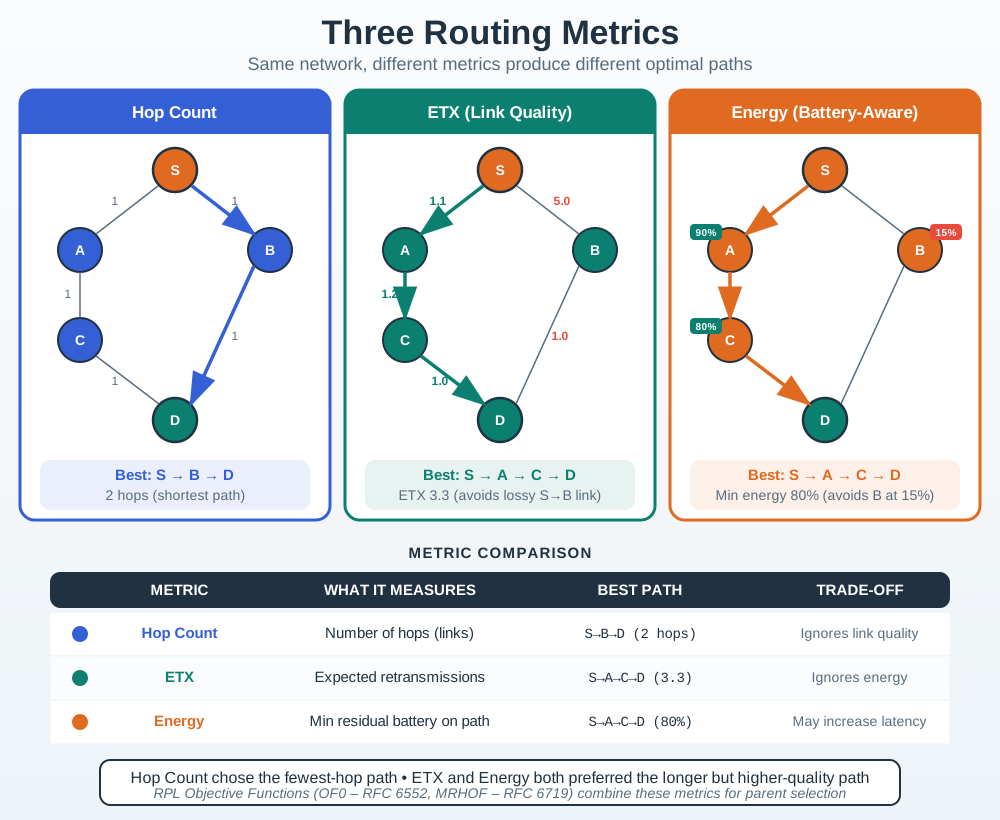
The Misconception: Routing should always choose the path with fewest hops.

Why It’s Wrong:

  • Hop count ignores link quality (a 2-hop path through reliable links beats a 1-hop path through a lossy link)
  • Doesn’t consider congestion (shortest path may be overloaded)
  • Ignores bandwidth (high-bandwidth path may be longer)
  • Energy cost varies by link (some hops cost more power)

Real-World Example:

  • Sensor network: Direct path to gateway = 1 hop, 30% packet loss
  • Alternative: 3-hop path through relays, 2% packet loss per hop
  • Direct path effective delivery: 70%
  • 3-hop path effective delivery: 98% x 98% x 98% = 94%
  • “Longer” path delivers more reliably!

The Correct Understanding:

  • Use composite metrics: ETX (expected transmissions), latency, energy
  • ETX accounts for retransmissions needed
  • RPL uses “rank” which can incorporate multiple metrics
  • Best path depends on application requirements

Shortest is not Best. Optimize for your actual goal.


7.5 Real-World Example: LoRaWAN Sensor Data Journey

Let’s trace a real packet from an IoT temperature sensor to AWS cloud, with actual numbers and realistic network hops.

Scenario: Smart Agriculture Temperature Monitoring

Network Setup:

Farm Sensor -> LoRaWAN Gateway -> Edge Router -> ISP Router ->
Regional Router -> AWS Edge -> AWS Data Center

Device Details:

  • Sensor: RAK7204 LoRaWAN Environmental Sensor
  • Location: Rural farm in Iowa, USA
  • Destination: AWS IoT Core in us-east-1 (Virginia)
  • Packet: 50-byte temperature reading + timestamp

7.5.1 Hop 1: Sensor -> LoRaWAN Gateway

Device: RAK7204 Sensor Action: Create packet and transmit via LoRa radio

Packet Created:

Source IP: 2001:db8:a:10::5 (sensor)
Dest IP: 2600:1f18:2148:bc00::1 (AWS)
TTL: 64 (initial value)
Payload: {"temp": 72.5, "humidity": 65, "timestamp": 1701234567}

Transmission:

  • LoRa Frequency: 915 MHz (US band)
  • Spreading Factor: SF7 (fastest mode, BW 125 kHz)
  • Time on Air: ~62 ms (50-byte payload + LoRaWAN overhead)
  • Range: 2 km to gateway
  • Power Used: 100 mW (20 dBm)

7.5.2 Hop 2: Gateway -> Farm Edge Router

Device: RAK7249 LoRaWAN Gateway Action: Decapsulate LoRa, forward via Ethernet

Routing Decision:

Gateway Routing Table Check:
Destination: 2600:1f18:2148:bc00::1
Match: ::/0 (default route)
Next Hop: fd00:1::1 (farm router)
Interface: eth0 (wired Ethernet)

TTL Update: 64 -> 63 (decremented)


7.5.3 Hop 3: Farm Router -> ISP Router

Device: Cisco ISR 4331 Router Action: Forward to ISP over fiber

Routing Decision:

Router Routing Table:
Destination: 2600:1f18:2148:bc00::/64
Match: ::/0 (default route)
Next Hop: 2001:db8:b::1 (ISP border router)

TTL Update: 63 -> 62

Link Details:

  • Connection: Fiber optic (rural ISP)
  • Speed: 100 Mbps
  • Distance: 15 km to ISP POP

7.5.4 Hop 4: ISP Router -> Regional Internet Exchange

Device: Juniper MX960 Router Action: Forward to internet backbone

Routing Decision:

ISP Router Routing Table:
Destination: 2600:1f18:2148:bc00::/64
Protocol: BGP (Border Gateway Protocol)
AS Path: 64512 -> 7018 -> 16509 (to AWS)

TTL Update: 62 -> 61


7.5.5 Hop 5: Regional Router -> AWS Edge Router

Routing Decision:

Regional Router Routing Table:
Destination: 2600:1f18:2148:bc00::/64
Protocol: BGP
Next Hop: AWS edge router (direct peer)

TTL Update: 61 -> 60


7.5.6 Hop 6: AWS Edge -> IoT Core Data Center

Routing Decision:

AWS Internal Routing:
Destination: 2600:1f18:2148:bc00::1
Service: iot.us-east-1.amazonaws.com
Next Hop: IoT Core load balancer

TTL Update: 60 -> 59 (final hop)

Packet Delivered!


7.5.7 Complete Journey Summary

Metric Value
Total Hops 5 forwarding routers + destination
Total Distance ~1,337 km
Total Latency ~35.5 ms
Initial TTL 64
Final TTL 59
Packet Size 90 bytes (payload + header)

Path Taken:

Iowa Farm (sensor)
  -> 2 km LoRa wireless
LoRaWAN Gateway
  -> 50 m Ethernet
Farm Router
  -> 15 km fiber
ISP Router (Des Moines)
  -> 120 km dark fiber
Regional Router (Chicago)
  -> 5 m cross-connect
AWS Edge Router
  -> 1,200 km AWS backbone
AWS IoT Core (Virginia)

Key Takeaways:

  1. Multi-technology path: LoRa (wireless) -> Ethernet -> Fiber -> Internet backbone
  2. Asymmetric latency: LoRa time on air (~62 ms) dominates total latency despite 1,337 km fiber distance
  3. TTL margin: Started at 64, ended at 59, plenty of headroom
  4. BGP routing: ISP learned AWS route via BGP, not manual configuration
  5. Scalability: Same infrastructure handles 1 sensor or 10,000 sensors

7.6 Calculating Optimal Routes

Worked Example: Calculating Optimal Route in a Smart Building Network

Scenario: A smart building has three routing paths from a temperature sensor cluster (192.168.10.0/24) to the central building management system (BMS). You need to determine which route the routing protocol will select.

Given:

Path Hops Bandwidth Delay Link Reliability
Path A 2 100 Mbps 5 ms 99.9%
Path B 3 1 Gbps 2 ms 99.99%
Path C 4 10 Mbps 15 ms 95%

Step 1: Calculate RIP metric (hop count only)

RIP selects lowest hop count:
- Path A: 2 hops (WINNER for RIP)
- Path B: 3 hops
- Path C: 4 hops

Step 2: Calculate OSPF cost (bandwidth-based)

OSPF Cost = Reference Bandwidth / Link Bandwidth (minimum cost = 1)
Reference bandwidth = 100 Mbps (Cisco default)

Path A cost = 100/100 = 1 per hop x 2 hops = 2 total
Path B cost = 100/1000 = 0.1 -> rounds up to 1 per hop x 3 hops = 3 total
Path C cost = 100/10 = 10 per hop x 4 hops = 40 total

Note: OSPF costs are integers (minimum 1). With a 100 Mbps reference bandwidth, any link at or above 100 Mbps gets cost 1. To differentiate Gigabit from 100 Mbps links, increase the reference bandwidth (e.g., auto-cost reference-bandwidth 10000 for 10 Gbps). With a 10 Gbps reference:

Path A cost = 10000/100 = 100 per hop x 2 = 200 total
Path B cost = 10000/1000 = 10 per hop x 3 = 30 total (WINNER for OSPF)
Path C cost = 10000/10 = 1000 per hop x 4 = 4000 total

Step 3: Calculate RPL ETX metric (for IoT with lossy links)

ETX (Expected Transmission Count) = 1 / (delivery_rate x ack_rate)
Assuming symmetric links (delivery = ack rate):

Path A: ETX per hop = 1/(0.999 x 0.999) = 1.002
        Total ETX = 1.002 x 2 = 2.004

Path B: ETX per hop = 1/(0.9999 x 0.9999) = 1.0002
        Total ETX = 1.0002 x 3 = 3.001

Path C: ETX per hop = 1/(0.95 x 0.95) = 1.108
        Total ETX = 1.108 x 4 = 4.432

Step 4: Compare protocol selections

Protocol Metric Used Selected Path Why
RIP Hop count Path A (2 hops) Fewest hops regardless of speed
OSPF Bandwidth cost Path B (cost 30)* Highest bandwidth path
RPL ETX Path A (2.004) Best reliability x hop balance

*With 10 Gbps reference bandwidth. With the 100 Mbps default, OSPF selects Path A (cost 2) since 100 Mbps and 1 Gbps links both get cost 1.

Key Insight: Protocol selection dramatically affects routing behavior. For battery-powered IoT sensors on lossy wireless links, RPL’s ETX metric often chooses better paths than traditional hop count or bandwidth metrics.

ETX (Expected Transmission Count) quantifies how many transmissions are needed to successfully deliver one packet.

\[\text{ETX} = \frac{1}{p_{\text{fwd}} \times p_{\text{ack}}}\]

where \(p_{\text{fwd}}\) is forward delivery probability and \(p_{\text{ack}}\) is ACK delivery probability.

For a multi-hop path, cumulative ETX is:

\[\text{ETX}_{\text{total}} = \sum_{i=1}^{n} \text{ETX}_i\]

For example, a 3-hop path with link qualities 95%, 98%, 90%:

\[\begin{align*} \text{ETX}_1 &= 1/(0.95 \times 0.95) = 1.108 \\ \text{ETX}_2 &= 1/(0.98 \times 0.98) = 1.041 \\ \text{ETX}_3 &= 1/(0.90 \times 0.90) = 1.235 \\ \text{ETX}_{\text{total}} &= 1.108 + 1.041 + 1.235 = 3.384 \end{align*}\]

This means you need an average of 3.384 transmission attempts to successfully deliver one packet end-to-end. Compare this to a 2-hop path with 99% links: \(ETX = 1/(0.99 \times 0.99) \times 2 = 1.020 \times 2 = 2.04\). Fewer hops with better quality wins.

Try It: ETX Path Calculator

Compare two paths by adjusting hop count and link reliability. See which path has lower ETX (fewer expected transmissions).

Try It: Routing Protocol Comparison

Enter path characteristics and see which path each routing protocol (RIP, OSPF, RPL) would select.


Common Mistake: Assuming Symmetric Routing Paths

The Mistake: Many IoT developers assume that if a packet successfully travels from Sensor A to Gateway B, the return path from B to A will follow the same routers in reverse order. This assumption leads to connectivity issues when only one direction works.

Why This Happens:

  • Asymmetric link quality: Wireless signal strength differs by direction due to antenna orientation, interference patterns, or transmit power differences
  • Different routing metrics: Path A to B may optimize for bandwidth while B to A optimizes for latency
  • Policy routing: Routers may apply different forwarding rules based on packet source/destination
  • Load balancing: Equal-cost multi-path (ECMP) can send forward and return traffic via different paths

Building: 12-story office with 480 IoT thermostats

Symptom: 60% of thermostats could send temperature readings but could not receive control commands.

  • Uplink (sensor to cloud) worked at 99% delivery
  • Downlink (cloud to sensor) failed 60% of the time
  • Root cause: Asymmetric routing + firewall NAT state timeout

Network Path Analysis:

Uplink (Working):
Thermostat → Floor Router → Border Router (NAT) → Cloud
  - 2 hops, 5 ms latency
  - NAT creates state entry: internal IP mapped to public IP

Downlink (Failing):
Cloud → Border Router → Building Core Router → Floor Router → Thermostat
  - 3 hops, 12 ms latency (different path!)
  - NAT state expired (60 s timeout) before return packet arrived
  - Router dropped packet: "No NAT mapping found"

Why Paths Differed:

  1. Uplink path used direct fiber link (Border Router eth0) – low latency, preferred outbound
  2. Downlink path entered via redundant connection (Border Router eth1) – different ingress interface
  3. Border Router had policy routing: outbound prefers fiber, inbound uses load balancing across both links
  4. Result: forward and return paths took different routers, breaking NAT state tracking

The Fix:

# Increase NAT connection tracking timeout from 60s to 300s
sysctl -w net.netfilter.nf_conntrack_tcp_timeout_established=300
sysctl -w net.netfilter.nf_conntrack_udp_timeout_stream=300

# Add static route to force symmetric return path
ip route add 10.0.0.0/8 via 192.168.1.1 dev eth0

# Alternative: Use connection tracking to force same-path return
iptables -t mangle -A PREROUTING -m conntrack --ctstate RELATED,ESTABLISHED \
  -j CONNMARK --restore-mark

Results: Downlink delivery improved from 40% to 98%.

How to Detect Asymmetric Routing:

  1. Traceroute both directions – compare hop counts and router IPs from each end
  2. Use MTR (mtr --report --report-cycles 100 <target>) – high loss in only one direction indicates asymmetric path issues
  3. Examine router interface statistics – check which interfaces handle forward versus return traffic

Design Principles:

  1. Test bidirectional connectivity – ping from both ends, verify equal packet loss
  2. Use symmetric routing policies when possible
  3. Increase stateful firewall/NAT timeouts to accommodate asymmetric delay differences
  4. Monitor both directions separately – track uplink and downlink metrics independently

Common Pitfalls

Circuit switching guarantees dedicated bandwidth and fixed latency; packet switching provides best-effort delivery with variable latency. IoT real-time control applications need to account for packet switching’s variable delays.

Each router in a path introduces store-and-forward delay. Over 5 hops at 1 ms per hop, cumulative switching delay is 5 ms — negligible for telemetry but significant for real-time control. Calculate end-to-end switching delay for latency budgets.

Network packet loss has probabilistic characteristics (burst loss vs random loss) that affect application performance differently. TCP congestion control handles random loss well but struggles with burst loss from interference.

7.7 Summary

  • Dynamic rerouting allows packets to take alternate paths when links fail
  • Convergence time is the delay while routing protocols detect failures and update tables
  • Metrics determine which route is “best” – lower metric is preferred
  • Different protocols use different metrics: hop count (RIP), bandwidth (OSPF), ETX (RPL)
  • Real IoT packets traverse multiple technologies: wireless, Ethernet, fiber, internet backbone
  • TTL margin must account for mesh hops plus internet path length
  • Asymmetric routing is common – always test bidirectional connectivity

Previous: Routing Tables Next: IoT Routing

7.8 What’s Next

If you want to… Read this
Understand how routes are determined Routing Basics
Learn about connectivity requirements End-to-End Connectivity
Study TTL and loop prevention TTL and Loop Prevention
Apply concepts in hands-on labs Routing Lab Fundamentals

Continue to IoT Routing to learn about IoT-specific routing challenges, common mistakes, and failure scenarios to avoid.