4  Routing Basics: What is Routing?

In 60 Seconds

Routing is how data packets find their way across multiple networks from source to destination, with each router examining the destination address and consulting its routing table to decide the next hop. The key distinction is between routing (building and maintaining the forwarding tables) and forwarding (the per-packet lookup that actually moves data along the path).

4.1 Learning Objectives

By the end of this section, you will be able to:

  • Explain Routing: Describe how routing implements packet switching across networks
  • Analyze Router Function: Explain how routers make forwarding decisions using routing tables
  • Distinguish Routing vs Forwarding: Differentiate between building tables (control plane) and using them (data plane)

Think of routing like a GPS for data packets.

When you send a message from your IoT sensor to a cloud server, that message doesn’t magically appear at its destination. It travels through multiple networks, hopping from router to router, until it reaches the right place. Routing is the process of deciding which path each packet should take.

Real-World Analogy: Postal Delivery

Imagine sending a letter from London to Sydney: 1. Your local post office doesn’t deliver directly to Sydney 2. The letter goes to a regional hub, then national hub, then international hub, then Australia, then Sydney, then the final address 3. At each step, someone decides “where does this letter go next?”

Routers do exactly this for data packets:

  • Each router looks at the destination address
  • Checks its “routing table” (like a list of directions)
  • Forwards the packet to the next hop toward the destination

Key Concepts You’ll Learn:

Term What It Means Analogy
Router Device that forwards packets between networks Post office sorting center
Routing Table List of destinations and next hops Postal code directory
Next Hop The immediate next router to send to “Send to Manchester hub”
TTL (Time-To-Live) Limits how many hops a packet can make “Return to sender after 30 days”

Why Routing Matters for IoT:

  • Mesh networks: Your sensor might be 5 hops away from the gateway - each hop needs routing
  • Reliability: Good routing finds alternate paths when links fail
  • Efficiency: Smart routing saves battery on your constrained devices
  • Scalability: Proper routing lets you add thousands of sensors without manual configuration

Routing is like passing notes in class, but way smarter!

4.1.1 The Sensor Squad Adventure: The Great Message Relay

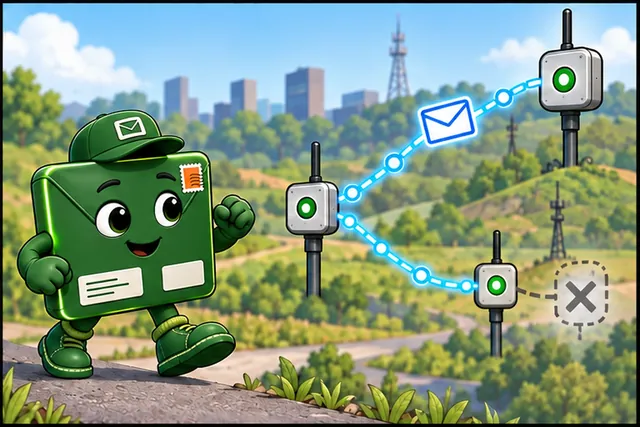
The Sensor Squad lives in a big school building with lots of rooms, and they need to send important messages to Principal Cloud, whose office is on the other side of the building. But here’s the tricky part - the hallways are like a maze, and there are many different ways to get there!

Sammy the Temperature Sensor has urgent news: “The science lab is getting too hot! We need to tell Principal Cloud right away!” But Sammy can’t run all the way to the principal’s office - sensors have to stay where they are. So Sammy hands the message to Relay Rita the Router, who lives in the hallway.

“Don’t worry, Sammy!” says Rita. “I know exactly who to pass this message to.” Rita looks at her special notebook called a routing table. It says: “Messages for Principal Cloud - give to Rocky Router in the next hallway.” Rita doesn’t know the whole path to the principal’s office, but she knows the next step - that’s how routing works!

Rocky Router receives the message and checks HIS notebook. “Ah, for Principal Cloud, I send messages to Rachel Router near the gym.” Rocky passes it along. Then Rachel checks HER notebook and sees she can deliver directly to Principal Cloud’s office! The message hops from router to router - each one only needs to know the next step, not the whole journey.

Meanwhile, Lux the Light Sensor in the art room also needs to send a message. But oh no! The hallway Rocky Router uses is blocked by a spilled bucket of paint! Rocky’s routing table has a backup plan: “If main path blocked, use the library route instead.” The message takes a different path but still arrives safely.

4.1.2 Key Words for Kids

Word What It Means
Router A helper device that passes messages along to the next stop on the way to the destination - like students passing notes!
Routing Table A router’s special notebook that says “messages for THIS place go THAT direction”
Hop One step in the journey - when a message moves from one router to the next router
TTL (Time-To-Live) A countdown number on each message that prevents it from traveling forever in circles

4.1.3 Try This at Home!

Play the Message Relay Game!

  1. Get 4-6 family members or friends to stand in different rooms or corners
  2. Each person is a “router” - give each router a piece of paper with simple rules like:
    • “If message is for Kitchen, pass to the person in the hallway”
    • “If message is for Bedroom, pass to the person in the living room”
  3. Write a message addressed to someone not right next to you
  4. Pass the message following only the rules - no direct delivery allowed!
  5. Count how many “hops” it takes to arrive

Deep Dives:

Architecture:

4.2 Prerequisites

Before diving into this chapter, you should be familiar with:

  • Networking Basics: Understanding fundamental networking concepts including IP addressing, packet switching, and the TCP/IP stack
  • Layered Network Models: Knowledge of the OSI and TCP/IP models helps you understand where routing operates (Network Layer)

4.3 Why Routing Matters for IoT

Time: ~10 min | Level: Intermediate

Routing enables IoT devices to communicate beyond local networks. Whether connecting sensors to cloud platforms or building multi-hop mesh networks, routing is fundamental. Understanding how packets find their way across complex networks is essential for designing reliable, scalable IoT systems.

Minimum Viable Understanding: Routing Fundamentals

Core Concept: Routing is hop-by-hop decision making - each router examines only the destination IP address, consults its routing table to find the best next hop, and forwards the packet one step closer to the destination without knowing the complete path.

Why It Matters: Your IoT sensor does not need to know how to reach the cloud - it only needs to know its default gateway. Routers handle path selection, failover when links break, and load balancing across multiple paths. This separation lets sensors stay simple while networks stay resilient.

Key Takeaway: For IoT deployments, use RPL (Routing Protocol for Low-Power and Lossy Networks) instead of enterprise protocols like OSPF - RPL uses 83% less energy, tolerates lossy wireless links, and fits in constrained device memory through its tree-based DODAG topology.

Misconception: “Routing protocols like OSPF route every single packet through the network.”

Reality: Routing protocols build routing tables. The actual packet forwarding uses these pre-computed tables.

The Misconception in Numbers:

If OSPF routed every packet individually:

Smart building with 100 sensors sending every 60 seconds:
- 100 sensors x 1,440 packets/day = 144,000 packets/day
- If OSPF runs SPF algorithm for each packet at 2ms:
- CPU time: 144,000 x 2ms = 288 seconds/day = 4.8 minutes/day just routing
- ESP32 gateway would waste significant CPU cycles on unnecessary computation!

The Reality:

Routing protocols work in two phases:

Phase 1: Control Plane (Routing Protocol)

  • Topology change detected: Link goes down
  • OSPF floods Link State Advertisements (LSAs): 50ms
  • All routers run Dijkstra SPF algorithm: 2ms
  • Routing tables updated: 10ms
  • Total: 62ms (happens only on topology change!)

Phase 2: Data Plane (Packet Forwarding)

  • Lookup destination IP in routing table: 5 microseconds
  • Find matching route: 10 microseconds
  • Forward out interface: 15 microseconds
  • Total: 30 microseconds per packet (~2,000x faster than SPF!)

Remember: Routing is the process (building tables). Forwarding is the action (moving packets using tables). Routing protocols enable forwarding, but don’t forward packets themselves!


4.4 What is Routing?

Think of routing exactly like GPS navigation for your car:

When you drive from home to a friend’s house across town, your GPS doesn’t give you one giant map showing every possible road in the world. Instead, it:

  1. Knows your current location (where you are now)
  2. Knows your destination (where you want to go)
  3. Gives you the next turn (“Turn right in 500 feet”)
  4. Recalculates if you miss a turn or if there’s traffic ahead

Routing works the SAME way for data packets:

GPS Navigation:

Your Car -> Turn right on Main St -> Go straight 2 blocks ->
Turn left on Oak Ave -> Destination reached

Packet Routing:

Your IoT Sensor -> Router 1 -> Router 2 -> Router 3 ->
Cloud Server (destination)

At each intersection (router), you only need to know:

  • Where you’re trying to go (destination IP address)
  • Which road to take next (next hop router)

You DON’T need to know:

  • Every single street in the entire city (complete network map)
  • Exactly how many turns until the end (total path)
  • What other cars are doing (other packets’ routes)

Key Insight: Hop-by-Hop Decisions

Just like GPS gives you ONE turn at a time, each router makes ONE decision at a time.

4.4.1 Definition

Routing is the process that implements packet switching.

Packet switching process showing routers examining destination IP and forwarding packets through network
Figure 4.1: Packet switching process showing routers examining destination IP and forwarding packets through network

How it works:

  1. Packet arrives at router
  2. Router examines destination IP address in packet header
  3. Router consults routing table to determine next hop
  4. Router forwards packet toward destination

Layer: Routing is a Network Layer (Internet Layer) process using IPv4 and IPv6 addresses.

4.4.2 Routing vs Forwarding

Term Definition Example
Routing Process of learning network paths and building routing tables Running OSPF protocol to exchange network information
Forwarding Process of moving packets from input to output interface Looking up destination IP and sending packet out correct port

Think of it like:

  • Routing = Learning all possible roads (building a map)
  • Forwarding = Using the map to choose the next turn

4.5 Routers: The Packet Directors

4.5.1 What is a Router?

Router architecture showing multiple network interfaces, routing table, and CPU for forwarding decisions
Figure 4.2: Router architecture showing multiple network interfaces, routing table, and CPU for forwarding decisions

This variant shows the same router concept using a real-world traffic intersection analogy to help beginners understand how routers direct packets.

Router as traffic intersection analogy where cars representing packets arrive, read signs representing routing table, and take the correct road representing interface
Figure 4.3: Router as Traffic Intersection - Cars (packets) arrive, read signs (routing table), and take the correct road (interface)

Key Insight: Just like road signs don’t physically move cars, routing tables don’t move packets - they just tell the CPU which interface to send them out.

Definition: A router is a specialized computing device with: - Multiple network interfaces (Ethernet, Wi-Fi, cellular) - Routing software (makes forwarding decisions) - Routing table (database of network paths)

Important: While routers are usually dedicated devices, any device with the necessary hardware and software can perform routing: - Linux servers - Raspberry Pi - IoT gateways - Even ESP32 (with limitations)

4.5.2 Router Operation at Network Layer

Network layer router operation showing receive packet, examine destination IP, lookup routing table, and forward out appropriate interface
Figure 4.4: Network layer router operation: receive packet, examine destination IP, lookup routing table, forward out appropriate interface

At the Network Layer, each packet is: 1. Received from one interface 2. Examined for destination IP address 3. Matched against routing table 4. Forwarded out appropriate interface

Each router makes independent forwarding decisions for each packet.


4.6 Router Forwarding Decisions

4.6.1 The Decision Process

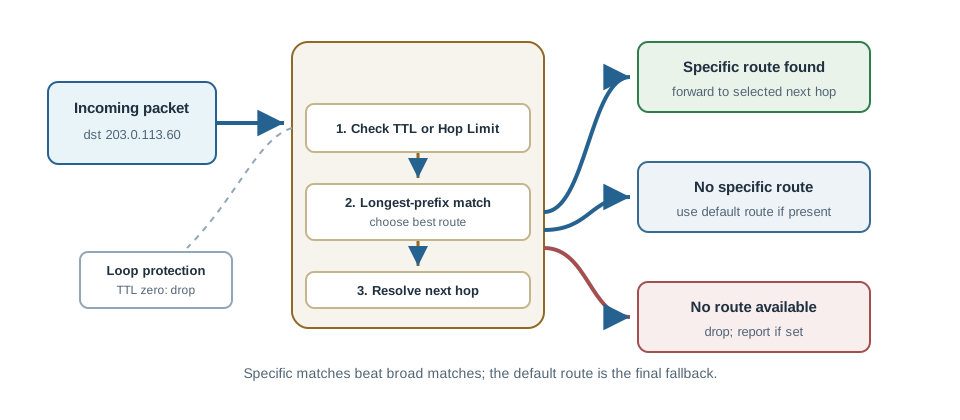
When a router receives a packet, it makes one of three decisions:

Router forwarding decision flowchart showing specific route lookup, default route fallback, or packet drop
Figure 4.5: Router forwarding decision process: specific route lookup, default route fallback, or packet drop

4.6.2 Decision Flowchart Details

1. Specific Route Match

  • Routing table contains route to destination network
  • Forward packet to specified “next hop” router
  • Use specified outbound interface

2. Default Route

  • No specific route found
  • Default route (0.0.0.0/0) is configured
  • Forward to default gateway
  • Hope next router has more specific route

3. Drop Packet

  • No specific route found
  • No default route configured
  • Drop packet (discard)
  • Optionally send ICMP “Destination Unreachable” error back to source

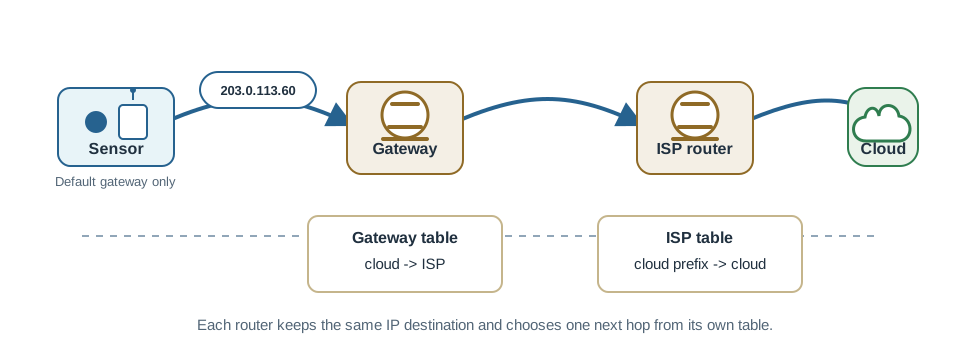
4.6.3 IoT Example: Smart Home Gateway

Smart home IoT gateway routing decisions showing local sensor traffic on LAN and cloud-bound traffic routed through ISP
Figure 4.6: Smart home IoT gateway routing decisions: local sensor traffic stays on LAN, cloud-bound traffic routes through ISP


4.7 Routing Protocol Categories for IoT

Not all routing protocols suit IoT networks. Understanding the categories helps you choose correctly.

Category Examples How It Works IoT Suitability
Distance Vector RIP, EIGRP Each router shares its distance table with neighbors Moderate – simple but slow convergence
Link State OSPF, IS-IS Each router floods complete link state info, all compute shortest path Poor – too much memory and CPU for constrained devices
Path Vector BGP Routers share full paths to prevent loops Poor – designed for internet backbone, not IoT
RPL (IoT-specific) RPL (RFC 6550) Builds DODAG tree rooted at gateway; optimized for lossy wireless Excellent – designed for constrained devices

Why enterprise routing protocols fail for IoT:

OSPF, the standard enterprise routing protocol, requires each router to store the complete network topology in memory. For a 500-node mesh network, this means ~200 KB of link-state database per node. An ESP32 with 320 KB total RAM cannot spare that much for routing alone.

RPL solves this by building a tree (DODAG) where each node only needs to know its parent and a small set of neighbors. Memory usage: ~2-5 KB per node regardless of network size.

Convergence time comparison (time to recover from a link failure):

Protocol 50-node network 500-node network Memory per node
OSPF 1-5 seconds 5-30 seconds 50-200 KB
RIP 30-180 seconds Minutes 10-50 KB
RPL 5-30 seconds 10-60 seconds 2-5 KB

RPL’s convergence time is acceptable because IoT traffic (sensor readings) tolerates brief interruptions, unlike voice or video traffic that demands sub-second failover.

Try It: Routing Protocol Resource Calculator

Adjust the network size to see how memory, convergence time, and energy consumption scale for different routing protocols.

Try It: TTL Hop Tracker

Set the initial TTL and number of router hops to see how the TTL decrements at each step.

For a network with \(N\) nodes, protocol overhead scales differently:

Link-state protocols (OSPF): \[\text{Memory} = O(N^2) \quad \text{(full topology map)}\] \[\text{Messages per change} = O(N) \quad \text{(flood to all nodes)}\]

Distance-vector (RIP, RPL): \[\text{Memory} = O(N) \quad \text{(routing table only)}\] \[\text{Messages per change} = O(k) \quad \text{(k = neighbor count)}\]

Convergence time after link failure: \[T_{\text{converge}} = T_{\text{detect}} + T_{\text{propagate}} + T_{\text{compute}}\]

A smart agriculture sensor (IP: 10.20.30.40) in field zone 3 sends soil moisture data to a cloud server (IP: 203.0.113.50). The packet travels through 3 routers. Trace the routing decisions at each hop.

Network Topology:

Sensor (10.20.30.40)
  ↓
Router A (Gateway for 10.20.30.0/24 network)
  - Interface 1: 10.20.30.1 (connects to sensors)
  - Interface 2: 10.20.0.1 (connects to Router B)
  ↓
Router B (Aggregation router)
  - Interface 1: 10.20.0.2 (connects to Router A)
  - Interface 2: 192.168.1.1 (connects to Router C)
  ↓
Router C (Border router)
  - Interface 1: 192.168.1.2 (connects to Router B)
  - Interface 2: 203.0.113.1 (connects to Internet)
  ↓
Internet → Cloud Server (203.0.113.50)

Router A’s Routing Table: | Destination Network | Next Hop | Interface | Route Type | |———————|———-|———–|————| | 10.20.30.0/24 | Directly connected | Interface 1 | Local | | 10.20.0.0/16 | Directly connected | Interface 2 | Local | | 0.0.0.0/0 (default) | 10.20.0.2 (Router B) | Interface 2 | Static |

Step 1: Router A receives packet

1. Extract destination IP from packet header: 203.0.113.50
2. Look for matching route in table:
   - 10.20.30.0/24? No (packet is 203.0.113.50)
   - 10.20.0.0/16? No
   - Default route 0.0.0.0/0? YES (matches anything)
3. Decision: Forward to next hop 10.20.0.2 via Interface 2
4. Update TTL: Decrement from 64 → 63

Router B’s Routing Table: | Destination Network | Next Hop | Interface | Route Type | |———————|———-|———–|————| | 10.20.0.0/16 | Directly connected | Interface 1 | Local | | 192.168.1.0/24 | Directly connected | Interface 2 | Local | | 0.0.0.0/0 (default) | 192.168.1.2 (Router C) | Interface 2 | Static |

Step 2: Router B receives packet

1. Destination: 203.0.113.50
2. No specific route, use default route
3. Decision: Forward to 192.168.1.2 (Router C) via Interface 2
4. Update TTL: 63 → 62

Router C’s Routing Table: | Destination Network | Next Hop | Interface | Route Type | |———————|———-|———–|————| | 192.168.1.0/24 | Directly connected | Interface 1 | Local | | 203.0.113.0/24 | Directly connected | Interface 2 | Local | | 0.0.0.0/0 (default) | 203.0.113.254 (ISP) | Interface 2 | Static |

Step 3: Router C receives packet

1. Destination: 203.0.113.50
2. Match: 203.0.113.0/24 is directly connected!
3. Decision: Forward directly to 203.0.113.50 via Interface 2 (no next hop needed)
4. Update TTL: 62 → 61
5. Packet delivered to cloud server

Key Insights:

  • Each router made independent decisions (no router knew the complete path)
  • Each router only knew the next hop (like GPS giving one turn at a time)
  • Default routes enabled routing to unknown destinations (most packets use default routes)
  • TTL decremented at each hop (original 64 → final 61 = 3 hops)

You’re deploying a 200-node wireless sensor network for environmental monitoring. Compare routing protocol options.

Criterion Static Routes RIP OSPF RPL (RFC 6550) Best For
Memory per Node 1-5 KB 10-50 KB 50-200 KB 2-5 KB Constrained devices (ESP32)
Convergence Time N/A (manual) 30-180 sec 1-5 sec 5-30 sec Recovery after failure
Energy per Day ~0 mAh 2-5 mAh 5-15 mAh 0.5-2 mAh Battery-powered sensors
Network Size <10 nodes <50 nodes <500 nodes 100-5000 nodes Large mesh networks
Mobility Support None Poor Poor Good (DODAG repair) Moving devices
Wireless Optimization No No No Yes (ETX, LQL metrics) Lossy wireless links

Decision Criteria:

Use Static Routes if:

  • Network has <10 nodes and topology never changes
  • Example: Home automation (5 sensors, 1 gateway, fixed locations)
  • Benefit: Zero protocol overhead, simplest to debug
  • Cost: Manual reconfiguration when devices fail

Use RIP if:

  • Legacy network with existing RIP infrastructure
  • Low complexity acceptable (distance-vector has slow convergence)
  • Example: Small office automation (20-30 devices)
  • Benefit: Simple to configure, widely supported
  • Cost: Slow convergence (30-180 sec), broadcasts waste battery

Use OSPF if:

  • You need enterprise-grade routing with fast failover
  • Devices have adequate memory (ESP32: 320KB RAM minimum)
  • Example: Industrial control (50-200 devices, wired Ethernet)
  • Benefit: Sub-second convergence, efficient flooding
  • Cost: High memory (200KB link-state DB), complex configuration

Use RPL if:

  • Battery-powered wireless mesh network
  • Constrained devices (ESP8266, nRF52, ARM Cortex-M0)
  • Example: Smart agriculture (200-2000 sensors, solar/battery powered)
  • Benefit: Designed for IoT (83% less energy than OSPF, tolerates lossy links)
  • Cost: Moderate convergence (10-30 sec), requires RPL-capable stack

Recommended: RPL for 99% of new IoT mesh deployments

  • Only protocol purpose-built for low-power lossy networks
  • Memory: 2-5 KB vs 50-200 KB for OSPF (40× reduction)
  • Energy: 0.5-2 mAh/day vs 5-15 mAh for OSPF (7× reduction)
  • Wireless-optimized metrics (ETX, LQL) vs hop-count only

4.8 How It Works: Router Packet Forwarding Step-by-Step

When a router receives a packet, it follows this precise sequence:

Step 1: Receive and Validate

1. Packet arrives on input interface (e.g., eth0)
2. Verify Layer 2 frame checksum (discard if corrupted)
3. Extract IP packet from Layer 2 frame
4. Verify IP header checksum (IPv4 only)

Step 2: Decrement and Check TTL/Hop Limit

1. Read TTL field from IP header
2. Decrement TTL by 1
3. If TTL == 0 after decrement: Drop packet, send ICMP Time Exceeded
4. If TTL > 0: Continue to Step 3

Step 3: Routing Table Lookup

1. Extract destination IP from packet header
2. Search routing table for longest prefix match:
   - Convert destination to binary
   - Compare against each route's network prefix
   - Select route with most matching bits
3. If no match found: Drop packet, send ICMP Destination Unreachable

Step 4: Determine Next Hop

1. If route is connected (next hop 0.0.0.0):
   - Destination is on local network
   - Use ARP to find MAC address of destination
   - Forward directly
2. If route has next hop IP:
   - Use ARP to find MAC address of next-hop router
   - Forward to next-hop router

Step 5: Forward Packet

1. Encapsulate IP packet in new Layer 2 frame
2. Set source MAC to outgoing interface MAC
3. Set destination MAC to next hop's MAC (from ARP)
4. Transmit frame out the specified interface

Example Trace:

Packet arrives: src=192.168.1.100, dst=8.8.8.8, TTL=64
→ Decrement TTL: 64 → 63
→ TTL check: 63 > 0 ✓ (continue forwarding)
→ Lookup 8.8.8.8: Match default route 0.0.0.0/0 via 192.168.1.1
→ ARP for 192.168.1.1: MAC = aa:bb:cc:dd:ee:ff
→ Forward out eth0 to aa:bb:cc:dd:ee:ff

4.9 Incremental Example: Building Understanding Layer by Layer

4.9.1 Level 1: Single Router, Two Networks

Simplest scenario: One router connecting two directly-attached networks.

Network A: 192.168.1.0/24 ←→ [Router] ←→ Network B: 10.0.0.0/24

Routing table: | Destination | Next Hop | Interface | |————|———-|———–| | 192.168.1.0/24 | 0.0.0.0 | eth0 | | 10.0.0.0/24 | 0.0.0.0 | eth1 |

What happens: Packet from 192.168.1.10 to 10.0.0.50 arrives on eth0, router looks up 10.0.0.50, matches 10.0.0.0/24, delivers directly via eth1.

Key insight: Connected routes need no next hop—router can deliver directly.


4.9.2 Level 2: Two Routers, Three Networks

Add complexity: Second router extends the network.

Network A ←→ [Router 1] ←→ Network B ←→ [Router 2] ←→ Network C
192.168.1.0/24    eth0/eth1     10.0.0.0/24      eth0/eth1    172.16.0.0/24

Router 1’s table: | Destination | Next Hop | Interface | |————|———-|———–| | 192.168.1.0/24 | 0.0.0.0 | eth0 | | 10.0.0.0/24 | 0.0.0.0 | eth1 | | 172.16.0.0/24 | 10.0.0.2 | eth1 |

What changes: To reach Network C, Router 1 can’t deliver directly. It forwards to Router 2 (10.0.0.2) as the next hop.

Key insight: Next hop is always on a directly-connected network.


4.9.3 Level 3: Three Routers, Multiple Paths

Add redundancy: Two possible paths to the destination.

        Network B
          10.0.0.0/24
            /  \
           /    \
 [Router 1]      [Router 2]
    |               |
Network A       Network C
192.168.1.0/24   172.16.0.0/24

Router 1’s table (with metrics): | Destination | Next Hop | Metric | Interface | |————|———-|——–|———–| | 192.168.1.0/24 | 0.0.0.0 | 0 | eth0 | | 10.0.0.0/24 | 0.0.0.0 | 0 | eth1 | | 172.16.0.0/24 | 10.0.0.2 | 10 | eth1 | | 172.16.0.0/24 | 10.0.0.5 | 20 | eth1 |

Decision: Router 1 selects route with metric=10 (lowest cost).

Key insight: When multiple routes exist, metric determines the best path.


4.9.4 Level 4: IoT Mesh with Default Route

Real-world IoT: Sensors need internet access via gateway.

Sensors ←→ Mesh Routers ←→ Gateway ←→ Internet
(many)     (10.20.x.x/24)  (10.20.0.1)  (8.8.8.8)

Sensor’s routing table: | Destination | Next Hop | Interface | |————|———-|———–| | 10.20.0.0/24 | 0.0.0.0 | wlan0 | | 0.0.0.0/0 | 10.20.0.1 | wlan0 |

What’s new: Default route (0.0.0.0/0) matches ANY destination not covered by specific routes. Sensor sends everything to gateway.

Key insight: Default routes enable internet connectivity without listing every possible destination.

4.10 Concept Check

Prerequisites:

  • IP Addressing → Understanding network prefixes and subnet masks
  • Network Layers → Knowing where routing operates (Layer 3)

Builds Toward:

  • Routing Tables → Detailed structure and route types
  • TTL → Loop prevention mechanism
  • RPL Protocol → IoT-specific routing implementation

Relates To:

  • Packet Switching → How packets move through networks
  • Network Topology → Star, mesh, tree impact routing complexity
  • ARP → MAC address resolution for next-hop delivery

Within This Module:

Related Modules:

Standards:

  • RFC 791: Internet Protocol (IPv4) specification
  • RFC 8200: Internet Protocol Version 6 specification (obsoletes RFC 2460)
  • RFC 1812: Requirements for IPv4 Routers

Scenario: You are configuring a home IoT gateway. Design the routing table for this topology:

Smart Home Devices (192.168.1.0/24) ←→ Gateway ←→ ISP Router (203.0.113.1)
                                         |
                                         ↓
                                   Cloud Server (8.8.8.8)

Your task:

  1. List the two routes the gateway needs
  2. For each route, specify: destination, next hop, interface
  3. Test: Where does a packet to 192.168.1.50 go? Where does 8.8.8.8 go?

Solution: | Destination | Next Hop | Interface | |————|———-|———–| | 192.168.1.0/24 | 0.0.0.0 | eth0 (connected) | | 0.0.0.0/0 | 203.0.113.1 | eth1 (default) |

Packet to 192.168.1.50: Matches 192.168.1.0/24, delivered directly via eth0. Packet to 8.8.8.8: No specific match, uses default route, forwards to 203.0.113.1 via eth1.

Common Pitfalls

Routing is the process of building routing tables; forwarding is the process of using them to move packets. They occur at different timescales — routing tables update in seconds to minutes; forwarding happens in microseconds.

Static routing works for small, stable topologies but requires manual update for every topology change. IoT networks with dozens of nodes that move or fail require dynamic routing protocols.

Forgetting to configure a default route on devices means packets to unknown destinations are dropped silently. Always verify default route configuration as part of any network setup.

4.11 Summary

  • Routing is the process of building tables that enable packet forwarding
  • Forwarding uses those tables to move packets from input to output interfaces
  • Routers examine destination IP addresses and make independent forwarding decisions
  • Each router knows only its next hop, not the complete path
  • Three possible decisions: specific route, default route, or drop
Previous: Routing Fundamentals Overview Next: TTL and Loop Prevention

4.12 What’s Next

If you want to… Read this
Learn how routing tables are built and used Routing Fundamentals
Understand how packets are switched across networks Packet Switching
See routing applied in IoT contexts Routing for IoT
Practice with routing lab exercises Routing Lab Fundamentals

Continue to TTL and Loop Prevention to understand how networks prevent packets from circulating forever when routing tables have errors.