35 RPL DODAG Construction and Routing Modes
Learning Objectives
By the end of this section, you will be able to:
- Trace the step-by-step DODAG construction process from root initialization to full convergence
- Differentiate RPL control messages (DIO, DIS, DAO, DAO-ACK) by purpose and direction
- Compare Storing mode vs Non-Storing mode routing behavior in RPL
- Analyze memory and performance trade-offs between modes for given network parameters
- Select the appropriate RPL mode for different deployment scenarios
For Beginners: RPL DODAG and Routing Modes
RPL supports different routing modes for different situations. Storing mode keeps routing tables at each device (like each postal worker memorizing local routes), while non-storing mode has only the root know all routes (like a central dispatch center directing every delivery). Each mode trades memory usage for efficiency.
Sensor Squad: Building the Tree and Choosing Modes!
“How does the DODAG tree actually get built?” asked Sammy the Sensor. “Does someone draw it on a whiteboard?”
“No, it builds itself!” said Max the Microcontroller. “The root starts by broadcasting a DIO message saying ‘I am the root, RANK zero!’ Nearby nodes hear it, calculate their RANK, and join. Then THEY broadcast DIO messages, and the next layer joins. It ripples outward like dominoes.”
“The cool part is choosing between Storing and Non-Storing mode,” explained Lila the LED. “In Storing mode, every node remembers routes to all devices below it – like every mailroom worker knowing every apartment in their wing. It is fast but uses lots of memory.”
“In Non-Storing mode, only the root keeps track of everyone,” added Bella the Battery. “When it needs to send a message, it writes the complete route into the packet header – like writing full driving directions on every envelope. It saves memory on tiny devices but puts more work on the root and makes packets bigger.”
35.1 Prerequisites
Before diving into this chapter, you should be familiar with:
- RPL Introduction and Core Concepts: Understanding DODAG topology, RANK mechanism, and why RPL is needed for IoT
- Routing Fundamentals: Knowledge of basic routing concepts and distance-vector protocols
Key Concepts
- Construction Algorithm: The step-by-step RPL DODAG construction: root starts with RANK=256 → broadcasts DIO → neighbors compute RANK → rebroadcast DIOs → DAOs flow upward.
- DIO Propagation Delay: The time for DIO messages to reach nodes N hops away; increases with network depth and Trickle interval size.
- DAO Registration Timeline: The time for full downward route registration in Storing Mode; proportional to network depth and DAO retransmission intervals.
- DODAG Convergence Indicator: Practical signals of DODAG convergence: stable RANK values, consistent DAO flow, and Trickle intervals at maximum size.
35.3 DODAG Construction Process
RPL builds the DODAG through control messages:
35.3.1 Step-by-Step DODAG Construction
35.3.2 Detailed Construction Steps
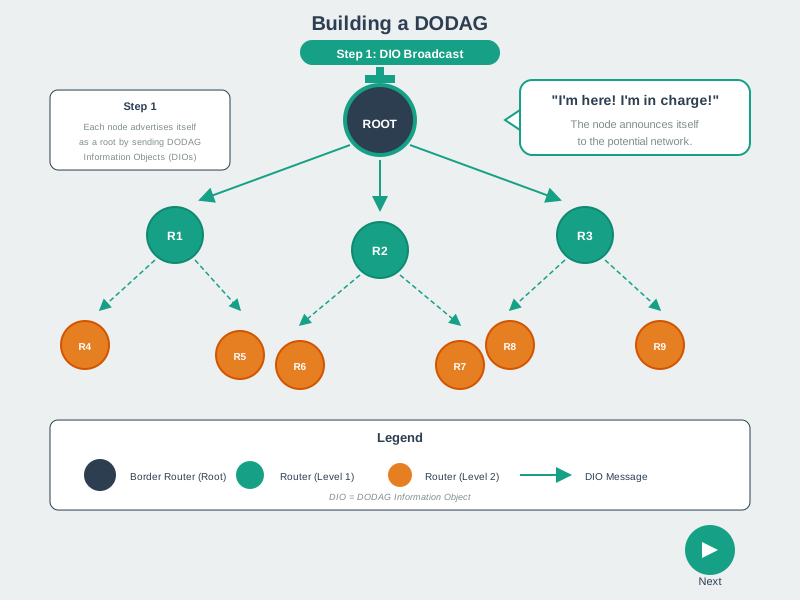
Step 1: Root Initiates DODAG
Root node (border router/gateway): 1. Creates DODAG: Assigns unique DODAG ID 2. Sets RANK = 0: Root has minimum RANK 3. Broadcasts DIO: Sends DODAG Information Object (multicast)
DIO Contents:
- DODAG ID (IPv6 address)
- RANK (0 for root)
- Objective function (routing metric)
- DODAG configuration (timers, etc.)
Step 2: Nodes Receive DIO and Join
Node receives DIO:
- Decision: Join this DODAG or wait for others?
- Compare DODAG rank, objective function
- May receive DIOs from multiple DODAGs
- Calculate RANK: RANK = parent_RANK + increase
- Select parent: Choose sender of DIO (if acceptable)
- Update state: Store DODAG ID, parent, RANK
Multiple DIO Sources:
- Node may hear DIOs from multiple neighbors
- Chooses best parent (lowest RANK, best link quality)
- May maintain backup parents (loop-free)
35.4 Step 3: Nodes Propagate DIO
After joining DODAG:
- Node becomes part of DODAG
- Sends own DIO: Advertises DODAG to neighbors
- DIO contents: Own RANK, DODAG ID, etc.
- Trickle timer: Controls DIO frequency (adaptive)
Trickle Algorithm:
- Stable network: Send DIOs infrequently (minutes)
- Network changes: Send DIOs frequently (seconds)
- Reduces overhead while maintaining responsiveness
Step 4: Build Upward Routes
Upward routes (towards root) established automatically: - Each node knows its parent (from DIO selection) - Default route: Send to parent (towards root) - No routing table needed for upward routes (just parent pointer)
Example:
Node 3 -> Node 1 -> Root
(N3 knows parent is N1, N1 knows parent is Root)
Step 5: Build Downward Routes (Storing Mode)
Downward routes (from root to nodes) require DAO messages:
- Node sends DAO to parent:
- “I am reachable via you”
- Includes node’s address and prefixes
- Parent updates routing table:
- “Node X is reachable via this child”
- Parent propagates DAO towards root:
- Aggregates reachability information
- Root knows all nodes:
- Complete routing table for downward routes
DAO-ACK (optional): - Parent confirms DAO receipt - Reliability for critical networks
35.5 RPL Routing Modes
RPL supports two modes with different memory/performance trade-offs:
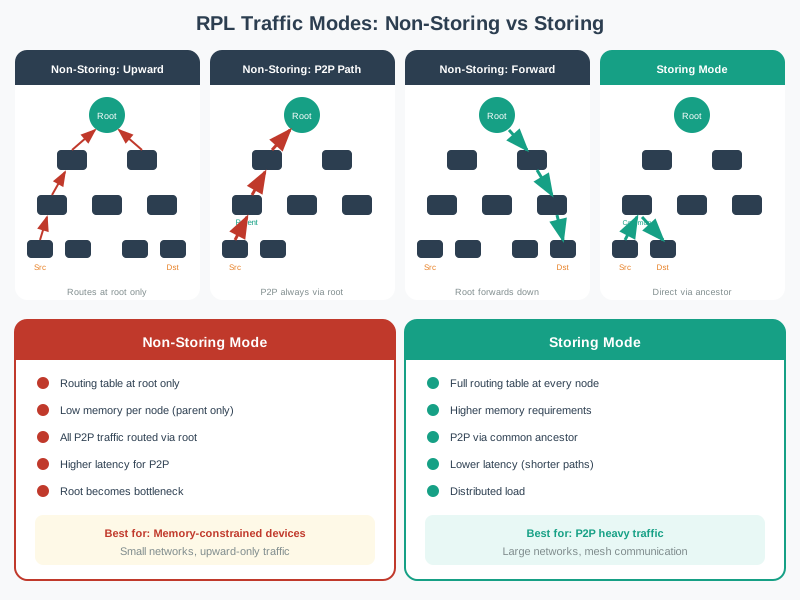
35.5.1 Storing Mode
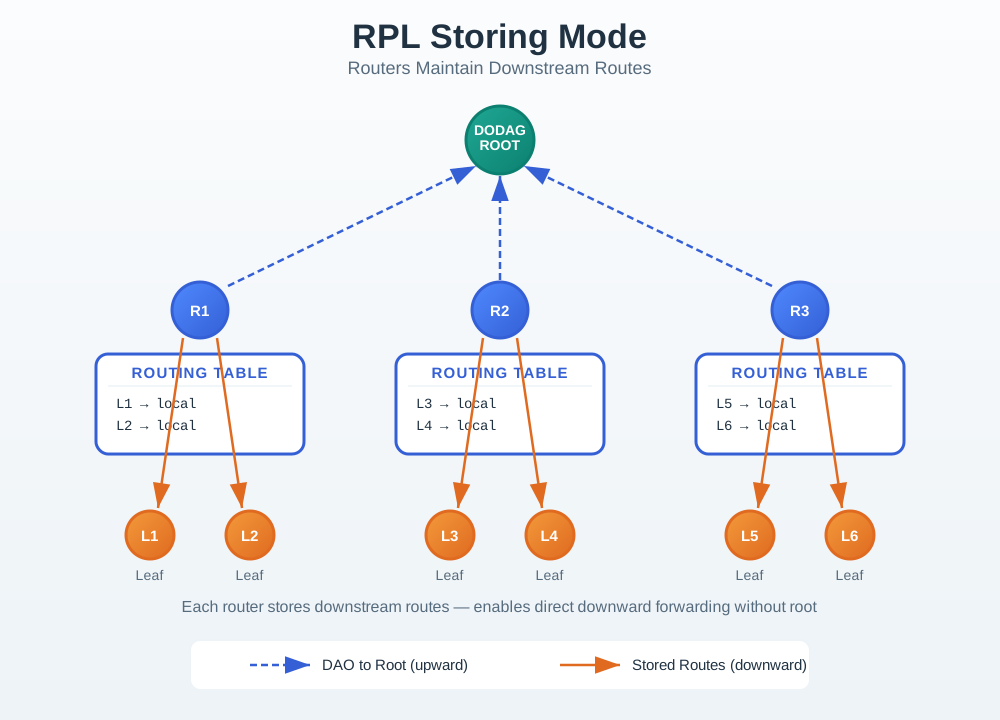
Each node maintains routing table for its sub-DODAG.
 How It Works:
- DAO messages: Nodes advertise reachability to parents
- Routing tables: Each node stores routes to descendants
- Packet forwarding: Node looks up destination in table, forwards to appropriate child
Example Route (E to F):
Step 1: E sends packet to parent B (upward)
Step 2: B checks routing table: "F is my child"
Step 3: B forwards directly to F (downward)

Route: E -> B -> F (optimal)Advantages:
- Efficient routing: Optimal paths (no detour through root)
- Low latency: Direct routes between any nodes
- Root not bottleneck: Distributed routing decisions
Disadvantages:
- Memory overhead: Each node stores routing table
- Scalability: Routing tables grow with network size
- Updates: DAO messages for every node change
Best For:
- Devices with sufficient memory (32+ KB RAM)
- Networks requiring low latency
- Point-to-point communication common
35.5.2 Non-Storing Mode
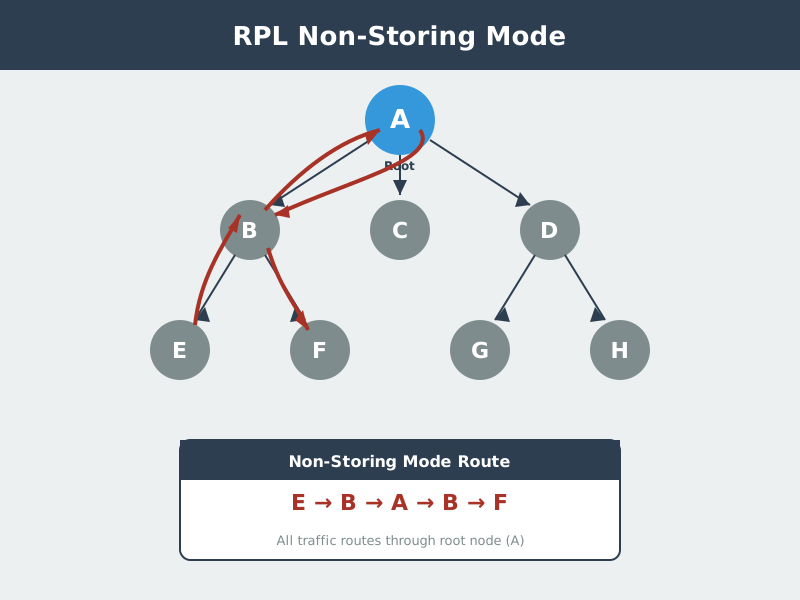
Only root maintains routing information; exploits source routing.
 How It Works:
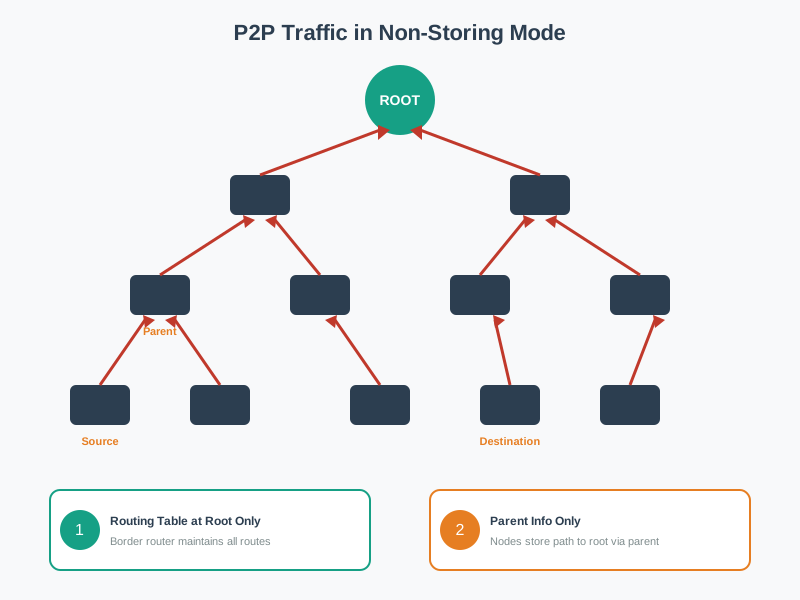
- DAO to root: All nodes send DAO directly to root (upward)
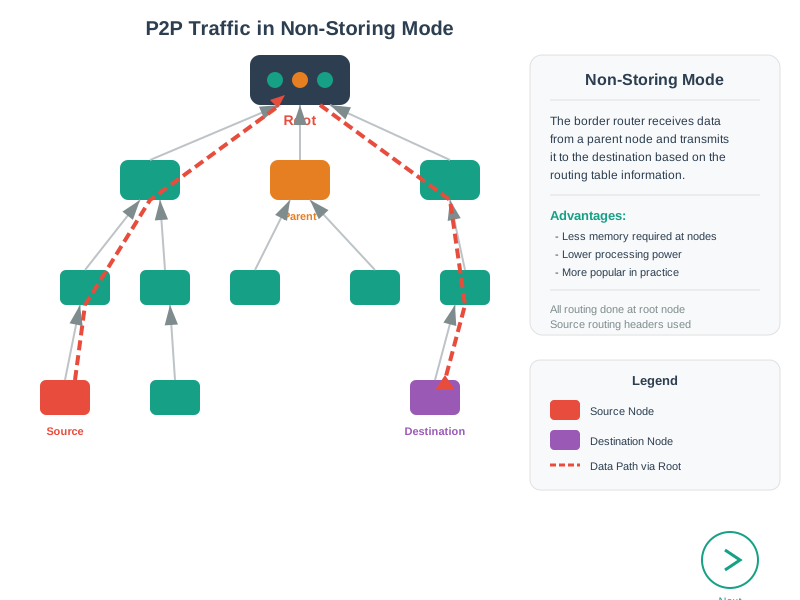
- Root stores all routes: Only root has complete routing table
- Source routing: Root inserts complete path in packet header
- Nodes forward: Follow instructions in packet header (no table lookup)
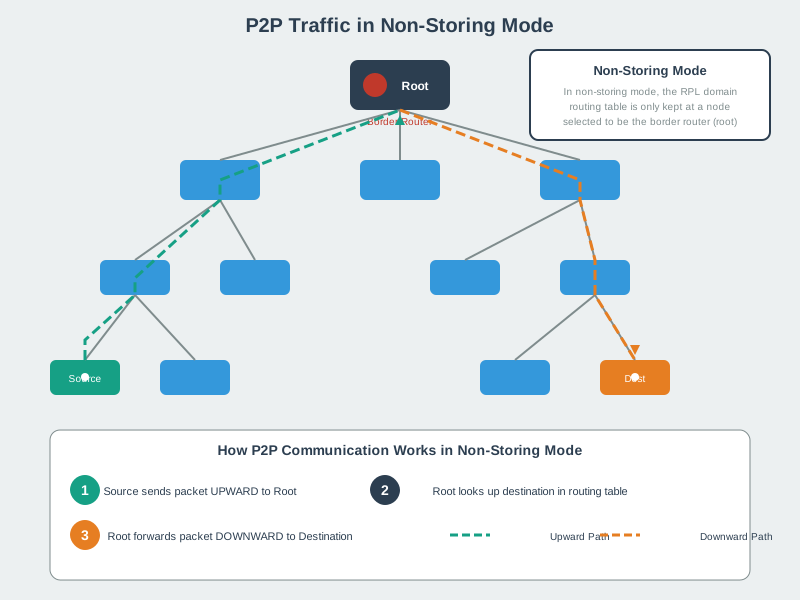
Example Route (E to F):
Step 1: E sends packet to parent B (upward, default route)
Step 2: B forwards to parent A (root) (upward, default route)
Step 3: A (root) checks routing table: "F via B"
Step 4: A inserts source route: [B, F]
Step 5: A sends to B with route in header
Step 6: B forwards to F following route

Route: E -> B -> A -> B -> F (via root)Advantages:
- Low memory: Nodes don’t store routing tables (just parent)
- Simple nodes: Minimal routing logic
- Scalability: Network size doesn’t affect node memory
Disadvantages:
- Suboptimal routes: All point-to-point traffic via root
- Higher latency: Extra hops through root
- Root bottleneck: All routing decisions at root
- Header overhead: Source route in every packet
Best For:
- Resource-constrained devices (< 16 KB RAM)
- Primarily many-to-one traffic (sensors to gateway)
- Point-to-point communication rare
- Large networks (many nodes)
35.5.3 Storing vs Non-Storing Comparison
| Aspect | Storing Mode | Non-Storing Mode |
|---|---|---|
| Routing Table | Distributed (all nodes) | Centralized (root only) |
| Node Memory | Higher (routing table) | Lower (parent pointer only) |
| Route Optimality | Optimal (direct paths) | Suboptimal (via root) |
| Latency | Lower | Higher (extra hops) |
| Root Load | Low | High (all routing decisions) |
| Scalability | Limited by node memory | Limited by root capacity |
| DAO Destination | Parent | Root (through parents) |
| Header Overhead | Low | High (source routing) |
| Best For | Powerful nodes, low latency | Constrained nodes, many-to-one |
Putting Numbers to It
Quantifying Packet Overhead: Storing vs Non-Storing Mode
Consider point-to-point traffic in a 6-hop deep network (node E at layer 5 to node F at layer 5).
Storing mode packet overhead: \(\text{IPv6 header} = 40\text{ bytes}\) \(\text{UDP header} = 8\text{ bytes}\) \(\text{Total overhead} = 48\text{ bytes}\)
Non-Storing mode packet overhead (source routing via root): \(\text{IPv6 header} = 40\text{ bytes}\) \(\text{Routing Header Type 3 (RH3)} = 8\text{ bytes base} + n \times 16\text{ bytes}\)
For a downward path with \(n\) intermediate hops after the root (e.g., ROOT→B→C→E, so \(n = 2\) intermediate addresses in the RH3 header): \(\text{RH3 size} = 8 + 2 \times 16 = 40\text{ bytes}\) \(\text{Total overhead} = 40 + 40 + 8 = 88\text{ bytes}\)
For a deeper 5-hop downward path (\(n = 4\) intermediate hops): \(\text{RH3 size} = 8 + 4 \times 16 = 72\text{ bytes}\) \(\text{Total overhead} = 40 + 72 + 8 = 120\text{ bytes}\)
Overhead comparison (5-hop downward path vs Storing mode): \(\text{Additional overhead (Non-Storing)} = 120 - 48 = 72\text{ bytes}\) \(\text{Percentage increase} = \frac{72}{48} = \mathbf{150\%}\) more overhead
For a 50-byte sensor reading: Storing mode packet = 98 bytes, Non-Storing = 170 bytes. However, for typical many-to-one traffic (sensor→gateway), upward routing needs NO source routing header in either mode—only downward and P2P traffic pays this penalty.
Alternative View: RPL Mode Selection Decision Tree
This variant provides a practical decision guide for choosing between Storing and Non-Storing modes based on your network characteristics.
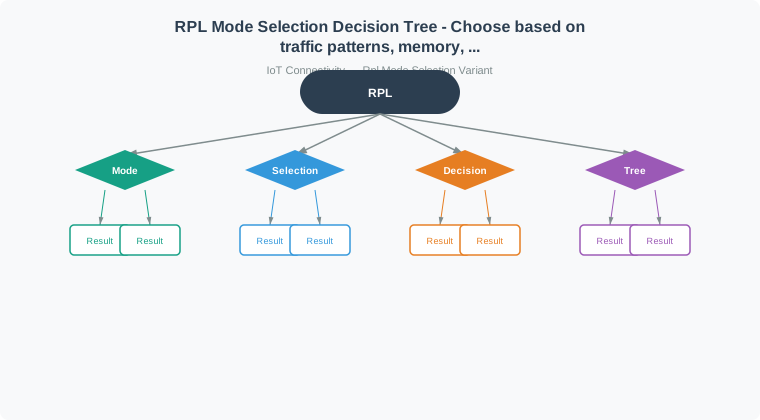
Key Insight: Non-Storing mode is the default choice for resource-constrained sensor networks. Only move to Storing mode when you have both the memory budget AND specific P2P or latency requirements.
Academic Reference: P2P Traffic Routing Sequence
The following sequence diagrams illustrate how RPL handles point-to-point (P2P) traffic in Non-Storing and Storing modes.
Non-Storing Mode P2P Traffic (Steps 1-3):
Storing Mode P2P Traffic:
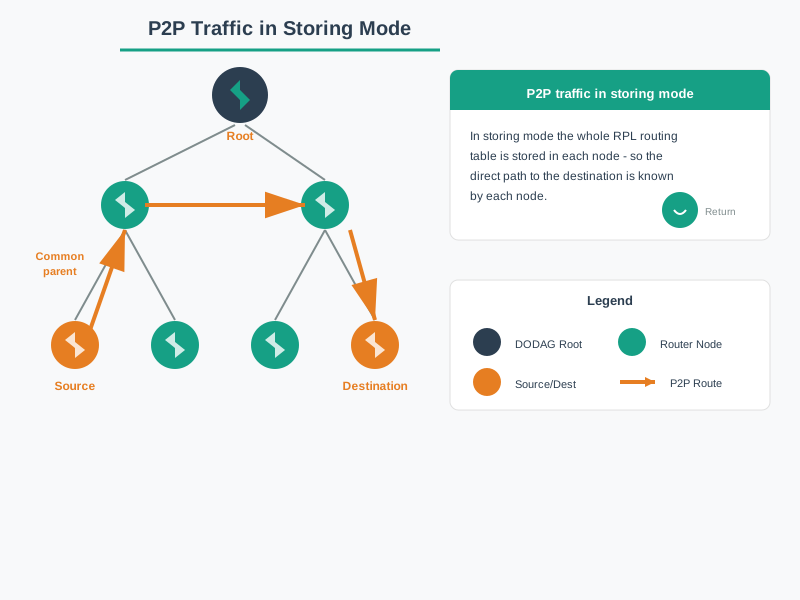
Key Insight: Non-Storing mode requires all P2P traffic to traverse the root (3 diagrams showing upward then downward path), while Storing mode enables direct routing through the nearest common ancestor (1 diagram showing optimized path). This explains why Storing mode has lower latency for P2P traffic despite higher memory requirements.
Source: CP IoT System Design Guide, Chapter 4 - Routing
35.6 Worked Example: Mode Selection for a 200-Node Smart Building
Scenario: A facilities management company is deploying 200 environmental sensors across a 12-floor office building. Each floor has a mix of temperature, humidity, and occupancy sensors. Two 6LoWPAN border routers (DODAG roots) on floors 6 and 12 provide internet connectivity. The network topology creates a maximum depth of 6 hops. The question: Storing mode or Non-Storing mode?
Step 1: Calculate memory requirements for Storing mode
Each routing entry in a Storing mode node requires approximately 20 bytes (destination prefix, next-hop address, lifetime, path sequence). A node at hop 1 (directly connected to the root) must store routing entries for all descendants reachable through it.
With 200 sensors across 2 roots, each root serves approximately 100 nodes. A hop-1 relay node with the largest sub-DODAG might have 30 descendants (one wing of a floor serves as a relay for 3 floors above it):
Routing table memory per hop-1 node:
  30 descendants x 20 bytes/entry = 600 bytes

Typical sensor node RAM budget:
  Total RAM (e.g., CC2538): 32 KB = 32,768 bytes
  Operating system (Contiki-NG): ~18 KB
  Application code + buffers:   ~8 KB
  Available for routing table:  ~6 KB

600 bytes << 6,144 bytes available -> Storing mode FITS
Step 2: Estimate Non-Storing mode header overhead
In Non-Storing mode, the root inserts a source routing header listing every hop. For a 6-hop path, that header contains 6 IPv6 addresses (16 bytes each, though compressed to approximately 2-8 bytes each via 6LoWPAN header compression):
Source routing header per packet:
  6 hops x ~4 bytes (compressed) = 24 bytes additional per packet

Typical sensor payload: 32 bytes (temp + humidity + occupancy + timestamp)
Total with source routing: 32 + 24 = 56 bytes
Overhead increase: 75%

With 802.15.4 MTU of 127 bytes, usable payload after MAC/6LoWPAN headers
is approximately 80 bytes. The 24-byte source route header consumes 30%
of available payload space.
Step 3: Evaluate traffic patterns
This building has two traffic types:
| Traffic Type | Pattern | Percentage | Mode Preference |
|---|---|---|---|
| Sensor readings to cloud | Many-to-one (upward) | 90% | Either mode (upward routing is free) |
| HVAC control commands | One-to-many (downward) | 8% | Storing (avoids root bottleneck) |
| Inter-sensor queries | Point-to-point | 2% | Storing (direct path vs via root) |
Since 90% of traffic flows upward (sensor data to cloud), the routing mode choice primarily affects only the remaining 10% of traffic.
Step 4: Decision
| Factor | Storing Mode | Non-Storing Mode | Winner |
|---|---|---|---|
| Memory (hop-1 nodes) | 600 bytes (3.7% of budget) | 0 bytes | Non-Storing (but Storing fits) |
| Packet overhead | None | +24 bytes/packet (75%) | Storing |
| HVAC command latency | 2-3 hops direct | 6-12 hops via root | Storing |
| Root load | Distributed | All downward routing | Storing |
| Complexity | Higher (table maintenance) | Simpler nodes | Non-Storing |
Recommendation: Storing mode. The CC2538 has ample memory (600 bytes out of 6 KB available), and the 8% downward HVAC traffic benefits significantly from direct routing. The clinching factor is HVAC latency: a thermostat adjustment command in Non-Storing mode must travel up to the root and back down (up to 12 hops), while Storing mode delivers it in 2-3 hops. For comfort control, the 50-100 ms latency difference matters when occupants are waiting for temperature adjustments.
When Non-Storing would win: If the same building used ultra-constrained sensors with only 2 KB RAM (such as the Texas Instruments CC2650 in low-power mode), the routing table would consume 30% of total RAM, risking memory fragmentation and crashes under network churn. In that case, Non-Storing mode with its zero per-node memory cost would be the safer choice, accepting higher downward latency as a trade-off.
35.6.1 Interactive: Storing Mode Memory Calculator
Use this calculator to estimate routing table memory requirements for your deployment and decide whether Storing mode fits your device’s RAM budget.
35.7 How It Works
DODAG Construction Step-by-Step Implementation:
- Root Broadcasts DIO (T=0ms): Border router sends ICMPv6 packet with DODAG ID, RANK=0, Objective Function
- Nodes Calculate RANK (T=10-50ms): Each node receiving DIO computes RANK = parent_RANK + metric_increase
- Parent Selection (T=50-100ms): Nodes choose parent with lowest RANK (or best metric if multiple candidates)
- DIO Propagation (T=100-200ms): Newly joined nodes forward DIOs to their neighbors
- DAO Messages (T=200-500ms, Storing mode only): Nodes send upward DAO to advertise reachability
- Convergence (T=30-60s): Trickle timer backs off, network stabilizes
Example Timeline (50-node smart home):
T=0s:     Root sends first DIO (RANK 0)
T=0.01s:  5 hop-1 nodes join (RANK 256)
T=0.02s:  12 hop-2 nodes join (RANK 512)
T=0.05s:  20 hop-3 nodes join (RANK 768)
T=0.10s:  13 hop-4 nodes join (RANK 1024)
T=0.50s:  DAO messages propagate upward
T=30s:    Trickle timer reaches steady state
35.8 Concept Check
35.9 Incremental Examples
Example 1: Minimal 3-Node DODAG
Start with the simplest possible DODAG to understand the core mechanics:
Network: 1 Border Router (BR) + 2 Sensors (A, B)

Step 1 - Root Initialization:
  BR: RANK = 0, broadcast DIO

Step 2 - Nodes Join:
  A receives DIO from BR:
    - Calculate RANK: 0 + 256 = 256
    - Select parent: BR
    - Store: parent=BR, RANK=256

  B receives DIO from BR:
    - Calculate RANK: 0 + 256 = 256
    - Select parent: BR
    - Store: parent=BR, RANK=256

Result: Two independent paths A→BR and B→BR
Example 2: Add Multi-Hop Path
Extend to show hierarchical RANK calculation:
Network: BR + A + B + C (C can only reach A, not BR)

Step 1 - BR and A join (same as Example 1):
  BR: RANK = 0
  A:  RANK = 256, parent = BR

Step 2 - C hears A's DIO:
  C receives DIO from A:
    - Calculate RANK: 256 + 256 = 512
    - Select parent: A
    - Send DIO with RANK=512

Result: Path C→A→BR (2 hops)
Example 3: Parent Selection with Multiple Candidates
Show how Objective Function affects parent choice:
Network: BR + A + B + C
Topology: C can hear both A (RANK 256) and B (RANK 256)

Link Quality:
  C↔A: ETX = 1.2 (good link, 17% loss)
  C↔B: ETX = 2.0 (poor link, 50% loss)

OF0 (Hop Count):
  C selects A or B arbitrarily (both RANK 256)
  C RANK = 256 + 256 = 512

MRHOF (ETX):
  Path via A: RANK 256 + (256 × 1.2) = 563
  Path via B: RANK 256 + (256 × 2.0) = 768
  C selects A (lower cost)
  C RANK = 563

Key Insight: MRHOF automatically routes around poor-quality links35.10 Concept Relationships
DODAG construction and mode selection connect to these RPL topics:
- RPL Introduction introduces the DODAG and RANK concepts that construction implements
- RPL Trickle and Modes details the Trickle timer controlling DIO frequency during construction
- RPL Specification defines the control message formats (DIO, DAO) used in construction
- RPL Core Concepts explains how RANK is calculated from parent metrics and objective functions
- Network Topologies shows how DODAG (tree) compares to star and mesh alternatives
35.11 See Also
Related Chapters:
- RPL Traffic Patterns and Design - Apply mode selection to real deployments
- RPL Production Framework - Production-ready construction patterns
- RPL Labs - Hands-on DODAG design exercises
Implementation References:
- Contiki-NG RPL - Open-source DODAG construction
- RIOT OS RPL - Alternative implementation
- RFC 6550 Section 8 - DODAG construction specification
Tools:
- Cooja Simulator - Visualize DODAG formation
- Wireshark RPL Filter - Capture DIO/DAO messages
- RPL Visual Simulator - Interactive DODAG builder
Common Pitfalls
1. Not Monitoring DODAG Construction Progress
DODAG construction occurs asynchronously — there’s no explicit ‘construction complete’ event. Monitor for converged indicators (stable RANKs, full DAO registration) rather than assuming construction completes after a fixed timeout.
2. Simultaneous Large-Scale Device Powering
Powering hundreds of devices simultaneously causes a DIO storm as all devices simultaneously send DIS and join the DODAG. Stage device power-up in batches to spread DODAG construction load.
35.12 What’s Next
| If you want to… | Read this |
|---|---|
| Understand RPL message flow in detail | RPL DODAG Message Flow |
| Study visual DODAG guide | RPL DODAG Visual Guide |
| Work through construction examples | RPL DODAG Worked Example |
| Apply construction in production context | RPL Production |