15 MCU vs MPU Selection for IoT
More
Depth: Practitioner
Progress saves as you read. Mark sections complete as you go; your progress appears in the sidebar.
15.1 Choose the Pump Monitor Hardware
This section: Choose the Pump Monitor Hardware — Imagine a remote pump monitor must sample all day but only send a rich report after a fault.
Imagine a remote pump monitor must sample all day but only send a rich report after a fault. The team must choose a small control chip, a larger processor, or both. A microcontroller is a small computer chip built to run a focused control job.
The pump monitor must keep sampling and hold a safe state even when its link is absent. A microcontroller suits bounded sensing and control; a larger processor may be needed for files, media, or a rich local service. Test the actual workload and power states before selecting either or both.
15.1.1 Check the Workload and Safe State
- What must run continuously when the pump is unattended?
- Does the fault report need a rich local application or only compact data?
- How much memory, wake time, and energy does the measured workload use?
- Who controls the safe state and software updates in a split design?
Write down the workload, worst operating state, measured wake and power behaviour, memory headroom, interfaces, and update route. In a two-chip design, assign one clear owner for the pump’s safe behaviour.
15.1.2 When More Processing Adds Cost
A faster processor can add power and maintenance costs without improving a bounded sensing and control job. If the device mainly wakes, samples, decides, reports, and sleeps, a full runtime may introduce boot, storage, update, and security duties that the workload does not require. Compare these duties with measured timing, memory use, and energy states before choosing the larger hardware class.
Additional processing becomes relevant when the role needs large buffers, files, rich local services, or heavier diagnostics. In a split design, the controller can retain responsibility for sensing and safe outputs while the processor handles heavier work. The Practitioner review keeps these measured roles, lifecycle needs, and conditions for reconsidering the choice together.
15.1.3 Before Approving the Hardware
Test the pump monitor’s sampling and local fault response with the network unavailable. Check that it retains the required safe behavior and records the event, then test report generation after the fault. These checks distinguish continuous control responsibilities from work that can wait for communication or a richer runtime.
In a two-chip design, assign clear authority for the safe output and test the controller’s action while the processor is still booting or unavailable. Measure wake time, power behavior, and memory headroom on the actual workload. Keep interface, update, recovery, and service evidence with the chosen and rejected hardware classes. Record the requirement changes that would reopen the decision, such as larger diagnostic buffers or a local dashboard.
15.2 Start With the Device Job
This section: Start With the Device Job — The MCU-versus-MPU decision starts with the job the device must do every day.
The MCU-versus-MPU decision starts with the job the device must do every day. A tiny controller may need predictable sensing, low power, and simple control. A processor-based device may need rich networking, storage, graphics, Linux services, or local analytics.
Choose the device computer by the work it must prove every day.
-
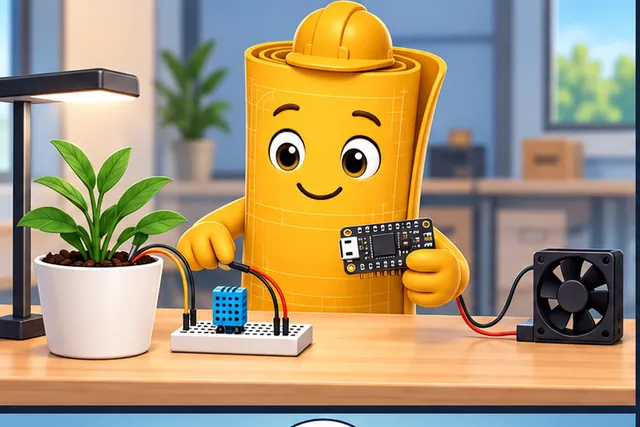
A small controller can handle steady sensing and simple control.
-
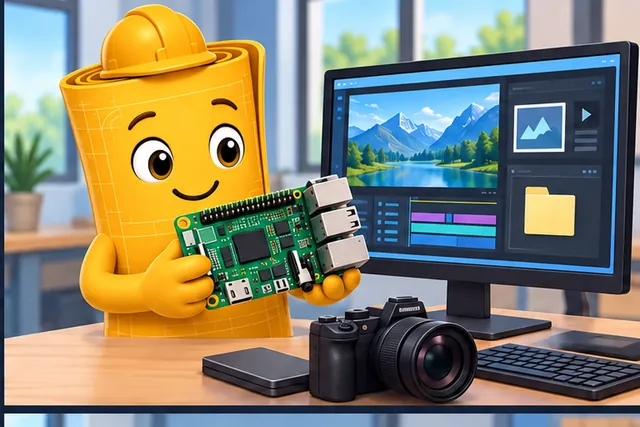
A richer processor may be needed for files, graphics, or heavy local work.
-
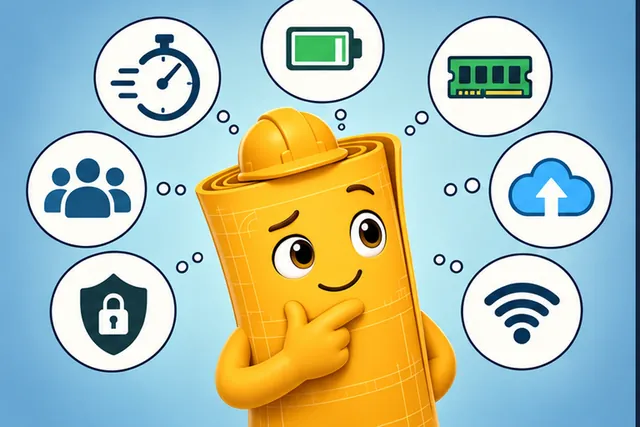
Compare timing, power, memory, updates, links, security, and support.
-
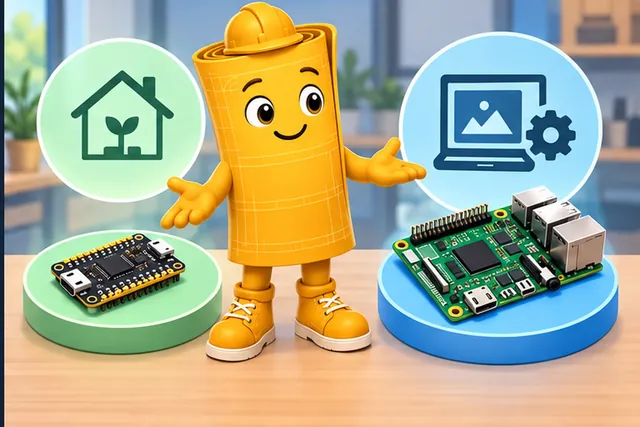
Choose the compute class that fits the daily job with less burden.
Start with the job, not the part number. The architecture should show why the chosen compute class fits timing, power, memory, update, security, interface, and support evidence for the deployment.
15.3 Overview
This section: Overview — The MCU versus MPU decision is one of the first hardware boundaries in an IoT architecture.
The MCU versus MPU decision is one of the first hardware boundaries in an IoT architecture. A microcontroller unit usually integrates compute, memory, timers, interfaces, and sometimes radio blocks into a small embedded platform. A microprocessor unit usually provides stronger general compute but relies on external memory, storage, power management, and a richer operating-system environment.
This chapter turns that distinction into a selection method. It avoids platform-specific shopping lists and instead asks what the device must prove: workload shape, memory pressure, wake behavior, interface needs, update path, service records, and lifecycle margin.
Instruction-set family is one part of that proof, not a shortcut around it. Many controller-class IoT devices use reduced-instruction-set families such as ARM Cortex-M, MIPS, or RISC-V because the smaller control logic can fit low-cost, low-power embedded designs. Processor-class devices may use richer application processors, including CISC-style x86 families, when the system needs an operating system, large memory, local services, or developer tooling that justifies the extra power, heat, board support, and update burden. The review question is therefore practical: does the selected core finish the required sensing, control, cryptography, communication, and recovery work inside the device energy, thermal, memory, and service envelope?
15.4 Learning Objectives
This section: Learning Objectives
By the end of this chapter, you should be able to:
- distinguish controller-class and processor-class hardware by proof, not brand or board familiarity;
- decide when a full operating system is a requirement rather than a convenience;
- connect memory, boot, sleep, interface, and update behavior to hardware class;
- identify hybrid designs where a controller wakes or supervises a processor;
- write a selection record that explains why one hardware class was chosen and what review condition would restart the decision.
15.5 Selection Route
This section: Selection Route — Start from the device role.
Start from the device role. If the role is bounded sensing, local control, state retention, and compact reporting, controller-class hardware is usually the first candidate. If the role includes a rich application runtime, large media buffers, local files, a web service, containerized software, or complex user-facing applications, processor-class hardware is usually justified.
Make the selection route premise visible in the diagram Figure 15.1: MCU versus MPU selection route from device role through operating-system need, workload shape, memory and storage pressure, energy states, interface proof, lifecycle support, and final selection record. Begin by distinguishing Device Role from Memory.
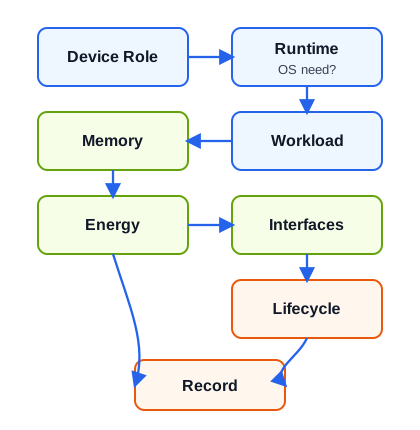
The route in Figure 15.1 starts with what the device must do. A bounded sensing and control role may fit controller firmware, while files, media, or local services can require a richer operating system. Workload and memory checks ask what runs at once and how much state must be held; energy checks ask when the device wakes and how it stays safe without a link. Interfaces and lifecycle then cover sensors, outputs, debug access, update, and support. The record closes with the chosen and rejected class plus tests that could change the answer. This sequence keeps board familiarity from replacing evidence about the product role.
Use this route in selection checks:
- Define the device role and the physical failure it must handle.
- Decide whether a full operating system is required by the workload.
- Check memory, storage, boot, update, and security-state needs.
- Check energy states, wake sources, and safe behavior during outages.
- Map every sensor, actuator, radio, debug port, and service interface.
- Record the chosen class, rejected class, assumptions, and validation tests.
15.6 Class Fit
This section: Class Fit — The choice is clearest when the proof is arranged by hardware class.
The choice is clearest when the proof is arranged by hardware class.
15.6.1 Controller-Class Fit
Use this class for bounded tasks: sample, filter, compare, control, encrypt a compact message, store small state, and sleep or wait for an event. The program usually runs as firmware with a small scheduler or a simple event loop.
15.6.2 Processor-Class Fit
Use this class for rich local applications: full networking services, file systems, camera pipelines, local databases, complex user interfaces, large libraries, or high-memory analytics. The platform usually runs a full operating system.
15.6.3 Hybrid Fit
Use both classes when an always-ready controller supervises sensors, safety, or wake behavior while a processor runs only for heavy bursts such as media processing, local analytics, or configuration services.
Treat hybrid fit as a system decision around Controller Class. The visual in Figure 15.2 places full runtime, files, rich apps within this relationship: Hardware class fit map comparing controller-class, processor-class, and hybrid choices against workload, operating-system need, memory pressure, energy states, and lifecycle proof.
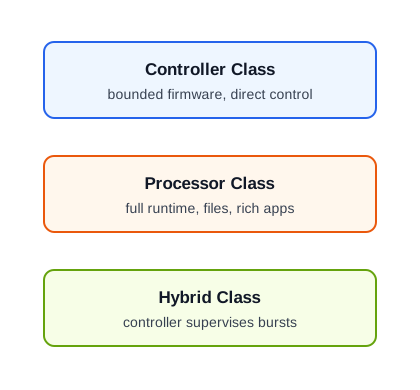
The class-fit map in Figure 15.2 links structure to operating duty. The controller side shows a compact wake, sample, validate, decide, report, and sleep loop with direct I/O ownership. The processor side adds a full runtime, files, services, and larger memory or storage needs, along with boot, update, and power costs. A hybrid keeps a controller ready for sensing or safe output while a processor wakes for heavier work. The small-memory note is a historical prompt, not a current cutoff. Measure timing, memory, power, interfaces, and lifecycle behavior on the chosen target before treating any class label as the selection proof.
15.7 Operating-System Boundary
This section: Operating-System Boundary — The operating-system question is a boundary question, not a preference question.
The operating-system question is a boundary question, not a preference question. A full operating system can simplify networking, files, drivers, application frameworks, and development workflow. It also adds boot time, storage health, update complexity, background services, security maintenance, and larger energy states.
Choose processor-class hardware by tracing the responsibilities that require a rich runtime. Start with a full network service stack containing several long-running services, then account for local files, large logs, media, or removable-storage management. Camera, audio, display, browser, and rich user-interface pipelines add another strong processor signal, as do application frameworks or libraries that cannot fit in embedded firmware. Multiple users, permissions, package management, shell-level diagnostics, large memory buffers, and complex local models complete the case because they all depend on resources and lifecycle services beyond a compact controller image.
Choose controller-class hardware when the same device can instead be followed through a bounded cycle: wake, sample, validate, decide, report, and sleep. In that design, deterministic local control owns its interfaces directly, state and logs remain compact, and updates use fixed images. Event-driven behaviour benefits from fast wake and a small retention burden, while the controller retains a safe output state even when the network is absent. Those properties describe an operational boundary, not merely a smaller bill of materials.
15.7.1 Make the Footprint Decision Explicit
A useful historical rule of thumb is that a single-loop application using less than roughly 16 KiB of RAM and flash may not need an operating system. Treat that number as a prompt, not a modern hardware law. A 14 KiB program can still need concurrency, isolation, or a certified scheduler; a 40 KiB program can still be safer and simpler as a bare-metal state machine. Decide from simultaneous responsibilities and evidence.
Start with separate flash and RAM budgets. For an RTOS-based image,
while the worst-case live RAM is approximately
The sums expose why “the kernel is only 8 KiB” is not a sizing argument. A TCP/TLS session, radio driver, filesystem cache, update manifest, and four task stacks may dominate the kernel. Add headroom for worst-case nesting and update mode, then measure stack high-water marks and heap peaks on the real workload. If two firmware slots are required for rollback, count both in nonvolatile storage even though only one executes.
Use the single-loop test next. If every responsibility can be expressed as bounded state transitions—sample, decide, report, sleep—with known interrupt latency and no blocking operation, bare metal may be the clearer boundary. If independent deadlines, protocol timers, privilege separation, dynamic services, or several blocking drivers must coexist, a scheduler or OS can reduce application complexity. It does not remove the need to bound priorities, stacks, queues, and failure behavior.
| OS selection question | What to verify |
|---|---|
| Footprint | kernel plus selected modules, task stacks, network/crypto buffers, update state, and measured peak headroom |
| Energy and timing | boot time, tick/tickless behavior, idle state, interrupt latency, context-switch cost, and worst-case deadline |
| Secure communication | maintained TLS/DTLS or equivalent, credential storage boundary, entropy source, and protocol-update path |
| Secure boot and code protection | immutable root, signature verification, rollback policy, debug lock, memory protection, and recovery path |
| Modularity and portability | hardware abstraction boundary, removable drivers/services, board-support ownership, and reproducible configuration |
| Support lifetime | security-fix policy, stable release line, vendor/community ownership, dependency inventory, and end-of-support date |
| Domain assurance | the exact standard edition, target assurance level, evidence plan, tool qualification needs, and certification authority |
Standards names are not interchangeable badges. DO-178B is a historical avionics software-assurance baseline, with DO-178C used for newer programmes. IEC 61508 defines functional-safety lifecycle obligations and Safety Integrity Levels; a project must derive its required SIL and evidence rather than claim “SIL 3/4 support” from an OS feature list. IEC 62304 governs medical-device software lifecycle processes. Transport and nuclear projects have their own sector standards and authorities, even when IEC 61508 concepts inform the risk argument. The hardware, OS configuration, application, development process, and verification evidence together form the assurance case.
The chapter needs visual evidence for operating-system boundary. Figure 15.3 provides it: The operating-system boundary: controller firmware with no OS, a processor operating-system runtime, and hybrid supervision between them. Examine MCU vs MPU: Operating-System Boundary together with network services + files.
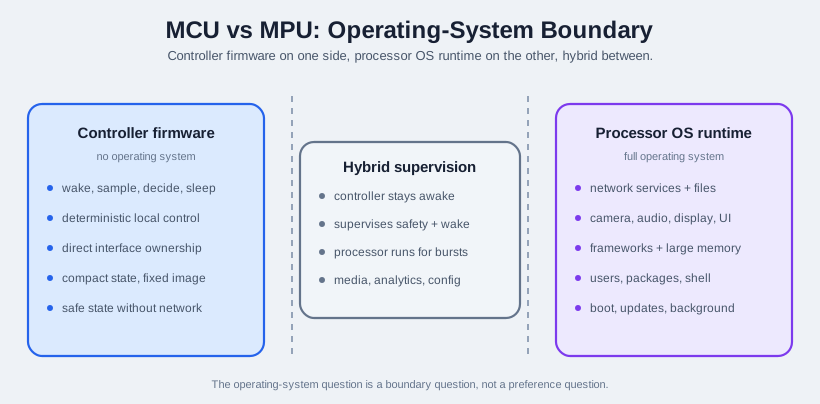
Keep MCU vs MPU: Operating-System Boundary, network services + files, and media, analytics, config separate while reading Figure 15.3. The diagram makes MCU vs MPU: Operating-System Boundary a visible operating-system boundary cue; its network services + files relationship advances the claim: The operating-system boundary: controller firmware with no OS, a processor operating-system runtime, and hybrid supervision between them.
15.8 Hardware Class Proof Checklist
This section: Hardware Class Proof Checklist — Do not approve a hardware class until each proof group has an answer.
Do not approve a hardware class until each proof group has an answer.
15.8.1 Workload
What runs locally? Include sampling, control, filtering, encryption, buffering, user interface, media, analytics, and diagnostic behavior.
15.8.2 Memory
What must fit at the same time? Include firmware image, update slot, buffers, stack, heap, protocol state, logs, model data, and temporary files.
15.8.3 Energy
Which states exist? Include boot, active work, idle wait, sleep or retention, fault recovery, service mode, and update mode.
15.8.4 Interfaces
Which physical signals must be owned? Include buses, voltage domains, interrupts, wake pins, debug access, storage, displays, radios, and protection.
15.8.5 Lifecycle
How will the device be updated, diagnosed, recovered, secured, repaired, and retired? Include update rollback and service access.
15.8.6 Review Condition
What proof would force a new review? Examples include new media processing, larger local models, stricter wake behavior, or field-service limits.
The practical risk in review condition needs a diagram. Figure 15.4 summarizes it: MCU versus MPU proof checklist with workload, memory, energy, interfaces, lifecycle, and review-condition proof feeding the selection decision. Look at Select Class beside Energy.
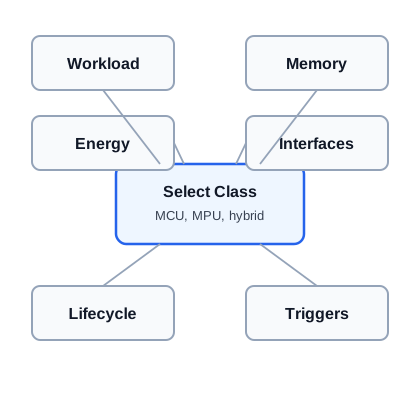
For review condition, the diagram Figure 15.4 uses Select Class as the entry and Energy as a later checkpoint. Finish at Triggers. The full reading conveys: MCU versus MPU proof checklist with workload, memory, energy, interfaces, lifecycle, and review-condition proof feeding the selection decision.
15.9 Platform Fit Decision Addendum
This section: Platform Fit Decision Addendum — Fold prototype hardware proof into the same MCU-versus-MPU decision record.
Fold prototype hardware proof into the same MCU-versus-MPU decision record. A convenient board is only a candidate when it can meet the workload, power, interface, update, and lifecycle requirements with proof.
| Decision area | Proof to keep with the selection |
|---|---|
| Workload fit | Sensing, control, gateway, user interface, media, files, local analytics, diagnostics, and field-service behavior. |
| Power path | Measured sleep, wake, sensor warm-up, processing, radio transfer, storage write, recovery, and environmental margin. |
| Interface and expansion | Pin map, buses, interrupts, analog channels, voltage levels, isolation, antenna clearance, test pads, and reserved growth margin. |
| Prototype to production | Exploration-board proof, pilot assembly proof, production-candidate tests, manufacturing programming, and service process. |
| Lifecycle | Availability, update rollback, repair path, replacement plan, retirement rule, and the next review condition. |
Use this addendum to challenge premature platform choices. A low-power controller or wireless module fits bounded sensing and battery-sensitive work; a processor-class board is justified when the device role needs rich local services, files, media, large memory, or a full operating-system runtime.
15.10 Hybrid Boundary
This section: Hybrid Boundary — Some systems need both.
Some systems need both. A controller can remain responsible for wake, safety, sensing, and low-state behavior while a processor is powered for heavier work. This boundary is useful only when the responsibilities are explicit.
Good hybrid boundaries include:
- controller watches a sensor and wakes a processor only for a complex event;
- controller owns a safety output while the processor handles user interface or analytics;
- controller stores a small fault record if the processor is unavailable;
- processor handles media, files, or local applications after the controller confirms the event is worth the energy and time;
- both sides have a defined update and recovery path.
Poor hybrid boundaries include:
- both sides trying to control the same actuator without an authority rule;
- the processor being required for a safety decision that must work during boot;
- the controller acting only as a decorative addition with no real supervisory role;
- unclear logs, timekeeping, or ownership when the processor restarts.
The split in Figure 15.5 gives sensing to the MCU and bursts to the MPU; check output ownership.
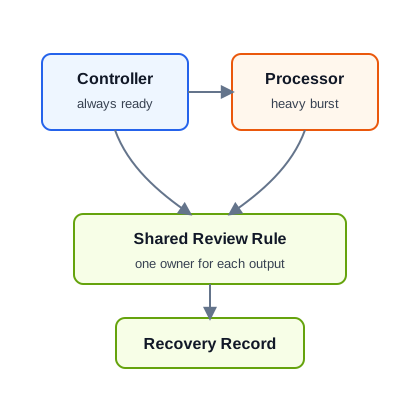
Interrogate Controller first, then find heavy burst in Figure 15.5. Apply the heavy burst review question before Recovery Record. Those answers support hybrid boundary; the figure states: Hybrid controller and processor boundary showing always-ready sensing, wake decision, heavy burst processing, safe output ownership, and shared decision proof.
15.11 Walkthrough: Remote Pump Monitor
This section: Walkthrough: Remote Pump Monitor — A facilities team needs a remote pump monitor.
A facilities team needs a remote pump monitor. The device reads vibration and temperature, detects abnormal conditions, stores a short event history, drives a local alarm output, and reports status to a gateway. The device may lose network connectivity and must keep local alarm behavior working.
15.11.1 Controller Fit Proof
Sampling is bounded, the decision rules are small, wake and safe output behavior matter, and local state is compact. The controller can own sensor reading, alarm output, event record, and retry behavior.
15.11.2 Processor Fit Proof
A processor would be justified only if the monitor adds local waveform analysis with large buffers, a rich local dashboard, a file-heavy diagnostic workflow, or local applications that require a full operating system.
15.11.3 Hybrid Fit Proof
A hybrid design may fit if the controller must always watch the pump while a processor occasionally performs deeper diagnostics after a confirmed abnormal event.
The initial selection is controller-class hardware. The decision should still reserve memory and interface margin for update, calibration, sensor replacement, service logs, and future diagnostic changes. If later requirements add local media, large model inference, or a web dashboard hosted on the device, the selection record should start a new review.
15.12 Selection Record
This section: Selection Record — The record should explain the decision in a way that another engineer can challenge.
The record should explain the decision in a way that another engineer can challenge.
The record in Figure 15.6 links the chosen class to the device role and the evidence that supports it. For the pump monitor below, controller hardware fits a bounded sensing loop, direct alarm output, fast wake, and safe action when the gateway is absent. The rejected processor class would add a full runtime and storage duties the current role does not require. Validation still has to test memory margin, interfaces, update behavior, service logs, and network-outage safety on the real target. The reopen field matters because local media, a large model, or a hosted dashboard would change the role and justify a new class review.
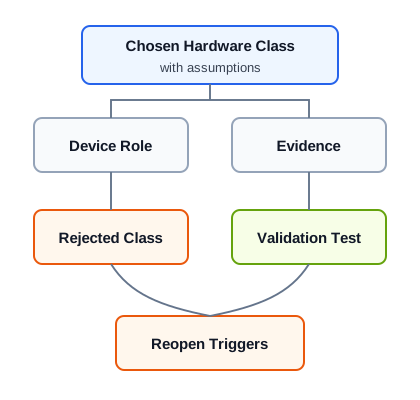
Begin the diagram Figure 15.6 with Chosen Hardware Class. Continue through Evidence before checking Reopen Triggers. This path preserves the chapter’s selection record argument: MCU versus MPU selection record linking device role, chosen class, proof groups, rejected class, validation tests, and review conditions.
Device role: Remote pump monitor with local alarm and gateway reporting.
Selected class: Controller-class hardware.
Proof: bounded sensing workload, compact state, direct sensor and alarm interfaces, fast wake, safe behavior during network outage, embedded update path, and service log requirements.
Rejected class: processor-class hardware, because the device does not need a full operating-system runtime, large files, media processing, or rich local applications.
Review condition: local dashboard, large waveform buffers, local model inference, camera/audio input, or storage-heavy diagnostics.
15.13 Common Pitfalls
This section: Common Pitfalls
Convenient scripting and familiar tools are useful during prototypes, but production hardware still has to satisfy wake, memory, update, service, and environmental proof. Keep development convenience separate from device-role requirements.
If the device mostly waits, wakes, samples, decides, reports, and sleeps, a processor-class runtime may add boot, storage, update, and energy burdens without improving the device role.
If the workload needs large memory, files, media, rich user interface, or full application services, forcing it into firmware can create fragile buffers, difficult updates, and missing diagnostic tools.
Hybrid designs fail when both sides can command the same output, store competing logs, or recover independently without a shared state rule. Assign authority before implementation.
15.14 Knowledge Check
This section: Knowledge Check
15.15 See Also
This section: See Also — Follow these chapters according to the constraint that decided—or still blocks—the compute class.
Follow these chapters according to the constraint that decided—or still blocks—the compute class. Use the series overview for the full proof route, power and interfaces for state and signal behavior, SoC architecture for integrated block ownership, workflow for build and release evidence, and selection-energy for the wider deployment trade-off. Carry the same device role and failure requirements into each comparison so a new board feature does not silently change the question.
- Hardware and Device Characteristics — series-level proof route for device hardware decisions.
- Power Management and Device Interfaces — deeper checks of wake states, GPIO, ADC, PWM, and physical interfaces.
- SoC Architecture — how integrated compute, memory, radio, and power blocks affect device behavior.
- Development Tools and Workflow — how firmware, debug, test, and release proof support the selected hardware class.
- Technology Selection and Energy Management — broader energy and communication trade-off decisions.
15.16 Overview: Start From Device Role
This section: Overview: Start From Device Role — If you only need the selection shortcut, this layer is enough: choose controller-class hardware when the device role is bounded, fast to wake, small in memory, and safe without a rich operating system.
If you only need the selection shortcut, this layer is enough: choose controller-class hardware when the device role is bounded, fast to wake, small in memory, and safe without a rich operating system. Choose processor-class hardware when the workload truly needs files, large memory, local services, media, or a full operating-system runtime.
For a pump monitor, controller-class does not mean weak hardware. An ARM Cortex-M, ESP32, nRF52840, or STM32-class design can sample vibration and temperature, hold calibration constants, drive a relay or alarm output, sign or encrypt a compact gateway message, and enter a low-power state without bringing up Linux. The proof is that every required state is bounded: wake on timer or interrupt, read sensors, filter enough data for the local rule, update a short event record, report status when the gateway is present, and keep the alarm behavior alive when it is not.
Processor-class hardware is justified when the device role changes. A Raspberry Pi Compute Module, i.MX, or similar Linux-capable platform may fit when local files, USB cameras, audio pipelines, dashboards, containerized services, Python packages, or large diagnostic buffers are product requirements rather than developer conveniences. That choice brings new work: boot sequencing, storage wear, package updates, permissions, secure remote access, and background services. The review condition is the point where those obligations become necessary for the product, not merely attractive during prototyping.
Do not apply overview: start from device role until its premise is visible near Controller Class in Figure 15.2: Keep the class-fit map inside the depth review so controller, processor, and hybrid choices remain tied to device role rather than board familiarity. Inspect the span to full runtime, files, rich apps.
In the depth review, Figure 15.2 is a workload check rather than a board ranking. A controller can own the pump monitor’s wake, sample, local alarm, compact record, and sleep cycle without a full operating system. A processor becomes relevant when files, camera or audio work, large buffers, rich services, or shell diagnostics become product needs. A hybrid can leave the controller in charge of safe local behavior and wake a processor for heavy bursts. These choices move boot, storage, update, security, and power duties as well as compute capacity. The next review should measure those duties on target hardware and record what changed.
Controller-class sign
The device can wake, sample, decide, report, keep compact state, and sleep with direct ownership of local outputs.
Processor-class sign
The device needs rich network services, file systems, media pipelines, large libraries, local applications, or shell-level diagnostics.
Hybrid sign
An always-ready controller owns sensing or safety while a processor wakes only for heavy bursts such as analytics or configuration.
15.17 Practitioner: Keep The Proof Record
This section: Practitioner: Keep The Proof Record — For the remote pump monitor, the selected hardware class should be explained by concrete device behavior.
For the remote pump monitor, the selected hardware class should be explained by concrete device behavior. The record should show why a controller can own vibration sampling, temperature checks, local alarm output, event history, gateway reports, and network-outage behavior. Include the bench trace or field log that proves the worst expected pump cycle, not only the nominal sample.
Build the record from measurements and ownership decisions. Name the sensor rates, expected event duration, alarm deadline, gateway message size, diagnostic command set, and maximum offline interval. Then size flash and RAM for the firmware image, a rollback or recovery image if used, protocol buffers, stack and heap, calibration values, event records, and any future fault snapshots. If the class-fit argument depends on FreeRTOS, Zephyr, bare-metal firmware, DMA, hardware timers, watchdogs, or nonvolatile memory, name that dependency in the record so it can be tested rather than assumed.
Do the same for the rejected class. If Linux-capable hardware was rejected, say why: no local file service, no camera or audio stream, no browser dashboard, no package-managed application, and no large model or waveform buffer in the current product role. If hybrid hardware was rejected, state which single controller owns the alarm output, time base, event record, and recovery path. That makes the decision reviewable when a later team adds a richer dashboard, a vibration spectrum file, or a technician-facing USB workflow. Keep debugger, manufacturing-programming, field-replacement, compiler, bootloader, and board-revision assumptions with the same record.
Memory margin
Include firmware image, update slot, buffers, stack, heap, logs, calibration data, and future diagnostic space.
Boot and safety
Show how quickly the device reaches a safe output state and what still works when the gateway or network is absent.
Interface ownership
Map sensors, alarm outputs, wake pins, radios, debug pads, storage, voltage domains, and update access to the responsible class.
15.18 Under the Hood: Why The Boundary Moves
This section: Under the Hood: Why The Boundary Moves — The correct class can change when the device role changes.
The correct class can change when the device role changes. A controller design may stop fitting when local diagnostics become storage-heavy, when a camera or audio pipeline appears, or when field service needs a rich on-device interface.
The boundary usually moves because one hidden resource stops being small. A short event counter can live in internal flash or FRAM; a rolling vibration waveform may need external flash, a file system, and careful wear management. A simple Modbus or MQTT status message can fit firmware; a local HTTPS dashboard brings TLS certificate storage, user sessions, logging, and update rules. A deterministic alarm output can be owned by an interrupt and watchdog; a Linux process may need a supervisor, boot-time safe state, and a separate controller if the output must work before the OS is ready.
- Memory pressure: larger protocol stacks, update slots, logs, models, or waveform buffers can exhaust controller resources.
- Runtime pressure: web services, local databases, user accounts, and package-managed software point toward processor-class hardware.
- Energy pressure: a processor can simplify software but add boot, idle, storage, and background-service costs.
- Ownership pressure: hybrid systems need one authority for safety outputs, logs, timekeeping, and recovery.
That is why the review should include failure states, not only the happy path. Check what happens during brownout, interrupted update, gateway outage, full log storage, watchdog reset, and technician access. For controller-class hardware, prove the firmware can preserve state and return to safe behavior. For processor-class hardware, prove boot time, service ordering, storage health, and remote update recovery. For hybrid hardware, prove which side owns the alarm, which side writes logs, how time is synchronized, and how each side behaves when the other side resets. Also check whether recovery can be tested without opening the enclosure or replacing storage.
15.19 Summary
This section: Summary — MCU versus MPU selection depends on workload, timing, memory, power, operating-system needs, security, update strategy, and lifecycle support.
MCU versus MPU selection depends on workload, timing, memory, power, operating-system needs, security, update strategy, and lifecycle support. A strong decision explains why the selected compute class fits the device role and what proof must be checked before scale.
15.20 Key Takeaway
This section: Key Takeaway — MCU and MPU selection should be justified by timing, power, memory, OS needs, security, updates, and lifecycle proof rather than compute labels alone.
MCU and MPU selection should be justified by timing, power, memory, OS needs, security, updates, and lifecycle proof rather than compute labels alone.
15.21 What’s Next
This section: What’s Next — Continue with Power Management and Device Interfaces to check the energy states and physical interfaces that often decide whether a controller, processor, or hybrid design is actually viable.
Continue with Power Management and Device Interfaces to check the energy states and physical interfaces that often decide whether a controller, processor, or hybrid design is actually viable.
Find help
3 reviewed answers.
Where should I start in a module?
Open the module page from the sidebar to see its chapters in order. Use the module map to return to a topic you need.
Modules and pathsReviewed
What can I try when a project does not work?
Check the symptom, then work through the diagnostic steps. Keep the error message and the smallest example that reproduces it.
When you are stuckReviewed
How do interactive examples work?
Use the interactive guide to check how examples and simulations work before changing your project.
Interactive examples guideReviewed