2 Reference Models as Responsibility Maps
More
Depth: Practitioner
Progress saves as you read. Mark sections complete as you go; your progress appears in the sidebar.
2.1 Begin With One Reading and One Owner
This section: Begin With One Reading and One Owner — Firmware is the code that runs on a device.
Firmware is the code that runs on a device. A gateway is a node that joins one network to another. Picture a heat sensor that reports a high value. The device reads it. A link carries it. A nearby box may clean it. A store keeps it. An app shows it. A person may then act. The first task is to name who owns each step and each handoff.
Trace one real reading from the room to the final work choice. Add the return path if a command can change the room. At each boundary, record the input, output, owner, proof, and safe failure. Then try one break. Lose the link, change the data shape, or delay the work order. Check which layer sees the fault and who must recover it.
A shared map can stop teams from talking past each other. Yet a neat stack can hide that one box does several jobs or that one duty spans many boxes. The map is a guide, not the deployed system. For a reference-model mapping, write the owner and flow record; check logical layers, physical placement, boundary faults, and reopen triggers before accepting the result.
2.2 Start With One Sensor Reading
This section: Start With One Sensor Reading — Picture one temperature reading leaving a freezer sensor.
Picture one temperature reading leaving a freezer sensor. It is sampled by hardware, encoded by firmware, carried by a network, filtered by a gateway, stored by a service, shown in a dashboard, and finally used by a person who must decide whether food is safe.
Follow one freezer reading through every handoff before a person acts.
-
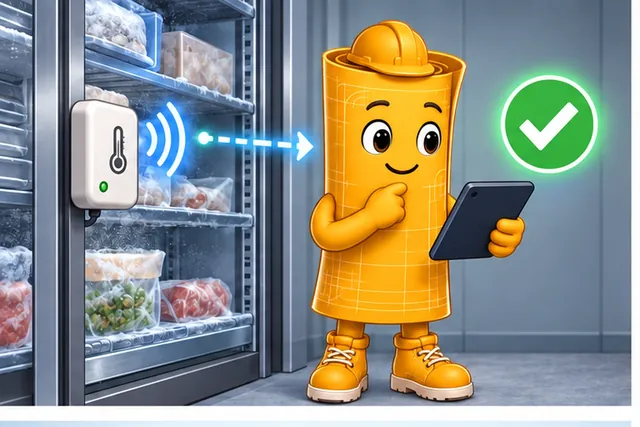
One freezer reading travels from sensor hardware to a food-safety decision.
-
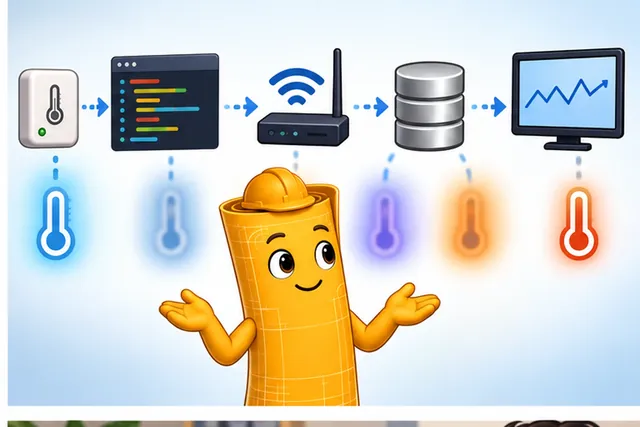
Its meaning can blur across code, network, bridge, store, and screen.
-
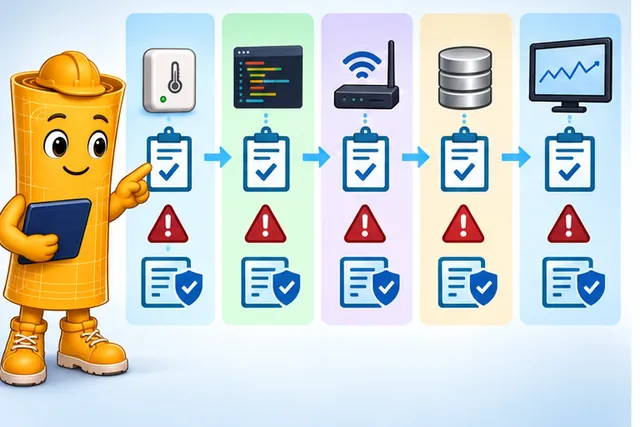
Assign each layer its job, handoff, failure, and proof.
-
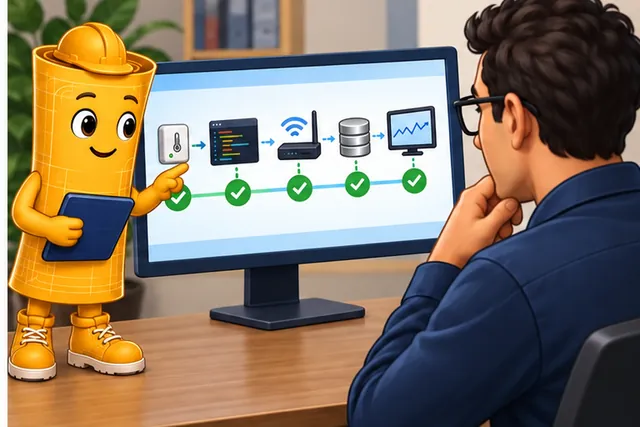
The person at the end can trace whether the reading still means the same thing.
The first panel starts at the freezer. The next shows code, a network gateway, a store, and a screen between the reading and the person. The last two assign a job and a check to each handoff, then let the person trace the reading back. That is the path a reference model must make clear.
A reference model is useful because it keeps that story from becoming a blur. It asks which layer owns each responsibility, which handoff can fail, and which evidence proves the reading still means the same thing at the end of the path.
2.3 Shared Map Before Diagram
This section: Shared Map Before Diagram — An IoT reference model is a responsibility map.
An IoT reference model is a responsibility map. It helps a team separate devices, connectivity, local processing, data, applications, and human workflow before they argue about products or draw a deployment diagram.
The useful question is not "which model is best?" The useful question is whether the model exposes the boundaries that the system must design, test, operate, and reopen when requirements change.
Reference models exist because the alternative was tried first and failed. As network-enabled devices got cheaper, thousands of applications appeared across unrelated domains, each with its own requirements; combining them produced complex, hard-to-manage, often proprietary systems sometimes called the "IoT spaghetti." Vendors and standards bodies asking what application domains to cover, where to place intelligence, what networking structure to use, and how to modularize a system for programmability slowly converged on a similar high-level view: a physical-world layer of sensors and actuators, an infrastructure or networking-fabric layer for connectivity and storage, a platform layer for APIs, protocols, data processing, and device management, and an application layer on top, with security and privacy running alongside all four as a cross-cutting concern rather than a fifth layer. That cross-cutting concern is genuinely hard to close end to end, and typically needs hardware isolation (such as ARM TrustZone), network isolation (VPNs, software-defined segmentation), and software isolation (sandboxing) working together rather than any single control. A reference model is useful precisely because it is this converged, shared vocabulary rather than one team's private diagram.

Blueprint Bina
“An architecture is a set of decisions you can point to — if you can’t name the boundary, you haven’t drawn it yet.”
In this chapter, Bina reads each layer line the same way: where is the boundary, what was decided there, and what artifact records it.
If you only need the intuition, this layer is enough: a reference model names the jobs that must be owned, the handoffs that must be traced, and the evidence that proves a connected system behaves as claimed.
Think of a building evacuation plan. The map is not the building, the people, or the alarm hardware. It gives everyone a shared way to discuss routes, exits, meeting points, and responsibilities. A reference model does the same for an IoT system: it gives teams a stable vocabulary for reviewing flows from physical events to operational decisions.
For a room-monitoring deployment, that vocabulary keeps a temperature value from becoming a vague dashboard claim. The physical responsibility covers sensor placement, calibration state, enclosure effects, and whether the reading still represents the room. Connectivity covers link loss, duplicate messages, retries, timestamps, and gateway receipt. Local work covers filtering, buffering, protocol translation, and fallback rules when the cloud is unreachable. Data responsibilities cover raw retention, transformed fields, quality flags, and query paths. Application and workflow responsibilities cover alarm thresholds, operator acknowledgements, maintenance tickets, and closure evidence.
The model is useful because it exposes review questions before the system fails. If the dashboard shows a stale 21 degrees C after a gateway outage, the team can ask whether the gateway marked buffered readings as old, whether the storage layer retained both raw and transformed values, whether the application displayed freshness, and whether the facilities workflow escalated the exception. Without that responsibility map, each team can point to its own box and still miss the boundary where the claim broke.
Treat shared map before diagram as a system decision around 1. Devices. The visual in Figure 2.1 places raw and retained records within this relationship: A reference model turns a layered diagram into a review trail: each responsibility needs an owner, evidence, and a way to reopen the review when operation exposes a broken boundary.
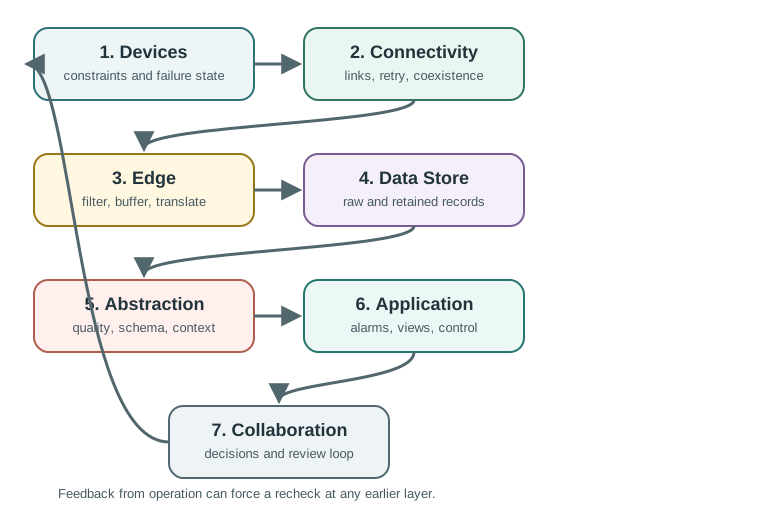
Three concrete diagram labels organize Figure 2.1: 1. Devices, raw and retained records, and decisions and review loop. Between them, the shared map before diagram relationship becomes visible: A reference model turns a layered diagram into a review trail: each responsibility needs an owner, evidence, and a way to reopen the review when operation exposes a broken boundary.
The One-Minute View
Responsibilities
What must the device, link, gateway, data service, application, and operator each make true?
Boundaries
Where does a measurement, command, exception, update, or support action change owner or representation?
Evidence
What trace, log, test, record, or review note proves the boundary still works after deployment?
Beginner Examples
Use the examples to separate the visible product feature from the responsibilities that make it trustworthy. Start with the dashboard and trace its reading backward, then take the command button and trace authority and delivery forward, and finally inspect which roles the gateway actually performs. This order shows why a device, cloud, screen, or gateway label cannot replace boundary and ownership evidence.
For each example, ask what happens during delay, loss, restart, stale data, or service intervention. The dashboard needs freshness and provenance, the command needs a bounded final state, and the gateway needs explicit buffering, translation, decision, and recovery roles. Those questions turn familiar product elements into a first reference-model review rather than a vocabulary exercise.
- A temperature dashboard is not just an application screen. The reading depends on sensor placement, link behavior, buffering, timestamps, storage, data abstraction, and operator response.
- A command button is not just a user interface control. The model asks how the command is authorized, delivered, acknowledged, retried, and made safe if the device is offline.
- A gateway is not automatically an "edge layer." It may route packets only, run local rules, buffer data, translate protocols, or own a recovery behavior.
Overview Knowledge Check
If this gives you enough to recognize the purpose, you can stop here. Continue to Practitioner when you need to build or review a model record.
2.4 Reference Model Review Record
This section: Reference Model Review Record — The practical workflow starts with a behavior and ends with a record that another reviewer can inspect.
The practical workflow starts with a behavior and ends with a record that another reviewer can inspect. The record matters because a clean model drawing can hide unclear ownership, stale data, unsafe commands, or missing support paths.
Walkthrough: From System Purpose to Evidence
Walk from the real behavior to a reviewable model without choosing layers prematurely. State what the system must sense, control, report, or support; select the smallest useful lens; assign responsibilities; and trace normal and abnormal flows. Only after those routes are visible should the team attach owners, proof, and reopen triggers. The steps below preserve that progression from purpose to durable evidence.
Use at least one observation, command, exception, and maintenance route so the model includes both technical and human closure. At each boundary name the payload or event, timing and quality rule, failure response, and evidence source. The completed walkthrough should let another reviewer challenge a handoff without needing to infer it from box placement.
- State the behavior. Name what the system senses, controls, reports, or helps people decide.
- Choose the model lens. Use the smallest model that exposes the risky boundaries. Add a companion lens only when it reveals an ownership or lifecycle issue.
- Map responsibilities. Separate physical state, connectivity, local processing, data lifecycle, application behavior, workflow, trust, and maintenance.
- Trace flows. Follow at least one observation, command, exception, and maintenance path across the model.
- Assign owners and evidence. For each risky boundary, record who owns it and which trace, test, log, or review note proves it.
- Define reopen triggers. State what change, failure, scale shift, or operating assumption must reopen the model review.
Worked Example: Building Room Monitoring
A building room-monitoring system observes temperature and occupancy, keeps bounded local rules active, stores history, displays status, and routes maintenance work. A reference model keeps those jobs from collapsing into one vague "IoT platform" claim.
Bina’s Boundary Sheet
- Boundary: the observation path — sensor reading to gateway, stored data, and dashboard value.
- Decision: the smallest model lens that exposes the risky handoffs — not one vague “IoT platform” claim.
- Point to it: the review record — timestamped raw reading, gateway receipt, storage write, dashboard query.
Incremental Practice
Beginner
Pick one sensor dashboard and name the physical, connectivity, data, application, and workflow responsibilities behind one visible value.
Intermediate
Trace one command from user intent to device action and back to acknowledgement or failure evidence.
Advanced
Write a reopen trigger for each risky boundary, such as a scale increase, new device class, changed ownership, or repeated exception.
Practitioner Knowledge Check
If your job is to create a defensible review record, you can stop here. Continue to Under the Hood for the boundary mechanics behind the workflow.
2.5 Layers, Boundaries, Failures
This section: Layers, Boundaries, Failures — The deeper layer explains why reference models use logical responsibilities instead of physical boxes.
The deeper layer explains why reference models use logical responsibilities instead of physical boxes. One gateway can hold several logical layers; one logical layer can be split across devices and services. The review question is whether the boundary contract is explicit enough to test.
Logical Layer Rules
Apply the rules whenever a logical responsibility and a physical component appear to coincide. Co-location does not erase sensing, decision, storage, or communication handoffs; distribution does not excuse missing ownership; and a familiar platform label does not define a contract. Reading the rules in that order keeps deployment choices flexible while preserving the evidence and failure behavior at every boundary.
Test the rule by moving one responsibility in the model. If local filtering moves from device to gateway, the data contract, outage behavior, latency, power, diagnostics, and owner may all change even though the application view stays similar. The logical model makes those consequences visible before a deployment diagram hardens them into an accidental architecture.
- Co-location does not remove a boundary. A device can sense, filter, decide, buffer, and communicate, but each job still has a distinct review question.
- Distribution does not remove ownership. A data lifecycle responsibility can span gateway storage, broker retention, cloud databases, and analytics, but one owner still needs the evidence record.
- Names are not contracts. Calling something an edge, platform, application, or workflow layer does not define freshness, failure behavior, security, or support responsibility.
Boundary Contract Ledger
Read each ledger row from meaning to failure. Name what crosses the boundary, state the contract that preserves its identity and timing, attach the trace or record that proves the handoff, and finish with the failure produced when the contract is missing. Comparing rows in that order reveals whether physical events, transport behavior, data lifecycle, application action, and operational closure remain connected.
Bina’s Boundary Sheet
- Boundary: physical to connectivity — where a reading enters the network path.
- Decision: the contract fixes what the event means at entry, ruling out correct-looking messages with no physical meaning.
- Point to it: the ledger row — units, timestamp policy, device identity, calibration state, transport receipt.
Troubleshooting With a Model
Layered troubleshooting works because the visible symptom is often not the failing layer. A dashboard can show stale data because a sensor failed, a link retried for too long, an edge rule buffered old state, a data abstraction cached the wrong field, or a workflow suppressed an alert.
Common Pitfalls
Diagnose the pitfalls as broken review assumptions. First separate logical responsibilities from hardware locations, then add the exception and maintenance flows omitted by a happy-path drawing. Next replace layer names with actual freshness, safety, and support evidence, and finish by naming the condition that reopens the model. The sequence keeps the architecture useful as deployment and ownership change.
A practical check is to remove one component or disturb one boundary and ask who detects the condition, what continues locally, which data becomes stale, and how recovery closes. If the answer is merely a layer name or vendor platform, the contract is still missing. Record the gap and its owner before approving the model.
- Treating layers as hardware locations. Layers are logical responsibilities. They may be co-located or distributed.
- Skipping exception and maintenance flows. Observation and command paths are not enough for an operable system.
- Confusing model vocabulary with evidence. A named layer does not prove data freshness, command safety, or closure of support work.
- Leaving no reopen trigger. A model that cannot say when to review itself will become stale as the system changes.
Under-the-Hood Knowledge Check
At this depth, a reference model is a review mechanism. It is only as useful as the boundary contracts, evidence records, and reopen triggers that keep it connected to real system behavior.
2.6 Summary
This section: Summary — A reference model is useful when it makes responsibilities and handoffs reviewable.
A reference model is useful when it makes responsibilities and handoffs reviewable. Begin with system purpose, place logical roles without confusing them with deployment locations, trace data and control in both directions, and attach contracts and evidence to every important boundary. The summary points below close the introduction by turning layers from labels into a shared method for finding ownership gaps, failure assumptions, and retest conditions.
Keep logical and physical views linked but distinct. One gateway can perform several layer roles, and one logical responsibility can be distributed across device, edge, and cloud components. The model earns its place when that mapping exposes who validates, stores, decides, operates, and recovers—not when every product is forced into the same number of boxes.
- An IoT reference model is a responsibility map, not a deployment diagram.
- The model is useful when it exposes boundaries that can be traced, owned, tested, and reopened.
- Observation, command, exception, and maintenance flows need separate review evidence.
- Logical layers may be co-located on one device or distributed across services; the boundary contract still matters.
- A short review record keeps the model testable as devices, links, data rules, applications, and workflows change.
Use an IoT reference model to make responsibilities reviewable: name the layer, trace the flow, assign the owner, keep the evidence, and define when to reopen the decision.
2.7 See Also
This section: See Also
Seven-Level IoT Reference Model
Study the common responsibility areas in more detail.
Alternative IoT Reference Models
Compare other model lenses and when they reveal different boundaries.
Practical Application and Assessment
Practice applying the model to architecture review tasks.
Reference Architecture Pitfalls
Review failure patterns that make architecture models hard to trust.
Find help
3 reviewed answers.
Where should I start in a module?
Open the module page from the sidebar to see its chapters in order. Use the module map to return to a topic you need.
Modules and pathsReviewed
What can I try when a project does not work?
Check the symptom, then work through the diagnostic steps. Keep the error message and the smallest example that reproduces it.
When you are stuckReviewed
How do interactive examples work?
Use the interactive guide to check how examples and simulations work before changing your project.
Interactive examples guideReviewed