4 The Seven-Level IoT Architecture
Sensor Squad: A Tour of the 7-Floor IoT Building
The Sensor Squad is visiting a 7-story building where each floor has a special job:
Floor 1 (Physical Devices): “This is where I live!” says Sammy the Sensor. “I measure temperature, humidity, and motion – turning real-world things into numbers.”
Floor 2 (Connectivity): “I help Sammy’s numbers travel!” says the Wi-Fi router. “I make sure messages get from sensors to the right place, like a mail carrier.”
Floor 3 (Edge Computing): Max the Microcontroller is busy here. “I filter Sammy’s data – if everything is normal, I just send a summary instead of every single reading. This saves energy and internet bandwidth!”
Floor 4 (Data Storage): “I remember everything!” says the Database. “Need to know what the temperature was last Tuesday? I have got it.”
Floor 5 (Data Abstraction): “I translate,” says the API. “Different sensors speak different languages, but I give everyone the same simple answer.”
Floor 6 (Application): Lila the LED lights up a dashboard. “I show humans what is happening with nice charts and alerts!”
Floor 7 (Collaboration): The building manager checks the dashboard and calls the maintenance team. “People make the big decisions based on what the building tells them!”
Bella the Battery sums it up: “Every floor adds value. Skip a floor, and something important goes missing!”
4.1 Learning Objectives
By the end of this chapter, you will be able to:
- Apply the 7-Level IoT Reference Model: Map IoT system components to the Cisco reference architecture layers
- Analyze Layer Functions: Explain the responsibilities of each layer from physical devices to collaboration processes
- Design Layered Systems: Create IoT architectures with clear separation of concerns between layers
- Trace Data Flow: Follow data transformation from raw sensor readings through processing to actionable insights
- Identify Integration Points: Locate interfaces between layers for protocol translation and data transformation
For Beginners: The Seven-Level IoT Architecture
This chapter covers foundational concepts for designing IoT systems at scale. Think of IoT system design like city planning – you need to consider where devices go, how they communicate, where data is stored, and how everything stays secure. Reference architectures and design principles help you create systems that work reliably and can grow over time.
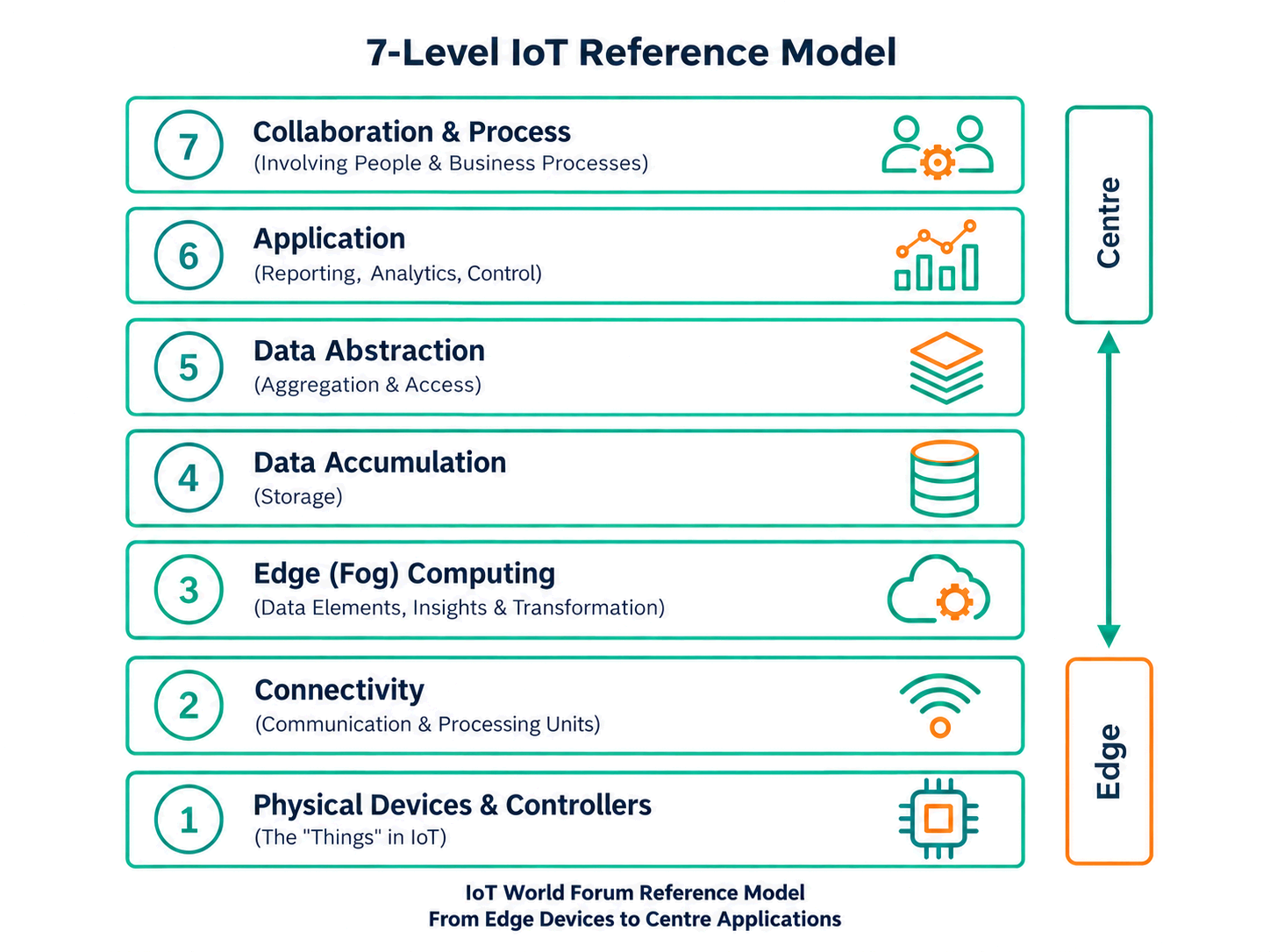
4.2 Seven (7) Level IoT Reference Model
Below, each level of the Seven (7) Level IoT Reference Model is discussed in detail, including the core functions, examples, and interactions that illustrate how raw data is transformed into valuable information for end users.
Alternative View: 7-Level IoT Reference Model (New Layout)
Source: CP IoT System Design Guide, Chapter 2 - Architecture
4.2.1 Level 1: Physical Devices and Controllers
Overview
This layer represents the physical “things” within the IoT ecosystem. These devices vary widely in their capabilities, form factors, and locations but are all responsible for generating or receiving data, and often for acting on control signals.
Generic IoT device block diagram illustrating the essential components at Level 1: sensing inputs, analog-to-digital conversion, processing core, wireless connectivity, power management, and actuator outputs - all integrated on a single embedded platform.
This generic block diagram shows the typical architecture of an IoT device at Level 1. Key components include sensors for data acquisition, ADC for analog-to-digital conversion, a processing unit (microcontroller or microprocessor), wireless communication modules for connectivity, and power management circuitry - all elements discussed in this section.
- Endpoint Devices
- Examples: Sensors (temperature, humidity, pressure), actuators (robotic arms, motors), RFID tags, smart thermostats, fitness trackers.
- Key Function: Sensing or actuating in the physical environment, sending or receiving data through a network connection.
- Analog-to-Digital (A/D) Conversion
- Why It Matters: Many real-world phenomena (e.g., temperature, pressure) exist as analog signals. IoT devices often include embedded A/D converters to transform these signals into digital data.
- Example: A pipeline pressure sensor continuously converts analog pressure readings to digital form, ready for transmission.
- Data Generation
- Approaches: Periodic reporting (e.g., every second, every minute) or event-triggered reporting (e.g., only when a threshold is reached).
- Example: A greenhouse temperature sensor sends data every five seconds to maintain environmental conditions.
- Remote Control and Queries
- Capabilities: Devices can often be queried or controlled over the network, enabling remote adjustments and firmware updates.
- Example: A factory robot can receive over-the-air software patches to improve performance or address security flaws.
Because IoT devices (Level 1) can differ significantly in power requirements, network capabilities, and operational environments (e.g., industrial sites, home settings, remote outdoor locations), the robustness and scalability of subsequent levels hinge on accommodating this diversity.
Knowledge Check: Physical Device Layer
4.2.2 Level 2: Connectivity
Overview
Level 2 is dedicated to communications and network connectivity, ensuring reliable and timely data transfer among devices, controllers, and the broader network. Although IoT often leverages existing networks, certain legacy or non-IP devices still require gateways or translation for interoperability.
- Network Protocols & Reliability
- Common Protocols: Ethernet, Wi-Fi, Bluetooth, Zigbee, Z-Wave, MQTT, TCP/IP.
- Example: In a smart home, light bulbs might communicate via Zigbee to a central hub, which then translates the messages to Wi-Fi for cloud-based data logging.
- East-West and North-South Traffic
- East-West: Data flows between devices within the same network tier (e.g., sensor-to-sensor communication in a local site).
- North-South: Data flows from lower levels (devices) “upward” to processing levels, and downward from processing layers back to devices.
- Example: A soil moisture sensor sends data (northbound) to a central server; a control command (southbound) then adjusts irrigation valves.
- Switching and Routing
- Role: Directing packets to the correct destination, whether local or remote.
- Example: A switch in a smart factory routes real-time production data from conveyor belt sensors to an on-site server for analysis.
- Protocol Translation
- Why Needed: Devices that use proprietary or legacy protocols may not speak IP natively.
- Example: A gateway converts serial communication (RS-232) from a decades-old machine into IP-based packets for cloud analytics.
- Network-Level Security
- Elements: Encryption, firewalls, virtual private networks (VPNs), identity management.
- Example: A firewall inspects incoming packets, allowing only authorized maintenance commands to reach a hospital’s IoT-enabled infusion pumps.
- Self-Learning or Adaptive Networking
- Purpose: Continuously monitor traffic patterns to optimize performance or detect anomalies (e.g., intrusion, device failures).
- Example: A predictive algorithm identifies unusual spikes in bandwidth usage by a security camera, flagging potential tampering or hacking attempts.
Knowledge Check: Connectivity and Protocol Selection
4.2.3 Level 3: Edge (Fog) Computing
Overview
Level 3 focuses on processing data closer to where it is generated. Often called fog computing, this approach helps filter, aggregate, and transform high-volume data before sending it to central repositories, reducing network load and enabling real-time insights.
- High-Volume Data Analysis
- Challenge: Sensors can generate continuous or burst data streams (e.g., hundreds of samples per second).
- Example: A manufacturing line with multiple temperature, vibration, and pressure sensors requires real-time checking of thresholds to prevent product defects.
- Packet-by-Packet Processing
- Constraint: At this level, processing is typically not session-aware but acts on individual packets or small data chunks.
- Example: An edge device inspects incoming data from a vibration sensor, looking for sudden spikes indicative of machine misalignment.
- Data Filtering & Clean-Up
- Goal: Remove noise, correct anomalies, or combine repeated readings into a single summarized value.
- Example: A building’s HVAC system might discard sensor readings that fall within normal range and only forward outliers (e.g., suspicious temperature drops).
- Thresholding & Event Generation
- Threshold Checks: Trigger immediate alerts if certain limits are exceeded or not met.
- Event Generation: Send events to higher levels for further action.
- Example: An edge system at a water facility flags sensor data that indicates unsafe pH levels, instantly alerting operators.
- Data Distillation
- Purpose: Distill or aggregate raw data into more compact forms.
- Example: A city traffic camera might record images at high frequency, but an edge processor only forwards vehicle counts and speeds, saving bandwidth and storage costs.
Putting Numbers to It
Edge processing latency determines which control loops can run locally. The 500ms water treatment requirement breaks down:
\[ \begin{align} T_{\text{total}} &= T_{\text{sense}} + T_{\text{process}} + T_{\text{actuate}} \\ 500\text{ms} &= 50\text{ms (sensor)} + T_{\text{process}} + 100\text{ms (valve)} \\ T_{\text{process}} &= 350\text{ms available} \end{align} \]
Edge processing (local microcontroller): \(T_{\text{process}} = 5\text{-}20\)ms → passes
Cloud round-trip: \(T_{\text{process}} = 200\text{-}400\)ms (network) + 50ms (cloud compute) = 250-450ms → barely fits, risky
Rule: If your safety budget \(T_{\text{total}}\) minus sensor/actuator delays is under 100ms, edge processing is mandatory.
Interactive Latency Calculator: Test your own control loop latency budget:
Knowledge Check: Edge vs Cloud Processing
4.2.4 Level 4: Data Accumulation
Overview
Level 4 is where data-in-motion transitions to data-at-rest. The events and streams arriving from Levels 1-3 become organized, persisted, and made available for query-based operations at higher layers.
- From “Event-Based” to “Query-Based” Computing
- Event-Based: Data flows determined by triggers from devices (e.g., sensor reading changes).
- Query-Based: Higher-level applications access data as needed, rather than receiving a continuous stream.
- Example: An industrial system captures real-time sensor data in a time-series database; a maintenance app later queries for a specific time window.
- Selective Storage
- Objective: Retain only the data necessary for analysis, archiving, or compliance.
- Example: A smart retail camera system might store daily transaction logs plus alerts for unusual customer traffic patterns, discarding raw video after a short retention.
- Determining Storage Type
- Options: Relational databases, big data systems (e.g., Hadoop, Spark), distributed file systems, NoSQL stores.
- Example: An energy company might use a distributed file system to store massive wind turbine data sets for monthly trend analysis, while short-term operational data sits in a high-speed in-memory cache.
- Recombining and Recomputing
- Need: Sometimes data must be combined with previously stored information or reformatted for consistency.
- Example: A shipping company correlates historical GPS data with new location pings to calculate route efficiency improvements over time.
Through consistent accumulation practices, Level 4 ensures the continuity of data for longer-term and non-real-time analysis.
Knowledge Check: Data Storage Selection
4.2.5 Level 5: Data Abstraction
Overview
IoT deployments often operate at corporate or global scale, employing multiple storage systems and sources of data (including non-IoT databases). Level 5 manages the integration and simplification of this distributed information, so higher-level applications can work seamlessly.
- Information Integration
- Need: Pull data from multiple repositories (e.g., real-time sensors, legacy SQL systems, external APIs).
- Example: A smart city platform merges traffic sensor data, GIS information, and public transit schedules to provide a single view of urban mobility.
- Schemas and Views
- Role: Present data in ways that reflect application requirements, masking underlying complexity.
- Example: A healthcare portal might unify heart rate sensor data, EHR records, and insurance claims into one coherent “patient” view.
- Reconciliation of Data Differences
- Challenge: Data may vary in format, units (Celsius vs. Fahrenheit), or semantics (different labels for the same concept).
- Example: A global weather service might unify temperature readings across different regions and measurement scales.
- Data Security and Access Controls
- Why: A single system might serve multiple stakeholders, each needing restricted or specialized data access.
- Example: An automotive company only allows authorized manufacturing engineers to see certain sensor logs from the production line, while external partners view a limited subset.
- Filtering, Selecting, and Reformating
- Goal: Provide only the necessary data to client applications in a consistent format.
- Example: An agricultural cooperative that processes raw soil moisture data, aerial imagery, and weather forecasts - returning a simplified dataset for farm management apps.
By abstracting and organizing disparate data streams at Level 5, application development (Level 6) becomes more efficient and scalable, ensuring that complex under-the-hood processes remain hidden from everyday users.
Knowledge Check: Data Abstraction Benefits
4.2.6 Level 6: Application
Overview
This level hosts the software applications that interpret, analyze, and act on the data. Freed from the real-time constraints of the network, these applications can present dashboards, generate reports, orchestrate controls, and integrate IoT-derived insights with broader enterprise workflows.
- Monitoring and Reporting
- Tools: Dashboards, alert systems, business intelligence (BI) applications.
- Example: A manufacturing dashboard shows machine performance metrics, highlighting anomalies in real time while also allowing historical trend comparisons.
- Controlling Devices
- Methods: Sending commands or adjusting parameters on Level 1 devices (through Levels 2-3).
- Example: A mobile app enables homeowners to turn on/off lights or lock doors remotely, using data from sensors to verify actions.
- Combining IoT and Non-IoT Data
- Value: Enhanced context by merging sensor readings with traditional enterprise data, like ERP or CRM systems.
- Example: A retailer’s inventory management updates product stock levels based on sensor data tracking crates at loading docks.
- Industry-Specific Applications
- Examples: Enterprise Resource Planning (ERP), specialized industry solutions (healthcare, manufacturing), business intelligence (BI) reporting, and system management/control center software.
- Example: A hospital might run a specialized patient monitoring system that integrates wearable data, bed occupancy rates, and EHR records.
These applications provide user-facing functionalities - real-time alerts, analytics, user interfaces - that rely on well-organized data from the previous layers.
Knowledge Check: Application Layer Integration
4.2.7 Level 7: Collaboration and Processes
Overview
Even the most detailed IoT insights have limited value if they do not lead to action. Level 7 focuses on the people, business processes, and collaboration required to turn data-driven insights into meaningful outcomes.
- Human and Organizational Engagement
- Scope: Involving multiple stakeholders - engineers, operators, managers, external partners - in decision-making.
- Example: A logistics firm orchestrates efforts between fleet managers, drivers, and mechanics when real-time vehicle telemetry shows an imminent maintenance issue.
- Communication and Coordination
- Tools: Email, instant messaging, dedicated collaboration platforms, phone calls, or specialized IoT dashboards.
- Example: City officials, emergency services, and utility companies coordinate via a shared platform when a smart system detects a major water main break.
- Workflow Integration
- Objective: Embed IoT data insights into routine or critical organizational processes, ensuring timely reactions.
- Example: A retailer’s marketing team receives automatic notifications about low stock or sudden sales spikes, prompting promotional campaigns or restocking actions.
- Beyond a Single Application
- Why: Many real-world responses span multiple systems, departments, and applications.
- Example: An agricultural cooperative merges meteorological data (Level 5) and supply chain apps (Level 6), allowing farm managers, distributors, and transportation services to coordinate seamlessly.
By aligning people and processes with the insights generated by IoT applications, Level 7 ensures that the data collected and processed throughout the preceding levels ultimately results in effective action and continuous improvement.
Knowledge Check: Collaboration Layer Value
Alternative View: Layer Mapping to Technologies
This variant maps each reference model layer to specific technologies and products, helping students connect abstract concepts to concrete implementations.
Common Misconception: “More Layers = More Complexity”
Misconception: “The 7-layer model is unnecessarily complex. Simpler systems should skip layers to reduce complexity.”
Reality: The 7-layer model is a conceptual framework, not a mandate for 7 separate software components. Even simple IoT systems perform all 7 functions - the question is whether you organize them explicitly or let them emerge ad-hoc.
Example - “Simple” Smart Thermostat:
Even a basic smart thermostat performs all 7 layers: - L1: Temperature sensor (DHT22 chip) - L2: Wi-Fi chip transmits data - L3: Microcontroller filters noise from sensor readings (edge processing) - L4: ESP32 stores last 100 readings in flash memory - L5: HTTP endpoint provides /temperature API (abstraction) - L6: Mobile app displays temperature chart - L7: User decides to adjust setpoint
The layers exist whether you acknowledge them or not. The 7-layer model helps you: 1. Identify what’s missing: “Why do we lose data when Wi-Fi fails?” - No Layer 4 storage 2. Troubleshoot systematically: “Dashboard shows wrong units” - Layer 5 abstraction issue 3. Scale efficiently: “Adding Zigbee sensors breaks app” - Need better Layer 5 abstraction
Key Insight: The model reduces complexity by organizing it, not by adding layers that weren’t already there implicitly. A “simple” system that ignores layering becomes more complex when you try to scale, debug, or integrate new devices.
Knowledge Check: Security Across Layers
Cross-Hub Connections: Reference Models in Practice
This chapter connects to multiple learning resources across the module:
Video Deep-Dives (Videos Hub): - “IoT Architecture Explained” - Visual walkthrough of the 7-layer model with real-world examples - “Edge Computing vs Cloud Computing” - When to use Layer 3 vs sending all data to cloud - “Building Scalable IoT Systems” - How reference models enable growth from 10 to 10,000 devices
Hands-On Practice (Simulations Hub): - Network Topology Explorer - Visualize different Layer 2 connectivity patterns (star, mesh, tree) - IoT Data Flow Simulator - Trace sensor data through all 7 layers with interactive diagrams - Protocol Comparison Tool - Compare Layer 2 protocols (Wi-Fi, Zigbee, LoRaWAN) for your use case
Self-Assessment (Quizzes Hub): - Architecture Fundamentals Quiz - Test your understanding of reference model concepts - Layer Responsibilities Challenge - Match functions to correct layers - Troubleshooting by Layer - Diagnose problems using systematic layer analysis
Related Technical Chapters:
- Edge Computing Patterns - Layer 3 implementation strategies
- Data Storage and Databases - Layer 4 storage options (SQL, NoSQL, time-series)
- IoT Protocols Overview - Layer 2 protocol selection framework
- Stream Processing - How Kafka/Flink fit into Layers 3-4
Common Learning Gaps (Knowledge Gaps Hub): - “When do I need Layer 3 edge processing?” - Answered with latency/bandwidth calculations - “Why can’t apps talk directly to databases?” - Layer 5 abstraction benefits explained - “How do layers map to actual code?” - Implementation examples for each layer
Study Path Recommendation:
- Complete this chapter on reference models (conceptual foundation)
- Watch “IoT Architecture Explained” video for visual reinforcement
- Use Network Topology Explorer simulation to experiment with Layer 2 connectivity
- Read Edge Computing Patterns for Layer 3 implementation details
- Take Architecture Fundamentals Quiz to validate understanding
Key Concepts
- Seven-Level Architecture: Cisco’s IoT Reference Model decomposing the IoT stack into seven discrete levels: physical devices, connectivity, edge computing, data accumulation, data abstraction, application, and collaboration/processes
- Level 1: Physical Devices: The sensing and actuation layer comprising sensors, actuators, and embedded processors that directly interface with the physical world — the data origin and control destination of the IoT stack
- Level 4: Data Accumulation: The storage tier converting in-motion streaming data to at-rest persistent storage, determining what sensor data to retain, at what resolution, and for how long
- Level 6: Application: The business logic tier interpreting accumulated IoT data through domain-specific analytics, control algorithms, and reporting — where business value is extracted from sensor data
- North-South Traffic: Data flowing vertically between IoT layers (device to cloud), typically time-sensitive telemetry requiring routing through multiple protocol translations and processing stages
- East-West Traffic: Data flowing horizontally within a single IoT level (e.g., device-to-device communication at level 1, or application-to-application at level 6) without traversing intervening layers
- Data Reduction: The transformation of raw high-frequency sensor data into lower-volume aggregated values at each processing level, reducing bandwidth and storage requirements as data moves toward the cloud
Common Pitfalls
1. Assuming All Seven Levels Must Be Separately Deployed
Designing a system where each of the seven levels runs on a separate physical server or device. Many levels can and should be collocated — levels 3 and 4 often share the same gateway; levels 5 and 6 may share the same cloud service. Use logical separation, not always physical.
2. Not Specifying Data Retention Policy at Level 4
Storing all raw sensor readings indefinitely at level 4. A factory with 10,000 sensors at 100 Hz generates 86.4 billion readings per day. Define data retention policies (keep raw data for 24 hours, hourly aggregates for 30 days, daily aggregates for 5 years) at architecture design time.
3. Bypassing Protocol Translation at Level 2
Allowing devices speaking different protocols (MQTT, CoAP, Modbus, BACnet) to connect directly to the application layer without standardized translation at the connectivity level. Protocol heterogeneity makes application layer code brittle and unmaintainable.
4. Neglecting East-West Security at Each Level
Implementing authentication and encryption only for north-south traffic (device to cloud) while leaving east-west traffic (device to device, application to application) unprotected. Lateral movement attacks exploit unprotected east-west paths to escalate privilege across levels.
4.3 Summary
In this chapter, you learned the detailed functions of each layer in the Cisco Seven-Level IoT Reference Model:
| Layer | Name | Core Function |
|---|---|---|
| 1 | Physical Devices | Sensors, actuators, A/D conversion, data generation |
| 2 | Connectivity | Protocols, routing, security, protocol translation |
| 3 | Edge Computing | Filtering, aggregation, thresholding, real-time decisions |
| 4 | Data Accumulation | Storage, databases, query-based access |
| 5 | Data Abstraction | Integration, schema views, access controls |
| 6 | Application | Dashboards, control, enterprise integration |
| 7 | Collaboration | Human engagement, workflows, cross-team coordination |
Key insight: Data flows upward through the stack gaining value at each layer, while control commands flow downward from human decisions to physical actuators.
4.4 Worked Example: Mapping a Smart Water System to the Seven-Level Model
Worked Example: Designing a Municipal Water Quality Monitoring System Using All Seven Levels
Scenario: A city of 500,000 people monitors drinking water quality at 120 distribution points across the network. The system must detect contamination within 15 minutes, generate compliance reports for the EPA, and allow operators to remotely flush contaminated pipe segments. Map each function to the seven-level model.
Layer-by-Layer Design:
| Level | Function | Implementation | Data Volume at This Layer |
|---|---|---|---|
| 1: Physical Devices | pH, chlorine, turbidity, flow sensors at 120 points | 4 sensors x 120 points = 480 sensors. Each samples at 0.1 Hz (every 10 sec). | 480 x 6 readings/min = 2,880 readings/min (raw) |
| 2: Connectivity | Sensors connect via Modbus RTU to local PLC, PLC to SCADA via DNP3, SCADA to cloud via MQTT over 4G LTE | Protocol chain: Modbus -> DNP3 -> MQTT. Three protocol translations. | Same volume, encapsulated in different protocols |
| 3: Edge Computing | Local PLC checks thresholds: if chlorine < 0.2 mg/L, trigger immediate alert. Averages 10-second readings into 1-minute summaries. | Reduces 2,880 readings/min to 480 summaries/min. Generates ~0-2 alerts/day. | 83% reduction at edge |
| 4: Data Accumulation | TimescaleDB stores 1-minute summaries. 30-day hot storage, 7-year cold archive (EPA requirement). | 480/min x 1,440 min/day = 691,200 rows/day. At 64 bytes each = 42 MB/day. | 42 MB/day stored |
| 5: Data Abstraction | Combines water quality data with weather (rain correlates with turbidity spikes), maintenance schedules, and population density. Normalizes all sources to common schema. | Joins 3 data sources. Creates “water quality index” (WQI) score per zone. | 120 WQI scores/min (abstracted) |
| 6: Application | Operator dashboard shows real-time WQI map. Automated flush commands when contamination confirmed. Mobile alerts for field crews. | REST API serves dashboard. SCADA integration for actuator commands. | API: ~200 requests/min |
| 7: Collaboration | EPA compliance reports (auto-generated monthly). Public-facing water quality transparency portal. Cross-department coordination during contamination events. | Scheduled reports + Slack/PagerDuty integration for incident response. | 12 reports/year + event-driven alerts |
Key Design Decisions by Level:
| Decision | Level | Choice | Why |
|---|---|---|---|
| Sensor sampling rate | 1 | 0.1 Hz (every 10 sec) | Contamination spreads slowly (hours, not seconds). Higher rate wastes battery without improving detection. |
| Edge threshold checking | 3 | Check at PLC, not cloud | 15-minute detection SLA. Cloud round-trip adds 2-5 seconds (acceptable), but network outage could delay detection by hours (unacceptable). |
| Storage retention | 4 | 30 days hot, 7 years cold | EPA Safe Drinking Water Act requires 10-year records. Hot/cold split saves 92% on storage costs. |
| Data abstraction | 5 | WQI composite score | Operators cannot monitor 480 individual sensor values. A single WQI score per zone (0-100) enables at-a-glance monitoring. |
Result: The seven-level model ensures no function is overlooked. Without Level 5 (data abstraction), operators would face 480 raw sensor streams – information overload causing alert fatigue. Without Level 3 (edge computing), a network outage during contamination could delay detection beyond the 15-minute SLA. Without Level 7 (collaboration), the system generates data but nobody acts on it during a crisis.
4.5 Knowledge Check
4.6 What’s Next
| If you want to… | Read this |
|---|---|
| Explore alternative reference architectures | Alternative Architectures |
| Apply the model to practical scenarios | Practical Application and Assessment |
| Compare with other reference architectures | Key IoT Reference Models |
| Study production deployment considerations | Production Architecture Management |
| Learn about IoT standards frameworks | IoT Standards and Frameworks |