Frame the scenario
Name the physical purpose, device families, response budgets, retention needs, user roles, and operating constraints.
Progress saves as you read. Mark sections complete as you go; your progress appears in the sidebar.
This section: Start With the Trace You Can Replay — Picture a school room warming while its window is open.
Follow One Building Event From Cause to Closed Action
Picture a school room warming while its window is open. The building system should warn staff, avoid fighting the open window with more heating, and keep enough evidence for the facilities lead to review the result. A box diagram alone cannot prove that path.
Start with the event and name every owner: room sensor, local controller, network boundary, central store, rule service, staff screen, and person who closes the action. Preserve identity, time, unit, quality, and software version whenever the record changes hands.
Replay the path with a wrong reading, old time, open-window signal loss, outside-link loss, restarted controller, full local store, denied user, and delayed repair note. Check the urgent local response, the message shown to staff, recovery after contact returns, and the final closed record.
One worked building proves a method under stated conditions. It does not prove every building, climate, law, occupant need, supplier, or control plant. Mark each assumption and the change that forces the design to reopen.
Practitioner maps layers, flows, owners, and evidence. Under the Hood examines boundary timing, competing writers, saved state, access, reopening rules, and the gaps hidden when a complex system is shown as a clean stack.
Use this event replay order:
A worked example is strongest when another reviewer can replay it. Start with one event, command, or alert, then follow the path through device behavior, connectivity, edge logic, data storage, application use, and human response.
The goal is not to produce a perfect architecture on the first pass. The goal is to make every assumption visible enough to challenge: where the data changes shape, where policy is enforced, where the system can fall back, and which artifact proves the claim.
This section: Reviewable Scenario Architecture — A smart-building worked example is not a tour of boxes.
A smart-building worked example is not a tour of boxes. It is a trace from building requirements to layer ownership, data and control flows, local decisions, application workflows, and evidence that proves each important requirement is covered.
Before using this part of the method, inspect Figure 8.1 to make reviewable scenario architecture concrete. The visual is worth pausing on because its caption identifies the intended design point: Use the route as a review checklist: scenario, layers, flows, storage, workflows, and evidence.
Read Figure 8.1 as an ordered review, not as decoration. Start at the first input or condition, follow the arrows through each intermediate responsibility, and finish at the evidence, decision, or operating outcome. In concrete terms, look for Smart-building worked-example route: scenario, layers, flows, storage, workflows, and evidence. That sequence explains why Use the route as a review checklist: scenario, layers, flows, storage, workflows, and evidence. Carry the result into the running narrative by recording the claim, boundary, evidence, owner, and next recheck in the architecture record.
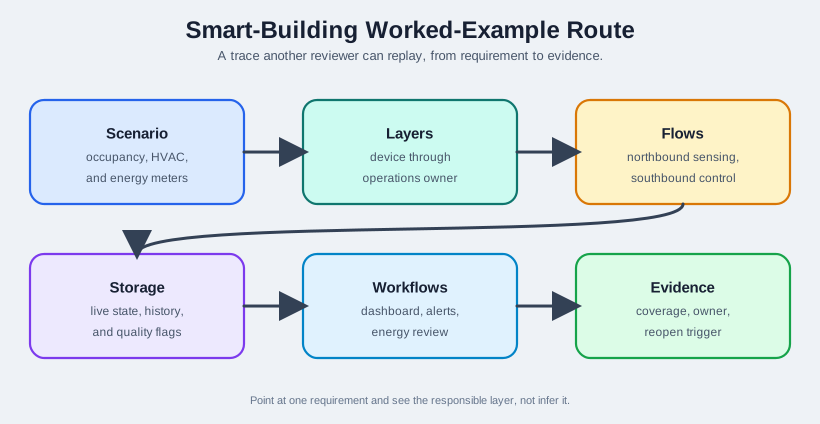
Interrogate Smart-Building Worked-Example Route first, then find southbound control in Figure 8.1. Apply the southbound control review question before reopen trigger. Those answers support reviewable scenario architecture; the figure states: Use the route as a review checklist: scenario, layers, flows, storage, workflows, and evidence.
Name the physical purpose, device families, response budgets, retention needs, user roles, and operating constraints.
Assign devices, networks, gateways, storage, APIs, applications, and operations to the layer that owns the main responsibility.
Follow northbound sensing, southbound control, exception handling, and review evidence across the architecture.
Close the example with requirement coverage, validation evidence, operational owner, and a trigger for reopening the decision.
For this scenario, the architecture decision is not "use cloud" or "use edge" in general. The decision is more specific: which path must remain available when a floor gateway loses WAN service, which records are needed for energy review, which stale readings must be visible to operators, and which people own follow-up action. A reviewer should be able to point at one requirement and see the responsible layer, not infer it from a marketing architecture diagram.
The walkthrough also separates live comfort behavior from reporting behavior. A zone can use local occupancy and temperature state to avoid an uncomfortable delay, while aggregated interval data supports monthly energy analysis. Those two uses may involve the same sensors but different timing, privacy, storage, and audit needs. Keeping that distinction visible prevents the team from overloading one data path with every responsibility.
The exact device count is less important than the method. If sampling rate, retention, response budget, or user workflow changes, the architecture record must show which layer decisions need to be retested.
This section: Map Layers, Flows, Evidence — The practitioner task is to make responsibilities explicit.
The practitioner task is to make responsibilities explicit. Start with the building scope, then decide which layer owns sensing, translation, local control, retained evidence, stable APIs, user views, and operating response.
Before using this part of the method, inspect Figure 8.2 to make map layers, flows, evidence concrete. The visual is worth pausing on because its caption identifies the intended design point: The seven-layer map prevents device, gateway, data, application, and operations responsibilities from being blended into one box.
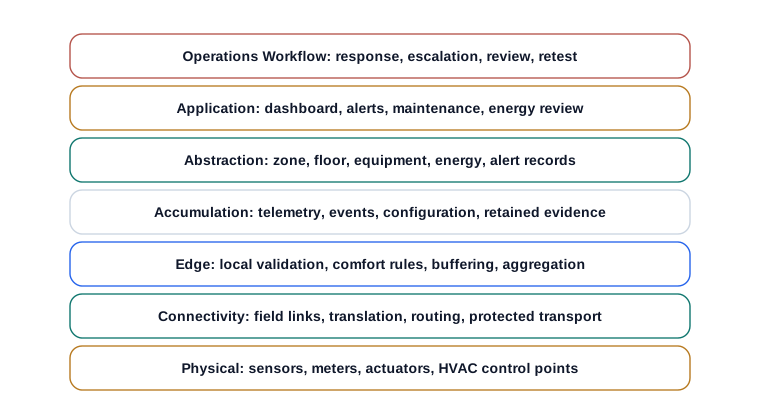
Read Figure 8.2 as an ordered review, not as decoration. Start at the first input or condition, follow the arrows through each intermediate responsibility, and finish at the evidence, decision, or operating outcome. In concrete terms, look for Smart building reference-model layer map from physical devices through connectivity, edge, accumulation, abstraction, application, and operations workflow. That sequence explains why The seven-layer map prevents device, gateway, data, application, and operations responsibilities from being blended into one box. Carry the result into the running narrative by recording the claim, boundary, evidence, owner, and next recheck in the architecture record.
Occupancy sensors, environmental sensors, energy meters, dampers, valves, and HVAC control points.
Field buses, mesh links, gateway links, protocol translation, routing, and protected transport.
Local validation, comfort-control rules, temporary buffering, floor-level aggregation, and offline behavior.
Telemetry history, event history, configuration records, and retained evidence for review.
Stable zone, floor, equipment, energy, and alert APIs that hide storage and protocol detail.
Operations dashboard, alert view, maintenance view, and energy review interface.
Acknowledgement, escalation, repair evidence, monthly review, change approval, and retest process.
Before using this part of the method, inspect Figure 8.3 to make operations concrete. The visual is worth pausing on because its caption identifies the intended design point: Traceability turns a walkthrough into a record another reviewer can audit.
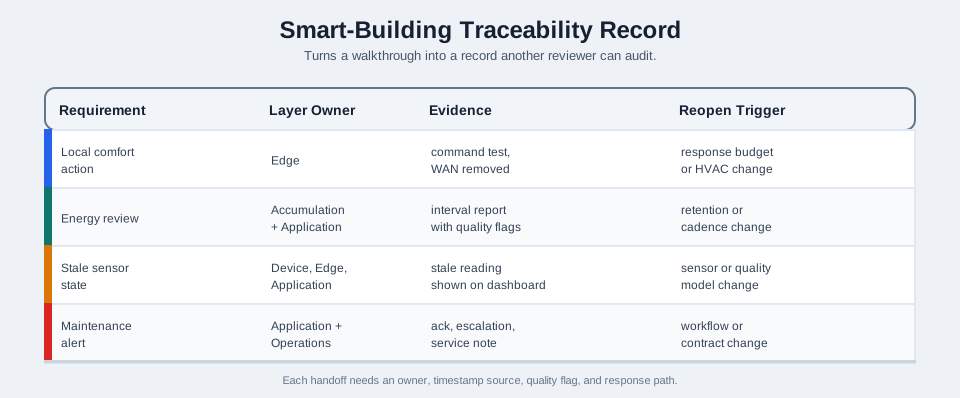
Read Figure 8.3 as an ordered review, not as decoration. Start with the headings or compared options, scan the rows or panels in their presented order, and finish by checking which evidence or constraint changes the decision. In concrete terms, look for Smart-building traceability table linking four requirements (local comfort action, energy review, stale sensor state, maintenance alert) to layer owner, evidence, and reopen trigger. That sequence explains why Traceability turns a walkthrough into a record another reviewer can audit. Carry the result into the running narrative by recording the claim, boundary, evidence, owner, and next recheck in the architecture record.
Read the record as a chain from obligation to retest. The requirement states what must be preserved, the layer owner locates responsibility, the decision records the chosen boundary, and the evidence shows that boundary working. The reopen trigger closes the chain by naming the change that invalidates the proof. Keeping those fields together lets a reviewer trace building behavior without relying on the architecture diagram alone.
Owner: edge. Evidence: command test with upstream connectivity removed. Reopen if response budget, gateway role, or HVAC integration changes.
Owner: accumulation and application. Evidence: summarized interval report with quality flags. Reopen if retention or report cadence changes.
Owner: device, edge, and application. Evidence: stale reading visible in the dashboard. Reopen if sensor type or quality model changes.
Owner: application and operations. Evidence: acknowledgement, escalation, and service note. Reopen if the workflow or equipment contract changes.
In implementation terms, the record can name concrete handoff points. BACnet/IP or Modbus TCP may expose equipment values to a gateway, MQTT or HTTPS may carry normalized telemetry upward, and a work-order system may own the final maintenance action. The practitioner check is whether each handoff has an owner, timestamp source, quality flag, retry behavior, and human response path. If those details are missing, the layer map still hides the real architecture risk.
A concrete subsystem map makes the physical and connectivity layers easier to audit. A building management system typically owns HVAC point groups such as variable air volume boxes, fan coil units, heat pumps, and chilled beams as one energy-and-power-metering equipment class. A separate lighting controller owns a DALI interface, occupancy sensors, and fixture control. A fire alarm panel owns pull stations, smoke and thermal sensors, and horn/strobe notification devices as its own equipment class, distinct from the BMS. A security headend owns CCTV, access-card readers, door controllers, and intrusion sensors. Each equipment class reaches a per-floor distribution switch over Ethernet, and those floor switches uplink to intra-building switches performing Ethernet/IP routing back to a building operations center. Keeping those four equipment classes distinct, rather than folding them into one generic "building system" box, is what lets the traceability record assign a believable owner to each row.
This section: Flow Boundaries and Reopen Rules — The under-the-hood question is whether the architecture still makes sense when communication, data quality, storage, or operations behave imperfectly.
The under-the-hood question is whether the architecture still makes sense when communication, data quality, storage, or operations behave imperfectly. Trace the critical flows and require evidence for normal, degraded, stale, and recovery conditions.
Before using this part of the method, inspect Figure 8.4 to make flow boundaries and reopen rules concrete. The visual is worth pausing on because its caption identifies the intended design point: Northbound sensing and southbound control are separate flows with different owners and failure behavior.
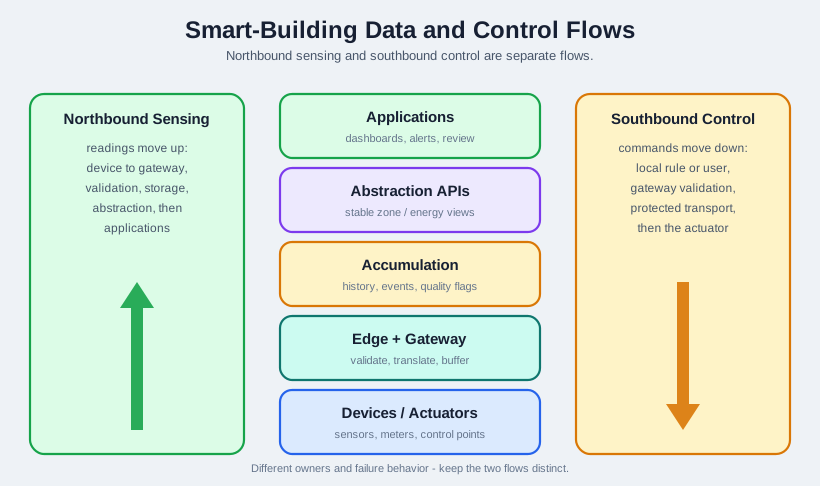
Read Figure 8.4 as an ordered review, not as decoration. Start at the first input or condition, follow the arrows through each intermediate responsibility, and finish at the evidence, decision, or operating outcome. In concrete terms, look for Smart-building data and control flows: a shared layer stack with northbound sensing moving up and southbound control moving down through gateway validation. That sequence explains why Northbound sensing and southbound control are separate flows with different owners and failure behavior. Carry the result into the running narrative by recording the claim, boundary, evidence, owner, and next recheck in the architecture record.
Readings move from device to gateway translation, validation, accumulation, abstraction, and applications.
Commands move from a user or local rule through validation and protected transport before actuators change state.
Recent high-resolution state, summarized history, event evidence, quality flags, and review status have different retention rules.
Alerts, acknowledgements, overrides, failed commands, gateway outages, and repair notes must be visible to people who act on them.
Before using this part of the method, inspect Figure 8.5 to make operations proof concrete. The visual is worth pausing on because its caption identifies the intended design point: The review record is the durable output of the worked example.
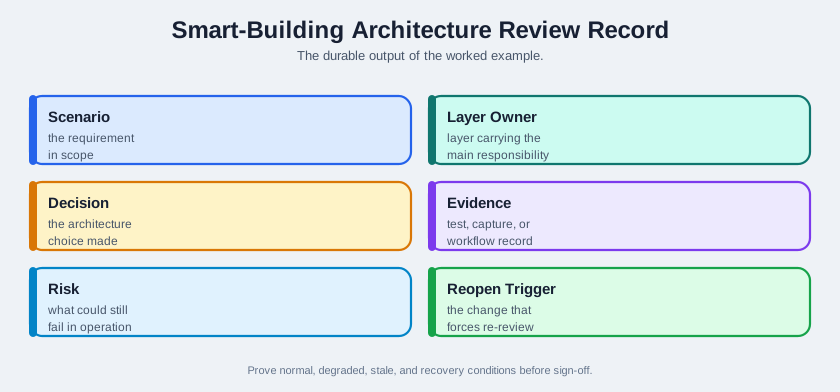
Read Figure 8.5 as an ordered review, not as decoration. Read the title and legend first, then move through the labelled elements in their presented order, and finish at the evidence or outcome the visual asks the reviewer to retain. In concrete terms, look for Smart-building architecture review record with fields for scenario, layer owner, decision, evidence, risk, and reopen trigger. That sequence explains why The review record is the durable output of the worked example. Carry the result into the running narrative by recording the claim, boundary, evidence, owner, and next recheck in the architecture record.
Run the gate in increasing distance from the normal path. Remove upstream connectivity first, then inject stale or invalid input, replay buffered events, and finally exercise the maintenance workflow. At each step inspect the resulting control, data-quality, duplicate, and operator state. This sequence proves that the smart-building architecture remains owned and understandable when communication, data, or service assumptions fail.
Keep a common event or run identifier across device, gateway, storage, dashboard, and work-order evidence. The gate should reveal whether local comfort control continues safely, whether stale state is labelled, whether replay preserves meaning, and whether an operator can close the incident with proof. Missing correlation is itself a result that reopens the architecture.
Review the architecture again when the response budget tightens, building zones are reorganized, gateway responsibility changes, a field protocol is replaced, retention rules change, or the operations team changes how alerts and reports are handled.
The under-the-hood evidence should be runnable, not just readable. Testers can disconnect the WAN link, freeze a sensor timestamp, replay duplicate gateway messages, force a failed HVAC command, and close a maintenance ticket without repair evidence. The expected result should be visible in system state: local comfort logic continues or fails safe, stale data is labeled, deduplication preserves event meaning, command failure reaches an operator, and the record says which architecture assumption was proven or reopened.
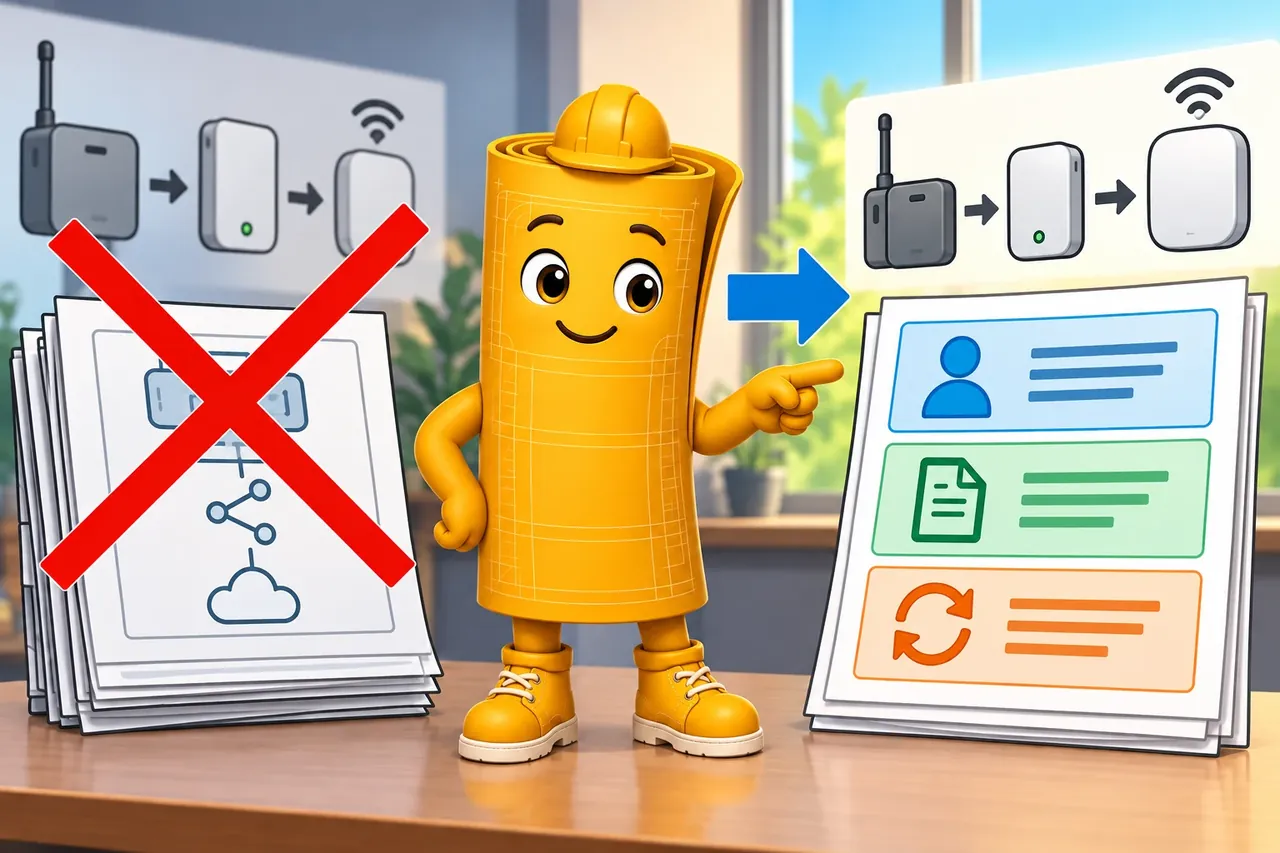
Wrong idea: freeze a product list so later changes cannot reopen the design. It fails because a useful record keeps duties, proof, and reasons to review again.
This section: Summary — The smart-building example closes as a trace from requirements to operations.
The smart-building example closes as a trace from requirements to operations. Start with purpose and response limits, assign each layer an owned responsibility, keep urgent control near the equipment, and move durable evidence upward through accumulation and abstraction to applications and operators. The summary points below preserve that route and the validation artifact or reopen trigger attached to every important choice.
The architecture remains credible during failure only when local control, stored history, dashboards, and human workflow degrade in known ways. That is why the final record includes upstream outages, stale data, override, maintenance, and recovery evidence alongside the normal path. The example is complete when another reviewer can replay both the intended route and its limits.
This section: Key Takeaway
A worked example is complete when a reviewer can trace each requirement through layer ownership, flow behavior, evidence, operations response, and the condition that would reopen the decision.
This section: See Also
IoT Reference Models Introduction - the model vocabulary behind the layer map.
The Seven-Level IoT Architecture - the layer structure used in this walkthrough.
IoT Architecture Selection Framework - the decision framework for choosing architecture patterns.
Common IoT Reference Architecture Pitfalls - the failure patterns this worked example avoids.
3 reviewed answers.
Open the module page from the sidebar to see its chapters in order. Use the module map to return to a topic you need.
Modules and pathsReviewed
Check the symptom, then work through the diagnostic steps. Keep the error message and the smallest example that reproduces it.
When you are stuckReviewed
Use the interactive guide to check how examples and simulations work before changing your project.
Interactive examples guideReviewed