21 Development Workflow and Tooling
21.1 Start With the Evidence Trail
A development workflow earns its place in the architecture when it leaves an evidence trail. A team should be able to trace a hardware choice, firmware build, interface test, debug finding, release decision, and rollback path without relying on memory.
Start with the artifact someone will need during a fault or review. Tooling, version control, serial logs, test rigs, CI checks, and release notes are architecture enablers when they make the system easier to prove, repair, and evolve.
21.2 Learning Objectives
By the end of this chapter, you will be able to:
- Design an IoT development workflow that links source changes to test evidence, release artifacts, and fleet state.
- Choose toolchain responsibilities without depending on one named IDE, cloud service, or board family.
- Use debugging evidence to diagnose intermittent firmware, driver, memory, and timing failures.
- Define CI release gates for embedded builds, configuration, tests, artifacts, and signing.
- Plan staged OTA rollout with health checks, rollback behavior, and fleet inventory records.
21.3 Workflow As A Release Record System
A development workflow is a chain of records. It starts when a requirement or defect is named and ends only when the deployed fleet reports the expected version and health.
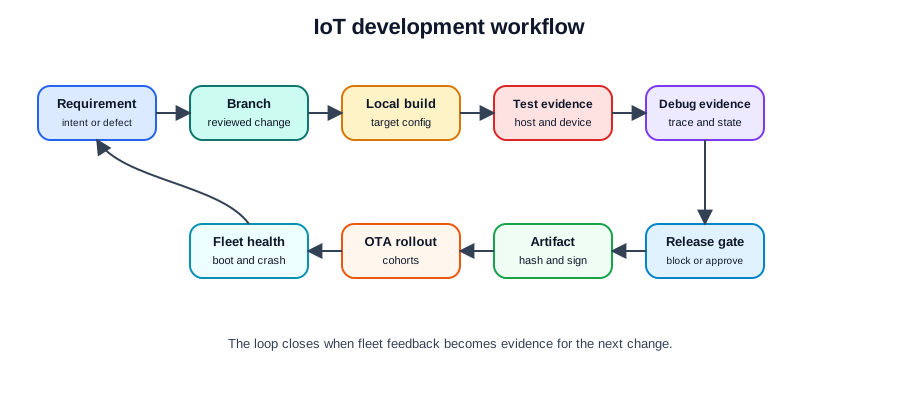
Use the workflow to answer these questions:
- What changed? Link each change to a requirement, defect, risk, or support issue.
- Who reviewed it? Keep review comments, test records, and unresolved risk decisions with the change.
- What was built? Record target hardware, configuration, dependency lock, compiler settings, and artifact hash.
- What was tested? Preserve unit, integration, hardware, power, radio, and recovery records.
- How was it released? Name release gate, signing step, rollout cohort, health signal, rollback rule, and owner.
- What did the fleet report? Confirm version, boot health, crash rate, connectivity, update success, and support impact.
Release rule: A firmware change is not ready for fleet release until a reviewer can rebuild the artifact, inspect the test record, identify the target devices, pause the rollout, and recover from a failed boot.
21.4 Toolchain Boundaries
The toolchain is a stack of responsibilities. The names of tools can change, but the responsibilities should remain visible.
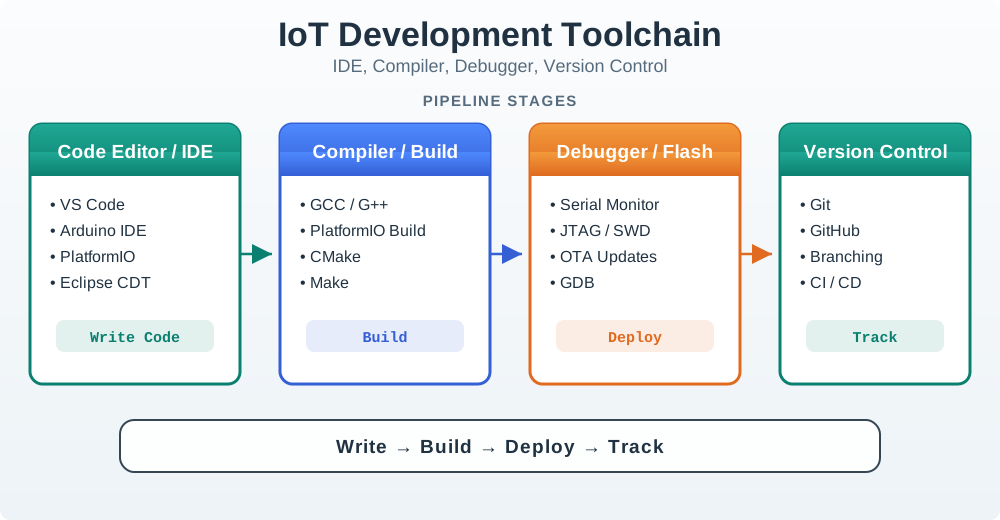
Local development
Use an editor, compiler, local build command, serial monitor, debugger, and test runner that can be repeated by another engineer.
Record board target, SDK version, dependency lock, debug flags, and expected build output.
Source control
Use branches, review, tags, and protected release paths so production firmware does not depend on a local laptop state.
Record change intent, reviewer, test evidence, release note, and artifact link.
Automated checks
Build the same target that will ship. Run static checks, unit tests, integration tests, configuration checks, and artifact inspection.
Record pass/fail state, logs, size budget, and artifact hash.
Release and fleet
Sign the artifact, publish it to the rollout system, monitor cohorts, and retain update, boot, crash, and rollback evidence.
Record cohort rule, health gate, pause owner, rollback trigger, and final fleet state.
Keep generated binaries, dependency caches, local debug output, and board-specific temporary files out of source control. Keep templates, lock files, target definitions, test fixtures, and release scripts in source control.
21.5 Debugging Record Path
Embedded failures often disappear when extra logging changes timing. The workflow should support multiple diagnostic paths instead of relying on one print log.
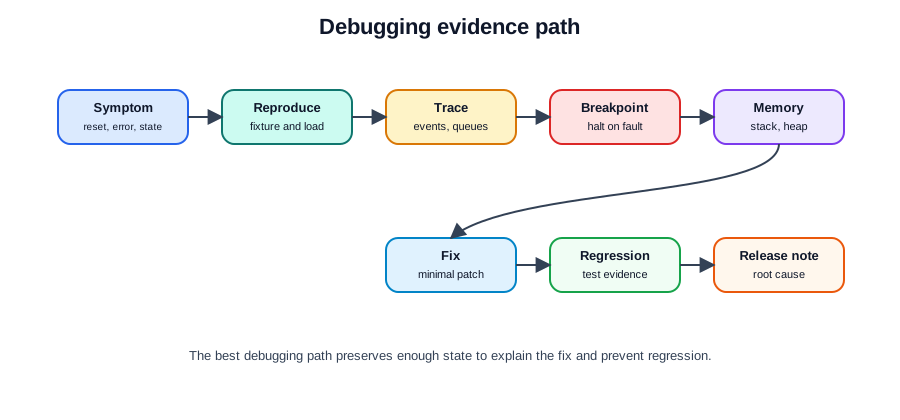
Use the least invasive diagnostic record that can answer the question:
- Symptom capture: boot reason, reset cause, error code, last state, version, device identity, and time window.
- Reproduction: test fixture, hardware revision, configuration, radio conditions, sensor input, and load pattern.
- Trace: structured logs, event counters, state transitions, queue depth, task state, and watchdog markers.
- Breakpoint and watchpoint: halt on exception, inspect stack, registers, heap, buffers, and invalid writes.
- Memory findings: stack high-water mark, heap fragmentation, allocation lifetime, buffer bounds, and leak checks.
- Fix record: root cause, minimal patch, regression test, release note, and reviewer signoff.
Do not treat “more logs” as the only debugging strategy. Logging can change timing, fill storage, drain power, or hide the race condition. Use logs with trace levels and retention limits, then switch to breakpoints, watchpoints, crash dumps, or hardware capture when the symptom requires it.
21.6 CI Release Gates
CI is useful when it rejects changes that would be unsafe, unreproducible, or unreviewable in the fleet.
Useful gates include:
- Build reproducibility: the release artifact is built from a tagged source state, target definition, and locked dependencies.
- Configuration guard: debug logging, test endpoints, unsafe credentials, development flags, and local URLs are rejected from release builds.
- Test pass: host tests, integration tests, hardware-in-the-loop checks, protocol checks, and boot checks pass for the target class.
- Artifact inspection: firmware size, partition fit, manifest fields, version string, and compatibility markers are checked.
- Signing and manifest: artifact hash, signature, target hardware, minimum compatible version, and rollback information are recorded.
- Record storage: build logs, test reports, static analysis results, artifact hash, and release notes remain linked to the release.
The workflow should fail closed. If a required gate cannot run, the release should wait for review rather than silently publishing an unverified artifact.
21.7 OTA Rollout Safety
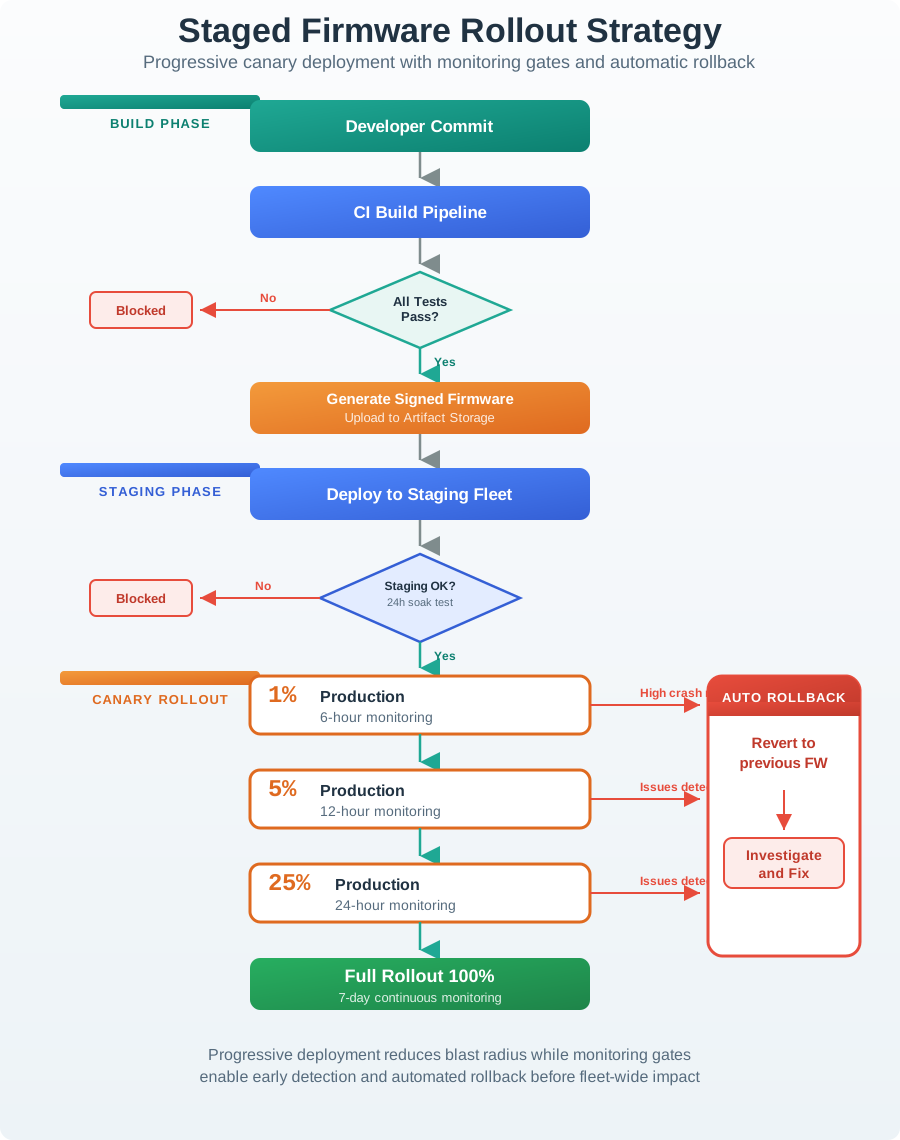
OTA is not only a transport mechanism. It is a controlled release process for devices that may be remote, battery constrained, intermittently connected, or physically hard to recover.
Safe rollout needs:
- Fleet inventory: each device reports stable identity, hardware revision, installed version, boot state, and last contact.
- Targeting: release rules select only compatible hardware, region, cohort, and dependency state.
- Staging: a small monitored group updates first, then later cohorts expand only after health gates pass.
- Health gates: boot confirmation, crash rate, watchdog resets, battery impact, connectivity, command success, and support signals.
- Rollback: dual image or equivalent recovery path, boot confirmation marker, rollback reason, and blocked-version record.
- Pause control: an owner can stop rollout when health signals degrade or support evidence changes.
OTA rollout rule: A rollout plan must explain which devices are eligible, what health signal opens the next cohort, what signal pauses the rollout, and how a device returns to the previous working image.
21.8 Cold-Room Firmware Change
A team maintains cold-room sensor gateways. A recent field report shows occasional missing compressor-state events after a reconnect. The team needs to change the firmware without breaking local alarms or losing event evidence.
21.8.1 Workflow Route
Change intake
- Link the change to the field report and affected firmware families.
- Capture version, hardware revision, reconnect timing, network state, and event sequence.
- Define success as preserved local alarm behavior and no duplicate or missing compressor-state transitions after reconnect.
Local development
- Add a reproducible reconnect test using a gateway fixture and a simulated network interruption.
- Keep device identity, retained event queue, and command freshness rules visible in logs.
- Use trace counters for reconnect attempts, replayed events, duplicate suppression, and final state.
Release Gates
- Add regression tests for event ordering, duplicate handling, and reconnect replay.
- Build release and debug configurations from the same source tag.
- Reject release if debug trace is left at a verbose level or if the replay buffer configuration is missing.
Rollout
- Release only to compatible hardware revisions.
- Start with a monitored cohort, then expand after boot health, reconnect success, alarm delivery, and event replay evidence remain acceptable.
- Keep rollback available until the fleet reports stable health across normal reconnect cycles.
21.9 Development Workflow Release Record
The workflow should end with a release record that can be used during audits, incident analysis, and future changes.
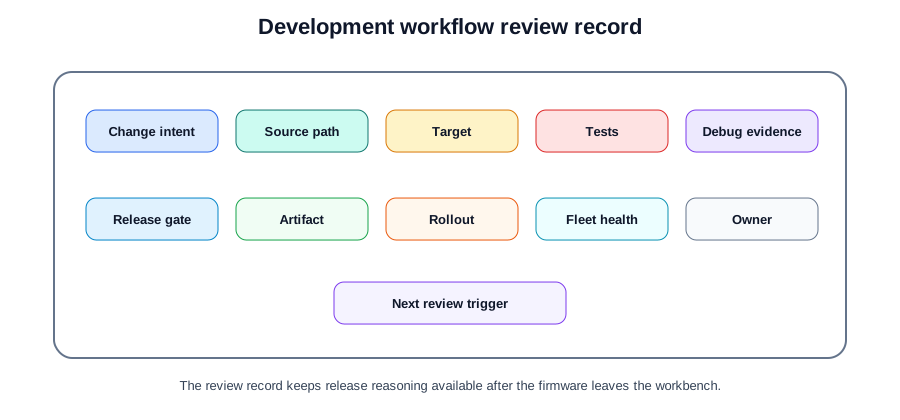
Record:
- Change intent: requirement, defect, support issue, risk, or maintenance need.
- Source path: branch, review, tag, reviewer, and unresolved decision notes.
- Target definition: board class, hardware revision, partition layout, dependencies, and configuration.
- Test records: host tests, hardware tests, protocol tests, power tests, and recovery tests.
- Debug records: crash record, trace, breakpoint finding, memory finding, and root cause.
- Release artifact: version, manifest, hash, signature, compatibility rule, and rollback data.
- Rollout record: cohort rule, health gate, pause owner, rollback trigger, and final fleet state.
- Next checkpoint: date or trigger for revisiting tooling, release gates, update safety, or fleet records.
21.10 Interaction: Workflow Release Decision
21.11 Interaction: Match The Workflow Record
21.12 Order a Safe Firmware Release
21.13 Common Pitfalls
If the release artifact depends on a developer laptop, local cache, or uncommitted setting, the team cannot reproduce the binary after an incident. Release builds should come from a reviewed source state and recorded environment.
Debug builds often include extra logs, assertions, test endpoints, and different timing. Release gates should verify the actual artifact that can reach devices.
OTA targeting is unsafe when the team cannot identify hardware revision, installed version, boot state, and last contact. Inventory is part of the release system, not an administrative side list.
A rollback design is incomplete until the team has tested boot confirmation, failed boot recovery, rollback reporting, and blocked-version handling.
21.14 Overview: Keep The Record Chain Intact
If you only need the selection shortcut, this layer is enough: a development workflow is ready when a firmware change can be rebuilt, tested, signed, rolled out, paused, rolled back, and explained from the same record chain.
For the cold-room gateway fix, the record chain starts with the field report and ends only when the affected fleet reports stable reconnect behavior. Git history, a reviewed commit SHA, the dependency lock, the target board definition, and the build command prove what was built. Hardware fixture logs, serial traces, boot records, and reconnect regression results prove what was tested. The signed firmware manifest, rollout cohort, health gate, pause owner, and rollback rule prove how the change reached devices.
The important detail is that no link should depend on memory. A teammate should be able to rebuild the same image from the tagged source, run the same PlatformIO, ESP-IDF, Zephyr, CMake, or Ninja build path, find the artifact hash, inspect the release gate, and explain which gateways were eligible. That is what turns a toolchain into engineering evidence.
Use that record chain during routine changes, not only emergencies. Small edits to reconnect timing, logging level, queue length, watchdog timeout, or certificate handling can change fleet behavior after devices sleep, lose network, or reboot under load. Treat each small edit as a future incident clue.
Build proof
Record source tag, target board, dependency lock, compiler settings, configuration guard, artifact hash, and release manifest.
Test proof
Keep host tests, hardware-in-the-loop checks, boot evidence, protocol behavior, power impact, and recovery tests with the change.
Fleet proof
Connect rollout cohort, health gate, pause owner, rollback trigger, installed version, boot state, crash rate, and support signal.
21.15 Prove Cold-Room Firmware Fix
For the reconnect replay fix, the workflow should prove more than one local pass. It should show that the team can reproduce the missing event, build the intended gateway image, gate it on representative hardware, and expand rollout only while fleet evidence remains healthy.
Make one release packet before the OTA job opens. The packet should include the issue link, reviewed branch, SDK/toolchain version, lock file, target hardware revision, release configuration, artifact hash, signature identity, manifest, and compatible-version rule. A CI system such as GitHub Actions, GitLab CI, Jenkins, or Buildkite can assemble much of this, but the workflow still needs owners for fixture availability, failed gate triage, signing-key access, and release approval.
The packet also needs debugging evidence. For this reconnect bug, keep the network-interruption fixture, retained queue state, replay counter, duplicate-suppression log, boot reason, watchdog marker, and final compressor-state sequence. If the team uses OpenOCD, J-Link, pyOCD, Segger SystemView, or vendor crash dumps, link the trace or crash record to the same change. Debug findings become useful only when they are tied to the artifact that actually ships.
When a required fixture is offline, write the exception as an owned release risk rather than hiding it in CI output. The owner should name the missing proof, compatible devices, rollout limit, monitoring window, and rollback condition before any cohort expands. This keeps temporary lab failure from becoming permanent fleet ambiguity.
Reproduction record
Capture affected version, hardware revision, reconnect timing, network interruption, retained queue state, duplicate suppression, and expected compressor event order.
Release gate record
Require reviewed source, locked dependencies, debug/release configuration checks, hardware boot test, replay regression test, size budget, signature, and artifact hash.
Rollout record
Start with compatible gateways, watch reconnect success, local alarm behavior, update success, crash rate, battery or power impact, and rollback readiness.
21.16 Why Tooling Workflows Lose Proof
The weak point is usually not the editor or test framework. The weak point is a gap between the local change, the artifact that shipped, and the fleet state after rollout.
Tooling gaps appear when each system records a different truth. The ticket says the bug is fixed, Git says a branch was merged, CI says a build passed, the OTA service says devices updated, and support says alarms still look wrong. The release record has to join those systems with stable identifiers: issue id, commit SHA, build id, artifact hash, firmware version, hardware revision, cohort id, device id, and health-window timestamp. Without those identifiers, the team cannot connect a crash report to the exact build and rollout decision that caused it.
Release gates should also distinguish transport success from product success. Mender, RAUC, SWUpdate, AWS IoT Jobs, Azure Device Update, or another OTA service can report download and install state, but the workflow still needs boot confirmation, application heartbeat, reconnect success, alarm delivery, rollback reason, and blocked-version handling. The tooling is working only when a missing hardware fixture, unsigned artifact, wrong target, failed boot check, or unhealthy cohort stops the rollout instead of becoming a note after the fact.
The practical test is simple: choose any device id and ask which source commit, binary hash, manifest, cohort, and health evidence explain its current firmware state.
- Local drift: uncommitted settings, cached dependencies, board-specific flags, or laptop-only tools produce an artifact that cannot be rebuilt later.
- Gate drift: CI builds the wrong target, skips a fixture, accepts verbose debug configuration, or stores logs without the artifact hash.
- Rollback drift: the device can download an image, but boot confirmation, failed-boot recovery, blocked-version handling, or rollback reporting was never tested.
- Fleet drift: rollout proceeds without compatible inventory, stable health signals, pause ownership, or support evidence tied back to the release.
21.17 Summary
Development workflow and tooling turn firmware change into traceable records. Keep toolchain responsibilities explicit, build from source control, debug from preserved state, run release gates automatically, sign and record artifacts, and treat OTA as a staged release with inventory, health signals, pause control, and rollback.
21.18 Key Takeaway
Development workflow should make builds, flashing, tests, debugging, reviews, and handoff repeatable so prototype evidence can survive team and device changes.
21.19 What’s Next
Continue with:
- Hardware Platform Selection for matching tooling to board, memory, power, and interface constraints.
- Serial Communication Protocols for debugging I2C, SPI, UART, and interface timing.
- Development and Tools for the broader tooling route across this part.