13  Architecture Best Practices

In 60 Seconds

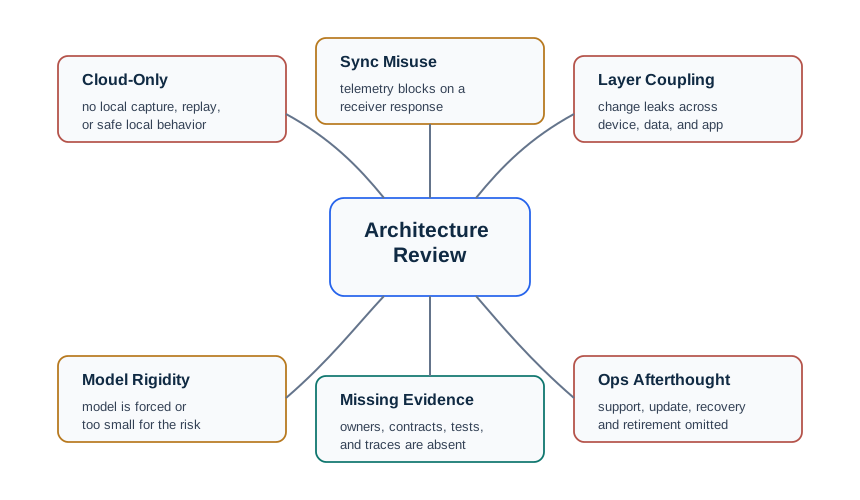
The three most common IoT architecture mistakes: cloud-only design (data loss during outages – always add edge buffering), synchronous communication for telemetry (use async MQTT instead of REST polling), and over-engineering small deployments (30 devices do not need enterprise-grade 4-layer abstraction). Design for offline-first operation.

Minimum Viable Understanding
  • Design for offline-first: always include edge buffering so data is not lost during network outages – devices should store readings locally and sync when connectivity returns.
  • Default to asynchronous communication (MQTT fire-and-forget) for sensor telemetry; use synchronous REST only for user-initiated operations where immediate feedback is expected.
  • Adapt reference architectures to your scale: a 30-device home product does not need enterprise-grade 4-layer abstraction – start with minimum viable architecture and add layers only when complexity demands it.

The Sensor Squad had made some mistakes on past missions, and they were sharing lessons learned:

Mistake 1 – No Backup Plan: “Remember when the internet went down at the farm?” said Sammy the Sensor. “I kept reading soil moisture, but Max the Microcontroller tried to send every reading to the cloud immediately. When the connection dropped, all my data was LOST!” Max learned to save readings in local memory first, then send them when the connection came back.

Mistake 2 – Waiting Too Long: Lila the LED recalled, “Max used to WAIT for the cloud to say ‘message received’ before doing anything else. If the cloud was slow, Max just stood there frozen! Now Max sends the message and keeps working – the cloud will handle it in its own time.”

Mistake 3 – Over-Engineering: Bella the Battery laughed, “Remember when they built us a four-layer enterprise architecture for a 30-sensor garden project? It was like building a highway system to connect two houses next door! We only needed a simple setup.”

Mistake 4 – Tangled Wires: Max admitted, “I used to put cloud-specific code directly in my sensor reading program. When we switched cloud providers, I had to rewrite EVERYTHING. Now I keep things separate – sensor reading in one part, cloud connection in another.”

The lesson: The biggest IoT architecture mistakes come from not planning for disconnections, waiting unnecessarily, over-complicating simple projects, and mixing different concerns together!

13.1 Learning Objectives

By the end of this chapter, you will be able to:

  • Diagnose common architecture pattern selection errors using requirement-driven analysis
  • Design systems with proper offline buffering and store-and-forward sync patterns
  • Distinguish between synchronous and asynchronous communication and select the appropriate pattern
  • Apply event-driven architecture patterns to reduce server load in IoT systems
  • Enforce clean layer boundaries to prevent tight coupling across reference architecture layers

13.2 Prerequisites

Before diving into this chapter, you should be familiar with:

  • Architecture Pitfall: A recurring mistake in IoT system design that appears reasonable during planning but leads to costly failures in production — typically around scalability, security, or maintainability.
  • Over-Engineering: Adding unnecessary complexity, redundancy, or capability to a system beyond what the requirements demand — increases cost, power consumption, and maintenance burden without proportional benefit.
  • Vendor Lock-In: Designing a system so tightly around a single vendor’s proprietary protocols or cloud platform that migration becomes prohibitively expensive — mitigated by using open standards at each layer.
  • Scalability Ceiling: The point at which a system’s architecture can no longer accommodate growth without fundamental redesign — often discovered too late when adding the 10,000th device breaks what worked with 100 devices.
  • Security Debt: Accumulated security vulnerabilities resulting from deferred security decisions — taking shortcuts in authentication or encryption during prototyping that become permanent liabilities in production.
  • Protocol Mismatch: Using a communication protocol optimized for one context in a different context — e.g., using MQTT (designed for reliable cloud messaging) for real-time control loops that require sub-10ms latency.
  • Monolithic Gateway Anti-Pattern: Designing a single gateway to handle all protocol translation, filtering, and business logic — creates a single point of failure and prevents independent scaling of each function.

13.3 For Beginners: What Are Architecture Pitfalls?

A “pitfall” is a common mistake that even experienced engineers make. In IoT architecture, the most frequent pitfalls include:

  1. Assuming the internet is always available – In reality, connections drop. Your devices need a backup plan (store data locally).
  2. Making everything wait in line – IoT devices should send data and move on, not wait for the cloud to respond before doing anything else.
  3. Using a sledgehammer for a thumbtack – Do not build complex enterprise architecture for simple projects with a few dozen sensors.
  4. Mixing everything together – Keep sensor code, communication code, and business logic separate so you can change one without breaking the others.

These pitfalls are easy to avoid once you know about them – which is why this chapter exists!

13.4 Common Misconception

Misconception: “Reference Architectures Are Just Theoretical”

What People Think: Reference architectures (ITU-T, IoT-A, WSN) are academic exercises with no practical use. Real IoT systems are too diverse to fit these models.

Reality: Reference architectures are practical decision frameworks that save significant time and money.

Real-World Evidence:

  1. Amazon AWS IoT Core follows ITU-T Y.2060 layering:
    • Device Layer: IoT Things (sensors, actuators)
    • Network Layer: MQTT/HTTP protocols
    • Service Support Layer: Device shadows, rules engine
    • Application Layer: Lambda functions, analytics
  2. Smart City Barcelona saved €58M annually using standardized IoT-A architecture that enabled:
    • Interoperability between 19 different vendor systems
    • Reusable components across traffic, parking, and lighting
    • Reduced integration costs by 60% compared to custom architectures

Let’s break down Barcelona’s €58M annual savings from standardized IoT-A architecture. The city deployed 19 different vendor systems (traffic management, parking sensors, street lighting, waste management, air quality monitors, irrigation, noise sensors, etc.).

Without reference architecture (custom integration per vendor pair):

\[N_{\text{integrations}} = \frac{19 \times 18}{2} = 171\text{ pairwise integrations}\]

Each custom integration costs ~€80,000 (6 person-months @ €50k/year + testing):

\[C_{\text{custom}} = 171 \times €80,000 = €13.7M\text{ one-time cost}\]

Annual maintenance (20% of integration cost): €13.7M × 0.20 = €2.74M/year

With IoT-A reference architecture (each vendor integrates to standard):

\[N_{\text{adapters}} = 19\text{ vendor adapters}\]

Each adapter costs ~€40,000 (standard API, 3 person-months):

\[C_{\text{IoT-A}} = 19 \times €40,000 = €760,000\text{ one-time cost}\]

Annual maintenance: €760k × 0.20 = €152k/year

Annual operational savings: €2.74M - €152k = €2.59M

Where’s the other €55.4M? Avoided costs from:

  1. Reusable components: Traffic analytics engine used for parking optimization (€8M saved)
  2. Vendor switching: Replaced 3 underperforming vendors without system-wide rewrites (€12M saved)
  3. Faster time-to-market: New service launches 60% faster (€18M opportunity cost avoided)
  4. Reduced downtime: Standardized monitoring cut outage costs by 70% (€17M saved)

ROI calculation: €58M annual savings / €760k initial investment = 76× return in first year!

  1. Industrial IoT (ISA-95) reference architecture enables:
    • Factory equipment from different vendors to communicate
    • Standard security boundaries (Purdue Model)
    • Predictable scalability patterns

Why the Misconception Persists:

  • Reference architectures seem complex initially
  • Short-term custom solutions appear faster
  • Benefits only become clear at scale (>1,000 devices)

The Truth: At small scale (<100 devices), custom architectures work fine. But beyond 1,000 devices or when integrating multiple systems, reference architectures become essential to avoid technical debt, vendor lock-in, and integration nightmares.

Practical Advice: Start with a reference architecture even for small projects. You can simplify layers initially, but maintaining the conceptual structure makes future scaling 10x easier.

13.5 Real-World Success: Barcelona Smart City

Real-World Example: Barcelona Smart City Architecture Selection

Challenge: Barcelona needed to deploy citywide IoT infrastructure serving 19 different departments (parking, lighting, waste, environment, tourism) with heterogeneous devices from multiple vendors.

Scale: 20,000+ sensors across 101 km² urban area, processing 1.8M messages/day, serving 1.6M residents

Architecture Selection Process:

  • Device Scale: 20,000+ devices → Large scale requires hierarchical architecture
  • Data Volume: 1.8M messages/day (average 21 messages/second) → Manageable with edge aggregation
  • Latency: Mixed requirements (traffic lights <1s, waste sensors >1 hour) → Multi-tier processing
  • Connectivity: Mix of LoRaWAN (80%), NB-IoT (15%), Wi-Fi (5%) → Need protocol abstraction
  • Domain: Smart City → Open standards, multi-stakeholder access, public APIs

Architecture Decision: IoT-A reference model with ITU-T Y.2060 layering

  • Why IoT-A: Multi-view architecture supports heterogeneous systems (19 departments, 50+ sensor types)
  • Device Layer: Sensors communicate via LoRaWAN/NB-IoT to 1,100 access points
  • Network Layer: Citywide fiber backbone connecting access points to 8 district data centers
  • Service Support Layer: Protocol translation (LoRaWAN → MQTT), data aggregation (80% reduction), multi-tenant access control
  • Application Layer: 19 department dashboards + public API for 3rd-party apps

Results (5 years operation):

  • Annual Savings: €58M (reduced water, energy, waste collection costs)
  • Interoperability: 19 city departments share infrastructure (vs. 19 separate systems)
  • Integration Cost: 60% reduction compared to custom architecture
  • Vendor Lock-in Avoided: Multiple vendor equipment interoperates via standard protocols
  • System Reliability: 99.7% uptime across 20,000+ devices

Key Lessons:

  1. Standards-based architecture essential at scale: Interoperability savings exceeded infrastructure costs
  2. Multi-tier processing critical: Edge aggregation reduced cloud bandwidth from 1.8M to 350K messages/day
  3. Protocol abstraction layer: Enabled mixing LoRaWAN (low power) with NB-IoT (metal structure penetration) without application changes
  4. Multi-stakeholder support: IoT-A’s multi-view architecture simplified access control (19 departments see only their data)

13.6 Common Pitfalls

13.6.1 Pitfall 1: Wrong Architecture Pattern Selection

Common Pitfall: Wrong Architecture Pattern Selection

The mistake: Choosing an architecture pattern based on familiarity or trends rather than actual system requirements, leading to over-engineered or under-capable designs.

Symptoms:

  • Cloud-centric design fails real-time requirements (<100ms latency)
  • Edge-heavy architecture creates unnecessary complexity for simple use cases
  • Massive infrastructure costs for systems that could run on simpler designs
  • Scalability issues when system grows beyond initial assumptions

Why it happens: Teams default to “cloud-first” because of familiarity with web architectures, or choose edge computing because it’s trendy, without analyzing actual latency, connectivity, and scale requirements.

The fix:

# Architecture Decision Framework
requirements:
  device_count: 5000
  latency_critical: "<50ms for safety sensors"
  latency_tolerant: "5s for quality metrics"
  connectivity: "reliable factory ethernet"

decision:
  # Multiple latency requirements -> multi-tier architecture
  safety_sensors: "Edge tier (local PLC controllers)"
  quality_metrics: "Fog tier (factory server)"
  analytics: "Cloud tier (enterprise dashboards)"

Prevention: Use the architecture selection framework systematically. Map each use case to latency, scale, and connectivity requirements. Start simple and add tiers only when requirements demand them.

Try It: Architecture Tier Selector

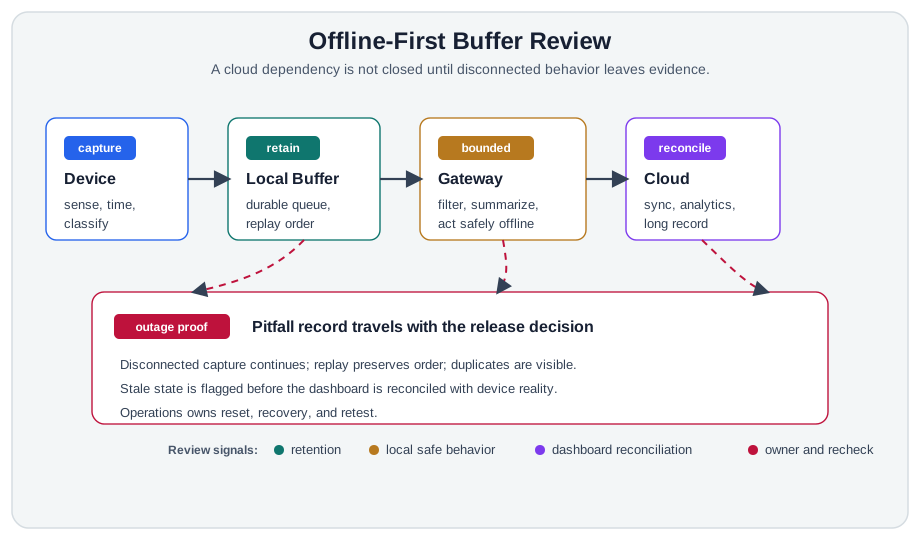
13.6.2 Pitfall 2: Missing Edge Buffer for Offline Operation

Common Pitfall: Missing Edge Buffer for Offline Operation

The mistake: Designing systems that depend on continuous cloud connectivity, losing all data during network outages.

Symptoms:

  • Complete data loss during internet disconnections
  • Missing critical readings from outage periods
  • Gaps in historical data affecting analytics and compliance
  • Devices become useless when cloud is unreachable

Why it happens: Development and testing occur in environments with reliable connectivity. Teams don’t simulate network failures or test offline scenarios.

The fix:

# Implement local buffering with sync-on-reconnect
class EdgeBuffer:
    def __init__(self, max_size=10000):
        self.buffer = collections.deque(maxlen=max_size)
        self.persistent_path = "/data/offline_buffer.json"

    def store_reading(self, reading):
        self.buffer.append(reading)
        if len(self.buffer) % 100 == 0:  # Periodic persistence
            self.persist_to_disk()

    def sync_when_connected(self, cloud_client):
        while self.buffer and cloud_client.is_connected():
            batch = [self.buffer.popleft() for _ in range(min(100, len(self.buffer)))]
            try:
                cloud_client.send_batch(batch)
            except NetworkError:
                for item in reversed(batch):  # Re-queue on failure
                    self.buffer.appendleft(item)
                break

Prevention: Design for “offline-first” operation. Include local storage capacity in hardware requirements. Test with simulated network failures. Implement graceful degradation.

Try It: Edge Buffer Capacity Calculator

13.6.3 Pitfall 3: Sync vs Async Communication Confusion

Common Pitfall: Sync vs Async Communication Confusion

The mistake: Using synchronous request-response patterns for operations that should be asynchronous, causing timeouts, blocking, and poor scalability.

Symptoms:

  • API timeouts when cloud is slow or unreachable
  • Device firmware hangs waiting for cloud responses
  • Poor scalability as devices block on responses
  • Battery drain from maintaining open connections

Why it happens: Web development experience leads teams to use REST/HTTP patterns everywhere. Synchronous patterns feel simpler during prototyping.

The fix:

# BAD: Synchronous pattern blocks device
def send_reading_sync(reading):
    response = http.post(cloud_url, reading)  # Blocks!
    if response.status != 200:
        retry()  # Still blocking

# GOOD: Asynchronous fire-and-forget with local buffer
def send_reading_async(reading):
    local_buffer.append(reading)  # Non-blocking
    mqtt_client.publish("readings", reading, qos=1)
    # Don't wait for response - MQTT handles delivery

# GOOD: Command pattern with async responses
def handle_command(cmd):
    # Acknowledge receipt immediately
    mqtt_client.publish(f"commands/{cmd.id}/ack", "received")

    # Process asynchronously
    result = process_command(cmd)

    # Send result when ready (could be seconds later)
    mqtt_client.publish(f"commands/{cmd.id}/result", result)

Prevention: Use message queues (MQTT, AMQP) for device-to-cloud communication. Reserve synchronous calls for configuration and provisioning only. Design command-response patterns with separate topics for acks and results.

Try It: Sync vs Async Throughput Simulator
Minimum Viable Understanding: Asynchronous Communication Patterns

Core Concept: Asynchronous communication allows IoT devices to send messages without waiting for immediate responses, using patterns like fire-and-forget (telemetry), request-acknowledge-result (commands), and event sourcing (audit trails) - enabling systems where producers and consumers operate independently.

Why It Matters: Synchronous HTTP requests block device operation until the server responds, draining batteries on connection timeouts and causing cascading failures when clouds are slow. Asynchronous patterns (MQTT QoS 1/2) let devices continue sensing while messages queue locally, automatically retrying delivery when connectivity returns, and decoupling device uptime from cloud availability.

Key Takeaway: Default to asynchronous fire-and-forget (MQTT QoS 0/1) for sensor telemetry - it handles 95% of IoT traffic. Use synchronous REST only for user-initiated operations (device configuration, firmware check) where the user expects immediate feedback. For device commands, implement async acknowledgment: device receives command, immediately publishes ACK, processes command, then publishes result.

13.6.4 Pitfall 4: Reference Architecture Rigidity

Common Pitfall: Reference Architecture Rigidity

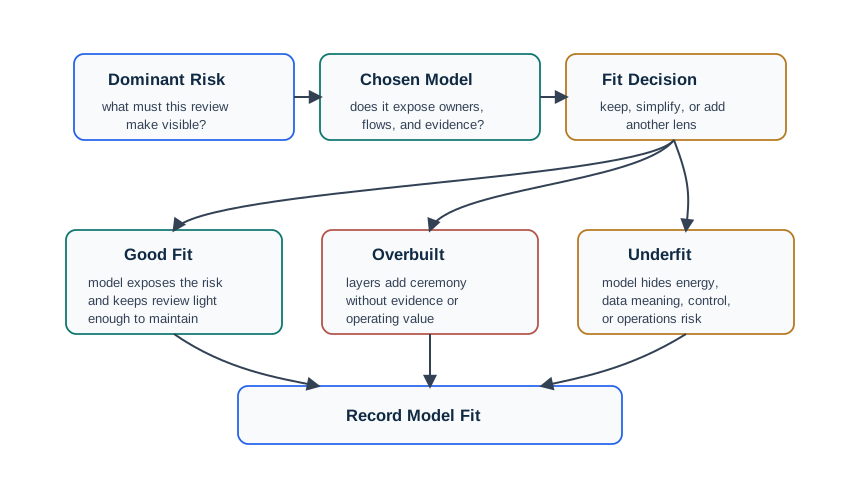
The mistake: Following a reference architecture too strictly when your actual constraints differ significantly from the assumed design context, leading to over-engineered or poorly-fitting solutions.

Symptoms:

  • Implementing layers that add no value for your use case (e.g., fog tier for 10 devices)
  • Forcing data through unnecessary protocol translations
  • Adding complexity to match reference model structure rather than solve problems
  • Architecture diagrams match the reference perfectly but implementation is awkward

Why it happens: Reference architectures are templates, not mandates. Teams treat them as rigid blueprints rather than flexible guidelines. ITU-T Y.2060 assumes telecom-scale deployments; applying it to a 50-sensor agricultural deployment adds unnecessary abstraction.

The fix:

# Architecture Adaptation Checklist
reference_model: "ITU-T Y.2060 (4-layer)"

adaptation_analysis:
  device_layer:
    reference: "Sensor gateway sub-layers"
    your_need: "Direct sensor-to-cloud (Wi-Fi sensors)"
    decision: "Skip gateway sub-layer - sensors have IP connectivity"

  network_layer:
    reference: "Multiple network domains and gateways"
    your_need: "Single Wi-Fi network, reliable connectivity"
    decision: "Simplify to direct Wi-Fi-to-internet path"

  service_layer:
    reference: "Generic/specific support capabilities"
    your_need: "Simple data storage and alerting"
    decision: "Use managed cloud services, skip custom middleware"

  application_layer:
    reference: "Industry-specific applications"
    your_need: "Dashboard and mobile alerts"
    decision: "Implement as specified - matches our needs"

result: "2-tier architecture (devices + cloud) instead of 4-tier"
justification: "Scale (50 devices), reliable connectivity, simple use case"

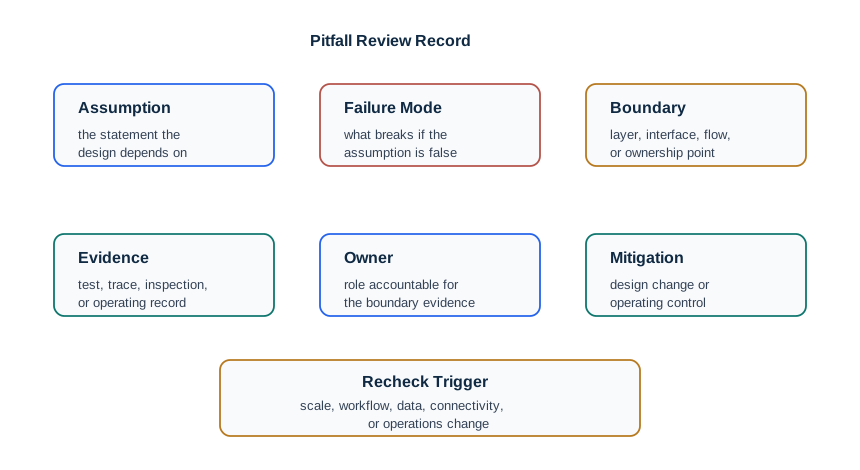
Prevention: Document why you’re adopting or skipping each layer. Reference architectures provide vocabulary and best practices, not mandatory structure. Start with minimum viable architecture and add layers only when specific problems demand them.

Try It: Architecture Scale Evaluator

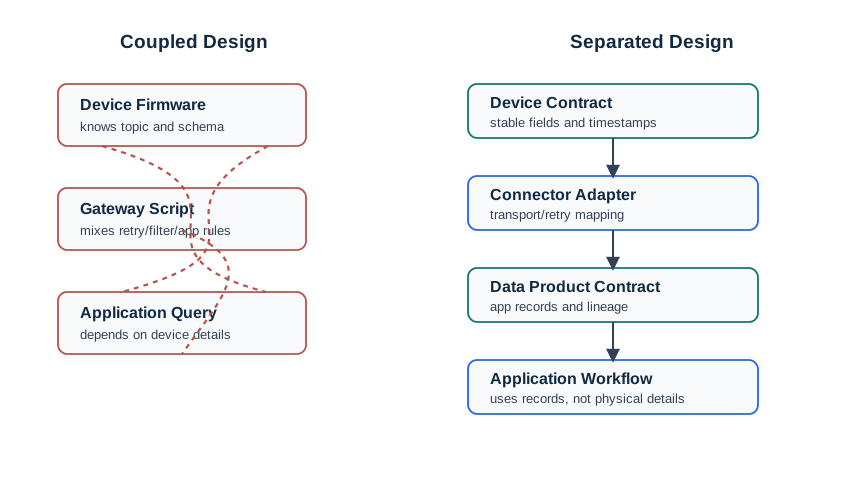
13.6.5 Pitfall 5: Layer Boundary Violation

Common Pitfall: Layer Boundary Violation

The mistake: Allowing tight coupling between layers that should be independent, making the system fragile to changes and difficult to evolve.

Symptoms:

  • Changing a sensor requires modifying cloud application code
  • Protocol upgrades (MQTT v3 to v5) cascade through all layers
  • Device firmware contains business logic that belongs in applications
  • Database schema changes break edge device functionality

Why it happens: Shortcuts during development blur layer boundaries. Teams embed protocol-specific details in business logic, hard-code device IDs in analytics, or put cloud URLs directly in firmware. Initially faster, but creates technical debt.

The fix:

# BAD: Tight coupling across layers
class SensorDevice:
    def read_temperature(self):
        temp = self.sensor.read()
        # Business logic in device layer!
        if temp > 30:
            alert = "HIGH_TEMP"
        # Cloud-specific formatting in device!
        payload = f'{{"device":"{self.aws_thing_name}","temp":{temp},"alert":"{alert}"}}'
        # Protocol details embedded!
        self.mqtt.publish("arn:aws:iot:us-east-1:123456:topic/temps", payload)

# GOOD: Clean layer separation
class SensorDevice:
    def read_temperature(self):
        return {"value": self.sensor.read(), "unit": "celsius", "timestamp": time.time()}

class EdgeGateway:
    def process(self, reading):
        # Edge layer handles local decisions
        return self.normalizer.transform(reading)

class CloudConnector:
    def __init__(self, config):
        # Configuration-driven, not hard-coded
        self.topic = config.get("telemetry_topic")
        self.formatter = config.get("payload_format")

    def send(self, data):
        payload = self.formatter.encode(data)
        self.transport.publish(self.topic, payload)

Prevention: Define clear interfaces between layers using abstract contracts (schemas, APIs). Use dependency injection and configuration for layer-specific details. Test layers independently with mock implementations of adjacent layers. Review architecture for “shotgun surgery” anti-pattern (one change requires edits across multiple layers).

13.7 Event-Driven Architecture Pattern

13.8 API Gateway Pattern

Minimum Viable Understanding: API Gateway Pattern for IoT

Core Concept: An API gateway is a single entry point that sits between IoT devices/applications and backend services, handling authentication, rate limiting, protocol translation, request routing, and response aggregation - acting as a reverse proxy that shields internal microservices from direct external access.

Why It Matters: IoT deployments often expose multiple backend services (device registry, telemetry storage, command dispatch, analytics). Without an API gateway, each service needs its own authentication, rate limiting, and versioning logic. The gateway centralizes these cross-cutting concerns, enabling backend services to focus on business logic while presenting a unified, versioned API to devices and applications.

Key Takeaway: Deploy an API gateway (AWS API Gateway, Kong, or cloud-native alternatives) when you have 3+ backend services or 1,000+ devices. Route device telemetry through message brokers (MQTT), not the API gateway, to avoid HTTP overhead. Reserve the gateway for REST operations: device provisioning, configuration updates, and dashboard queries.

13.10 Summary

IoT reference architectures provide proven patterns for system design. Avoiding common pitfalls requires:

Key Concepts:

  • Reference Architectures: Standardized frameworks defining layers, components, and interactions
  • ITU-T Y.2060: International standard with device, network, service, and application layers
  • IoT-A: Comprehensive European framework with functional, information, and deployment views
  • WSN Architecture: Sensor-network-focused model emphasizing energy efficiency and routing
  • Scale-Driven Selection: Device count fundamentally shapes architectural choices
  • Latency-Processing Trade-off: Response time requirements determine edge vs cloud processing
  • Domain-Specific Adaptations: Industry requirements guide reference model selection

Pitfall Prevention:

  1. Match architecture to requirements - don’t follow trends or familiarity
  2. Design for offline-first - always include edge buffering
  3. Default to async - use sync only for user-initiated operations
  4. Adapt, don’t copy - reference architectures are guidelines, not mandates
  5. Maintain layer boundaries - avoid tight coupling across layers

13.11 Concept Relationships

Concept Relationship Connected Concept
Offline-First Design Prevents Data loss during network outages by buffering locally before cloud sync
Edge Buffer Enables Resilient operation where devices store 10,000+ readings during 72-hour outages
Asynchronous Communication Avoids Device firmware hangs waiting for cloud responses (fire-and-forget MQTT)
Layer Boundary Violation Creates Tight coupling where cloud provider changes require firmware updates to 1,000s of devices
Reference Architecture Rigidity Causes Over-engineering (e.g., 4-layer architecture for 30-device home product)
Event-Driven Architecture Reduces Server load 30× by pushing events only on changes vs polling every second
API Gateway Pattern Centralizes Authentication, rate limiting, and routing for 5+ backend microservices

13.12 See Also

Architecture Foundations:

Implementation Patterns:

Avoiding Mistakes:

13.13 Comprehensive Quiz

13.14 Understanding Checks

Scenario: A smart factory has 2,000 sensors monitoring 50 production machines. Critical safety sensors must respond within 20ms (emergency stop). Quality monitoring sensors report every 10 seconds. Predictive maintenance analyzes historical data weekly. The factory has 100 Mbps local network and 10 Mbps internet to cloud.

Think about:

  1. Should safety, quality, and predictive maintenance use the same processing tier (edge, fog, or cloud)?
  2. How do latency and bandwidth constraints drive your architecture?
  3. What happens if internet connection fails?

Key Insight: Multi-tier architecture is essential—different requirements demand different processing locations. Safety sensors (20ms) must use edge/PLC. Quality sensors (10s) can use fog. Predictive maintenance uses cloud. Internet failure: edge/fog continue, predictive maintenance delayed.

Scenario: A startup is building a consumer smart home product (thermostat, lights, door locks). They plan to sell 100,000 units over 5 years. They must decide between: (A) Custom proprietary architecture optimized for their specific devices, or (B) Standards-based architecture (Matter/Thread) for interoperability.

Think about:

  1. What are the short-term benefits of custom architecture (faster time-to-market, optimized performance)?
  2. What are the long-term risks (vendor lock-in, integration challenges)?
  3. How does the 100,000-unit scale and 5-year timeline affect your decision?

Key Insight: Standards-based architecture (Matter/Thread) is strongly recommended. Short-term delay (3-6 months) is offset by: 60% of buyers prefer interoperable systems ($12M revenue risk), $2.5M maintenance savings over 5 years from community-maintained standards.

13.15 Worked Example: Architecture Pitfall Post-Mortem for a Failed Smart Building

Worked Example: Why a $2.1M Smart Office Deployment Failed in Year 2

Scenario: A real estate developer deployed a “smart building” system across a 15-story, 800-employee office tower. The system included 2,400 sensors (occupancy, temperature, lighting, air quality), a cloud-only architecture (AWS IoT Core), and a vendor-specific dashboard. After 18 months, the system was switched off. Post-mortem analysis identified three architectural pitfalls.

Pitfall 1: Cloud-Only Architecture for Latency-Sensitive HVAC Control

Design Choice Consequence
All sensor data sent to AWS IoT Core 2,400 sensors x 1 reading/min = 40 msg/sec to cloud
Cloud rule engine evaluates HVAC thresholds Round-trip latency: 200-800 ms (acceptable)
Internet outage on month 6 (ISP fiber cut, 4 hours) Zero HVAC control for 4 hours. Building reached 31 degrees C. 200 employees left early.
Cost of outage $45,000 (lost productivity) + $12,000 (emergency portable AC rental)
What should have been done Edge gateway per floor with local threshold logic. Cloud for analytics only. Edge cost: $3,200 (16 Raspberry Pi gateways).

Pitfall 2: No Data Abstraction Layer (Level 5 Missing)

Design Choice Consequence
Occupancy sensors from Vendor A (PIR-based, binary occupied/empty) Building management asked: “How many people are on Floor 7 right now?”
Temperature sensors from Vendor B (Celsius, 0.1 degree resolution) Energy team asked: “What’s the heating cost per employee?”
No semantic layer to combine occupancy + temperature + energy data Each cross-domain query required custom SQL written by a $150/hr consultant
12 custom queries in year 1 $28,800 in consulting fees for queries that should have been self-service
What should have been done Data abstraction layer (e.g., Brick Schema ontology) mapping all sensors to a common building model. One-time setup: $15,000. All future queries self-service.

Pitfall 3: Vendor Lock-In Without Exit Strategy

Design Choice Consequence
Vendor-specific dashboard (3-year contract, $8,000/month) $288,000 total contract
Vendor discontinued the product in month 14 6-month sunset notice. No API for data export.
Data migration to replacement platform $85,000 (consultant to reverse-engineer data format + rebuild dashboards)
What should have been done Required open API (REST/MQTT) in contract. Used standards-based platform (e.g., ThingsBoard, Home Assistant). Migration cost would have been <$5,000 with standard data formats.

Total Cost of Architectural Pitfalls:

Category Avoidable Cost
HVAC outage (cloud-only, no edge) $57,000
Missing data abstraction layer $28,800 (year 1 alone)
Vendor lock-in migration $85,000
Total avoidable cost $170,800 (on a $2.1M project = 8.1% waste)

The fix that worked: In the redesign (year 3), the team added floor-level edge gateways ($3,200), deployed Brick Schema for semantic mapping ($15,000), and migrated to an open-source platform ($20,000). Total fix: $38,200 – preventing $170,800+ in recurring costs. The lesson: spending 2% more upfront on architecture prevents 8%+ in avoidable failures.

13.17 What’s Next

If you want to… Read this
Review complete reference architecture concepts IoT Reference Architectures
Select the right architecture for your use case Architecture Selection Framework
Study a complete worked example Smart Building Worked Example
Learn production architecture management Production Architecture Management
Test your knowledge with a quiz IoT Architecture Quiz