2 Privacy and Security
Protecting IoT Systems from Device to Cloud
Learning Objectives
After completing this part, you will be able to:
- Explain why traditional IT security approaches fail for IoT and apply defense-in-depth strategies
- Implement authentication, authorization, and encryption mechanisms appropriate for resource-constrained devices
- Apply threat modeling frameworks (STRIDE, OWASP IoT Top 10) to identify and prioritize IoT security risks
- Design privacy-preserving IoT architectures that meet GDPR and regulatory compliance requirements
2.1 Part Overview
Security in IoT is fundamentally different from traditional IT security because IoT devices directly interact with the physical world, making security failures potentially life-threatening. A compromised smart home lock is not just data loss – it is physical access. A hacked insulin pump or cardiac device can cause direct harm. This comprehensive part covers the entire security landscape from zero-trust architecture through encryption, authentication, threat modeling, and privacy-preserving techniques.
You will learn why traditional IT security approaches fail for IoT (devices cannot always be patched, have minimal compute resources, and operate for years), and master the defense-in-depth strategies that protect production systems. Through real case studies – including the Mirai botnet (300,000+ compromised devices) and the Jeep Cherokee hack (remote control via infotainment system) – you will understand how attacks happen and how to prevent them.
What makes this part unique: We focus on practical security that works within IoT constraints. Every security mechanism includes concrete implementation guidance (code examples, configuration snippets), cost-benefit analysis (security versus usability), and real-world validation through labs. You will design systems that meet NIST, OWASP, and GDPR requirements while remaining usable and maintainable.
2.2 Learning Paths
Beginner Path
Start Here: New to IoT security
- Security Foundations (2h)
- Security Architecture Overview (2h)
- Common Threats & Attacks (2h)
- Privacy Fundamentals (2h)
- Basic Encryption Concepts (2h)
Time: ~10 hours
Intermediate Path
Prerequisites: Security basics, networking
- Zero-Trust Architecture (4h)
- Authentication & Access Control (4h)
- Encryption Implementation (5h)
- Threat Modeling (STRIDE) (3h)
- Device & Network Security (4h)
Time: ~20 hours
Advanced Path
Prerequisites: Crypto, threat modeling
- Privacy-by-Design Patterns (4h)
- Advanced Encryption (E1-E5 levels) (5h)
- Security Frameworks (NIST, OWASP) (3h)
- Mobile Privacy Analysis (3h)
- Compliance (GDPR, CCPA) (3h)
Time: ~18 hours
2.3 Visual Topic Map
2.4 Key Topics & Sub-Sections
2.4.1 Security Foundations
Core Chapters
- Security Overview - Master index with chapter structure
- Security Foundations - CIA triad, real-world incidents (Mirai, Jeep hack)
- Security Architecture - Three-layer model (device, network, cloud)
- Security Frameworks - OWASP, NIST, ETSI standards
- Security-by-Design Principles - Build security in from start
- Security Case Studies - Mirai botnet, smart grid success stories
- Security Practice Labs - Hands-on security audits
Quick Win: Start with Security Foundations – understand the CIA triad in 45 minutes
Key Insight: Most IoT breaches exploit basic security failures (default passwords, no encryption) that cost less than $1 per device to prevent
2.4.2 Zero-Trust Architecture
Core Chapters
- Zero-Trust Fundamentals - “Never trust, always verify” principle
- Zero-Trust Architecture - Micro-segmentation, continuous verification
- Zero-Trust Device Identity - Device attestation and certificates
- Zero-Trust Implementation - Step-by-step deployment guide
- Zero-Trust Network Segmentation - Isolate IoT from IT networks
Quick Win: Use Zero-Trust Policy Builder – interactive game with 12 scenarios
Key Insight: Traditional perimeter security fails for IoT because devices are deployed in untrusted physical environments. Zero-trust limits breach impact through segmentation
Tools: Zero-Trust Simulator, Comparison Tool
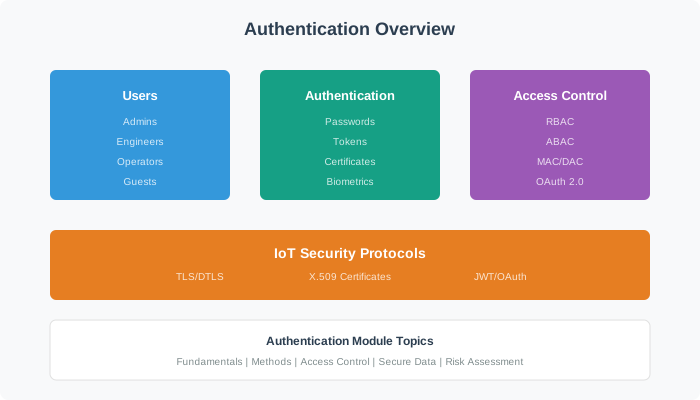
2.4.3 Authentication & Access Control
Core Chapters
- Authentication & Access Control Overview - Master index
- Auth Fundamentals - Authentication factors, MFA
- Auth Concepts - PKI, certificates, tokens
- Auth Advanced - OAuth2, JWT, hardware security modules
- Auth Challenges - Scalability, key distribution
Quick Win: Jump to Cyber Security Authentication for practical implementations
Key Insight: Multi-factor authentication reduces account takeover by 99.9% but adds deployment complexity for resource-constrained IoT devices
2.4.4 Encryption & Cryptography
Core Chapters
- Encryption Principles - Symmetric vs asymmetric, hashing
- Symmetric Encryption - AES implementation details
- Asymmetric Encryption - RSA, ECC for IoT
- TLS/DTLS - Secure transport layer protocols
- E1-E5 Multi-Layer Encryption - Link, network, transport, app, key renewal
- Key Management - Generation, storage, rotation, revocation
- Encryption Labs - Hands-on AES, RSA implementation
Quick Win: Start with Hash Functions for a simple introduction to SHA-256 and HMAC
Key Insight: E1-E5 multi-layer encryption protects even if one layer is compromised (defense-in-depth)
Security Levels:
- E1: Link-layer (Zigbee AES-128)
- E2: Device-to-gateway (DTLS)
- E3: Gateway-to-cloud (TLS)
- E4: End-to-end application encryption
- E5: Key renewal and rotation
2.4.5 Threats, Attacks & Vulnerabilities
Core Chapters
- Threats Overview - Master index
- Threats Introduction - Common attack vectors
- OWASP Top 10 - IoT-specific vulnerabilities (weak passwords, insecure network, etc.)
- STRIDE Framework - Threat modeling methodology
- Threat Modeling - Building attack trees
- Attack Scenarios - Step-by-step real exploits
- Threat Lab - Hands-on vulnerability assessment
Quick Win: See Attack Visualization Suite for interactive attack demos
Key Insight: STRIDE categorizes threats into six types: Spoofing, Tampering, Repudiation, Information Disclosure, Denial of Service, and Elevation of Privilege
Tools: Security Posture Assessment
2.4.6 Privacy & Compliance
Core Chapters
- Privacy Introduction - Privacy fundamentals
- Privacy Principles - Data minimization, purpose limitation
- Privacy Regulations - GDPR, CCPA, PIPEDA comparison
- Privacy-by-Design - 7 foundational principles
- Privacy Techniques - Anonymization, k-anonymity, differential privacy
- GDPR Compliance - Right to erasure, data portability
- Mobile Privacy - Location tracking, sensor data leakage
Quick Win: Use Privacy Compliance Checker to assess GDPR readiness
Key Insight: Privacy-by-design costs significantly less than retrofitting privacy compliance after launch
Compliance Examples:
- GDPR: Up to 20M EUR or 4% of annual global revenue for violations (WhatsApp fined 225M EUR in 2021)
- CCPA: $7,500 per violation for intentional breaches
- UK PSTI Act: Bans default passwords, requires vulnerability disclosure
Tools: Privacy Compliance Game, Privacy-Preserving Flow
2.5 Popular Chapters (Start Here!)
| Chapter | Why Start Here | Time | Difficulty |
|---|---|---|---|
| Security Foundations | CIA triad + real incidents (Mirai, Jeep) with executive summary | 45 min | Beginner |
| OWASP IoT Top 10 | Learn the 10 most common IoT vulnerabilities with examples | 30 min | Beginner |
| Zero-Trust Fundamentals | Modern security model: “never trust, always verify” | 35 min | Intermediate |
| Zero-Trust Policy Builder | Interactive game: 12 scenarios, policy categories, attack simulation | 45 min | Intermediate |
| Encryption Principles | AES, RSA, hashing – crypto fundamentals for IoT | 40 min | Intermediate |
| Mirai Botnet Case Study | How 300,000+ devices were compromised with default passwords | 35 min | All levels |
| STRIDE Threat Modeling | Systematic threat identification framework | 30 min | Intermediate |
| Privacy-by-Design | 7 principles for building privacy into systems from the start | 40 min | Intermediate |
2.6 Interactive Learning Tools
This part includes 25+ interactive simulations and tools:
Security Architecture
- Zero-Trust Simulator - Design and test zero-trust policies
- Zero-Trust Policy Builder - 12-scenario game with attack simulation
- Network Segmentation Visualizer - VLAN design for IoT
Threat Analysis
- Security Posture Assessment - Evaluate system security
- Attack Visualization Suite - See how attacks work
- Attack Mitigations Reference - Countermeasures database
Privacy Tools
- Privacy Compliance Checker - GDPR, CCPA assessment
- Privacy Compliance Game - Learn regulations through scenarios
- Privacy-Preserving Flow - Anonymization techniques
Wokwi Security Labs (10+ labs)
- AES encryption implementation
- RSA key generation and signing
- Secure boot sequence
- TLS/DTLS handshake
- Certificate validation
2.7 Estimated Time to Complete
2.7.1 Full Part Completion
| Track | Chapters | Labs | Interactive Tools | Assessments | Total Time |
|---|---|---|---|---|---|
| Beginner Track | 20 chapters | 3 basic labs | 6 tools | 2 quizzes | ~25 hours |
| Intermediate Track | 45 chapters | 7 labs | 15 tools | 5 assessments | ~50 hours |
| Advanced Track | All 120 chapters | All 10+ labs | All 25+ tools | All assessments | ~95 hours |
2.7.2 Quick Learning Options
Weekend Sprint (10 hours):
- Security Foundations (3h)
- Zero-Trust Architecture (3h)
- Encryption Basics (2h)
- Threat Modeling (2h)
One-Week Intensive (25 hours):
- Complete Beginner Path (10h)
- 5 Interactive Labs (8h)
- Case Studies & Reviews (7h)
Professional Mastery (3 months, 10h/week):
- All learning paths (48h)
- All labs and tools (28h)
- Compliance project (security audit) (14h)
2.8 Learning Outcomes
By completing this part, you will be able to:
Foundation Skills
- Explain the CIA triad and why IoT security is fundamentally different from IT security
- Identify attack surfaces across device, network, and cloud layers
- Apply the OWASP IoT Top 10 to prevent common vulnerabilities
- Understand zero-trust architecture and the “never trust, always verify” principle
Practical Implementation
- Design multi-layer encryption (E1-E5) for IoT communications
- Implement authentication systems with PKI, certificates, and MFA
- Build network segmentation with VLANs to isolate IoT devices
- Configure secure boot and hardware root of trust on IoT devices
- Apply STRIDE framework for systematic threat modeling
- Implement key management (generation, storage, rotation, revocation)
Advanced Capabilities
- Design privacy-by-design systems following 7 foundational principles
- Achieve GDPR, CCPA, and NIST compliance
- Build zero-trust architectures with micro-segmentation and continuous verification
- Implement advanced privacy techniques (k-anonymity, differential privacy)
- Conduct security audits using OWASP, NIST, and ETSI frameworks
- Debug cryptographic issues (key distribution, certificate validation, timing attacks)
Decision-Making
- Choose between symmetric (AES) and asymmetric (RSA, ECC) encryption based on device constraints
- Evaluate security versus usability trade-offs for IoT deployments
- Calculate security costs (e.g., AES-128 adds 2-5 ms latency, under 5% power overhead on ESP32)
- Select authentication methods (certificates versus tokens versus biometrics) for different scenarios
- Apply lessons from real-world incidents including the Mirai botnet and Jeep Cherokee hack
2.9 Prerequisites
Before starting this part, ensure familiarity with:
Essential
- Basic networking concepts (TCP/IP, firewalls, VPNs)
- Programming in any language (for crypto implementations)
- Understanding of data structures and algorithms
- Binary/hexadecimal number systems
Helpful but Not Required
- Networking Fundamentals - Network security context
- IoT Architecture - Where security fits
- Data Management - Securing data pipelines
Mathematics
- Basic probability (for understanding cryptographic strength)
- Modular arithmetic (for RSA understanding)
- Binary operations (XOR, shifts for crypto)
2.10 What’s Next
After completing Privacy and Security:
Immediate Next Steps
- System Architecture - Integrate security into designs
- Design Strategies - Build secure prototypes
- Human Factors - Balance security and usability
Related Advanced Topics
- Network Segmentation - Advanced VLAN design
- Secure OTA Updates - Firmware update security
- Hardware Security - Physical attack mitigation
2.11 Real-World Impact: Case Studies
Mirai Botnet (2016)
- Attack: 300,000+ IoT devices compromised using 61 default username/password combinations
- Impact: 1 Tbps DDoS attack against Dyn DNS, taking major services (Twitter, Netflix, Reddit) offline
- Root Cause: Weak default passwords with no mechanism for security updates
- Lesson: Default passwords must be banned – the UK PSTI Act (2024) now mandates unique passwords per device
Jeep Cherokee Hack (2015)
- Attack: Remote takeover via unprotected CAN bus accessed through the infotainment system
- Impact: 1.4 million vehicle recall by Fiat Chrysler
- Root Cause: No network segmentation between entertainment and safety-critical vehicle systems
- Lesson: Network segmentation is critical – always isolate safety-critical systems from non-critical ones
St. Jude Pacemaker Vulnerability (2017)
- Attack: 465,000 pacemakers recalled due to remote exploitation vulnerabilities discovered by security researchers
- Impact: FDA recall requiring patients to visit hospitals for firmware updates
- Root Cause: Weak encryption and no mutual authentication between device and programmer
- Lesson: Medical IoT requires hardware security modules, secure boot, and mutual authentication
Smart Grid Success Story
- Scale: 50 million smart meters deployed with security-by-design
- Security: Multi-layer encryption (E1-E5), zero-trust architecture, hardware root of trust
- Results: Zero major breaches over 10+ years of operation, 99.99% uptime
- Cost: Security added under $2 per device (approximately 2% of total device cost)
- Lesson: Investing in security from the start is far more cost-effective than retrofitting
2.12 Support Resources
Quick References
- OWASP Top 10 Cheat Sheet - Vulnerability checklist
- Encryption Level Guide - When to use E1-E5
- Security Framework Comparison - NIST vs OWASP vs ETSI
Practice Materials
- Security Practice Labs - 3 hands-on security audits
- Exam Preparation Guide - Key concepts and practice problems
- Encryption Labs - Implement AES, RSA, TLS
Decision Frameworks
- Zero-Trust Policy Builder - Interactive policy designer
- Privacy Compliance Checker - GDPR/CCPA assessment
- Security Posture Assessment - System evaluation
2.13 Start Your Journey
Ready to begin? Choose your path:
Active Learning Approach
- Read security concepts (25%)
- Study real attack case studies (25%)
- Use threat modeling tools (25%)
- Complete hands-on security labs (25%)
Recommended Study Pattern
- Session 1 (2h): Read chapter + case study
- Session 2 (1h): Complete interactive tool
- Session 3 (1.5h): Hands-on security lab (encryption, auth)
- Session 4 (30m): Threat modeling exercise
Common Pitfalls to Avoid
- Do not skip the fundamentals – the CIA triad is foundational to everything else
- Practice threat modeling early – it changes how you design systems
- Test encryption implementations thoroughly – subtle bugs create vulnerabilities
- Study real attacks (Mirai, Jeep Cherokee) – learn from actual failures
Pro Tips
- Keep an OWASP Top 10 checklist for every project
- Build a threat model template using STRIDE
- Join security communities (OWASP, ISSA)
- Document your security decisions and trade-offs
- Practice zero-trust policy design on paper first
Security Calculation Practice
- Encryption overhead: AES-128 adds 2-5 ms latency, under 5% power on ESP32 – acceptable for most IoT
- Key size trade-off: AES-256 is approximately 40% slower than AES-128 but provides stronger long-term security
- MFA benefit: Reduces account takeover by 99.9% but adds 5-10 seconds per authentication event
- Network segmentation: Limits breach to a single VLAN (~100 devices) versus the entire network (~10,000 devices)
Compliance Checklist
- GDPR: Data minimization, purpose limitation, right to erasure, 72-hour breach notification
- OWASP Top 10: No default passwords, encrypted storage, secure updates, hardware security
- NIST 8259: Device identity, data protection, logical access, updates, incident response
Navigation: Data Analytics | Human Factors