Core concept: IoT applications span every domain of human activity – from city infrastructure and agriculture to personal health and home comfort. Understanding the breadth of real-world IoT deployments helps you recognize common architectural patterns and identify opportunities in your own domain.
Why it matters: Over 75% of IoT project failures stem from teams not studying existing deployments in similar domains. Reviewing a gallery of real applications builds the pattern recognition needed to avoid reinventing the wheel and to spot where sensors, connectivity, and cloud analytics combine to create measurable value.
One-sentence summary: Study how other domains deploy IoT – each application teaches you a reusable architectural pattern.
11.1 Learning Objectives
By the end of this chapter, you will be able to:
Classify IoT applications: Categorize IoT implementations across diverse domains using concrete visual examples and deployment patterns
Distinguish application patterns: Compare common IoT architectural patterns (sense-transmit-act, edge processing, cloud analytics) across smart cities, homes, and industry
Evaluate domain requirements: Analyze how different environments impose different constraints on power, connectivity, cost, and data volume
Demonstrate sensor-to-value chains: Trace how each application converts raw sensor readings into actionable business or societal outcomes
Assess cross-domain synergies: Justify the breadth of IoT from consumer to industrial applications and identify reusable architectural patterns
For Beginners: IoT Applications Gallery
This gallery shows real examples of IoT in action across many different fields – from smart parking meters and connected farms to health monitors and factory robots. Browsing these examples is like visiting a technology exhibition: you do not need to understand every detail, but seeing the variety helps you realize that IoT follows similar patterns everywhere. A sensor collects data, sends it over a network, and software turns that data into useful actions.
This chapter is a visual tour requiring no prior technical knowledge. Basic familiarity with everyday technologies (smartphones, Wi-Fi, GPS) will help you connect the examples to your own experience. If you have read IoT Introduction, you will recognize the Three Ingredients and Five Verbs frameworks in each application.
For Kids: IoT Is Everywhere – A Picture Tour!
Sammy the Sensor says: “Let me show you how smart things help in EVERY part of life!”
Imagine walking through a magic city where:
Parking lots count cars by themselves and tell drivers where to go (like a robot parking helper!)
Buses tell you exactly when they will arrive at your stop (no more guessing!)
Fridges know when you are running out of milk and send a message to your parents’ phone
Farms know exactly when plants are thirsty and give them water automatically
How does it all work? Every smart thing in this gallery follows the same recipe:
Sense – A sensor measures something (temperature, movement, light)
Send – The measurement travels over the internet to a computer
Think – The computer figures out what to do
Act – Something happens! (water the plant, turn on the light, alert the driver)
As you look at each picture, try to spot: What is the sensor? How does it send data? What action does it trigger?
11.2.1 The Sensor Squad Challenge
Count how many different types of sensors you can find as you scroll through the gallery. Here is a hint – look for:
Cameras (they “see” things)
Temperature sensors (they “feel” hot and cold)
GPS (it knows where things are)
Motion detectors (they notice movement)
In 60 Seconds
This chapter covers applications gallery, explaining the core concepts, practical design decisions, and common pitfalls that IoT practitioners need to build effective, reliable connected systems.
Write down your count and compare with a friend!
How It Works: From Sensor to Value in Smart Parking
The big picture: Smart parking systems show the complete IoT data flow from physical sensing to business value. Each parking space has a sensor, gateways collect data, the cloud processes it, and drivers see real-time availability - reducing search time by 30%.
Step-by-step breakdown:
Sense (Ultrasonic or Infrared Sensor): Mounted above each space, detects car presence by measuring distance - Real example: ParkMobile uses ultrasonic sensors measuring 30cm-200cm range every 10 seconds
Transmit (LoRaWAN Gateway): Sensor sends 12-byte occupancy message via LoRaWAN to gateway 500m away consuming 0.1 mAh per transmission - Real example: San Francisco parking pilot has 1 gateway per 3,000 spaces covering 2 km radius
Aggregate (Cloud Platform): Gateway forwards data via cellular to cloud platform which maintains real-time occupancy map for all 5,000 spaces citywide - Real example: AWS IoT Core processes 50,000 updates per minute at $0.08 per million messages
Display (Mobile App & Signs): Digital signage at garage entrance shows “Level 3: 42 spaces” and driver app shows real-time map - Real example: Drivers find parking 8.5 minutes faster on average (UC Berkeley study)
Why this matters: Before smart parking, drivers circled searching an average 7.8 minutes (30% of urban congestion). Real-time occupancy data cuts search time to 2.3 minutes, saving 5.5 minutes per trip. At 1,000 daily parkers, that’s 92 hours of productivity saved daily, plus 284 kg less CO2 from reduced circling.
Key Concepts
Application Domain: Category of IoT deployment (agriculture, healthcare, manufacturing) sharing common sensor types, connectivity, and data patterns.
Common Pitfalls: Recurring mistakes made during IoT deployments that cause project failures despite technically sound components.
Design Pattern: Reusable solution to a commonly occurring design problem in IoT system architecture or product development.
Scalability: System property ensuring performance and cost remain acceptable as device count grows from prototype to mass deployment.
Interoperability: Ability of devices and systems from different vendors to exchange and use information without special configuration.
Total Cost of Ownership (TCO): Complete cost of acquiring, deploying, and operating an IoT system over its full lifecycle, including connectivity and maintenance.
Return on Investment (ROI): Financial benefit of an IoT deployment expressed as a percentage of the total investment, used to justify business cases.
11.3 Introduction
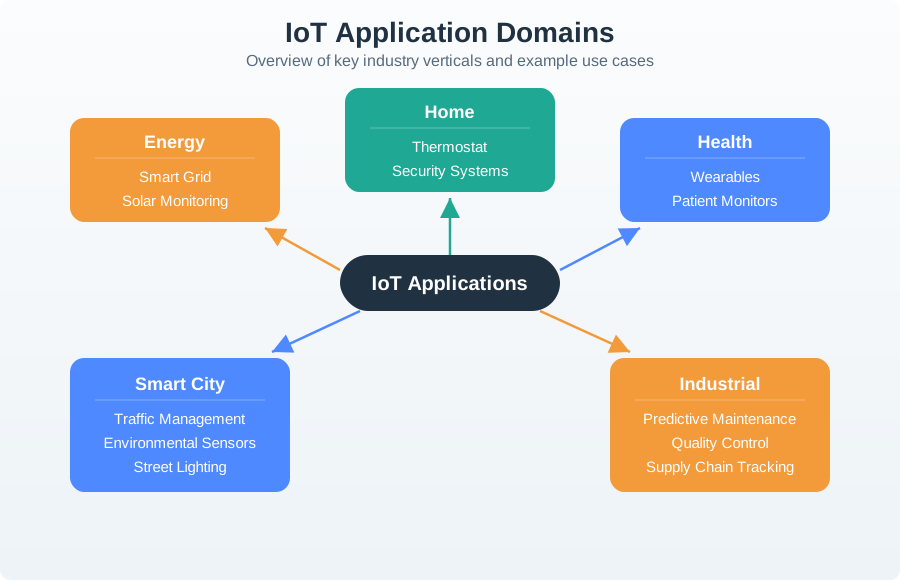
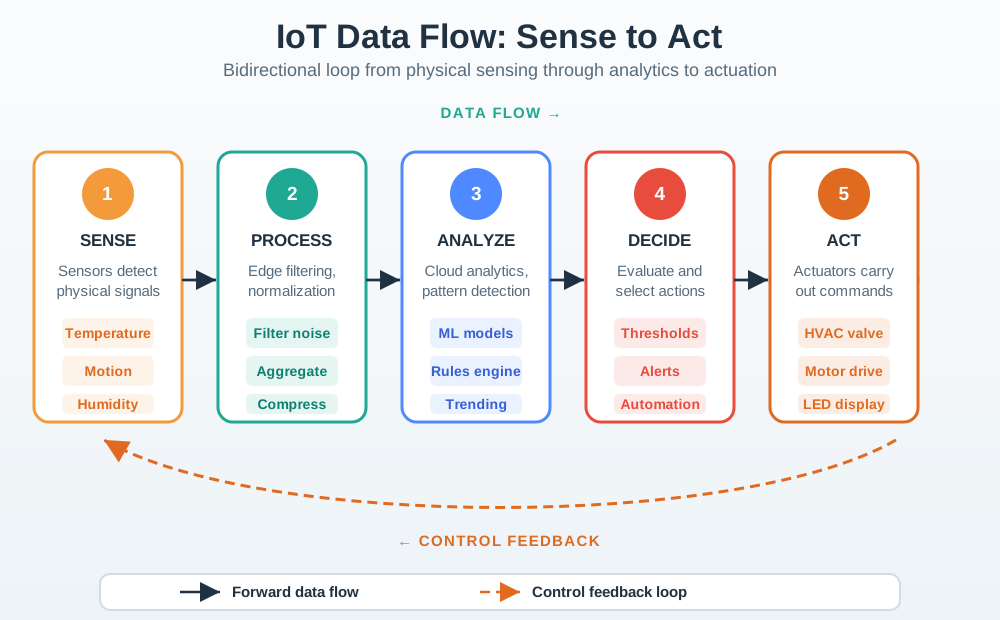
The Internet of Things transforms nearly every sector of human activity. Rather than describing these transformations in abstract terms, this chapter provides a visual walkthrough of real IoT deployments across six key domains. Each application illustrates how the core IoT pattern – sensor data flowing through connectivity layers to cloud analytics and back to actuators – adapts to different environments, constraints, and goals.
As you explore the gallery, notice how each domain imposes different constraints and yields different value propositions:
Domain
Key Constraint
Primary Value
Typical Connectivity
Smart City
Scale (thousands of nodes)
Public safety, efficiency
LoRaWAN, cellular, Wi-Fi
Smart Home
Cost, ease of install
Convenience, energy savings
Wi-Fi, Zigbee, BLE
Agriculture
Power, range, weather
Yield optimization, water savings
LoRaWAN, cellular
Building
Interoperability
Energy efficiency, security
Zigbee, Thread, Matter
Energy
Reliability, safety
Grid stability, ROI
Cellular, Ethernet, Wi-Fi
Putting Numbers to It
Cross-domain IoT scale is easiest to compare with a common telemetry volume formula:
That is about \(16.5 \times 365 \approx 6.0\) GB/year before metadata expansion and retries. This simple number helps compare storage and backhaul requirements across city, agriculture, and building deployments on the same basis.
Interactive Calculator: IoT Data Volume Estimator
Use this calculator to estimate data volumes for your own IoT deployment based on the formula above.
Show code
viewof numNodes = Inputs.range([10,10000], {value:5000,step:10,label:"Number of Nodes:",width:400})viewof messagesPerDay = Inputs.range([1,1440], {value:144,step:1,label:"Messages per Node per Day:",width:400})viewof bytesPerMessage = Inputs.range([1,500], {value:24,step:1,label:"Bytes per Message:",width:400})
The following figures illustrate the breadth of IoT applications across consumer, industrial, and environmental domains covered in detail in subsequent chapters. For each application, consider the sensor type, connectivity method, data processing location (edge vs. cloud), and actionable outcome that creates value.
11.4.1 Smart City and Transportation
Smart city IoT deploys thousands of sensors across urban infrastructure to improve traffic flow, reduce emissions, and enhance public services. The key architectural challenge is scale – managing reliable connectivity for massive numbers of low-power devices spread across a city. Most smart city deployments use LPWAN technologies (LoRaWAN, NB-IoT) for their long range and low power consumption, with cellular backhaul for gateways.
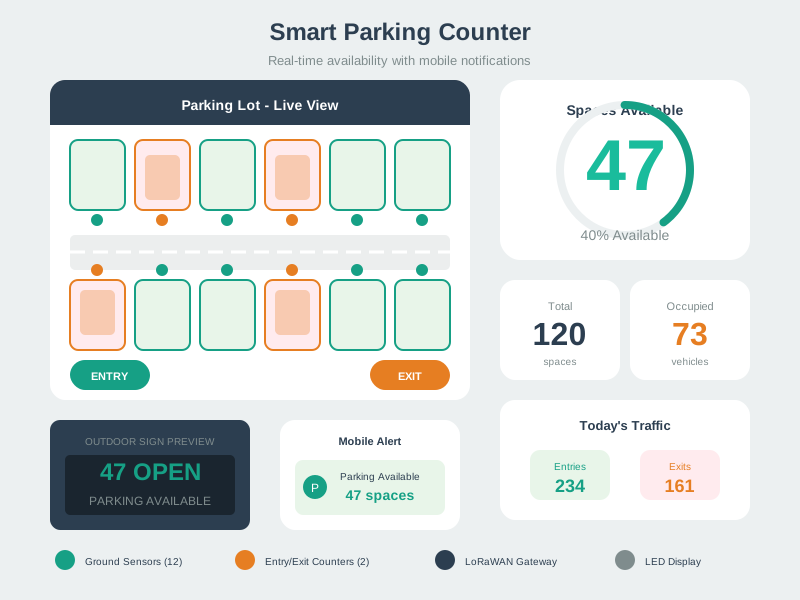
Parking Count System
Figure 11.1: Smart parking count systems guide drivers to available spaces, reducing search time by 30% and associated emissions through real-time occupancy tracking.
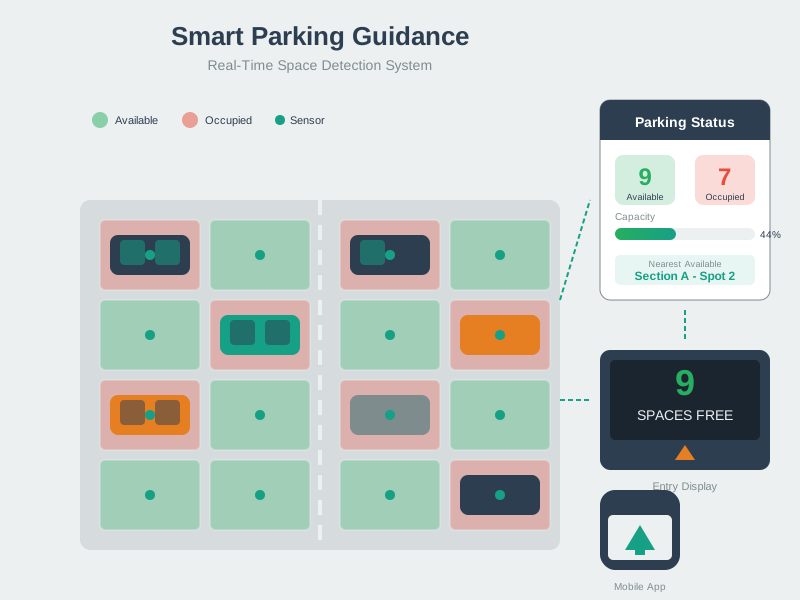
Parking Guidance System
Figure 11.2: Parking guidance systems reduce cruising for parking by up to 30%, improving driver experience while decreasing urban congestion.
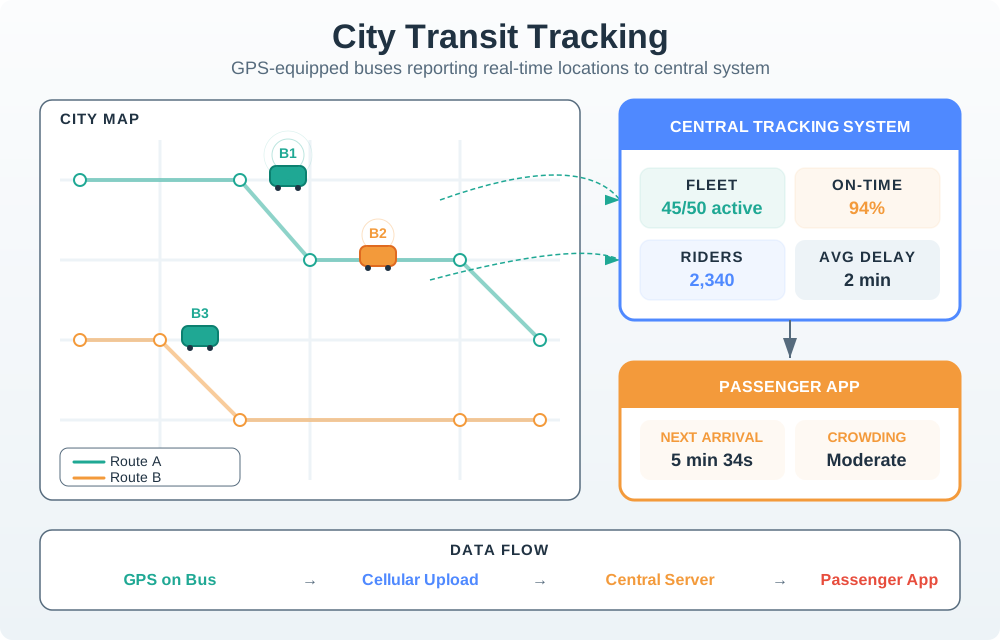
Public Transit Tracking
Figure 11.3: Public transit IoT provides real-time vehicle tracking. GPS tracking and automatic passenger counters improve service reliability.
Design Pattern: Sense-Aggregate-Display
All three smart city examples above follow the same architectural pattern. Sensors at the edge (parking sensors, GPS units, camera systems) collect data continuously. A gateway or base station aggregates readings from multiple sensors and forwards them to a cloud platform. The platform processes data in near-real-time and pushes updates to display devices (electronic signage, mobile apps, dispatch systems). This sense-aggregate-display pattern is the most common IoT architecture for public-facing systems.
11.4.2 Smart Home and Consumer Devices
Smart home IoT focuses on convenience, energy savings, and safety within residential environments. The key architectural challenge is interoperability – homes accumulate devices from dozens of manufacturers that must work together seamlessly. Wi-Fi dominates for high-bandwidth devices (cameras, displays), while Zigbee, Z-Wave, and BLE serve low-power sensors and actuators. The emerging Matter standard aims to unify these fragmented ecosystems.
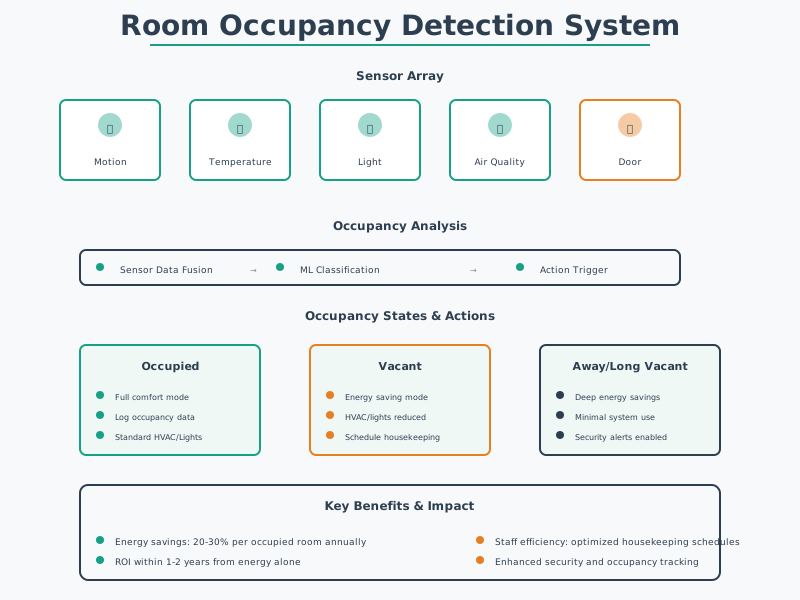
Occupancy Detection
Figure 11.4: Occupancy detection enables demand-based HVAC control, reducing building energy consumption by 15-30% through usage-based optimization.
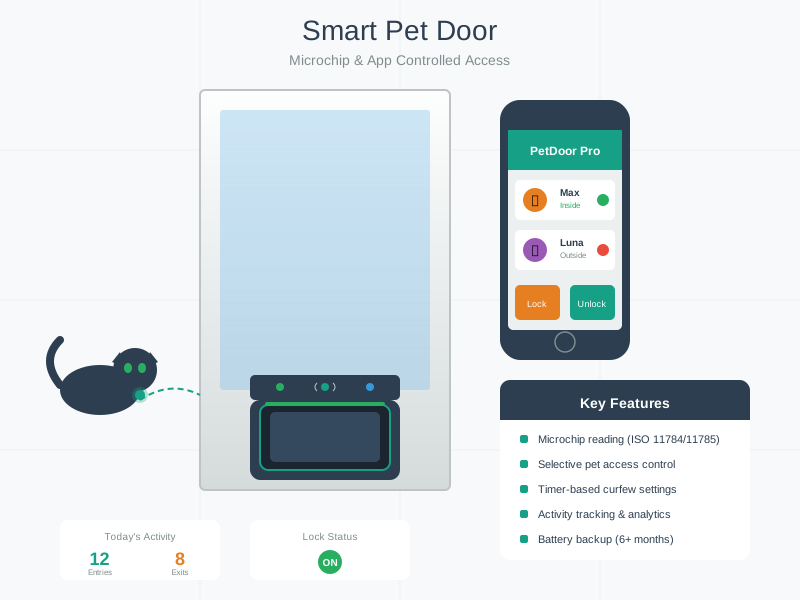
Smart Pet Door
Figure 11.5: Smart pet doors provide selective access control using RFID identification, with notifications when pets enter or exit.
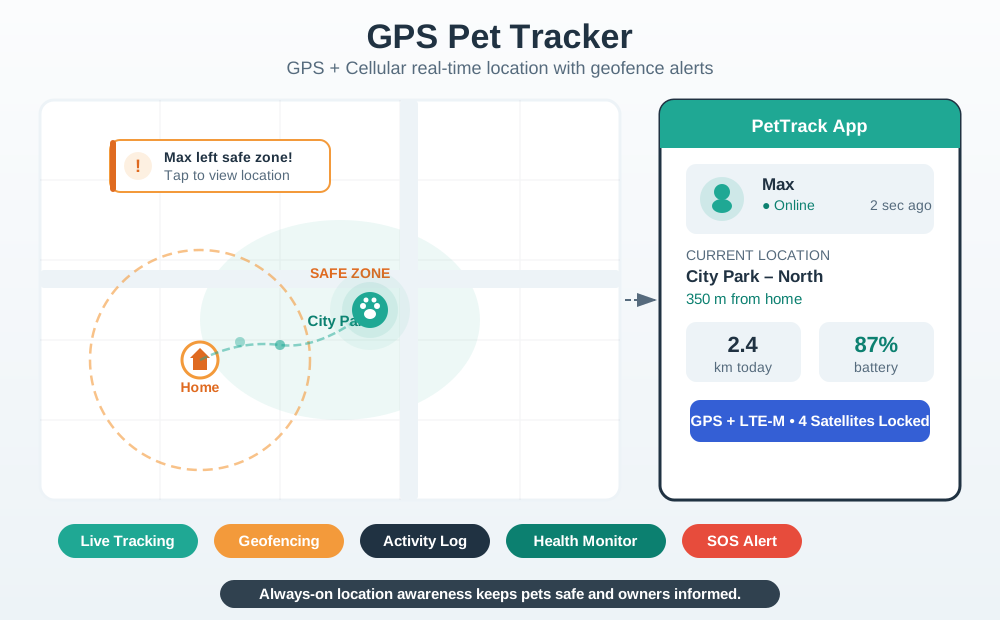
Pet Tracker
Figure 11.6: GPS pet trackers combine cellular connectivity with activity monitoring and geofencing for pet safety.
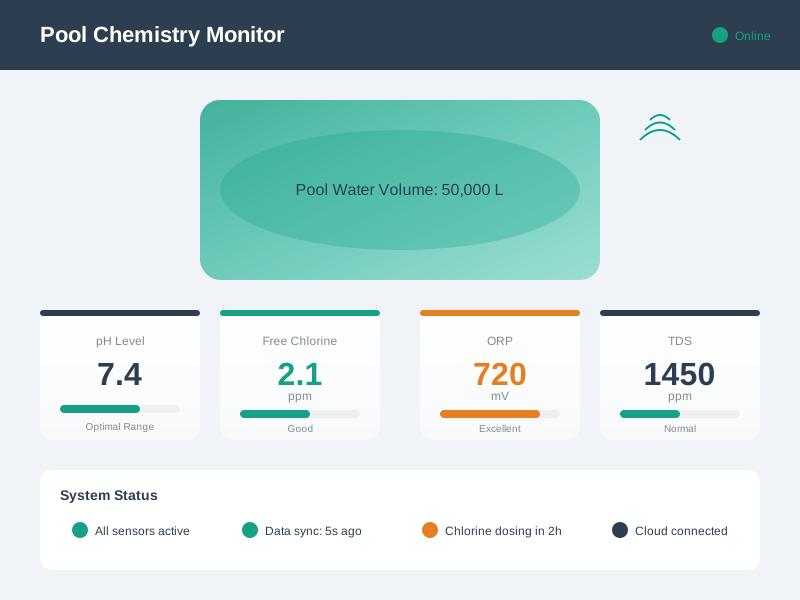
Pool Chemistry Monitor
Figure 11.7: Pool chemistry monitors automate water quality management through continuous measurement and mobile alerts.
Smart Oven Control
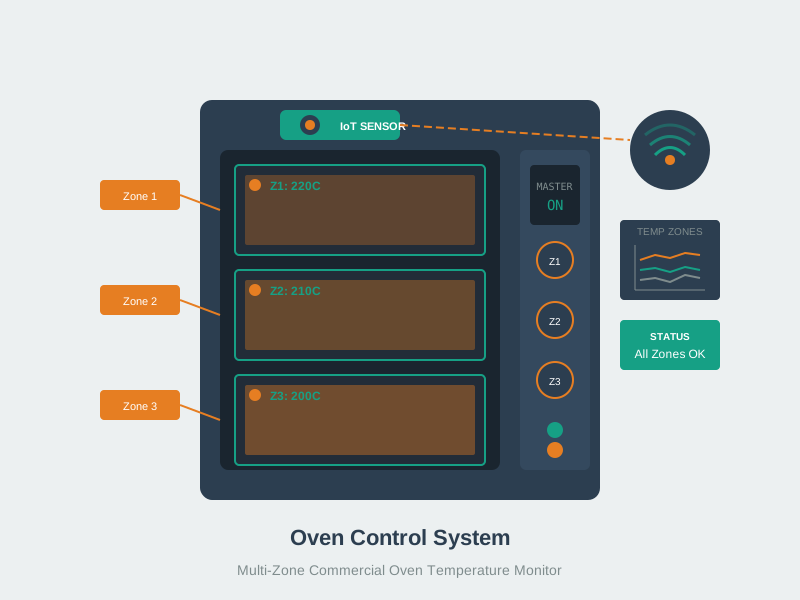
Figure 11.8: Smart oven control provides remote monitoring and safety features that automatically turn off unattended ovens.
Smart Refrigerator
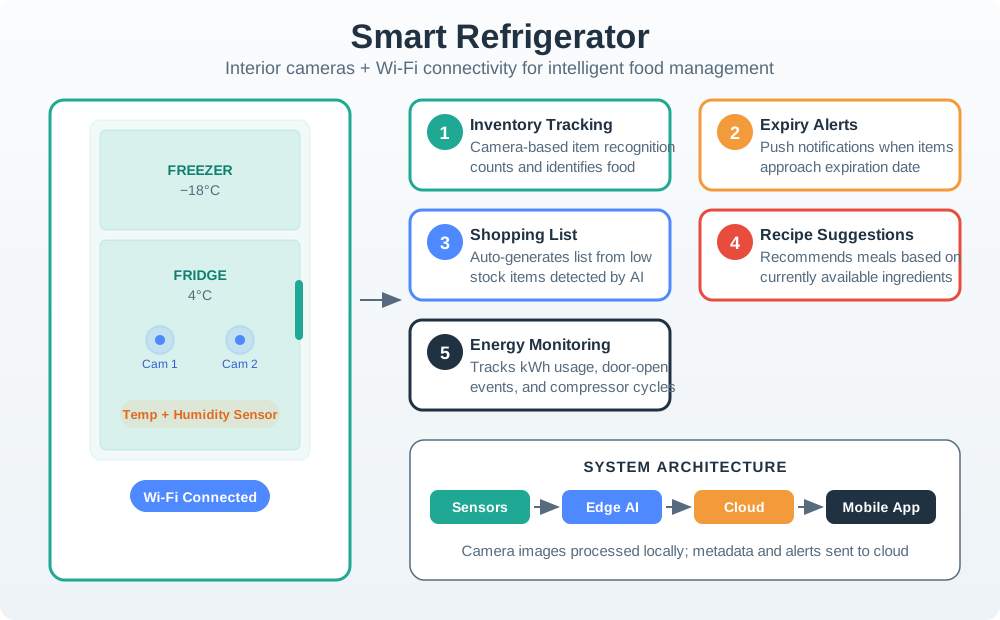
Figure 11.9: Smart refrigerators use interior cameras and inventory tracking to reduce food waste.
11.4.3 Agriculture and Environment
Agriculture and environmental monitoring present the most demanding IoT constraints: devices must operate outdoors in harsh conditions (rain, dust, extreme temperatures), often in remote locations without grid power or cellular coverage, and for years without maintenance. Solar-powered sensors with LoRaWAN or satellite connectivity are the typical solution, with edge processing to reduce data transmission costs.
Precision Agriculture Platform
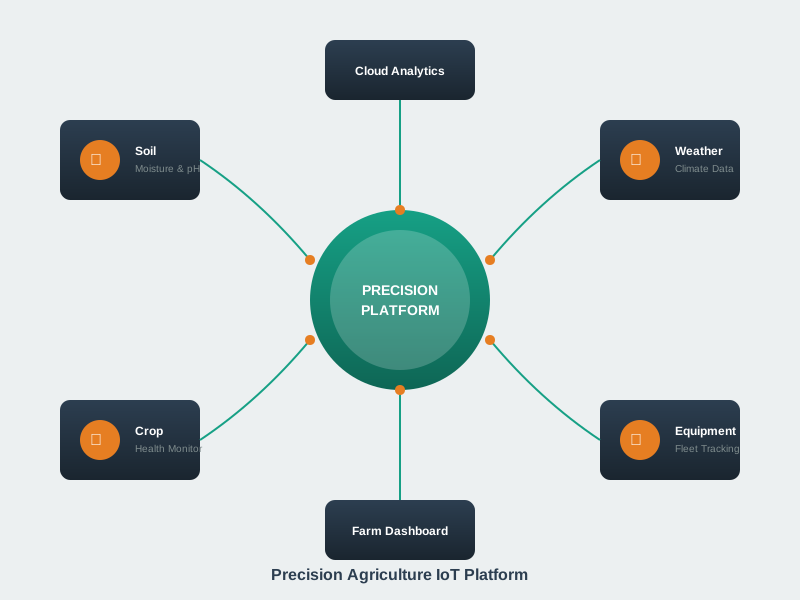
Figure 11.10: Precision agriculture platforms integrate GPS guidance and yield mapping for data-driven field management.
Precision Farming System
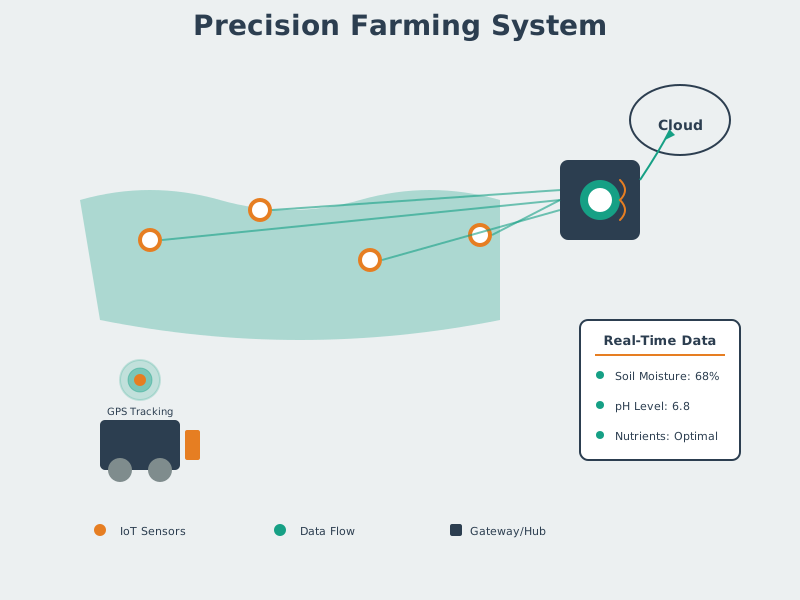
Figure 11.11: Precision farming combines sensor networks with AI to reduce water consumption by 30-40%.
Permafrost Monitoring
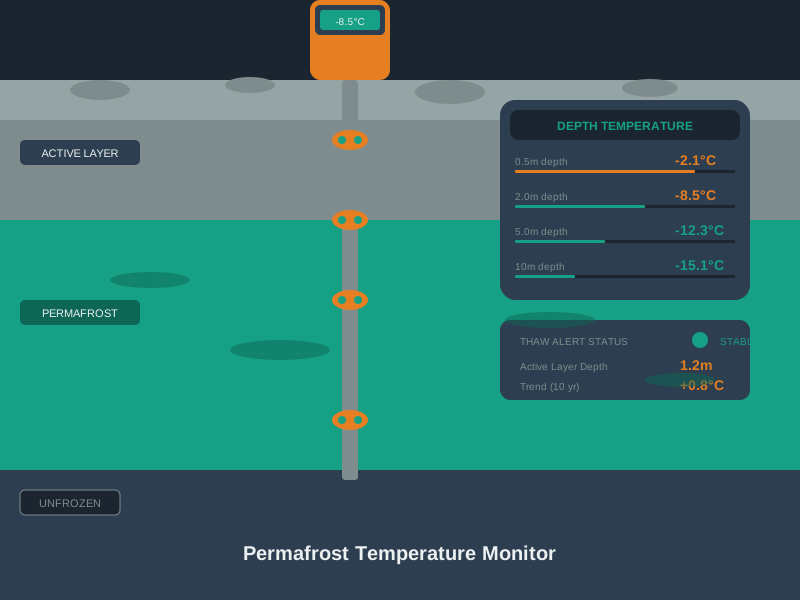
Figure 11.12: Permafrost monitoring tracks temperature changes critical for infrastructure stability and climate research.
Polar Research Buoy
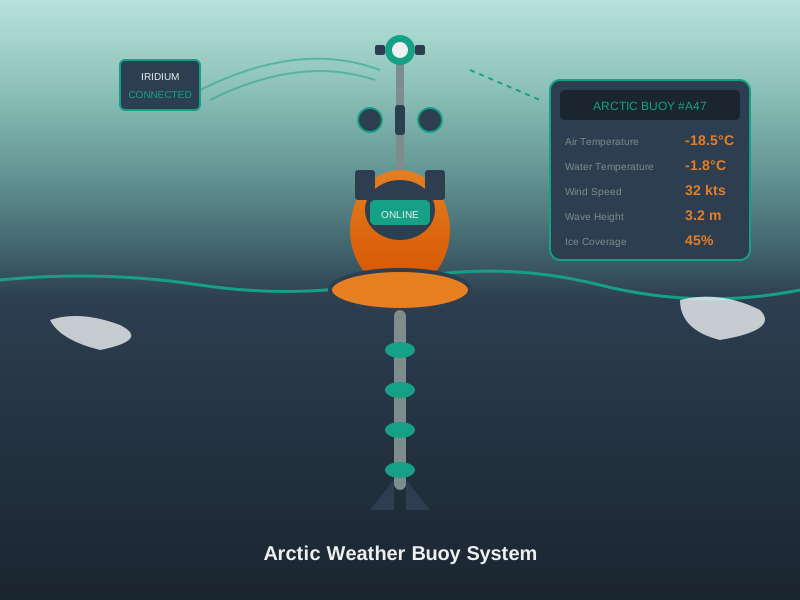
Figure 11.13: Polar research buoys collect critical climate data through ice-resistant design and satellite connectivity.
Particle Counter
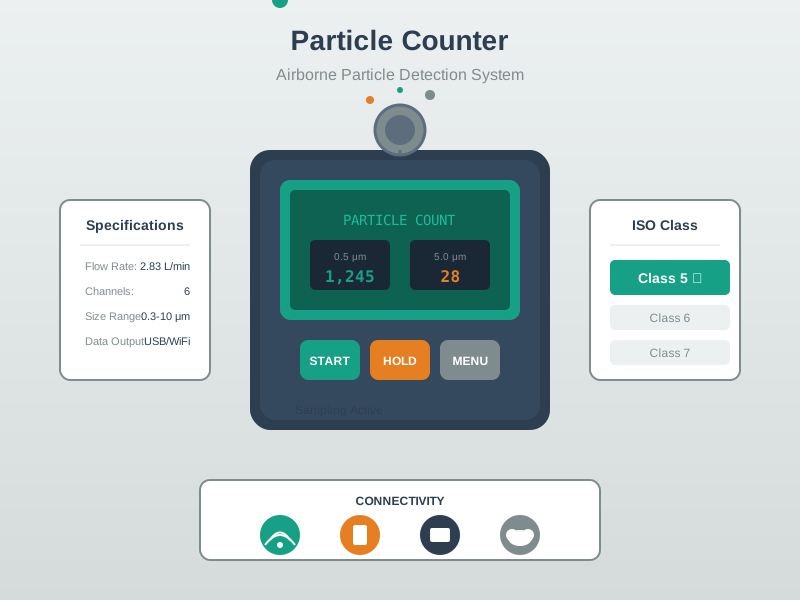
Figure 11.14: Particle counters measure fine particulate matter for hyperlocal air quality monitoring networks.
Design Pattern: Low-Power Wide-Area Sensing
Agriculture and environmental IoT shares a common deployment pattern. Battery or solar-powered sensors sleep most of the time, waking at intervals (every 15 minutes to every few hours) to take measurements and transmit a small data payload (typically 10-50 bytes). LoRaWAN, NB-IoT, or satellite links carry these payloads over distances of 2-15 km. Cloud platforms accumulate time-series data for trend analysis and alerting. This duty-cycled LPWAN pattern maximizes battery life (often 5-10 years) while providing the long range needed for remote deployments.
11.4.4 Smart Home and Building Automation Gallery
Building automation represents the most mature IoT market segment, with decades of evolution from proprietary BACnet and Modbus systems to modern IP-based smart building platforms. The key trend is convergence: lighting, HVAC, access control, and security systems that once operated independently are now integrated through common hubs and the Matter protocol standard. This integration enables holistic building intelligence – for example, linking occupancy sensors to both lighting and HVAC for coordinated energy optimization.
Home Automation Hub
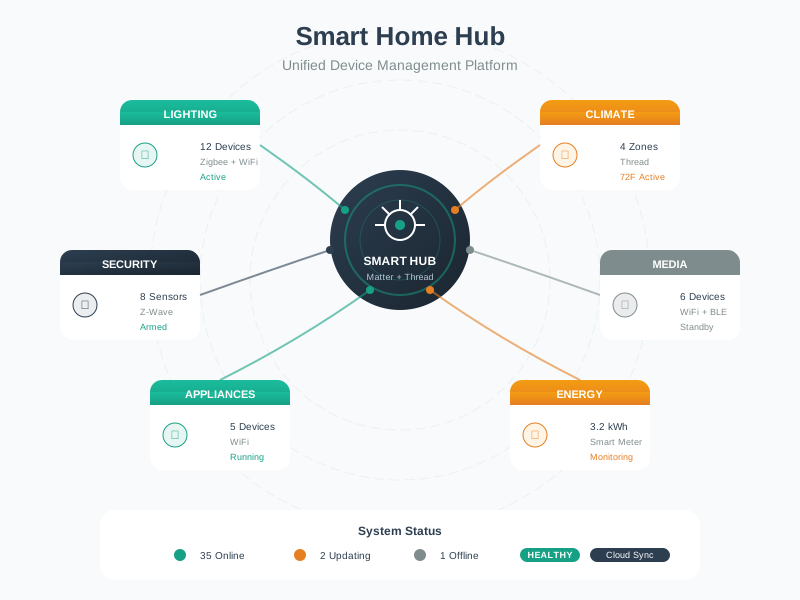
Figure 11.15: Smart home hubs centralize control of diverse IoT devices, enabling unified automation rules, voice control integration, and remote management through smartphone applications.
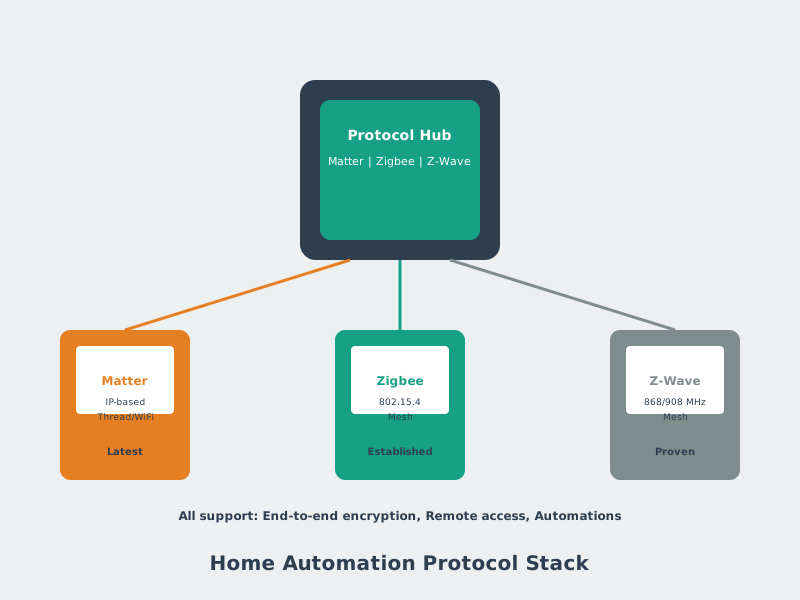
Home Automation Protocols
Figure 11.16: Multiple wireless protocols serve different smart home needs, with Matter emerging as a unifying standard that enables interoperability across previously incompatible ecosystems.
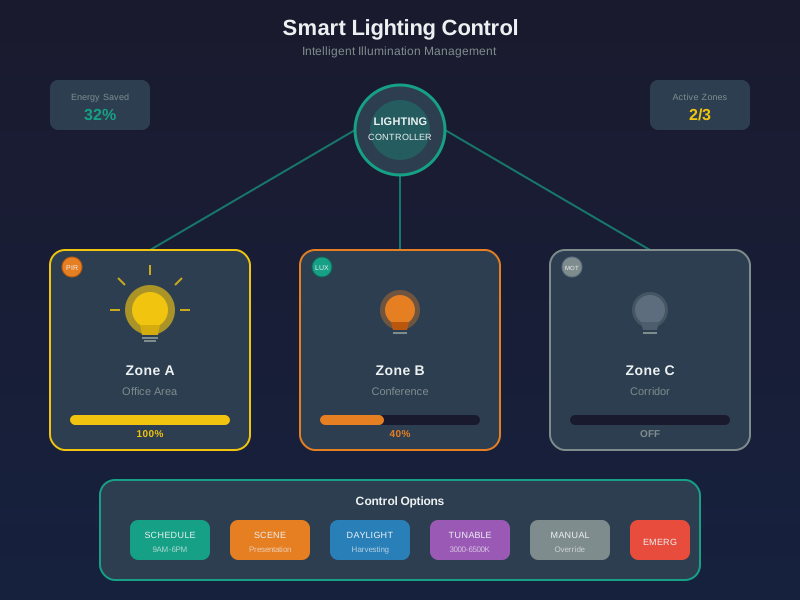
Smart Lighting Control
Figure 11.17: Smart lighting systems provide energy savings through occupancy sensing and daylight harvesting while enabling ambiance customization and circadian rhythm support.
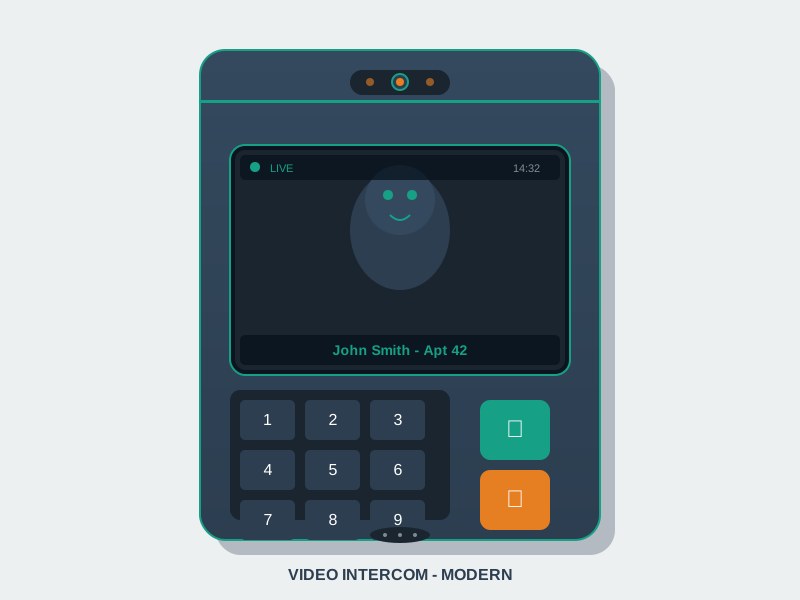
Smart Intercom Panel
Figure 11.18: Smart intercom systems enable remote visitor screening, package delivery management, and integration with smart lock systems for controlled property access.
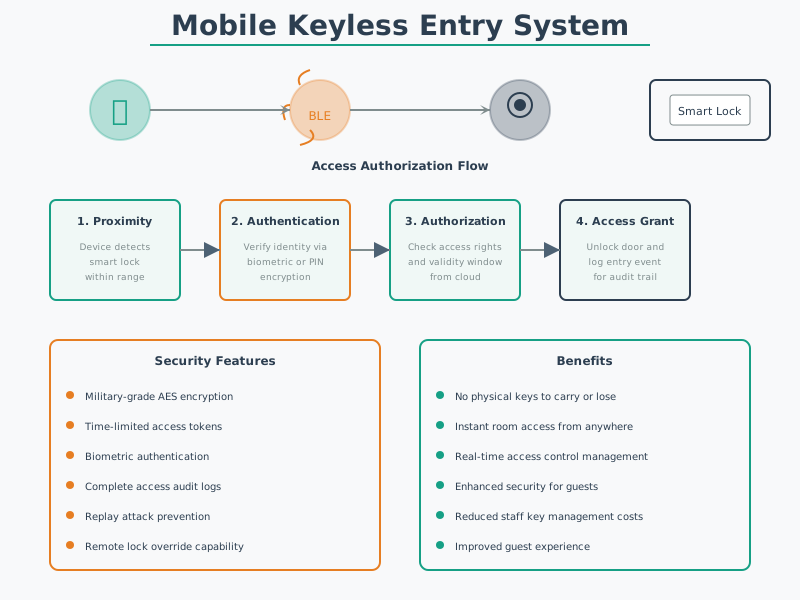
Keyless Entry System
Figure 11.19: Keyless entry systems eliminate physical key management while providing detailed access logs and the ability to grant temporary credentials remotely.
11.4.5 Energy and Utilities IoT Gallery
Energy IoT transforms grid infrastructure through smart monitoring, optimization, and distributed resource management. The critical requirement in this domain is reliability – energy systems demand five-nines (99.999%) availability because failures can cause safety hazards, equipment damage, or widespread outages. IoT solutions in energy must also handle real-time control loops with latencies under 100 ms for grid stabilization, making edge computing essential.
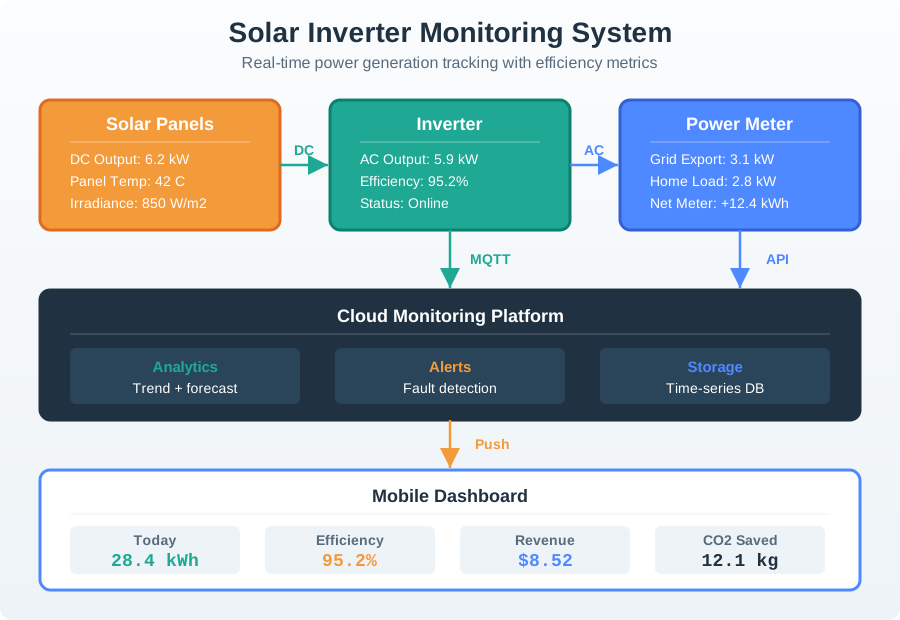
Solar Inverter Monitoring
Figure 11.20: Smart inverter monitoring enables homeowners and installers to track solar generation, identify performance issues, and optimize system configuration remotely.
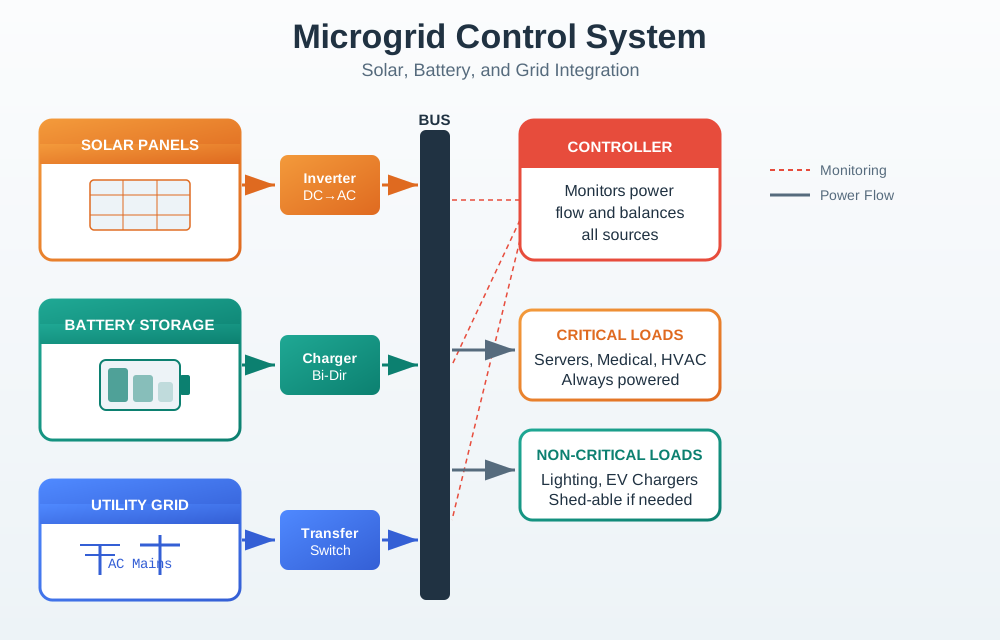
Microgrid Control System
Figure 11.21: Microgrid controllers orchestrate distributed energy resources, balancing generation, storage, and consumption while providing backup power during grid disruptions.
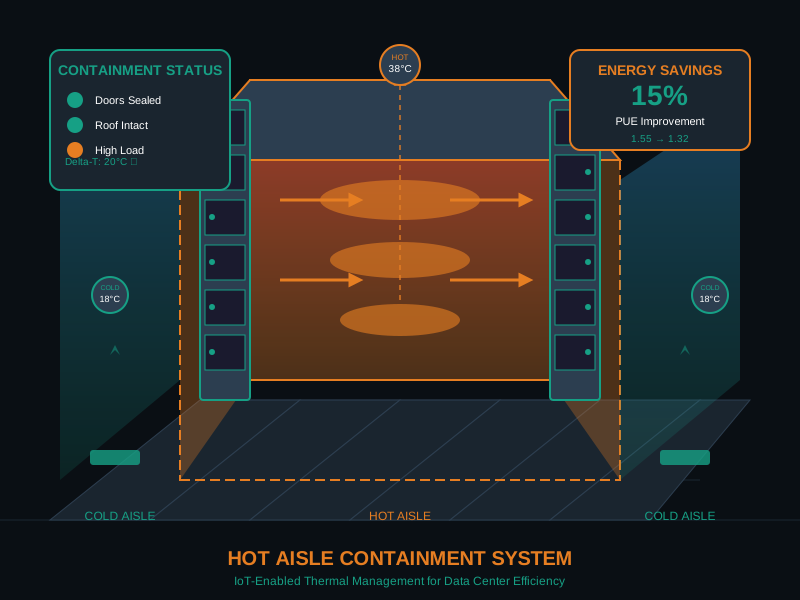
Data Center Cooling Control
Figure 11.22: Data center environmental monitoring ensures optimal cooling efficiency while protecting equipment through early detection of hot spots and cooling failures.
11.5 Cross-Domain Architectural Comparison
Having explored applications across five domains, a crucial insight emerges: all IoT systems share the same fundamental architecture – sense, transmit, process, act – but the constraints in each domain shift which layer receives the most engineering attention.
The table below summarizes the dominant engineering focus for each domain:
Domain
Dominant Challenge
Engineering Focus
Latency Requirement
Smart City
Scale and coverage
Network planning, gateway placement
Seconds to minutes
Smart Home
Device interoperability
Protocol bridges, Matter adoption
Sub-second (UX)
Agriculture
Power and range
Duty cycling, LPWAN selection
Minutes to hours
Building
System integration
BACnet/IP migration, unified dashboards
Seconds
Energy
Reliability and safety
Redundancy, real-time edge processing
Milliseconds
Key Insight: Constraints Drive Architecture
The same temperature sensor might appear in a smart home (Wi-Fi, plug-powered, 1-second updates), a farm field (LoRaWAN, solar-powered, 15-minute updates), or a data center (Ethernet, rack-powered, 100-ms updates). The application context – not the sensor itself – determines the connectivity, power, processing, and latency requirements. This is why understanding domain constraints is essential before selecting technologies.
11.6 Visual Reference Gallery
These conceptual visualizations provide frameworks for thinking about IoT systems holistically.
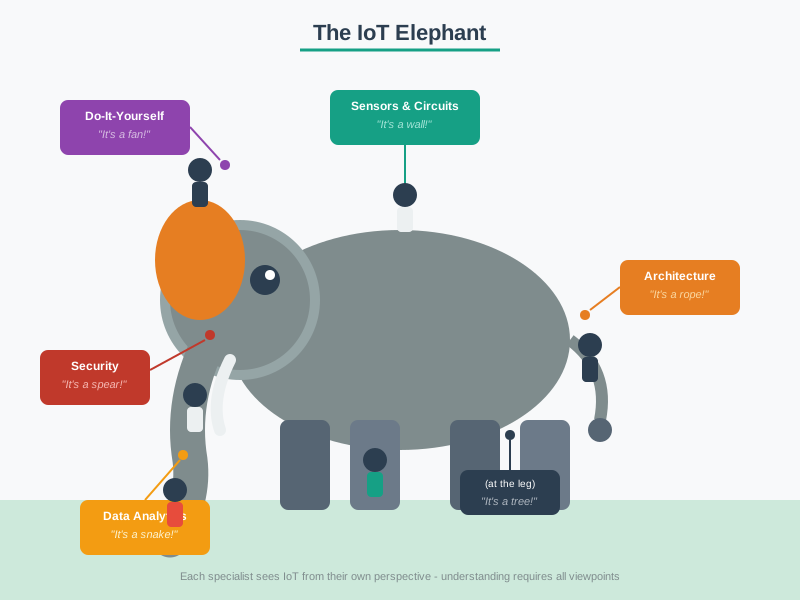
Visual: The IoT Elephant
The IoT Elephant - Multiple perspectives on IoT
Just as blind men touching different parts of an elephant perceive it differently, various stakeholders view IoT through their own professional lens – hardware engineers focus on sensors and circuits, software developers see APIs and data flows, business leaders see revenue models and ROI, and security experts see attack surfaces and vulnerabilities. Effective IoT teams integrate all these perspectives.
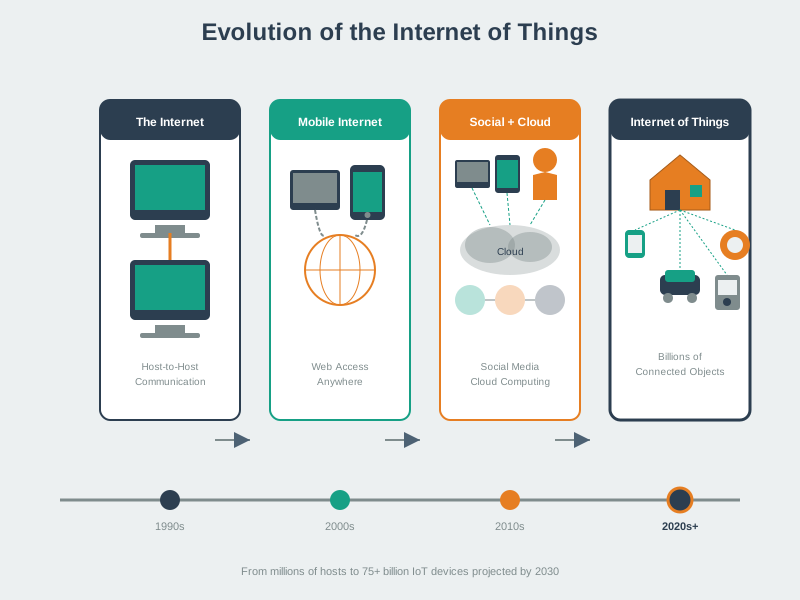
Visual: Evolution of IoT
Evolution of IoT from embedded to connected to intelligent
This visualization traces the progression from simple embedded systems (a thermostat with a timer) through connected products (a thermostat controlled via app) to fully intelligent IoT solutions (a thermostat that learns your schedule, integrates weather data, and optimizes across a building). Each stage adds value – and complexity.
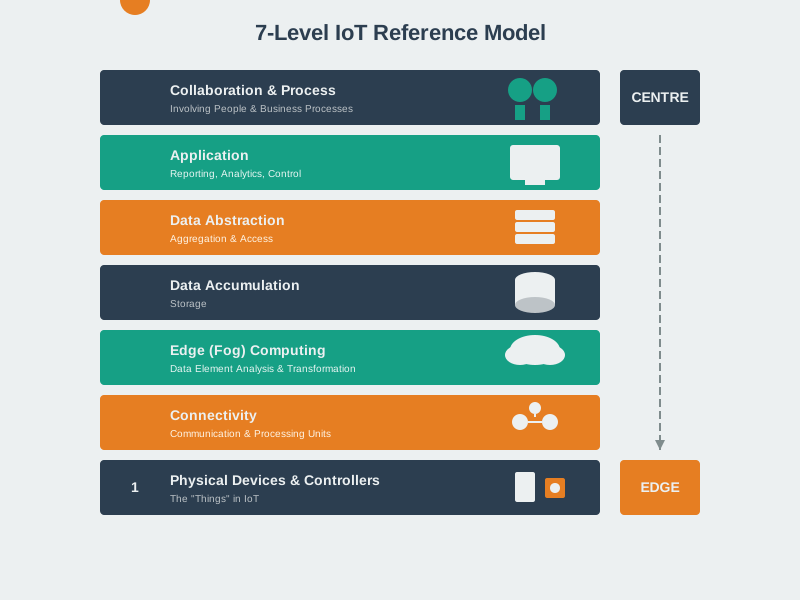
Visual: 7-Level IoT Reference Model
7-Level IoT Reference Model architecture
The 7-level reference model provides a comprehensive framework for understanding how data flows through all layers of an IoT system: (1) Physical Devices and Controllers, (2) Connectivity, (3) Edge Computing, (4) Data Accumulation, (5) Data Abstraction, (6) Application, and (7) Collaboration and Processes. Every application in the gallery above maps onto this model.
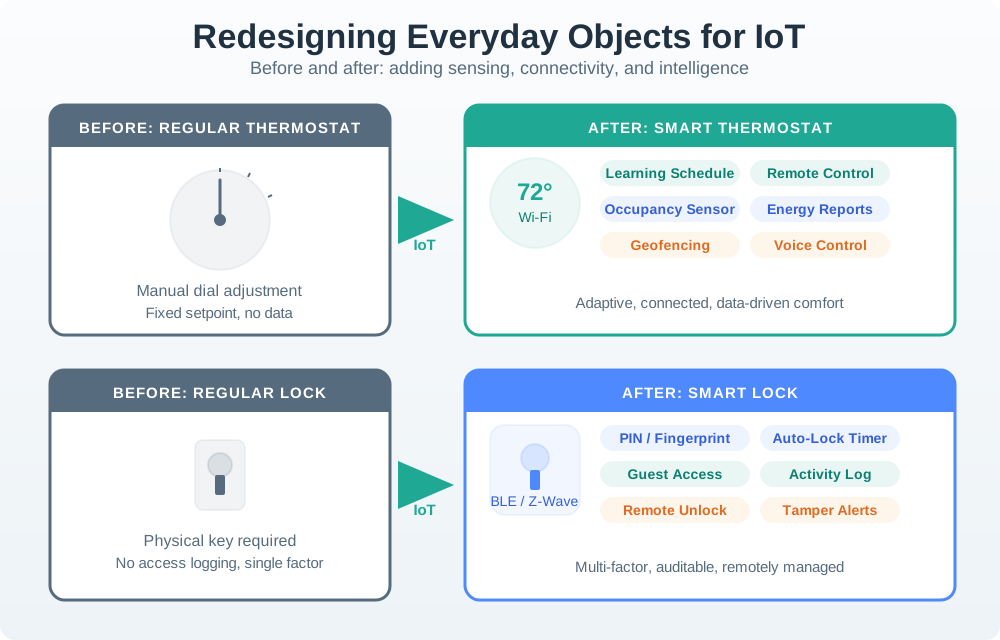
Visual: Redesigning Everyday Objects for IoT
Redesigning Everyday Objects
IoT transforms everyday objects by adding sensors, connectivity, and intelligence. A traditional parking lot becomes a smart parking system. A manual irrigation valve becomes a precision agriculture controller. The transformation follows a predictable pattern: instrument (add sensors), connect (add networking), analyze (add cloud/edge processing), and automate (add actuation and feedback loops).
11.7 Knowledge Check: IoT Applications Gallery
Concept Check: Matching Connectivity to Application
Interactive Quiz: Match Concepts
Interactive Quiz: Sequence the Steps
11.8 Concept Relationships
Concept
Builds On
Leads To
Related Modules
Sense-Aggregate-Display
Sensor fundamentals, cloud computing
Dashboard design, real-time visualization
Sensors (measurement), MQTT (pub-sub), Data Visualization
This visual gallery demonstrated how IoT transforms five major domains of human activity. The most important lessons from this cross-domain tour are:
Universal architecture, domain-specific constraints. Every IoT application follows the sense-transmit-process-act pattern, but the dominant engineering challenge differs by domain – scale for cities, interoperability for homes, power/range for agriculture, integration for buildings, and reliability for energy.
Connectivity choice is driven by constraints, not capability. The “best” protocol depends entirely on context. Smart parking uses LoRaWAN (scale), smart homes use Wi-Fi/Zigbee/BLE (cost, ease), agriculture uses LoRaWAN/satellite (range, power), and energy uses Ethernet/cellular (reliability).
Three recurring design patterns appear across all domains:
Sense-aggregate-display – Sensors feed cloud platforms that update dashboards and displays (parking, transit, building management)
Real-time edge control – Local processing for safety-critical millisecond decisions (microgrids, HVAC, industrial)
Cross-domain learning accelerates design. A smart parking sensor and a soil moisture sensor face similar engineering challenges (battery life, outdoor enclosure, wireless range). Solutions proven in one domain often transfer directly to another.
IoT value is measurable. Each application in the gallery delivers quantifiable benefits: 30% reduction in parking search time, 15-30% building energy savings, 30-40% water consumption reduction, five-nines grid reliability. This measurability is what distinguishes successful IoT deployments from technology experiments.
11.9.2 Domain Coverage Summary
Domain
Applications Shown
Key Technologies
Measurable Impact
Smart City
Parking count, parking guidance, transit tracking
LoRaWAN, GPS, infrared, computer vision
30% less search time, lower emissions
Smart Home
Occupancy, pet door/tracker, pool, oven, fridge
RFID, GPS, Wi-Fi, PIR sensors
15-30% energy savings, convenience
Agriculture
Precision ag platform, precision farming, permafrost, polar buoy, particle counter
Answer four simple questions about your deployment requirements, and this tool will recommend the best connectivity technology based on the decision framework below.
{const colors = {primary:"#2C3E50",secondary:"#16A085",accent:"#E67E22",blue:"#3498DB",gray:"#7F8C8D",purple:"#9B59B6",red:"#E74C3C" };functionselectTechnology(range, power, frequency, payload) {// Latency critical?if (frequency ==="Milliseconds") {return {tech:"Wired Ethernet or Wi-Fi 6",reason:"Millisecond latency requires wired or high-performance wireless",color: colors.blue,examples:"Microgrid control, industrial automation, data center" }; }// Global/no infrastructure?if (range ==="Global/No infrastructure") {return {tech:"Satellite (Iridium, Starlink)",reason:"Only satellite provides coverage in remote/polar/ocean locations",color: colors.purple,examples:"Polar research buoys, ocean monitoring, remote agriculture" }; }// High bandwidth?if (payload ===">100KB"|| payload ==="1KB-100KB") {if (power ==="Wall-powered") {return {tech:"Wi-Fi or Ethernet",reason:"High bandwidth requirements need Wi-Fi/wired connection",color: colors.blue,examples:"Smart refrigerator cameras, IP security cameras" }; } else {return {tech:"Cellular LTE-M or 4G",reason:"Large payloads on battery power require cellular efficiency",color: colors.accent,examples:"Connected vehicles, asset tracking with image data" }; } }// Multi-year battery life needed?if (power ==="Battery (multi-year)") {if (range ==="<100m") {return {tech:"BLE or Zigbee",reason:"Short range with extreme low power - BLE/Zigbee optimal",color: colors.secondary,examples:"Smart door locks, fitness trackers, home sensors" }; } else {return {tech:"LoRaWAN or NB-IoT",reason:"Long range + multi-year battery life = LPWAN required",color: colors.secondary,examples:"Parking sensors, agriculture soil monitoring, smart city" }; } }// Short range consumer device?if (range ==="<100m"&& power ==="Battery (weeks/months)") {return {tech:"Bluetooth Low Energy (BLE)",reason:"Short-range consumer devices use smartphone as gateway",color: colors.blue,examples:"Pet trackers, health monitors, smart home accessories" }; }// Home automation?if (range ==="100m-1km"&& (power ==="Wall-powered"|| power ==="Battery (weeks/months)")) {return {tech:"Zigbee, Thread, or Matter",reason:"Home automation benefits from mesh networking and Matter interop",color: colors.accent,examples:"Smart lighting, thermostats, door sensors" }; }// Default for wall-poweredif (power ==="Wall-powered") {return {tech:"Wi-Fi",reason:"Wall power available - Wi-Fi provides best bandwidth/range tradeoff",color: colors.blue,examples:"Smart ovens, video doorbells, smart displays" }; }// Cellular fallback for mobile/medium rangeif (range ==="1-15km"|| range ===">15km") {return {tech:"Cellular LTE-M or NB-IoT",reason:"Wide area coverage with moderate power consumption",color: colors.accent,examples:"Fleet tracking, utility metering, remote monitoring" }; }// Final fallbackreturn {tech:"LoRaWAN",reason:"General LPWAN solution for low-power wide-area sensing",color: colors.secondary,examples:"Environmental monitoring, smart agriculture" }; }const result =selectTechnology(connRange, connPower, connFrequency, connPayload);returnhtml` <div style="padding: 20px; border-radius: 8px; background: linear-gradient(135deg, ${result.color}15 0%, ${colors.primary}10 100%); border-left: 4px solid ${result.color};"> <h3 style="margin-top: 0; color: ${colors.primary};">Recommended Technology</h3> <div style="padding: 20px; background: white; border-radius: 6px; margin-top: 15px; border-top: 3px solid ${result.color};"> <div style="font-size: 1.6em; font-weight: bold; color: ${result.color}; margin-bottom: 10px;">${result.tech} </div> <div style="font-size: 1em; color: ${colors.primary}; margin-bottom: 15px; line-height: 1.5;"> <strong>Why:</strong> ${result.reason} </div> <div style="padding: 12px; background: ${result.color}10; border-radius: 4px; font-size: 0.9em; color: ${colors.primary};"> <strong>Examples from gallery:</strong> ${result.examples} </div> </div> <div style="margin-top: 15px; padding: 12px; background: ${colors.gray}15; border-radius: 6px; font-size: 0.85em; color: ${colors.primary};"> <strong>Your requirements:</strong> ${connRange} range, ${connPower} power, ${connFrequency} updates, ${connPayload} payload </div> </div> `;}
11.10 Decision Framework: Choosing the Right Connectivity for Your Application
When reviewing the applications gallery, you saw devices using Wi-Fi, LoRaWAN, cellular, Bluetooth, and other technologies. How do you choose? Use this decision framework:
Requirement
Recommended Technology
Example from Gallery
Why It Works
High bandwidth (>1 Mbps), power available, indoor
Wi-Fi
Smart refrigerator, IP camera
Leverages existing infrastructure, high speed for video
Low data (<100 bytes), battery-powered, outdoor, multi-year life
Is latency critical (<100ms)? → Use wired Ethernet or Wi-Fi 6
Is the device battery-powered? → If yes, continue; if no, Wi-Fi/Ethernet likely best
How often does it transmit?
Every few seconds: Cellular LTE-M or Wi-Fi (if power available)
Every 15+ minutes: LoRaWAN or NB-IoT
What is the range?
<100m: BLE or Zigbee
100m-1km: Wi-Fi or Thread
1-15km: LoRaWAN or cellular
15km or no infrastructure: Satellite
How much data per message?
<100 bytes: Any LPWAN works
100 bytes-1KB: Cellular or Wi-Fi
1KB: Wi-Fi or cellular mandatory
Common Mistake: Choosing technology before understanding requirements. Always start with application constraints (power budget, update frequency, range, environment), then select connectivity accordingly.
Real Example: A startup chose Wi-Fi for agricultural sensors because “everyone knows Wi-Fi.” After deployment, they discovered:
Wi-Fi range inadequate for 500-acre fields (required 50+ access points at $300 each = $15K)
Battery life only 3 weeks (expected 2+ years)
Wi-Fi congestion from neighboring farms caused packet loss
Switching to LoRaWAN (2 gateways at $400 each, 5-year battery life) reduced infrastructure cost by 93% and eliminated maintenance visits. The technology selection error cost the company 18 months and $200K in redesign costs.
Lesson: Map requirements first, technology second. No connectivity solution is universally “best” – only “best for this specific use case.”
11.12 Try It Yourself: Design an IoT Application for Your Environment
Time: 45 minutes | Difficulty: Intermediate | Challenge: Map an IoT solution to a real problem in your daily environment
Scenario: Look around your home, campus, workplace, or neighborhood. Identify ONE inefficiency or problem that IoT could address. Examples: wasted water from overwatering, parking congestion, energy waste from lights left on, unsafe intersections, food waste in cafeterias.
Your Task:
Define the Problem (1 paragraph): What is the current state? What gets wasted? Who is affected?
Design the IoT Solution using the gallery patterns:
Sensors: What needs to be measured? (occupancy, temperature, flow rate, etc.)
Connectivity: Which technology fits your range, power, and data requirements? (Use the decision tree from the summary)
Processing: Where should intelligence live? (Edge for real-time control, cloud for analytics)
Action: What happens with the data? (Alert, automate, optimize, visualize)
Estimate Impact: Quantify the benefit (% savings, time reduction, cost avoidance)
Map to Gallery Example: Which application from this chapter is most similar to yours?
Deliverables:
Problem statement (1 paragraph)
IoT architecture diagram (hand-drawn sketch is fine; label sensors, connectivity, processing, and action)
Connectivity choice matches your constraints (power, range, data rate)
Impact is measurable and realistic (not “saves the planet” - specific numbers)
Architecture matches one of the three design patterns (sense-aggregate-display, duty-cycled LPWAN, or real-time edge control)
Example Output:
Problem: Campus library study rooms are frequently marked “occupied” when actually empty because students forget to check out. Wastes 20 hours/week of productive study time for 300 students.
Solution: PIR motion sensors in each room detect occupancy, transmit via campus Wi-Fi every 30 seconds to cloud platform, update real-time room availability map on website and app. Follows sense-aggregate-display pattern similar to parking guidance system.
Impact: Reduces room search time from 8 minutes to 1 minute average (87.5% improvement). At 300 students × 2 searches/week, saves 3,360 student-hours per academic year. NPV of solution at $10/hour student time value: $33,600/year benefit vs. $4,500 hardware + $600/year cloud = 9.8 month payback.