20 GPS Location: Architecture and Error Control
More
Depth: Practitioner
Progress saves as you read. Mark sections complete as you go; your progress appears in the sidebar.
20.1 Start With the Decision
This section: Start With the Decision — A receiver can see four satellites and still produce a poor fix.
A receiver can see four satellites and still produce a poor fix. Clock, atmosphere, geometry, and multipath each change the answer.
20.2 Route Overview
This section: Route Overview — This is part 2 of 2.
This is part 2 of 2. Review GPS Location: Ranging Methods for the preceding evidence.
20.3 Learning Objectives
This section: Learning Objectives
- Trace a GPS fix through receiver architecture.
- Estimate timing, geometry, and propagation error effects.
20.4 Chapter Roadmap
This section: Chapter Roadmap
- GPS Architecture
- Satellite Synchronization
- Relativity Effects in GPS
- Relativistic Time Dilation
- Checkpoint: Satellite Timekeeping
- GPS Position Calculation
- Position from Satellite Signals
- Uber GPS Accuracy in Manhattan
- GPS Error Sources
- Checkpoint: Operational Accuracy
- Knowledge Check
- Quiz: GPS Fundamentals
- Interactive Quiz: Match Concepts
- Interactive Quiz: Sequence the Steps
- Key Takeaway
- For Kids: Meet the Sensor Squad!
- Concept Relationships
- See Also
- Try It Yourself
- Common Pitfalls
- Overbuilt Initial Prototypes
- Security During Development
- Failure Modes and Recovery
- Label the Diagram
- What’s Next
- Code Challenge
20.5 GPS Architecture
This section: GPS Architecture — Use Figure 20.1 to separate the satellite, ground control, and receiver parts of positioning.
Use Figure 20.1 to separate the satellite, ground control, and receiver parts of positioning.
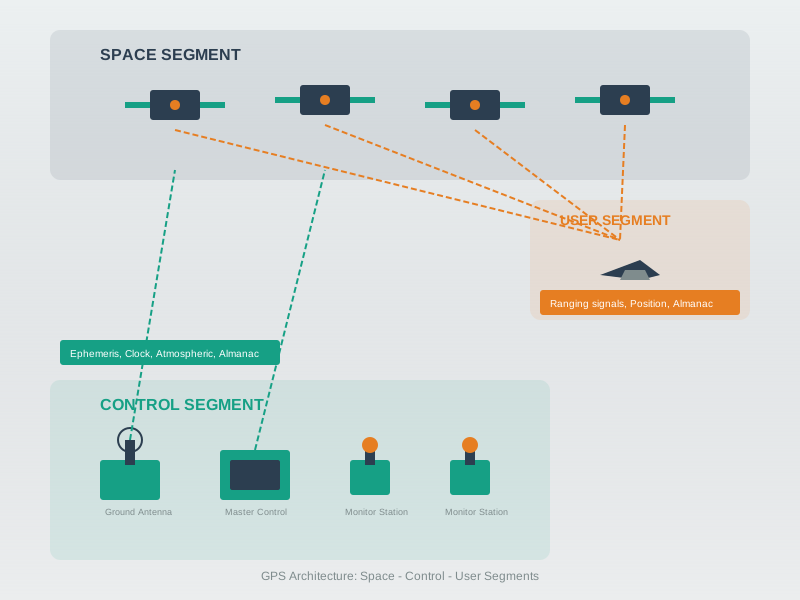
Satellites transmit their time and orbit information, while ground stations monitor the orbits and upload corrections. The receiver measures when signals arrive using its own clock, then solves for position and a clock offset together. The figure’s four satellite condition follows from those four unknowns: three coordinates and one clock term. This is why a time error cannot be treated as a small display issue. Review the received signals, correction data, and geometry before claiming that a position estimate is reliable.
GPS is TDoA (Inverted):
Satellites play the part of static devices (but are transmitters). Mobile device measures reception time using its clock. Uses satellite’s transmitted time for the time difference. For each satellite: measures (ToF + c × clockOffset). These are pseudoranges (erroneous distances).
20.6 Satellite Synchronization
This section: Satellite Synchronization — The clocks in Figure 20.2 show why GPS timing and receiver timing must be treated separately.
The clocks in Figure 20.2 show why GPS timing and receiver timing must be treated separately.
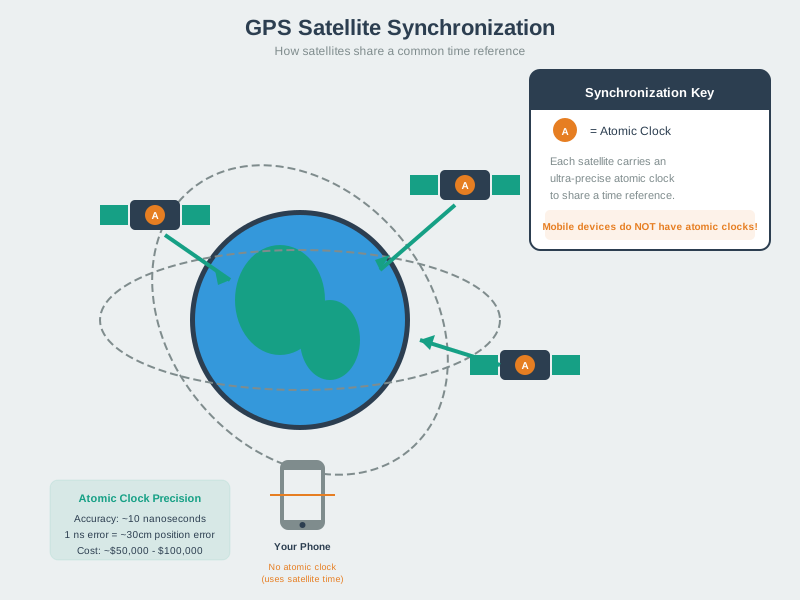
Each satellite carries an atomic clock so transmitted times share a precise reference. A phone does not carry that clock; it uses incoming satellite signals while estimating its own clock offset. The precision note in the figure shows how quickly a small timing error becomes distance error. For the positioning decision, check the time carried by the signal and the offset solved at the receiver. Treating the phone clock as already synchronized would hide a core unknown in the range calculation.
How Satellites Stay Synchronized:
Atomic Clocks On Board (Caesium or Rubidium). Cost: ~$100,000 per clock. Accuracy: ~1 nanosecond per day. All satellites share time reference.
But They Aren’t Static?. True! But we know their orbits precisely. Can predict positions quite accurately. Small errors do creep in…
Ground Control Segment:. Dedicated ground stations monitor satellite orbits. Track actual positions vs predicted. Upload corrections to satellites. Must model relativistic effects!
Use Figure 20.3 to see why a satellite’s position must be known when its signal is received.
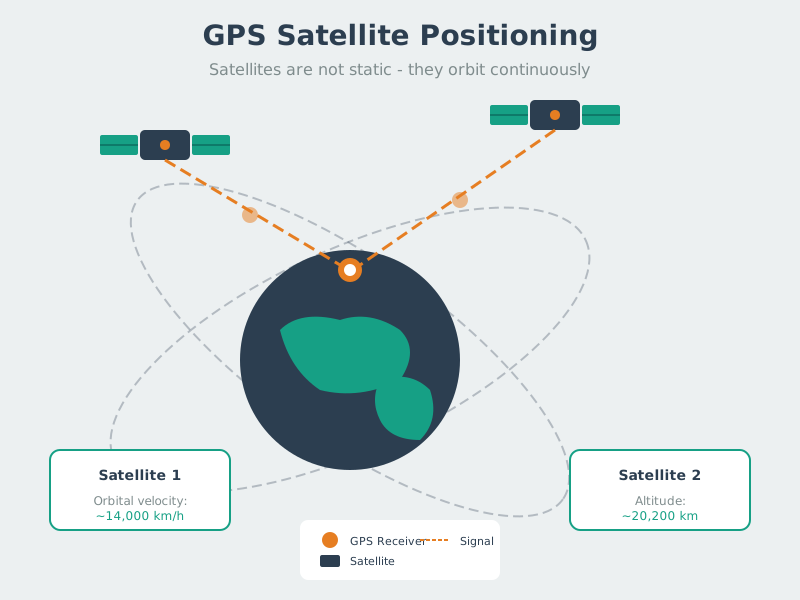
The satellites in the figure are moving around Earth, not fixed points above the receiver. A range measurement therefore needs orbit information for the signal’s transmission time as well as the measured arrival time. Ground control tracks actual paths against predicted paths and supplies corrections that help the receiver place each satellite. If that location is wrong, the same travel time points to the wrong geometry. Check the orbit data and its age before assigning all position error to the receiver.
Relativistic Effects:
Special Relativity: Satellite clocks run slower due to velocity (~7 μs/day slower). General Relativity: Satellite clocks run faster due to weaker gravity (~45 μs/day faster). Net Effect: ~38 μs/day faster → must be corrected! (NIST)
Without relativistic corrections, GPS would accumulate ~10 km of error per day. Here’s why:
Special Relativity (time dilation from velocity): Satellites orbit at m/s. Time dilation factor:
For GPS:
Clock runs slower by: μs/day
General Relativity (gravitational time dilation): At GPS orbit altitude (20,200 km), gravitational potential is weaker than at Earth’s surface. Clock rate difference:
Where m³/s², m, m.
Net effect: μs/day clock advancement
Position error if uncorrected: Light travels at m/s, so:
GPS solution: Satellite clocks are pre-adjusted to run at 10.22999999543 MHz (instead of exactly 10.23 MHz) to cancel the net +38.7 μs/day drift.
Explore: Change the satellite velocity or altitude to see how relativistic effects change. GPS satellites at 20,200 km altitude traveling at 3,874 m/s experience a net +38.7 μs/day clock advancement, which must be corrected.
 Checkpoint: Satellite Timekeeping
You now know:
- Satellite atomic clocks and ground control keep the shared time reference usable.
- Relativity matters at GPS orbit: about 7 us/day slower from velocity, 45 us/day faster from gravity, and 38.7 us/day net.
- Without correction, the timing drift would accumulate about 10 km of position error per day.
20.7 GPS Position Calculation
This section: GPS Position Calculation — The equations in Figure 20.4 connect four measured ranges to position and receiver clock offset.
The equations in Figure 20.4 connect four measured ranges to position and receiver clock offset.
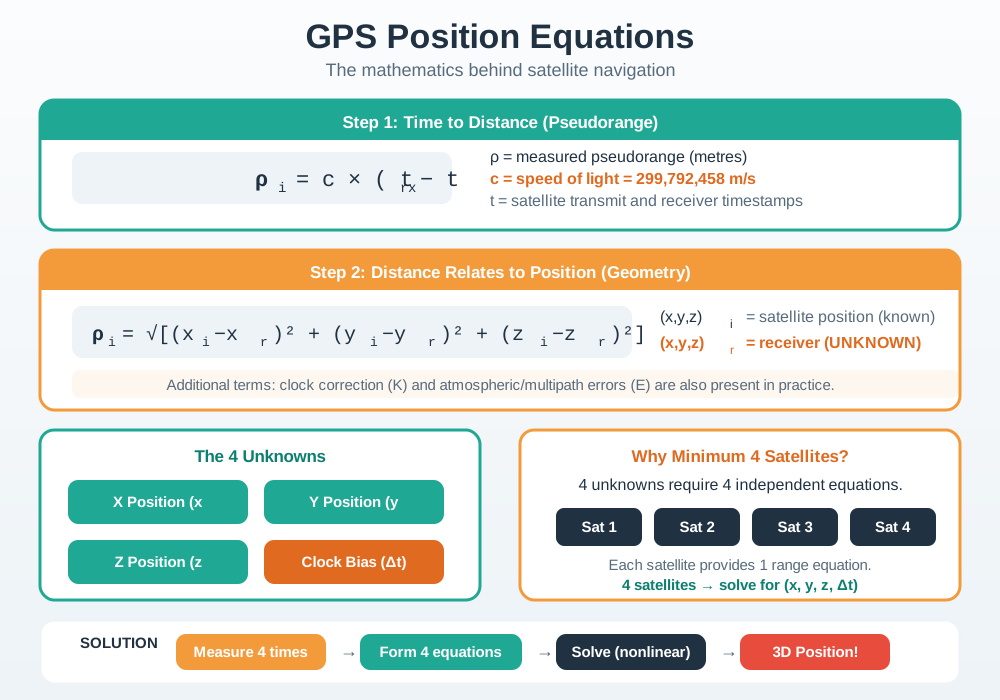
For each satellite, the receiver knows a position from orbit data and measures a range that includes clock error. The model adds true distance, receiver clock offset, and any error left over. Four separate satellite equations can solve three position values and one clock offset. Yet a solution can still be poor. The record asks for the error left by each satellite, signal geometry, and correction data. Check those items before using the point for a product action. A coordinate alone does not show how much trust it deserves.
Position Equations:
For each satellite :
Where: = pseudorange to satellite (measured). = satellite position (known from ephemeris). = receiver position (unknown). = speed of light. = receiver clock offset (unknown). = error term (atmospheric delays, etc.).
Four Unknowns:
(receiver X position). (receiver Y position). (receiver Z position). (clock offset).
Need at least 4 satellites to solve for 4 unknowns!
20.8 Position from Satellite Signals
This section: Position from Satellite Signals — Scenario: Your GPS receiver picks up signals from 4 satellites.
Scenario: Your GPS receiver picks up signals from 4 satellites. You need to understand how position is derived from raw timing measurements.
Given data (simplified to 2D for clarity):
| Satellite | Known Position (km) | Signal Travel Time | Pseudorange (km) |
|---|---|---|---|
| Sat A | (0, 20200) | 67.33 ms | 20,185.0 |
| Sat B | (14290, 14290) | 67.28 ms | 20,170.0 |
| Sat C | (-14290, 14290) | 67.38 ms | 20,200.0 |
| Sat D | (20200, 0) | 67.40 ms | 20,206.0 |
Step 1: Convert time to distance
Each pseudorange = speed of light x travel time:
- Sat A: 299,792 km/s x 0.06733 s = 20,185.0 km
Step 2: Notice the clock offset
All pseudoranges include the same unknown clock error. If the receiver clock is 50 nanoseconds fast, every pseudorange is 15 meters too long. The fourth satellite lets us solve for this offset.
Step 3: Solve the system of equations
With 4 equations and 4 unknowns (x, y, z, clock offset), the receiver’s least-squares solver finds the position. In practice, modern receivers process signals from 10-12 satellites simultaneously; additional usable satellites can improve geometry and redundancy, depending on measurement quality, and help detect anomalies.
Key insight: Additional usable satellites can improve geometry and redundancy, but the accuracy gain depends on geometry and measurement quality; no fixed 20-30% reduction applies per satellite.
20.9 Hypothetical Manhattan Pickup Exercise
This section: Hypothetical Manhattan Pickup Exercise — Assume reflected GPS signals displace some pickup pins by 20–50 m; model how wrong-side-of-street placements affect calls, delay and driver idle cost.
Assume reflected GPS signals displace some pickup pins by 20–50 m; model how wrong-side-of-street placements affect calls, delay and driver idle cost. Do not attribute the scenario figures to Uber.
Hypothetical mechanism: Manhattan’s dense skyscraper grid can create multipath interference. For this exercise, assume reflected signals add 50–200 ns of delay, corresponding to illustrative 15–60 m range-bias values.
The technical challenge in numbers:
| Environment | Assumed GPS error | Assumed pickup-success rate |
|---|---|---|
| Open suburban | 3-5 meters | 94% |
| Low-rise urban | 8-15 meters | 87% |
| Midtown Manhattan | 20-50 meters | 72% |
| Financial District (canyon) | 30-80 meters | 61% |
Possible multi-technology mitigations for the hypothetical urban scenario:
- Sensor fusion: Combine GPS with phone accelerometer and gyroscope data; dead reckoning between fixes may help during multipath events.
- Map matching: Snap estimated positions to the road network using a suitable model, while retaining uncertainty about the match.
- 3D building models: Use building-height data to estimate satellite visibility and potential multipath interference.
- Wi-Fi fingerprinting: Add access-point signal strengths as supplementary positioning data where coverage supports it.
Modeled outcomes:
- Manhattan pickup accuracy improved from 25-50m median error to 8-12m
- Assumed phone calls for pickup coordination drop 62%
- Assumed average pickup time decreases by 2.8 minutes
- Assumed annual savings are $32 million in reduced driver idle time
Lesson for IoT designers: Any IoT application that depends on GPS positioning in urban environments must budget for multipath mitigation. Raw GPS alone is insufficient — sensor fusion, map matching, and supplementary positioning technologies are essential for sub-10-meter accuracy in built-up areas.
20.10 GPS Error Sources
This section: GPS Error Sources — Use Figure 20.5 to see how independent timing, atmosphere, geometry, and reflection errors combine in a position estimate.
Use Figure 20.5 to see how independent timing, atmosphere, geometry, and reflection errors combine in a position estimate.
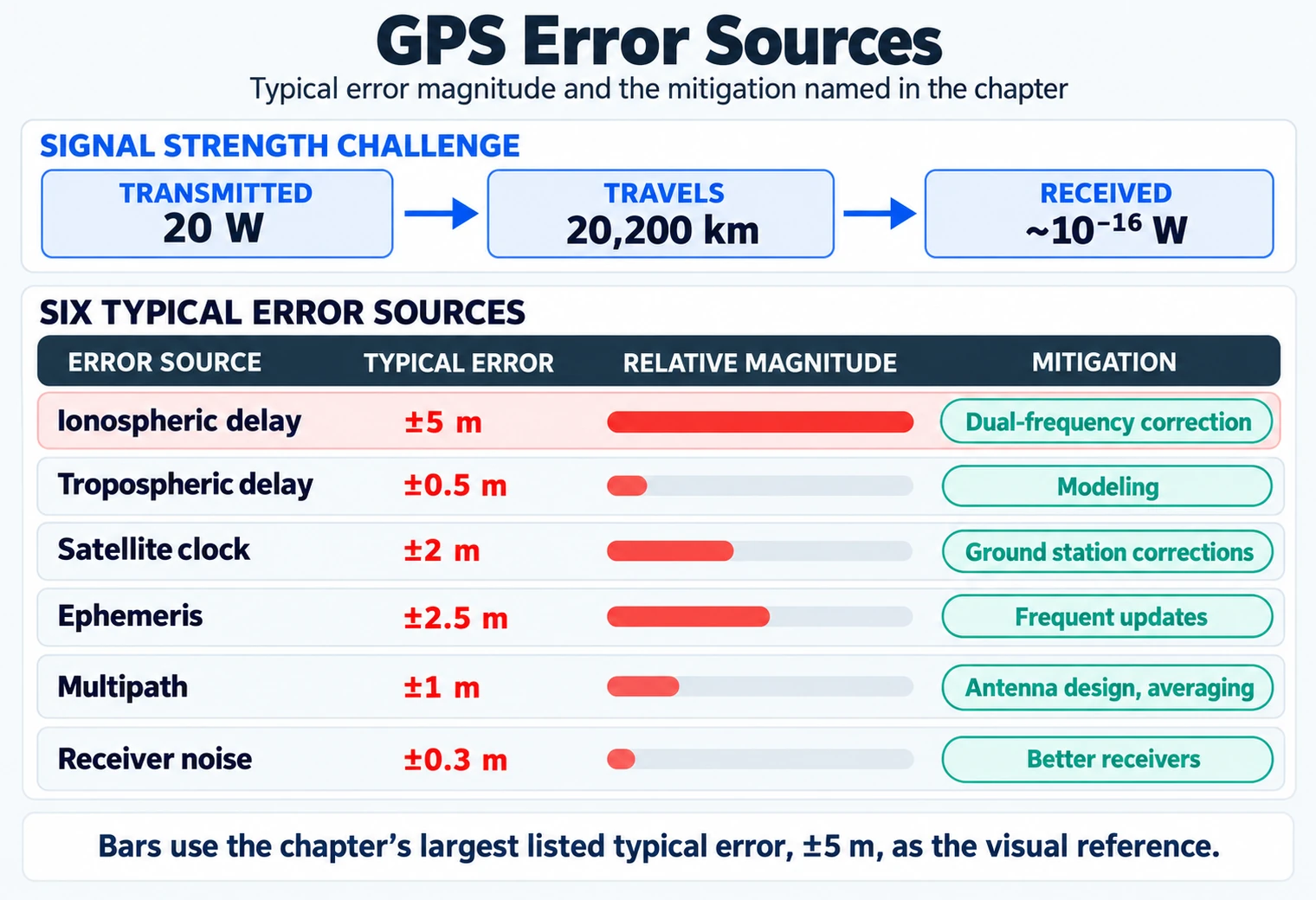
Read the satellite and receiver clock terms first. A small time error becomes a range error because the radio wave moves so fast. The upper air and lower air add more delay. Orbit error and satellite shape then affect how all those range errors turn into a point on the map. Near a building, a bounced path is longer than the direct path. The metre values are parts of the error, not a promise of final accuracy. Save fix quality and facts about the site with each point; latitude and longitude are not exact truth by themselves.
Signal Strength Challenge:
GPS signal transmitted at 20 watts. Travels 20,200 km (GPS orbit altitude). Received power: ~10^-16 watts (incredibly weak!). Various atmospheric effects introduce errors.
| Error Source | Typical Error | Mitigation |
|---|---|---|
| Ionospheric delay | ±5 m | Dual-frequency correction |
| Tropospheric delay | ±0.5 m | Modeling |
| Satellite clock | ±2 m | Ground station corrections |
| Ephemeris | ±2.5 m | Frequent updates |
| Multipath | ±1 m | Antenna design, averaging |
| Receiver noise | ±0.3 m | Better receivers |
Checkpoint: Operational Accuracy
You now know:
- Four satellites solve the minimum four unknowns; 10-12 satellites let receivers improve and cross-check the solution.
- Dense streets can add 50-200 ns of delay and 15-60 m of position error.
- A weak 20 W satellite signal arriving from 20,200 km needs correction, filtering, and honest quality metadata.
20.11 Knowledge Check
This section: Knowledge Check
GPS is an inverted TDoA system where satellites broadcast synchronized time signals and receivers calculate position from pseudoranges. Four satellites are the minimum (3 position unknowns + 1 clock offset), while additional usable satellites can improve geometry and redundancy depending on measurement quality. The system’s genius is treating the receiver’s cheap clock offset as a solvable unknown rather than requiring expensive atomic clocks in every device. The biggest practical limitations are multipath (signal reflections in cities) and weak satellite signals that are often blocked or degraded indoors.
GPS is like playing Marco Polo with satellites in SPACE!
20.11.1 Messages from Space
“How does my phone know where I am?” asked the LED one day, staring at the blue dot on a map.
Temperature Terry knew the answer. “GPS uses a basic 24-slot plan and normally has extra satellites in orbit, about 20,200 kilometers up! Each one is basically shouting ‘I’M HERE and the time is 3:00:00.000000!’”
“But how does that help?” asked Lila.
“Imagine you’re blindfolded in a big park,” said the microcontroller. “Three friends stand in different spots and each one shouts ‘I’m 50 meters from you!’ or ‘I’m 30 meters from you!’ With three distances, there’s only ONE spot where you could be standing!”
“That’s TRILATERATION!” cheered the battery. “GPS works the same way, but instead of friends shouting, it’s satellites sending time signals. Your phone calculates how far each satellite signal traveled by how long it took to arrive.”
“But here’s the tricky part,” said Sammy. “Radio signals travel at the SPEED OF LIGHT — 300,000 kilometers per second! That’s SO fast that if your phone’s clock is off by just ONE MILLIONTH of a second, it’s wrong by 300 meters!”
“That’s why we need a FOURTH satellite!” explained Max. “Three satellites tell us where we are, and the fourth one helps us figure out exactly what time it is. The satellites have super-expensive atomic clocks that cost $100,000 each, but our phones can figure out the right time by using math!”
“So GPS is really about TIME, not just PLACE!” realized Lila.
“Exactly! And the satellites are so far away that their signals are incredibly weak when they reach us. That’s why GPS doesn’t work inside buildings — the signals can’t get through walls and ceilings!”
20.11.2 Key Words for Kids
| Word | What It Means |
|---|---|
| Satellite | A special machine orbiting Earth in space that sends time signals to GPS receivers |
| Speed of Light | The fastest speed in the universe — 300,000 km per second! GPS signals travel this fast |
| Atomic Clock | A super-accurate clock on satellites that loses less than 1 second in a MILLION years |
| Pseudorange | A distance measurement that’s slightly wrong because your phone’s clock isn’t perfect |
How this chapter connects to other IoT concepts:
Foundation for: GPS Accuracy Enhancement builds on error sources and pseudorange concepts to implement DGPS/RTK corrections. Contrasts with: Indoor Positioning which requires entirely different technologies where satellite signals fail. Atomic clocks: Satellite Synchronization explains why GPS provides an authoritative time source for distributed IoT systems. Multipath: Wireless Fading and Interference explains why signal reflection affects all RF systems, not just GPS. Case study: Urban IoT Challenges Manhattan multipath problem affects all outdoor location services.
Related topics for deeper exploration:
GNSS Constellations: Details on GLONASS, Galileo, and BeiDou systems that supplement GPS. Relativistic Effects on Satellites: Why satellite clocks run 38 microseconds fast per day due to gravity and velocity. GPS Error Sources: How ionospheric delay, tropospheric delay, multipath, and receiver noise affect GPS accuracy. Kalman Filtering for GPS: Mathematical framework for combining GPS with IMU dead reckoning. A-GPS and Assistance Data: How cellular networks accelerate GPS acquisition via ephemeris assistance.
The exercises turn the same quality fields into field evidence: satellite geometry, acquisition time, multipath, and track smoothness.
Hands-on exercises to understand GPS mechanics:
20.11.3 Exercise 1: Observe GDOP Changes
Use a satellite tracking app (GPS Test, GPSTest+ for Android):
- Record satellite positions and HDOP/GDOP in open field (good sky view)
- Walk to urban area between buildings (limited sky view)
- Compare satellite count and geometry
What to observe: Open sky may show 8-12 satellites spread across the sky; an urban canyon may show 4-6 satellites clustered overhead. Compare the reported HDOP/GDOP and fix quality; satellite count alone does not determine expected accuracy, and HDOP scales horizontal uncertainty.
20.11.4 Time to First Fix (TTFF)
Test GPS acquisition speed:
- Use the receiver’s documented cold-start reset to clear stored time, position, almanac and ephemeris; record which assistance data were cleared. If the device cannot clear these, call the trial a warm restart.
- After a cold-start reset, enable GPS in airplane mode (no network assistance)
- Time how long until position fix
- Repeat with cellular data enabled (A-GPS active)
What to observe: TTFF ranges depend on the device and conditions. Record the observed cold-start or warm-restart time and whether assistance data were available. A-GPS can provide assistance data over a network.
20.11.5 Track Multipath Environments
Use GPS logger app to record tracks in different environments:
- Open field: Walk 100-meter straight line, record GPS track
- Urban canyon: Walk same distance between tall buildings, record track
- Forest: Walk under dense tree canopy, record track
- Compare actual distance to GPS-calculated distance
What to observe: Open field track is smooth and accurate (±5m). Urban track has large jumps and zigzags (±20-50m from multipath reflections). Forest track has gaps where signal is lost entirely. This demonstrates environmental impact on GPS performance.
Common Pitfalls
This section: Common Pitfalls
Adding too many features before validating core user needs wastes weeks of effort on a direction that user testing reveals is wrong. IoT projects frequently discover that users want simpler interactions than engineers assumed. Define and test a minimum viable version first, then add complexity only in response to validated user requirements.
Treating security as a phase-2 concern results in architectures (hardcoded credentials, unencrypted channels, no firmware signing) that are expensive to remediate after deployment. Include security requirements in the initial design review, even for prototypes, because prototype patterns become production patterns.
Designing only for the happy path leaves a system that cannot recover gracefully from sensor failures, connectivity outages, or cloud unavailability. Explicitly design and test the behaviour for each failure mode and ensure devices fall back to a safe, locally functional state during outages.
20.12 What’s Next
This section: What’s Next — Continue to GPS Accuracy and Enhancement to learn about the GPS error budget, differential GPS corrections, and RTK techniques that achieve centimeter-level accuracy for precision applications.
Continue to GPS Accuracy and Enhancement to learn about the GPS error budget, differential GPS corrections, and RTK techniques that achieve centimeter-level accuracy for precision applications.
| Previous | Up | Next |
|---|---|---|
| Location Awareness Fundamentals | UX Design | GPS Accuracy and Enhancement |
20.13 Continue Your Route
This section: Continue Your Route — This is the last part of this chapter.
This is the last part of this chapter. Return to GPS Location: Ranging Methods. See ux-design module index.
Find help
3 reviewed answers.
Where should I start in a module?
Open the module page from the sidebar to see its chapters in order. Use the module map to return to a topic you need.
Modules and pathsReviewed
What can I try when a project does not work?
Check the symptom, then work through the diagnostic steps. Keep the error message and the smallest example that reproduces it.
When you are stuckReviewed
How do interactive examples work?
Use the interactive guide to check how examples and simulations work before changing your project.
Interactive examples guideReviewed