19 GPS Location: Ranging Methods
More
Depth: Practitioner
Progress saves as you read. Mark sections complete as you go; your progress appears in the sidebar.
19.1 Start With the Decision
This section: Start With the Decision — A GPS receiver measures travel time, not a dot on a map.
A GPS receiver measures travel time, not a dot on a map. Four biased ranges are needed to solve position and clock error.
19.2 Route Overview
This section: Route Overview — This is part 1 of 2.
This is part 1 of 2. Continue with GPS Location: Architecture and Error Control.
19.3 Part Objectives
This section: Part Objectives
- Derive pseudorange from signal travel time.
- Solve position and clock bias with satellite geometry.
19.4 Start Simple
This section: Start Simple — Picture a walking app beside tall buildings.
Design for the Moment the Position Becomes Uncertain
Picture a walking app beside tall buildings. The dot appears on the wrong street, moves in jumps, and then freezes while still looking current. The user needs to know whether the position is good enough for the next choice, not merely whether a dot exists.
Start with the decision the position supports. Record event time, arrival time, age, stated accuracy, movement, and the amount of open sky. Define the states the user will see: searching, usable, weak, old, and unavailable. Keep the last known place separate from a fresh position.
Walk from open ground into a narrow street, stand still, restart the receiver, change direction, and block part of the sky. Check how quickly the state changes, whether the screen explains uncertainty, and what safe action remains when the position is lost. Compare the record with a known route rather than one perfect point.
This trial cannot prove every city, weather, or device. The deeper sections show how satellite timing, geometry, reflected signals, clock error, update rate, and receiver evidence bound an outdoor position claim.
Outdoor positioning begins with a simple question: can the receiver see enough sky to support the promise? Start with satellite geometry, timing error, multipath, update rate, and power, then decide what the user should see when the fix is good, degraded, or unavailable.

19.5 Summary
This section: Summary — GPS/GNSS positioning depends on satellite timing, pseudoranges, geometry, receiver clocks, and environmental multipath.
GPS/GNSS positioning depends on satellite timing, pseudoranges, geometry, receiver clocks, and environmental multipath. Outdoor positioning designs should account for accuracy limits, power use, update rate, and failure conditions.
- Start Simple
- Phoebe’s Field Notes: Why the Pseudorange Needs a Fourth Satellite
- Summary
- In 60 Seconds
- GPS and Outdoor Positioning
- Key Concepts
- Prerequisites
- GPS Timing as Product Context
- Receiver State Machine Design
- Under the Hood: The Fix Is a Pipeline
- Checkpoint: Fix Lifecycle
- Global Navigation Satellite Systems
- Time of Flight (ToF)
- Time of Flight to Distance
- Clock Error Impact
- The Multipath Problem
- Checkpoint: Timing and Reflections
- Time Difference of Arrival (TDoA)
19.6 In 60 Seconds
GPS determines position by measuring time-of-flight from at least 4 satellites, solving for 3D position plus clock offset. Satellite clocks provide accurate transmission times; a 1 microsecond receiver-clock bias adds about 300 meters to each pseudorange, and the receiver estimates that bias using a fourth satellite. The multipath problem (signals bouncing off buildings) is GPS’s biggest challenge in urban environments, degrading accuracy from 5-10 meters to 50+ meters.
19.7 Learning Objectives
This section: Learning Objectives
By the end of this chapter, you will be able to:
- Explain GPS/GNSS Architecture: Describe the space, control, and user segments of satellite navigation systems
- Calculate Positioning from Satellites: Apply Time of Flight and TDoA principles to determine position
- Diagnose Multipath Effects: Distinguish how signal reflections degrade positioning accuracy in different environments
- Justify Clock Synchronization: Explain why atomic clocks are essential and demonstrate how pseudoranges compensate for receiver clock errors
GPS (Global Positioning System) works by measuring the time it takes for radio signals to travel from satellites to your device. With signals from at least 4 satellites, a receiver can calculate its 3D position. Satellite clocks provide accurate transmission times; a 1 microsecond receiver-clock bias adds about 300 meters to each pseudorange, and the receiver estimates that bias using a fourth satellite. The biggest real-world challenge is multipath — signals bouncing off buildings in cities can degrade accuracy from 5 meters to 50+ meters.
Key Concepts
This section: Key Concepts — GPS: Global Positioning System providing 3-10 metre outdoor accuracy using pseudorange lateration from at least four satellites, consuming 20-100 mA active current.
GPS: Global Positioning System providing 3-10 metre outdoor accuracy using pseudorange lateration from at least four satellites, consuming 20-100 mA active current. Indoor Positioning: Techniques (BLE beacons, UWB, Wi-Fi RSSI, IMU dead-reckoning) achieving 0.1-5 metre accuracy where GPS signals are unavailable. Geofencing: Virtual geographic boundary triggering automated actions when a tracked asset enters or exits the defined area. Dead Reckoning: Position estimation using last known location plus measured movement (speed, heading) when GPS signal is lost. RSSI-Based Positioning: Location estimation from signal strength of known beacon nodes, achieving 2-5 metre accuracy in calibrated environments. Ultra-Wideband (UWB): Radio technology providing 10-30 cm indoor positioning accuracy using time-of-flight measurements between anchor nodes. Location Privacy: User right to control who can access their location history and how granular that location data is stored.
19.8 Prerequisites
This section: Prerequisites
- Location Awareness Fundamentals: Understanding of positioning technology landscape
19.9 GPS Timing as Product Context
This section: GPS Timing as Product Context — GPS/GNSS is not just a map dot.
GPS/GNSS is not just a map dot. It is a timing system that lets an IoT product infer outdoor context from weak satellite signals, known orbits, receiver clock error, and a changing view of the sky. The product decision is what the system should do with that context: show a vehicle route, confirm a gate arrival, enforce a geofence, steer a machine, timestamp a field event, or refuse an unsafe automation.
Follow Figure 19.1 to see why a position fix needs at least four pseudoranges and a clock-offset estimate.
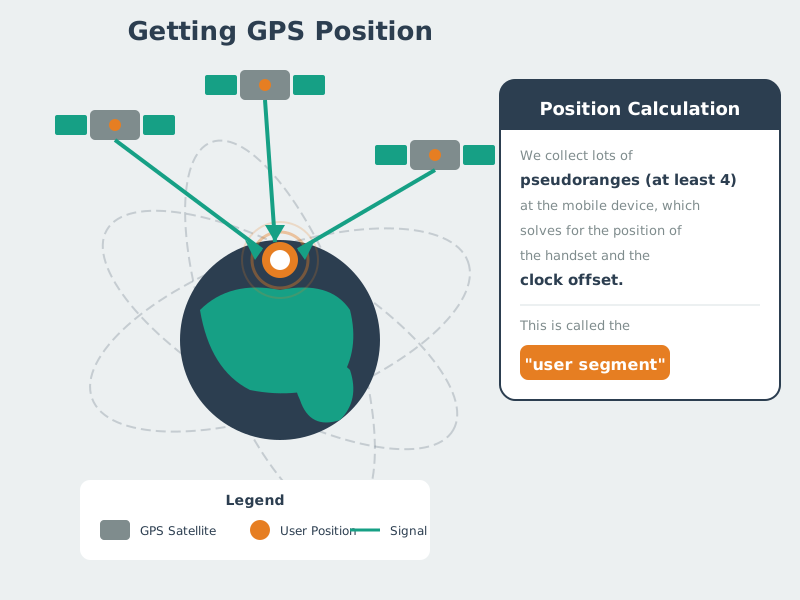
Begin with the time mark and known orbit sent by each satellite. The receiver uses signal travel time to form a pseudorange. Three ranges narrow the point in three axes, but the cheap receiver clock does not match satellite time. A fourth range lets the solver find that clock error as well as north-south, east-west, and height. The final point comes from a timed set of measures; it is not a direct sensor value. A poor sky shape, weak signal, or lost satellite can make the doubt wider even when the solver still returns a point.
Good outdoor location design starts by separating the fix lifecycle from the user promise. A receiver may be searching, downloading assistance data, using a two-dimensional fix, using a three-dimensional fix, coasting on dead reckoning, or reporting a stale position after losing sky view. The interface should not show all of those states as the same precise blue dot.
That distinction matters because the same receiver can be excellent in one context and misleading in another. A field sensor with a clear antenna view may produce stable fixes every few minutes. A courier phone in an urban canyon may report plausible but wrong locations because reflected signals make pseudoranges too long. A tracker under a vehicle dashboard may acquire slowly because metal and glass attenuate the satellite signals. The product should expose the quality difference before it triggers an action.
Design the user promise around the consequence. “The asset was last seen near gate 4 at 10:31” is a different promise from “unlock the gate because the vehicle is here.” A route display can tolerate a snapped-to-road correction, but an audit trail should keep the raw fix and the corrected point separate. A safety geofence should require dwell time, accuracy radius, and current timestamp instead of accepting a stale point inside the boundary.
- Acquisition: cold start, warm start, assisted GPS, and time-to-first-fix affect what a user sees during setup and recovery.
- Continuity: update rate, power mode, antenna placement, map matching, and IMU handoff decide whether tracks are smooth or jumpy.
- Trust: accuracy radius, timestamp, fix type, and fallback wording tell users when the location is useful enough to act on.
19.10 Receiver State Machine Design
This section: Receiver State Machine Design — Treat the GNSS receiver as a stateful component.
Treat the GNSS receiver as a stateful component. During setup, record whether the device has a valid time source, recent almanac, recent ephemeris, enough satellites, acceptable HDOP, and a clear antenna view. During operation, record whether the receiver is using GPS alone or a multi-GNSS fix with Galileo, GLONASS, BeiDou, or QZSS; whether position comes from GNSS, Android Fused Location Provider, Apple Core Location, or an external receiver; and whether the product has applied map matching or sensor fusion.
For battery IoT devices, the correct update rate is rarely “as fast as possible.” A livestock collar, rental scooter, delivery app, and safety beacon have different duty cycles. Track the cost of each fix in active current, radio upload, cloud storage, and user attention. Use batching, geofence triggers, adaptive sampling, and motion detection when continuous GNSS would waste energy without improving the decision.
Build acceptance tests around the places where GNSS changes behavior. Test open-sky startup, tree cover, urban street canyons, indoor-to-outdoor transition, pocket or bag carry, low battery, airplane mode, poor antenna orientation, and recovery after several hours powered off. For embedded modules, include antenna ground plane, enclosure material, cable length, and placement near radios or processors. For phones, include permission denial, approximate-location mode, background throttling, and operating-system power saving.
Use different display and automation rules for different fix classes. A dashboard can show a stale position with a timestamp and grey styling. A dispatch workflow can route a driver only after speed, heading, and map-matched road segment agree. A custody workflow can ask for a QR or NFC confirmation at the site when the GNSS radius is larger than the loading bay. Those rules make uncertainty operational instead of leaving support staff to explain why a blue dot looked exact.
- Specify the fix policy: define no-fix, searching, coarse, good, stale, and degraded states with display text and allowed automations.
- Specify the movement policy: combine speed, heading, accelerometer, gyroscope, odometer, or map-matched road segment only when their timing and frames line up.
- Specify the power policy: choose continuous tracking, periodic fixes, event-triggered fixes, or user-requested fixes based on consequence and battery life.
19.11 Under the Hood: The Fix Is a Pipeline
This section: Under the Hood: The Fix Is a Pipeline — A practical GNSS pipeline starts with RF acquisition and ends with a position, velocity, and time solution.
A practical GNSS pipeline starts with RF acquisition and ends with a position, velocity, and time solution. The receiver searches for signals such as GPS L1 C/A, GPS L5, Galileo E1/E5, BeiDou B1/B2, or GLONASS signals; locks code phase and Doppler; decodes navigation data; applies ephemeris, clock, atmospheric, and relativistic corrections; estimates pseudoranges; and solves for receiver position and clock offset. Many modules expose the result through NMEA sentences such as GGA, RMC, GSA, and GSV, or through binary protocols such as UBX.
The product should keep the quality fields near the coordinate. Useful fields include fix type, HDOP/VDOP/PDOP, satellite count, constellation mix, C/N0 signal quality, estimated horizontal error, estimated vertical error, speed, course over ground, timestamp, leap-second/time status, assistance-data age, and antenna status. If a cloud service or map layer changes the coordinate, keep both the raw fix and the processed position so operations teams can distinguish receiver behavior from product logic.
The receiver clock is the reason GPS needs at least four satellites for a full fix. Each satellite gives one pseudorange equation. The unknowns are receiver x, y, z, and receiver clock offset from GNSS time. Once more than four satellites are available, the solver can use an overdetermined least-squares solution and report dilution-of-precision values that describe the geometry. Good geometry does not remove all error, but poor geometry can make otherwise valid measurements produce a weak position.
Make that fourth unknown visible with the chapter’s clean four-satellite teaching case. Step from one range sphere through the added constraints and shared clock term to one Gauss–Newton update and the final rank/geometry diagnosis. Keep a pseudorange ledger beside the solved receiver and clock-bias values so the geometry and arithmetic stay tied to one state.
For the counterexample, leave every satellite coordinate, pseudorange, clock term, and noise value unchanged and vary only the enabled measurements from three to four. The conclusion reverses from insufficient independent measurements with no published fix to a solved 3-D position plus the shared receiver-clock bias. Then compare GDOP and PDOP with the residual ledger; a rank-four solution can exist while weak geometry still amplifies small measurement errors.
Assistance and correction services change the pipeline. Assisted GNSS can provide approximate time, approximate location, almanac, or ephemeris data over a network to reduce time-to-first-fix. SBAS, DGPS, RTK, or PPP can reduce some satellite, clock, and atmospheric errors when the receiver and service support them. Those features should be represented in product metadata because a centimeter-capable RTK rover in fixed mode is making a different claim from a phone-grade coarse fix.
- Cold-start risk: without valid time, location, almanac, or ephemeris, first fix can be slow; assisted data over SUPL or a vendor service changes startup behavior.
- Urban risk: multipath and blocked sky can pass through the solver as plausible coordinates; map matching and inertial smoothing help but can also hide real uncertainty.
- System risk: a geofence, route, or safety command should consume the quality-aware location event, not a naked latitude/longitude pair.
This section:
Checkpoint: Fix Lifecycle
You now know:
- A GPS product should show searching, stale, degraded, and good fixes differently.
- The useful event includes fix type, quality fields, timestamp, source, and fallback wording.
- Power policy and automation policy should follow consequence, not raw latitude and longitude.
This section: — With the product states named, the next question is where the numbers behind a GPS fix come from.
With the product states named, the next question is where the numbers behind a GPS fix come from.
19.12 Global Navigation Satellite Systems
This section: Global Navigation Satellite Systems — Before comparing accuracy, inspect Figure 19.2 to ask which satellite groups and radio bands a GNSS receiver may use beyond GPS alone.
Before comparing accuracy, inspect Figure 19.2 to ask which satellite groups and radio bands a GNSS receiver may use beyond GPS alone.
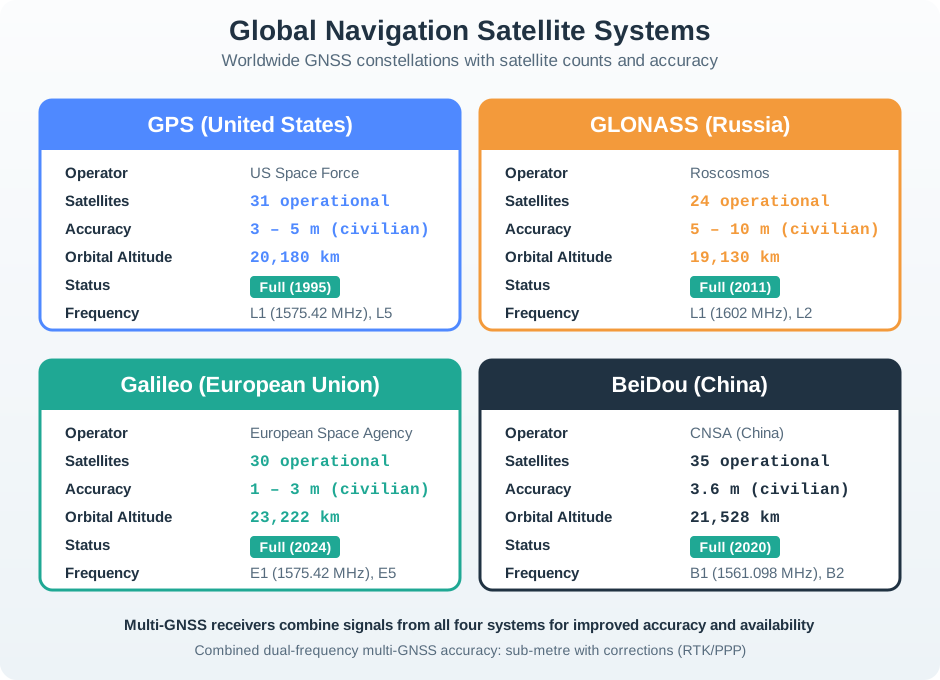
Read the first card in Figure 19.2 for US GPS. It shows 31 active craft at a height of 20,180 km, which is 20,180,000 m, and a civil error class of 3–5 m. The next cards show 24 GLONASS craft with 5–10 m and a Galileo class of 1–3 m. Compare the radio bands as well as the counts. More than one group can improve the view of the sky, but the real fix still depends on bands the receiver supports, antenna view, sky shape, and the error sources covered next.
GPS (Global Positioning System): The first and most widely deployed Global Navigation Satellite System (GNSS), which has come to dominate outdoor positioning.
To understand GPS fully, we first examine two important techniques…
19.13 Time of Flight (ToF)
This section: Time of Flight (ToF) — Time of Flight: Measure the time taken for a signal to propagate from transmitter to receiver.
Time of Flight: Measure the time taken for a signal to propagate from transmitter to receiver.
Use Figure 19.3 to connect a measured travel time with one range and then with a position from several ranges.
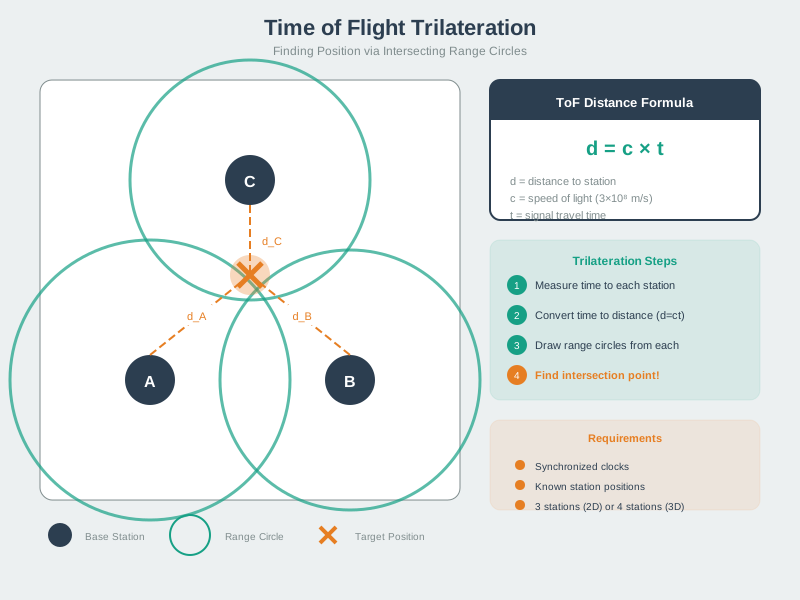
Start with one transmitter and the receiver: travel time multiplied by propagation speed gives a range, placing the receiver somewhere on a circle or sphere rather than at one point. At light speed, 10 ns × 3 × 10^8 m/s = 3 m, which shows why nanosecond timing error matters. Add ranges from other known transmitters and inspect where their surfaces intersect. That trilateration step estimates position; it does not remove clock bias, non-line-of-sight delay, or weak geometry, so the result still needs an uncertainty bound.
Distance Calculation:
Distance = Speed of Light × Time of Flight
d = c × Δt

where:
- c = 299,792,458 m/s (speed of light in vacuum)
- Δt = reception time - transmission timeTry it: Adjust the signal travel time to see how distance changes. GPS satellites orbit at ~20,200 km altitude, so typical travel times are 67-68 milliseconds.
Critical Challenge: Both transmitter and receiver must have synchronized clocks to know the true transmission time.
Key insight: Even tiny clock errors create huge position errors because signals travel at light speed (300 million meters/second).
19.14 The Multipath Problem
This section: The Multipath Problem — Compare the direct and reflected paths in Figure 19.4 to see why an apparently strong signal can still produce a biased range.
Compare the direct and reflected paths in Figure 19.4 to see why an apparently strong signal can still produce a biased range.
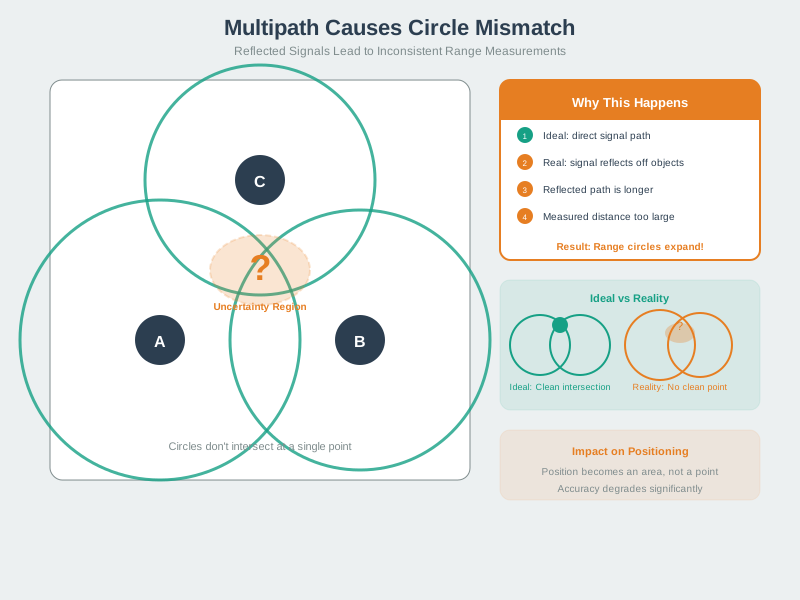
The ideal panel assumes each measured range follows a direct line from satellite to receiver, so the range surfaces meet near one point. In the real panel, a building or other object reflects the signal and lengthens its route. If the reflected route adds 30 m, the receiver interprets roughly 30 m of extra pseudorange unless it can reject that path. Several biased ranges then shift or scatter the intersection. Open-sky testing cannot establish urban performance; antenna placement, signal diagnostics, and uncertainty-aware behaviour must be checked where reflections occur.
Multipath: Signals reflect off objects, creating multiple paths between transmitter and receiver.
Impact:
Fine for communications: Multiple signals can be combined. Kills positioning: Makes distances appear longer than reality. Indoor environments: Severe multipath due to many reflective surfaces.
Checkpoint: Timing and Reflections
You now know:
- Time-of-flight turns signal travel time into distance, so 67-68 ms maps to GPS-orbit ranges.
- A 1 microsecond clock error means about 300 m of range error.
- Multipath can move an urban fix from 5-10 m accuracy to 50+ m error.
19.15 Time Difference of Arrival (TDoA)
This section: Time Difference of Arrival (TDoA) — Use Figure 19.5 to follow how arrival time differences narrow a transmitter’s possible location.
Use Figure 19.5 to follow how arrival time differences narrow a transmitter’s possible location.
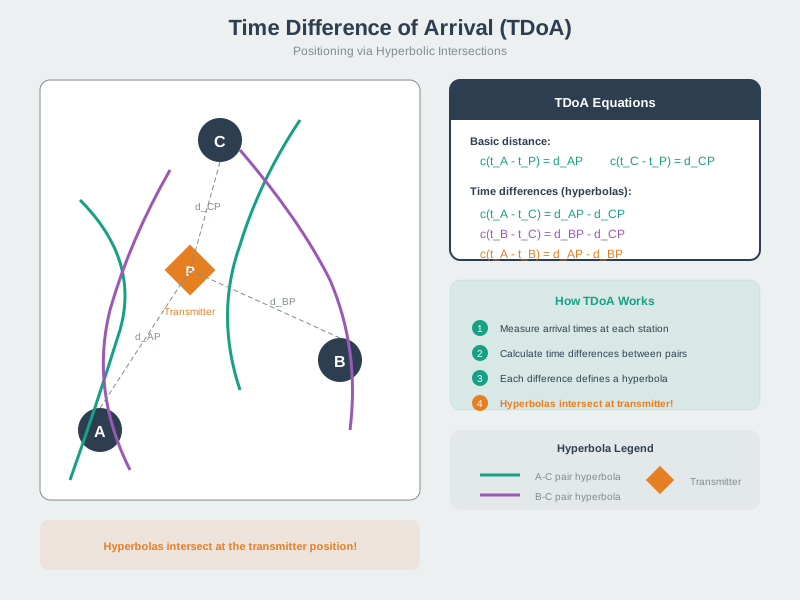
Stations A, B, and C receive the same signal at different times. Comparing two arrival times removes the need to know the transmitter’s exact send time and gives a difference in path length. Each station pair defines a curve of possible points; the curves intersect near the transmitter position P. The equations in the figure label those pairwise differences. Review clock alignment and station geometry before trusting the intersection, since the drawn crossing is an idealized result of the measured times.
The Problem with Simple ToF:
Mobile device and fixed sites separated by large distances. Cannot keep clocks synchronized. RF signals travel at c, so 1 μs sync error = 300m position error.
TDoA Solution:
Accept that clocks aren’t synced. Solve for the clock offset as an additional unknown. Any single range is wrong, but every range is wrong by the same amount. These erroneous ranges are called pseudoranges.
Key Requirements for TDoA:
Base Stations Must Be Synchronized:. Lay cables between stations. Use GPS (ironically!). Give them all atomic clocks ($$$).
Mobile Device Clock Can Be Wrong:. Clock offset becomes an additional unknown to solve. Need N+1 stations for N-dimensional positioning. 3D position + clock offset = 4 unknowns → need 4 satellites.
GPS uses the same idea in reverse: the expensive clocks are in space, and the receiver solves its own cheap clock error as part of the position.
19.16 Continue to the Next Part
This section: Continue to the Next Part — Carry this evidence into GPS Location: Architecture and Error Control, which begins with GPS Architecture.
Carry this evidence into GPS Location: Architecture and Error Control, which begins with GPS Architecture.
Find help
3 reviewed answers.
Where should I start in a module?
Open the module page from the sidebar to see its chapters in order. Use the module map to return to a topic you need.
Modules and pathsReviewed
What can I try when a project does not work?
Check the symptom, then work through the diagnostic steps. Keep the error message and the smallest example that reproduces it.
When you are stuckReviewed
How do interactive examples work?
Use the interactive guide to check how examples and simulations work before changing your project.
Interactive examples guideReviewed