16 Location Awareness: Positioning Basics
More
Depth: Practitioner
Progress saves as you read. Mark sections complete as you go; your progress appears in the sidebar.
16.1 Start With the Decision
This section: Start With the Decision — Positioning estimates where a device may be.
Positioning estimates where a device may be. A distance estimate is an inferred gap from a known point. A signal model links a measured radio value to that gap. RSSI is the strength of a received radio signal; a map pin is the point shown to the user. A distance estimate changes when walls, bodies, and radio power change. Positioning starts with a measured signal model, not a map pin.
16.2 Route Overview
This section: Route Overview — This is part 1 of 3.
This is part 1 of 3. Continue with Location Awareness: Technology Tradeoffs.
16.3 Part Objectives
This section: Part Objectives
- Relate RSSI path loss to a distance estimate.
- Distinguish ranging, positioning, and location context.
16.4 Start Simple
This section: Start Simple — Bluetooth Low Energy (BLE) is a short-range radio method designed for low power.
Choose the Action Before the Dot
Bluetooth Low Energy (BLE) is a short-range radio method designed for low power. Ultra-wideband (UWB) is a radio method that can measure distance with short signals. Picture an app that guides a visitor to a room. A rough zone may be enough for a sign, while an automatic door action needs much stronger proof.
Start with the action and the person affected. Name the required area, update time, acceptable error, power limit, and privacy rule. Then compare outdoor signals, nearby radio clues, measured ranges, and fixed room markers against those needs.
Walk the real route with the device in a pocket, bag, and hand. Test walls, crowds, lifts, weak signals, and a lost fix. The screen should show doubt instead of a false exact point. High-impact actions need a safe fallback or a second source.
No method is best in every place. The deeper sections compare accuracy, energy, installed equipment, and privacy so the choice remains tied to one use and one tested setting.
Keep the result plain. Say where the person may be, how old the estimate is, and what the app will do next. If the evidence is weak, wait or ask rather than hide doubt behind a sharp map pin.
Location is not just a dot on a map; it is evidence for a decision. Start with the action location enables, the accuracy and freshness it needs, the privacy boundary it crosses, and the fallback message when the system is uncertain.
16.5 Summary
This section: Summary — Location awareness gives IoT systems context for automation, safety, navigation, asset tracking, and resource management.
Location awareness gives IoT systems context for automation, safety, navigation, asset tracking, and resource management. Effective designs match positioning technology to environment, accuracy, power, infrastructure, and privacy requirements.

- Start Simple
- Summary
- Phoebe’s Field Notes: Where the Path-Loss Exponent n Actually Comes From
- Prerequisites
- Location as Design Signal
- Match Tech to Risk and Place
- Checkpoint: Fit the Zone
- Location Needs Time and Frames
- Getting Started (For Beginners)
16.6 Learning Objectives
This section: Learning Objectives
By the end of this chapter, you will be able to:
- Explain Location Awareness: Describe why location awareness is fundamental to IoT and mobile services
- Compare Positioning Technologies: Evaluate GPS, Wi-Fi, BLE beacons, UWB, and cellular positioning for different scenarios
- Classify Application Domains: Distinguish where location-aware systems add value (safety, energy, navigation, social)
- Assess Technology Trade-offs: Analyze accuracy, cost, power, and infrastructure trade-offs for positioning systems
16.7 Prerequisites
This section: Prerequisites
Before diving into this chapter, you should be familiar with:
- Wireless Communication Fundamentals: Understanding of RF propagation, signal strength, and time-of-flight principles is essential for grasping positioning technologies
- Sensor Fundamentals: Knowledge of how sensors work provides context for understanding GPS receivers, accelerometers, and other positioning sensors
16.8 Location as Design Signal
This section: Location as Design Signal — Location awareness helps an IoT system decide what context it is in: at home or away, inside or outside, near a machine or outside the safe zone, on the correct shelf or only in the correct building.
Location awareness helps an IoT system decide what context it is in: at home or away, inside or outside, near a machine or outside the safe zone, on the correct shelf or only in the correct building. The useful design question is what action changes when location confidence changes.
A precise coordinate is not always the right target. A thermostat may only need home/away presence. A hospital asset tag may need room-level location. A warehouse robot may need lane-level position and obstacle context. A safety application may need a conservative geofence that avoids false unlocks, false alarms, or missed exits.
the linked figure in Part 2 shows that the same raw location estimate can support very different product behavior. A home automation app may use “inside the home geofence” as a low-risk hint to warm the house, but it should not use the same hint to unlock a door without additional confirmation. A delivery app can show “nearby” when GPS uncertainty is high, while a warehouse forklift system may need lane-level confidence before changing a speed rule. The interface should communicate the level of confidence that matters to the next action.
That is why location awareness is a service design problem as much as a sensing problem. The product has to define the zones people understand, the automation that depends on each zone, the fallback when location is stale, and the privacy promise attached to the data. Users rarely think in latitude and longitude. They think in places, routes, rooms, entrances, shelves, restricted areas, and “close enough to act.” A good system translates signals into those terms without hiding uncertainty.
The beginner mistake is treating location as a single answer. Real systems usually have a location claim with a source, age, estimated error, confidence, and permission state. A location claim can be fresh but coarse, precise but stale, available outdoors but missing indoors, or accurate for the device while still wrong for the person carrying it. The design should name those states before using location to automate anything important.
- Outcome: Name the decision location should support: alert, unlock, route, log, disable, hand over, or ask for confirmation.
- Confidence: Define what the system does when position is fresh, stale, approximate, contradictory, or unavailable.
- Consent: Explain what is collected, when it is collected, who can see it, and how long it remains useful.
16.9 Match Tech to Risk and Place
This section: Match Tech to Risk and Place — Choose positioning technology from the operating context, not from the most accurate option on paper.
Choose positioning technology from the operating context, not from the most accurate option on paper. GNSS works well outdoors but degrades indoors, in urban canyons, and near reflective surfaces. Wi-Fi positioning can reuse installed access points but depends on fingerprint quality and infrastructure change. BLE beacons are cheap for proximity but RSSI moves with bodies, shelves, and doors. UWB can support precise ranging but needs anchors, calibration, and power planning.
Cellular positioning, LTE-M, NB-IoT, LoRaWAN gateway metadata, inertial sensors, barometers, QR codes, NFC tags, and manual check-in can also be useful when the product needs coarse zones, audit-friendly check points, or fallback confirmation. Many real systems fuse several weak signals instead of trusting one perfect source.
Start by writing an accuracy budget in product language. For a hospital asset tag, “the correct room within a few meters” may be enough because staff only need to find the wheelchair or pump. For a worker safety exclusion zone, a false “outside the danger zone” result can injure someone, so the design may need conservative boundaries, dwell time, redundant signals, and a local alarm. For a parking reminder, a coarse estimate may be acceptable if the app shows uncertainty and lets the user correct it.
Then design the zone model. A zone can be a country, site, building, floor, room, corridor, shelf, doorway, dock bay, vehicle, or near-device bubble. Each zone needs an enter rule, exit rule, stale limit, and ownership model. Geofences often need hysteresis so the enter boundary is not the same as the exit boundary. Indoor systems often need map versioning because moving a beacon, anchor, access point, or metal shelving can change the signal landscape.
Finally, plan field maintenance and privacy before rollout. BLE tags need battery replacement and attachment policy. UWB anchors need surveyed locations and clock behavior. Wi-Fi fingerprints need refresh when access points move. Smartphone location needs operating-system permission flows, background limits, and battery-aware scan intervals. Privacy review needs to decide whether exact paths are required, whether coarse zones are enough, and who can access historic movement records.
- Set the zone model. Decide whether the product needs country, site, building, floor, room, shelf, lane, doorway, or near-device context.
- Set the error policy. Define hysteresis, dwell time, confidence threshold, and manual confirmation for risky transitions.
- Set the maintenance model. Include beacon batteries, UWB anchor placement, map updates, calibration, access-point moves, and privacy review.
This section:
Checkpoint: Fit the Zone
You now know:
- A useful location design starts with the action it changes, not with the sensor brand.
- Zones need enter rules, exit rules, stale limits, ownership, and maintenance plans.
- Privacy review belongs beside the accuracy budget because coarse zones are often enough.
This section:
16.10 Location Needs Time and Frames
This section: Location Needs Time and Frames — Location data is only meaningful with a coordinate frame, timestamp, source, and quality estimate.
Location data is only meaningful with a coordinate frame, timestamp, source, and quality estimate. A latitude/longitude pair from GNSS, a room label from BLE fingerprinting, and a distance estimate from UWB two-way ranging are different kinds of claims. They should not be mixed without stating uncertainty.
Reliable location-aware systems also model transitions. Geofences need enter and exit thresholds, dwell time, and duplicate suppression. Indoor systems need map versioning, anchor identity, clock behavior, and multipath handling. Mobile apps need permission state, background execution limits, battery policy, and local fallback when the operating system throttles scans.
GNSS estimates position from satellite timing and needs line of sight to enough satellites. Urban canyons and indoor spaces introduce multipath, where reflected signals make the receiver solve against a distorted path length. Wi-Fi and BLE methods often use received signal strength or fingerprints, so walls, people, doors, and shelving can change the estimate. UWB improves ranging by using very short pulses and time-of-flight or time-difference methods, but it depends on anchor geometry, calibration, and clock assumptions.
Sensor fusion is useful because each signal fails differently. A phone can combine GNSS, Wi-Fi scans, Bluetooth scans, inertial motion, barometer readings, cellular information, and map constraints. An industrial RTLS can combine UWB anchors with BLE proximity or manual check points. The fusion layer should output more than a position: it should include source list, confidence, estimated error, last update time, coordinate frame, and whether the value is suitable for automation or only for display.
Automation should consume those quality flags deliberately. A stale room estimate might still be useful for search history but not for a live safety alert. A geofence transition might require 30-60 seconds of dwell time before an arrival action fires. A high-risk unlock or machine-control rule might require a second factor such as local BLE proximity, NFC tap, keypad input, or operator confirmation. Those policies belong in the product contract, not as hidden thresholds scattered through code.
- Quality: Store source, timestamp, estimated error, stale limit, and confidence so automation can degrade safely.
- Fusion: Combine GNSS, Wi-Fi, BLE, UWB, inertial, cellular, and manual signals only when their coordinate frames and timing are understood.
- Privacy: Prefer coarse zones, on-device checks, short retention, aggregation, and explicit user controls when exact paths are not needed.
16.11 Getting Started (For Beginners)
This section: Getting Started (For Beginners)
Analogy: Location awareness is like giving your IoT devices a sense of where they are.
Just like you know you’re in the kitchen (not the bedroom), IoT devices can learn their location and act differently based on it!
Before comparing methods, inspect Figure 16.1 to ask how a device turns radio signals into a named zone and a bounded action.
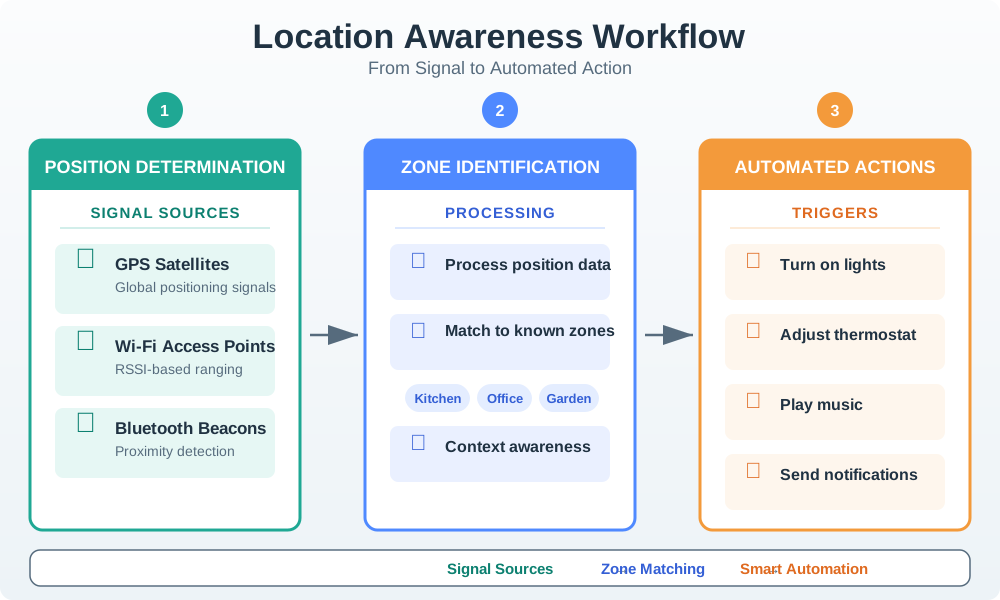
In Figure 16.1, the left-hand signals are observations rather than final truth. The processing stage turns them into a zone claim, and the last stage applies a rule such as changing lighting or issuing an alert. The rest of the chapter adds the missing engineering conditions—accuracy, freshness, consent, and fallback—that determine whether that rule is trustworthy. Keeping those stages separate also makes a wrong action easier to diagnose.
16.12 Continue to the Next Part
This section: Continue to the Next Part — Carry this evidence into Location Awareness: Technology Tradeoffs, which begins with Positioning Tech Decision Tree.
Carry this evidence into Location Awareness: Technology Tradeoffs, which begins with Positioning Tech Decision Tree.
Find help
3 reviewed answers.
Where should I start in a module?
Open the module page from the sidebar to see its chapters in order. Use the module map to return to a topic you need.
Modules and pathsReviewed
What can I try when a project does not work?
Check the symptom, then work through the diagnostic steps. Keep the error message and the smallest example that reproduces it.
When you are stuckReviewed
How do interactive examples work?
Use the interactive guide to check how examples and simulations work before changing your project.
Interactive examples guideReviewed