7 Interaction Patterns: State and Feedback
More
Depth: Practitioner
Progress saves as you read. Mark sections complete as you go; your progress appears in the sidebar.
7.1 Start With the Decision
This section: Start With the Decision — A phone can show success before the device has changed.
A phone can show success before the device has changed. The design must separate a request from a confirmed state.
7.2 Route Overview
This section: Route Overview — This is part 1 of 2.
This is part 1 of 2. Continue with Interaction Patterns: Synchronization and Recovery.
7.3 Part Objectives
This section: Part Objectives
- Model pending, confirmed, failed, and stale states.
- Choose feedback that exposes delay and system authority.
7.4 Start Simple
This section: Start Simple
7.4.1 Show the User Which State Is Real
A tenant taps Heat now on a phone. The button changes colour at once, but the heater has lost its connection and never starts. Fast feedback helped the tap feel responsive, yet it also created a false belief. The tenant needs to see the request, the confirmed device state, the time limit, and the safe next step as separate facts.
Map the action as a short state story. The interface accepts the request. The remote service may accept it. The device may confirm the change. The room may later show the expected result. Give each stage a clear label and time. Make authority visible so a quick local display never looks stronger than the latest confirmed state.
Test repeated taps, a late reply, no reply, the wrong account, and a device that changes state after the app closes. Check that commands are not silently doubled. Make timeout and rollback clear. Let the user retry safely or move to support with the event time and device identity intact.
This pattern does not make a remote action immediate or certain. It makes uncertainty visible and recoverable. The deeper sections compare quick visual response, shared state, alert escalation, feedback channels, and the records needed when several interfaces disagree.
Use four plain labels during the design review. Requested means the person has asked. Accepted means a service has taken the request. Confirmed means the device reports the new state. Observed means the physical result matches the aim. Do not let one label stand in for the next.
Now ask what the person sees at each step. Is the request still pending? Can it be cancelled? When does it time out? Which state came from the device? How old is that state? What happens after a late reply? Can support find the same event? Does another phone show the same truth?
Test the wording with no design hints. Ask a new user to tap once and explain the state. Hold the reply. Send a failure. Let another user act at the same time. Close and reopen the app. The user should not need to guess whether the colour means hope, receipt, or proof.
Keep the path safe when views disagree. Show the latest trusted time. Prevent a stale screen from overwriting a newer state. Keep repeat commands easy to spot. Give a safe retry only when repeat action cannot cause harm. Send the user to a person when the system cannot resolve the conflict itself.
An interaction pattern should make timing and authority visible. Start with the command, the optimistic state, the authoritative confirmation, the timeout, the rollback, and the message the user needs when a device, app, cloud service, or support record disagrees.
7.5 Learning Objectives
This section: Learning Objectives
By the end of this chapter, you will be able to:
- Implement Optimistic UI Updates: Provide immediate feedback while commands travel to devices
- Design Distributed State Synchronization: Keep multiple interfaces synchronized with a single source of truth
- Apply Notification Escalation: Create intelligent alert systems that avoid fatigue while ensuring critical events get attention
- Match Feedback to Action Importance: Design appropriate response timing and modality for different action types
Core concept: Network latency is unavoidable in IoT, so interfaces must provide immediate visual feedback (optimistic updates) while commands travel to devices, then reconcile with actual state on success or failure. Why it matters: Users tap buttons expecting instant response. A 3-second delay with no feedback leads to repeated taps, queued commands, and broken user trust. Key takeaway: Acknowledge every action within 100 ms visually, show progress during processing, and confirm or gracefully revert based on actual device response.
- Start Simple
- MVU: Minimum Viable Understanding
- Make Delay Visible
- Design State Pairs
- Synchronization as UX Problem
- Checkpoint: Delay and Authority
- Interaction Pattern Basics
- Key Concepts
- Prerequisites
- Core Interaction Patterns
- Responsiveness Gain Calculator
- Checkpoint: Pattern Selection
- Code Example: MQTT State Synchronization
7.6 Make Delay Visible
This section: Make Delay Visible — IoT interaction patterns exist because a user action often crosses an app, cloud service, gateway, radio link, device firmware, sensor, and actuator before the result is known.
IoT interaction patterns exist because a user action often crosses an app, cloud service, gateway, radio link, device firmware, sensor, and actuator before the result is known. The interface must respond immediately while staying honest about the final device state.
The core pattern is not “pretend it worked.” It is “acknowledge the intent now, show the pending state clearly, then reconcile with the authoritative device state.”
Use Figure 7.1 to compare where feedback appears when a command crosses local, cloud, and human boundaries.
Start with a local control, where immediate physical feedback can confirm that input was received even if the network is absent. A mobile or web command adds cloud transit, so accepted, pending, applied, and failed states must remain distinct. Notifications carry selected state changes to a person’s attention, while support views need the history required to explain them. These surfaces share one system state but have different delay and detail. The interaction contract should say which surface is authoritative, how stale views are marked, and how a person recovers when the cloud path breaks.
Consider a thermostat, smart lock, garage door opener, or security camera. The person does not care whether a delay came from Wi-Fi roaming, a sleeping radio, a gateway queue, a cloud rule, or a firmware retry. They care whether their intent was received, whether the physical world is changing, whether they can safely act again, and what to do if the result does not match the request. Good interaction design turns those questions into visible states.
An optimistic update is one part of that contract. It lets the interface acknowledge a command quickly, usually within a perceptual instant, while marking the result as pending rather than final. A thermostat can show the requested temperature immediately but add “sending” until the device reports the applied setpoint. A lock can show “locking” and suppress duplicate toggles while still exposing that the bolt is moving. A garage door can show “opening” for the mechanical travel time instead of leaving the button unchanged.
The companion pattern is reconciliation. When the authoritative state arrives, the interface either confirms the optimistic state, corrects it, or explains why it was rejected. That explanation should be practical: device offline, permission denied, low battery, blocked sensor, local override, safety interlock, or command timed out. Without reconciliation, optimistic UI becomes misleading decoration. With reconciliation, the user sees both responsiveness and truth.
Synchronization and notification patterns extend the same idea across touchpoints. If a physical panel changes a setpoint, the app, dashboard, voice assistant, and support console need a consistent story. If a camera detects motion all day, notification design must separate routine events from unusual events so people do not silence every alert. Interaction patterns are therefore product rules for state, timing, escalation, and recovery, not only visual components.
7.7 Design State Pairs
This section: Design State Pairs — For each interaction, design both the optimistic interface state and the authoritative state that can confirm, correct, or reject it.
For each interaction, design both the optimistic interface state and the authoritative state that can confirm, correct, or reject it.
- Optimistic command: show the user’s intent quickly, such as “locking…” or a temporary selected state, so repeated taps do not create duplicate commands.
- Authoritative update: replace the pending state only when the device, gateway, or service reports the outcome.
- Conflict case: explain when another interface, physical control, permission rule, or safety condition changed the result.
- Escalation path: move from silent status to badge, push, sound, alarm, or support handoff based on risk and user response.
Start with a command-state table before drawing the screen. Useful columns include trigger, affected device, optimistic copy, disabled or allowed follow-up actions, command id, authoritative event, timeout threshold, rollback state, user-facing explanation, accessibility feedback, and support evidence. This table keeps the team from hiding distributed-system uncertainty behind a single spinner.
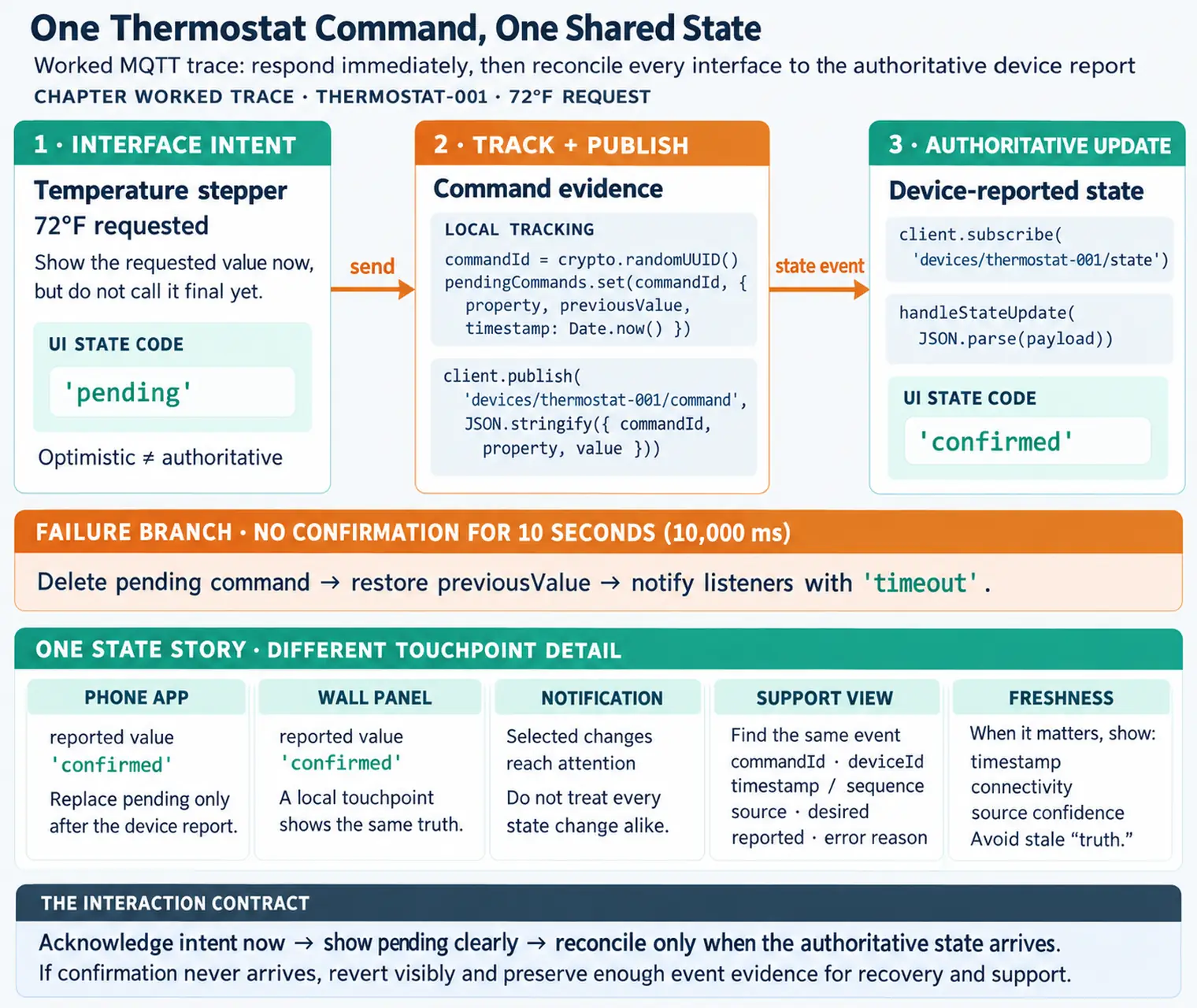
For a temperature stepper, the optimistic state might be “72 degrees requested” while duplicate taps are merged for a short debounce window. The authoritative event might be a reported setpoint from the device shadow, MQTT topic, or WebSocket stream. If confirmation does not arrive before the timeout, the UI should show the last known actual value, the requested value, and the next action: retry, queue for later, check connectivity, or use local controls.
Design each pattern across at least two touchpoints. A smart lock test should include the mobile app, the lock reader or keypad, and the support view if support handles failed commands. A camera notification test should include phone settings, in-app notification preferences, event history, quiet hours, activity zones, and the escalation rule for night or unknown-person events. A facilities dashboard test should include a live value, stale timestamp, source device, threshold rule, acknowledgement owner, and exportable incident record.
Accessibility belongs in the state table. Pending, confirmed, rejected, stale, and escalated states need non-color indicators, readable text, focus behavior, screen-reader announcements where appropriate, and input paths that do not depend on precise tapping during a moving status change. A disabled control should explain why it is disabled or expose a nearby status detail. A high-priority alert should not rely on sound alone; it should leave a persistent, reviewable state.
Acceptance criteria should test both speed and honesty. The interface should acknowledge intent quickly, suppress accidental duplicate commands, update when another touchpoint changes the device, recover from offline or permission failure, and maintain the same vocabulary in logs and support tooling. If the pattern only works on a perfect network with one user and one interface, it is not ready for an IoT product.
7.8 Synchronization as UX Problem
This section: Synchronization as UX Problem — One command now has user-visible states.
One command now has user-visible states. Next: many interfaces changing the same device at nearly the same time.
State synchronization failures look like interface bugs even when the backend is working. A dashboard, app, physical switch, voice assistant, and support console can all show different truths if freshness, source, ordering, and conflict policy are not visible.
Good UX therefore exposes enough distributed-system behavior for the user to act safely: pending, stale, unreachable, overridden, denied, confirmed, and reverted are different states and need different feedback.
The implementation needs explicit hooks for those states. Command APIs should return a command id or idempotency key so retries do not create extra physical actions. Event streams should include device id, sequence number or timestamp, source, desired state, reported state, and error reason. A device-shadow model such as desired versus reported state is useful because it separates what the user requested from what the device has actually applied.
MQTT and WebSocket updates are common ways to push authoritative changes back to interfaces. MQTT retained messages can help a newly opened dashboard learn the latest reported state, while WebSocket streams can keep browser or mobile sessions synchronized. Both still need freshness policy: a retained value from yesterday should not look the same as a value received five seconds ago. The UI should render timestamp, connectivity, and source confidence when the distinction changes the user’s next action.
Ordering is another product concern. A physical button, mobile app, automation rule, and voice assistant can all send commands close together. Last-write-wins may be acceptable for a lamp, but it can be dangerous for heaters, locks, pumps, or access control. The backend may need conflict rules such as role priority, safety interlock, monotonic sequence checks, lockout windows, or explicit acknowledgement. The interface should expose the result in plain language instead of leaking internal phrases like race condition or stale write.
Notification escalation also depends on implementation detail. APNs and FCM can deliver push messages, but the product still needs event classification, duplicate suppression, quiet-hours policy, acknowledgement state, escalation timer, digest generation, and audit history. A dismissed notification is not the same as an acknowledged incident. A muted camera zone is not the same as a resolved event. Store those as separate states so the UI can preserve signal without flooding the user.
Finally, support and observability should share the same state vocabulary as the interface. Logs that include command id, account role, device firmware, gateway id, network status, battery state, retry count, notification severity, and correlation id let support explain what happened without asking the user to reproduce the failure blindly. The implementation is doing its job when the interface can be fast, truthful, accessible, and diagnosable at the same time.
This section:
 Checkpoint: Delay and Authority
You now know:
- Optimistic UI means acknowledging intent now, not pretending the device has already finished.
- Pending, confirmed, rejected, stale, overridden, denied, and reverted are different product states and need different feedback.
- A robust command path carries reconciliation evidence: command id, desired state, reported state, timestamp or sequence, source, and error reason.
This section:
This section:
When you tap “turn off lights” on your phone, the command travels over Wi-Fi to a hub, then via Zigbee to the bulb — a journey that takes 200-500 milliseconds. Meanwhile, you are staring at the button wondering if it worked. Interaction patterns solve this problem. The most important one is optimistic UI: the app immediately shows “lights off” (before the command even reaches the bulb), then quietly confirms or corrects when the real response arrives. This chapter covers the patterns that make IoT interfaces feel instant and trustworthy despite the unavoidable network delays underneath.
This section:
Key Concepts
This section: Key Concepts — Application Domain: Category of IoT deployment (agriculture, healthcare, manufacturing) sharing common sensor types, connectivity, and data patterns.
Application Domain: Category of IoT deployment (agriculture, healthcare, manufacturing) sharing common sensor types, connectivity, and data patterns. Common Pitfalls: Recurring mistakes made during IoT deployments that cause project failures despite technically sound components. Design Pattern: Reusable solution to a commonly occurring design problem in IoT system architecture or product development. Scalability: System property ensuring performance and cost remain acceptable as device count grows from prototype to mass deployment. Interoperability: Ability of devices and systems from different vendors to exchange and use information without special configuration. Total Cost of Ownership (TCO): Complete cost of acquiring, deploying, and operating an IoT system over its full lifecycle, including connectivity and maintenance. Return on Investment (ROI): Financial benefit of an IoT deployment expressed as a percentage of the total investment, used to justify business cases.
7.9 Prerequisites
This section: Prerequisites
- Interface Design Fundamentals: Understanding of UI patterns and component hierarchies
- Communication Networks: Knowledge of network protocols and latency characteristics
7.10 Core Interaction Patterns
This section: Core Interaction Patterns
7.10.1 Optimistic UI Updates
Network latency is a fundamental challenge in IoT interfaces. Optimistic UI provides immediate visual feedback while commands travel to devices:
The lock flow in Figure 7.2 separates a quick acknowledgement from a confirmed device result.
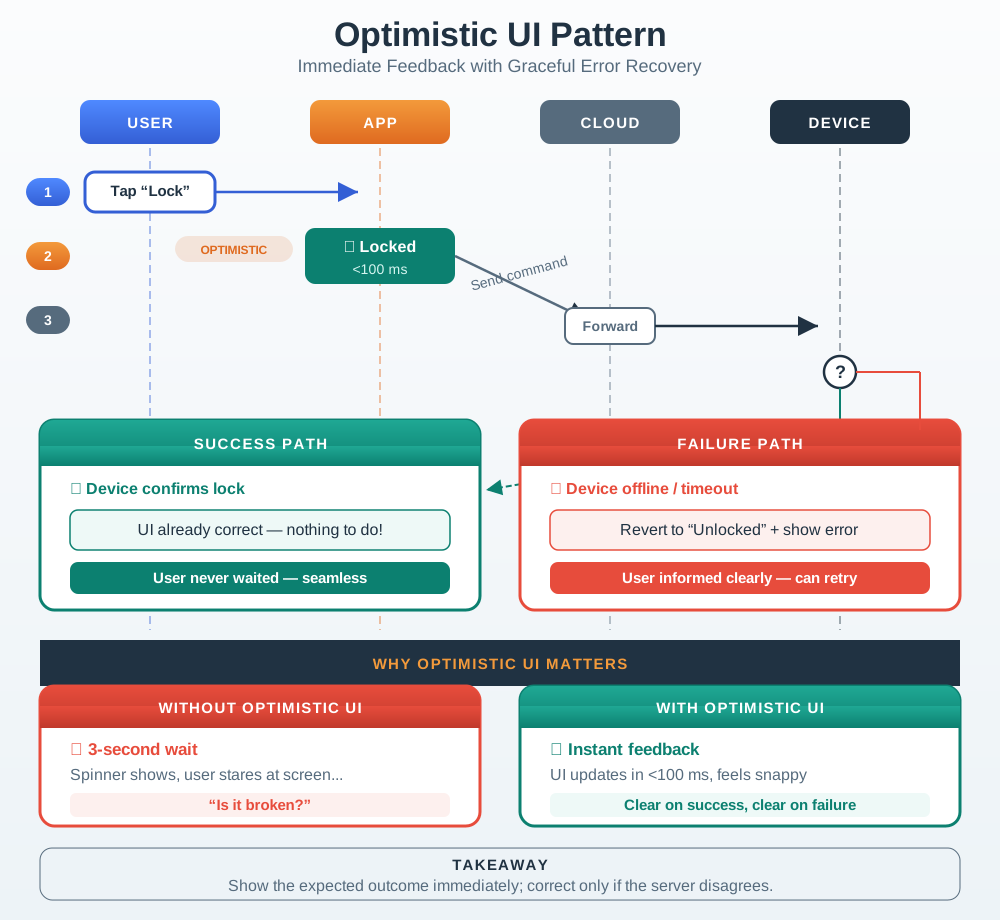
The user taps once, and the app promptly shows pending while the command moves through cloud and device. That message acknowledges intent; it does not say the door is locked. Duplicate toggles are suppressed while the outcome is unknown. When the device replies, the interface confirms the new state or rolls back the optimistic view. This sequence matters for a lock because an early success label could invite the person to leave before the physical state is known. Test the delayed and failed paths as well as success.
Why Optimistic UI Matters:
| Scenario | Without Optimistic UI | With Optimistic UI |
|---|---|---|
| User taps button | 3-second wait, no feedback | Instant visual change |
| User perception | “Is it broken?” | “Command acknowledged” |
| Repeated taps | Multiple commands queue up | Single command sent |
| On failure | Confusing state | Clear error + recovery |
7.10.2 Distributed State Synchronization
IoT devices often have multiple interfaces (app, voice, physical controls). All must stay synchronized:
Use Figure 7.3 to trace how one physical button change reaches several interfaces.
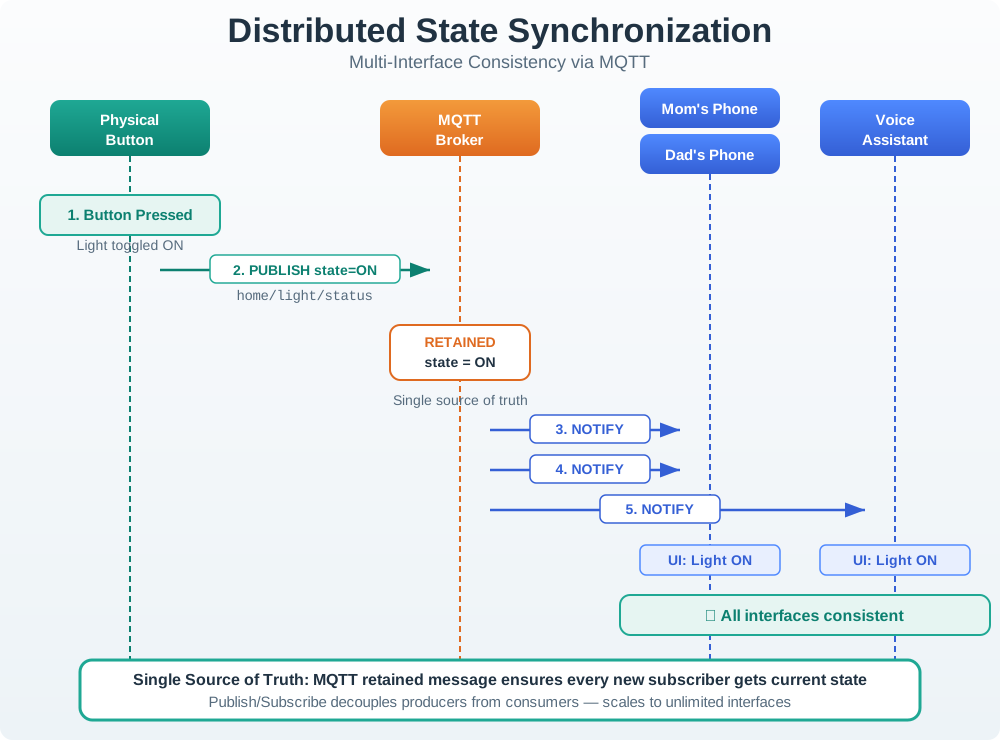
A button turns the light on and publishes a status message to the MQTT broker. The phones and voice assistant subscribe to that status, so their displays can follow the device rather than guessing from a local tap. The retained message gives a new subscriber the latest published state in this example. A review still needs to ask whether that state is fresh and whether a later device report confirms it. Shared displays should show uncertainty when the network or device has not supplied a current update.
Synchronization Principles:
Single Source of Truth - Device state is authoritative. Publish/Subscribe - Changes broadcast to all interfaces. Last-Write-Wins - Simple conflict resolution. Offline Queue - Commands stored when disconnected.
7.10.3 Notification Escalation
Alert fatigue occurs when users receive too many notifications. Smart escalation ensures important alerts get attention:
Read Figure 7.4 to see how severity, acknowledgement time, and recipient scope change together.
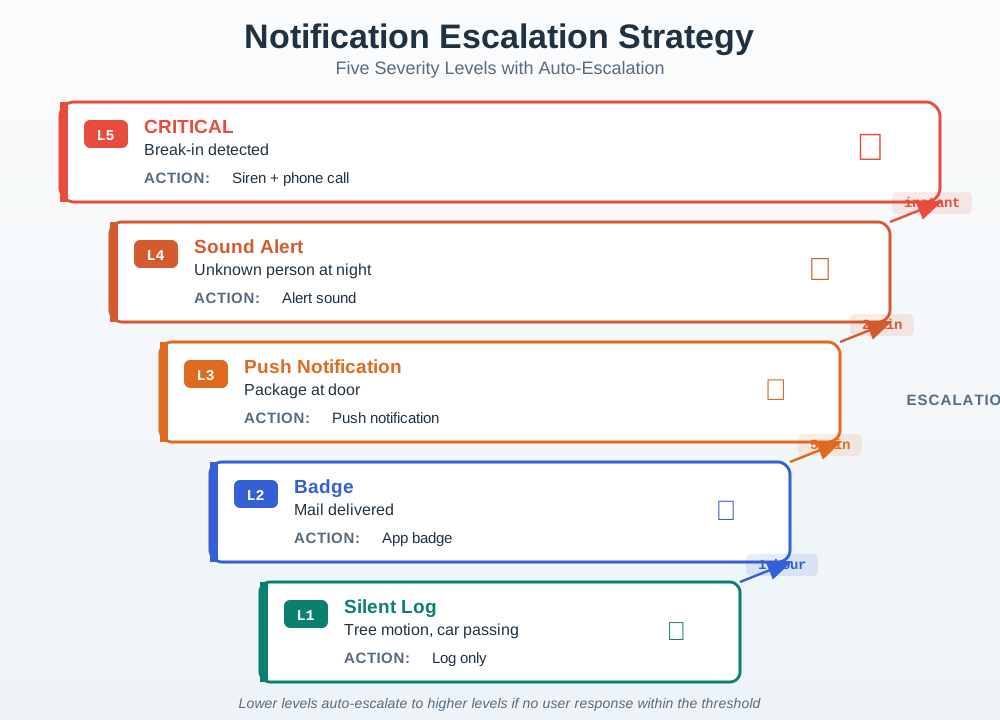
Begin at the lowest level, where the event can stay on screen without a break in the user’s work. Higher levels add a direct alert, less time to reply, and more people. An advice item may wait 1 hour, or 60 min, while a grave event may wait only 2 min. The gap is 60 min - 2 min = 58 min. Follow both the reply and alert paths so one dealt-with event does not keep paging others. Each level needs an owner, a repeat check, and a safe step when no one responds.
Escalation Levels:
| Level | Trigger | Notification Type | Example |
|---|---|---|---|
| 1 - Silent | Routine | Log only | Tree motion, car passing |
| 2 - Badge | Low | App badge update | Mail delivered |
| 3 - Push | Medium | Standard notification | Package at door |
| 4 - Sound | High | Alert sound | Unknown person at door |
| 5 - Alarm | Critical | Siren + phone call | Break-in detected |
7.10.4 Feedback Design Principles
Effective IoT feedback matches the importance of the action:
Feedback should reflect the consequence and expected duration of an action, not apply the same spinner or alert to everything. The timing chart in Figure 7.5 aligns urgency, modality, and timing so the interface can set an honest expectation.
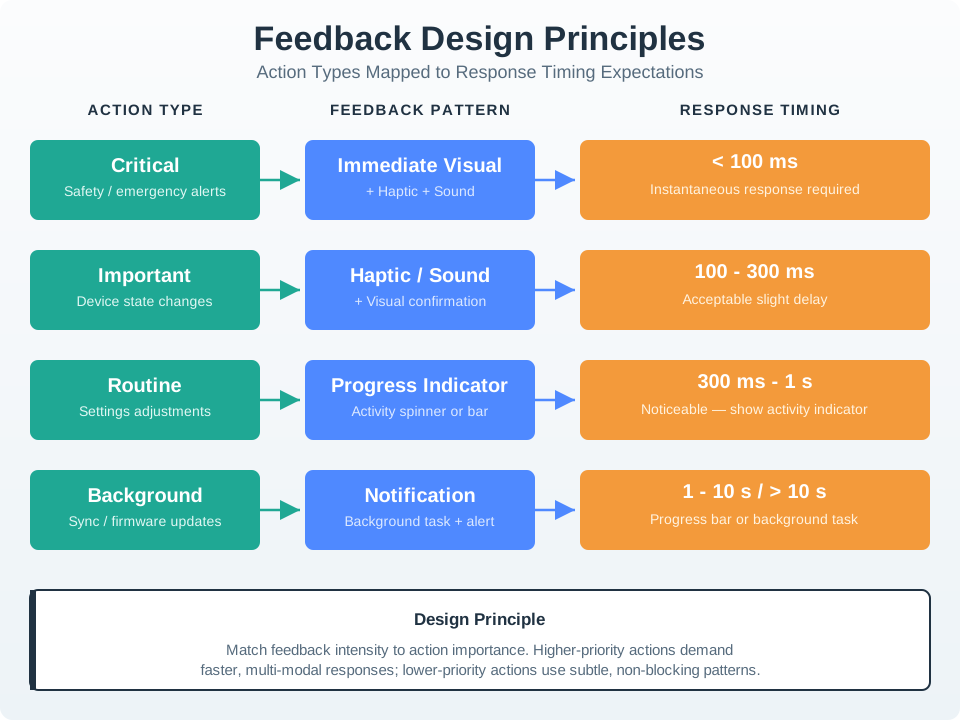
Across Figure 7.5, a Critical safety alert pairs immediate visual, haptic, and sound feedback with a target below 100 ms. An Important device-state change tolerates 100–300 ms but still needs haptic or sound plus visual confirmation. A Routine settings adjustment in the 300 ms–1 s band calls for a progress indicator, while a Background sync or firmware update moves to a non-blocking notification and longer progress. The hierarchy links the chapter’s interaction patterns to consequence: stronger feedback is reserved for the actions that demand attention fastest.
Response Time Expectations:
| Delay | User Perception | Design Response |
|---|---|---|
| < 100 ms | Instantaneous | Direct manipulation feel |
| 100-300 ms | Slight delay | Acceptable for most actions |
| 300 ms-1s | Noticeable | Show activity indicator |
| 1-10s | Slow | Progress bar + status |
| > 10s | Broken | Background task + notification |
Calculate how much perceived responsiveness improves with optimistic UI:
Key Insight: Even small improvements in feedback timing create dramatic improvements in perceived responsiveness. A 3-second actual delay with 50 ms optimistic feedback feels 60× faster to users.
Checkpoint: Pattern Selection
You now know:
- Use optimistic updates when the user needs feedback under 100 ms but the device confirmation may take longer.
- Use publish/subscribe when app, voice, wall panel, dashboard, and support views must share one authoritative state.
- Escalate notifications by severity, response, and context; routine motion should not use the same channel as a break-in.
7.11 Code Example: MQTT State Synchronization
This section: Code Example: MQTT State Synchronization — The following JavaScript example demonstrates real-time state synchronization across multiple IoT interfaces using MQTT.
The following JavaScript example demonstrates real-time state synchronization across multiple IoT interfaces using MQTT. This pattern keeps phone apps, wall panels, and voice assistants in sync:
// MQTT-based state synchronization for IoT dashboards
class DeviceStateSync {
  constructor(mqttClient, deviceId) {
    this.client = mqttClient;
    this.deviceId = deviceId;
    this.state = {};
    this.pendingCommands = new Map();
    this.listeners = new Set();

    // Subscribe to device state updates
    this.client.subscribe(`devices/${deviceId}/state`);
    this.client.on('message', (topic, payload) => {
      if (topic === `devices/${deviceId}/state`) {
        this.handleStateUpdate(JSON.parse(payload));
      }
    });
  }

  // Send command with optimistic update and timeout
  sendCommand(property, value) {
    const commandId = crypto.randomUUID();
    const previousValue = this.state[property];

    // Optimistic update: show new value immediately
    this.state[property] = value;
    this.notifyListeners(property, value, 'pending');

    // Track command for rollback on failure
    this.pendingCommands.set(commandId, {
      property, previousValue, timestamp: Date.now()
    });

    // Publish command via MQTT
    this.client.publish(`devices/${this.deviceId}/command`, JSON.stringify({
      commandId, property, value
    }));

    // Timeout: revert if no confirmation in 10 seconds
    setTimeout(() => {
      if (this.pendingCommands.has(commandId)) {
        this.pendingCommands.delete(commandId);
        this.state[property] = previousValue;
        this.notifyListeners(property, previousValue, 'timeout');
      }
    }, 10000);
  }

  // Handle confirmed state from device
  handleStateUpdate(newState) {
    for (const [key, value] of Object.entries(newState)) {
      this.state[key] = value;
      this.notifyListeners(key, value, 'confirmed');
    }
    // Clear any pending commands that are now confirmed
    this.pendingCommands.clear();
  }

  notifyListeners(property, value, status) {
    for (const listener of this.listeners) {
      listener({ property, value, status });
    }
  }

  onStateChange(callback) {
    this.listeners.add(callback);
  }
}

// Usage: Connect UI elements to synchronized state
const thermostat = new DeviceStateSync(mqttClient, 'thermostat-001');

thermostat.onStateChange(({ property, value, status }) => {
  const display = document.getElementById('temp-display');
  display.textContent = `${value}°F`;
  display.className = status; // 'pending', 'confirmed', or 'timeout'

  if (status === 'timeout') {
    display.setAttribute('aria-label',
      `Temperature change failed. Showing last confirmed: ${value}°F`);
  }
});
State synchronization design decisions:
| Pattern | Why |
|---|---|
| Optimistic update with rollback | User sees instant response; reverts gracefully on failure |
| 10-second timeout | Balances responsiveness with network variability |
| Status-based CSS classes | Visual distinction between pending, confirmed, and failed states |
aria-label on timeout | Screen reader users understand the failure context |
7.12 Continue to the Next Part
This section: Continue to the Next Part — Carry this evidence into Interaction Patterns: Synchronization and Recovery, which begins with Ecobee State Synchronization.
Carry this evidence into Interaction Patterns: Synchronization and Recovery, which begins with Ecobee State Synchronization.
Find help
3 reviewed answers.
Where should I start in a module?
Open the module page from the sidebar to see its chapters in order. Use the module map to return to a topic you need.
Modules and pathsReviewed
What can I try when a project does not work?
Check the symptom, then work through the diagnostic steps. Keep the error message and the smallest example that reproduces it.
When you are stuckReviewed
How do interactive examples work?
Use the interactive guide to check how examples and simulations work before changing your project.
Interactive examples guideReviewed