25 Location Privacy: Boundaries and Patterns
More
Depth: Practitioner
Progress saves as you read. Mark sections complete as you go; your progress appears in the sidebar.
25.1 Overview
This section: Overview — This first route follows location data through its boundaries and applies privacy-preserving design and consent controls.
This first route follows location data through its boundaries and applies privacy-preserving design and consent controls.
This is part 1 of 2. Continue with Location Privacy: Failures and Trade-offs for the second focused route.
25.2 Start Simple
This section: Start Simple — Picture a school app that tells a parent when a bus is near the next stop.
Share a Place Only for a Clear Job
Picture a school app that tells a parent when a bus is near the next stop. The family needs a useful arrival alert. They do not need a permanent map of every child and driver.
The service designer should begin with the job. Name whose place is used, who may see it, and when the alert should stop. Ask whether a rough area will work instead of an exact point. Set a short life for the record and give the person a clear way to pause or end the sharing.
Then test the whole path. Check the phone, the service, each saved copy, and every person who can open it. Make a missing signal visible so silence is not mistaken for safety.
Write the promise in words a family can check. “Show the bus within ten minutes of this stop” is clearer than “improve travel.” It limits both the place and the time. Let the family see when sharing is on. Let them remove an old record without hunting through several screens.
Run the test with a child, a driver, a parent, and a support worker. Give each role only the view needed for its task. Try a late bus, a lost phone, and an account used by the wrong person. The result should protect people even when the day does not go to plan.
Keep a short review card beside the feature. It should state the job, people, place detail, start time, stop time, saved copies, and help route. A new team member can then see why each fact exists. If no one can explain a field, remove it from the plan.
Check the card when the service adds a map, report, partner, or new use. Ask the same family question again: would a reasonable person expect this? Give notice before the change, not after. Keep the old choice until the person makes a new one.
At the end of the bus trip, verify that live sharing stopped. At the end of the saved period, verify that old records are gone from the main service and its planned copies. Record the check so the promise is more than text on a screen.
Use five short questions during review. What job needs the place? Who needs to see it? How much detail is enough? When should sharing stop? What can the person do?
Answer with a real case. The bus alert needs a route area. It may need the next stop. It does not need every shop passed on the way. The driver needs traffic guidance. A parent needs the arrival window. A school worker may need a late-bus warning. Those are different views.
Now test control. Turn sharing on. Check the visible sign. Pause it. Check that new facts stop. Start it again. End the trip. Check that live access closes. Ask a support worker to repeat these steps.
Test an error next. Give the phone a wrong time. Remove its network link. Move it outside the route. Let its battery die. The screen must show doubt. It must not show an old place as current. Help must stay reachable.
Finally, inspect the record. Use a random trip name. Follow it through each planned store and copy. Check each access role. Remove the trip. Confirm the stated end state. Record any copy that needs more time and why.
These checks keep the design tied to a human promise. They also expose broad collection early. If the alert still works without an exact point, use less detail. If an old copy has no job, do not keep it. If a new partner needs data, run the review again before sharing.
This simple rule has a limit. Several harmless facts can reveal more when they are joined. Practitioner shows how to record consent and access. Under the Hood explains how time, radio clues, and combined records can expose a person again.
Location privacy starts before the first coordinate is stored. Begin with who can be located, who can infer something from that location, what purpose justifies it, how long it remains useful, and how the user can understand, limit, or withdraw the tracking.

- First, define the product boundary for location data before choosing sensors or maps.
- Then, minimize raw coordinates into purpose-bound events, consent states, and role-limited views.
- Next, connect privacy patterns to regulation, emergency accuracy, and public failure cases.
- Finally, test tradeoffs with fleet tracking, re-identification risk, quizzes, and calculators.
Checkpoint callouts pause after major design decisions; Deep-dive material holds optional examples, calculations, or extended practice.
25.3 Learning Objectives
This section: Learning Objectives
By the end of this chapter, you will be able to:
- Assess Privacy Risks: Evaluate the sensitivity of location data and potential for re-identification
- Apply Privacy-Preserving Patterns: Implement tiered disclosure, anonymous aggregation, and on-device geofencing
- Explain E911 Requirements: Describe regulatory mandates for emergency location services and accuracy thresholds
- Design Ethically: Justify design decisions that balance safety, functionality, and user autonomy in location-aware IoT systems
Key Concepts
This section: Key Concepts — GPS: Global Positioning System providing 3-10 metre outdoor accuracy using trilateration from 4+ satellites, consuming 20-100 mA active current.
GPS: Global Positioning System providing 3-10 metre outdoor accuracy using trilateration from 4+ satellites, consuming 20-100 mA active current. Indoor Positioning: Techniques (BLE beacons, UWB, Wi-Fi RSSI, IMU dead-reckoning) achieving 0.1-5 metre accuracy where GPS signals are unavailable. Geofencing: Virtual geographic boundary triggering automated actions when a tracked asset enters or exits the defined area. Dead Reckoning: Position estimation using last known location plus measured movement (speed, heading) when GPS signal is lost. RSSI-Based Positioning: Location estimation from signal strength of known beacon nodes, achieving 2-5 metre accuracy in calibrated environments. Ultra-Wideband (UWB): Radio technology providing 10-30 cm indoor positioning accuracy using time-of-flight measurements between anchor nodes. Location Privacy: User right to control who can access their location history and how granular that location data is stored.
25.4 Prerequisites
This section: Prerequisites
- Location Awareness Fundamentals: Understanding of positioning technologies
- Privacy Foundations: Basic privacy principles
25.5 Location Privacy Boundaries
This section: Location Privacy Boundaries — Location privacy starts with the question a feature is allowed to answer.
Location privacy starts with the question a feature is allowed to answer. “Is someone home?”, “did the driver reach stop 17?”, “which room contains the pump?”, and “where is the caller during an emergency?” require different precision, timing, retention, and audiences. A design that stores a continuous coordinate trail for all four questions has crossed the product boundary.
Privacy-preserving location design makes the boundary visible. Users should know when tracking is off, paused, active, coarse, precise, emergency-only, or shared with another person. The interface should also show what happens when operating-system permission changes, such as Android approximate location, iOS Precise Location being disabled, background location being denied, or Bluetooth scanning permission being revoked.
The permission prompt is only one point in a much longer location-data path. Figure 25.1 exposes what a feature can infer and where the resulting evidence travels, so the team can minimize the whole boundary rather than its first screen.
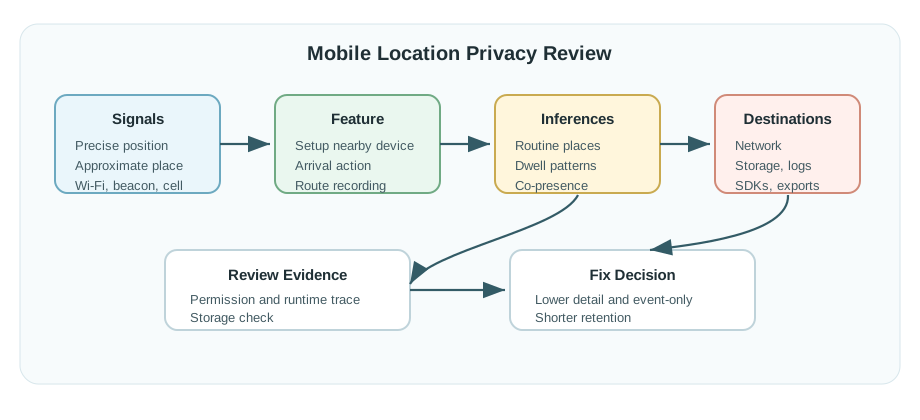
Begin Figure 25.1 with Signals: precise position, approximate place, and Wi-Fi, beacon, or cell evidence. The Feature column narrows those inputs to purposes such as nearby setup, an arrival action, or route recording, but Inferences shows the extra knowledge created—routine places, dwell patterns, Co-presence, and destinations. Network then reveals storage, logs, SDKs, and exports beyond the handset. The final Fix Decision reduces detail, retention, or collection frequency, carrying the chapter’s purpose and control principles into an auditable privacy choice.
Purpose: connect each location event to a named feature, not a generic analytics bucket. Precision: choose presence, named zone, coarse radius, floor/room, or coordinates according to the task. Control: give users pause, delete, export, selective sharing, emergency override, and permission-repair paths they can understand.
That boundary should be stated in product language before the team chooses a sensor. A family safety app might need “arrived at school” and “SOS location now,” not a minute-by-minute route. A workplace comfort system might need “zone occupied” and “zone recently empty,” not a named employee trail. A fleet system might need “stop confirmed,” “break mode active,” and “emergency assistance requested,” not every off-route errand. The privacy design is stronger when the feature can still be explained without showing a raw map.
The user experience should also reveal uncertainty. Approximate permission, stale fixes, indoor drift, multipath, low battery, disabled Bluetooth, revoked background access, and missing network connectivity can all change what the system knows. Instead of quietly escalating collection, the interface can show “using coarse arrival zone,” “waiting for local geofence,” “precise location shared for emergency only,” or “tracking paused until the next shift.” Those visible states help users understand the tradeoff and help operators avoid over-trusting a location claim.
Finally, location privacy includes people who are not the account owner. Children, guests, employees, delivery drivers, patients, bystanders, and nearby device owners can appear in location-derived data. The design record should name who is sensed, who controls the setting, who can see the result, and how a person can challenge or delete a record. Without that record, later analytics, support tooling, or partner integrations can turn a narrow feature into broader surveillance.
25.6 Data Flow Before Maps
This section: Data Flow Before Maps — Start by drawing where raw location appears and where it disappears.
Start by drawing where raw location appears and where it disappears. A phone can evaluate a geofence locally through Android Geofencing API, Google Fused Location Provider, Apple Core Location region monitoring, or the browser Geolocation API. A wearable can convert GNSS, BLE proximity, UWB room state, or Wi-Fi BSSID observations into a zone event before upload. A building system can store occupancy counts from PIR, CO2, or mmWave presence sensors without naming individuals.
The server should receive the least precise event that still runs the feature. For many automations, that means “entered home geofence,” “asset near dock 3,” “room occupied,” or “driver arrived at stop 17” rather than raw latitude/longitude. When precise location is justified, such as SOS, fall detection, E911-like emergency escalation, or turn-by-turn navigation, shorten retention and mark the event with the reason precision was used.
- Define the event schema: include purpose, precision tier, source, timestamp, freshness, consent version, retention expiry, and sharing audience.
- Separate modes: handle off-duty, break, guest, child, caregiver, employee, emergency, and support states with different defaults.
- Test the controls: verify denied permission, approximate permission, pause, deletion, export, background tracking, emergency sharing, and retention expiry.
Design the permission flow as a recovery path, not only an onboarding step. The app should explain why foreground location, background location, Bluetooth scanning, nearby-device access, notification permission, or motion activity is requested, and it should still offer a degraded feature when the user declines. For example, a thermostat can accept manual “away” status, a child tracker can show the last known zone with staleness, and a delivery app can request a one-time precise fix only at delivery confirmation. A privacy review should include screenshots or test notes for each denied, approximate, paused, and restored state.
Then align operational dashboards with the same precision tiers. Dispatchers, caregivers, supervisors, support agents, and analytics users rarely need identical views. A dispatcher may need live location for an active incident, a caregiver may need a safe-zone alert, a supervisor may need aggregate on-shift progress, and support may only need permission state and error logs. If every role receives a full coordinate history because it was convenient to build one map component, the product has failed the minimization design.
Before release, walk one event through the system. Take “entered delivery stop” from GNSS or fused provider, through local geofence evaluation, event creation, upload, API validation, database storage, dashboard display, export, retention expiry, and deletion. Confirm that the record keeps the purpose id, precision tier, consent version, and expiry date, and confirm that raw coordinates are absent when the feature promised zone-only processing. This walkthrough catches privacy regressions that a UI review alone misses.
25.7 Minimize Before Persisting
This section: Minimize Before Persisting — Location systems need minimization at the edge, in transit, and at rest.
Location systems need minimization at the edge, in transit, and at rest. On the device, convert coordinates to geofence transitions or room/zone labels when possible. In transit, use TLS and avoid query-string coordinates. At rest, separate identity from location events, apply role-based access control, encrypt sensitive fields, set retention TTLs, and log access to live or historical location.
Be careful with identifiers that look harmless. Bluetooth LE identifiers, Wi-Fi BSSID lists, device ids, advertising ids, installation ids, and repeated timestamps can re-identify a person even when a name is removed. Aggregation needs suppression thresholds or differential privacy noise when outputs are shared beyond the immediate operational team. Support tools should show only the precision needed for the support task.
- Derived event: prefer zone_enter, zone_exit, near_beacon, room_occupied, stop_confirmed, or emergency_location over raw coordinate streams.
- Access boundary: separate user view, caregiver view, dispatcher view, support view, and analytics view so one role does not inherit every location detail.
- Failure mode: when permission is denied, sensors disagree, or the event is stale, explain the degraded behavior without pushing users into unnecessary tracking.
Implementation should treat privacy as data-plane behavior. A mobile client can keep raw latitude and longitude in memory long enough to evaluate a geofence, then upload only a signed zone transition with a monotonic event id. A gateway can translate room-level UWB or BLE observations into an occupancy topic before publishing to MQTT. An API can reject coordinate fields on endpoints that accept only zone events. A database can place precise emergency records in a short-retention table instead of the same table used for routine analytics.
Schema design matters. Useful fields include event_id, user_or_device pseudonym, purpose_id, precision_tier, source_family, zone_id, timestamp, observed_at, received_at, stale_after, consent_version, retention_until, emergency_flag, and sharing_scope. Store quality and policy metadata alongside the derived event so later services do not infer permission from missing fields. If the product supports export or deletion, keep enough indexing to find all records for the user without joining through a raw coordinate trail.
Security controls should match the sensitivity of location history. Enforce authorization on both live and historical reads, protect admin dashboards with least-privilege roles, log access to precise or emergency events, and alert on bulk exports or unusual support lookups. Encrypting a coordinate column is helpful, but it does not solve purpose creep if analytics jobs, feature stores, or partner webhooks receive the same precise data. The safer pattern is to minimize first, then encrypt, audit, and expire the records that remain.
Automated tests can keep the contract honest. Add fixtures for denied permission, approximate permission, background revocation, emergency escalation, retention expiry, support access, and deletion. The assertions should check not only that the feature works, but that forbidden data is absent: no coordinates in zone-only events, no user id in aggregate occupancy, no retained emergency fix after the retention window, and no support view of precise history without an authorized purpose.
This section:
Checkpoint: Boundary and Data Flow
- You now know how to state the location question a feature is allowed to answer.
- You now know why raw coordinates should disappear into zone, room, stop, or emergency events as early as possible.
- You now know how purpose ids, precision tiers, retention expiry, and role views keep minimization enforceable.
This section: — We have bounded what the product is allowed to know.
We have bounded what the product is allowed to know. The next question is how a release review turns those boundaries into practical privacy patterns and user controls.
25.8 Location Privacy for IoT Design
This section: Location Privacy for IoT Design — Location data is among the most sensitive information IoT systems collect.
Location data is among the most sensitive information IoT systems collect. This section provides practical guidance for privacy-preserving location-aware design.
Before deploying location-aware IoT, evaluate these privacy dimensions:
25.8.1 Data Collection
[ ] Minimal precision: Collect only precision needed (zone vs. coordinates). [ ] Temporal limits: Limit how often location is recorded. [ ] Contextual necessity: Location only collected when feature requires it. [ ] On-device processing: Process location locally when possible, not cloud.
Precision Guidelines:
| Use Case | Precision Needed | Privacy-Preserving Approach |
|---|---|---|
| Presence detection | Room-level | PIR sensors (anonymous), zone-based (no coordinates) |
| Home automation | Geofence (100m radius) | Coarse location API, on-device geofence detection |
| Asset tracking | Building-level | BLE proximity (which beacon, not coordinates) |
| Navigation | Meter-level | Ephemeral (don’t store history) |
| Emergency/Safety | Precise coordinates | Only transmitted on SOS trigger |
25.8.2 Data Storage
[ ] Retention limits: Automatically delete old location records using the stated 24–48 hour default. Connect expiry to the feature’s purpose and verify deletion in the main service and planned copies.
[ ] Local-first: Keep location on the device when possible. Local geofence processing can produce a zone event for upload without retaining a server-side coordinate trail.
[ ] Anonymisation: Where centralised storage is required, protect identifiers through hashing or encryption and separate identity from location events. Removed names do not resolve re-identification risks from repeated timestamps or device identifiers.
[ ] Aggregation: Store the zones or patterns needed for the task rather than coordinate trails. Shared aggregate outputs may also need suppression thresholds or differential privacy noise.
25.8.3 Data Sharing
[ ] User control: Provide a separate sharing choice for each feature. Make active, paused, and shared states visible so users can understand when location is available to another person.
[ ] Purpose limitation: Connect each shared event to the stated feature and give each role the precision needed for its task. Review a new use before expanding the sharing boundary.
[ ] Third-party audits: Check data destinations, including SDKs, exports, and partner integrations, against the requirement to exclude sharing with advertisers or data brokers.
[ ] Consent transparency: Explain who receives location, why they need it, and whether they see live position, zone events, history, or aggregate counts. Review changes to audience or default visibility before release.
25.8.4 User Controls
[ ] Pause tracking: Let users temporarily disable tracking without uninstalling the app. Show the paused state and test that new location collection stops, then check the behavior when tracking resumes.
[ ] History access: Provide a way to view and export the user’s location records. Retain enough indexing to find those records without requiring a raw coordinate trail.
[ ] Selective sharing: Let users choose who can see location, including family or public audiences. Explain the detail available to each audience and any safety exception.
[ ] Deletion: Provide a one-click route to delete location history. Follow the record through planned stores and copies, verify the stated end state, and record any copy that needs more time and why.
25.8.5 Technical Safeguards
[ ] Encryption in transit: HTTPS/TLS for location transmission. [ ] Encryption at rest: Location data encrypted in database. [ ] Access controls: Strict authentication for location queries. [ ] Audit logs: Track who accessed location data and when. [ ] Differential privacy: Add noise to aggregated location statistics.
25.8.6 Pattern 1: Tiered Disclosure
Don’t share precise location by default. Escalate precision based on need:
| Tier | Precision | When to Use | Example |
|---|---|---|---|
| 0: Offline | No location shared | Normal operation | Smart thermostat doesn’t need location |
| 1: Status | Boolean (home/away) | Automation triggers | “Someone is home” (lights on) |
| 2: Zone | Named area | Notifications | “Package delivered to porch” |
| 3: Coarse | ~100m radius | Geofencing | “Arrived in neighborhood” (start preheating) |
| 4: Precise | GPS coordinates | Emergency only | 911 call, fall detection alert |
Implementation:
Normal: No location tracking
Geofence trigger: "Device entered 'Home' zone" (no coordinates)
Emergency: "Fall detected at 37.7749 N, 122.4194 W"
25.8.7 Pattern 2: Anonymous Aggregation
For space utilization, collect presence counts, not identities:
Bad (invasive):
Track “John’s phone is in Conference Room A”. Store: {user_id: “john@company”, location: “Room_A”, timestamp: “2026-01-15 14:32”}.
Good (anonymous):
Detect: “4 people in Conference Room A”. Store: {room: “A”, occupancy: 4, timestamp: “2026-01-15 14:30”} (15-min buckets).
25.8.8 Pattern 3: On-Device Geofencing
Detect zone entry/exit on device, not server:
Privacy-Preserving:
App downloads geofence zones (coordinates of home, office). Phone continuously checks GPS against local zones. On zone transition, sends trigger: “Entered zone ‘Home’” (no coordinates). Server never sees GPS coordinates, only zone events.
Invasive Alternative:
Phone streams GPS to server continuously. Server checks against zones. Creates coordinate trail revealing everywhere user went.
25.8.9 Differential Privacy Analytics
Add mathematical noise to aggregated location data:
Use Case: Building management wants foot traffic heatmap
Without differential privacy:
Store exact coordinates of every person. Risk: Re-identification possible, especially for rare paths.
With differential privacy:
Add calibrated noise to aggregated counts. Publish: “~42 people passed this hallway today” (±5). Preserves general patterns while preventing individual tracking.
Use Figure 25.2 to see where person level location detail should stop.
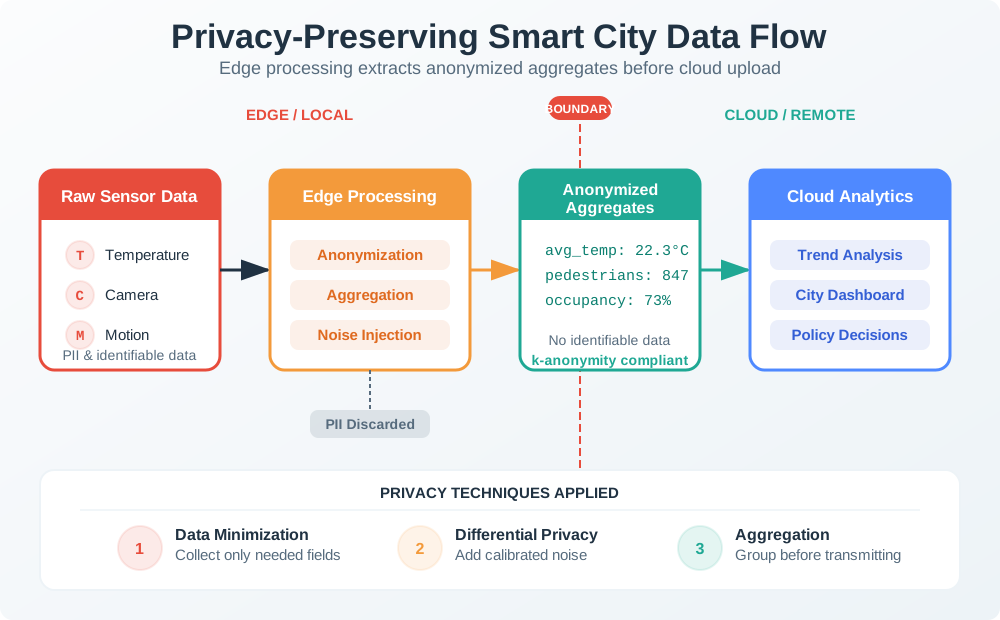
The raw example pairs a named phone with a room and timestamp, which can reveal an individual’s movement. At the edge, detections are turned into an occupancy count for the room and time bucket, and the identity field is discarded before cloud analytics. The privacy boundary is the transfer point, not merely a label on a dashboard. Review the stored record and network payload to confirm that only the aggregate crosses it. If an action needs identity, that purpose and authority need a separate decision.
Run this review before any release that changes location collection, precision, retention, sharing, or default visibility:
Purpose: Name the user-visible feature that requires location data and remove any collection not needed for that feature. Precision: Record the lowest useful level: presence, named zone, coarse radius, or precise coordinate. Timing: State when tracking starts, pauses, resumes, and stops, including break, off-duty, and emergency states. Audience: List every role that can see the data and whether they see live location, zone events, history, or aggregate counts. Control: Confirm the user can pause tracking, view recent events, delete history, and understand any safety exception. Evidence: Keep one test case for opt-in, pause, deletion, denied permission, emergency escalation, and retention expiry.
If the change cannot pass this review, the design is asking for more location authority than the feature justifies.
Checkpoint: Privacy Patterns
- You now know how tiered disclosure escalates from offline status to precise emergency location only when justified.
- You now know why anonymous aggregation, on-device geofencing, and differential privacy reduce both risk and stored data.
- You now know how consent change reviews catch precision, timing, audience, control, and retention changes before release.
The design patterns reduce routine collection. Emergency systems are different because regulation can require precise, timely location under constrained conditions.
Be aware of legal requirements in your jurisdiction:
| Regulation | Key Requirements | Penalties |
|---|---|---|
| GDPR (EU) | Valid lawful basis (consent is one option), purpose limitation, applicable erasure rights | Up to €10M or 2% for lower-tier, or €20M or 4% for higher-tier infringements, whichever is higher in the applicable tier (EDPB) |
| CCPA (California) | Notice and right to opt out of sale/sharing; opt-in rules for minors | Up to $2,663 per violation or $7,988 for intentional violations or violations involving known minors under 16 (CPPA inflation-adjusted amounts) |
| COPPA (US, children) | Parental consent for <13 location tracking | $46,000+ per violation |
| Location Privacy Laws | Various US states restrict tracking without consent | Varies |
Best Practices:
Consent-first: Don’t track location until user explicitly enables. Continuous indication: Show icon/LED when location is active. Easy opt-out: One-tap disable, not buried in settings. Data minimization: GDPR Article 5 requires collecting only necessary data. Breach notification: Notify the supervisory authority without undue delay and, where feasible, within 72 hours after awareness when a personal-data breach is likely to risk people’s rights and freedoms (GDPR Article 33).
25.9 Regulatory Requirements: E911 Mandates
This section: Regulatory Requirements: E911 Mandates — One of the most significant regulatory drivers for mobile location technology in the United States has been the Enhanced 911 (E911) mandates from the Federal Communications Commission (FCC).
One of the most significant regulatory drivers for mobile location technology in the United States has been the Enhanced 911 (E911) mandates from the Federal Communications Commission (FCC). These regulations established mandatory location accuracy requirements for wireless emergency calls.
The Problem: When you call 911 from a landline, emergency responders know exactly where you are—the phone is physically connected to your address. But what happens when you call from a mobile phone while driving or from an unfamiliar location?
The Solution: The FCC created E911 rules requiring mobile carriers to automatically transmit your location to 911 call centers. This drove massive investment in mobile location technology, making GPS and network-based positioning standard features in every phone—technology that IoT devices now use for tracking, geofencing, and safety applications.
Why IoT designers care: E911 accuracy requirements (50-300 meters) define what “good enough” location accuracy means for emergency applications, and the handset-based vs. network-based distinction maps directly to IoT design choices.
25.9.1 E911 Phase I and Phase II Requirements
The FCC implemented E911 in two phases:
| Phase | Effective Date | Requirements |
|---|---|---|
| Phase I | April 1998 | All 911 calls must complete even without active subscription; report cell tower location and callback number |
| Phase II | December 2005 | Historical handset-based rollout goal: 95% of that carrier’s subscribers using location-capable handsets; Phase II service rollout had a separate timeline (GAO) |
Use Figure 25.3 to see how emergency-location requirements expand from callback identity to tighter position and richer service capability.
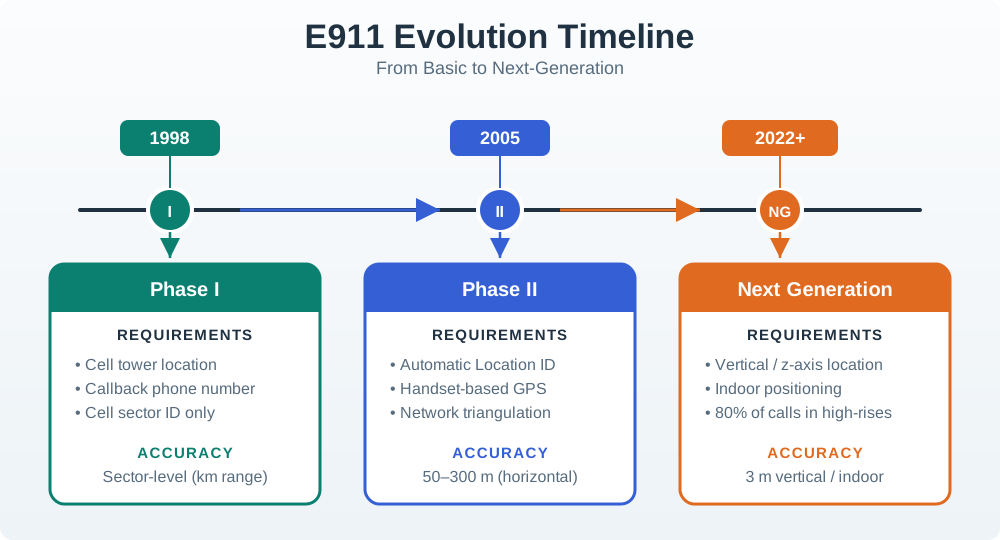
Read the time line from a basic emergency call to Phase I. A call-back number and the serving cell give the response team a first route. Phase II adds a closer point from the phone or network. That change adds both useful proof and more private data. The last stage adds newer call tools; it does not remove the old fallback. A service may gain detail without gaining the same reach or trust in all places. State which stage the product meets and what it does when its best location fix is not there.
25.9.2 E911 Handset vs Network Tiers
Compare the handset and network rows in Figure 25.4 to see why an accuracy requirement includes both a distance and a population percentage.
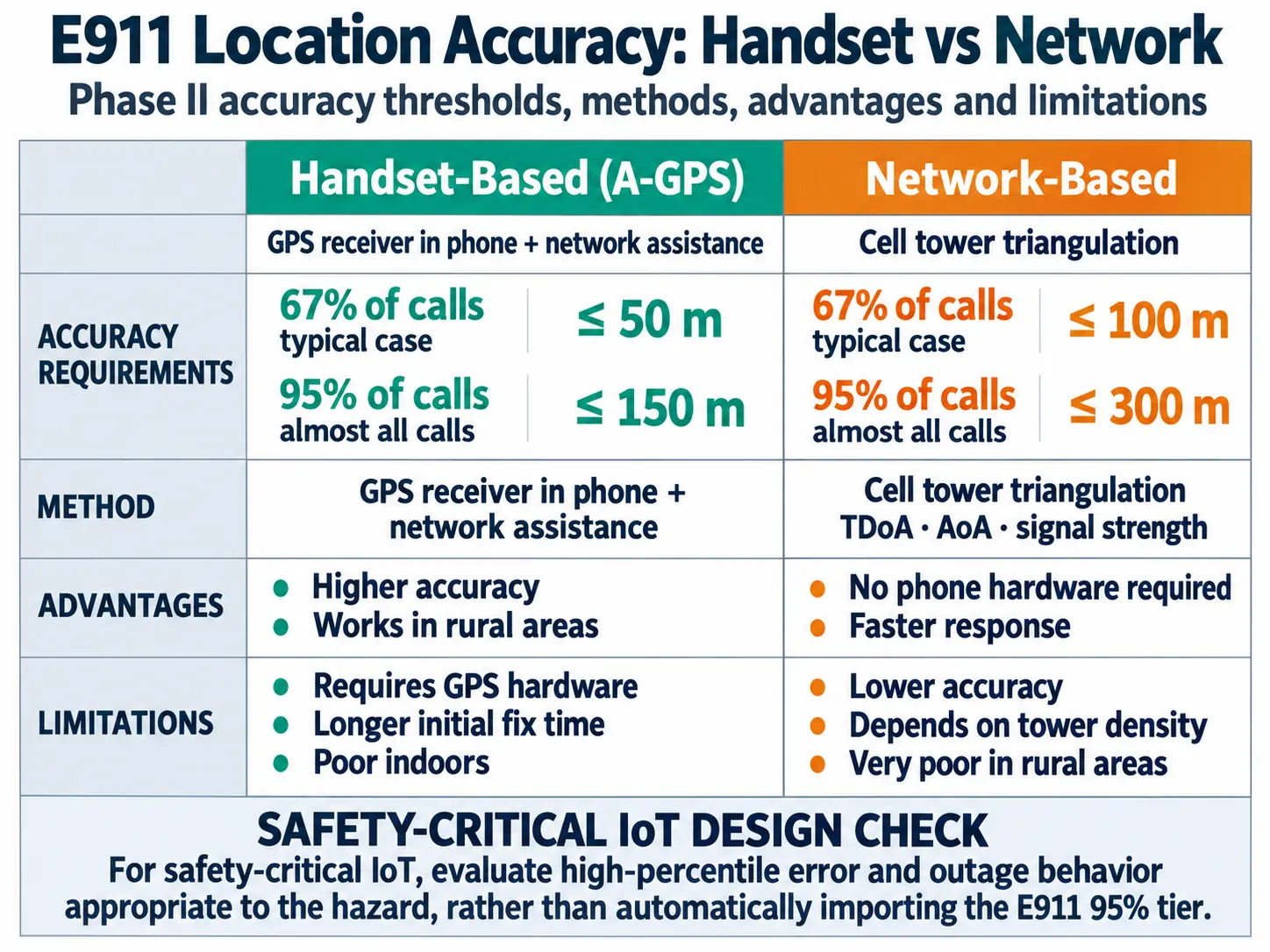
Start with the method column, which separates a handset-derived position from a network-derived estimate. Then read each distance together with its percentage: a 150 m threshold for a stated share of calls does not promise that every call falls inside 150 m. The second percentage exposes the longer tail where errors are larger. That structure prevents a median or best-case result from standing in for service coverage. A review should retain the tested call population, environment, unavailable fixes, and fallback path alongside the headline distance.
Historical FCC Phase II thresholds for tested wireless E911 calls under the applicable rule:
| Technology | 67% of Calls | 95% of Calls | Method | Advantages | Limitations |
|---|---|---|---|---|---|
| Handset-Based (A-GPS) | ≤ 50 meters | ≤ 150 meters | GPS receiver in phone + network assistance | Higher accuracy, works in rural areas | Requires GPS hardware, longer initial fix time, poor indoors |
| Network-Based | ≤ 100 meters | ≤ 300 meters | Cell tower triangulation (TDoA, AoA, signal strength) | No phone hardware required, faster response | Lower accuracy, depends on tower density, very poor in rural areas |
The historical 67% and 95% requirements specify the fraction of tested calls whose error must fall within each distance threshold:
- 67% threshold: At least 67% of tested calls must fall within the first distance limit.
- 95% threshold: At least 95% of tested calls must fall within the second distance limit; the remaining calls may have larger errors.
IoT Design Implication: For safety-critical IoT, evaluate high-percentile error and outage behavior appropriate to the hazard, rather than automatically importing the E911 95% tier.
25.9.3 Implications for IoT Location Design
The E911 framework provides valuable benchmarks for IoT location system design:
| Application | E911 Comparison | Recommended Accuracy |
|---|---|---|
| Personal safety devices (elderly trackers, child watches) | Similar to E911 emergency use | 50-100m (handset-level) |
| Fleet management | Less critical than 911 | 100-300m (network-level sufficient) |
| Asset tracking (shipping, equipment) | Non-emergency | 300m+ acceptable |
| Precision applications (agriculture, surveying) | Exceeds E911 requirements | 1-10 cm (RTK/PPP) |
Indoor limitations: E911 accuracy requirements were designed for outdoor mobile calls. Achieving 50-150 meter accuracy indoors or in urban canyons remains challenging—a critical gap for IoT devices deployed in buildings.
Vertical location gap: Traditional E911 provides horizontal position only. The FCC adopted a ±3 m vertical-location metric for 80% of wireless E911 calls from z-axis-capable handsets, subject to carrier implementation requirements; this does not directly mandate all IoT devices. (FCC order)
IoT lesson: For indoor safety applications (hospital patient tracking, emergency evacuation), rely on BLE beacons or Wi-Fi fingerprinting rather than GPS/cellular location to meet accuracy needs.
Checkpoint: Emergency Accuracy
- You now know how E911 separates typical and worst-case accuracy expectations.
- You now know why horizontal, vertical, indoor, and rural conditions need different technology choices.
- You now know when emergency use justifies precision that routine automation should avoid.
Emergency rules show when precision is justified. The failure cases below show what happens when routine products keep more location history than their purpose requires.
25.10 Continue to Part 2
This section: Continue to Part 2 — Continue with Location Privacy: Failures and Trade-offs.
Continue with Location Privacy: Failures and Trade-offs.
Find help
3 reviewed answers.
Where should I start in a module?
Open the module page from the sidebar to see its chapters in order. Use the module map to return to a topic you need.
Modules and pathsReviewed
What can I try when a project does not work?
Check the symptom, then work through the diagnostic steps. Keep the error message and the smallest example that reproduces it.
When you are stuckReviewed
How do interactive examples work?
Use the interactive guide to check how examples and simulations work before changing your project.
Interactive examples guideReviewed