17 Location Awareness: Technology Tradeoffs
More
Depth: Practitioner
Progress saves as you read. Mark sections complete as you go; your progress appears in the sidebar.
17.1 Start With the Decision
This section: Start With the Decision — A hospital tag and a delivery truck need different ways to find their place.
A hospital tag and a delivery truck need different ways to find their place. The decision tree must weigh accuracy, power, range, and cost.
17.2 Route Overview
This section: Route Overview — This is part 2 of 3.
This is part 2 of 3. Review Location Awareness: Positioning Basics for the preceding evidence.
17.3 Learning Objectives
This section: Learning Objectives
- Compare GPS, BLE, Wi-Fi, UWB, and cellular positioning.
- Choose a location method from accuracy and power limits.
17.4 Chapter Roadmap
This section: Chapter Roadmap
- Positioning Tech Decision Tree
- Positioning Accuracy Tradeoffs
- Checkpoint: Read the Quality Flags
- For Kids: Meet the Sensor Squad!
- Key Concepts
- Introduction
Inspect Figure 17.1 to ask which indoor, outdoor, or mixed path meets the error need with power and site work the team can support.
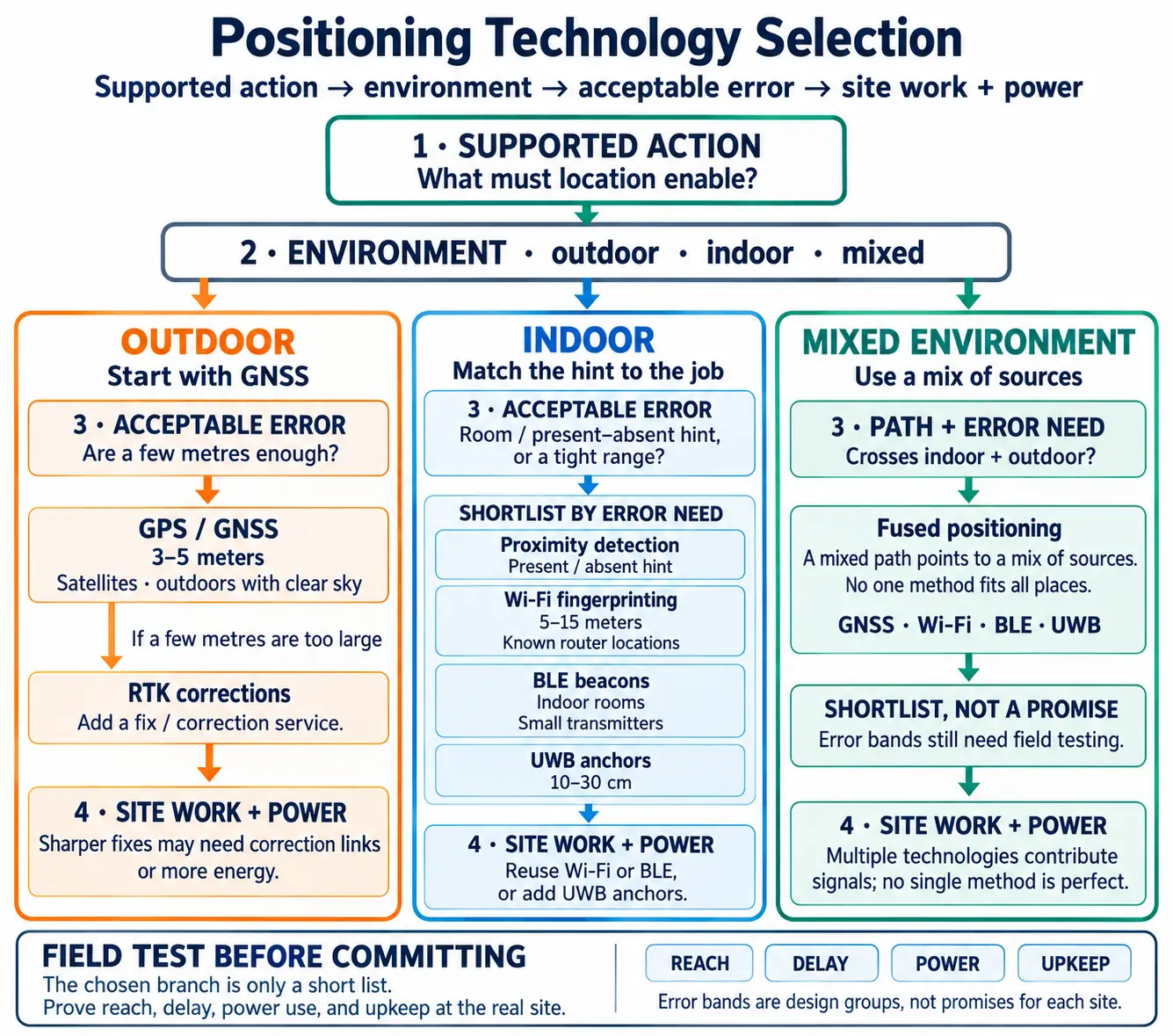
GNSS uses satellite signals to estimate an outdoor position. BLE is Bluetooth Low Energy, a short-range radio option. UWB uses radio timing for tighter ranging; an anchor is a fixed site point used as a reference. Figure 17.1 splits low-cost room or present/absent hints from a tight range. The outdoor path starts with GNSS, then adds a fix service when an error of a few metres is too large. The indoor path asks whether the site can reuse Wi-Fi or BLE, or must add UWB anchors. A path that crosses both spaces points to a mix of sources; no one method fits all places. The chosen branch is only a short list. Field tests must still prove its reach, delay, power use, and upkeep at the real site.
Different technologies for different needs:
| Technology | How It Works | Accuracy | Best For |
|---|---|---|---|
| GPS | Satellites in space | 3-5 meters | Outdoors |
| Wi-Fi | Known router locations | 5-15 meters | Indoors/outdoors |
| Bluetooth Beacons | Small transmitters | 1-3 meters | Indoor rooms |
| UWB | Ultra-precise timing | 10-30 cm | Exact position |
| Cell Tower | Phone network | 100+ meters | Rough area |
Inspect Figure 17.2 to ask how each method trades error size against reach, installed gear, and power from broad cell area to tight UWB range.
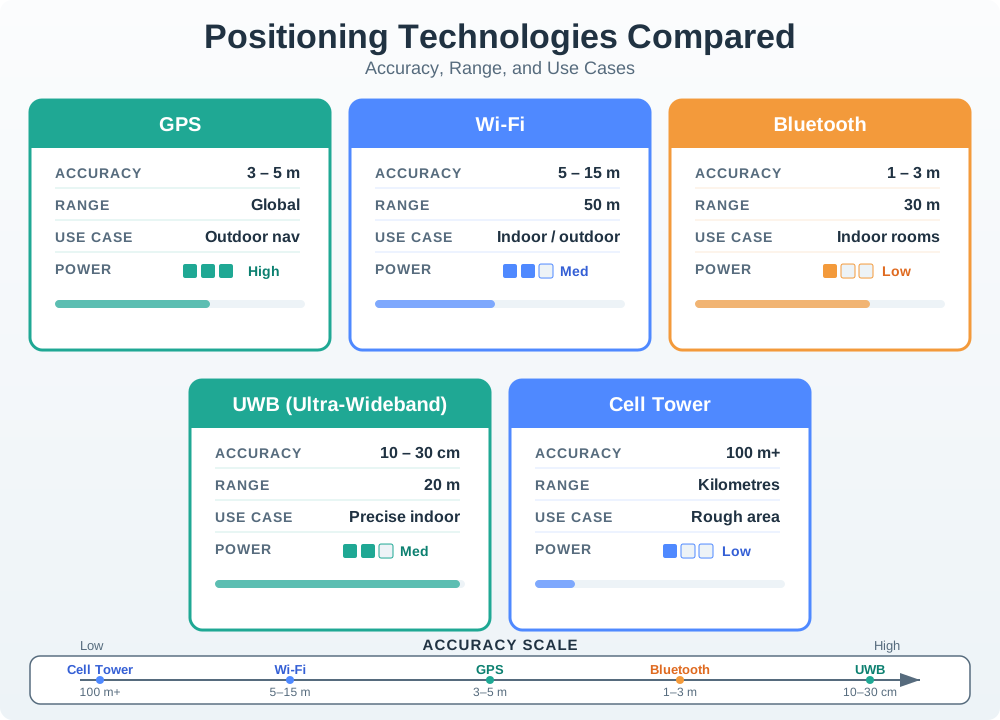
In Figure 17.2, the error bands are design groups, not promises for each site. Cell identity gives a broad area. Wi-Fi and BLE often mark indoor zones. GNSS gives an outdoor point with a clear sky, while UWB can give a tight local range when its anchors are kept in place. Use this side-by-side view with the choice tree above it. The tree can narrow the options, but only a field test can show that the chosen error band holds in the real building or outdoor path.
What is it? An invisible “fence” around a location that triggers actions when crossed.
Analogy: Like an automatic door that opens when you approach—but for any action!
| Enter Geofence | Exit Geofence |
|---|---|
| Turn on porch light | Turn off all lights |
| Unlock door | Lock door |
| Start heating | Set to away mode |
| Reminder: “Don’t forget keys!” | Reminder: “Did you lock up?” |
Before automating a zone, inspect Figure 17.3 to ask how the system tells a true entry or exit from noisy points near the virtual edge.
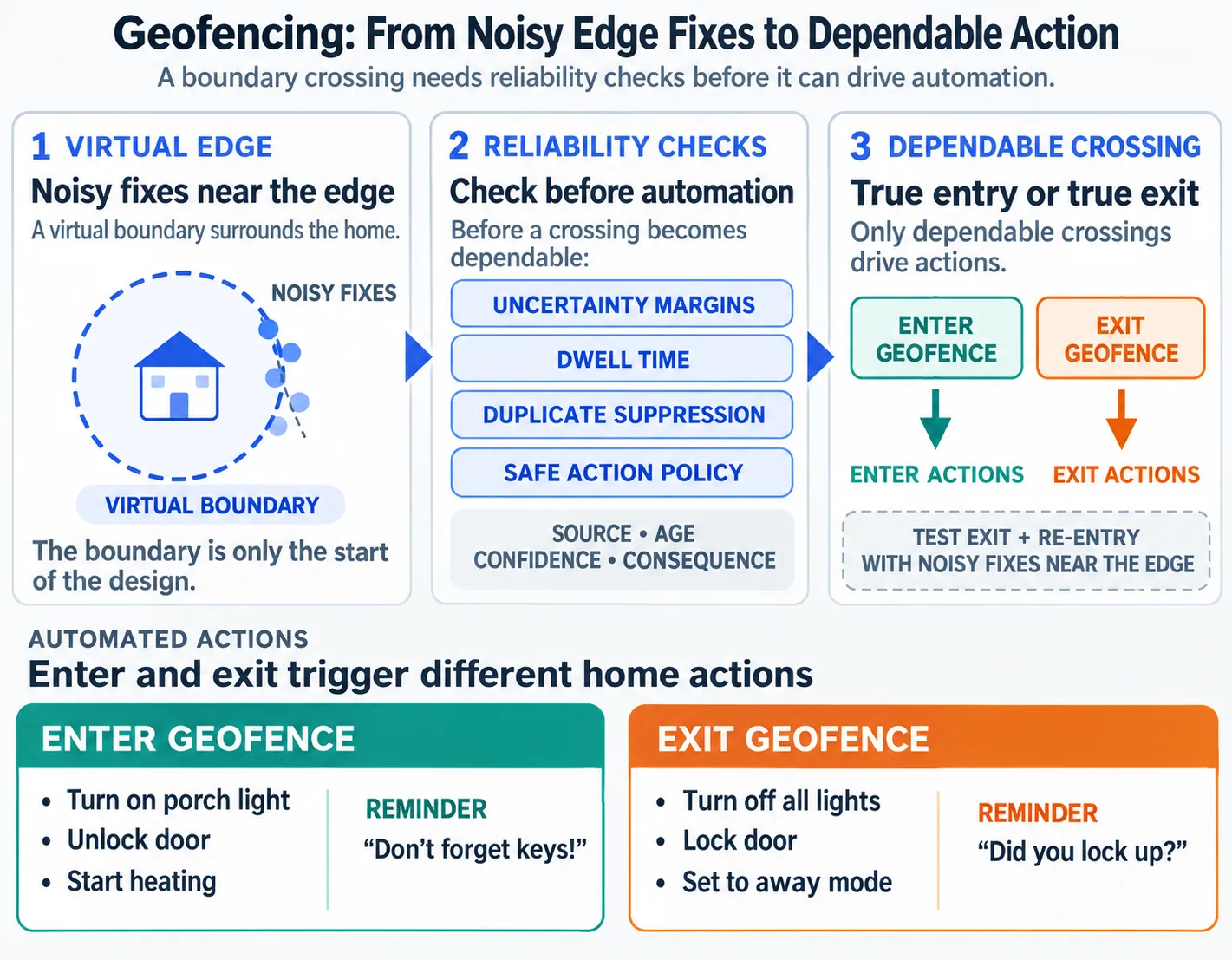
Figure 17.3 shows why the boundary is only the start of the design. The system must add uncertainty margins, dwell time, duplicate suppression, and a safe action policy before a crossing becomes dependable. That connects the beginner example to the chapter’s running claim: a location estimate should drive automation only when its source, age, confidence, and consequence are understood. Exit and re-entry tests should cover noisy fixes near the edge.
Location data is sensitive. Your position reveals: Where you live and work. What stores you visit. When you’re not home.
Best Practices:
Only collect location when needed. Let users control tracking. Store location data securely. Delete old location history.
Before diving deeper, test your understanding:
Why would GPS not work well inside a building?. Hint: Where are the satellites?
What’s the difference between GPS (5m accuracy) and UWB (10cm)?. Hint: One tells you the street, the other tells you the shelf.
What is a geofence?. Hint: An invisible boundary that triggers actions.
Answers explored in the detailed chapters!
Different technologies achieve different accuracy levels through fundamental physics constraints:
GPS (outdoor):
Satellite signal travels at speed of light: m/s. Timing precision: ~10 ns (commercial receivers). Distance error: m. With 4 satellites and geometric dilution of precision (GDOP ≈ 1.5), typical accuracy:.
BLE beacons (indoor):
RSSI-based ranging: where (path loss exponent), signal at 1m. Multipath fading adds ±4 dB variance. Distance uncertainty: (for 4 dB error). At 5 m distance, error ≈ 2.3 m; trilateration with 3 beacons yields ~3-5 m accuracy.
UWB (ultra-wideband):
500 MHz+ bandwidth enables <1 ns time resolution. Two-way time-of-flight: . With 0.5 ns precision: m = 7.5 cm. Real-world accuracy 10-30 cm (multipath + clock drift).
Trade-off: GPS uses narrow bandwidth (20 MHz) → limited timing precision. UWB’s wide bandwidth = precise timing but limited range (~50 m vs GPS global).
Before deciding how Location shapes positioning accuracy tradeoffs, inspect Figure 17.4. The circles illustrate range estimates from different mechanisms: GPS pseudoranges and UWB timing derive range from signal time, while ordinary BLE beacon ranging estimates it from RSSI. The estimated location depends on those ranges and their uncertainty.

Read Figure 17.4 as an illustration of estimated ranges. GPS pseudoranges and UWB timing derive range from signal time; ordinary BLE beacon ranging estimates range from RSSI.
 Checkpoint: Read the Quality Flags
You now know:
- A location claim should carry source, age, estimated error, confidence, permission state, and coordinate frame.
- GPS, Wi-Fi, BLE, UWB, cellular, inertial, and manual signals fail in different ways, so fusion must expose uncertainty.
- Automation should degrade from control to display, history, or confirmation when the quality flags are not strong enough.
Location Awareness is like having a magic treasure map that always knows where you are!
Imagine you have a special map that follows you wherever you go. When you walk into the kitchen, the map lights up and says “Kitchen!” When you go outside to play, it says “Backyard!” Smart devices use this same idea to know where they are and do helpful things automatically.
17.4.1 Great Treasure Hunt
It was Grandpa’s birthday, and the Sensor Squad had planned the most amazing treasure hunt ever! But there was a problem - how would Grandpa know where to go next?
“I know!” said Temperature Terry. “We can use LOCATION AWARENESS! I’ll put little helper sensors all around the house and yard.”
the LED placed tiny Bluetooth beacons everywhere - one in the kitchen, one in the garage, one by the big oak tree, and one in the garden shed. the microcontroller programmed Grandpa’s special treasure hunt tablet to know about each beacon.
“Now watch this,” whispered the battery excitedly.
Grandpa picked up the tablet and saw: “Start at the kitchen table!” He walked to the kitchen, and the tablet beeped. “You found Clue 1! Now go where we keep the car.”
“The garage!” laughed Grandpa. As he walked toward the garage, the tablet knew exactly when he arrived and showed the next clue.
But the coolest part happened when Grandpa got to the big oak tree. “It’s too far for the beacons,” worried Lila. “What do we do?”
“GPS to the rescue!” announced Sammy. “When we’re outside, we can use satellites in SPACE to find our location!” The tablet switched from using the indoor beacons to using GPS signals from satellites orbiting Earth.
Grandpa found all the clues and his present - a new garden tool kit! “How did it always know where I was?” he asked in amazement.
The Sensor Squad smiled. They had learned that different location tools work in different places: GPS works outside, beacons work inside, and smart devices can switch between them automatically!
17.4.2 Key Words for Kids
| Word | What It Means |
|---|---|
| GPS | A system using satellites in space to find where you are outdoors (like a treasure hunt clue from space!) |
| Bluetooth Beacon | A tiny device that says “I’m here!” to phones and tablets nearby (like a lighthouse for indoor navigation) |
| Geofence | An invisible fence around a place that triggers actions when you cross it (like a magic doormat) |
| Trilateration | Measuring distances from multiple known points to figure out where you are (like Marco Polo but with math!) |
17.4.3 Try This at Home!
The Human GPS Game
This game shows how GPS uses multiple satellites to find your location!
Go to a room and stand somewhere (this is the “mystery location”). Have 3 friends or family members stand in different corners of the room. Each person measures how many “giant steps” away you are from them and says it out loud:. Person A: “5 steps from me!”. Person B: “3 steps from me!”. Person C: “4 steps from me!”. Now have someone who wasn’t watching try to find your mystery location using ONLY those step counts. They should be able to find the ONE spot that matches all three distances!
This is exactly how GPS works - satellites in space measure how far you are, and by using 3 or more distances, they find the one spot where you must be. Try moving to different spots and see if your “human satellites” can always find you!
Key Concepts
This section: Key Concepts — IoT Device Architecture: Hardware stack comprising microcontroller, sensors, connectivity module, power supply, and optional display or actuator.
IoT Device Architecture: Hardware stack comprising microcontroller, sensors, connectivity module, power supply, and optional display or actuator. Design Triangle: Trade-off between size, battery life, and capability that constrains every IoT device design decision. Power Budget: Maximum average current consumption a device can draw while meeting its battery life target. Form Factor: Physical size, shape, and mounting method of a device determined by its deployment environment and user interaction model. Ingress Protection (IP) Rating: IEC 60529 code specifying a device’s resistance to dust and water ingress, required for outdoor and industrial deployments. Bill of Materials (BOM): Itemised list of every component in a device with part numbers, quantities, and costs used for procurement and cost estimation. Certification: Regulatory approval (FCC, CE, UL) required before a wireless IoT device can be sold in a given market.
17.5 Introduction
This section: Introduction — Location Awareness: The ability of a system to determine and utilize the physical position of devices, users, or objects in space.
Location Awareness: The ability of a system to determine and utilize the physical position of devices, users, or objects in space.
Device mobility is fundamentally about moving through space, so localisation is at the core of many mobile services and applications.
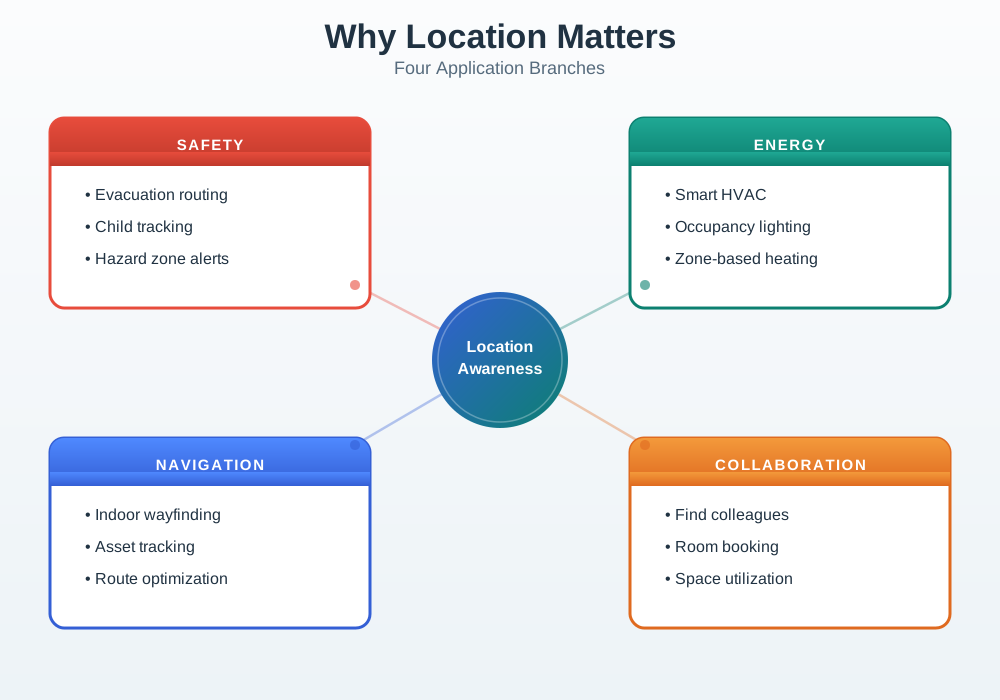
17.5.1 Why Location Matters
Read Figure 17.5 to see how three BLE range estimates lead to an uncertain indoor fix.
The dashed circles are ranges inferred from signal strength, not exact distances. The figure’s model carries ±4 dB of multipath variation into a distance error of about 0.46 times the range. At 5 m, 0.46 × 5 m = 2.3 m. Combining three beacons gives an approximate fix, with roughly 3–5 m accuracy to test in the building. The right-hand actions—protect people, reduce energy, guide movement, and coordinate resources—depend on what that error band permits. A product should use the estimate only at a precision the field test supports.
Inspect Figure 17.6 to ask how the source and trust of the location claim change as a person moves from outdoors through the building.
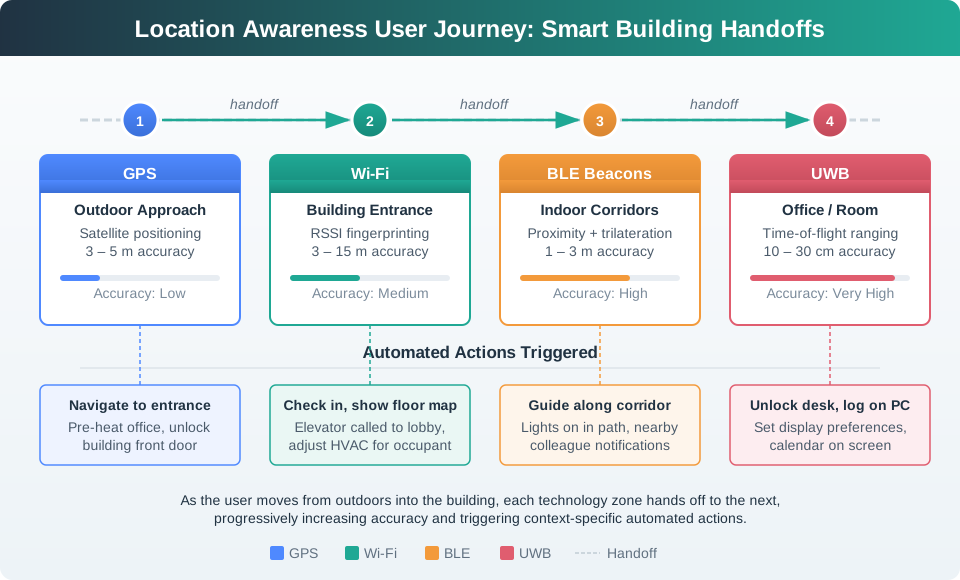
Follow Figure 17.6 in the order of the trip. GNSS marks the outdoor arrival. Signals in the building take over indoors, BLE narrows the nearby zone, and UWB gives a tighter range where the task needs it. The acts by code come after those handoffs. That order shows the main point: the service must keep the level of trust and note when its source changes. A smooth line on screen does not mean that each point is just as exact. Every handoff needs its own fallback and pass rule.
17.5.2 High-Level Location Service Architecture
The journey now needs a system boundary. In Figure 17.7, begin with the heterogeneous signal sources, follow them into the location engine, then inspect the services that consume its estimate. Keep the privacy controls in view throughout; they constrain collection, precision, sharing, and retention rather than acting as a final checkbox.
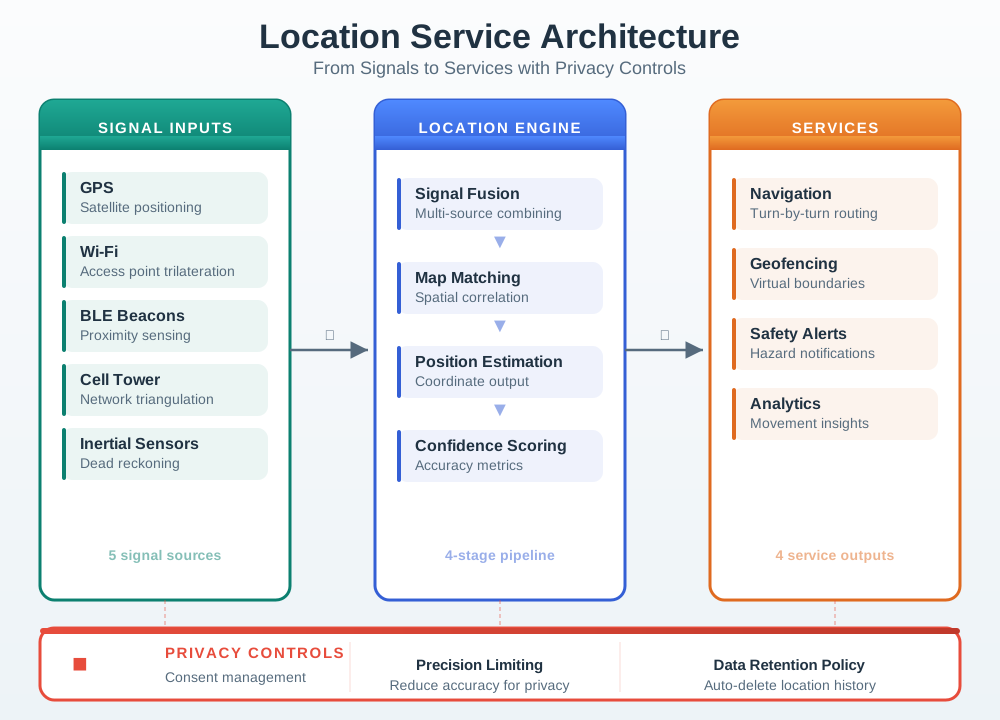
Figure 17.7 places fusion between raw observations and stable application services. That boundary lets navigation, safety, geofencing, and analytics share one quality-aware estimate while retaining consent and retention rules. Architecture alone does not choose a sensor, so Figure 17.8 next compares what each candidate demands from the product.
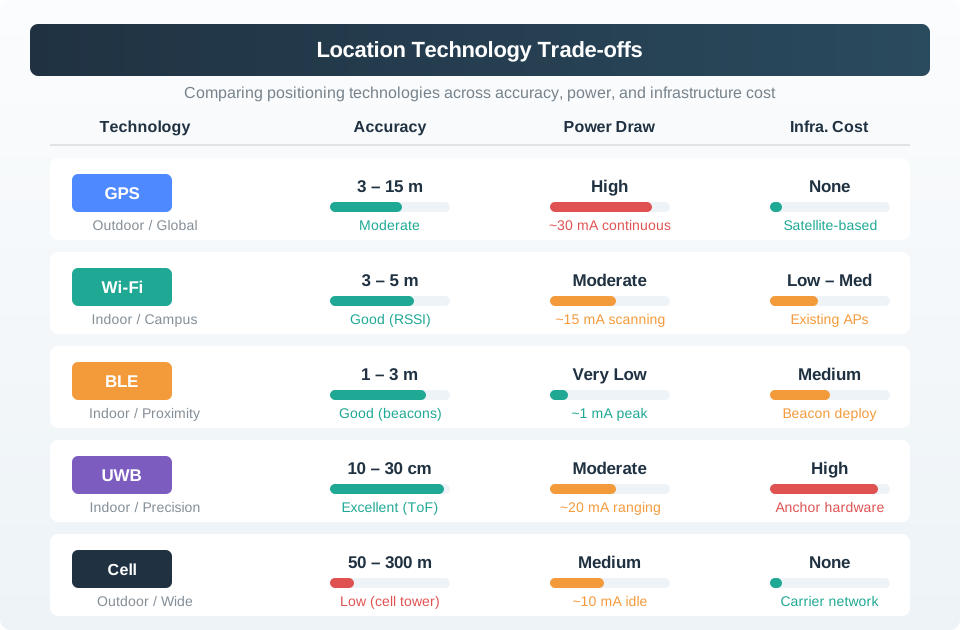
Read Figure 17.8 across its accuracy, power, and infrastructure dimensions rather than ranking technologies on precision alone. Methods that sharpen a position can require anchors, surveys, correction links, or more energy; low-infrastructure choices may return only a coarse zone. Those coupled costs complete the architecture story by showing why the engine needs multiple sources and why applications must declare the accuracy they truly require.
This architecture highlights key ideas:
- Multiple technologies (GPS, Wi-Fi, BLE, cell, inertial sensors) contribute signals; no single method is perfect in all environments.
- A location engine fuses these signals with map/context data to produce a best-estimate position rather than trusting one raw source.
- Applications consume location through stable services (navigation, safety, geofencing, analytics) instead of re-implementing algorithms.
- Privacy controls (consent, precision, retention) must surround both the engine and services—location is powerful but highly sensitive data.
Potential Applications:
- Safety: Efficient evacuation, tracking children, monitoring high-risk areas (building sites, etc.)
- Energy Reduction: Enable smart buildings to optimize heating/lighting/HVAC
- Space Usage: Assess office layouts for optimization
- Security: Auto-locking doors, computers, access control
- Navigation: Wayfinding in unfamiliar buildings, resource finding
- Collaboration: “Where is X?”, “Is Y in yet?”
- Resource Routing: Nearest telephone, printer, meeting room
- Retail: Find the right item, intelligent shopping, personalized offers
- Health: Activity level monitoring, care of elderly, patient tracking
17.6 Continue to the Next Part
This section: Continue to the Next Part — Carry this evidence into Location Awareness: Context and Geofencing, which begins with MVU: Context Detection and Geofencing.
Carry this evidence into Location Awareness: Context and Geofencing, which begins with MVU: Context Detection and Geofencing.
Find help
3 reviewed answers.
Where should I start in a module?
Open the module page from the sidebar to see its chapters in order. Use the module map to return to a topic you need.
Modules and pathsReviewed
What can I try when a project does not work?
Check the symptom, then work through the diagnostic steps. Keep the error message and the smallest example that reproduces it.
When you are stuckReviewed
How do interactive examples work?
Use the interactive guide to check how examples and simulations work before changing your project.
Interactive examples guideReviewed