18 Software Optimization Techniques
More
Depth: Practitioner
Progress saves as you read. Mark sections complete as you go; your progress appears in the sidebar.
18.1 Start With Firmware That Wakes Too Often
This section: Start With Firmware That Wakes Too Often — Picture a battery sensor that wakes every second to ask whether anything happened.
Remove One Wasteful Wake-Up and Measure It
Picture a battery sensor that wakes every second to ask whether anything happened. Most wake-ups do no useful work, yet each one starts clocks and code.
Firmware means the software stored on the device. Duty cycle means the share of time a device spends active instead of asleep. A useful change should reduce work without losing required events.
Capture a baseline trace, replace one polling loop with an event, and repeat under normal, busy, and restart conditions. Keep wake reason, active time, events handled, memory, energy, version, and missed work.
This runway does not prove that every software change saves energy. The deeper sections explain profiling, event-driven design, batching, data movement, peripheral use, compiler choices, and whole-cycle validation.
Software wastes energy when it polls instead of sleeps, copies data it could stream, misses batching windows, or keeps clocks running after the useful work is done. The bug is often a time shape, not a line count.
The practical route is to make firmware event driven, keep data movement small, let peripherals work while the core sleeps, and prove the improvement in the trace.
18.2 Software Optimization Techniques
This section: Software Optimization Techniques — Software optimization is not a list of tricks to apply everywhere.
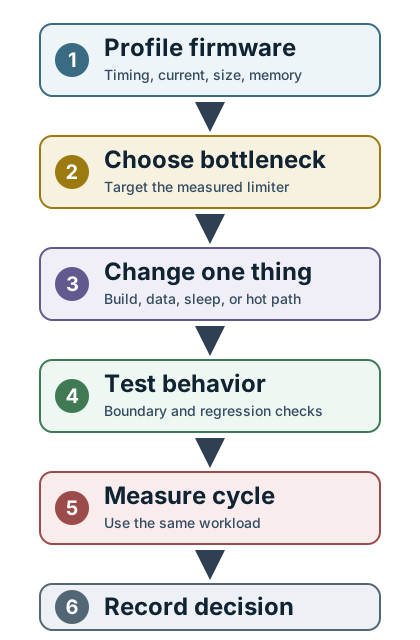
Software optimization is not a list of tricks to apply everywhere. It is a sequence of evidence-led decisions:
- define the target
- profile the workload
- choose the measured bottleneck
- apply the smallest useful change
- verify correctness and whole-device energy
- repeat only if the target is not met
This chapter focuses on firmware changes that commonly matter in IoT: compiler settings, data layout, memory movement, event-driven sleep, and code-level changes such as inlining, lookup tables, loop structure, and fixed-point handoff.
18.3 Learning Objectives
This section: Learning Objectives
By the end of this chapter, you will be able to:
- Choose compiler and linker settings from evidence instead of habit.
- Identify when code size, memory traffic, active time, or wakeups dominate firmware cost.
- Apply data-layout and buffering changes that reduce copies and memory stalls.
- Replace busy waiting with event-driven sleep where hardware support allows it.
- Decide when code-level changes such as inlining, lookup tables, or loop restructuring are worth the risk.
- Build a validation record for firmware optimization.
18.4 Firmware Optimization Loop
This section: Firmware Optimization Loop — Use the same loop for compiler changes, data-layout changes, and hand-written code changes.
Use the same loop for compiler changes, data-layout changes, and hand-written code changes.
Read Figure 18.1 from top to bottom. It follows one polling example through profiling, one change, a same-workload check, and a written keep-or-rollback decision.
The first card compares an always-active polling baseline with a short event-driven workload; the second swaps waiting for an interrupt and sleep. In the third card, the CPU-only current model drops sharply, but the note excludes sensor and radio current. The final card therefore asks for the full-cycle trace, correct results, and memory and build-size checks before keeping the change. The story below puts that loop into a device scene.
-

Bruno writes a clear energy target.
-

He profiles the whole cycle on real work.
-

The trace reveals the true bottleneck.
-

Bruno changes only that path.
-

The device must still behave correctly.
-

He measures the whole cycle again and records the result.
The six panels put the same rule on a workbench. Bruno sets a battery target, measures wake, work, radio, and sleep, then spots the tall energy bar. He changes the waiting path from a busy gear to an event bell. The device passes the correctness gate before he compares the two full-cycle traces and files the result. Use the ledger below to record that evidence and the condition for rolling back.
18.5 Software Optimization Levers
This section: Software Optimization Levers — Firmware optimization levers affect different parts of the system.
Firmware optimization levers affect different parts of the system. Choose the lever that matches the measured problem.
A design can appear sound at bottleneck and still fail at Compiler and linker. The illustration in Figure 18.2 frames that exact concern for the chapter’s discussion of software optimization levers.
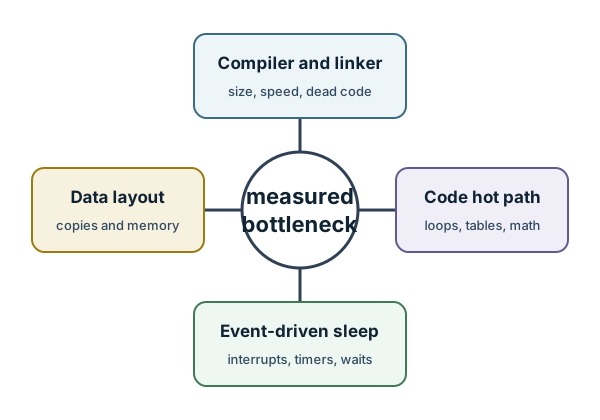
Trace the labelled evidence in Figure 18.2 beginning at bottleneck, the element that adds a distinct review condition. Pause at Compiler and linker because it tests whether evidence can travel; resolve the path at size, speed, dead code, which adds a distinct review condition. What the visual establishes is that no-panel software optimization levers map: compiler settings, data layout, memory movement, event-driven sleep, and code-level changes. This is the bounded result needed for software optimization levers.
18.6 Compiler And Linker
Use build settings to remove unused code, balance speed and size, and enable whole-program cleanup when the toolchain supports it.
18.7 Data Layout
Use compact types, stable alignment, and cache-friendly structures when memory movement is the bottleneck.
18.8 Event-Driven Sleep
Use interrupts, timers, and peripheral completion events so firmware sleeps while hardware waits.
18.9 Code-Level Changes
Use inlining, lookup tables, loop restructuring, and fixed-point handoff only for measured hot paths.
18.10 Compiler And Build Choices
This section: Compiler And Build Choices — Compiler flags are a starting point, not an optimization strategy by themselves.
Compiler flags are a starting point, not an optimization strategy by themselves.
18.11 Data, Memory, And Copies
This section: Data, Memory, And Copies — Data movement can dominate firmware cost.
Data movement can dominate firmware cost. A clean algorithm can still waste energy if it copies buffers, parses verbose payloads, or wakes the CPU for every small transfer.
Reduce copies Use clear buffer ownership so data can move from peripheral to processing to packet builder without repeated duplication.
Choose data width deliberately Smaller fields reduce memory and radio cost, but only if the precision and range still meet the requirement.
Avoid hot-path formatting Human-readable formatting is useful for logs, but expensive inside frequent active windows.
Batch when latency allows Batching can reduce wakeups and protocol overhead, but it must not hide important events or overload buffers.
18.12 Event-Driven Sleep
This section: Event-Driven Sleep — Busy waiting is one of the easiest ways to waste energy.
Busy waiting is one of the easiest ways to waste energy. If firmware waits for a sensor, timer, radio, storage device, or peripheral transfer, the CPU should usually sleep until the event occurs.
Replacing a polling loop is only useful if firmware has a complete route back to sleep. The diagram in Figure 18.3 exposes that route before the chapter turns event-driven execution into a release requirement.
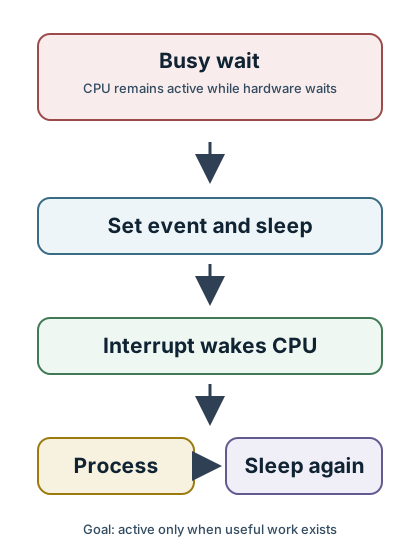
The wasteful branch in the diagram at Figure 18.3 is Busy wait, where the CPU remains active while hardware waits. The alternative begins at Set event and sleep, continues through Interrupt wakes CPU, performs the short Process step, and explicitly reaches Sleep again. The final return matters as much as the interrupt: it is what converts an asynchronous design into lower active time. Firmware tracing must therefore prove both wake handling and re-entry to the chosen sleep state.
18.13 Code-Level Changes
This section: Code-Level Changes — Code-level changes are useful when a measured hot path is truly limiting the product.
Code-level changes are useful when a measured hot path is truly limiting the product. They are risky when applied broadly.
18.14 Inline Small Hot Functions
Inlining can remove call overhead and enable constant propagation. Avoid inlining large functions or cold paths.
18.15 Restructure Loops
Loop restructuring can reduce branches and expose repeated operations. Keep boundary handling clear and tested.
18.16 Use Lookup Tables Carefully
Lookup tables can replace expensive calculations, but they use memory and must match accuracy requirements.
18.17 Move To Fixed-Point When Validated
Integer math can reduce cost on some targets, but only after range, resolution, overflow, and reference-vector checks.
18.18 Worked Review: Firmware Hot Path
This section: Worked Review: Firmware Hot Path — Suppose a device wakes every reporting interval, reads sensors, filters samples, builds a payload, and transmits the result.
Suppose a device wakes every reporting interval, reads sensors, filters samples, builds a payload, and transmits the result. A profile shows three issues:
Start with event-driven sleep because the profile shows wait time. Then reduce hot-path formatting if packet size or active time remains high. Optimize the filter loop only after reference tests prove the numerical behavior is safe.
18.19 Review Checklist
This section: Review Checklist
Before accepting a software optimization:
- The target requirement is measurable.
- The baseline uses the same workload as the after measurement.
- The change targets a measured bottleneck.
- Build size, RAM use, active time, wakeups, and current trace are checked.
- Boundary cases and reference vectors still pass.
- Logging and diagnosability remain adequate.
- The rollback condition is written down.
- The optimization record explains why the change was kept.
18.20 Knowledge Check
This section: Knowledge Check
18.21 Knowledge Check: Waiting Work
This section: Knowledge Check: Waiting Work
18.22 Knowledge Check: Build Setting Trade-Off
This section: Knowledge Check: Build Setting Trade-Off
18.23 Match Software Item To Purpose
This section: Match Software Item To Purpose
18.24 Order The Software Optimization Process
This section: Order The Software Optimization Process
18.25 Label The Software Optimization Record
This section: Label The Software Optimization Record
18.26 Polling Keeps The Core Awake; Events Let It Sleep
This section: Polling Keeps The Core Awake; Events Let It Sleep — The single largest software lever on battery life is how the firmware waits.
The single largest software lever on battery life is how the firmware waits. A polling design loops and repeatedly checks whether something has happened, which keeps the processor active - or at best idling in a shallow state - the entire time. An event-driven design puts the processor into deep sleep and lets a hardware interrupt wake it only when something actually happens. Same job, wildly different energy, because one structure holds the core awake and the other lets it sleep.
The gap is not a few percent. A processor active at several milliamps versus asleep at ten microamps differ by a factor of hundreds. So a chapter's worth of clever micro-optimizations inside a polling loop cannot come close to the saving from simply restructuring the firmware to sleep and wake on events.
Put numbers on that structure. If a node polls at 8 mA for one hour, it spends 8 mAh just waiting. If the same node sleeps at 10 uA for that hour and wakes for ten 5 ms handlers at 8 mA, the sleep floor is 0.010 mAh and the handlers add only about 0.00011 mAh. The event-driven hour is roughly 0.0101 mAh, so the polling loop is about 790 times higher before counting any sensor or radio current.
Use Figure 18.4 to verify how an external event wakes the core, bounds interrupt work, and returns execution to a sleep-capable main path.
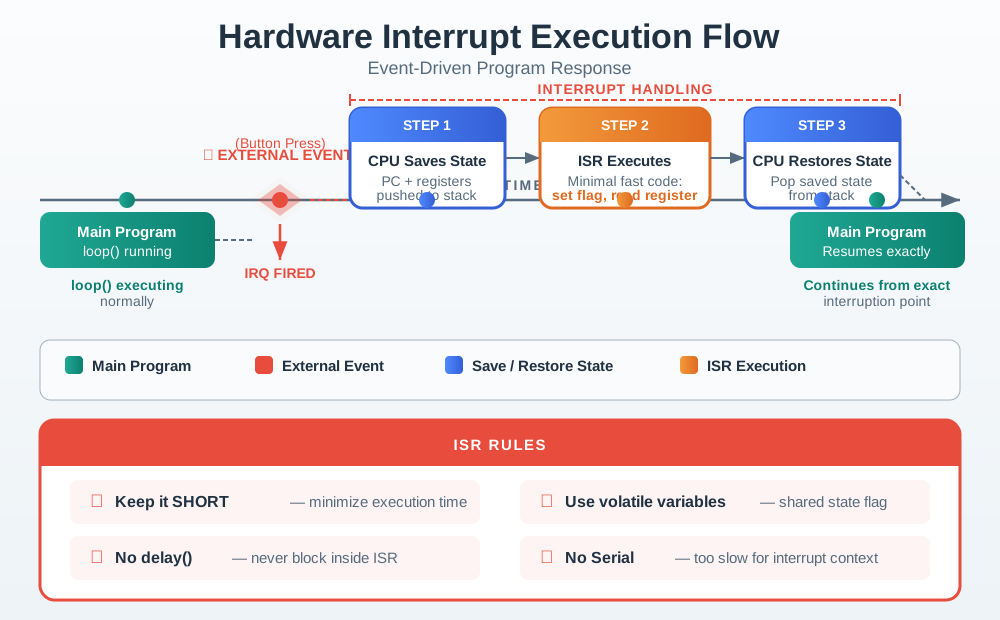
Follow one interrupt from wake to sleep. Count active time. Read Figure 18.4 from the sleeping main path to the external event that raises an interrupt. The processor saves state, runs a deliberately short handler, restores state, and resumes at the interrupted point. That order separates detection from expensive application work: the peripheral can wake the core, but the handler should capture the event and defer longer processing. The return path matters as much as entry because an interrupt design saves energy only if firmware clears the source, avoids a busy loop, and allows the processor to sleep again after the event is handled.
Intuition only: if the firmware is ever spinning in a loop waiting for something, the battery is paying active current to do nothing. Let a peripheral watch for the event and wake the core with an interrupt instead.
18.27 Two Ways To Wait
This section: Two Ways To Wait
Polling
The core loops and checks a condition, staying active. It burns current continuously whether or not anything happens.
Event-driven
The core sleeps until a hardware interrupt wakes it, so it draws sleep current almost all the time.
Wake source
A timer, GPIO, comparator, or sensor interrupt does the watching so the processor does not have to.
Sleep, not delay
A busy-wait delay looks like waiting but keeps the core active. Only a real sleep primitive saves energy.
18.28 Overview Knowledge Check
This section: Overview Knowledge Check
18.29 The Same Job At 8 mA Or 10 uA
This section: The Same Job At 8 mA Or 10 uA — Compare the two structures by average current for the same task: detect sparse events and report them.
Compare the two structures by average current for the same task: detect sparse events and report them. Polling averages near the active current; event-driven averages near the sleep current plus a tiny contribution from brief wakes.
18.30 Worked Example: A Sparse-Event Sensor Node
This section: Worked Example: A Sparse-Event Sensor Node — Events occur about 10 times per hour, and each needs 5 ms of processing at 8 mA.
Events occur about 10 times per hour, and each needs 5 ms of processing at 8 mA. The core can sleep at 10 uA.
- Polling: the loop keeps the core active at about 8 mA continuously. On a 2000 mAh pack that is 2000 / 8 = 250 h, about 10 days.
- Event-driven: wake energy is 10 x 5 ms x 8 mA = 0.4 mA-s per hour, which averages 0.11 uA, on top of the 10 uA sleep, for about 10.1 uA total. That is a factor of roughly 800 below polling.
- Life: at 10.1 uA the pack would last far beyond a decade on paper, so the practical limit becomes battery self-discharge rather than the load - the opposite regime from the 10-day polling design.
The daily budget makes the same point in battery units. Polling at 8 mA consumes 8 x 24 = 192 mAh/day. Event-driven waiting at roughly 10.1 uA consumes 0.0101 mA x 24 = 0.242 mAh/day before sensor and radio work. A 2000 mAh cell would calculate to more than 8000 days at that software floor, so real products become limited by self-discharge, leakage, temperature, and the useful work outside the core.
The processing per event is identical in both; the only change is that the event-driven core sleeps between events instead of spinning. That structural choice moved the average current by nearly three orders of magnitude.
18.31 Structure Energy Ledger
This section: Structure Energy Ledger
18.32 Practitioner Knowledge Check
This section: Practitioner Knowledge Check

18.33 A Busy-Waiting delay() Does Not Sleep, And You Must Offload The Watching
This section: A Busy-Waiting delay() Does Not Sleep, And You Must Offload The Watching — Two traps turn an intended low-power design back into a polling one.
Two traps turn an intended low-power design back into a polling one. The first is the busy-wait delay. On Arduino AVR, a call like delay(10) busy-waits and does not enter low-power sleep; on ESP32 Arduino, delay() yields to FreeRTOS, which can permit automatic light sleep when configured. Check the target implementation and current trace before assigning an active-current cost. A duty cycle built from such busy-wait delays still pays active current the whole time. The fix is to replace the delay with a real sleep primitive - a wait-for-interrupt, light sleep, or deep sleep - armed with a timer wake, so the core is genuinely off during the interval.
The arithmetic is unforgiving. A busy-waiting implementation that waits one second with delay(1000) at 8 mA burns 8 mA-s during that second even though it did no useful work. Across 3600 one-second waits, that is 8 mAh per hour of waiting current. A timer-backed sleep at 10 uA over the same hour is about 0.010 mAh before wake work, so the firmware primitive - delay versus sleep - decides almost the whole current budget.
The second trap is watching in software. If the "event" is detected by the CPU reading a sensor or ADC in a loop, the core cannot sleep, and you have an event-driven shape with polling energy. The watching must be offloaded to a peripheral that runs while the core sleeps: a GPIO interrupt for a digital line, an analog comparator or the sensor's own threshold interrupt for a level crossing, or a low-power timer for periodic wakes. Only then can the processor stay asleep until the peripheral raises an interrupt. One more caveat closes the loop: if events become very frequent, the wake and processing overhead can keep the core effectively awake anyway, and batching several events per wake restores the benefit. Event-driven design wins when the watching is offloaded and the events are sparse relative to the processing.
18.34 Making Sleep Real
This section: Making Sleep Real
Replace busy delays
Swap spinning delays for a wait-for-interrupt or sleep with a timer wake, or the interval saves nothing.
Offload the watch
Let a GPIO, comparator, or sensor interrupt detect the event so the core can stay asleep.
Avoid ADC polling
Polling an ADC for a threshold keeps the core active; use a hardware comparator or threshold interrupt instead.
Batch frequent events
If events arrive fast, group several per wake so the core is not effectively always awake.
18.35 Under-the-Hood Knowledge Check
This section: Under-the-Hood Knowledge Check
18.36 Compiler Optimization Modes
This section: Compiler Optimization Modes — Optimization flags express a preference to a particular toolchain; they do not guarantee a fixed list of transformations.
Optimization flags express a preference to a particular toolchain; they do not guarantee a fixed list of transformations. In common GCC- and Clang-style workflows, a speed-focused -O3 build may inline more aggressively, unroll or vectorize loops, reorder instructions, and create separate fast paths for alignment or aliasing cases. A size-focused -Os build usually discourages growth, favors shorter encodings, and may keep branches or calls that a speed build removes. Inspect the compiler version, generated code, link map, and measurements rather than assigning universal behavior to the flag name.
Use a four-result comparison for the production workload:
| Build | Flash bytes | Hot-path time | Whole-cycle energy | Why it may win |
|---|---|---|---|---|
| Balanced optimization | Measure | Measure | Measure | Stable baseline with moderate code growth |
Speed-focused (-O3-style) | Often larger | Often shorter | Depends on active-time reduction and fetch/cache effects | A deadline-bound hot loop dominates energy |
Size-focused (-Os-style) | Often smaller | May be longer | Depends on flash fetch, cache fit, and added active time | Flash/update slot or instruction-fetch pressure dominates |
| Custom pass set | Toolchain-specific | Toolchain-specific | Must be measured | One known transformation helps while another causes regression |
A speed build can reduce energy by returning to sleep sooner, yet lose that gain if code growth causes more flash wait states or instruction-cache misses. A size build can reduce fetch energy, yet keep the core awake longer. The winning flag is the one that lowers measured charge per useful task while preserving timing, stack, numerical, and update-slot requirements.
18.37 Code Density and Instruction-Level Parallelism
This section: Code Density and Instruction-Level Parallelism — Code density and execution width are not the same optimisation.
Code density and execution width are not the same optimisation. Figure 18.5 compares compressed encodings, CISC complexity, and VLIW bundles against one signed-update-slot constraint.

In Figure 18.5, Compressed 16-bit encodings reduce flash traffic but may need extra instructions when registers or immediates do not fit. VLIW bundles expose parallel slots to the compiler, yet unused slots become encoded NOPs; the Measure the whole image card therefore requires text size, cycles, stalls, energy, and WCET together.
Code occupies silicon and consumes energy every time it is fetched. One historical same-process comparison put a 128 Mbit (16 MB) flash array at 27.3 mm and a Cortex-M3 core at 0.43 mm in a 0.13 m technology. The ratio is about
That is not a modern die-area prediction; it is a scale lesson. A memory large enough to hold software can dwarf a small processor core, so instruction density can affect area, fetch bandwidth, leakage, and update time.
Compressed instruction sets commonly provide short 16-bit encodings alongside wider 32-bit encodings. Short forms save bytes but have fewer encoding bits, so they may expose only a subset of registers, smaller immediate ranges, fewer addressing modes, or an explicit mode/history constraint on older designs. The assembler expands to a wider form when operands do not fit. The source line stays the same while its byte cost changes; use the disassembly and section map to see what was selected.
Complex instruction sets take another route: encode more work per instruction. This can improve density, but decoding and execution hardware become more complex, and a rarely used instruction contributes nothing if the compiler cannot recognize or safely generate it. Very-long-instruction-word (VLIW) machines expose parallel functional-unit slots directly to the compiler. A bundle might contain an add, multiply, load, and branch slot; when independent work cannot fill a slot, the encoding carries a no-operation. VLIW therefore exchanges dynamic scheduling hardware for compiler scheduling and can waste code space when parallelism is sparse.
The practical rule is to separate three quantities: source statements, executed operations, and fetched instruction bytes. None is a reliable proxy for the other two.
18.38 Vectorization and Tail Handling
This section: Vectorization and Tail Handling — The tail is visible when the same ten-element calibration loop is laid out lane by lane.
The tail is visible when the same ten-element calibration loop is laid out lane by lane. Figure 18.6 compares ten scalar iterations with two complete four-lane vectors and the remaining two elements.

In Figure 18.6, V0 · [0 1 2 3] and V1 · [4 5 6 7] account for eight valid elements. The TAIL [8 9] then branches to masked lanes or scalar cleanup, so the speedup boundary includes setup and remainder work and never reads beyond x[9] merely to fill a vector.
Suppose a scalar loop adds two arrays:
for (size_t i = 0; i < N; ++i)
    c[i] = a[i] + b[i];
A SIMD instruction with lanes performs element additions per vector iteration. Split the trip count into
The vector loop executes times over elements; a tail path handles the remaining elements. For and , there are four vector iterations covering 16 elements and two scalar tail iterations. Omitting the tail silently leaves c[16] and c[17] wrong.
size_t i = 0;
for (; i + W <= N; i += W)
    vector_add(&c[i], &a[i], &b[i]);
for (; i < N; ++i)
    c[i] = a[i] + b[i];
Some instruction sets provide masked loads and stores, allowing one final vector operation with only the first lanes enabled. That removes a scalar loop but does not remove the boundary obligation: the mask must prevent out-of-range memory access and preserve inactive lanes.
Ideal arithmetic speedup approaches , but real time is
so short arrays, tails, alignment repair, alias checks, and memory bandwidth reduce the gain. Validate lengths , , , , , and a large non-multiple; test aligned and unaligned buffers; and compare every element with the scalar reference. Vectorization is complete only when the remainder path is as deliberate as the fast path.
18.39 Predication and Function Inlining
This section: Predication and Function Inlining — Use Figure 18.7 to compare branch latency with predicated work and call overhead with inline flash growth before choosing either optimisation.
Use Figure 18.7 to compare branch latency with predicated work and call overhead with inline flash growth before choosing either optimisation.

Count the saved branch first. Then count added work. Read Figure 18.7 first across the branch timeline, where a misprediction creates the visible flush slot, and then across the predicated track, which avoids that control delay but may still issue work for a false path. The lower comparison changes currency from cycles to bytes. A shared call keeps one 12 B body plus call and return boundaries; inlining it at three sites removes those boundaries but copies the body, adding 24 B relative to one copy. The figure therefore requires both a measured hot-path gain and enough signed update-slot and instruction-cache margin before either transformation is accepted.
A conditional branch chooses one instruction stream. If its direction is hard to predict, a misprediction flushes useful pipeline work. Predication instead attaches a condition to one or more instructions, allowing a short conditional operation to pass through without changing control flow.
For a branch with misprediction probability and recovery cost cycles, the expected branch penalty is approximately . Predication is attractive when executing or issuing the guarded instructions costs less than that penalty and has no unsafe side effects. It becomes wasteful when both paths are long, when predicated work still consumes execution resources, or when a suppressed load could fault or touch memory unexpectedly. Use predication for short, balanced choices—not as a blanket replacement for control flow.
Inlining makes a different trade. A normal call may require argument setup, a branch-and-link, prologue/epilogue work, return, and inhibited optimization across the call boundary. Replacing the call site with the function body removes that boundary and can expose constants to further optimization. If a three-instruction helper is called in a hot inner loop, this can be valuable. If a 200-byte body is inserted at 40 sites, it creates roughly 8 kB before secondary transformations and may damage cache or update-slot fit.
Not every function is inlineable: recursion, indirect calls, separately linked code, debug or instrumentation requirements, and toolchain limits can prevent it. In C and C++, inline also has language linkage semantics and is generally a request, not a command. Toolchain-specific always-inline attributes may force a stronger attempt, but they still need a build-size and correctness review.
Use this stepwise decision:
- Measure call frequency and the cycles attributable to the call boundary.
- Inspect optimized assembly to confirm a call actually remains.
- Inline only the small, hot candidate and rebuild.
- Compare hot-path cycles, total flash, instruction-cache behavior, and whole-cycle charge.
- Retain the change only if the saved active energy exceeds the extra fetch and storage cost with update margin intact.
Predication and inlining both trade control-flow overhead for more instructions in the straight-line path. Their success is therefore visible in disassembly and a current trace, not in the source keyword alone.
18.40 Summary
This section: Summary
Software optimization should make the product requirement more true:
- Measure first.
- Choose the firmware bottleneck that matters.
- Use compiler settings as one lever, not the whole strategy.
- Reduce data movement and hot-path formatting.
- Sleep while hardware waits.
- Apply code-level changes only to measured hot paths.
- Verify correctness, build size, memory, timing, and full-cycle energy.
Common Pitfalls
This section: Common Pitfalls
Debug builds are for diagnosis. Use production-like settings before making timing or energy claims.
Polling can keep the CPU active for no useful work. Prefer event-driven sleep when the hardware and error paths support it.
Inlining and speed-focused builds can make firmware too large for flash, update slots, or rollback images.
Lookup tables, fixed-point conversion, and loop restructuring need reference vectors and boundary tests before release.
18.41 What’s Next
This section: What’s Next
18.42 Use Fixed-Point Carefully
Fixed-Point Arithmetic explains Q-format choices, saturation, and validation for integer math.
18.43 Compare Hardware Paths
Hardware Optimization Strategies covers peripherals, data paths, accelerators, and platform selection.
18.44 Review The Fundamentals
Optimization Fundamentals explains bottlenecks, trade-off ledgers, and optimization records.
18.45 Measure The Result
Energy Measurement and Profiling shows how to prove that firmware changes improved the full duty cycle.
18.46 Key Takeaway
This section: Key Takeaway — Software saves energy when it reduces unnecessary work and lets hardware sleep.
Software saves energy when it reduces unnecessary work and lets hardware sleep. Prefer efficient algorithms, bounded loops, batching, interrupt-driven design, and clear wake/sleep ownership.
Open printable teacher run sheet
Find help
3 reviewed answers.
Where should I start in a module?
Open the module page from the sidebar to see its chapters in order. Use the module map to return to a topic you need.
Modules and pathsReviewed
What can I try when a project does not work?
Check the symptom, then work through the diagnostic steps. Keep the error message and the smallest example that reproduces it.
When you are stuckReviewed
How do interactive examples work?
Use the interactive guide to check how examples and simulations work before changing your project.
Interactive examples guideReviewed