16 Measure-First Optimization
More
Depth: Practitioner
Progress saves as you read. Mark sections complete as you go; your progress appears in the sidebar.
16.1 Start With One Measured Bottleneck
This section: Start With One Measured Bottleneck — Picture a battery sensor that dies early even after its code was made faster.
Change One Energy Cost and Measure Again
Picture a battery sensor that dies early even after its code was made faster. Firmware means the software stored on the device that controls sensing, sleep, radio use, and recovery.
Follow the four panels to find why faster code has not fixed the sensor’s short battery life. First the battery is still low; then radio retries, a power part, and sensor warm-up become suspects. The last two panels show the test: measure one change and keep it only if the battery and radio result both improve.
-
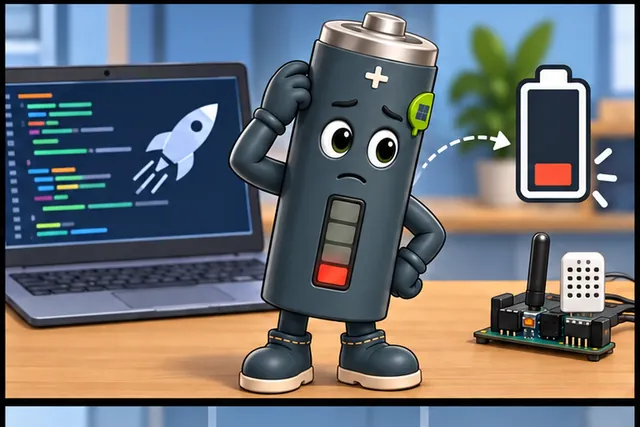
A battery sensor still dies early after its code was made faster.
-
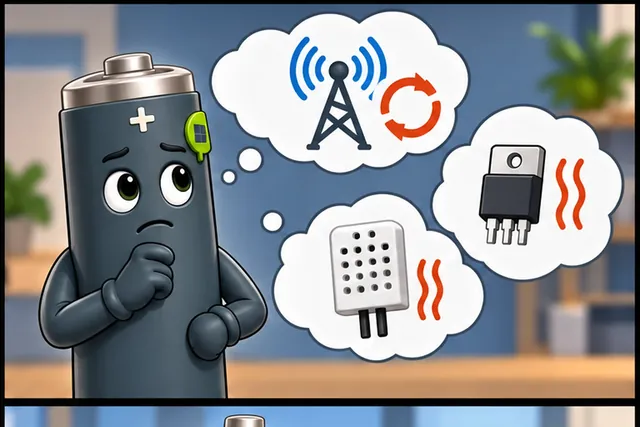
The real loss may be a radio retry, power part, or sensor warm-up.
-
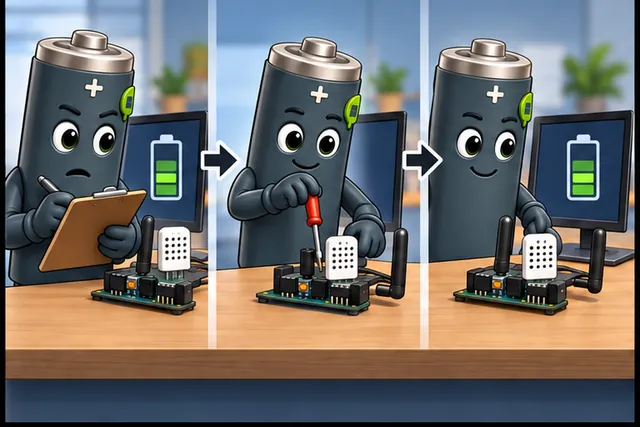
Measure the baseline, change one suspected cost, and test again.
-
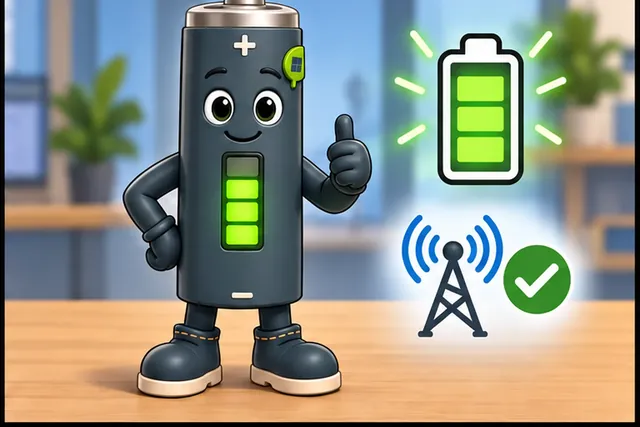
Keep the change only when total energy improves without lost reliability.
The third panel moves from a written baseline to one hardware change and a new reading; the fourth shows a higher battery level with a working radio. That is the rule for this chapter: count time and current in each mode, then repeat the normal, weak-link, and restart cases before accepting an energy saving.
Keep traces, settings, version, energy total, and any reliability change. This proves one change improved one measured budget, not every device goal; the deeper sections compare bottlenecks, trade-offs, constraints, and verification.
Optimization without evidence is guesswork. A firmware loop may look inefficient while the real energy loss is a radio retry, a voltage regulator, or a sensor warm-up delay.
This chapter keeps optimization grounded: measure first, choose the dimension that matters, change one lever, and verify that the full device budget improved.

- First, separate speed, size, power, and energy so the optimization target is explicit.
- Then, connect power, energy, switching, leakage, and power gating to real device limits.
- Next, use the measurement loop, bottleneck check, ledger, and gates to choose one change.
- Finally, test the race-to-sleep arithmetic and voltage-scaling break-even before keeping a result.
Checkpoint callouts pause the process at review boundaries; deep-dive material carries the detailed arithmetic.
16.2 Optimization Fundamentals
This section: Optimization Fundamentals — Optimization changes a system so it uses fewer resources or meets a tighter requirement.
Optimization changes a system so it uses fewer resources or meets a tighter requirement. In IoT, that usually means one or more of these outcomes:
- lower total energy per useful result
- lower peak power or thermal stress
- shorter response time
- smaller flash, RAM, or data transfer footprint
- better reliability under the same resource budget
The difficult part is that these goals interact. Faster code may use more memory. Smaller code may take longer. Lower peak power may increase execution time. A good optimization process makes those trade-offs explicit before changing firmware, hardware, protocol behavior, or sampling policy.
16.3 Learning Objectives
This section: Learning Objectives
By the end of this chapter, you will be able to:
- Explain the difference between speed, size, power, and energy optimization.
- Use measurement evidence to identify the real bottleneck.
- Estimate whether an optimization can materially improve the whole system.
- Compare candidate optimizations with a trade-off ledger.
- Define stop conditions and regression checks before changing code or hardware.
- Build a validation record that proves the optimization helped without breaking the product.
16.4 Four Optimization Dimensions
This section: Four Optimization Dimensions — Most IoT optimization decisions can be described with four dimensions.
Most IoT optimization decisions can be described with four dimensions.
Use the labelled path in Figure 16.1 to challenge four optimization dimensions. If Speed cannot be connected to latency trace, the surrounding conclusion is premature.
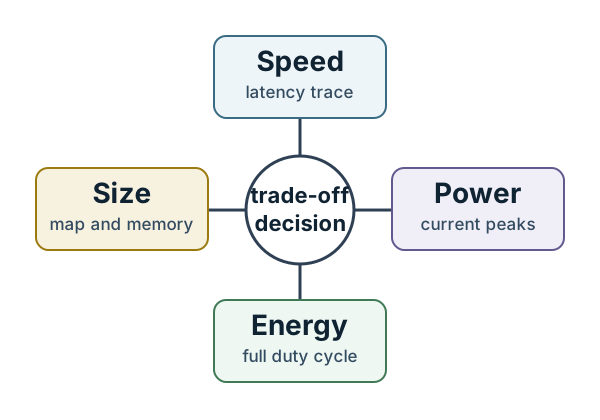
Rather than treating the labels as a list, relate Speed to latency trace in Figure 16.1. The former adds a distinct review condition; the latter adds a distinct review condition. Size then adds a distinct review condition, completing the visual statement: No-panel diagram showing speed, size, power, and energy as four optimization dimensions connected to latency traces, build size, current traces, and duty-cycle evidence. That completed statement informs four optimization dimensions.
16.5 Speed
Speed is about time to complete work or respond to an event. Measure it with traces, timestamps, deadlines, and end-to-end latency.
16.6 Size
Size is about flash, RAM, persistent storage, packet size, and update footprint. Measure it from build maps, memory reports, and data formats.
16.7 Power
Power is instantaneous load, usually visible as current peaks or thermal limits. Measure it with current traces and worst-case operating states.
16.8 Energy
Energy is power accumulated over time. For battery systems, it is often the most important number because sleep time, retry behavior, and radio duty cycle dominate the budget.
The same change can improve one dimension while harming another. For example, caching a lookup result may reduce CPU time but use more RAM. Compressing a packet may reduce radio airtime but add compute time. Deep sleep may lower average energy but add wake latency. The right choice depends on the product target and measured workload.
Checkpoint: Name The Target Dimension
- You now know why speed, size, power, and energy are different optimization targets.
- You now know that a single change can improve one dimension while harming another.
- You now know to tie the choice to the product target and measured workload.
16.9 Why Energy Becomes the Constraint
This section: Why Energy Becomes the Constraint — Device count does not automatically make an IoT system more valuable.
Device count does not automatically make an IoT system more valuable. A fleet that adds sensors faster than it adds trustworthy decisions can flatten out: each new device brings battery service, credential rotation, firmware updates, privacy review, support load, and failure modes. The desired curve is different. More devices and services should make the system’s decisions more useful without letting security, privacy, energy, or management cost grow faster than the benefit.
That is why optimization starts with measurement. It is not enough to say that a future processor will be faster or a future battery will be better. Compute density has historically improved much faster than battery energy density, and small devices are often limited by how much heat they can remove. The gap is not a vague impression — semiconductor logic has tracked something close to Moore’s law, roughly doubling every two years, while battery energy density has improved on the order of 5-8 percent a year, doubling closer to once a decade. A processor generation can leapfrog its predecessor before a comparable battery generation ships, which is why a design that assumes “the next chip will just be more efficient” is gambling on the wrong curve. A desktop processor can dissipate tens or hundreds of watts with a heat sink and fan. A phone may have only about a watt of comfortable thermal headroom. A wearable sensor may live in the uW-mW range, where an always-on radio, LED, regulator, or debug bridge can dominate the budget.
Power density creates another limit. As features shrink, the same chip area can try to do more work, but the heat has to leave through a package, enclosure, skin surface, or nearby air. When power density approaches uncomfortable or unsafe levels, the design response is not simply “clock it higher.” It is to reduce voltage where possible, use lower-power states, choose efficient peripherals, batch or avoid work, and verify the result on the whole device. The optimization record should therefore name the physical limit as well as the software change.
For IoT, the practical conclusion is direct: value, privacy, support, and energy are coupled. A change that saves 5 ms of CPU time but forces a radio retry, raises sleep current, increases support tickets, or exposes more household behavior may reduce the product’s real value. A defensible optimization proves that the full system improves, not only that one number moved.
16.10 Power, Energy, And Switching Reality
This section: Power, Energy, And Switching Reality — Power and energy are related, but they answer different review questions.
Power and energy are related, but they answer different review questions. Power is the instantaneous rate of energy use. It sets heat, regulator, and capacity limits. Energy is power accumulated over time. It sets battery life, operating cost, and whether a task that looks low-power actually consumed more total charge because it ran for longer. For a transactional workload, throughput and average power may dominate the review. For a non-transactional job, completion time and total energy may matter more.
The comparison with biological systems is a useful warning, not a product requirement. A human brain performs an enormous amount of distributed work on roughly 20 W, and a widely cited estimate puts its synaptic switching cost near 2 femtojoules per operation. A low-power Cortex-M0-class microcontroller running near its efficiency sweet spot, around 9 uA/MHz at 1.5 V with roughly one instruction per cycle, lands closer to 13 picojoules per operation — on the order of 6,000 times less efficient than the biological comparison. The lesson for IoT design is not to copy biology literally. It is to avoid wasting transitions, moving data, and keeping support systems awake when the useful work is small.
Energy proportionality is the missing property in many systems. A device at 30 percent utilization should ideally consume close to 30 percent of peak power, but real boards often keep regulators, clocks, memories, displays, radios, fans, or DC-DC converters partly on. That creates poor efficiency at low utilization, which is exactly where sensor gateways, intermittent edge nodes, and standby hubs spend much of their lives. The current trace should therefore include peripherals, processing, communication interfaces, physical I/O, chargers, and storage, not only the CPU core.
At the chip level, CMOS logic gives a concrete model for that trace. Dynamic power is switching power: a node changes state, charges or discharges capacitance, and pays an energy cost. A common review shorthand is P_switch = alpha * C * V^2 * f, where alpha is the activity factor, C is switched capacitance, V is supply voltage, and f is frequency. Static power is leakage: current that flows even when useful switching is not happening, and it often rises as features, operating temperature, and always-on domains become harder to control.
That model turns “optimize power” into specific levers. Lowering voltage can reduce dynamic power sharply, but frequency and voltage are coupled by timing limits, so DVFS needs a measured break-even point rather than a slogan. Reducing activity means disabling inactive clocks, gating unused data paths, batching work, and encoding buses so fewer bits toggle. Reducing capacitance means avoiding oversized drivers, long traces, unnecessary external buses, and layouts that switch more metal than the workload needs. Each lever belongs in the same evidence loop: state the workload, measure before, change one thing, and prove total energy, thermal margin, and correctness improved together.
Leakage power gives the static side its own levers. Process choices such as silicon on insulator can reduce substrate leakage. Architecture choices can use fewer transistors in the always-on path. Circuit choices can use slower or higher-threshold devices where timing slack allows it, because faster devices are often larger and leak more. Those are not firmware toggles after the board ships, but they are valid selection and review criteria when a device family is being chosen for a long-life endpoint.
Power gating is the runtime version of that idea: cut the virtual supply to an unused core, cache slice, floating-point unit, decoder, memory bank, or peripheral island instead of merely stopping its clock. Processor examples can show tens-of-times leakage reduction when a domain moves from active to shut-off, but that number is not free energy. The review must include wake latency, inrush and rail settling, retained or rebuilt state, thermal-sensor availability, cache or memory reinitialization, and the workload rule that decides when the component is idle long enough to shut down. A cool block in an infrared image is useful evidence only if the product still meets its response and recovery requirements.
Checkpoint: Include The Whole Device
- You now know why a 5 ms CPU saving is not enough evidence by itself.
- You now know to include radios, regulators, memories, displays, chargers, storage, and sleep states in the trace.
- You now know power gating must repay wake latency, inrush, rail settling, and state recovery.
16.11 Measurement-First Loop
This section: Measurement-First Loop — Optimization should be treated as a controlled loop, not a collection of tricks.
Optimization should be treated as a controlled loop, not a collection of tricks.
The next measurement-first loop claim rests on a relationship, not an isolated value. Inspect Target and define a measurable in Figure 16.2 before accepting it.
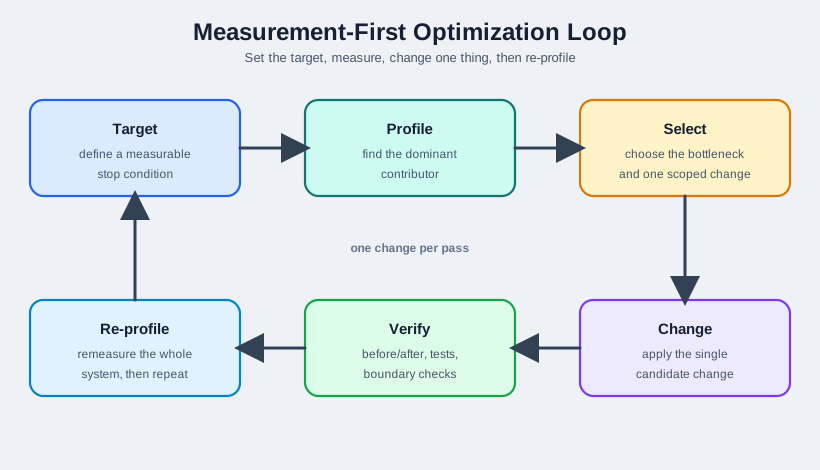
First isolate Target on the figure at Figure 16.2; it defines what the design promises. Next pair define a measurable (adds a distinct review condition) with stop condition (adds a distinct review condition). Their pairing demonstrates that cyclic optimization loop through target, profile, select the bottleneck, change, verify, and re-profile, one change per pass. This is what the chapter needs before continuing measurement-first loop.
For each optimization, write down the target, baseline, candidate change, expected trade-off, after measurement, correctness checks, and rollback condition. This record prevents the team from keeping changes that only look faster in one narrow test.
16.12 Bottlenecks And Limits
This section: Bottlenecks And Limits — A bottleneck is the part of the system that dominates the resource you care about.
A bottleneck is the part of the system that dominates the resource you care about. If a function consumes most of the active time, a speed optimization there may matter. If sleep current dominates the energy budget, rewriting a fast function may not change battery life.
Treat the map at Figure 16.3 as the evidence boundary for bottlenecks and limits. Its Dominant and Secondary labels identify the conditions that must be checked together.
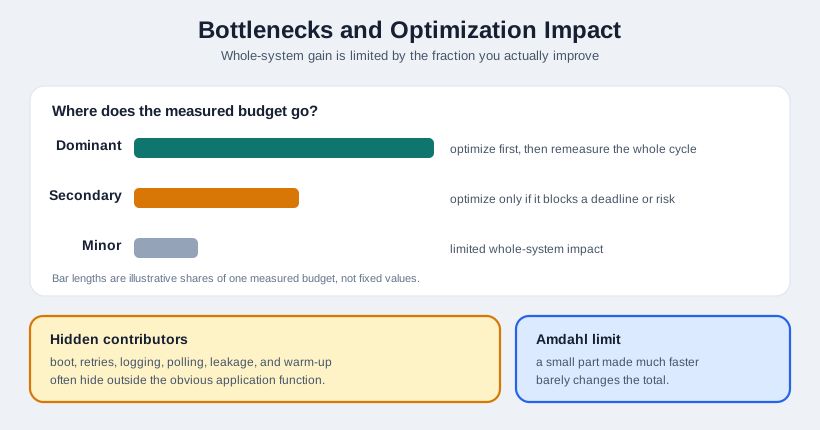
The evidence changes character across the diagram at Figure 16.3: Dominant adds a distinct review condition, Secondary adds a distinct review condition, then Minor adds a distinct review condition. The transition explains the caption’s core point — bar comparison of dominant, secondary, and minor contributors to a measured budget, with notes on hidden contributors and the Amdahl limit on whole-system gain. That point is the next premise in bottlenecks and limits.
A useful mental model is Amdahl-style reasoning:
Whole-system improvement is limited by the fraction you actually improve.
If a task is only a small part of the measured cycle, making it dramatically faster may barely change the total. If a state dominates the current trace, a modest improvement there can matter more than a dramatic improvement elsewhere.
Large contributor If a state or function dominates the measured budget, optimize it first and remeasure the whole cycle.
Small contributor If a part is minor, optimize it only when it blocks a hard deadline, creates reliability risk, or is easy to remove safely.
Hidden contributor Boot work, retries, logging, polling, leakage, and warm-up delays often hide outside the obvious application function.
16.13 Trade-Off Ledger
This section: Trade-Off Ledger — Use a ledger before committing to a change.
Use a ledger before committing to a change. The goal is not to predict everything perfectly; it is to make risk visible and measurable.
16.14 Decision Gates
This section: Decision Gates — Before applying a change, ask whether it passes these gates.
Before applying a change, ask whether it passes these gates.
16.15 Requirement Gate
Which requirement is being improved, and how much improvement is enough?
16.16 Bottleneck Gate
Does the measured bottleneck match the proposed change?
16.17 Regression Gate
What can break: accuracy, reliability, safety margin, update size, wake latency, or compatibility?
16.18 Evidence Gate
What before/after measurement will prove the change improved the whole system?
If a candidate fails one of these gates, it may still be a useful idea, but it is not ready to be treated as an optimization.
16.19 Worked Review: Duty-Cycled Sensor
This section: Worked Review: Duty-Cycled Sensor — The best first optimization is not necessarily the most interesting code change.
Consider a duty-cycled sensor node with three measured contributors in each reporting cycle:
The best first optimization is not necessarily the most interesting code change. It is the change that moves the measured whole-system budget while preserving the product requirement.
Start with sleep-state cleanup because it affects the longest part of the duty cycle. Then revisit the radio session because retries and receive windows can dominate energy under poor links. Treat payload formatting as a follow-up only if packet size or memory footprint becomes the next measured bottleneck.
16.20 Review Checklist
This section: Review Checklist
Before marking an optimization complete, confirm:
- The target requirement is stated in measurable terms.
- The baseline measurement covers the full relevant cycle.
- The selected change addresses a measured bottleneck.
- The trade-off ledger includes speed, size, power, energy, and reliability effects.
- Correctness tests still pass after the change.
- The after measurement uses the same workload and environment as the baseline.
- The improvement remains meaningful after considering wake time, retries, storage, and protocol overhead.
- The optimization record says when to keep, revise, or roll back the change.
Checkpoint: Keep Or Roll Back
- You now know the process order: target, profile, select, change, verify, and re-profile.
- You now know why the bottleneck gate comes before the favorite technique.
- You now know a result is complete only when the before/after record and regression checks agree.
16.21 Knowledge Check
This section: Knowledge Check
16.22 Knowledge Check: Bottleneck First
This section: Knowledge Check: Bottleneck First
16.23 Knowledge Check: Trade-Off Choice
This section: Knowledge Check: Trade-Off Choice
16.24 Match Optimization Item To Purpose
This section: Match Optimization Item To Purpose
16.25 Order The Optimization Process
This section: Order The Optimization Process
16.26 Label The Optimization Record
This section: Label The Optimization Record
16.27 Power Is A Rate; Energy Is The Bill
This section: Power Is A Rate; Energy Is The Bill — Optimization for battery life hinges on keeping power and energy distinct.
Optimization for battery life hinges on keeping power and energy distinct. Power is the instantaneous rate of consumption, measured in watts or, at a fixed voltage, in milliamps. Energy is power accumulated over time, measured in joules or watt-hours; milliamp-hours measure charge and proxy energy only when voltage is held fixed. A design can draw more power yet use less energy, if it finishes its work faster and returns to a low-power sleep sooner.
That idea is called race-to-sleep. Running a fixed amount of work at a higher clock draws more current while it runs, but it runs for less time, and crucially it pays any fixed active overhead - peripherals, regulators, a powered sensor - for a shorter interval before sleeping. Whether racing wins depends on how big that fixed overhead is and on whether going faster forces a higher voltage.
A quick charge check makes the distinction concrete. If mode A draws 12 mA for 20 ms, the active charge is 12 x 0.020 = 0.240 mA-s. If mode B draws only 6 mA but needs 70 ms, it spends 6 x 0.070 = 0.420 mA-s. The lower-current mode costs 0.180 mA-s more per report. At one report each minute, that gap is 259.2 mA-s per day, or about 0.072 mAh before sleep leakage, radio retries, and sensor warm-up are even counted.
Intuition only: the battery is billed for energy, not peak power. Ask not "which mode draws less current right now?" but "which finishes the job and gets back to sleep for the least total charge?"
Use that question before accepting any benchmark result. A fast result that leaves the radio waiting, keeps a sensor biased, or prevents the regulator from entering its lowest state is not an energy optimization yet. The measurement window must include the return-to-sleep path, because that is where many apparent firmware wins disappear.
16.28 Four Quantities To Keep Straight
This section: Four Quantities To Keep Straight
Power
The instantaneous draw. A high peak alone does not decide battery life.
Energy
Power over time. This is what the battery pays and what optimization targets.
Fixed overhead
Current drawn whenever the device is awake, independent of clock. Racing shrinks the time it is paid.
Sleep floor
The low state the device returns to. Race-to-sleep only helps if you truly sleep afterward.
16.29 Overview Knowledge Check
This section: Overview Knowledge Check
16.30 Race-To-Sleep Pays Off The Fixed Overhead
This section: Race-To-Sleep Pays Off The Fixed Overhead — Model the active current as I_active = k x f + I_fixed, a frequency-proportional dynamic part plus a fixed overhead that is on whenever the core is awake.
Model the active current as I_active = k x f + I_fixed, a frequency-proportional dynamic part plus a fixed overhead that is on whenever the core is awake. For a fixed workload of N cycles, run time is N / f, so the dynamic energy is constant with frequency while the fixed-overhead energy shrinks as the clock rises.
16.31 Worked Example: An 8 Million Cycle Task
This section: Worked Example: An 8 Million Cycle Task — Take k = 0.15 mA/MHz and a fixed overhead of 2 mA while awake, at a constant core voltage.
Take k = 0.15 mA/MHz and a fixed overhead of 2 mA while awake, at a constant core voltage.
- At 16 MHz: run time 0.5 s; current 0.15 x 16 + 2 = 4.4 mA; charge 4.4 x 0.5 = 2.20 mA-s.
- At 48 MHz: run time 0.167 s; current 0.15 x 48 + 2 = 9.2 mA; charge 9.2 x 0.167 = 1.53 mA-s.
- Why: the dynamic charge is 1.2 mA-s at either clock (frequency cancels), but the fixed 2 mA overhead costs 1.0 mA-s at 16 MHz and only 0.33 mA-s at 48 MHz. Racing pays that overhead for a third of the time.
So the faster clock uses about 30% less energy despite drawing twice the current, entirely because the fixed active overhead was paid for less time - and only if the core actually sleeps once the task ends.
Do the same arithmetic with the costs around the task. If both choices pay a 0.25 mA-s wake transition, the totals become 2.45 and 1.78 mA-s, so the fast case still wins. If the fast case alone also pays a 0.70 mA-s voltage-switch or PLL-lock cost, its total rises to 2.23 mA-s, roughly equal to the slow baseline. That is why the ledger must include wake, clock, sensor, and regulator overheads, not just instruction time.
16.32 Race-To-Sleep Ledger
This section: Race-To-Sleep Ledger
16.33 Practitioner Knowledge Check
This section: Practitioner Knowledge Check
16.34 Voltage Scaling Can Flip The Result
This section: Voltage Scaling Can Flip The Result — Race-to-sleep assumed the higher clock ran at the same voltage.
Race-to-sleep assumed the higher clock ran at the same voltage. Often it cannot. Dynamic power scales with the square of the supply voltage as well as with frequency, so if reaching a higher clock requires raising the core voltage, the dynamic energy that was previously constant now grows with voltage squared. A 20% voltage increase multiplies the dynamic energy by about 1.44, which can wipe out the fixed-overhead saving. In the worked example, a 20% voltage increase raises dynamic energy from 1.20 mJ to 1.728 mJ and the 2 mA overhead energy to 0.400 mJ, for a 2.128 mJ 48 MHz total - now barely better than the 2.20 mJ slow-clock baseline, and worse at larger voltage steps.
Use Figure 16.4 to test whether a faster operating point still saves cycle energy after voltage-squared switching power, execution time, and idle break-even are included.
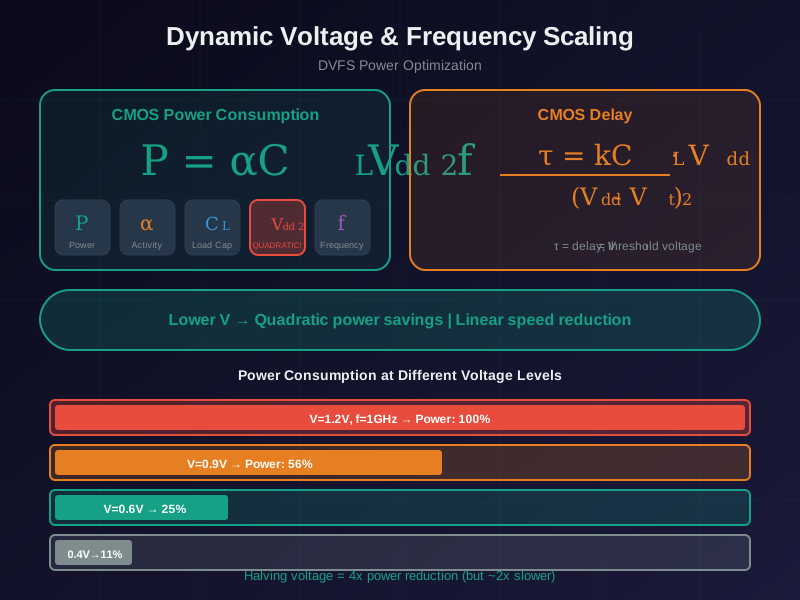
Read Figure 16.4 from the switching-power relation P ∝ V²f to execution time and then active energy. Raising frequency shortens the task, but any required voltage increase is squared in the dynamic term. At 1.3 V instead of 1.0 V, that multiplier is 1.3² = 1.69; the 1.20 mJ dynamic energy becomes 2.028 mJ, while dynamic charge becomes 1.56 mA·s, before fixed overhead. The break-even view then asks whether the resulting idle interval repays the transition. Measured rail energy and achieved sleep, not frequency alone, decide the operating point.
For the same 8 Mcycle task, suppose the 48 MHz point needs the core voltage to rise from 1.0 V to 1.3 V. The dynamic term is multiplied by 1.3 x 1.3 = 1.69, so dynamic energy becomes 2.028 mJ while dynamic charge becomes 1.56 mA-s. With the 2 mA fixed overhead on the same 1.3 V rail, the shorter run costs 0.433 mJ (0.333 mA-s), making the fast case 2.461 mJ, worse than the 16 MHz baseline at 2.20 mJ. The useful rule is to race within the constant-voltage band, then stop when voltage scaling crosses the measured break-even point.
That is why the energy-optimal frequency is often a middle value rather than the maximum. As long as you can raise frequency at constant voltage, race to the top and sleep. Once further speed demands more voltage, the square-law dynamic penalty eventually overtakes the linear time saving, and pushing faster costs more energy. Two other conditions must also hold: the device must return to a genuinely low sleep floor after finishing, and the wake and transition overhead must be small compared with the saving. Race-to-sleep is a real and useful strategy, but it is a claim to verify with the voltage curve and the sleep behavior, not a universal law.
16.35 When Racing Stops Winning
This section: When Racing Stops Winning
Constant-voltage headroom
While a faster clock needs no more voltage, racing reduces energy. Use the top of that band.
Voltage-square penalty
Once speed demands more voltage, dynamic energy grows with voltage squared and can overtake the time saving.
Must actually sleep
If the core idles at active current after finishing, there is no race-to-sleep benefit.
Transition cost
Wake and clock-switch overhead must be small next to the energy the race saves.
16.36 Under-the-Hood Knowledge Check
This section: Under-the-Hood Knowledge Check — Use this check to distinguish a shorter execution time from lower task energy when the fastest operating point also requires a higher core voltage.
Use this check to distinguish a shorter execution time from lower task energy when the fastest operating point also requires a higher core voltage. Work through the evidence in three stages: identify whether frequency increased inside a constant-voltage band, determine whether the new performance state raised voltage, and compare measured charge for the complete task plus its return to sleep. A faster result is beneficial only when the reduced active duration outweighs the voltage-squared dynamic penalty, transition cost, and any change in the sleep floor. The answer should therefore follow the measured operating-point curve, not a universal “race faster” rule.
This section:
Checkpoint: Verify The Energy Arithmetic
- You now know why 12 mA for 20 ms can beat 6 mA for 70 ms.
- You now know why the 48 MHz case can use about 30% less energy than the 16 MHz case at constant voltage.
- You now know why a 1.3 x voltage step can flip 2.20 mJ into a worse 2.461 mJ result.
This section:
16.37 Summary
This section: Summary
Optimization fundamentals are the discipline behind every later optimization technique:
- Define the target before changing anything.
- Measure the full cycle or workload.
- Choose the measured bottleneck, not the most familiar technique.
- Compare speed, size, power, energy, reliability, and support effects.
- Change one scoped thing at a time.
- Verify correctness and remeasure the whole system.
- Keep the optimization only if the evidence proves it helped.
Common Pitfalls
This section: Common Pitfalls
Without a target, there is no stop condition. The team can keep changing code after the product requirement is already met.
Peak current matters for regulators and thermal design, but battery life depends on energy across the full duty cycle.
Function timing is useful, but the product may be dominated by radio sessions, retries, wake delay, or sleep leakage.
A faster build that breaks accuracy, wake behavior, field diagnosis, or firmware updates is not a successful optimization.
16.38 What’s Next
This section: What’s Next
16.39 Review The Full Lever Stack
Hardware and Software Optimisation shows how to combine algorithm, firmware, memory, peripheral, and hardware levers.
16.40 Tune Firmware
Software Optimization Techniques covers compiler settings, data layout, scheduling, and memory-aware firmware changes.
16.41 Compare Hardware Choices
Hardware Optimization Strategies covers hardware acceleration and processor selection when firmware changes are not enough.
16.42 Use Fixed-Point Carefully
Fixed-Point Arithmetic explains Q-format choices, scaling, saturation, and validation evidence for integer math.
16.43 Key Takeaway
This section: Key Takeaway — Optimization starts with a measured objective.
Optimization starts with a measured objective. Profile first, choose the bottleneck, preserve correctness, and verify that the change improves energy, latency, memory, or cost under the target workload.
Open printable teacher run sheet
Find help
3 reviewed answers.
Where should I start in a module?
Open the module page from the sidebar to see its chapters in order. Use the module map to return to a topic you need.
Modules and pathsReviewed
What can I try when a project does not work?
Check the symptom, then work through the diagnostic steps. Keep the error message and the smallest example that reproduces it.
When you are stuckReviewed
How do interactive examples work?
Use the interactive guide to check how examples and simulations work before changing your project.
Interactive examples guideReviewed