15 Compute Offloading and Placement
More
Depth: Practitioner
Progress saves as you read. Mark sections complete as you go; your progress appears in the sidebar.
15.1 Start With a Choice: Compute Here or Transmit
This section: Start With a Choice: Compute Here or Transmit — Picture a battery camera that must spot a person before opening a gate.
Time One Decision on the Device and Across the Link
Picture a battery camera that must spot a person before opening a gate. It can inspect an image nearby or send data elsewhere, but either path may waste energy or arrive too late. The first useful comparison measures the same decision both ways.
DSP means digital signal processing, or math that changes or extracts meaning from sampled signals. A gateway means a device or service that joins two system paths. Latency means the time from an input event to the result that matters.
Run one known input locally, then through the remote path. Measure energy, elapsed time, bytes, queue delay, and returned result. Weaken the link, repeat the request, restart the gateway, and keep a safe local response when the remote answer is missing or stale.
This runway does not prove that local or remote work is always cheaper. The deeper sections compare processor fit, radio states, transfer size, privacy, waiting cost, and the break-even evidence for each placement.
A device can process data locally, send features to an edge node, or push raw samples to the cloud. None of those choices is automatically cheaper; the winner depends on radio energy, data size, latency, privacy, and accelerator fit.
The start-simple calculation is the break-even point: how many bytes can you afford to move before local compute becomes the lower-energy path?

15.2 Compute Offloading and Placement
This section: Compute Offloading and Placement — Offloading is not a synonym for “use the cloud.” In an IoT design review, it is a placement decision for one workload at one moment.
Offloading is not a synonym for “use the cloud.” In an IoT design review, it is a placement decision for one workload at one moment. The candidate locations are usually local MCU or application processor, local accelerator, nearby gateway or edge node, and remote cloud service.
The decision should be made with an energy ledger and service constraints. If the ledger uses guessed radio costs, ignores retry and tail states, or assumes cloud processing is always free to the device, the resulting policy can shorten battery life instead of extending it.
15.3 Learning Objectives
This section: Learning Objectives
By the end of this chapter, you will be able to:
- Build a local-versus-remote energy ledger for an IoT workload.
- Explain why upload size, result size, radio state, retries, and latency affect offloading decisions.
- Apply MAUI-style runtime profiling without treating cloud execution as automatically cheaper.
- Decide when edge offload, cloud offload, local acceleration, partial offload, or deferral is the best placement.
- Match CPU, DSP, GPU, and NPU execution to workload characteristics.
- Record the evidence needed to promote an offloading policy into deployment.
15.4 The Offloading Ledger
This section: The Offloading Ledger — An offloading decision starts by comparing two ledgers at the same workload boundary.
An offloading decision starts by comparing two ledgers at the same workload boundary.
Use Figure 15.1 to compare the complete local and remote energy paths before an annotated method is approved for offloading.
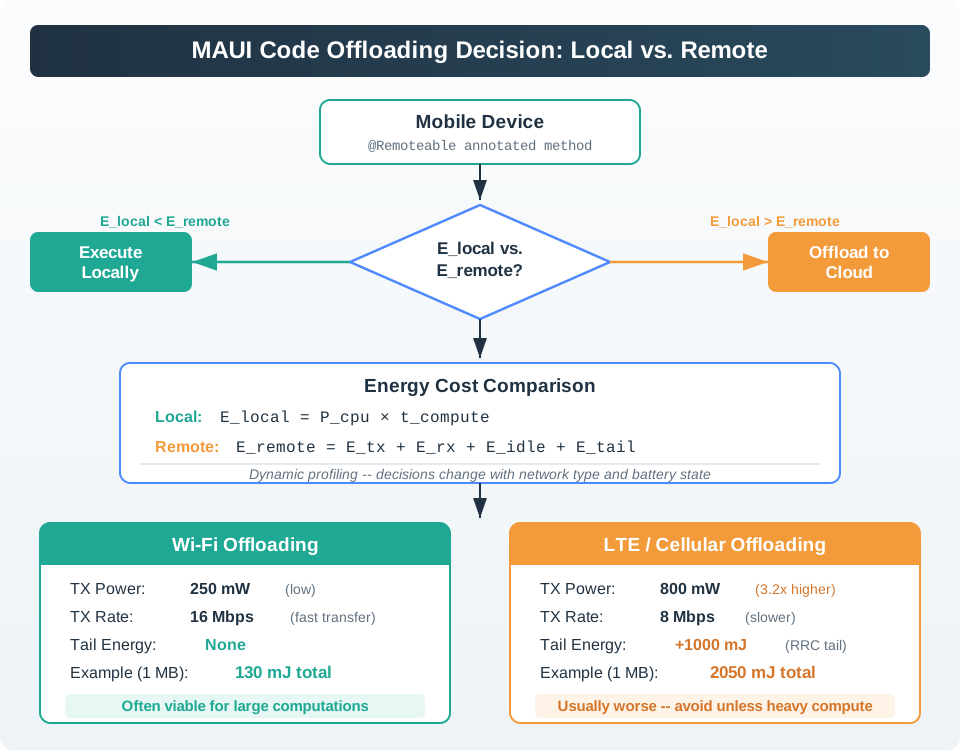
Read Figure 15.1 from the annotated method to the local and remote energy branches. The local branch counts processor power over run time. The remote branch counts upload, wait, download, radio tail, server cost, and retries. Measure the same task on both paths. Then check latency, privacy, reachability, and failure handling. A faster remote run does not always save energy. The bottom cards show why the link matters. For the figure’s 1 MB example, Wi-Fi uses about 130 mJ, while LTE uses about 2,050 mJ with radio tail. Those values alone do not prove that offloading wins. Compare each link with the local task and keep both energy records.
Use the following model as a review scaffold:
E_local  = P_compute_local * T_compute_local

E_remote = E_upload
         + E_download
         + E_wait
         + E_radio_transition
         + E_retry
         + E_local_preprocess
Offload only when the remote path saves enough energy while still meeting the service requirement:
choose_remote when:
  E_remote < E_local
  latency_remote <= deadline
  privacy_policy_allows_transfer
  remote_service_available
The ledger should use measured values from the device, firmware, network, and deployment environment. Vendor datasheet currents are useful for early sizing, but promotion decisions need current traces or power-monitor logs.
15.5 Worked Example: Feature Extraction
This section: Worked Example: Feature Extraction — Scenario: A wearable collects a 150 kB motion window and runs a feature-extraction model.
Scenario: A wearable collects a 150 kB motion window and runs a feature-extraction model. Local CPU execution takes 5 seconds at 180 mW.
Local CPU:
  E_local = 180 mW * 5.0 s = 900 mJ
Wi-Fi offload path: upload the 150 kB window, receive a small result, and wait for remote processing.
Upload:   400 mW * 0.60 s = 240 mJ
Download: 180 mW * 0.05 s =   9 mJ
Wait:      30 mW * 0.40 s =  12 mJ
Total Wi-Fi remote path     = 261 mJ
For this workload, Wi-Fi offload is attractive because the compute is heavy and the transfer is moderate.
Cellular offload path: the same transfer uses a higher-power radio and includes state-transition overhead.
Radio ramp:                    250 mJ
Upload:  1000 mW * 1.20 s =  1200 mJ
Download: 400 mW * 0.08 s =    32 mJ
Wait:     100 mW * 0.40 s =    40 mJ
Tail/connected state:          500 mJ
Total cellular remote path  = 2022 mJ
For the same workload, cellular offload is worse than local CPU execution. The policy should process locally, use a local accelerator, defer until Wi-Fi is available, or transmit a smaller feature vector instead of raw data.
15.6 Placement Gates
This section: Placement Gates — A robust offloading policy applies gates before making a final placement decision.
A robust offloading policy applies gates before making a final placement decision.
Gate
Question
Likely action
Model fit
Can the model and working set fit on the device or nearby gateway?
If not, cloud or edge offload may be required regardless of energy.
Data movement
Is the upload small compared with the computation saved?
If not, preprocess locally or stay local.
Radio state
Is the radio already connected, strong, and low-retry?
If not, include ramp, tail, and retry costs before offloading.
Deadline
Can the remote path meet the timing requirement with network variance?
If not, local or edge execution is safer.
Policy
Can the data legally and ethically leave the device or site?
If not, local processing, anonymization, or on-prem edge processing is required.
Use the placement calculator after applying the gates: change the workload, timing, privacy, and link assumptions, then record which execution site changes and why.
15.7 Runtime Decision Frameworks
This section: Runtime Decision Frameworks — MAUI-style systems profile methods, estimate energy, and decide at runtime whether a component should run locally or remotely.
MAUI-style systems profile methods, estimate energy, and decide at runtime whether a component should run locally or remotely. The important idea is the discipline, not one fixed formula:
- Split the application into offloadable components.
- Measure or estimate local execution time and energy for each component.
- Measure or estimate network upload, download, wait, and radio-state costs.
- Reject candidates that violate latency, privacy, availability, or dependency constraints.
- Choose the placement with the lowest measured total energy.
- Re-profile when firmware, model size, input size, radio conditions, or battery policy changes.
15.8 Full local
Use when data is small, computation is light, latency is strict, privacy is sensitive, or the radio is expensive.
15.9 Edge offload
Use when a gateway can run the workload with lower latency and lower transfer cost than the cloud.
15.10 Cloud offload
Use when computation or model size is too large for the device and the network path is cheap enough.
15.11 Partial offload
Use local filtering, compression, or feature extraction to reduce upload size before remote processing.
15.12 Deferred offload
Queue non-urgent work until Wi-Fi, charging, or better signal quality is available.
15.13 Local accelerator
Use a DSP, GPU, NPU, or dedicated peripheral when it completes the task with lower energy than CPU or radio transfer.
15.14 Heterogeneous Local Computing
This section: Heterogeneous Local Computing — Heterogeneous computing changes the offloading tradeoff because the local option is no longer only “general CPU.” Many IoT and mobile-class devices include lower-power accelerators for specific work.
Heterogeneous computing changes the offloading tradeoff because the local option is no longer only “general CPU.” Many IoT and mobile-class devices include lower-power accelerators for specific work.
For heterogeneous local computing, a result at checks workload type, deadline, is incomplete without CPU baseline. The figure in Figure 15.2 shows why those labels belong in one review.

Read Best fit: control flow, last in Figure 15.2. checks workload type, deadline, has already sets the timing constraint, and CPU baseline has establishes the starting condition; the final label adds a distinct review condition. This order makes the caption operational: A heterogeneous mobile system-on-chip dispatches work through a context-aware scheduler to a CPU baseline at about 1 watt per core, a DSP at about 50 milliwatts for always-on sensing, a GPU at 2 to 4 watts for parallel work, and an NPU at about 0.5 watts for machine-learning inference. The figure illustrates assumed workload-specific efficiency ranges of 5–20× for GPU, 10–50× for DSP, and 50–100× for NPU, then compares unsuitable workloads with an edge-gateway fallback. It supplies the evidence hand-off for heterogeneous local computing.
Processor
Best fit
Review risk
CPU
Control flow, small tasks, irregular logic, and firmware orchestration.
May be too slow or too energy-intensive for repeated signal or ML workloads.
DSP
Audio, sensor filtering, FFT, and always-on signal processing.
Tooling and fixed-point constraints can make integration harder.
GPU
Large parallel image, matrix, and batch workloads.
Setup power can dominate small tasks; speedup is not the same as energy savings.
NPU
Supported neural-network inference with quantized or compiled models.
Unsupported layers, memory pressure, or model conversion can force fallback.
Edge gateway
Shared local compute near sensors, often with better power and network budgets.
Gateway availability and contention must be included in the service design.
15.15 Breakeven Thinking
This section: Breakeven Thinking — If a remote path costs 300 mJ and local compute power is 150 mW, remote placement starts to save energy only when local compute would take more than 2 seconds.
The breakeven point is the local compute duration where remote placement becomes cheaper:
T_breakeven = E_remote / P_local_computeIf a remote path costs 300 mJ and local compute power is 150 mW, remote placement starts to save energy only when local compute would take more than 2 seconds.
T_breakeven = 300 mJ / 150 mW = 2.0 sBreakeven is not stable. It moves when:
- Input size changes.
- Signal strength changes.
- Retransmissions increase.
- The radio is already awake for another transfer.
- A local accelerator becomes available.
- The model grows or shrinks.
- The service deadline tightens.
- Privacy rules require local handling.
15.16 Measurement Record
This section: Measurement Record
An offloading review should leave a compact evidence record:
- Workload boundary: input size, output size, model version, and deadline.
- Local path: processor used, execution time, power trace, setup overhead, and thermal throttling notes.
- Remote path: upload bytes, download bytes, radio state, retries, signal quality, wait time, and failure handling.
- Placement decision: local CPU, local accelerator, edge, cloud, partial, or deferred.
- Policy gate: privacy, availability, safety, data residency, or model-fit constraint that affected the choice.
- Recheck trigger: new firmware, new model, changed radio profile, changed battery target, or changed deployment site.
15.17 Common Pitfalls
This section: Common Pitfalls
15.18 Treating cloud compute as free
Cloud processing can be fast, but the device still pays radio energy, wait energy, retry energy, and failure-recovery cost.
15.19 Ignoring result size
Some workloads return a tiny class label; others return images, maps, or model outputs. Download energy belongs in the ledger.
15.20 Forgetting radio state
A transfer that rides on an already-awake Wi-Fi connection differs from waking a cellular modem and holding it in a connected state.
15.21 Measuring speed only
A GPU or NPU can be faster but not always lower energy. Measure power x time plus setup overhead.
15.22 Offloading raw data too early
Local feature extraction or compression may reduce the upload enough to change the decision.
15.23 No fallback path
If the edge or cloud is unavailable, the device needs a degraded local behavior, queued job, or safe fail state.
15.29 Knowledge Check
This section: Knowledge Check
15.30 Knowledge Check: Offloading Ledger
This section: Knowledge Check: Offloading Ledger
15.31 Knowledge Check: Heterogeneous Execution
This section: Knowledge Check: Heterogeneous Execution
15.32 Matching Quiz: Placement Options
This section: Matching Quiz: Placement Options
15.33 Ordering Quiz: Offloading Review
This section: Ordering Quiz: Offloading Review
15.34 Label the Diagram: Offloading Decision Ledger
This section: Label the Diagram: Offloading Decision Ledger
15.35 What’s Next
This section: What’s Next
15.36 Practice Placement
Energy Optimization Worksheets and Assessment
Practice energy-placement and optimization decisions with structured review exercises.
15.37 Connect Implementation
Hardware and Software Optimisation
Connect offloading decisions to firmware, processor, and board-level design choices.
15.38 Compare Low Power
Energy-Aware Low Power Strategies
Compare compute placement with sleep, wake, and low-power operating modes.
15.39 Adapt Policy
Context-Aware Energy Management
Use battery, workload, network, and context signals to choose adaptive policies.
15.40 Compute Or Communicate
This section: Compute Or Communicate — Offloading moves a computation off the device to an edge server or the cloud.
Offloading moves a computation off the device to an edge server or the cloud. It never removes energy cost; it trades one kind for another. Instead of paying the processor to run the work, the node pays the radio to ship the input out and pull the answer back. Whether that trade wins depends on how much computation you avoid versus how much data you must move.
The rule of thumb is simple: offload heavy computation on small data, and keep light computation on large data local. A one-second inference on a two-kilobyte feature vector is a good offload. A one-line threshold check on a hundred-kilobyte image is a terrible one, because sending the image costs far more than the check ever would.
Worked example: a vibration node can either classify a ten-second window locally or send extracted features to a gateway. If local inference draws 120 mW for 2.5 s, the local path costs 300 mJ. Sending a 2 KB feature vector over a short-range link at 80 mJ, then receiving a 2 mJ result, leaves plenty of margin for offload. Sending the raw 120 KB waveform at 0.04 mJ per byte would cost 4,800 mJ before any wait or retry energy, so the same algorithm should stay local unless the node first compresses or summarizes the data.
Intuition only: compare the energy to run the work locally against the energy to move its input and result over the radio. The radio is often the most expensive thing on the board, so moving a lot of data is rarely free.
Figure 15.3 weighs local processing against the full remote energy cost and the service constraints that can rule out offloading.

Add each path first. Then apply the service tests. Read Figure 15.3 from processor power and run time into the local-energy total, then compare it with upload, wait, download, transition, retry, and preprocessing on the remote path. The 1 MB baseline shows why link state matters: about 130 mJ over Wi-Fi versus about 2,050 mJ over LTE with its RRC tail, a difference of 2,050 − 130 = 1,920 mJ. Apply latency, privacy, connectivity, and reliability gates after the energy comparison. Offload only when the complete remote ledger wins and every service gate passes; otherwise stay local or reduce the transferred feature set.
15.41 The Two Paths
This section: The Two Paths
Local path
Processor active current times run time. Scales with how hard the computation is.
Offload path
Radio energy to send the input plus receive the result. Scales with how much data you move.
Break-even
The data size at which the two paths cost the same. Below it, offload; above it, stay local.
Hidden radio cost
Connection setup and the high-power state the radio holds after the last byte, both easy to forget.
15.42 Overview Knowledge Check
This section: Overview Knowledge Check
15.43 Find The Break-Even Data Size
This section: Find The Break-Even Data Size — Give the radio an energy-per-byte figure from its active current and effective throughput, then compare against the local compute charge.
Give the radio an energy-per-byte figure from its active current and effective throughput, then compare against the local compute charge. Offload wins when E_local > e_byte x D + E_result + E_setup, where D is the payload size and e_byte is radio energy per byte.
15.44 Worked Example: Offload An Inference Over BLE
This section: Worked Example: Offload An Inference Over BLE — The local inference holds the MCU active at 15 mA for 2 s, so E_local = 30 mA-s.
The local inference holds the MCU active at 15 mA for 2 s, so E_local = 30 mA-s. The BLE radio draws 6 mA while active at an effective 50 kbps, giving e_byte = 6 mA x (8 bit / 50000 bit/s) = 0.00096 mA-s per byte. Ignoring setup for the moment, the break-even payload is D* = 30 / 0.00096 = 31250 bytes, about 30 KB.
- Small input (2 KB feature vector): offload costs 2048 x 0.00096 = 2.0 mA-s. Offloading beats the 30 mA-s local run by about 15x.
- Large input (100 KB raw capture): offload costs 102400 x 0.00096 = 98 mA-s. Now local computing at 30 mA-s wins by more than 3x.
- Break-even: at roughly 30 KB the two paths cost the same; the decision flips around that size.
The same inference is a good offload for a small feature vector and a bad offload for a raw capture. Placement is a property of the data-to-compute ratio, not of the algorithm alone.
Now add setup overhead. If the link costs 8 mA-s to wake, negotiate, and settle before payload transfer, the break-even becomes D* = (30 - 8) / 0.00096 = 22917 bytes, about 22 KB. The 2 KB feature vector still wins, but the 30 KB case no longer breaks even: it costs about 8 + 30720 x 0.00096 = 37.5 mA-s. Record that fixed overhead separately so a later firmware change or already-awake radio state can be reviewed without rebuilding the whole ledger.
15.45 Placement Ledger
This section: Placement Ledger
15.46 Practitioner Knowledge Check
This section: Practitioner Knowledge Check
15.47 The Radio Does Not Stop When The Packet Does
This section: The Radio Does Not Stop When The Packet Does — A naive offload model counts only the active transmit time.
A naive offload model counts only the active transmit time. Real radios add two costs that can flip a break-even. First, connection setup: bringing up a BLE connection or attaching a cellular modem burns energy before any payload moves, which punishes small transfers most. Second, the tail: after the last byte, many radios hold a high-power state for a while before releasing. A cellular modem in particular can stay connected for several seconds after transmission, drawing tens of milliamps, before it drops to a low-power idle or power-save mode. That tail is pure overhead a payload-only calculation misses.
The energy-per-bit also varies enormously by technology, so the break-even data size is radio-specific. A short-range link like BLE moves bits cheaply. A long-range low-rate link like LoRa has such low throughput that a modest payload occupies the radio for a long airtime, making its energy per bit high. A cellular link adds the setup and tail costs above. The same 30 KB break-even computed for BLE could be a few kilobytes on a slow or tail-heavy radio.
Worked example: suppose a small cellular offload transmits for 0.4 s at 120 mA, so a payload-only model records only 48 mA-s. The modem also spends 25 mA-s attaching and then holds a 40 mA connected tail for 8 s, adding 320 mA-s. The real radio charge is 25 + 48 + 320 = 393 mA-s. If the local compute path is 90 mA-s, the payload-only model says offload wins, while the measured device says local compute is more than four times cheaper. That is why tail timers and network state must be captured with the same power trace as payload transfer.
15.48 Costs A Payload-Only Model Misses
This section: Costs A Payload-Only Model Misses
Setup energy
Connection or attach handshakes cost energy before the payload. Small offloads may be dominated by setup.
Tail state
A radio held in a high-power connected state after the last byte adds seconds of overhead current.
Wait current
If the link must stay up while the server computes, the wait is not free even though the node sends nothing.
Per-radio energy per bit
BLE, LoRa, and cellular differ by orders of magnitude, so the break-even size must be recomputed per radio.
15.49 Under-the-Hood Knowledge Check
This section: Under-the-Hood Knowledge Check
15.50 LEO-Style Heterogeneous Scheduling
This section: LEO-Style Heterogeneous Scheduling — A heterogeneous scheduler is more than a table saying “DSP is efficient” or “GPU is fast.” It needs a live path from arriving sensor work to a compatible execution unit.
A heterogeneous scheduler is more than a table saying “DSP is efficient” or “GPU is fast.” It needs a live path from arriving sensor work to a compatible execution unit. A LEO-style architecture makes that path explicit:
- Sensor applications describe jobs with data size, deadline, accuracy mode, and permitted execution targets.
- A workload monitor observes the queued jobs and their recent runtimes.
- A resource monitor records processor availability, frequency, memory pressure, thermal state, radio state, and the measured energy model for CPU, DSP, GPU, or cloud execution.
- Jobs wait in a sensor-job buffer so compatible work can be batched without losing deadline order.
- A scheduler running on a low-power unit scores feasible placements and dispatches each job to a CPU, DSP, GPU, or off-device target.
- Completion measurements update the models; a timeout or unavailable accelerator takes a declared fallback path.
For job on processing element , a useful score is not runtime alone:
where includes migration and data movement, is the deadline, and represents a quantified service risk such as unsupported precision or cloud unavailability. Infeasible placements receive infinite score. The scheduler then chooses the lowest-score feasible target, rechecking shared memory and thermal constraints before dispatch.
Historical keyword-spotting experiments illustrate why the control path must stay cheap. In LEO’s tested sensor-app workload, the low-power scheduler took about 100 ms on average and used less than 0.5% of the phone’s daily battery. LEO study These figures are workload- and platform-specific; the durable requirement is and small relative to the tightest deadline.
15.51 Reading the Keyword-Spotting Benchmarks
This section: Reading the Keyword-Spotting Benchmarks — The same experiments reported two different speedups because they used two different baselines.
The same experiments reported two different speedups because they used two different baselines. An optimized local GPU path was about 6.5 times faster than the cloud comparison in one measurement and about 21.3 times faster than a sequential CPU implementation in another. Petkogeorgiev thesis Neither ratio means “GPU is always best.” Read a speedup as
and always name , , the batch size, model, precision, data-transfer boundary, and whether setup time is included.
Cloud energy also changes with bandwidth and batching. A complete device-side model is
while a local batched accelerator can be approximated as
Increasing batch size amortizes the fixed local wake and setup costs, but it also delays the oldest sample by roughly the batch-formation time. Higher link throughput reduces the payload-time terms in , yet it does not erase attach, wait, retry, or tail energy. That is why the reported optimized-GPU batching curve could beat cloud execution across its tested bandwidths and batch sizes without proving a universal result.
To reproduce the decision on a new device, drive the comparison step by step: benchmark the same keyword model and inputs on every eligible processor; include buffer copies and accelerator setup; measure cloud attach and tail states; sweep batch size without violating the detection deadline; then choose the lowest-energy placement that still meets accuracy, privacy, and availability requirements. A bar chart supplies a hypothesis. Only this end-to-end ledger supplies a scheduler policy.
Trace every scheduling input and placement output in Figure 15.4.

Check the waiting job first. Then inspect device limits. Read Figure 15.4 from the sensor-job buffer, where each queued job records its deadline, tensor shape, and memory demand, into the workload and resource monitors. Urgency and backlog describe the work, while processor availability, battery state, and thermal limits describe the device that must execute it. The scheduler joins those views before dispatching to CPU, DSP, or GPU. Its output is not merely an engine name: the retained record includes the inputs, chosen placement, measured outcome, and fallback, allowing a later review to explain why the decision changed under another load or energy condition.
Challenge any universal offloading claim with the two axes in the diagram Figure 15.5.

In the diagram Figure 15.5, lOCAL shows an Optimized GPU runtime near 0.05 s, while CLOUD is bandwidth-led and pays batching, radio, and queue costs. The There is no universal winner panel directs the review toward the crossover among batch size, link rate, wake cost, and transfer energy.
15.52 Summary
This section: Summary — This chapter evaluates when IoT devices should compute locally, offload to edge or cloud, or use heterogeneous hardware.
This chapter evaluates when IoT devices should compute locally, offload to edge or cloud, or use heterogeneous hardware. It weighs energy, latency, data-transfer cost, privacy, reliability, and fallback behavior.
15.53 Key Takeaway
This section: Key Takeaway — Offloading saves energy only when communication, waiting, retry, privacy, and failure costs are lower than local execution.
Offloading saves energy only when communication, waiting, retry, privacy, and failure costs are lower than local execution. Compare total task energy and service risk before moving work away from the device.
Open printable teacher run sheet
Find help
3 reviewed answers.
Where should I start in a module?
Open the module page from the sidebar to see its chapters in order. Use the module map to return to a topic you need.
Modules and pathsReviewed
What can I try when a project does not work?
Check the symptom, then work through the diagnostic steps. Keep the error message and the smallest example that reproduces it.
When you are stuckReviewed
How do interactive examples work?
Use the interactive guide to check how examples and simulations work before changing your project.
Interactive examples guideReviewed