17 Fog Resource Allocation

More
Depth: Practitioner
Progress saves as you read. Mark sections complete as you go; your progress appears in the sidebar.
17.1 Start Simple
This section: Start Simple — A gateway is the nearby computer that receives device messages and passes work onward.
A gateway is the nearby computer that receives device messages and passes work onward. Firmware is the software stored on a device. Think of a shop with one small back-room computer. Alarms, camera clips, stock checks, and updates may all reach it at once.
Make the first decision before that rush starts. Name the work that must finish first and hold enough space for it. Then set a clear rule for work that may wait. This is safer than letting every new task join the same queue.
Watch what happens when demand rises. A high average score can hide a short burst, a hot processor, full memory, or a blocked link. The useful check is whether urgent work still finishes on time while less important work slows down.
This simple story does not choose exact limits or prove that moving work is safe. Those choices need measured demand, spare capacity, and a recovery plan. A move can cost more time and energy than it saves.
Use the Practitioner sections to build the work record and choose the controls. Use Under the Hood to test hard limits, ranking rules, and the stable control loop. The deeper material adds proof to this opening story; it does not reverse it.
Try one short load test. Send alarms first. Add normal reports. Add a large update. Watch the queue grow. Keep alarm space free. Slow the update. Drop work that may wait. Let the node cool. Restore work in steps. Record each rule and result.
Picture a site gateway that has more requests than local compute, memory, network, or energy can serve at once. The core idea is to protect critical work before the queue collapses. Everyday IoT fog allocation starts with one priority rule, one rejection rule, one backpressure signal, and one quota that operators can explain. Build the allocation record first, then tune utilization after safety, fairness, and recovery behavior are visible.
17.2 Learning Objectives
This section: Learning Objectives
By the end of this chapter, you will be able to:
- Build a fog resource allocation record from workload contracts and measured capacity.
- Separate hard feasibility gates from ranking and optimization rules.
- Choose between reservations, quotas, priority queues, backpressure, load shedding, and migration.
- Explain why resource allocation must include CPU, memory, accelerator, storage, network, energy, thermal, and failure-mode constraints.
- Design a stable control loop that adjusts capacity without oscillating or starving low-priority work.
- Write simple admission logic that protects reserved capacity before accepting best-effort work.
The correct allocation is the one that keeps the promised workloads inside their measured contracts during normal, burst, and degraded modes. High utilization is useful only after deadlines, safety, recovery, and fairness are protected.
17.3 Prerequisites
This section: Prerequisites
- Fog Network Selection: Review how candidate links and fallback paths constrain available capacity.
- Fog Energy and Latency: Review measured response budgets, energy budgets, and placement tradeoffs.
- Fog Fundamentals Tradeoffs: Review how fog placement decisions should be recorded and challenged.
17.4 Why This Chapter Exists
This section: Why This Chapter Exists — Fog nodes sit close to devices, but they are not miniature clouds with unlimited headroom.
Fog nodes sit close to devices, but they are not miniature clouds with unlimited headroom. A gateway may have a small CPU, limited memory, one accelerator, a flash device with finite write endurance, a shared uplink, and a thermal envelope that changes with the enclosure and ambient temperature. If every workload is admitted because the average looks fine, the first burst can break the very local response that justified fog placement.
Use this chapter when a design needs to answer questions like these:
“Which work gets protected capacity?” Reserve capacity for control, safety, recovery, and observability paths before best-effort work consumes the node.
“Can this node accept another workload?” Check deadline, memory, network, storage, energy, thermal, and fallback constraints before starting the task.
“What happens when load spikes?” Define throttling, priority, shedding, local buffering, and degraded-mode behavior before the spike occurs.
“When should work move?” Migrate only when the benefit exceeds the disruption risk and the destination has verified headroom.
17.5 The Allocation Surface
This section: The Allocation Surface — Resource allocation is broader than CPU percentages.
Resource allocation is broader than CPU percentages. A task can be CPU-light but memory-heavy, network-heavy, flash-write-heavy, accelerator-bound, or thermally risky. The allocation record should expose each scarce resource and the controls that protect it.
Inspect Figure 17.1 before continuing. CPU utilisation by itself cannot explain whether a fog placement is feasible. Figure 17.1 exposes the competing inputs and controls that turn allocation into a multi-objective decision.
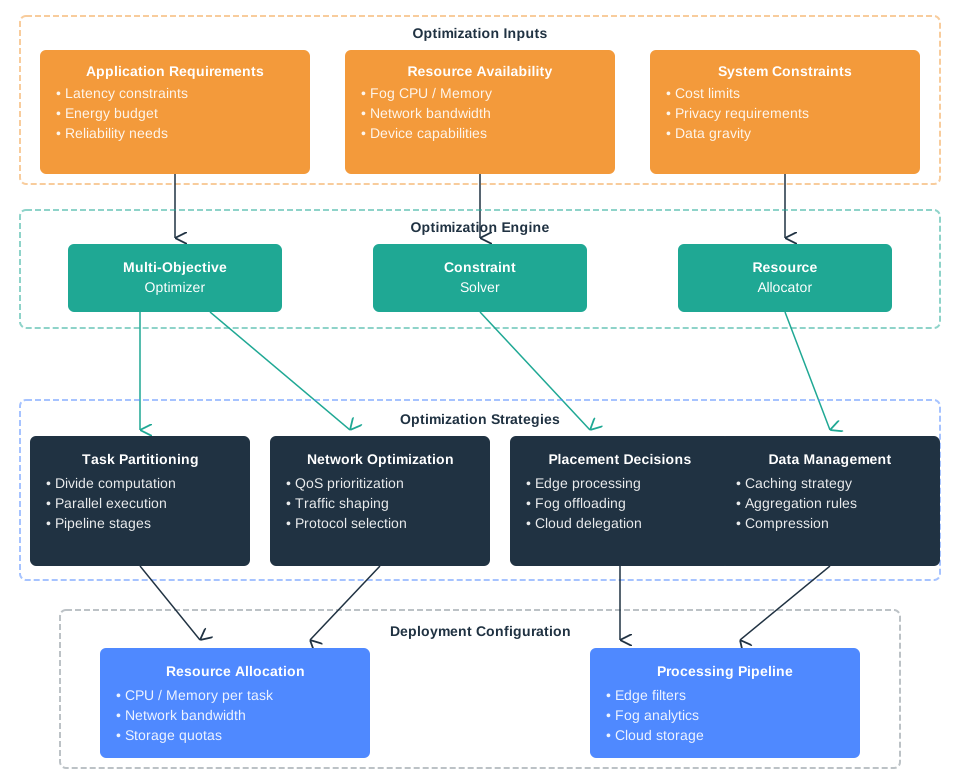
In the diagram Figure 17.1, on the input side, Application Requirements names latency, energy, and reliability; Resource Availability adds fog CPU, memory, bandwidth, and device capability; and System Constraints brings cost, privacy, and data gravity. These feed the Multi-Objective Optimizer, Constraint Solver, and Resource Allocator, which can choose task partitioning, traffic shaping, placement, or caching. The surface therefore links each allocation choice to the constraint it is meant to satisfy rather than presenting capacity as one interchangeable number.
17.5.1 Workload contract
Defines deadline, criticality, payload, rate, state, persistence, retry, and degraded-mode behavior.
17.5.2 Capacity snapshot
Measures CPU, memory, accelerator, storage, network, energy, thermal headroom, and reserved recovery capacity.
17.5.3 Allocation control
Combines admission gates, reservations, quotas, priorities, backpressure, shedding, and migration rules.
17.6 Build the Allocation Record
This section: Build the Allocation Record — Write the resource allocation record before tuning scheduler knobs.
Write the resource allocation record before tuning scheduler knobs. The record should be short, measurable, and reviewable.
17.6.1 Allocation Record Template
Workload
Task name, traffic class, deadline, statefulness, persistence need, burst pattern, retry behavior, and criticality.
Resource envelope
Measured CPU, memory, accelerator, storage, network, energy, and thermal demand in normal, burst, and degraded modes.
Reserved capacity
Capacity held for control, alarm, recovery, local observability, and safe shutdown paths.
Admission rule
Conditions that must be true before a workload starts or receives more quota.
Sharing rule
Priority, fair-share, quota, deadline, or weighted policy used after feasibility gates pass.
Pressure response
Backpressure, degraded mode, shedding, migration, operator alert, and review trigger.
17.7 Measure Before You Allocate
This section: Measure Before You Allocate — Resource allocation should start with measurements that match the deployment, not with a single generic formula.
Resource allocation should start with measurements that match the deployment, not with a single generic formula. Use representative payloads, competing traffic, expected storage writes, warm and cold starts, network failures, and the actual enclosure or power budget when possible.
17.7.1 CPU and accelerator
Record average and burst demand, startup spikes, hardware acceleration availability, fallback CPU cost, and whether the task is batch, streaming, or deadline-driven.
17.7.2 Memory and state
Record resident memory, buffer growth, model size, cache behavior, session state, and the cost of restart or migration.
17.7.3 Network and queues
Record ingress rate, egress rate, broker queue depth, retry bursts, uplink backlog, and whether the path is shared with alarms or management traffic.
17.7.4 Storage and write endurance
Record log volume, local buffer duration, database compaction, media writes, update downloads, and retention during WAN outages.
17.7.5 Energy and thermal state
Record power draw, duty cycle, battery reserve, enclosure temperature, throttling behavior, and recovery behavior after brownout or overheating.
17.7.6 Failure and recovery
Record what capacity remains during link outage, cloud outage, node restart, broker restart, credential renewal, and operator maintenance.
17.8 The Stable Allocation Model
This section: The Stable Allocation Model — A stable allocator is easier to audit when hard gates are separated from ranking.
A stable allocator is easier to audit when hard gates are separated from ranking. One practical model is:
-
Protect reserves: keep control_reserve, recovery_reserve, and observability_reserve available
-
Reject infeasible work: deadline_ok && memory_ok && network_ok && storage_ok && energy_ok && thermal_ok && fallback_ok
-
Admit work by class: critical: reserve and priority queue important: quota plus deadline monitoring best_effort: spare capacity only
-
React to pressure: throttle best_effort before important work shed optional work before violating critical deadlines migrate only when destination headroom and state cost are acceptable
-
Review the decision: reopen when deadline misses, queue growth, thermal throttling, flash pressure, retry storms, or repeated failovers appear
The model can use weighted fairness, deadline scheduling, token buckets, priority queues, or container limits. The important part is that the chosen mechanism is tied to the workload contract and verified under pressure.
This section:
Do not let a workload start because CPU looks available if it violates memory headroom, control reserve, storage endurance, thermal budget, or fallback behavior. Filter infeasible work first; optimize only among feasible choices.
This section:
17.9 Placement, Scheduling, and Admission Gates
This section: Placement, Scheduling, and Admission Gates — A fog allocator has three related jobs.
A fog allocator has three related jobs. Placement chooses which node can host a task under CPU, memory, accelerator, storage, network, and energy limits. Scheduling orders accepted work using priority, quota, fair share, or earliest-deadline-first rules. Admission control decides whether new work may start at all.
The order matters. Admission and hard feasibility gates come before ranking because no scheduling score can make an infeasible workload safe.
Node capacity: 4 CPU units Arriving tasks: A = 2, B = 2, C = 1.5
2 + 2 + 1.5 = 5.5 > 4
A + B can fit exactly. C must wait, move, shrink, or be rejected.
Production systems often use fast heuristics such as first-fit, best-fit, priority classes, quotas, and earliest-deadline-first scheduling instead of exhaustive optimal search. That is reasonable only when the hard gates remain visible. A heuristic may choose among feasible placements; it must not hide that total demand exceeds the node, memory is below the floor, a broker queue threatens the alarm reserve, or migration would move too much state.
17.9.1 Placement
Fit tasks onto nodes that have the measured resources, authority, and fallback behavior needed by the workload contract.
17.9.2 Scheduling
Order accepted work so critical deadlines, quotas, and fairness promises are met under expected contention.
17.9.3 Admission
Reject, defer, shrink, or relocate new work before it breaks already accepted commitments.
17.9.4 Overcommitment
Accepting all work can make queues grow until critical and best-effort tasks fail together.
17.10 Allocation Control Loop
This section: Allocation Control Loop — Fog allocation is not a one-time bin-packing exercise.
Fog allocation is not a one-time bin-packing exercise. The node must observe pressure, adjust work, and document when the allocation record is no longer valid.
Inspect Figure 17.2 before continuing. Fog-node capacity changes while the system is running, so an initial allocation is never the whole control policy. Figure 17.2 shows the evidence and reserve checks needed to adapt without consuming the resources required for recovery.
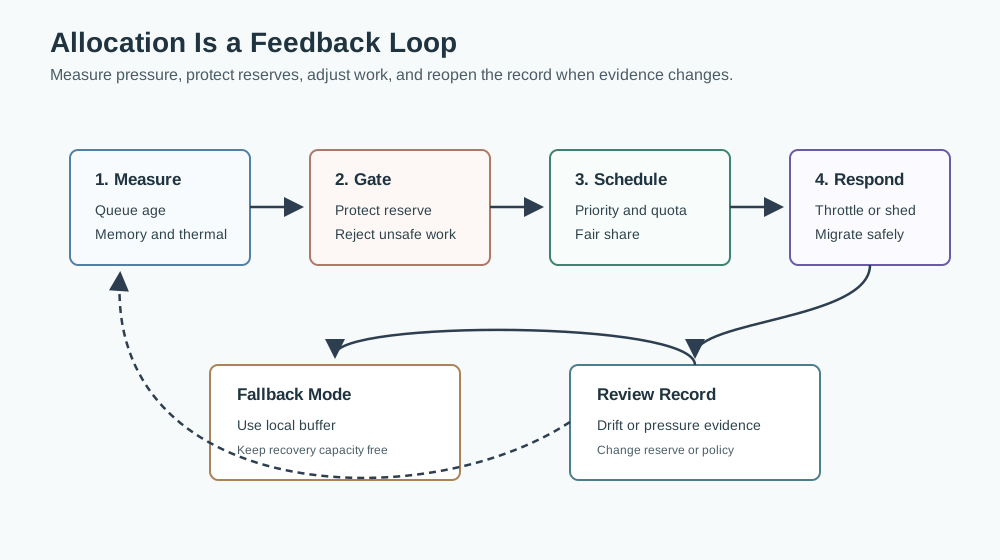
In the diagram Figure 17.2, 1. Measure observes queue age, deadline misses, memory, thermal state, and power pressure. 2. Feasible? protects hard limits and reserve before 3. Admit applies quotas and preserves critical tasks; 4. Schedule then chooses priority or fair share. Under pressure, the node may throttle, shed, defer, buffer, or migrate, but Fallback Capacity stays free. The allocation record should name the workload contract, measured arrival and service rates, p95 queue age, memory and storage headroom, thermal and energy limits, protected reserve, admission result, scheduling class, pressure action, migration or replay outcome, and the operator responsible for recovery. Test it with a burst, one unavailable peer, and delayed cloud acknowledgement so the reserve proves useful under the failure it was meant to absorb. Repeated pressure or deadline drift reaches Review Trigger, reopening the allocation record instead of normalising overload.
1. Measure current pressure. Track queue age, deadline misses, memory headroom, network backlog, storage writes, power state, and thermal state.
2. Apply feasibility gates. Reject work that would consume protected reserve or violate a hard resource or fallback constraint.
3. Admit and schedule. Use reservations, quotas, priorities, or fair-share rules that match workload criticality and measured demand.
4. Respond to pressure. Throttle, shed, defer, buffer, or migrate in an order that preserves critical commitments.
5. Reopen the record. Treat repeated pressure, drift, deadline misses, or failover problems as evidence that the allocation policy needs review.
17.11 Allocation Pattern Guide
This section: Allocation Pattern Guide — Treat these as starting patterns.
Treat these as starting patterns. The correct choice depends on measured demand, criticality, and failure mode.
17.11.1 Fixed Gateway With Critical Control
Use protected reserves and strict admission. Control, safety, and local recovery paths should keep capacity even when analytics, updates, or reporting jobs are busy.
17.11.2 Strong signal
The fog node directly affects equipment, local alarms, or operator safety.
17.11.3 Watch out
Average utilization can look healthy while queue age on the critical path is already unsafe.
17.11.7 Bursty Media or ML Pipeline
Use queue limits, batch windows, accelerator reservations, and graceful degradation. Optional frames, lower-resolution summaries, or delayed inference can absorb pressure.
17.11.8 Strong signal
The workload is valuable but not every item has the same deadline or fidelity requirement.
17.11.9 Watch out
Accelerator memory, model loading time, and output upload backlog can be the bottleneck rather than CPU.
17.11.10 Disconnected or Intermittent Site
Use local storage budgets, buffer admission, summarization, retention tiers, and replay rules. The allocator must decide what is stored, summarized, or discarded during outage.
17.11.11 Strong signal
WAN outages are expected and the site still needs local visibility or control.
17.11.12 Watch out
Accepting all data into local storage can crowd out recovery logs, alarms, or future replay.
17.12 Worked Example: Clinic Cold-Storage Gateway
This section: Worked Example: Clinic Cold-Storage Gateway — A clinic monitors medicine refrigerators.
A clinic monitors medicine refrigerators. Normal temperature samples are small and delay tolerant. Out-of-range alarms must be processed locally, logged, and shown to staff even when the WAN is down. A gateway also runs a daily diagnostic summary and occasionally downloads updates.
17.12.1 Workload Contracts
17.12.2 Alarm path
Small events, high criticality, local controller response required, duplicate messages acceptable if the controller suppresses them.
17.12.3 Normal telemetry
Small periodic events, delay tolerant, can be buffered and replayed when the backhaul returns.
17.12.4 Daily diagnostics
Batch work, useful for maintenance, may be delayed during alarms, WAN outages, or thermal pressure.
17.12.5 Firmware update
High storage and network demand, must never consume alarm reserve or recovery storage.
17.12.6 Allocation Decision
The team reserves CPU, memory, broker queue, local log space, and network priority for alarm handling and recovery visibility. Normal telemetry receives a bounded queue and replay budget. Diagnostic summaries run only when queue age and thermal state are healthy. Firmware updates require an explicit maintenance window and are paused if alarm reserve, storage reserve, or uplink headroom is threatened.
17.12.7 Allocation Record
Protected reserve
Alarm processing, local alert display, broker health, recovery logs, and operator diagnostics.
Best-effort share
Daily summaries and cloud reporting use spare capacity after alarm and telemetry commitments are safe.
Admission gate
Do not start update or diagnostic work when alarm queue age, storage reserve, thermal state, or uplink backlog is outside limits.
Pressure response
Pause update, shrink diagnostic batch, summarize telemetry, preserve alarm logs, and notify operators if reserve is repeatedly threatened.
Review trigger
Reopen the record after refrigerator count changes, failed alarm drills, repeated WAN outages, firmware changes, or flash pressure.
17.13 Label the Allocation Record
This section: Label the Allocation Record
17.14 Code Challenge
This section: Code Challenge
17.15 Common Mistakes
This section: Common Mistakes
17.15.1 Optimizing average utilization first
Average utilization hides queue age, deadline misses, burst pressure, thermal throttling, and recovery reserve exhaustion.
17.15.2 Treating CPU as the only scarce resource
Memory, accelerator slots, flash writes, broker queues, uplink backlog, energy, and cooling can be the real limit.
17.15.3 Letting optional work grow unbounded queues
Backpressure, queue limits, and shedding rules are safer than pretending storage and retry time are infinite.
17.15.4 Migrating without state evidence
Moving a task can duplicate commands, lose local cache, reset TLS sessions, or overload the destination link.
17.15.5 Forgetting observability reserve
A node under pressure still needs enough capacity to report health, expose logs, and accept operator actions.
17.15.6 Testing only normal mode
Allocation must be tested during bursts, outages, restarts, update windows, and degraded operation.
17.16 Review Checklist
This section: Review Checklist
Before signing off a fog resource allocation, verify:
- Every workload has a contract with criticality, deadline, rate, state, persistence, and degraded-mode behavior.
- Capacity was measured for CPU, memory, accelerator, storage, network, energy, thermal state, and recovery reserve.
- Critical, control, recovery, and observability paths have protected capacity.
- Admission gates reject work before it threatens hard commitments.
- Scheduling policy matches workload class: reserve, quota, priority, deadline, or fair share.
- Backpressure, queue limits, and load shedding are defined for overload.
- Migration rules include destination headroom, state cost, duplicate handling, and rollback.
- Best-effort work cannot consume alarm, recovery, or local observability reserves.
- Review triggers are written for deadline misses, queue growth, thermal throttling, storage pressure, retry storms, and failed drills.
17.17 Reference Notes
This section: Reference Notes
- TCP-style feedback, operating-system scheduling, container resource controls, queueing theory, and distributed-systems admission control all inform fog allocation, but none of them replaces local measurement.
- Use standards and platform features to express limits, priorities, health checks, and isolation. Use deployment tests to decide whether the resulting policy meets the workload contract.
- Treat vendor capacity, accelerator, and benchmark claims as planning inputs. They become engineering evidence only after the node, enclosure, firmware, workload, and network path have been measured.
17.18 Summary
This section: Summary — Fog resource allocation is a measured capacity decision.
Fog resource allocation is a measured capacity decision. Start with workload contracts, protect critical reserves, reject infeasible work, admit and schedule feasible work, apply backpressure before queues fail, and reopen the record when pressure evidence appears. The strongest designs explain what is allowed to run, what must wait, what can be shed, and what must keep working during degraded modes.
17.19 Concept Relationships
This section: Concept Relationships
17.19.1 Network selection
The selected link constrains queueing, backpressure, fallback, and migration options from Fog Network Selection.
17.19.2 Energy and latency
Allocation decisions change local response time, device energy, thermal behavior, and retry cost from Fog Energy and Latency.
17.19.3 Use-case placement
The workload contract comes from the real use case, not from a generic allocation template. Continue with Fog Optimization and Privacy.
17.19.4 Production governance
Resource records become production review evidence for capacity planning, incident response, and operational handoff.
17.20 What’s Next
This section: What’s Next
17.20.1 Fog Optimization and Privacy
Use allocation evidence to decide which workload patterns fit privacy-sensitive and local-control use cases in Fog Optimization and Privacy.
17.20.2 Fog Optimization Examples
Apply the allocation record together with energy, latency, and network-selection evidence in Fog Optimization and Examples.
17.20.3 Production Framework
Carry resource reserves, admission gates, and review triggers into production governance in Fog Production Framework.
17.21 Key Takeaway
This section: Key Takeaway — Fog resources are finite.
Fog resources are finite. Allocate CPU, memory, storage, and bandwidth by workload priority, isolation needs, and failure consequences so critical local services keep capacity under stress.
Find help
3 reviewed answers.
Where should I start in a module?
Open the module page from the sidebar to see its chapters in order. Use the module map to return to a topic you need.
Modules and pathsReviewed
What can I try when a project does not work?
Check the symptom, then work through the diagnostic steps. Keep the error message and the smallest example that reproduces it.
When you are stuckReviewed
How do interactive examples work?
Use the interactive guide to check how examples and simulations work before changing your project.
Interactive examples guideReviewed