12 Model Optimization for Edge AI
More
Depth: Practitioner
Progress saves as you read. Mark sections complete as you go; your progress appears in the sidebar.

12.1 Start Simple
This section: Start Simple — Imagine a model that works on a laptop but misses the memory or latency budget on the device.
Imagine a model that works on a laptop but misses the memory or latency budget on the device. The core idea is to change one thing at a time and keep comparing against the baseline. Everyday IoT optimization starts with the deployment budget, then tests quantization, pruning, distillation, or compiler changes only when they can be measured on the target runtime. Start with one conversion record that shows what improved, what degraded, and when rollback is required.
12.2 Learning Objectives
This section: Learning Objectives
By the end of this chapter, you will be able to:
- Define an optimization budget for edge deployment.
- Explain post-training quantization, quantization-aware training, pruning, distillation, and operator fusion.
- Choose an optimization path based on the actual bottleneck rather than a generic compression recipe.
- Build a validation gate that compares baseline and optimized models.
- Identify when a smaller model is not deployable because of unsupported operators, activation memory, calibration gaps, or runtime mismatch.
- Write an optimization decision record suitable for design review.
Never accept an optimized model from file size alone. Accept it only after it passes the target-device gate: accuracy, latency, peak memory, supported operators, power, thermal behavior, observability, and rollback.
12.3 Prerequisites
This section: Prerequisites
- Edge AI Fundamentals: Review placement drivers and data minimization.
- TinyML Gesture Classification Lab: Review measurement gates and confidence thresholds.
- Edge AI Hardware: Review hardware, runtime, operator, and lifecycle constraints.
12.4 Start With the Deployment Budget
This section: Start With the Deployment Budget — Before choosing a technique, write the budget the model must fit.
Before choosing a technique, write the budget the model must fit.
Model artifact: file size, precision, input shape, operator set, postprocessing, and versioning format.
Runtime memory: weights, tensor arena, intermediate activations, image/audio buffers, logs, and update staging.
Latency path: sensor capture, preprocessing, model invocation, postprocessing, local action, and telemetry.
Accuracy gate: task metric, validation split, edge cases, confidence threshold, false accept cost, and false reject cost.
Runtime support: TensorFlow Lite, TensorFlow Lite Micro, ONNX Runtime, vendor delegate, CMSIS-NN, or accelerator compiler.
Deployment operations: model registry, signed update, rollback, drift monitoring, and failure reporting.
Inspect Figure 12.1 before continuing. Optimization should answer a measured deployment constraint, not merely make a checkpoint smaller. Figure 12.1 connects the budget to the sequence of experiments that can justify changing the model.
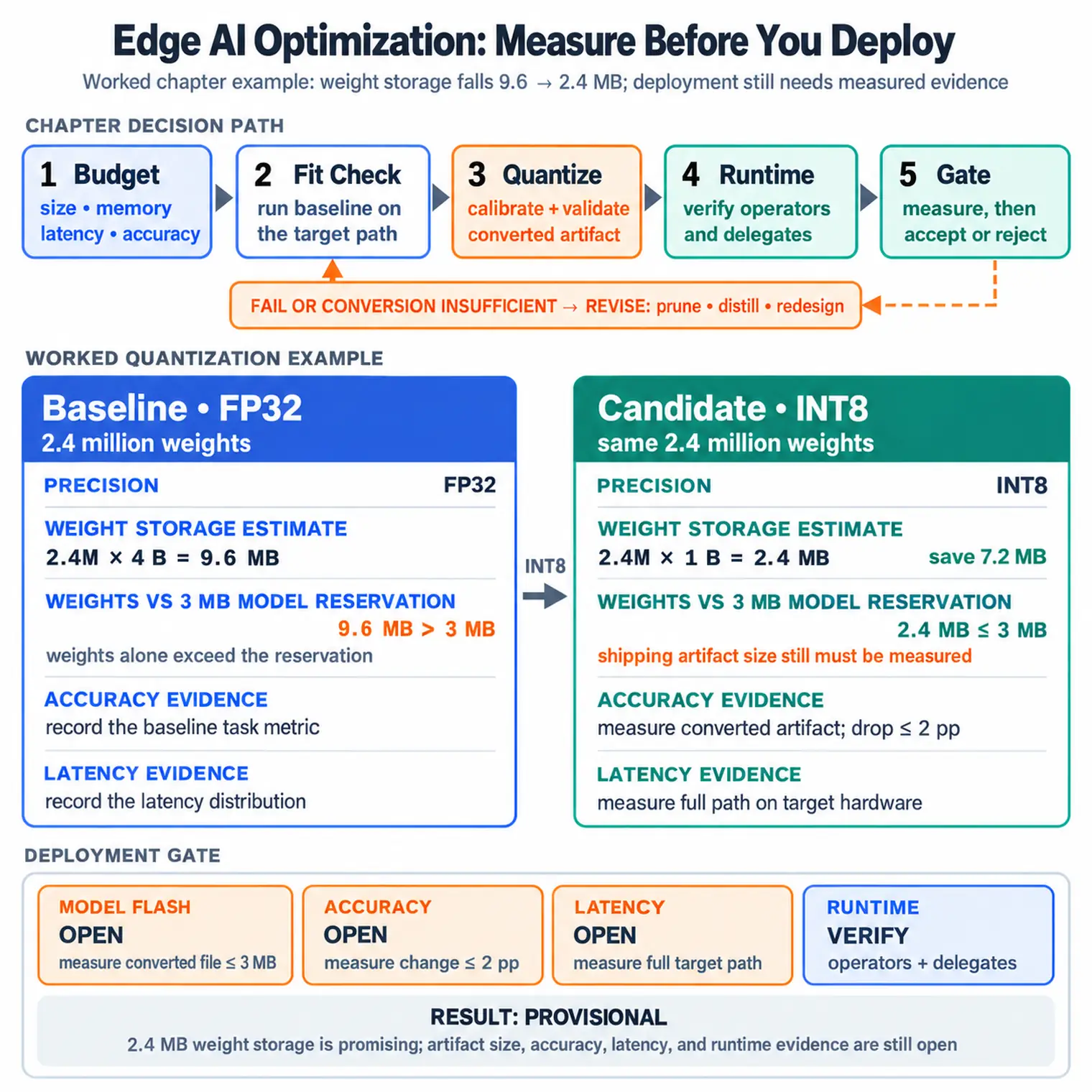
In the diagram Figure 12.1, start at Budget, where size, memory, latency, and accuracy are named together. Fit Check runs the baseline on the target path; Quantize then requires calibration and validation, while Revise covers pruning, distillation, or redesign when conversion alone is insufficient. Runtime verifies operators and delegates before the final Gate says measure, then accept or reject. This order protects task quality while locating the specific device limit each optimization is meant to relieve.
12.5 Optimization Techniques
This section: Optimization Techniques — Use each technique for the bottleneck it actually addresses.
Use each technique for the bottleneck it actually addresses.
12.5.1 Post-Training Quantization
Converts a trained model to lower-precision weights or activations after training. It is often the first experiment because it can be fast to try, but it still needs calibration and validation.
12.5.2 Quantization-Aware Training
Simulates quantization during training or fine-tuning. It is useful when post-training quantization changes accuracy or threshold behavior too much.
12.5.3 Structured Pruning
Removes whole channels, filters, heads, or blocks. It can create a smaller dense model that standard edge runtimes can execute efficiently.
12.5.4 Unstructured Pruning
Removes individual weights. It can create high sparsity, but speed benefits require sparse kernels, sparse storage, and hardware/runtime support.
12.5.5 Knowledge Distillation
Trains a smaller student model with help from a larger teacher model. Use it when the original architecture is fundamentally too large for the device class.
12.5.6 Compiler and Runtime Optimization
Fuses operations, chooses kernels, delegates layers to accelerators, and lays out memory. These steps often decide whether a converted model is actually deployable.
12.6 Quantization
This section: Quantization — Quantization maps floating-point values into lower-precision representations.
Quantization maps floating-point values into lower-precision representations. For an 8-bit affine quantizer, the common form is:
where x is the floating value, s is the scale, and z is the zero point. To recover an approximate value:
What is reliable: a float32 weight uses 4 bytes and an int8 weight uses 1 byte. What is not automatic: total file size, runtime memory, latency, and accuracy. Those depend on activations, operators, runtime kernels, delegates, memory layout, and calibration data.
12.6.1 Quantization Choices
12.6.2 Dynamic Range
Weights are quantized, while some activations may remain floating point. This is easy to try, but may not give full integer acceleration.
12.6.3 Full Integer
Weights and activations use integer representations. This is often needed for microcontroller and integer accelerator deployment.
12.6.4 Float16
Weights use half precision. This can reduce storage on some devices, but support and speed benefits depend on the target hardware.
12.6.5 Calibration Data
Post-training integer quantization uses representative data to estimate activation ranges. Poor calibration can make the converted model fail on real inputs even when the average validation score looks acceptable.
Use real input distribution: Include sensor noise, lighting, placement, user variation, and edge cases expected in deployment.
Keep a held-out validation set: Calibration data and validation data should not be the same evidence.
Check threshold behavior: Compare false accepts and false rejects, not just top-line accuracy.
Compare target runtime: Validate the .tflite, ONNX, or vendor artifact that will actually ship.
Suppose a layer has weights in the range [-0.50, 0.50] and you use a symmetric signed int8 representation. A simple scale is approximately:
A weight of 0.236 becomes round(0.236 / 0.00394) = 60. Reconstructed, it is 60 x 0.00394 = 0.2364. This single weight changed only slightly, but the whole model still needs validation because many small changes can alter borderline decisions.
12.7 Pruning
This section: Pruning — Pruning removes model capacity that appears unnecessary for the task.
Pruning removes model capacity that appears unnecessary for the task. There are two very different deployment outcomes.
12.7.1 Structured Pruning
Removes channels, filters, layers, attention heads, or blocks. The result can be exported as a smaller dense model, which is usually easier for MCUs and edge runtimes.
12.7.2 Unstructured Pruning
Sets individual weights to zero. The model may look sparse, but runtime speed improves only if the sparse representation is preserved and supported.
12.7.3 Pruning Workflow
1. Baseline Train or select the model that already meets task quality.
2. Remove Prune a small amount by structure, magnitude, or search result.
3. Fine-tune Recover behavior with training or calibration.
4. Export Confirm the exported artifact is actually smaller or faster.
5. Validate Run the full target-device gate.
Sparse weights in a notebook are not the same as a faster edge model. If the runtime stores zeros in a dense tensor or lacks sparse kernels, pruning may reduce neither latency nor memory. Measure the exported artifact, not the training checkpoint.
12.8 Knowledge Distillation
This section: Knowledge Distillation — Knowledge distillation uses a larger teacher model to train a smaller student model.
Knowledge distillation uses a larger teacher model to train a smaller student model. It is most useful when the baseline architecture is too large even after direct conversion.
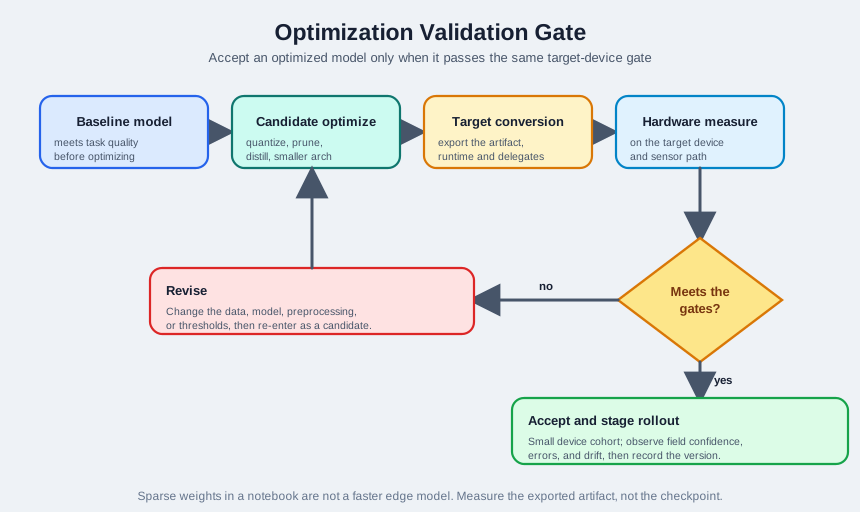
Inspect Figure 12.2 before continuing. Knowledge distillation produces a candidate student, not automatic deployment approval. Figure 12.2 shows how to compare that student with the accepted baseline without relaxing the target-device evidence gate.
The bench pictures put the gate into a work sequence. Follow one candidate from baseline card through changed model, converter, target board, and release lights.
-

Eddie records a baseline before changing the model.
-

He changes one model property at a time.
-

The model is converted for the real runtime.
-

The target device and sensor path are measured.
-

Quality, speed, memory, and energy must all pass.
-

A failed gate means revise. A full pass may be staged.
Eddie records the original board result before swapping one model part. The candidate then goes through the target converter and runs beside the real sensor and power meter. The lights keep quality, speed, memory, and energy as separate checks. The last panel sends a failed result back to the bench and lets a full pass move only to a small trial. The diagram above names the same gate; neither picture makes distillation an automatic release.
In the diagram Figure 12.2, the Baseline model first establishes task quality; Candidate optimize may then distil, prune, quantize, or change architecture. Target conversion fixes the exported artefact, runtime, and delegates before Hardware measure tests the device and sensor path. At Meets the gates?, a yes branch can Accept and stage rollout, whereas no returns to Revise data, preprocessing, model, or thresholds. Distillation is useful only when the smaller student survives that same measured route.
12.8.1 Teacher
The teacher can be a larger cloud model, ensemble, or previous production model. It provides richer output distributions than a single hard label.
12.8.2 Student
The student is chosen for the target device class. Its architecture should fit the memory, operator, and latency budget before training starts.
12.8.3 Soft Outputs
The teacher’s class probabilities can reveal relationships between similar classes. The student learns from both labels and teacher behavior.
12.8.4 Validation
The student is accepted only if it passes the same task and deployment gates as any other optimized model.
The student does not inherit the teacher’s weights. It learns its own parameters while being guided by the teacher’s outputs. This means the student can use a different architecture that fits the target device.
12.9 Compiler and Runtime Optimization
This section: Compiler and Runtime Optimization — Optimization is not complete when the model converter produces a file.
Optimization is not complete when the model converter produces a file. Edge runtimes can change performance more than the model transformation itself.
12.9.1 Operator Fusion
Combines adjacent operations, such as convolution, batch normalization, and activation, so the runtime moves less data.
12.9.2 Delegates and Accelerators
Routes supported operators to GPU, NPU, DSP, TPU, or vendor kernels. Unsupported operators may fall back to CPU and dominate latency.
12.9.3 Memory Planning
Reuses activation buffers when lifetimes do not overlap. This is critical for TensorFlow Lite Micro tensor arenas and other embedded runtimes.
12.9.4 Export Hygiene
Freezes training-only behavior, removes unused nodes, locks input shapes when possible, and checks that preprocessing matches training.
An optimized model can still be undeployable if one custom operator, resize mode, activation, or postprocessing step is unsupported by the target runtime. Check operator compatibility before committing to a hardware choice.
12.10 Selection Guide
This section: Selection Guide — Choose the next optimization step from the evidence.
Choose the next optimization step from the evidence.
12.10.1 If the model barely misses flash
Try post-training quantization first. If accuracy or threshold behavior fails, improve calibration or move to quantization-aware training.
12.10.2 If activation memory is too high
Quantizing weights may not solve the problem. Reduce input size, batch size, layer width, feature maps, or architecture.
12.10.3 If latency is too high
Profile the full path. If preprocessing dominates, changing model precision may not help. If unsupported operators dominate, change architecture or runtime.
12.10.4 If the architecture is much too large
Use a smaller architecture, distillation, or a task-specific model before stacking aggressive compression tricks.
Conservative order: baseline measurement, post-training quantization, calibration improvement, quantization-aware training if needed, structured pruning if the artifact is still too large, distillation or architecture change if the model class is fundamentally wrong for the device.
12.11 Deep Dive: Proving the Optimization Trade
This section: Deep Dive: Proving the Optimization Trade — An optimization is a trade only after the numbers close.
An optimization is a trade only after the numbers close. A model with 2.4 million FP32 weights uses about 9.6 MB for weights alone. Storing the same weights as INT8 uses about 2.4 MB, saving 7.2 MB before activation memory, tensor arenas, preprocessing buffers, or update staging are counted. If the device reserves 3 MB of flash for the model and the accuracy gate allows at most a 2 percentage point drop, the INT8 candidate is still provisional until both the flash budget and task metric are measured on the converted artifact.
Structured pruning needs the same proof. If a 24 million-MAC inference removes 25 percent of channels, the dense work target falls to about 18 million MACs. At 5 inferences per second, that is 90 million MACs/s instead of 120 million MACs/s. The saving matters only if the exported model and runtime execute the smaller dense graph; unstructured zeros stored in dense tensors do not automatically reduce latency.
12.11.1 Quantization Proof
Record the baseline metric, calibration set, converted artifact, operator list, false accepts, false rejects, latency, peak memory, and rollback version.
12.11.2 Pruning Proof
Record whether pruning is structured or unstructured, whether dense dimensions changed, whether sparse kernels are used, and whether fine-tuning recovered the task metric.
12.11.3 Distillation Proof
Record teacher version, student architecture, training data, validation data, and the exact budget reason the smaller student is safer than compressing the old model.
12.11.4 Runtime Proof
Record delegate coverage, CPU fallback operators, tensor arena size, preprocessing cost, postprocessing cost, power, thermal behavior, and update path.
Under the hood, INT8 quantization maps real values back from integers with an affine rule:
real_value = scale x (quantized_value - zero_point)

example scale = 0.01, zero_point = 0
weight 0.53 -> round(0.53 / 0.01) = 53
dequantized 53 -> 53 x 0.01 = 0.53
Calibration chooses ranges for those scales and zero points. If the representative data misses night images, vibration spikes, clipped audio windows, or rare sensor poses, the activation range can be too narrow and real inputs may saturate after conversion. If the range is too wide, the step size becomes coarse and borderline classes can drift. When one class fails after conversion, inspect the activation histogram and the raw examples together; a numeric range problem and a missing data scenario can look identical in aggregate accuracy.
12.12 Implementation Checklist
This section: Implementation Checklist — Use this checklist for every optimization candidate.
Use this checklist for every optimization candidate.
Record the baseline: model version, task metric, validation set, latency distribution, peak memory, file size, operator list, and runtime.
Change one factor: quantization, pruning, distillation, input size, or runtime delegate. Avoid mixing changes before knowing which one helped.
Export the shipping artifact: validate the actual model file that will be signed and deployed.
Measure on target hardware: include preprocessing, inference, postprocessing, and local action.
Test edge cases: rare classes, noisy sensors, low light, high vibration, cold start, and threshold boundary examples.
Plan rollback: the optimized model needs versioning, monitoring, safe update, and a path back to the previous model.
12.13 Optimization Decision Record
This section: Optimization Decision Record — Write a short decision record before deployment.
Write a short decision record before deployment.
12.13.1 Context
- Model name and version
- Target device and runtime
- Budget for size, memory, latency, and accuracy
- Validation and calibration datasets
12.13.2 Candidate
- Technique applied
- Converter/runtime options
- Unsupported operators or fallbacks
- Model artifact checksum
12.13.3 What to Record
- Accuracy and threshold comparison
- Latency distribution
- Peak memory
- Power or thermal notes
- Failure cases
12.13.4 Decision
- Accept, revise, or reject
- Rollback plan
- Monitoring signal
- Next optimization step
Decision: Accept full-integer quantization for field pilot.
Evidence: The quantized artifact fits flash and tensor memory, uses only supported runtime operators, keeps the validation metric within the project tolerance, and meets the measured latency budget on the target board.
Limits: The pilot must monitor confidence drift and false rejects because calibration data came from a limited sensor batch.
12.14 Common Pitfalls
This section: Common Pitfalls
12.14.1 Quantizing Without Representative Data
Calibration that misses real sensor conditions can produce a model that works in a notebook and fails in the field.
Fix: Calibrate with real input windows and validate on held-out deployment-like data.
12.14.2 Treating Sparse as Faster
Unstructured zeros do not help if the exported artifact and runtime still execute dense kernels.
Fix: Verify sparse support or use structured pruning.
12.14.3 Ignoring Activation Memory
Weights may fit in flash while intermediate activations exceed RAM.
Fix: Measure peak arena or activation memory after conversion.
12.14.4 Forgetting Preprocessing
Image resize, feature extraction, filtering, or normalization may dominate the latency path.
Fix: Benchmark sensor-to-action, not model invocation alone.
12.15 Reference Path
This section: Reference Path — First, TensorFlow Lite model optimization: https://www.tensorflow.org/lite/performance/model_optimization.
Use primary documentation when implementing an optimization pipeline:
First, TensorFlow Lite model optimization: https://www.tensorflow.org/lite/performance/model_optimization. Next, TensorFlow Lite post-training quantization: https://www.tensorflow.org/model_optimization/guide/quantization/post_training. Then, TensorFlow Lite Micro: https://www.tensorflow.org/lite/microcontrollers. After that, ONNX Runtime quantization: https://onnxruntime.ai/docs/performance/model-optimizations/quantization.html. Finally, PyTorch quantization overview: https://pytorch.org/docs/stable/quantization.html.
12.16 Summary
This section: Summary — Model optimization for edge AI is an evidence loop.
Model optimization for edge AI is an evidence loop. Define the deployment budget, measure the baseline, change one thing, convert the shipping artifact, run it on the target runtime, and accept it only if the gate passes. Quantization, pruning, distillation, and runtime optimization are powerful, but none of them replace target-device validation.
12.17 What’s Next
This section: What’s Next
12.17.1 Hardware Accelerators for Edge AI
Use the optimized model artifact and operator set to choose a realistic hardware target.
12.17.2 TinyML on Microcontrollers
Apply memory and runtime constraints to microcontroller-class inference.
12.17.3 Edge AI Applications
Connect model optimization decisions to application deployment and monitoring.
12.17.4 TinyML Gesture Classification Lab
Practice optimization gates with a hands-on simulator workflow.
12.18 Key Takeaway
This section: Key Takeaway — Optimize after you have a measured baseline.
Optimize after you have a measured baseline. Quantization, pruning, model selection, batching, and hardware delegates are tradeoffs among accuracy, latency, memory, power, and maintainability.
Find help
3 reviewed answers.
Where should I start in a module?
Open the module page from the sidebar to see its chapters in order. Use the module map to return to a topic you need.
Modules and pathsReviewed
What can I try when a project does not work?
Check the symptom, then work through the diagnostic steps. Keep the error message and the smallest example that reproduces it.
When you are stuckReviewed
How do interactive examples work?
Use the interactive guide to check how examples and simulations work before changing your project.
Interactive examples guideReviewed